

Are you the author? Sign in to claim
A Retrieval-Augmented Generation (RAG) system that leverages Google's Agent Development Kit (ADK) and Qdrant vector data
A Retrieval-Augmented Generation (RAG) system that leverages Google's Agent Development Kit (ADK) and Qdrant vector database via MCP server.
This project implements a Retrieval-Augmented Generation (RAG) system that combines the power of Google's Agent Development Kit (ADK) with Qdrant vector database (via MCP server) for efficient knowledge retrieval. The system enhances Large Language Model (LLM) responses by retrieving relevant context from a vector database before generating answers.
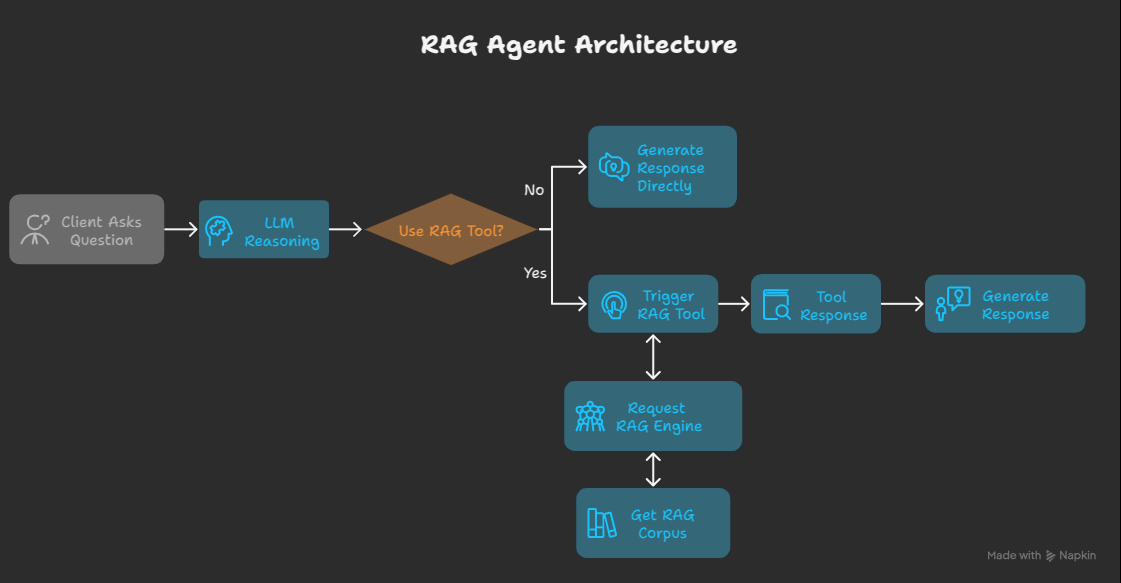
Remember to install the uv first
# Clone the repository
git clone https://github.com/khoi03/adk-mcp-rag.git
cd adk-mcp-rag

# Create a virtual environment and install dependencies
uv sync

# Activate the virtual environment
# For macOS/Linux
source .venv/bin/activate
# For Windows
.venv\Scripts\activate

# Add required dependencies via requirement file (In case there are new libs)
uv add -r requirements.txt
Create a .env file in docker directory:
# Change directory into docker
cd docker

# Set up environment variables
cp .env.example .env
# Edit .env with your API keys and configuration
Example .env file:
# -------------------
# Google API keys
# -------------------
GOOGLE_API_KEY=YOUR_VALUE_HERE

# -------------------
# OPENAI API keys
# -------------------
OPENAI_API_KEY=YOUR_VALUE_HERE

# -------------------
# ANTHROPIC API keys
# -------------------
ANTHROPIC_API_KEY=YOUR_VALUE_HERE

# -------------------
# Network names
# -------------------
NETWORK_NAME=mcp-servers

# ----------------------------------
# Parameters for Qdrant MCP Server
# ----------------------------------
QDRANT_CONTAINER_NAME=qdrant-mcp
QDRANT_URL=http://qdrant:6333
QRANT_MCP_SSE=http://localhost:8888/sse
# QDRANT_LOCAL_PATH=/qdrant/db
COLLECTION_NAME=default_collection
QDRANT_EMBEDDING_MODEL=sentence-transformers/all-MiniLM-L6-v2
QDRANT_SEARCH_LIMIT=3
FASTMCP_HOST=0.0.0.0
FASTMCP_PORT=8888
Build Qdrant and Qdrant MCP server using Docker Compose after completing the configuration steps:
# Build and start services
docker compose -p qdrant-mcp up --build -d

# Check running services
docker compose ps

# View logs
docker compose logs -f

# Stop and remove services
docker compose -p qdrant-mcp down
You can also access qdrant web UI at http://localhost:6333/dashboard
Push all your needed files into the data directory and run:
python local_vector_store/prepare_corpus_and_data_locally.py
Note: Currently only processes .md and .pdf files. The system will:
To test and run the system with default settings:
python main.py
For tracing, testing, and debugging with a UI, run the built-in web interface provided by ADK:
adk web
adk-mcp-rag/
├── assets/                  # Images and static files
├── data/                    # Documents for ingestion
├── docker/                  # Docker configurations
│   ├── .env.example         # Example environment variables
│   ├── Dockerfile.qdrant    # Docker file for qdrant mcp
│   └── docker-compose.yml   # Docker Compose configuration
├── agents/                  # Main code
│   ├── config/prompts.yml   # Store prompts
│   ├── tools/               # Embedding generation
│       ├── mcp_tools.py     # Manage MCP Tools
│       └── prompts.py       # Manage Prompts
│   └── agent/               # Manage agents
├── .gitignore               # Git ignore file
├── main.py                  # Main entry point
├── README.md                # This file
└── requirements.txt         # Python dependencies
Run Claude Code as an MCP server so any agent can delegate coding tasks to it
 @microsoft✓ Official
Browser automation using accessibility snapshots instead of screenshots
 @googleapis✓ Official
Google's universal MCP server supporting PostgreSQL, MySQL, MongoDB, Redis, and 10+ databases
 @github✓ Official
Official GitHub integration for repos, issues, PRs, and CI/CD workflows