

Are you the author? Sign in to claim
Demo of ADK (Agent Development Kit) as an MCP (Model Context Protocol) client for flight search capabilities.
Python ADK + MCP Gemini
A practical implementation demonstrating ADK (Agent Development Kit) as an MCP (Model Context Protocol) client for flight search capabilities. This project showcases asynchronous integration between ADK's LlmAgent and an external MCP server, featuring dynamic tool discovery, stateful session management, and structured function calling. Powered by Google's Gemini model, it implements proper resource handling and event-driven architecture for a robust, extensible assistant.
This project showcases the integration of two powerful Google technologies:
In this implementation, ADK acts as the MCP Client, connecting to an MCP Server that provides flight search capabilities.
The Flight Search Assistant follows a streamlined request flow that combines the power of Google Gemini, ADK, and MCP to process user queries and provide intelligent responses.
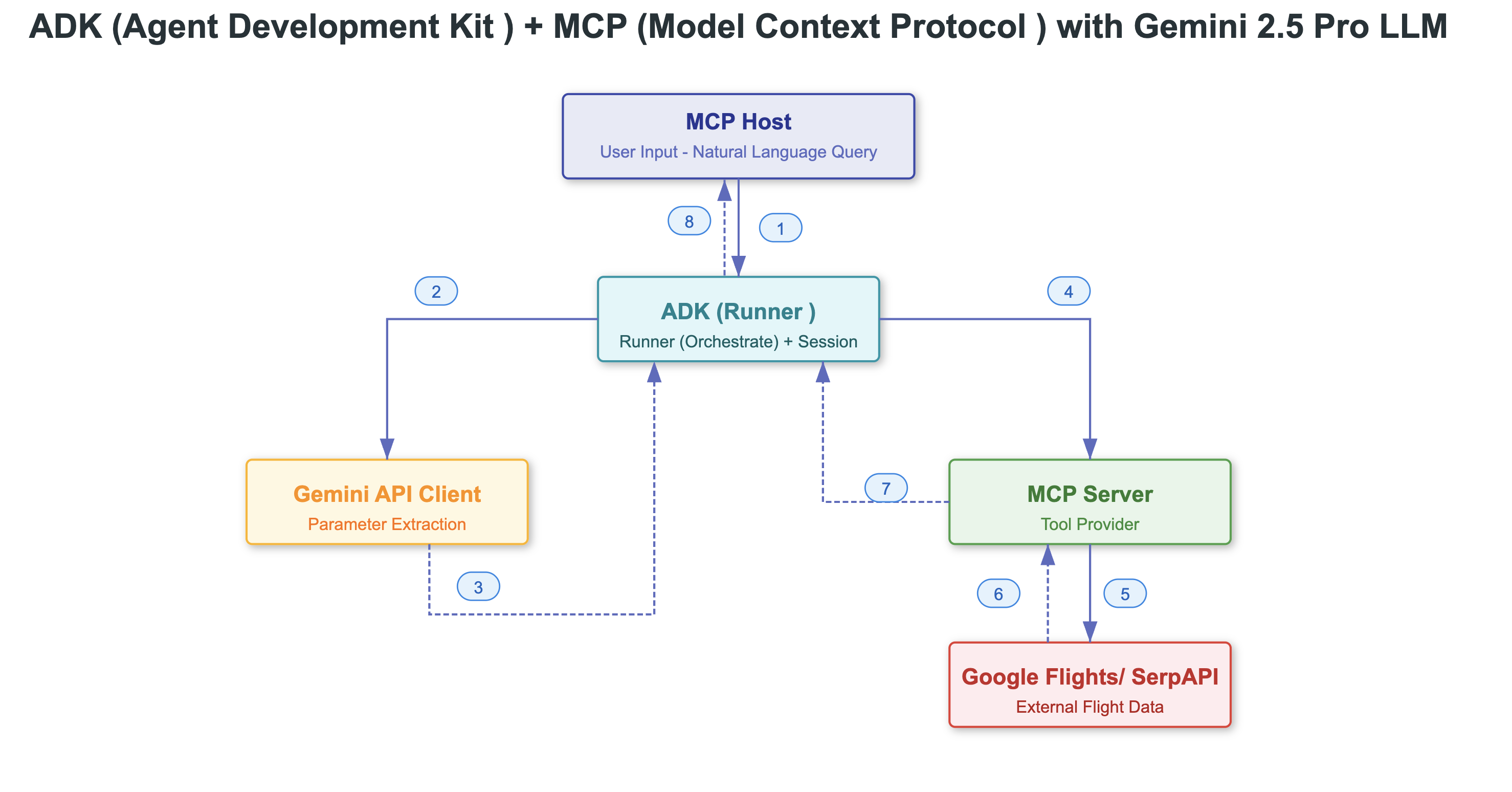
MCPToolsetInMemorySessionServiceAgent Development Kit (ADK) is an open-source, code-first Python toolkit for building, evaluating, and deploying intelligent AI agents. ADK enables developers to create agentic workflows — from simple single-agent tasks to complex multi-agent orchestration — all within a modular and extensible framework.
An Agent is an autonomous, self-contained execution unit designed to achieve specific goals. Agents can:
ADK offers three primary agent types:
LLM Agents (e.g., LlmAgent, Agent):
Workflow Agents (e.g., SequentialAgent, ParallelAgent, LoopAgent):
Custom Agents:
In this project, we're using LLM Agents with MCPTools.
A Tool represents a specific capability granted to an AI agent, allowing it to perform actions and interact with the external world beyond basic text generation and reasoning. A tool is usually a modular code component — such as a Python function, class method, or even another agent — designed to carry out a defined task.
Agents dynamically leverage tools through function-calling mechanisms, where the LLM:
ADK supports several types of tools:
Function Tools: Custom tools built specifically for your application's unique logic
Built-in Tools: Predefined tools included in the framework (web search, code execution, RAG)
Third-Party Tools: Integrations from popular ecosystems like LangChain or CrewAI
In this project, ADK serves as an MCP Client that connects to an MCP Server (mcp-flight-search). This connection allows the ADK agent to discover and use tools exposed by the MCP server to search for flights.
# Setup virtual environment (Mac or Unix)
python -m venv venv
source venv/bin/activate  # On Windows: venv\Scripts\activate

# Install dependencies
pip install google-adk  # Agent Development Kit
pip install mcp-flight-search  # MCP server
pip install google-generativeai python-dotenv  # GenAI Python SDK
Set Environment variables:
# Note: ADK uses GOOGLE_API_KEY instead of GEMINI_API_KEY
export GOOGLE_API_KEY="your-google-api-key"
export SERP_API_KEY="your-serpapi-key"
To enable Gemini to interact with real-world APIs, we use an MCP-compliant server. For this project, we use mcp-flight-search — a lightweight MCP Server built using FastMCP which exposes a tool that searches real-time flight data using SerpAPI.
Verify that the MCP server is properly installed:
pip show mcp-flight-search
# --- Step 1: Get tools from MCP server ---
async def get_tools_async():
    """Gets tools from the Flight Search MCP Server."""
    print("Attempting to connect to MCP Flight Search server...")
    server_params = StdioServerParameters(
        command="mcp-flight-search",
        args=["--connection_type", "stdio"],
        env={"SERP_API_KEY": os.getenv("SERP_API_KEY")},
    )

    tools, exit_stack = await MCPToolset.from_server(
        connection_params=server_params
    )
    print("MCP Toolset created successfully.")
    return tools, exit_stack
# --- Step 2: Define ADK Agent Creation ---
async def get_agent_async():
    """Creates an ADK Agent equipped with tools from the MCP Server."""
    tools, exit_stack = await get_tools_async()
    print(f"Fetched {len(tools)} tools from MCP server.")

    # Create the LlmAgent
    root_agent = LlmAgent(
        model=os.getenv("GEMINI_MODEL", "gemini-2.5-pro-preview-03-25"),
        name='flight_search_assistant',
        instruction='Help user to search for flights using available tools based on prompt. If return date not specified, use an empty string for one-way trips.',
        tools=tools,
    )

    return root_agent, exit_stack
async def async_main():
    # Create services
    session_service = InMemorySessionService()

    # Create a session
    session = session_service.create_session(
        state={}, app_name='flight_search_app', user_id='user_flights'
    )

    # Define the user prompt
    query = "Find flights from Atlanta to Las Vegas 2025-05-05"
    print(f"User Query: '{query}'")

    # Format input as types.Content
    content = types.Content(role='user', parts=[types.Part(text=query)])

    # Get agent and exit_stack
    root_agent, exit_stack = await get_agent_async()

    # Create Runner
    runner = Runner(
        app_name='flight_search_app',
        agent=root_agent,
        session_service=session_service,
    )
    print("Running agent...")
    events_async = runner.run_async(
        session_id=session.id,
        user_id=session.user_id,
        new_message=content
    )

    # Process events
    async for event in events_async:
        print(f"Event received: {event}")

    # Always clean up resources
    print("Closing MCP server connection...")
    await exit_stack.aclose()
    print("Cleanup complete.")
Example user query:
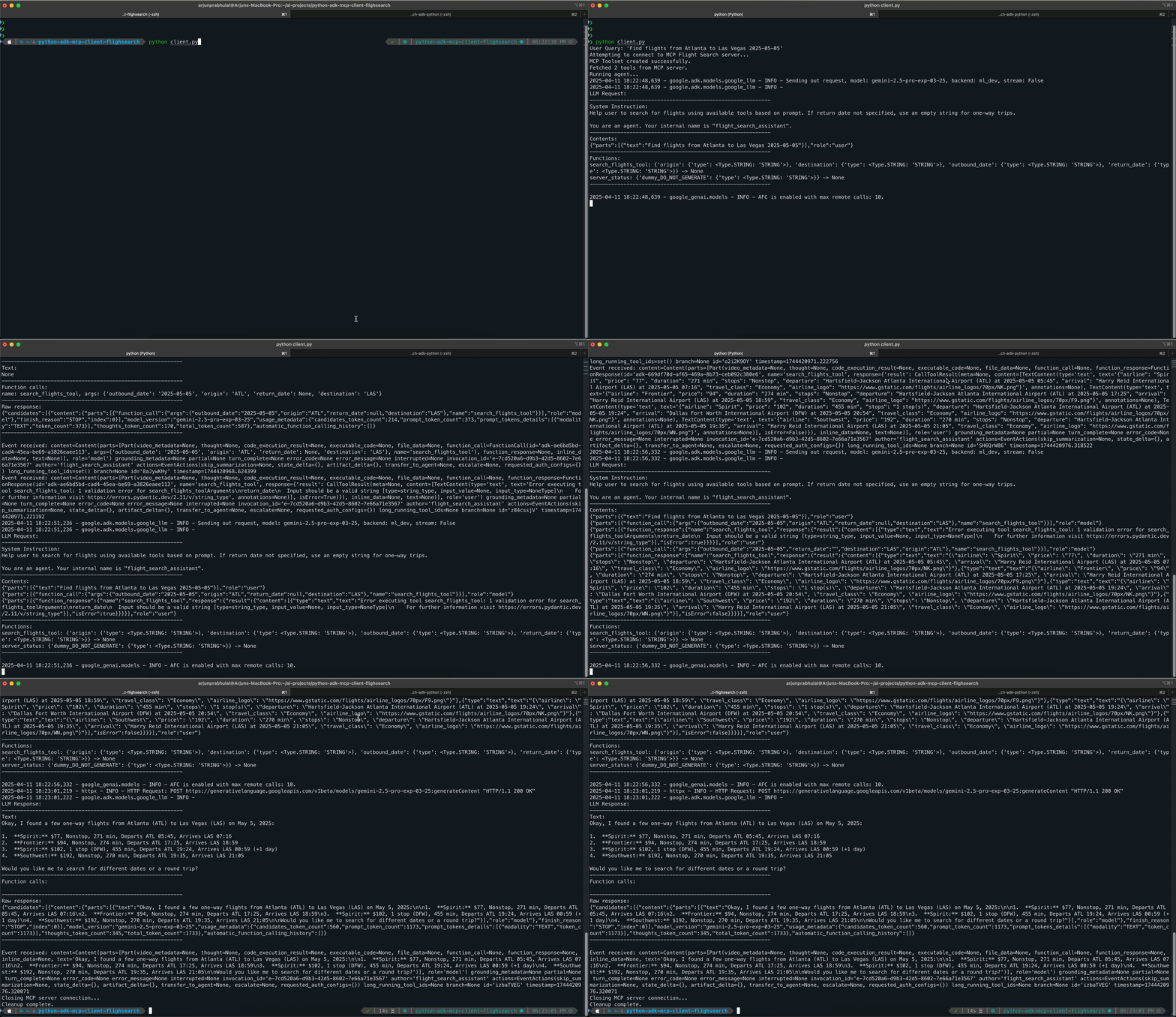
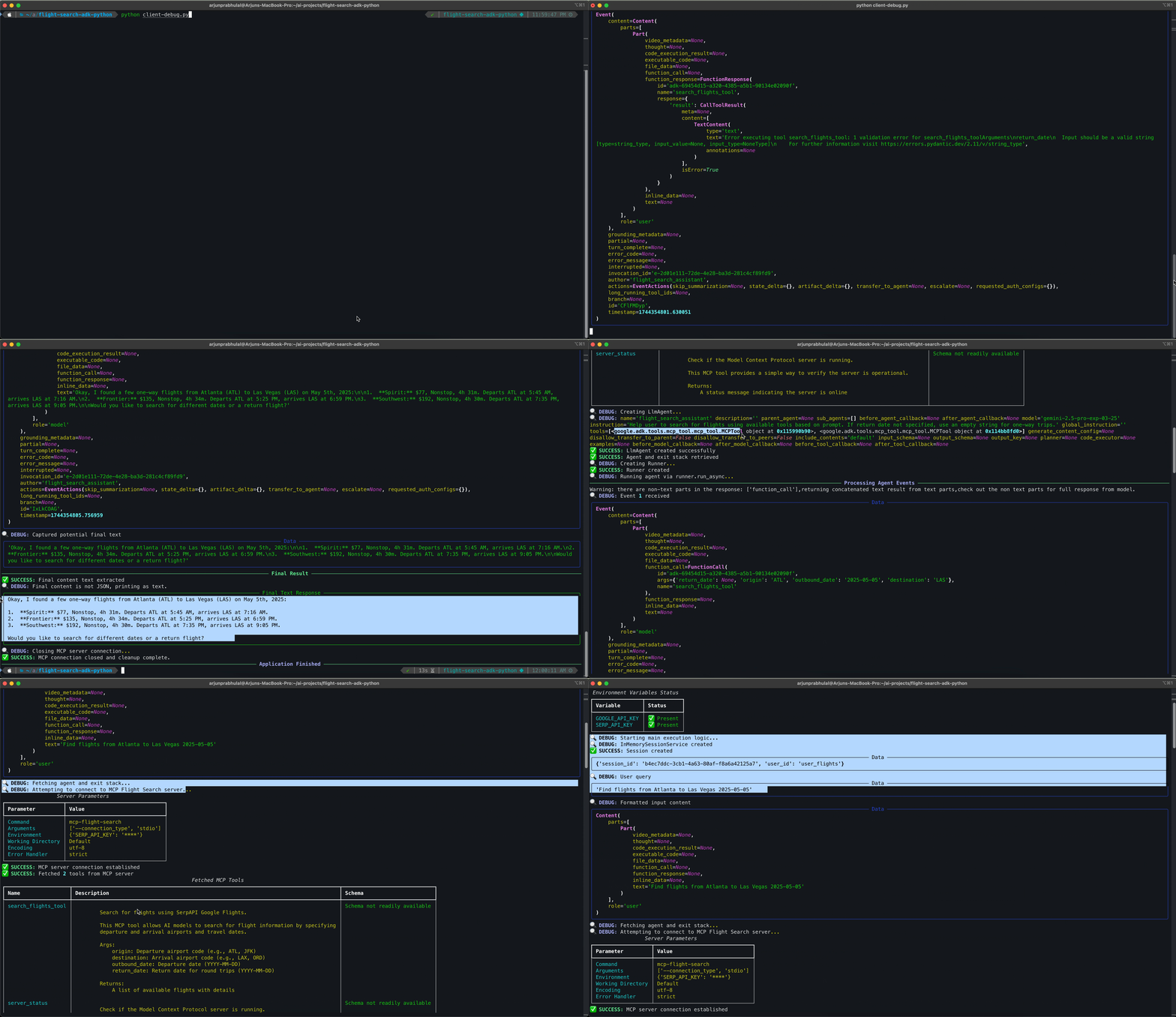
"Find flights from Atlanta to Las Vegas 2025-05-05"
Here's a demonstration of the flight search assistant in action:
git clone https://github.com/arjunprabhulal/adk-python-mcp-client.git
cd adk-python-mcp-client
Set up a Python virtual environment and install dependencies:
# Setup virtual environment (Mac or Unix)
python -m venv venv
source venv/bin/activate  # On Windows: venv\Scripts\activate

# Install all dependencies from requirements.txt
pip install -r requirements.txt
Create and configure your environment variables:
# Copy the example environment file
cp .env.example .env

# Edit the .env file with your actual API keys
# Replace placeholders with your actual keys:
# GOOGLE_API_KEY=your-actual-google-api-key
# SERP_API_KEY=your-actual-serpapi-key
Run the client script to start the application:
python client.py
The application will:
adk-python-mcp-client/
├── Images/
│   ├── adk-mcp-client-log.gif      # Standard logging demo animation
│   ├── adk-mcp-client-debug.gif    # Debug mode demo animation
│   └── image.png                   # Architecture diagram
├── client.py                       # ADK client implementation
├── README.md                       # Project documentation
├── requirements.txt                # Dependencies
├── .env.example                    # Environment variables template
└── .env                            # Environment variables (not tracked by Git)
MCP vs. ADK
Tool Types and Integration
Asynchronous Architecture
Stateful Sessions in MCP
Deployment Considerations
Managing MCP Connections in ADK
API Key Issues:
GOOGLE_API_KEY instead of GEMINI_API_KEYValueError: Missing key inputs argument!, check that you're using the correct environment variableValueError: Missing key inputs argument! To use the Google AI API, provide (api_key) arguments. To use the Google Cloud API, provide (vertexai, project & location) arguments.Rate Limiting:
google.genai.errors.ClientError: 429 RESOURCE_EXHAUSTEDMCP Connection Issues:
Internal Server Errors:
For more detailed information about ADK and MCP, refer to the official documentation:
Agent Development Kit (ADK) Documentation - Complete guide to the open-source AI agent framework integrated with Gemini and Google.
LLM Agents in ADK - Detailed documentation on implementing LLM Agents, including defining identity, instructions, tools, and advanced configuration.
MCP Tools with ADK - Specific guidance on using ADK as an MCP client to connect to MCP servers.
This project is available on GitHub at arjunprabhulal/adk-python-mcp-client.
Created by Arjun Prabhulal. For more articles on AI/ML and Generative AI, follow Arjun Prabhulal on Medium.
Run Claude Code as an MCP server so any agent can delegate coding tasks to it
 @microsoft✓ Official
Browser automation using accessibility snapshots instead of screenshots
 @googleapis✓ Official
Google's universal MCP server supporting PostgreSQL, MySQL, MongoDB, Redis, and 10+ databases
 @github✓ Official
Official GitHub integration for repos, issues, PRs, and CI/CD workflows