Session management for Codex, Claude, OpenCode, Cursor, GitHub Copilot CLI, Pi, Gemini CLI, Hermes, and OpenClaw on macOS.
Search, inspect, save, and resume local AI-coding sessions from CLI tools, desktop apps, and IDE agent surfaces.
Requires: macOS 14+
License: MIT
Security & Privacy: Local-only. No telemetry. Details: docs/PRIVACY.md and docs/security.md
Agent Sessions is a local-first Mac app for finding useful work that coding agents already wrote to disk. It brings Codex, Claude, OpenCode, Cursor Agent, Hermes, OpenClaw, Gemini CLI, GitHub Copilot CLI, and Pi histories into one searchable view, with transcript inspection, image browsing, saved-session recovery, and resume commands for supported CLIs.
Sessions search with transcript and image preview
Saved Sessions with restore actions
Image Browser for visual session outputs
Security & Privacy
Local-first: session data stays on your Mac.
No telemetry, analytics, remote logging, advertising identifiers, or session-history uploads.
Reads local session folders you choose, plus supported default CLI locations.
Builds local indexes/databases for search and navigation.
Explicit actions may open Terminal/iTerm2 resume commands or run status/probe cleanup workflows.
The only network activity is optional Sparkle update checks.
Details: docs/PRIVACY.md and docs/security.md.
What's New in 3.9
TL;DR - Limits Widget now adds freshness-aware run-out predictions and Limit Alerts.
Highlights: MacBook users can pin a tiny always-on limits window instead of opening the full Agent Cockpit or relying on a crowded menu bar item. It shows Codex and Claude 5h/weekly usage, keeps visible usage sources fresh, surfaces projected 5h run-out ETAs before the final warning window, and adds a dedicated Limit Alerts pane with separate controls for predicted exhaustion and threshold warnings.
Also new in 3.9:
Update tours now introduce Limits Cockpit prediction markers and Limit Alerts.
The Dock tile right-click menu now includes Hide Dock Icon.
Turning off the menu bar item now persists across relaunches by restoring the Dock path instead of re-enabling the menu bar item.
Unified Window controls to collapse or expand visible session hierarchy groups.
A persistent Transcript Window toggle for list-focused browsing.
Saved-only session counts when the saved filter is active.
A fix for live-session refreshes jumping the session list back to the top.
A fix that keeps Collapse All and Expand All scoped to visible hierarchy groups.
Refreshed agent-format support for current Codex, Claude, Gemini, Copilot, OpenCode, Hermes, OpenClaw, Cursor, and Pi builds, including stronger real-session verification and Cursor Desktop metadata monitoring.
Browse Cursor Agent transcripts from Cursor's local storage, enriched with Cursor chat metadata when available.
Hermes Agent sessions participate in browsing, search, filtering, analytics, and resume workflows, including current ~/.hermes/state.db storage.
OpenClaw sessions participate in browsing, search, filtering, deleted-session visibility, and resume workflows while ignoring trajectory traces.
Pi CLI sessions now participate in browsing, search, filtering, and resume workflows.
Unified browsing across supported agents, with strict filtering, saved sessions, and a single session list.
Unified Search and Image Browser across sessions, plus in-session Find for fast transcript navigation.
Readable tool calls/outputs and navigation between prompts, tools, and errors.
Right-click Copy Resume Command or Resume for supported CLI sessions, with Terminal.app, iTerm2, and Warp launch targets.
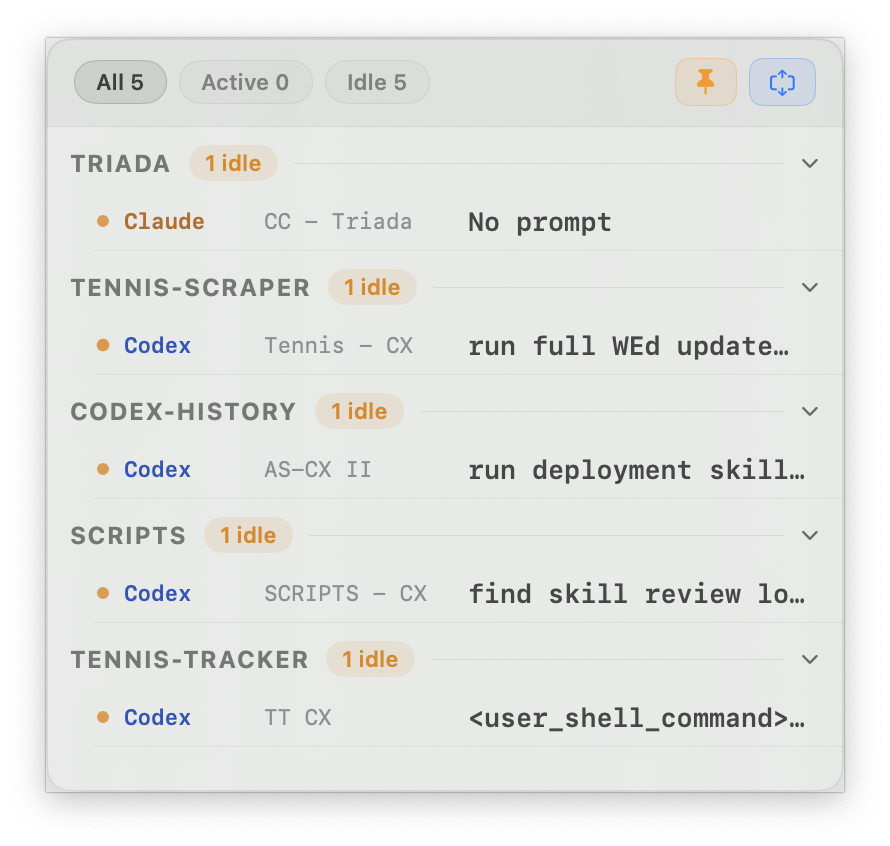
Agent Cockpit is the live command center for active Codex CLI, Claude CLI, and OpenCode CLI iTerm2 sessions, with a compact Limits Widget for always-on Codex and Claude usage visibility, freshness diagnostics, and projected run-out alerts.
Local-only indexing designed for large histories.
Agent Cockpit (Beta)
Agent Cockpit is the live command center for active iTerm2 Codex CLI, Claude CLI, and OpenCode CLI sessions, with shared active/waiting summaries and live Claude usage tracking.
Limits Widget for Codex and Claude usage predictions
Agent Cockpit
Agent Cockpit Setup
Prerequisites
Agent Sessions with Live Sessions enabled
iTerm2
Agents running in iTerm2
Ideal Setup
Set the iTerm window title to the repo name
Run that repo's agents in that window
Give each tab/session its own clear name
Use the same name for the tab, session, and badge
Layout
One repo per desktop/Space if possible
Or keep several on one desktop if you prefer
Keep Agent Cockpit pinned in a corner so you can always see activity
Click from the cockpit to jump straight to a session