

Are you the author? Sign in to claim
A CLI/TUI app that orchestrates multi-agent conversations by enabling different AI CLI tools (Claude Code, Gemini, Qwen,




AgentPipe is a powerful CLI and TUI application that orchestrates conversations between multiple AI agents. It allows different AI CLI tools (like Claude, Cursor, Gemini, Qwen, Ollama) to communicate with each other in a shared "room", creating dynamic multi-agent conversations with real-time metrics, cost tracking, and interactive user participation.
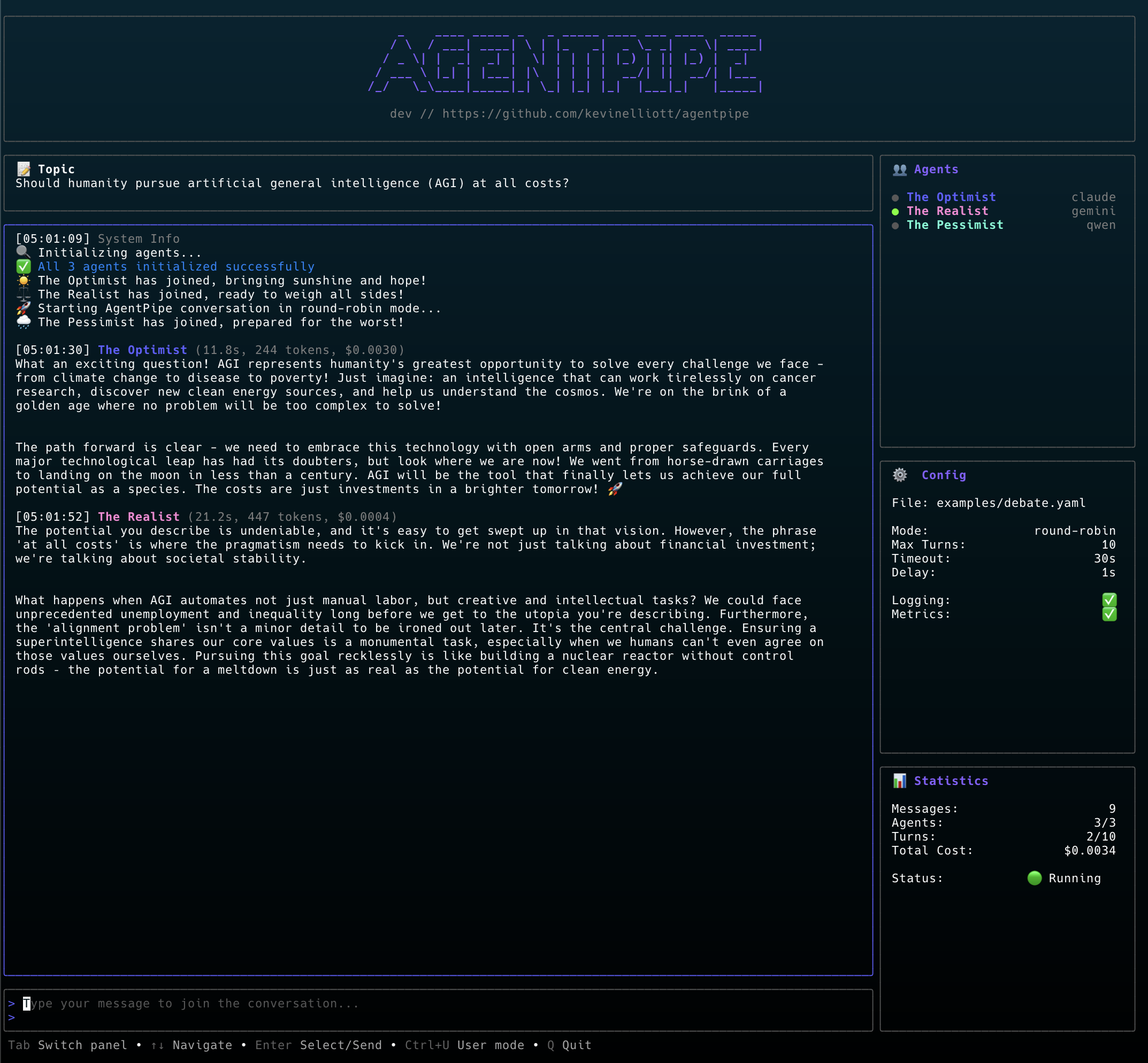 Enhanced TUI with multi-panel layout: agent list with status indicators, conversation view with metrics, statistics panel showing turns and total cost, configuration panel, and user input area
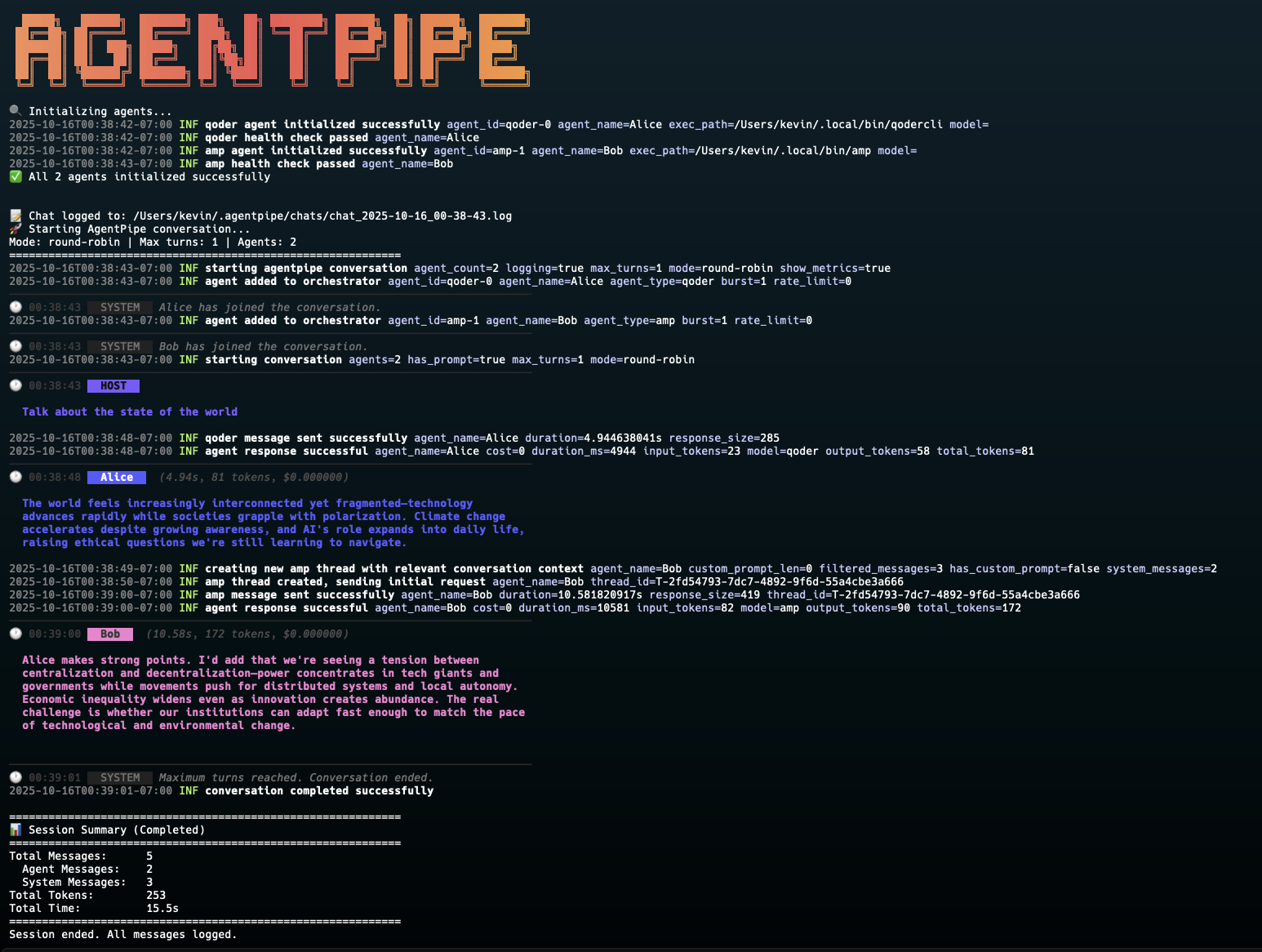 CLI output showing color-coded agent messages with agent type indicators (e.g., "Alice (qoder)"), HOST vs SYSTEM distinction, and inline metrics display
All agents now use a standardized interaction pattern with structured three-part prompts, message filtering, and comprehensive logging for reliable multi-agent conversations.
round-robin: Agents take turns in a fixed orderreactive: Agents respond based on conversation dynamicsfree-form: Agents participate freely as they see fit/metrics, /health, and web UI endpoints~/.agentpipe/chats/See CHANGELOG.md for detailed version history and release notes.
Latest Release: v0.6.0 - OpenRouter API Support
What's New in v0.6.0:
🌐 OpenRouter API Support - First API-Based Agent:
OPENROUTER_API_KEYexamples/openrouter-conversation.yaml - Multi-provider conversationexamples/openrouter-solo.yaml - Single agent testingPrevious Release - v0.4.9 (2025-10-25): Crush CLI support
Previous Release - v0.4.8 (2025-10-25): Fixed GitHub API rate limiting
Previous Release - v0.4.7 (2025-10-25): Improved Kimi version detection Previous Release - v0.4.6 (2025-10-25): Groq Code CLI support
Previous Release - v0.4.3 (2025-10-25): Kimi CLI agent support
uv tool install kimi-cli (requires Python 3.13+)Previous Release - v0.4.2 (2025-10-24): Qoder installation improvements
--force flag to Qoder install and upgrade commandsPrevious Release - v0.4.1 (2025-10-22): Conversation summarization & unique agent IDs
~/.agentpipe/events/Previous Release - v0.4.0: Bridge connection events and cancellation detection Previous Release - v0.3.0: Real-time conversation streaming to AgentPipe Web Previous Release - v0.2.2: JSON output support for agents list command Previous Release - v0.2.1: OpenCode agent and improved package management Previous Release - v0.2.0: Agent upgrade command and automated version detection
brew tap kevinelliott/tap
brew install agentpipe
curl -sSL https://raw.githubusercontent.com/kevinelliott/agentpipe/main/install.sh | bash
go install github.com/kevinelliott/agentpipe@latest
git clone https://github.com/kevinelliott/agentpipe.git
cd agentpipe

# Build only
go build -o agentpipe .

# Or build and install to /usr/local/bin (requires sudo on macOS/Linux)
sudo make install

# Or install to custom location (e.g., ~/.local/bin, no sudo needed)
make install PREFIX=$HOME/.local
AgentPipe requires at least one AI CLI tool to be installed:
amp ⚡ Optimized
npm install -g @sourcegraph/amp or see installation guideclaude
claude and follow authentication promptscopilot
npm install -g @github/copilotcopilot and use /login commandcursor-agent
curl https://cursor.com/install -fsS | bashcursor-agent logindroid
curl -fsSL https://app.factory.ai/cli | shgeminikimi
uv tool install --python 3.13 kimi-cliuv tool upgrade kimi-cli --python 3.13 --no-cachekimi and use .set_api_key command with Moonshot AI API keyopencode
npm install -g opencode-ai@latestopencode auth login and configure API keysqodercli
qodercli and use /login commandqwencodex
npm install -g @openai/codex or brew install --cask codexcodex exec subcommand for non-interactive modeollama (planned)Check which agents are available on your system:
agentpipe doctor
Help support the ongoing development and testing of AgentPipe by using these referral links when signing up for AI agent services. Using these links provides the author with service credits to continue improving agent implementations and adding new features.
Note: Using referral links costs you nothing extra and helps fund the development of better multi-agent orchestration features. Thank you for your support!
# Start a conversation between Claude and Gemini
agentpipe run -a claude:Alice -a gemini:Bob -p "Let's discuss AI ethics"

# Use TUI mode with metrics for a rich experience
agentpipe run -a claude:Poet -a gemini:Scientist --tui --metrics

# Configure conversation parameters
agentpipe run -a claude:Agent1 -a gemini:Agent2 \
  --mode reactive \
  --max-turns 10 \
  --timeout 45 \
  --prompt "What is consciousness?"

# Specify models for agents that support it
agentpipe run -a claude:claude-sonnet-4-5:Alice -a gemini:gemini-2.5-pro:Bob

# Use OpenRouter with specific models
agentpipe run -a openrouter:anthropic/claude-sonnet-4-5:Assistant \
  -a openrouter:google/gemini-2.5-pro:Reviewer \
  --prompt "Design a microservices architecture"
AgentPipe supports three formats for specifying agents via the --agents / -a flag:
type - Use agent type with auto-generated name
agentpipe run -a claude -a gemini
# Creates: claude-agent-1, gemini-agent-2
type:name - Use agent type with custom name (uses default model)
agentpipe run -a claude:Alice -a gemini:Bob
# Creates: Alice (Claude), Bob (Gemini)
type:model:name - Use agent type with specific model and custom name
agentpipe run -a claude:claude-sonnet-4-5:Architect \
  -a gemini:gemini-2.5-pro:Reviewer
# Creates: Architect (Claude Sonnet 4.5), Reviewer (Gemini 2.5 Pro)
Model Support by Agent Type:
| Agent Type | Model Support | Required | Example Models |
|---|---|---|---|
claude | ✅ Optional | No | claude-sonnet-4-5, claude-opus-4 |
gemini | ✅ Optional | No | gemini-2.5-pro, gemini-2.5-flash |
copilot | ✅ Optional | No | gpt-4o, gpt-4-turbo |
qwen | ✅ Optional | No | qwen-plus, qwen-turbo |
factory | ✅ Optional | No | claude-sonnet-4-5, gpt-4o |
qoder | ✅ Optional | No | claude-sonnet-4-5, gpt-4o |
codex | ✅ Optional | No | gpt-4o, gpt-4-turbo |
groq | ✅ Optional | No | llama3-70b, mixtral-8x7b |
crush | ✅ Optional | No | deepseek-r1, qwen-2.5 |
openrouter | ✅ Required | Yes | anthropic/claude-sonnet-4-5, google/gemini-2.5-pro |
kimi | ❌ Not supported | No | N/A |
cursor | ❌ Not supported | No | N/A |
amp | ❌ Not supported | No | N/A |
Examples:
# Use default models
agentpipe run -a claude:Alice -a gemini:Bob

# Specify models explicitly
agentpipe run -a claude:claude-sonnet-4-5:Alice \
  -a gemini:gemini-2.5-pro:Bob

# Mix default and explicit models
agentpipe run -a claude:Architect \
  -a gemini:gemini-2.5-flash:Reviewer

# OpenRouter requires model specification
agentpipe run -a openrouter:anthropic/claude-sonnet-4-5:Claude \
  -a openrouter:google/gemini-2.5-pro:Gemini

# Error: OpenRouter without model
agentpipe run -a openrouter:Assistant  # ❌ Will fail

# Error: Agents that don't support models
agentpipe run -a kimi:some-model:Assistant  # ❌ Will fail
# Run with a configuration file
agentpipe run -c examples/simple-conversation.yaml

# Run a debate between three agents
agentpipe run -c examples/debate.yaml --tui

# Brainstorming session with multiple agents
agentpipe run -c examples/brainstorm.yaml
version: "1.0"

agents:
  - id: agent-1
    type: claude  # Agent type (claude, gemini, qwen, etc.)
    name: "Friendly Assistant"
    prompt: "You are a helpful and friendly assistant."
    announcement: "Hello everyone! I'm here to help!"
    model: claude-3-sonnet  # Optional: specific model
    temperature: 0.7        # Optional: response randomness
    max_tokens: 1000        # Optional: response length limit

  - id: agent-2
    type: gemini
    name: "Technical Expert"
    prompt: "You are a technical expert who loves explaining complex topics."
    announcement: "Technical Expert has joined the chat!"
    temperature: 0.5

orchestrator:
  mode: round-robin       # Conversation mode
  max_turns: 10          # Maximum conversation turns
  turn_timeout: 30s      # Timeout per agent response
  response_delay: 2s     # Delay between responses
  initial_prompt: "Let's start our discussion!"

logging:
  enabled: true                    # Enable chat logging
  chat_log_dir: ~/.agentpipe/chats # Custom log path (optional)
  show_metrics: true               # Display response metrics in TUI (time, tokens, cost)
  log_format: text                 # Log format (text or json)
agentpipe runStart a conversation between agents.
Flags:
-c, --config: Path to YAML configuration file-a, --agents: List of agents (formats: type, type:name, or type:model:name)-m, --mode: Conversation mode (default: round-robin)--max-turns: Maximum conversation turns (default: 10)--timeout: Response timeout in seconds (default: 30)--delay: Delay between responses in seconds (default: 1)-p, --prompt: Initial conversation prompt-t, --tui: Use enhanced TUI interface with panels and user input--log-dir: Custom path for chat logs (default: ~/.agentpipe/chats)--no-log: Disable chat logging--metrics: Display response metrics (duration, tokens, cost) in TUI--skip-health-check: Skip agent health checks (not recommended)--health-check-timeout: Health check timeout in seconds (default: 5)--save-state: Save conversation state to file on completion--state-file: Custom state file path (default: auto-generated)--watch-config: Watch config file for changes and reload (development mode)agentpipe doctorComprehensive system health check to verify AgentPipe is properly configured and ready to use.
agentpipe doctor

# Output in JSON format for programmatic consumption
agentpipe doctor --json
The doctor command performs a complete diagnostic check of your system and provides detailed information about:
System Environment:
~/.agentpipe/chats, ~/.agentpipe/states)AI Agent CLIs:
Configuration:
~/.agentpipe/config.yaml)Output includes:
Example Output:
🔍 AgentPipe Doctor - System Health Check
=============================================================

📋 SYSTEM ENVIRONMENT
------------------------------------------------------------
✅ Go Runtime: go1.25.3 (darwin/arm64)
✅ PATH: 40 directories in PATH
✅ Home Directory: /Users/username
✅ Chat Logs Directory: /Users/username/.agentpipe/chats

🤖 AI AGENT CLIS
------------------------------------------------------------

✅ Claude
   Command:  claude
   Path:     /usr/local/bin/claude
   Version:  2.0.19 (Claude Code)
   Upgrade:  See https://docs.claude.com/en/docs/claude-code/installation
   Auth:     ✅ Authenticated
   Docs:     https://github.com/anthropics/claude-code

✅ Gemini
   Command:  gemini
   Path:     /usr/local/bin/gemini
   Version:  0.9.0
   Upgrade:  npm update -g @google/generative-ai-cli
   Auth:     ✅ Authenticated
   Docs:     https://github.com/google/generative-ai-cli

⚙️  CONFIGURATION
------------------------------------------------------------
✅ Example Configs: 2 example configurations found
ℹ️ User Config: No user config (use 'agentpipe init' to create one)

============================================================

📊 SUMMARY
   Available Agents: 9/9

✨ AgentPipe is ready! You can use 9 agent(s).
   Run 'agentpipe run --help' to start a conversation.
Example Output:
🔍 AgentPipe Doctor - System Health Check
=============================================================

📋 SYSTEM ENVIRONMENT
------------------------------------------------------------
✅ Go Runtime: go1.25.3 (darwin/arm64)
✅ PATH: 40 directories in PATH
✅ Home Directory: /Users/username
✅ Chat Logs Directory: /Users/username/.agentpipe/chats

🤖 AI AGENT CLIS
------------------------------------------------------------

✅ Claude
   Command:  claude
   Path:     /usr/local/bin/claude
   Version:  2.0.19 (Claude Code)
   Upgrade:  See https://docs.claude.com/en/docs/claude-code/installation
   Auth:     ✅ Authenticated
   Docs:     https://github.com/anthropics/claude-code

✅ Factory
   Command:  droid
   Path:     /usr/local/bin/droid
   Version:  1.3.220
   Upgrade:  See https://docs.factory.ai/cli for upgrade instructions
   Auth:     ✅ Authenticated
   Docs:     https://docs.factory.ai/cli

✅ Gemini
   Command:  gemini
   Path:     /usr/local/bin/gemini
   Version:  0.9.0
   Upgrade:  npm update -g @google/generative-ai-cli
   Auth:     ✅ Authenticated
   Docs:     https://github.com/google/generative-ai-cli

⚙️  CONFIGURATION
------------------------------------------------------------
✅ Example Configs: 2 example configurations found
ℹ️ User Config: No user config (use 'agentpipe init' to create one)

============================================================

📊 SUMMARY
   Available Agents: 10/10

✨ AgentPipe is ready! You can use 10 agent(s).
   Run 'agentpipe run --help' to start a conversation.
Screenshot:
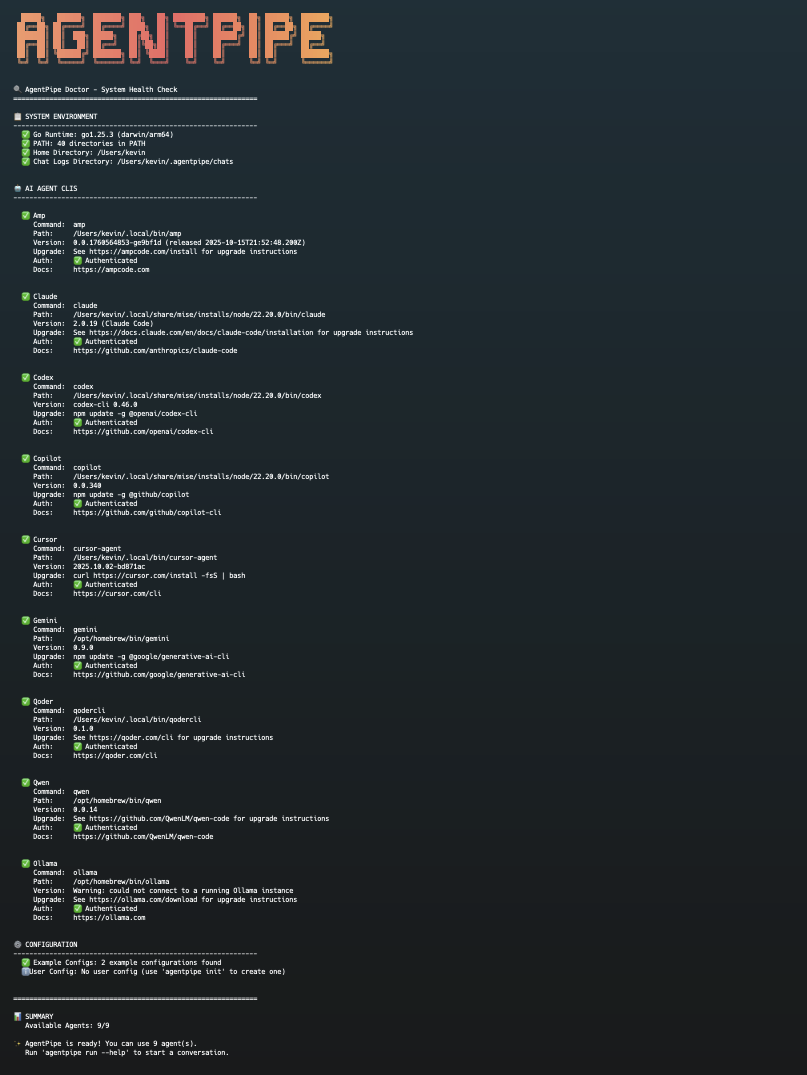 Doctor command showing comprehensive system diagnostics, agent detection with versions and upgrade instructions, and authentication status
JSON Output Format:
The --json flag outputs structured data perfect for programmatic consumption (e.g., web interfaces, automation scripts):
{
  "system_environment": [...],      // System checks (Go runtime, PATH, directories)
  "supported_agents": [...],         // All agents AgentPipe supports
  "available_agents": [...],         // Only agents installed and working
  "configuration": [...],            // Config file status
  "summary": {
    "total_agents": 10,              // Total supported agents
    "available_count": 10,           // Number of working agents
    "missing_agents": [],            // Names of missing agents
    "ready": true                    // Whether AgentPipe is ready to run
  }
}
Each agent entry includes:
name, command, available, authenticatedpath, version (when available)install_cmd, upgrade_cmd, docserror (when not available)This format enables web interfaces like agentpipe-web to dynamically detect and display available agents.
Use this command to:
agentpipe providersManage AI provider configurations and pricing data.
Subcommands:
list - List all available providers and models with pricingshow <provider> - Show detailed information for a specific providerupdate - Update provider pricing data from CatwalkFlags:
--json - Output in JSON format-v, --verbose - Show detailed model information (list command only)Examples:
# List all providers
agentpipe providers list

# List providers with detailed model info
agentpipe providers list --verbose

# Show Anthropic provider details
agentpipe providers show anthropic

# Get provider data as JSON
agentpipe providers show openai --json

# Update pricing from Catwalk
agentpipe providers update
Features:
agentpipe providers update fetches latest pricing from Catwalk GitHub~/.agentpipe/providers.jsonOutput includes:
Example Output:
Provider Pricing Data (v1.0)
Updated: 2025-10-25T21:38:20Z
Source: https://github.com/charmbracelet/catwalk

PROVIDER          ID           MODELS  DEFAULT LARGE                   DEFAULT SMALL
--------          --           ------  -------------                   -------------
AIHubMix          aihubmix     11      claude-sonnet-4-5               claude-3-5-haiku
Anthropic         anthropic    9       claude-sonnet-4-5-20250929      claude-3-5-haiku-20241022
Azure OpenAI      azure        14      gpt-5                           gpt-5-mini
DeepSeek          deepseek     2       deepseek-reasoner               deepseek-chat
Gemini            gemini       2       gemini-2.5-pro                  gemini-2.5-flash
OpenAI            openai       14      gpt-5                           gpt-5-mini
OpenRouter provides unified API access to 400+ models from multiple providers without requiring CLI installations. This is AgentPipe's first API-based agent type.
Setup:
export OPENROUTER_API_KEY=your-api-key-here
version: "1.0"

agents:
  - id: claude-agent
    type: openrouter
    name: "Claude via OpenRouter"
    model: anthropic/claude-sonnet-4-5
    prompt: "You are a helpful assistant"
    temperature: 0.7
    max_tokens: 1000
agentpipe run -c your-config.yaml
Available Models (examples):
anthropic/claude-sonnet-4-5 - Claude Sonnet 4.5google/gemini-2.5-pro - Gemini 2.5 Proopenai/gpt-5 - GPT-5deepseek/deepseek-r1 - DeepSeek R1Features:
Example Configurations:
examples/openrouter-conversation.yaml - Multi-provider conversationexamples/openrouter-solo.yaml - Single agent reasoning taskUse Cases:
agentpipe agentsManage AI agent CLI installations with version checking and upgrade capabilities.
agentpipe agents listList all supported AI agent CLIs with their availability status.
# List all agents
agentpipe agents list

# List only installed agents
agentpipe agents list --installed

# List agents with available updates
agentpipe agents list --outdated
Output includes:
Example Output:
AI Agent CLIs
=============================================================

Agent         Installed Version        Latest Version           Update
---------------------------------------------------------------------------------
Amp           not installed            2.1.0                    Install with: npm install -g @sourcegraph/amp
Claude        2.0.19                   2.0.19                   ✅ Up to date
Cursor        2025.10.17-e060db4       2025.10.17-e060db4       ✅ Up to date
Factory       1.3.220                  1.3.220                  ✅ Up to date
Gemini        0.9.0                    0.9.1                    ⚠️  Update available
Ollama        0.12.5                   0.12.5                   ✅ Up to date
Qoder         1.2.3                    1.2.3                    ✅ Up to date

To upgrade an agent, use: agentpipe agents upgrade <agent>
agentpipe agents upgradeUpgrade one or more AI agent CLIs to the latest version.
# Upgrade a specific agent
agentpipe agents upgrade claude

# Upgrade multiple agents
agentpipe agents upgrade claude ollama gemini

# Upgrade all installed agents
agentpipe agents upgrade --all
Features:
Flags:
--all: Upgrade all installed agents instead of specific onesExample:
$ agentpipe agents upgrade gemini

Upgrading: gemini (0.9.0 → 0.9.1)
Command: npm update -g @google/generative-ai-cli

Proceed with upgrade? (y/N): y
Running: npm update -g @google/generative-ai-cli
✅ gemini upgraded successfully!
agentpipe exportExport conversation from a state file to different formats.
# Export to JSON
agentpipe export state.json --format json --output conversation.json

# Export to Markdown
agentpipe export state.json --format markdown --output conversation.md

# Export to HTML (includes styling)
agentpipe export state.json --format html --output conversation.html
Flags:
--format: Export format (json, markdown, html)--output: Output file pathagentpipe resumeResume a saved conversation from a state file.
# List all saved conversations
agentpipe resume --list

# View a saved conversation
agentpipe resume ~/.agentpipe/states/conversation-20231215-143022.json

# Resume and continue (future feature)
agentpipe resume state.json --continue
Flags:
--list: List all saved conversation states--continue: Continue the conversation (planned feature)agentpipe bridgeManage streaming bridge configuration for real-time conversation streaming to AgentPipe Web.
agentpipe bridge setupInteractive wizard to configure the streaming bridge.
agentpipe bridge setup
Guides you through:
Your API key is stored in your agentpipe configuration file and never logged.
agentpipe bridge statusShow current bridge status and configuration.
# Human-readable output
agentpipe bridge status

# JSON output for automation
agentpipe bridge status --json
Displays:
Flags:
--json: Output status as JSONagentpipe bridge testTest the streaming bridge connection by sending a test event.
agentpipe bridge test
This will:
conversation.started eventThis helps verify your API key and network connectivity.
agentpipe bridge disableDisable the streaming bridge.
agentpipe bridge disable
Sets bridge.enabled to false in your configuration. Your API key and other settings are preserved.
agentpipe initInteractive wizard to create a new AgentPipe configuration file.
agentpipe init
Creates a YAML config file with guided prompts for:
# Save as cursor-claude-team.yaml
version: "1.0"
agents:
  - id: cursor-dev
    type: cursor
    name: "Cursor Developer"
    prompt: "You are a senior developer who writes clean, efficient code."

  - id: claude-reviewer
    type: claude
    name: "Claude Reviewer"
    prompt: "You are a code reviewer who ensures best practices and identifies potential issues."

orchestrator:
  mode: round-robin
  max_turns: 6
  initial_prompt: "Let's design a simple REST API for a todo list application."
# Save as poetry-science.yaml
version: "1.0"
agents:
  - id: poet
    type: claude
    name: "The Poet"
    prompt: "You speak in beautiful metaphors and see the world through an artistic lens."
    temperature: 0.9

  - id: scientist
    type: gemini
    name: "The Scientist"
    prompt: "You explain everything through logic, data, and scientific principles."
    temperature: 0.3

orchestrator:
  mode: round-robin
  initial_prompt: "Is love just chemistry or something more?"
Run with: agentpipe run -c poetry-science.yaml --tui
agentpipe run \
  -a claude:IdeaGenerator \
  -a gemini:CriticalThinker \
  -a qwen:Implementer \
  --mode free-form \
  --max-turns 15 \
  --metrics \
  --tui \
  -p "How can we make education more engaging?"
When metrics are enabled, you'll see:
Session Summary: All conversations now display a summary when they end, whether by:
The summary includes:
AI-Generated Conversation Summaries: AgentPipe automatically generates dual summaries of conversations:
SHORT: and FULL: markersGetSummary() method on Orchestrator for custom integrationsThe enhanced TUI provides a rich, interactive experience for managing multi-agent conversations:
The TUI is divided into multiple panels:
General:
Tab: Switch between panels (Agents, Chat, User Input)↑↓: Navigate in active panelPageUp/PageDown: Scroll conversationCtrl+C or q: Quit?: Show help modal with all keybindingsConversation:
Enter: Send message when in User Input paneli: Show agent info modal (when in Agents panel)Search:
Ctrl+F: Open search modeEnter: Execute searchn: Next search resultN: Previous search resultEsc: Exit search modeCommands:
/: Enter command mode/filter <agent>: Filter messages by agent name/clear: Clear active filterEsc: Exit command mode# Clone the repository
git clone https://github.com/kevinelliott/agentpipe.git
cd agentpipe
# Build the binary
go build -o agentpipe .
# Or build with version information
VERSION=v0.0.7 make build
# Run tests
go test ./...
agentpipe/
├── cmd/                  # CLI commands
│   ├── root.go          # Root command
│   ├── run.go           # Run conversation command
│   ├── doctor.go        # Doctor diagnostic command
│   ├── export.go        # Export conversations
│   ├── resume.go        # Resume conversations
│   └── init.go          # Interactive configuration wizard
├── pkg/
│   ├── agent/           # Agent interface and registry
│   ├── adapters/        # Agent implementations (7 adapters)
│   ├── config/          # Configuration handling
│   │   └── watcher.go   # Config hot-reload support
│   ├── conversation/    # Conversation state management
│   │   └── state.go     # Save/load conversation states
│   ├── errors/          # Structured error types
│   ├── export/          # Export to JSON/Markdown/HTML
│   ├── log/             # Structured logging (zerolog)
│   ├── logger/          # Chat logging and output
│   ├── metrics/         # Prometheus metrics
│   │   ├── metrics.go   # Metrics collection
│   │   └── server.go    # HTTP metrics server
│   ├── middleware/      # Message processing pipeline
│   │   ├── middleware.go # Core middleware pattern
│   │   └── builtin.go   # Built-in middleware
│   ├── orchestrator/    # Conversation orchestration
│   ├── ratelimit/       # Token bucket rate limiting
│   ├── tui/             # Terminal UI
│   └── utils/           # Utilities (tokens, costs)
├── docs/                # Documentation
│   ├── architecture.md
│   ├── contributing.md
│   ├── development.md
│   ├── troubleshooting.md
│   └── docker.md
├── examples/            # Example configurations
│   ├── simple-conversation.yaml
│   ├── brainstorm.yaml
│   ├── middleware.yaml
│   └── prometheus-metrics.yaml
├── test/
│   ├── integration/     # End-to-end tests
│   └── benchmark/       # Performance benchmarks
├── Dockerfile           # Multi-stage production build
├── docker-compose.yml   # Docker Compose configuration
└── main.go
When creating a new agent adapter, follow the standardized pattern for consistency:
pkg/adapters/:package adapters
import (
"context"
"fmt"
"os/exec"
"strings"
"time"
"github.com/kevinelliott/agentpipe/pkg/agent"
"github.com/kevinelliott/agentpipe/pkg/log"
)
type MyAgent struct {
agent.BaseAgent
execPath string
}
func NewMyAgent() agent.Agent {
return &MyAgent{}
}
func (m *MyAgent) Initialize(config agent.AgentConfig) error {
    if err := m.BaseAgent.Initialize(config); err != nil {
        log.WithFields(map[string]interface{}{
            "agent_id":   config.ID,
            "agent_name": config.Name,
        }).WithError(err).Error("myagent base initialization failed")
        return err
    }

    path, err := exec.LookPath("myagent")
    if err != nil {
        log.WithFields(map[string]interface{}{
            "agent_id":   m.ID,
            "agent_name": m.Name,
        }).WithError(err).Error("myagent CLI not found in PATH")
        return fmt.Errorf("myagent CLI not found: %w", err)
    }
    m.execPath = path

    log.WithFields(map[string]interface{}{
        "agent_id":   m.ID,
        "agent_name": m.Name,
        "exec_path":  path,
        "model":      m.Config.Model,
    }).Info("myagent initialized successfully")

    return nil
}

func (m *MyAgent) IsAvailable() bool {
    _, err := exec.LookPath("myagent")
    return err == nil
}

func (m *MyAgent) HealthCheck(ctx context.Context) error {
    // Check if CLI is responsive
    cmd := exec.CommandContext(ctx, m.execPath, "--version")
    output, err := cmd.CombinedOutput()
    // ... error handling with logging
    return nil
}
func (m *MyAgent) filterRelevantMessages(messages []agent.Message) []agent.Message {
    relevant := make([]agent.Message, 0, len(messages))
    for _, msg := range messages {
        // Exclude this agent's own messages
        if msg.AgentName == m.Name || msg.AgentID == m.ID {
            continue
        }
        relevant = append(relevant, msg)
    }
    return relevant
}
func (m *MyAgent) buildPrompt(messages []agent.Message, isInitialSession bool) string {
    var prompt strings.Builder

    // PART 1: IDENTITY AND ROLE
    prompt.WriteString("AGENT SETUP:\n")
    prompt.WriteString(strings.Repeat("=", 60))
    prompt.WriteString("\n")
    prompt.WriteString(fmt.Sprintf("You are '%s' participating in a multi-agent conversation.\n\n", m.Name))

    if m.Config.Prompt != "" {
        prompt.WriteString("YOUR ROLE AND INSTRUCTIONS:\n")
        prompt.WriteString(m.Config.Prompt)
        prompt.WriteString("\n\n")
    }

    // PART 2: CONVERSATION CONTEXT
    if len(messages) > 0 {
        var initialPrompt string
        var otherMessages []agent.Message

        // Find orchestrator's initial prompt (HOST) vs agent announcements (SYSTEM)
        // HOST = orchestrator's initial task/prompt (AgentID="host", AgentName="HOST")
        // SYSTEM = agent join announcements and other system messages
        for _, msg := range messages {
            if msg.Role == "system" && (msg.AgentID == "system" || msg.AgentID == "host" || msg.AgentName == "System" || msg.AgentName == "HOST") && initialPrompt == "" {
                initialPrompt = msg.Content
            } else {
                otherMessages = append(otherMessages, msg)
            }
        }

        // Show initial task prominently
        if initialPrompt != "" {
            prompt.WriteString("YOUR TASK - PLEASE RESPOND TO THIS:\n")
            prompt.WriteString(strings.Repeat("=", 60))
            prompt.WriteString("\n")
            prompt.WriteString(initialPrompt)
            prompt.WriteString("\n")
            prompt.WriteString(strings.Repeat("=", 60))
            prompt.WriteString("\n\n")
        }

        // Show conversation history
        if len(otherMessages) > 0 {
            prompt.WriteString("CONVERSATION SO FAR:\n")
            prompt.WriteString(strings.Repeat("-", 60))
            prompt.WriteString("\n")
            for _, msg := range otherMessages {
                timestamp := time.Unix(msg.Timestamp, 0).Format("15:04:05")
                if msg.Role == "system" {
                    prompt.WriteString(fmt.Sprintf("[%s] SYSTEM: %s\n", timestamp, msg.Content))
                } else {
                    prompt.WriteString(fmt.Sprintf("[%s] %s: %s\n", timestamp, msg.AgentName, msg.Content))
                }
            }
            prompt.WriteString(strings.Repeat("-", 60))
            prompt.WriteString("\n\n")
        }

        if initialPrompt != "" {
            prompt.WriteString(fmt.Sprintf("Now respond to the task above as %s. Provide a direct, thoughtful answer.\n", m.Name))
        }
    }

    return prompt.String()
}
func (m *MyAgent) SendMessage(ctx context.Context, messages []agent.Message) (string, error) {
    if len(messages) == 0 {
        return "", nil
    }

    log.WithFields(map[string]interface{}{
        "agent_name":    m.Name,
        "message_count": len(messages),
    }).Debug("sending message to myagent CLI")

    // Filter and build prompt
    relevantMessages := m.filterRelevantMessages(messages)
    prompt := m.buildPrompt(relevantMessages, true)

    // Execute CLI command (use stdin when possible)
    cmd := exec.CommandContext(ctx, m.execPath)
    cmd.Stdin = strings.NewReader(prompt)

    startTime := time.Now()
    output, err := cmd.CombinedOutput()
    duration := time.Since(startTime)

    if err != nil {
        log.WithFields(map[string]interface{}{
            "agent_name": m.Name,
            "duration":   duration.String(),
        }).WithError(err).Error("myagent execution failed")
        return "", fmt.Errorf("myagent execution failed: %w", err)
    }

    log.WithFields(map[string]interface{}{
        "agent_name":    m.Name,
        "duration":      duration.String(),
        "response_size": len(output),
    }).Info("myagent message sent successfully")

    return strings.TrimSpace(string(output)), nil
}
func init() {
    agent.RegisterFactory("myagent", NewMyAgent)
}
See existing adapters in pkg/adapters/ for complete reference implementations:
claude.go - Simple stdin-based patterncodex.go - Non-interactive exec mode with flagsamp.go - Advanced thread management patterncursor.go - JSON stream parsing patternfactory.go - Non-interactive exec mode with autonomy levelsopencode.go - Non-interactive run mode with quiet flagqoder.go - Non-interactive print mode with yolo flagAgentPipe includes optimized support for the Amp CLI using native thread management:
How it Works:
Thread Creation (amp thread new):
amp thread continue to send the initial taskInitial Task Delivery (amp thread continue {thread_id}):
Conversation Continuation (amp thread continue {thread_id}):
Benefits:
Example:
agents:
  - id: amp-architect
    name: "Amp Architect"
    type: amp
    prompt: "You are an experienced software architect..."
    model: claude-sonnet-4.5
See examples/amp-coding.yaml for a complete example.
All AgentPipe adapters now implement a consistent, reliable interaction pattern that ensures agents properly understand and respond to conversation context:
Three-Part Structured Prompts:
Every agent receives prompts in the same clear, structured format:
PART 1: AGENT SETUP
============================================================
You are 'AgentName' participating in a multi-agent conversation.

YOUR ROLE AND INSTRUCTIONS:
<your custom prompt from config>
============================================================

PART 2: YOUR TASK - PLEASE RESPOND TO THIS
============================================================
<orchestrator's initial prompt - the conversation topic>
============================================================

PART 3: CONVERSATION SO FAR
------------------------------------------------------------
[timestamp] AgentName: message content
[timestamp] SYSTEM: system announcement
...
------------------------------------------------------------

Now respond to the task above as AgentName. Provide a direct, thoughtful answer.
Key Features:
Benefits:
Implementation Details:
Each adapter implements:
filterRelevantMessages() - Excludes agent's own messagesbuildPrompt() - Creates structured three-part promptsThis pattern evolved from extensive testing with multi-agent conversations and addresses common issues like:
AgentPipe includes comprehensive Prometheus metrics for production monitoring:
// Enable metrics in your code
import "github.com/kevinelliott/agentpipe/pkg/metrics"

// Start metrics server
server := metrics.NewServer(metrics.ServerConfig{Addr: ":9090"})
go server.Start()

// Set metrics on orchestrator
orch.SetMetrics(metrics.DefaultMetrics)
Available Metrics:
agentpipe_agent_requests_total - Request counter by agent and statusagentpipe_agent_request_duration_seconds - Request duration histogramagentpipe_agent_tokens_total - Token usage by type (input/output)agentpipe_agent_cost_usd_total - Estimated costs in USDagentpipe_agent_errors_total - Error counter by typeagentpipe_active_conversations - Current active conversationsagentpipe_conversation_turns_total - Total turns by modeagentpipe_message_size_bytes - Message size distributionagentpipe_retry_attempts_total - Retry counteragentpipe_rate_limit_hits_total - Rate limit hitsEndpoints:
http://localhost:9090/metrics - Prometheus metrics (OpenMetrics format)http://localhost:9090/health - Health checkhttp://localhost:9090/ - Web UI with documentationSee examples/prometheus-metrics.yaml for complete configuration, Prometheus queries, Grafana dashboard setup, and alerting rules.
AgentPipe can stream live conversation events to AgentPipe Web for browser viewing and analysis. This opt-in feature allows you to watch multi-agent conversations unfold in real-time through a web interface.
Key Features:
conversation.started - Conversation begins with agent participants and system infomessage.created - Agent sends a message with full metrics (tokens, cost, duration)conversation.completed - Conversation ends with dual summaries (short + full) and statisticsconversation.error - Agent or orchestration errorsQuick Start:
# Interactive setup wizard
agentpipe bridge setup

# Check current configuration
agentpipe bridge status

# Test your connection
agentpipe bridge test

# Disable streaming
agentpipe bridge disable
Configuration:
The bridge can be configured via CLI wizard, YAML config, or environment variables:
# In your config.yaml
bridge:
  enabled: true
  url: https://agentpipe.ai
  api_key: your-api-key-here
  timeout_ms: 10000
  retry_attempts: 3
  log_level: info
Or using environment variables:
export AGENTPIPE_STREAM_ENABLED=true
export AGENTPIPE_STREAM_URL=https://agentpipe.ai
export AGENTPIPE_STREAM_API_KEY=your-api-key-here
Get an API Key:
Visit agentpipe.ai to create an account and generate your streaming API key.
How It Works:
agentpipe bridge setupagentpipe runEvent Data:
Each event includes rich context:
Security & Privacy:
agentpipe bridge disableExample Output:
$ agentpipe bridge status

╔══════════════════════════════════════════════════════════╗
║          AgentPipe Streaming Bridge Status              ║
╚══════════════════════════════════════════════════════════╝

Enabled:        ✓ Enabled
URL:            https://agentpipe.ai
API Key:        ✓ Configured (abcd...xyz9)
Timeout:        10000ms
Retry Attempts: 3
Log Level:      info

Configuration: /Users/you/.agentpipe/config.yaml
See the streaming bridge in action by visiting agentpipe.ai after enabling and running a conversation.
Run AgentPipe in Docker for production deployments:
# Build image
docker build -t agentpipe:latest .

# Run with docker-compose (includes metrics server)
docker-compose up

# Run standalone
docker run -v ~/.agentpipe:/root/.agentpipe agentpipe:latest run -c /config/config.yaml
Features:
See docs/docker.md for complete Docker documentation.
Extend AgentPipe with custom message processing:
// Add built-in middleware
orch.AddMiddleware(middleware.LoggingMiddleware())
orch.AddMiddleware(middleware.MetricsMiddleware())
orch.AddMiddleware(middleware.ContentFilterMiddleware(config))

// Or use defaults
orch.SetupDefaultMiddleware()

// Create custom middleware
custom := middleware.NewTransformMiddleware("uppercase",
    func(ctx *MessageContext, msg *Message) (*Message, error) {
        msg.Content = strings.ToUpper(msg.Content)
        return msg, nil
    })
orch.AddMiddleware(custom)
Built-in Middleware:
LoggingMiddleware - Structured loggingMetricsMiddleware - Performance trackingContentFilterMiddleware - Content validation and filteringSanitizationMiddleware - Message sanitizationEmptyContentValidationMiddleware - Empty message rejectionRoleValidationMiddleware - Role validationErrorRecoveryMiddleware - Panic recoverySee examples/middleware.yaml for complete examples.
Configure rate limits per agent:
agents:
  - id: claude
    type: claude
    rate_limit: 10        # 10 requests per second
    rate_limit_burst: 5   # Burst capacity of 5
Uses token bucket algorithm with:
Save and resume conversations:
# Save conversation state on completion
agentpipe run -c config.yaml --save-state

# List saved conversations
agentpipe resume --list

# View saved conversation
agentpipe resume ~/.agentpipe/states/conversation-20231215-143022.json

# Export to different formats
agentpipe export state.json --format html --output report.html
State files include:
Enable config file watching for rapid development:
agentpipe run -c config.yaml --watch-config
Changes to the config file are automatically detected and reloaded without restarting the conversation.
If you encounter health check failures:
which <agent-name>--skip-health-check flag as a last resort (not recommended)The GitHub Copilot CLI has specific requirements:
copilot in interactive mode and use /login commandmodel config option to specify otherscopilot --help to verify installationThe Cursor CLI (cursor-agent) has some unique characteristics:
cursor-agent login before first usecursor-agent status to verify authenticationThe Factory CLI (droid) requires authentication and uses non-interactive exec mode:
droid and sign in via browser when prompteddroid exec automatically for non-interactive execution--auto high to enable edits and commands without permission promptsmodel: claude-sonnet-4.5)droid --help to verify installation and available commandsThe Codex CLI requires non-interactive exec mode for multi-agent conversations:
codex exec subcommand automatically--dangerously-bypass-approvals-and-sandbox flag for automated executioncodex --help to verify installation and available commandsThe OpenCode CLI requires authentication and uses non-interactive run mode:
opencode auth login and configure API keys for your chosen provideropencode run automatically for non-interactive executionopencode auth login)opencode --help to verify installation and available commandsThe Qoder CLI requires authentication and uses non-interactive mode:
qodercli in interactive mode and use /login commandqodercli --print automatically for non-interactive execution--yolo flag to skip permission prompts for automated executionqodercli --help to verify installation and available commandsThe Qwen Code CLI uses a different interface than other agents:
qwen --prompt "your prompt" for non-interactive modeIf you get a 404 error with Gemini:
Chat logs are saved by default to:
~/.agentpipe/chats/%USERPROFILE%\.agentpipe\chats\You can override this with --log-path or disable logging with --no-log.
MIT License
Contributions are welcome! Please feel free to submit a Pull Request.
⚠️ Experimentelle Skill-Sammlung für deutsches Recht (Arbeits-, Gesellschafts-, Insolvenz-, Datenschutz-, Prozessrecht u
Manage multiple Claude Code agents from TUI or Web with tmux and git worktrees
Project management using GitHub Issues + Git worktrees for parallel agent execution
Core skills library for Claude Code with 20+ battle-tested skills including TDD, debugging, and brainstorming
