

Are you the author? Sign in to claim
AI coding assistant rule manager for Claude Code, Cursor, and Codex. Load only the rules you need.
한국어 | English
Only 2-3 relevant rules and skills load per prompt. The rest are hidden from Claude completely. Your rules and skills also work in Cursor and Codex — no extra setup.



Homepage | Documentation | Roadmap
npx ai-nexus install
Rules with alwaysApply: true load on every prompt — the more you have, the more tokens you waste. With alwaysApply: false, Claude reads every rule's description to decide what to load — all your rule descriptions sit in Claude's context while it picks 2-3. You're paying Claude to filter rules instead of writing code. Skills and commands only load when invoked, but that means you have to remember what to call and when.
So most people only install a handful of rules. The more you have, the harder it is to know what's there — useful rules end up never loading or never getting installed in the first place.
A recent study from ETH Zurich (12 repos, 5,694 PRs) confirms this: loading all rules at once hurts performance by ~3% and increases cost by 20%+. The takeaway: only relevant context should be loaded per prompt.
On top of that, every AI tool has its own format — .claude/rules/*.md, .cursor/rules/*.mdc, .codex/AGENTS.md. If you use more than one tool, you end up maintaining the same rules and skills in multiple places, and they inevitably drift apart.
ai-nexus filters rules before Claude sees them. A semantic router hook runs on each prompt, picks 2-3 relevant files, and physically parks the rest in rules-inactive/. Claude only sees what it needs — it doesn't even know the rest exist. Filtering is done by keyword matching (free) or GPT-4o-mini (~$0.50/month), not by Claude.
Nothing is deleted — just parked in rules-inactive/ and reactivated when the next prompt needs it. Write once, deploy across all your tools:
Write once:
  config/rules/commit.md
  config/skills/react.md

Deploy everywhere:
  ✓ Claude Code  → .claude/rules/ (with semantic routing)
  ✓ Cursor       → .cursor/rules/*.mdc (auto-converted)
  ✓ Codex        → .codex/AGENTS.md (aggregated)

One source of truth. Every tool in sync.
Only 2-3 relevant rules and skills loaded per prompt.
| Benefit | Detail | |
|---|---|---|
| Filter before Claude, not inside Claude | However many installed, only 2-3 loaded per prompt | Native alwaysApply: false has Claude read all descriptions to decide. ai-nexus filters before Claude starts — Claude never sees irrelevant files. Filtering costs $0 (keywords) or ~$0.50/mo (GPT-4o-mini). |
| Write once, deploy everywhere | One file → three tools | Write a single .md file. ai-nexus auto-converts to .mdc for Cursor and AGENTS.md for Codex. No more copy-pasting. |
| AI-powered selection | GPT-4o-mini or Claude Haiku picks files for you | A hook runs on every prompt, loading only what you need. Costs ~$0.50/month. Falls back to keyword matching with zero cost. |
| Team-wide consistency | Git-based sharing | Everyone installs from the same repo. npx ai-nexus update keeps the whole team in sync. |
| Your edits are safe | Non-destructive updates | Install and update never overwrite your local customizations. Only new files are added. |
| Community marketplace | Browse, install, remove — from your browser | npx ai-nexus browse opens a local web UI. 230+ community rules and skills available instantly after PR merge. |
# Interactive setup wizard (default)
npx ai-nexus install

# Quick install with defaults
npx ai-nexus install -q

# Use your team's rules
npx ai-nexus install --rules github.com/your-org/team-rules
Setup Wizard

Installed Rules

| Tool | How it works | Token overhead |
|---|---|---|
| Claude Code | Semantic Router dynamically loads relevant rules and skills per prompt | Only 2-3 files loaded |
| Cursor | Converts to .mdc format; Cursor's built-in search handles filtering | Depends on Cursor's search |
| Codex | Aggregated AGENTS.md (all files merged into single file) | All files loaded |
Unlike alwaysApply: false where Claude reads all descriptions inside its context, ai-nexus runs a hook before Claude starts. It moves relevant files into rules/ and parks the rest in rules-inactive/. Claude never sees the irrelevant ones:
~/.claude/
├── hooks/
│   └── semantic-router.cjs   # Runs on each prompt
├── settings.json             # Hook configuration
├── rules/                    # Active rules
└── rules-inactive/           # Parked rules (not loaded)
With AI routing (optional):
export OPENAI_API_KEY=sk-xxx        # or ANTHROPIC_API_KEY
export SEMANTIC_ROUTER_ENABLED=true
GPT-4o-mini or Claude Haiku analyzes your prompt and picks the right rules and skills. Cost: ~$0.50/month. Requires explicit opt-in.
Full setup guide: Semantic Router Setup — provider selection, environment variables, custom models, and verification.
Without AI (default): Keyword matching activates rules and skills based on words in your prompt. Zero cost, no API key needed.
ai-nexus converts .md rules to Cursor's .mdc format, adding description and alwaysApply metadata automatically:
---
description: Git commit message conventions and best practices
alwaysApply: false
---

# Commit Rules
...
After conversion, Cursor's built-in semantic search handles rule filtering — ai-nexus does not run a router for Cursor. The value is unified rule management: write rules once, use them across Claude Code, Cursor, and Codex.
Individual rule files are aggregated into a single AGENTS.md file, which is loaded at session start. No dynamic loading.
Codex users: select only the rules you need. Since all rules are loaded every session, installing too many wastes tokens. Use the interactive wizard (
npx ai-nexus install) to pick only relevant categories and files. Recommended starting set:rules/essential.md,rules/commit.md,rules/security.md.
| Command | Description |
|---|---|
install | Install rules globally (interactive wizard) |
install -q | Quick install with defaults |
init | Install in current project (.claude/) |
update | Sync latest rules (respects local changes) |
list | Show installed rules |
test <prompt> | Preview which rules would load |
search [keyword] | Search community rules from the registry |
get <filename> | Download a rule from the community registry |
add <url> | Add rules from a Git repository |
remove <name> | Remove a rule source |
browse | Open rule marketplace in browser |
doctor | Diagnose installation issues |
uninstall | Remove ai-nexus installation |
Share rules across your team via Git:
# Everyone installs from the same source
npx ai-nexus install --rules github.com/acme/team-rules

# When rules are updated
npx ai-nexus update
team-rules/
├── config/
│   ├── rules/           # Core rules (essential.md, security.md)
│   ├── commands/        # Slash commands (/commit, /review)
│   ├── skills/          # Domain knowledge (react.md, rust.md)
│   ├── agents/          # Sub-agents (code-reviewer.md)
│   ├── contexts/        # Context files (@dev, @research)
│   ├── hooks/           # semantic-router.cjs
│   └── settings.json    # Claude Code hook config
└── README.md
---
description: When to load this rule (used by semantic router)
---

# Rule Title

Your rule content...
Rules are installed as independent copies. Your customizations are always safe:
npx ai-nexus update syncs new rules from the latest package--force to override (backup first!)# This will NOT overwrite your custom commit.md
npx ai-nexus update
# This WILL overwrite everything
npx ai-nexus update --force
Migrating from symlink mode? Just run
npx ai-nexus update— symlinks are automatically converted to copies.
.ai-nexus/                    # ai-nexus metadata
├── config/                   # Merged rules from all sources
├── sources/                  # Cloned Git repositories
└── meta.json                 # Installation info

.claude/                      # Claude Code
├── hooks/semantic-router.cjs
├── settings.json
├── rules/                    # Copied from .ai-nexus/config/rules
└── commands/                 # Copied from .ai-nexus/config/commands

.cursor/rules/                # Cursor (.mdc files)
├── essential.mdc
└── commit.mdc

.codex/AGENTS.md              # Codex
npx ai-nexus install
# Select: Claude Code, Cursor
# Select: rules, commands, hooks, settings
# Template: React/Next.js
# 1. Create team rules repo on GitHub

# 2. Each developer:
npx ai-nexus install --rules github.com/acme/team-rules

# 3. Weekly sync:
npx ai-nexus update
# Base company rules
npx ai-nexus install --rules github.com/acme/base-rules

# Add frontend team rules
npx ai-nexus add github.com/acme/frontend-rules

# Add security rules
npx ai-nexus add github.com/acme/security-rules

# Update all at once
npx ai-nexus update
ai-nexus runs locally. Here is a complete list of network requests the tool may make:
| When | Destination | Purpose | Required? |
|---|---|---|---|
| Semantic routing (per prompt) | api.openai.com | AI-powered rule selection via GPT-4o-mini | Opt-in only — requires SEMANTIC_ROUTER_ENABLED=true + OPENAI_API_KEY |
| Semantic routing (per prompt) | api.anthropic.com | AI-powered rule selection via Claude Haiku | Opt-in only — requires SEMANTIC_ROUTER_ENABLED=true + ANTHROPIC_API_KEY |
search, get, browse | api.github.com | Fetch community rule registry | Only when you run these commands |
get | raw.githubusercontent.com | Download rule file content | Only when you run get |
browse | localhost:3847 | Local-only HTTP server for marketplace UI | Bound to 127.0.0.1 — not accessible from other machines |
install --rules <url> | Git remote host | Clone a team rules repository | Only when you provide a --rules URL |
No telemetry. No analytics. No external data collection.
browse server binds to 127.0.0.1 and is not accessible from the network.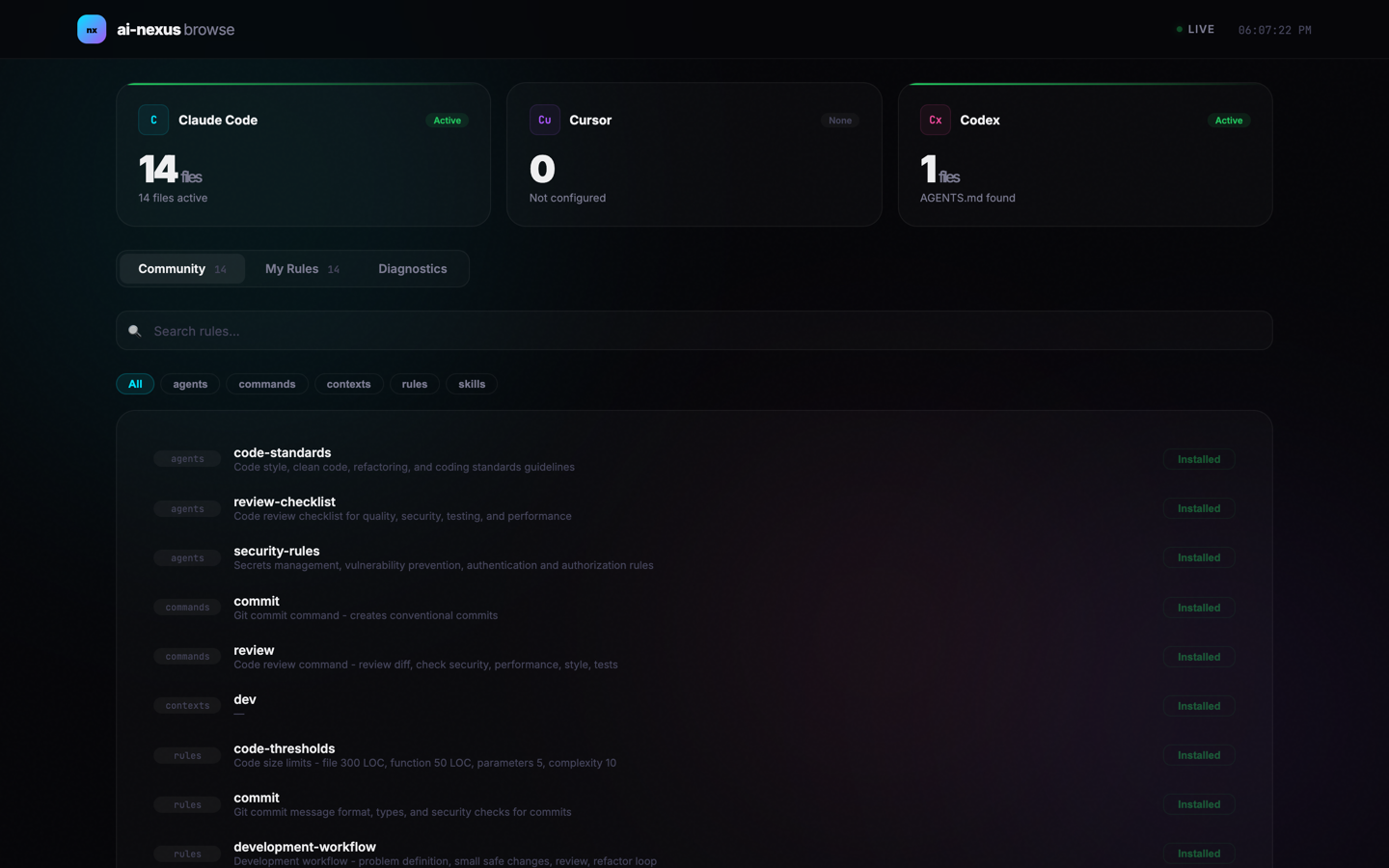
Open the web-based marketplace to search, install, and remove rules with one click:
npx ai-nexus browse
http://localhost:3847Browse and download community-contributed rules directly from GitHub — no npm publish needed.
# List all available rules
npx ai-nexus search

# Search by keyword
npx ai-nexus search react
  Results for "react":

  skills/
    react.md - React/Next.js best practices

  1 file(s) found.
  Use "ai-nexus get <filename>" to download.
# Download a rule
npx ai-nexus get react.md

# Specify category when name exists in multiple
npx ai-nexus get commit.md --category commands
Rules are downloaded from the latest GitHub repo to ~/.claude/. Anyone can contribute new rules via PR — they become available to search and get immediately after merge.
Preview which rules would load for a given prompt:
$ npx ai-nexus test "write a react component with hooks"

Method: Keyword matching

Selected files (3):
  • rules/essential.md
  • rules/react.md
  • skills/react.md
We welcome rule contributions! Contributed rules are instantly available via ai-nexus search and ai-nexus get — no npm publish needed.
# Quick start for contributors
git clone https://github.com/JSK9999/ai-nexus.git
cd ai-nexus && npm install && npm run build

# Add your rule to config/rules/, then test:
node bin/ai-nexus.cjs test "your prompt"
Do I actually need this?
If you use one tool with a few rules or skills, probably not — your tool's built-in settings are enough. ai-nexus is for people who:
I only use skills, not rules. Is this relevant?
Yes. The semantic router handles skills, rules, commands, and agents equally. Install 50 skills and only the relevant ones load per prompt. The "install everything without worrying about tokens" benefit applies to skills just as much as rules.
How is this different from Claude Code skills (alwaysApply: false)?
Skills handle on-demand loading within Claude Code. ai-nexus adds:
Why not just put everything in CLAUDE.md or AGENTS.md?
Works fine with 5 files. With 50+, you're burning tokens on Docker best practices while writing a commit message. The ETH Zurich study shows this hurts both performance and cost. ai-nexus loads only 2-3 relevant files per prompt.
Skills vs rules?
Skills are workflows you explicitly invoke (/commit, /review). Rules are passive guidelines that apply automatically (coding conventions, security standards, naming patterns). ai-nexus routes both based on your prompt — no need to remember which to invoke.
If you find ai-nexus useful, give it a ⭐ on GitHub — it helps others discover the project and motivates continued development.
Apache 2.0
Flutter AI Skills and Rules for Cursor, Copilot, Antigravity, and Other AI-Powered IDEs
An opinionated, AI-native development workflow for Java Enterprise — reusable Skills, Agents, Commands, and MCP servers
AI 服务分流规则聚合: 多源合并 | 按 provider 精修 | 每日自动同步. 覆盖 OpenAI / Anthropic / Gemini / Cursor / Copilot 等主流 AI 服务, 适配 Clash /
A RedwoodJS optimized .cursorrules file
