

Are you the author? Sign in to claim
Open-source AI gateway — pool your provider keys behind one OpenAI-compatible endpoint with load balancing, failover, ci
One OpenAI-compatible endpoint. Every model. Zero key chaos.










Route Anthropic Claude, OpenAI GPT, Google Gemini, Groq, and OpenRouter
through a single hardened proxy. Pool multiple API keys per provider, load-balance
across them, auto-failover between tiers, and give every team their own scoped key —
with full usage analytics and cost tracking built in.
Quick start · How it compares · Screens · Connect your tools · API
The demo is the real dashboard, signed in as a viewer, reading a frozen snapshot of a gateway seeded with synthetic traffic. No sign-up, nothing to install, and nothing you do there is saved.
Running, from nothing:
curl -O https://raw.githubusercontent.com/Alayra-Systems-Pvt-Limited/Alayra-Nexus/main/docker-compose.yml
printf 'MASTER_ENCRYPTION_KEY=%s\nADMIN_PASSWORD=change-me\n' "$(openssl rand -hex 32)" > .env
docker compose up -d
Dashboard on localhost:3000 · OpenAI-compatible API on localhost:3000/v1
Three lines, not one: the gateway will not start without an encryption key, and generating one for you silently would mean every install shared a key we published.
Built and maintained by Alayra Systems Pvt. Limited · Islamabad, Pakistan
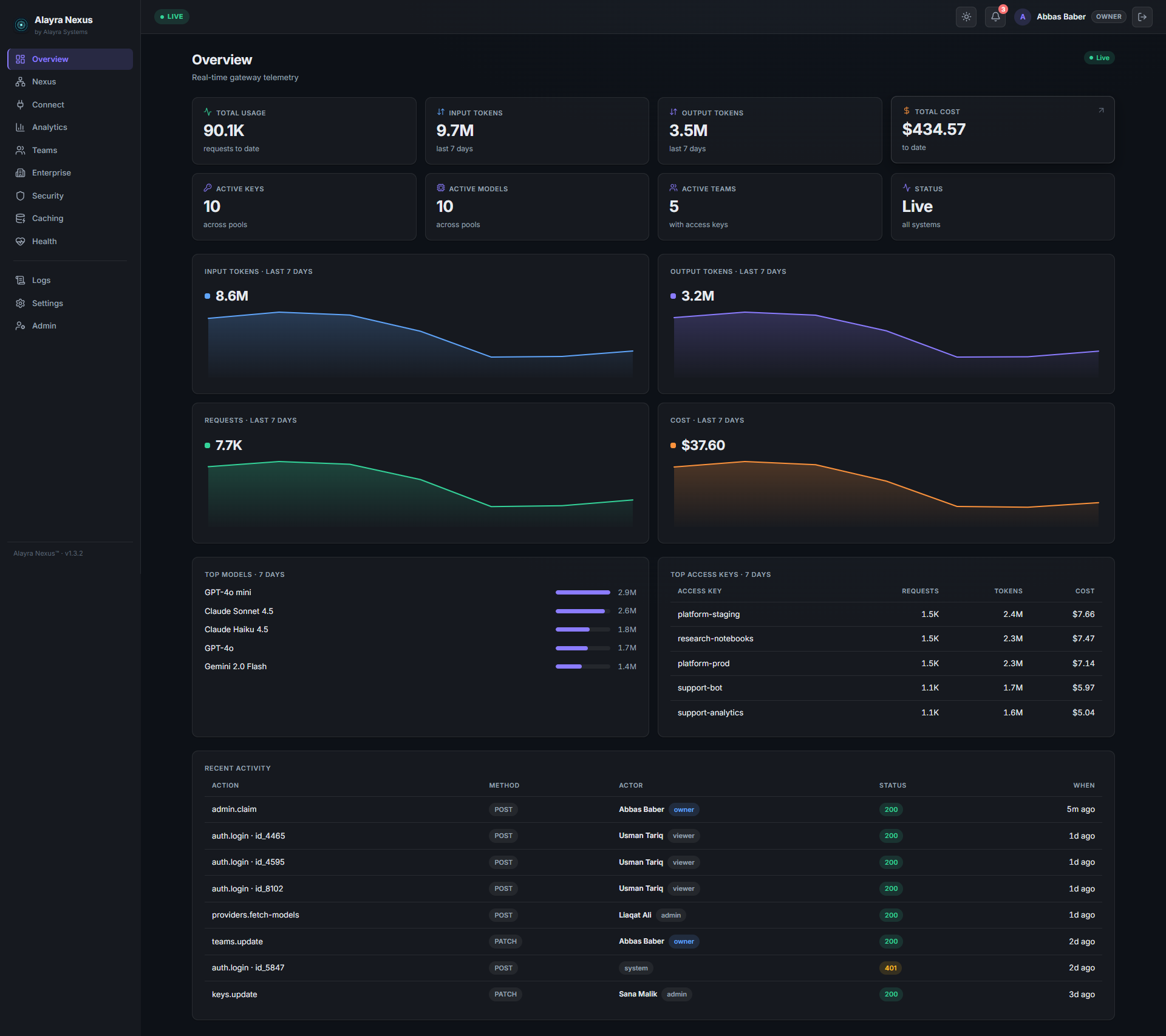
The overview after 90 days of traffic across five teams and ten models.
Get started · Live demo · Why Alayra Nexus? · Features · Screens · How it compares · Supported providers · Architecture · Quick start · Connect your tools · Environment variables
How it works · Rate limits, explained · Resilience & routing · Teams & budgets · BYOK · API reference · Dashboard · Observability
Operate & contribute · Security model · Accounts and roles · Roadmap · Contributing · License
[!NOTE] A command-line interface is coming soon — everything the dashboard does is already an HTTP API today, so the CLI is a convenience layer over endpoints that exist, not new capability. Until it lands, the admin API and the web dashboard cover every operation.
Most teams hit the same wall: multiple AI providers, API keys scattered across engineers, no visibility into who spent what, and a hard-coded provider string that makes switching models painful.
Alayra Nexus is the infrastructure layer that sits between your application and every AI provider. Change one URL. Get load balancing, automatic failover, team-level access control, and a live cost dashboard — without touching your application code.
| Capability | Details |
|---|---|
| Key Pool Management | Store unlimited API keys per provider, encrypted at rest with AES-256-GCM |
| Intelligent Load Balancing | Automatic rotation across active keys; cooling and banned keys are automatically bypassed |
| Circuit Breaker | Per-key breaker with escalating cooldown, a single half-open recovery probe, separate 429 handling, and auto-ban on repeated auth failures |
| Cache-Aware Sticky Routing | Multi-turn conversations stay pinned to the same upstream so the provider's prompt cache isn't thrown away by round-robin |
| Content Guardrails | Optional, pluggable prompt/response filtering — redact PII or block banned content and injection patterns. Off by default |
| Tiered Failover | Premium → Standard → Fast chains; when the best key fails the next tier fires instantly |
| Cost-Aware Routing | Optional: within a tier, bias toward the cheapest healthy, in-headroom provider using registry pricing — a tiebreaker that never overrides health or cache affinity |
| OpenAI-Compatible API | Drop-in /v1/chat/completions — change one base URL, nothing else |
| Anthropic-Compatible API | /v1/messages too, so Claude Code and the Anthropic SDKs route through the same pool — streaming, tools, and all |
| Team Key Issuance | Create scoped access tokens per team, each with an independently configurable RPM limit |
| BYOK (Bring Your Own Key) | A team can register its own provider keys, encrypted at rest and routed only for that team's traffic — with optional fall-back to the shared pool, or hard isolation |
| Real-Time Rate Limiting | Per-key RPM enforcement via Redis with live utilization meters (per-key TPM budgets are configurable; enforcement is on the roadmap) |
| Cost Tracking | Per-request USD cost computed from model pricing, attributed to the requesting team |
| Full Analytics Dashboard | Request trends, token breakdowns, team leaderboard, provider split — powered by Chart.js |
| Custom Date Ranges | Analytics filterable by today / 7d / 30d / 90d or any custom from→to window |
| CSV Export | One-click export of all analytics data for finance or reporting |
| Model Registry | Manage which models are available, their tier, capabilities, and per-1M token pricing |
| Web Admin Dashboard | Full browser UI — no CLI required for day-to-day operations |
| Two-Factor Admin Auth | Optional TOTP second factor with single-use recovery codes, session tokens, per-source login lockout, and revocable API tokens for scripts |
| Security Hardened | Fastify Helmet, CORS, constant-time secret comparison, AES-256-GCM key encryption, zero plaintext secrets at rest |
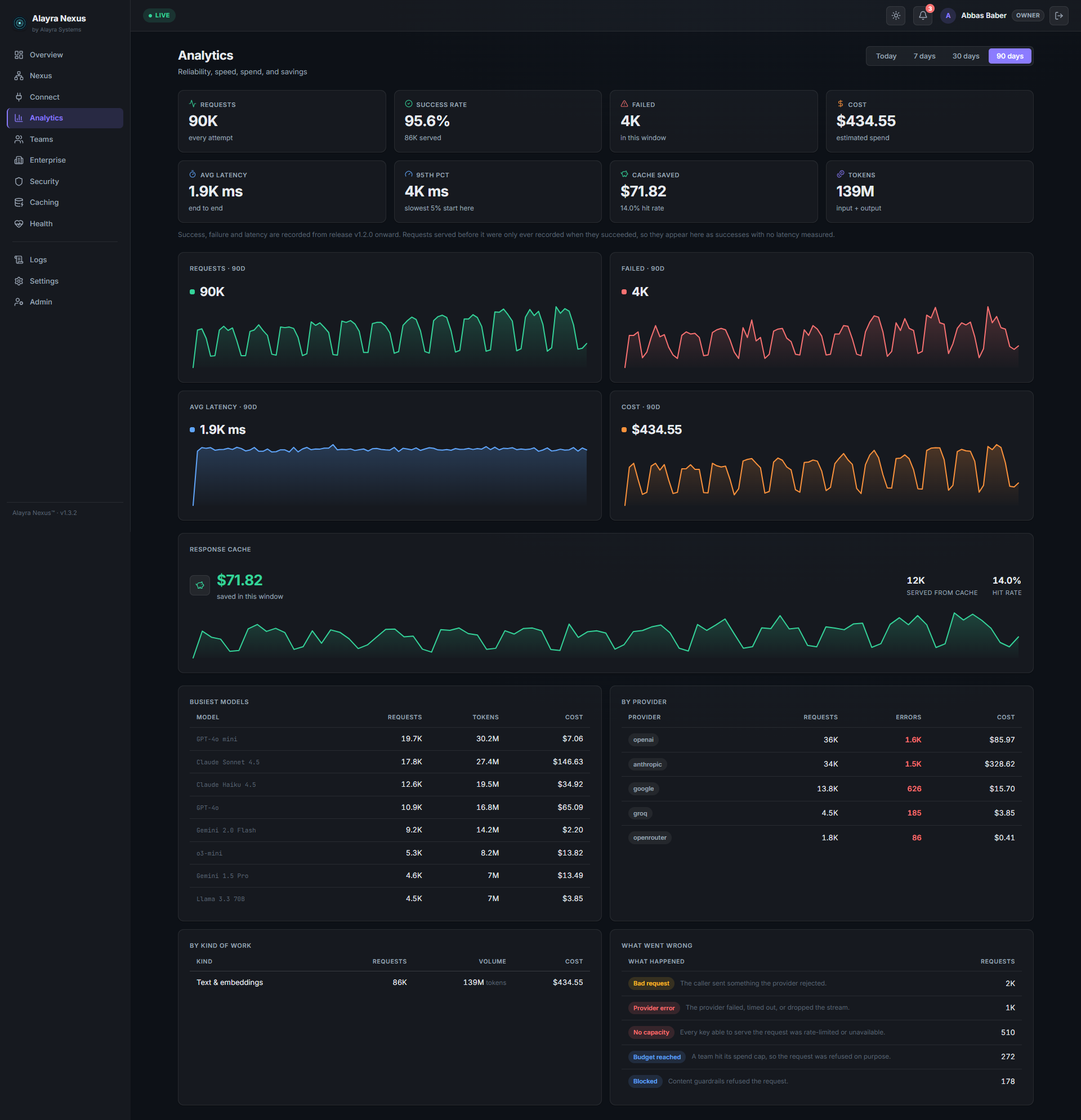
Analytics — reliability, speed, spend and savings over any window, with a per-model and per-provider breakdown and a plain-English account of what failed. |
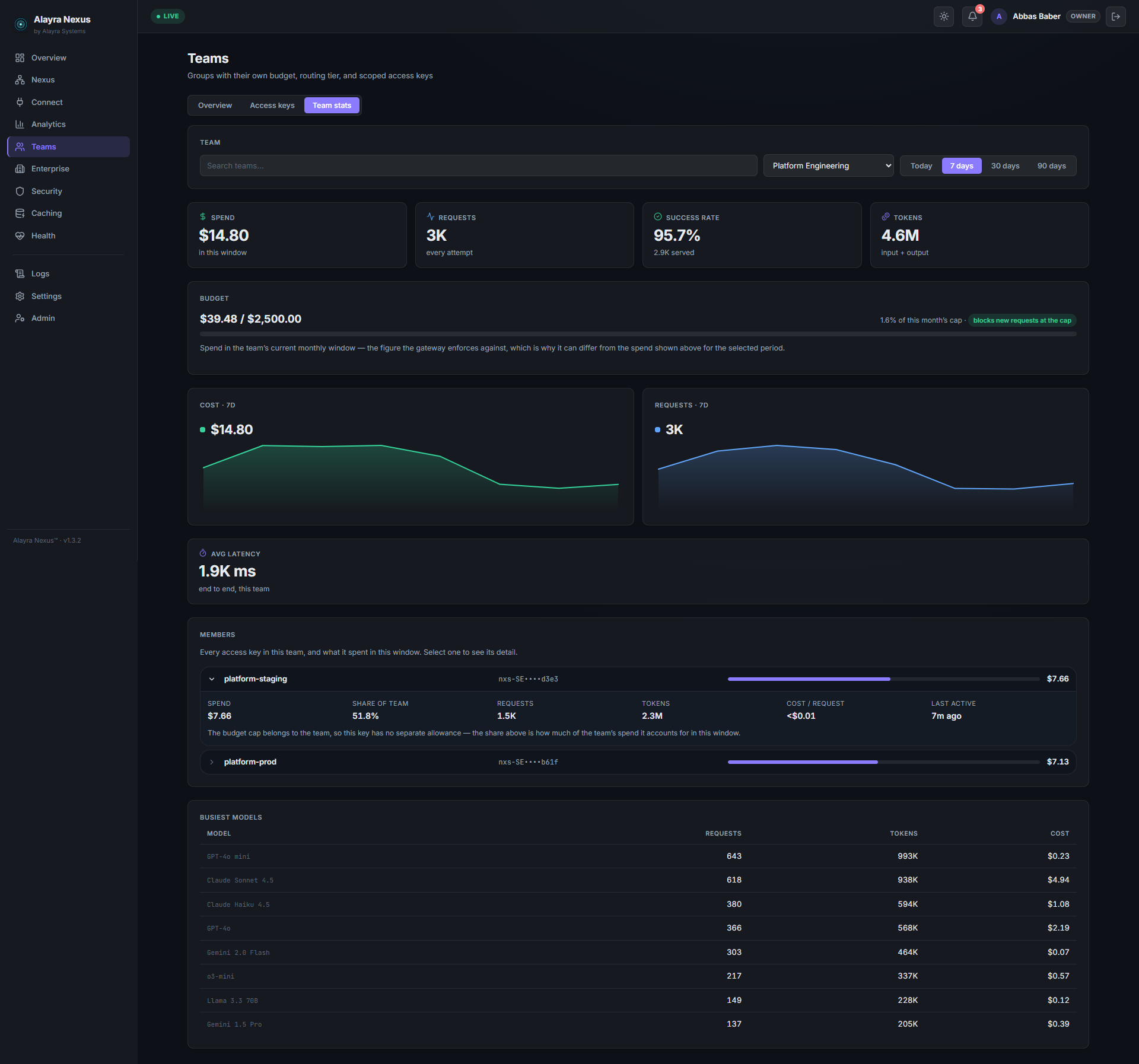
Teams — each team's budget against its cap, what every access key inside it spent, and the models it leans on. |
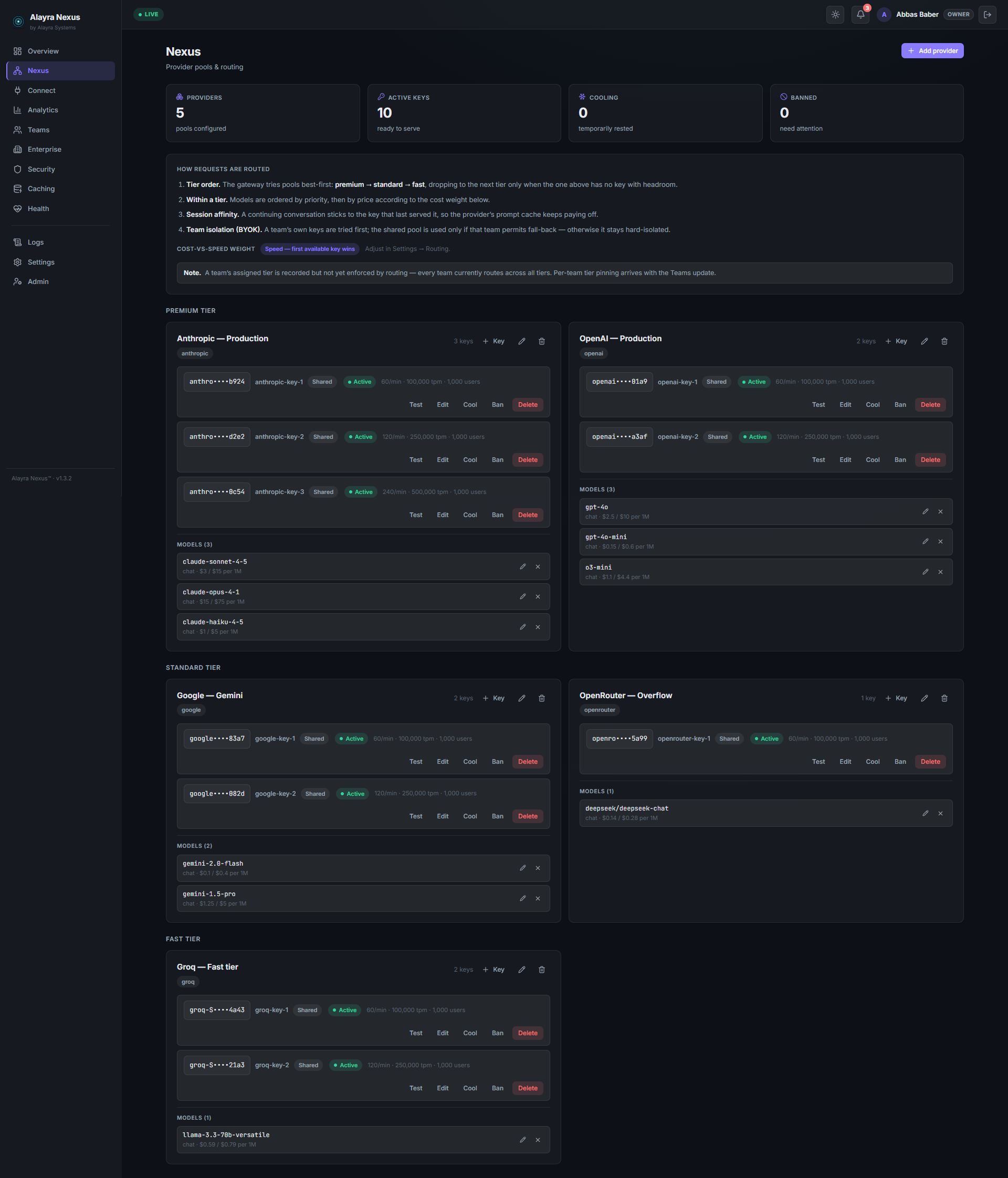
Pools & routing — provider pools by tier, every key with its own limits, status and controls: test, cool, ban. |
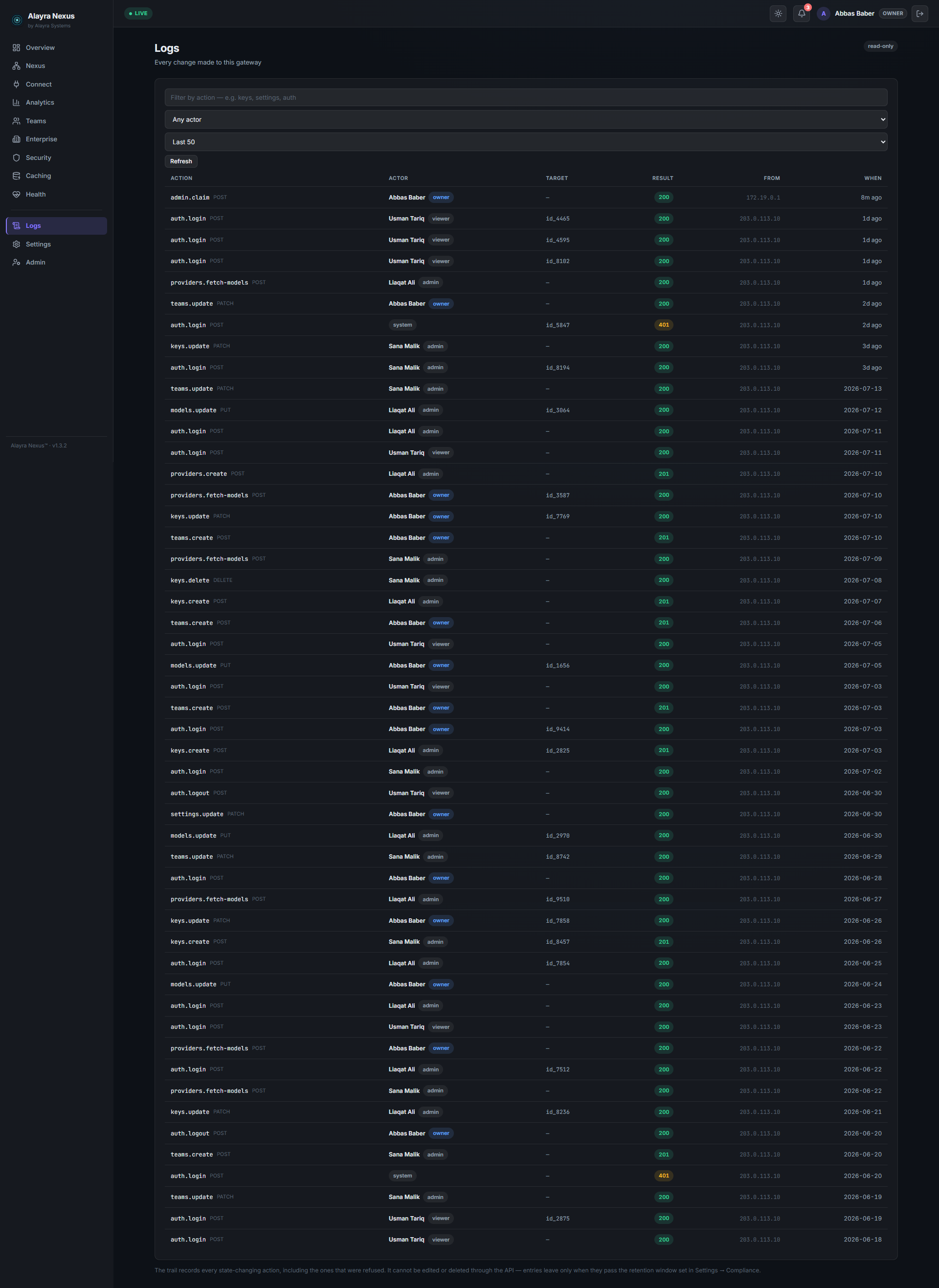
Audit trail — every state-changing action with who did it, from where, and what the server answered. Read-only over the API. |
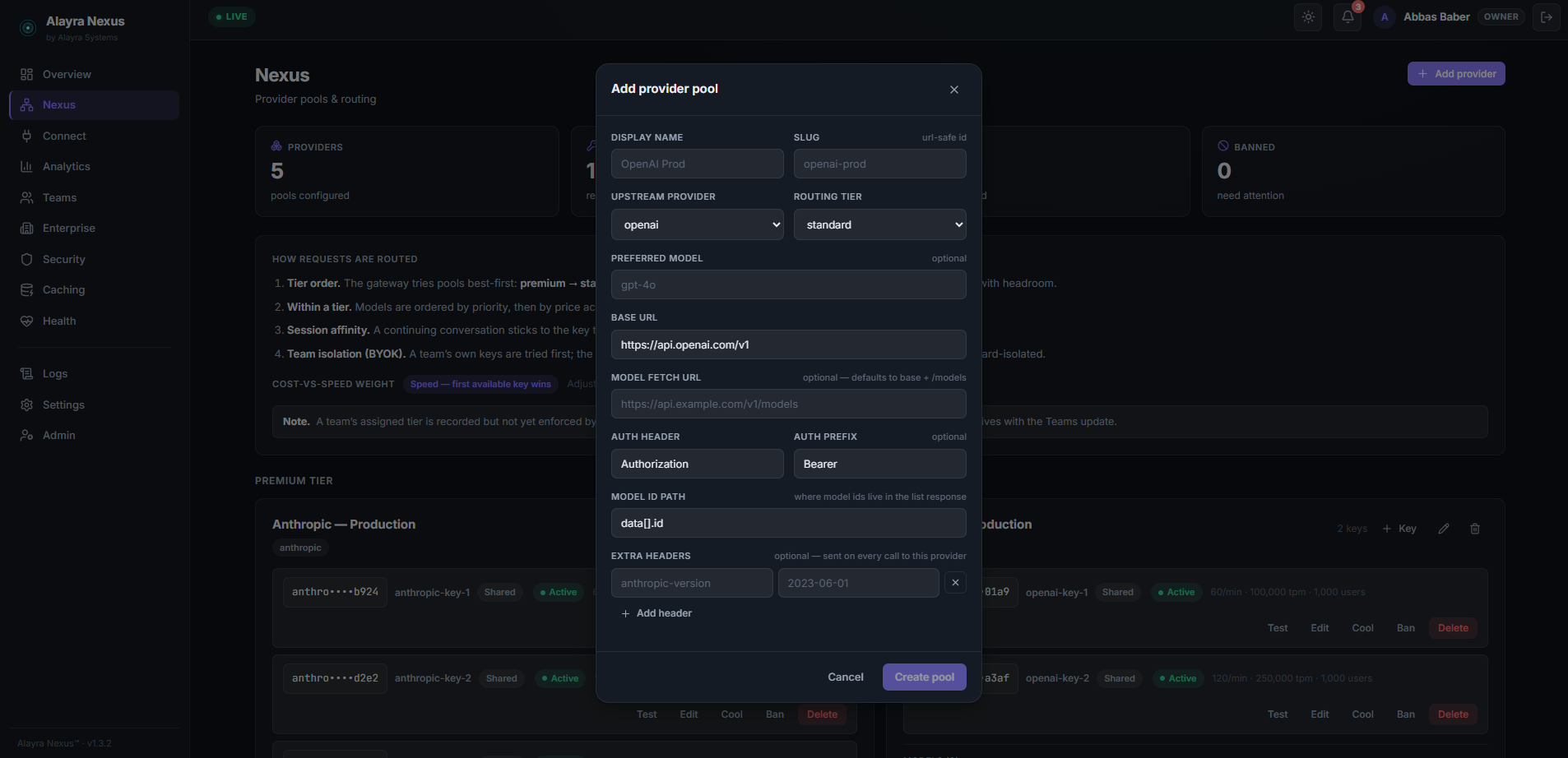
Any OpenAI-compatible endpoint — base URL, auth header, model-id path and per-provider headers, without touching a config file. |
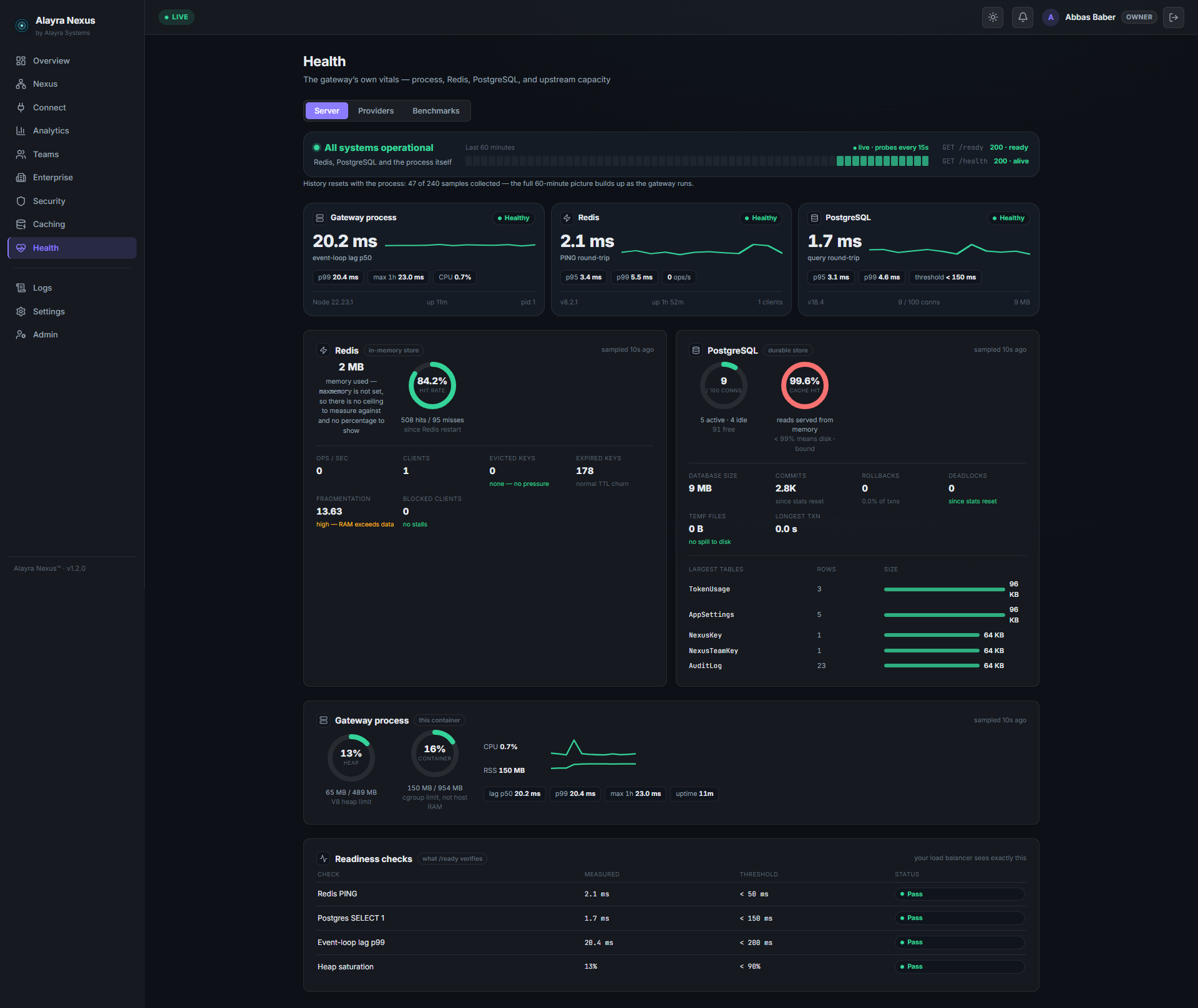
Health — live probes for every dependency, so an outage names itself instead of arriving as a wall of failed requests. |
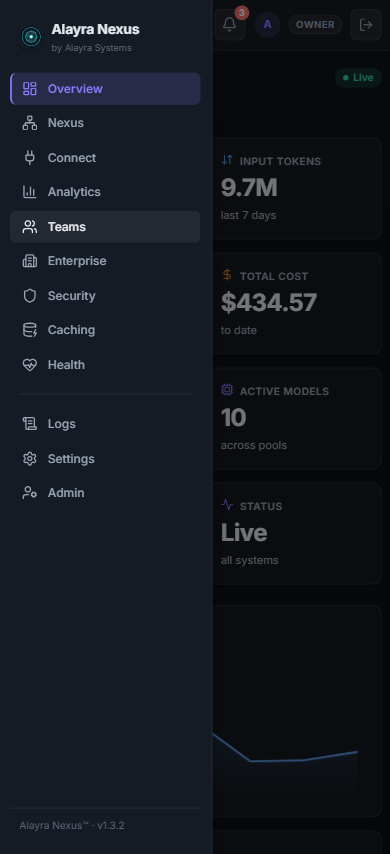
The console works on a phone — the sidebar becomes a drawer below 820px.
LiteLLM is the closest well-known project, so here is an honest side-by-side. It wins on reach and ecosystem; Nexus wins on what you get without paying, and on depth of the operator console.
| Alayra Nexus | LiteLLM | |
|---|---|---|
| Providers | 5 first-class + any OpenAI-compatible endpoint | 100+ built in |
| Admin dashboard | Built in — analytics, teams, pools, audit, health | Built in |
| Scoped team keys | Yes | Yes (virtual keys) |
| Team budgets | Yes, with block / notify / downgrade at the cap | Yes |
| Key pooling & failover | Per-provider pools, tiered failover, circuit breaker | Load balancing, retries, fallbacks |
| Audit trail | Append-only, per-action, no delete endpoint | Logging integrations |
| SSO | Included, Apache-2.0 | Commercial licence |
| Two-factor auth | Included | — |
| CLI | Coming soon | Mature |
| SDK | Not yet | Python SDK |
| Language | TypeScript / Node | Python (Rust core) |
| Licence | Apache-2.0, every feature included | Open source + commercial tier |
Choose LiteLLM if you need breadth of providers today, a mature CLI and SDK, or its ecosystem of integrations.
Choose Alayra Nexus if you want a self-hosted gateway whose enterprise controls — SSO, two-factor, audit trail, team budgets — are in the open-source licence rather than behind a sales call, and a console your finance team can read without help.
Compared against LiteLLM's public documentation, July 2026. If anything here has gone out of date, please open an issue — we would rather fix it than win on a stale fact.
| Provider | Status | Endpoint used | Models |
|---|---|---|---|
| Anthropic | ✅ Stable | api.anthropic.com/v1 | Claude 3.5 Sonnet, Claude 3 Opus, Claude 3 Haiku, and all Claude variants |
| OpenAI | ✅ Stable | api.openai.com/v1 | GPT-4o, GPT-4 Turbo, GPT-3.5 Turbo, o1, o3-mini |
| ✅ Stable | Gemini's OpenAI-compatible API | Gemini 1.5 Pro, Gemini 1.5 Flash, Gemini 2.0 Flash | |
| Groq | ✅ Stable | api.groq.com/openai/v1 | Llama 3.3 70B, Llama 3.1 405B / 70B, Mixtral 8x7B, Gemma |
| OpenRouter | ✅ Stable | openrouter.ai/api/v1 | Every model in OpenRouter's catalogue — 340+ behind one key |
| Custom | ✅ Stable | Whatever you configure | Any OpenAI-compatible endpoint: base URL, auth header, and model-id path are all settable |
| Azure OpenAI · Bedrock · Vertex | ⚪ Via Custom | your endpoint | Reachable today through the Custom provider if the endpoint speaks OpenAI's schema; first-class adapters are on the roadmap |
"Stable" means a default base URL ships for it and its keys route, pool, fail over and cost-track
like any other. Anthropic additionally gets a native /v1/messages endpoint, so Claude Code and
the Anthropic SDKs work unchanged.
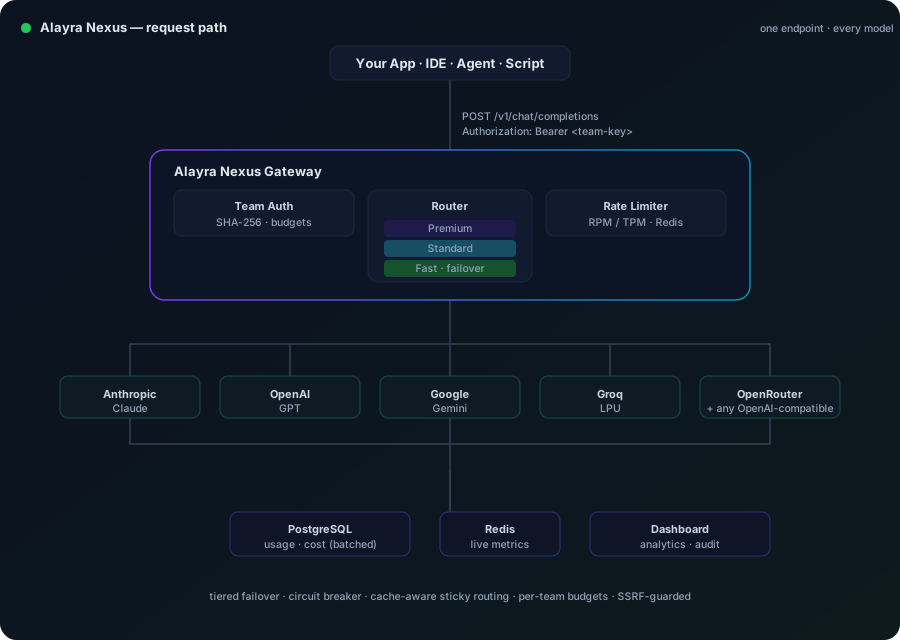
One request enters authenticated and budget-checked, the router picks a healthy key by tier and cache affinity, the circuit breaker keeps a failing provider out of rotation, and usage is batched to PostgreSQL while live metrics land in Redis — all behind a single OpenAI-compatible URL.
  Your Application / IDE / Agent / Script
           │
           │  POST /v1/chat/completions
           │  Authorization: Bearer <team-key>   ← optional, enables per-team analytics
           ▼
  ┌──────────────────────────────────────────────────────────┐
  │                   Alayra Nexus Gateway                  │
  │                                                          │
  │   ┌───────────────┐          ┌─────────────────────────┐ │
  │   │  Team Auth    │          │     Rate Limiter        │ │
  │   │  SHA-256 hash │          │   RPM / TPM via Redis   │ │
  │   └───────┬───────┘          └──────────┬──────────────┘ │
  │           └─────────────┬───────────────┘                │
  │                    ┌────▼───────┐                        │
  │                    │   Router   │                        │
  │                    │  Premium   │                        │
  │                    │  Standard  │  ← tiered failover     │
  │                    │   Fast     │                        │
  │                    └────┬───────┘                        │
  │        ┌────────────────┼──────────────┬──────────────┐  │
  │        ▼                ▼              ▼              ▼  │
  │    Anthropic          OpenAI        Google           Groq │
  │    (Claude)           (GPT)        (Gemini)      OpenRouter│
  └──────────────────────────────────────────────────────────┘
           │
           ▼
    Token usage → async buffer → batched PostgreSQL write
    Real-time metrics  → Redis
    Analytics          → Admin Dashboard
A multi-arch image (amd64 + arm64) is published to Docker Hub and the GitHub Container Registry from the same build, so the two are byte-identical — use whichever you prefer. If you already have Postgres and Redis, run the gateway with one command:
docker run -d --name alayra-nexus -p 3000:3000 \
  -e DATABASE_URL="postgresql://user:pass@host:5432/nexus" \
  -e REDIS_URL="redis://host:6379" \
  -e MASTER_ENCRYPTION_KEY="$(node -e "console.log(require('crypto').randomBytes(32).toString('hex'))")" \
  -e ADMIN_PASSWORD="change-me" \
  alayrasystems/nexus:latest
| Registry | Image |
|---|---|
| Docker Hub | alayrasystems/nexus |
| GHCR | ghcr.io/alayra-systems-pvt-limited/alayra-nexus |
Pin a version for production (e.g. :1.3.2) rather than :latest.
Nothing to clone and nothing to compile: Compose downloads the published image and starts Postgres and Redis alongside it.
curl -O https://raw.githubusercontent.com/Alayra-Systems-Pvt-Limited/Alayra-Nexus/main/docker-compose.yml

</details>

# Two secrets. Keep MASTER_ENCRYPTION_KEY safe — without it your stored
# provider keys can never be decrypted again.
cat > .env <<EOF
MASTER_ENCRYPTION_KEY=$(node -e "console.log(require('crypto').randomBytes(32).toString('hex'))")
ADMIN_PASSWORD=change-me
NEXUS_VERSION=1.3.2
EOF

docker compose up -d
Dashboard is live at http://localhost:3000. The container applies its own database
migrations on startup, and prints your generated Nexus API key on first run —
docker compose logs nexus to see it. Save it then: the key is stored as a hash, so it is shown
once and never again (lost it? rotate for a new one from Connect).
Open the dashboard and it will ask you to create your owner account, using the ADMIN_PASSWORD you
set above — see Accounts and roles.
DATABASE_URL and REDIS_URL are set by Compose; you do not need to supply them.
Omit NEXUS_VERSION to track latest, but pin it in production.
git clone https://github.com/Alayra-Systems-Pvt-Limited/Alayra-Nexus.git
cd alayra-nexus
cp .env.example .env   # set MASTER_ENCRYPTION_KEY and ADMIN_PASSWORD

docker compose -f docker-compose.yml -f docker-compose.dev.yml up -d --build
The gateway builds from the repo and serves the dashboard from a single service, so a managed deploy is three plugins and four variables:
DATABASE_URL = ${{Postgres.DATABASE_URL}}REDIS_URL = ${{Redis.REDIS_URL}}MASTER_ENCRYPTION_KEY = 64 hex chars — generate fresh, never reuse:
node -e "console.log(require('crypto').randomBytes(32).toString('hex'))"ADMIN_PASSWORD = a strong install secret (claims the first owner account)https://…up.railway.app URL.Railway's proxy sets X-Forwarded-Proto, so the dashboard's Connect page prints the
correct https:// base URL with no extra config. Behind a proxy that doesn't, pin it with
PUBLIC_URL. The container runs its own migrations on boot; open
the domain and it greets you with the owner-account setup screen.
Prerequisites: Node.js 20+, PostgreSQL 15+, Redis 7+
git clone https://github.com/Alayra-Systems-Pvt-Limited/Alayra-Nexus.git
cd alayra-nexus

npm install

cp .env.example .env

</details>

# Edit .env with your values

# Generate a secure MASTER_ENCRYPTION_KEY (run this once and save it):
node -e "console.log(require('crypto').randomBytes(32).toString('hex'))"

# Postgres and Redis must be running. Don't have them locally? Start just the
# two dependencies with Compose and run the gateway from source:
docker compose up -d postgres redis

# Run database migrations
npm run migrate

# Start
npm run dev          # development — hot reload via tsx
npm run build && npm start   # production
Dashboard is live at http://localhost:3000
[!TIP]
Cannot reach Redis/Cannot reach PostgreSQLon startup? Both are hard dependencies — Redis holds rate-limit counters, circuit-breaker state, sticky routing, budgets and the response cache; Postgres holds everything else. The startup error names the one that's missing and the command that starts it.The dashboard is a Vite + Preact app in
web/, built to static assets that the gateway serves at/— there is no separate web server to run. To work on the dashboard with hot reload,cd web && npm run dev(it proxies API calls to a gateway running on:3000).
Alayra Nexus speaks both the OpenAI API (/v1/chat/completions) and the
Anthropic Messages API (/v1/messages), so almost any tool that lets you set a
custom base URL works — including Claude Code. You only need three values:
http://<your-host>:3000/v1Authorization: Bearer <key>, or x-api-key: <key>)alayra-nexus-1[!NOTE] Cursor (and some other cloud tools) route requests through their own servers, so they cannot reach
http://localhost:3000— they need a publicly reachable HTTPS base URL. Local tools such as Cline, Continue.dev, and Claude Code call your gateway directly and work against localhost. This is a Cursor constraint, not a Nexus one — LiteLLM has the same requirement.
Claude Code speaks the Anthropic Messages API. Point it at the gateway:
export ANTHROPIC_BASE_URL="http://<your-host>:3000"
export ANTHROPIC_AUTH_TOKEN="<your-team-key>"
claude
Requests route through the same pool, failover, budgets, and analytics as everything
else. On startup Claude Code reads GET /v1/models to populate its model picker.
Settings → Models → enable OpenAI API Key, paste your team key, tick Override OpenAI Base URL and set it to http://<your-host>:3000/v1. Add a custom model named alayra-nexus-1.
API Provider → OpenAI Compatible → Base URL http://<your-host>:3000/v1, API Key = your team key, Model ID alayra-nexus-1.
{
  "models": [
    {
      "title": "Alayra Nexus",
      "provider": "openai",
      "model": "alayra-nexus-1",
      "apiBase": "http://<your-host>:3000/v1",
      "apiKey": "<your-team-key>"
    }
  ]
}
from openai import OpenAI

client = OpenAI(base_url="http://<your-host>:3000/v1", api_key="<your-team-key>")
resp = client.chat.completions.create(
    model="alayra-nexus-1",
    messages=[{"role": "user", "content": "Hello"}],
)
print(resp.choices[0].message.content)
import OpenAI from "openai";

const client = new OpenAI({
  baseURL: "http://<your-host>:3000/v1",
  apiKey: "<your-team-key>",
});
const resp = await client.chat.completions.create({
  model: "alayra-nexus-1",
  messages: [{ role: "user", content: "Hello" }],
});
console.log(resp.choices[0].message.content);
curl http://<your-host>:3000/v1/chat/completions \
  -H "Authorization: Bearer <your-team-key>" \
  -H "Content-Type: application/json" \
  -d '{"model":"alayra-nexus-1","messages":[{"role":"user","content":"Hello"}]}'
Streaming works everywhere — add
"stream": true(or the client's streaming flag). Running Nexus behind TLS? Use yourhttps://…/v1URL instead.
| Variable | Required | Description |
|---|---|---|
DATABASE_URL | Yes | PostgreSQL connection string (postgresql://user:pass@host:5432/db) |
REDIS_URL | Yes | Redis connection string (redis://localhost:6379) |
MASTER_ENCRYPTION_KEY | Yes | 64 hex characters (32 bytes) — encrypts all stored API keys |
ADMIN_PASSWORD | Yes | The gateway's deployment secret. Claims the first owner account on first run, and authorises a full reset. Not a day-to-day login once an owner exists — see Accounts and roles. |
PORT | No | HTTP port (default: 3000) |
PUBLIC_URL | No | The address the outside world reaches this gateway at — pins what the Connect page, quick-start snippets, and SSO redirect_uri print. Leave unset and the gateway infers it from the proxy's X-Forwarded-Proto / X-Forwarded-Host headers, or the Host header. Set it (e.g. https://gateway.example.com) when a proxy forwards the host but not the scheme, so a TLS deployment would otherwise print http://. |
LOG_LEVEL | No | Pino log level: info, debug, warn (default: info) |
ABUSE_RATE_LIMIT_MAX | No | Requests per credential per window before the abuse guard trips (default: 12000). This is DoS/abuse protection, not a throughput cap — see Rate limits, explained. |
ABUSE_RATE_LIMIT_WINDOW | No | Abuse-guard window (default: 1 minute) |
NEXUS_DEFAULT_MAX_TOKENS | No | Output tokens reserved against a key's TPM budget when a request omits max_tokens (default: 2048; reconciled to real usage afterward) |
UPSTREAM_TTFT_MS | No | Abort if a provider doesn't return response headers within this many ms (default: 20000) |
UPSTREAM_BODY_MS | No | Non-streaming: max ms to read the full response body (default: 60000) |
UPSTREAM_STREAM_IDLE_MS | No | Streaming: max ms gap between chunks before a hung stream is aborted (default: 30000) |
[!IMPORTANT] Generate
MASTER_ENCRYPTION_KEYwith:hljs language-bashnode -e "console.log(require('crypto').randomBytes(32).toString('hex'))"This key encrypts every provider API key stored in your database. Keep it secret. Keep a backup. Never reuse it across deployments.
Alayra Nexus has two independent limits, and it's important not to confuse them:
| Limit | Where | What it does | Who sets it |
|---|---|---|---|
| Per-key RPM / TPM | Inside the pool, per provider key | The real throughput control. Enforced exactly against what each provider allows a given key (e.g. "this key: 60 RPM, 100K TPM"). This is what keeps you inside your providers' contracts. | Set per key in the dashboard |
| Abuse guard | At the server edge, per credential | A generous DoS/abuse backstop, not a throughput cap. Sized well above any single credential's legitimate rate so it never interferes with real traffic — it only trips on a runaway or malicious client. | ABUSE_RATE_LIMIT_MAX env var |
Your gateway's real ceiling is the sum of your active keys' RPM limits — pool more keys and that ceiling rises. The abuse guard should always sit comfortably above that number, never below it.
[!IMPORTANT] Size
ABUSE_RATE_LIMIT_MAXabove the busiest single credential's expected rate, not your whole pool's. Because the guard is keyed per credential (each team key gets its own bucket), a fleet of team keys can collectively far exceed this number — but if you route most traffic through one key, give that key headroom. The default of12000per minute (200 req/s) suits most self-hosters; raise it if a single key legitimately drives more.
The guard is Redis-backed, so the limit stays correct even when you run multiple Nexus replicas behind a load balancer, and it fails open — if Redis is briefly unreachable, requests are allowed through rather than blocked.
Every key in the pool sits behind a per-key circuit breaker, so one failing provider never keeps taking traffic it can't serve. The breaker state lives in Redis, so it stays consistent across every Nexus replica.
| Failure | How the breaker reacts |
|---|---|
| 5xx / timeout / hung stream | Counts as a strike. After 3 consecutive strikes in a 5-minute window the key trips open and is skipped by the router. |
| Cooldown | Escalates on each successive trip — 10s → 20s → 40s … doubling up to a 10-minute cap — so a key that keeps failing is pushed further away instead of being retried on the same fixed timer forever. |
| Half-open recovery | When the cooldown expires the router lets exactly one trial request through. Success closes the breaker and resets the streak; failure re-escalates without dumping full traffic back onto a still-dead provider. |
| 429 (rate limited) | Handled separately — a flat, non-escalating cooldown. A rate limit is expected back-pressure, not an outage, so it never feeds the strike counter. |
| 401 / 403 (auth) | A bad credential won't fix itself. 2 consecutive auth failures ban the key outright rather than merely cooling it. |
Any success at any point resets the streak to zero. Cooling and banned keys are reflected live in the dashboard; the admin unban action clears the breaker state as well.
Provider prompt caching only pays off when a conversation's follow-up turns hit the same upstream key. Naïve round-robin (always pick the least-recently-used key) throws that cache away on every turn. Nexus instead pins a conversation to the key that last served it:
X-Nexus-Session header or the OpenAI user
field if you send one, and otherwise by a stable fingerprint of the opening messages.X-Nexus-Sticky: true header.Within a tier, when several providers are healthy and in-headroom, Nexus can bias toward the
cheaper one using the per-token pricing already in your model registry — so "route to the
cheapest capable, healthy, in-headroom provider" becomes real. It is a tiebreaker only,
controlled by a single weight (Settings → Cost-aware routing, or ROUTING_COST_WEIGHT):
0 (default) — cost is ignored; provider order is unchanged.1 — strict cheapest-first within a tier.Cost never overrides correctness. It is applied after tier priority (capability), the circuit breaker and rate/token headroom (an ineligible cheap provider is still skipped), and sticky cache affinity (a continuing conversation stays pinned to its cached key even if a cheaper provider exists — a cache hit usually wins on total cost anyway). Unpriced providers are ranked last but never dropped.
[!NOTE] Model exposure: Nexus deliberately exposes a single virtual model — send
model: "alayra-nexus-1"and the gateway routes across your pool by tier, health, and cache affinity. This keeps the client contract to one stable name; task-class dispatch to named virtual models (nexus-fast,nexus-premium, …) is intentionally out of scope for now so the routing contract stays simple for early adopters.
Distinct from cache-aware routing above (which reuses the provider's prompt cache),
this caches the response itself. When enabled, an exact-match request — same model,
messages, and generation params — is served straight from Redis, skipping the provider
entirely: a real $0 call. Off by default; turn it on under Settings → Response cache
(or CACHE_ENABLED / CACHE_TTL_SECONDS).
stream and user, so a streamed and a non-streamed request with
the same content share an entry — and a hit is replayed in whichever mode the client
asked for (drop-in compatible).X-Nexus-Cache: hit / miss.n > 1) requests are not cached. Identical requests
return the same cached answer until the TTL expires — enable it where that's what you want
(deterministic prompts, repeated evals, shared boilerplate).[!NOTE] Semantic caching (nearest-neighbour on prompt embeddings) is a heavier, opt-in extension planned on top of this exact-match layer — not enabled today.
Group your scoped access keys into teams, and give each team a USD budget cap per day, week, or month. Enforcement happens on the admission path — before a request ever reaches a provider:
429 with the current spend,
the cap, and a Retry-After for when the window resets (UTC).403 immediately.[!NOTE] Cost is only knowable after a response completes (streaming), so enforcement is check-then-spend: requests already in flight when the cap is crossed can overshoot it by their own cost. That's the standard trade for budget caps on a streaming gateway.
Manage teams from the dashboard's Teams tab — create and budget teams, issue and
assign scoped access keys, and read per-team usage — or drive the same operations over
the admin API (/admin/teams).
A provider key can be owned by a team instead of living in the shared pool. An
owned key serves only that team's traffic; nobody else can route through it. Set the
owner when you add the key (Pools → + Key → Owner), or pass ownerTeamId to
POST /admin/providers/:providerId/keys.
Routing then works in two passes:
Per-team, byokFallback decides what happens when a team's own keys are all
rate-limited, cooling, or banned:
byokFallback | Behaviour |
|---|---|
true (default) | Fall back to the shared pool. Responses carry X-Nexus-BYOK: true only when an owned key served them |
false | Hard isolation. The request gets 503 + Retry-After. It never touches a credential the team did not bring |
A BYOK key is not a parallel proxy — it is a scoped pool. Owned keys flow through the exact same admission control, circuit breaker, guardrails, SSRF checks, and analytics pipeline as pooled keys. There is one request path.
Two guarantees worth stating explicitly:
BYOK spend is still costed, attributed, and counted against the team's budget cap —
set budgetUsd: null for a team that funds its own keys and shouldn't be capped.
[!WARNING] Deleting a team deletes its owned provider keys along with it. This is deliberate: releasing a private credential into the shared pool would let every other caller route through it. The team's access keys survive, losing only their budget cap.
Watch adoption with the nexus_byok_requests_total{result} metric — a sustained
fallback rate means a team is under-provisioned on its own credentials.
POST /v1/chat/completions   OpenAI Chat Completions (streaming + non-streaming)
POST /v1/messages           Anthropic Messages (streaming + non-streaming)
POST /v1/embeddings         OpenAI Embeddings — for RAG / vector search
POST /v1/completions        OpenAI legacy completions — fill-in-the-middle / autocomplete
POST /v1/images/generations OpenAI Images — billed per image, not per token
POST /v1/audio/speech       OpenAI TTS — returns audio, billed per character
POST /v1/audio/transcriptions  OpenAI STT — multipart upload, billed per file
GET  /v1/models             Model discovery (OpenAI + Anthropic shape)
Every proxy endpoint runs through the same model-first routing, failover, circuit
breaker, budgets, and analytics — the non-chat endpoints are a thin transport over the
same core, not a separate path. Each selects a model by capability: /v1/embeddings
needs a model with the embedding capability, /v1/completions one with completion,
and so on. If none is configured the endpoint answers 503 naming the missing
capability rather than failing obscurely. Authenticate with Authorization: Bearer <key> or, for Anthropic clients, x-api-key: <key>.
curl http://localhost:3000/v1/chat/completions \
  -H "Content-Type: application/json" \
  -H "Authorization: Bearer <your-team-key>" \
  -d '{
    "model": "alayra-nexus-1",
    "messages": [{ "role": "user", "content": "Hello" }],
    "stream": true
  }'
alayra-nexus-1 routes to your highest-priority active pool. You can also specify an exact model string (claude-3-5-sonnet-20241022, gpt-4o, etc.) to target a specific provider directly.
Streaming ("stream": true) is fully supported — server-sent events pass through from the upstream provider with no buffering.
| Method | Endpoint | Description |
|---|---|---|
GET | /admin/nexus/summary | Provider pool overview (active / cooling / banned counts) |
GET | /admin/providers | Full list of provider pools |
POST | /admin/providers | Create a provider pool |
POST | /admin/providers/:providerId/keys | Add an API key to a pool (ownerTeamId makes it private to a team — BYOK) |
POST | /admin/keys/:id/test | Test a key and check latency |
POST | /admin/keys/:id/ban | Ban a key from rotation |
GET | /admin/keys/:id/metrics | Live RPM and status for a key |
GET | /admin/models | List model registry |
PUT | /admin/models | Add or update a model in the registry |
GET | /admin/teams | List teams with key counts and current-period spend |
POST | /admin/teams | Create a team (name, budget cap + period, status) |
PATCH | /admin/teams/:id | Update a team (budget, status, tier, byokFallback) |
DELETE | /admin/teams/:id | Delete a team (access keys survive unassigned; owned provider keys are deleted) |
GET | /admin/team-keys | List team keys |
POST | /admin/team-keys | Issue a new team key (optionally assigned to a team) |
PATCH | /admin/team-keys/:id | Assign or unassign a key's team |
GET | /admin/usage | Usage totals for a period |
GET | /admin/usage/by-team-key | Usage breakdown by team key |
GET | /admin/analytics/timeseries/teams | Daily time series by team |
GET | /admin/analytics/timeseries/models | Daily time series by model |
All admin routes require Authorization: Bearer <token> — a session token from POST /admin/login,
or an admin API token for scripts and CI. On a gateway that has not been claimed yet, the raw
ADMIN_PASSWORD is still accepted, exactly as it was before Phase 7.13a; creating an owner account
closes that door. See Accounts and roles.
The built-in web dashboard (served at /, a Vite + Preact app) gives you full operational
control — no CLI required for day-to-day work:
The Health tab — the gateway's own vitals: process, Redis, and PostgreSQL latency, cache-hit rates, and the readiness checks your load balancer sees.
A Prometheus-compatible /metrics endpoint exposes the gateway's operational
shape, so it drops straight into an existing ops stack.
/metrics is not world-readable like /health. Scrape it with a bearer
token — set a dedicated METRICS_TOKEN (recommended), or it falls back to
ADMIN_PASSWORD. It is exempt from the abuse guard's rate limit but never from auth.# prometheus.yml
scrape_configs:
- job_name: alayra-nexus
authorization:
credentials: <your METRICS_TOKEN>
static_configs:
- targets: ['your-host:3000']
The gateway → provider call is wrapped in an OpenTelemetry span. It's a no-op by default (zero overhead); to collect traces, run the app with a standard OTel SDK and point it at your collector — nothing to change in the code:
OTEL_EXPORTER_OTLP_ENDPOINT=http://your-collector:4318 \
node --require @opentelemetry/auto-instrumentations-node/register dist/server.js
| Layer | Implementation |
|---|---|
| Key encryption | AES-256-GCM with a per-deployment MASTER_ENCRYPTION_KEY; plaintext keys never touch the database |
| Admin authentication | Per-person accounts; email and password exchanged at /admin/login for a short-lived session token; optional per-user TOTP second factor; per-source lockout after repeated failures (see below) |
| Password hashing | scrypt (memory-hard), per-user salt, cost parameters stored with the digest. The only human-chosen secret the gateway stores |
| Constant-time secrets | The admin password and the metrics token are compared with crypto.timingSafeEqual over fixed-width digests, so rejection latency reveals nothing about the secret |
| Nexus API key hashing | SHA-256; shown once when generated or rotated, never stored in the clear and never displayable again |
| Team key hashing | SHA-256; plaintext shown once at creation, never stored |
| Audit attribution | Every state-changing admin action records the account that performed it, by name — copied onto the record, so it outlives the account |
| HTTP hardening | Fastify Helmet — X-Frame-Options, X-Content-Type-Options, HSTS, CSP headers |
| CORS | Configurable origin allowlist |
| SSRF protection | Outbound provider requests are restricted to http(s) and blocked from private/loopback/internal hosts by default (see below) |
| No telemetry | Zero outbound calls to Alayra Systems or any third party. All data stays in your infrastructure |
The gateway has accounts. Everyone who administers it signs in as themselves, with their own email, password and second factor — so the audit trail records who did each thing, and one person can be removed without disturbing anyone else.
First run. A fresh gateway has no accounts, so the dashboard opens on a setup screen. It asks for
ADMIN_PASSWORD from your server's environment: that is the proof you are the person who installed
this gateway rather than the first stranger to find the port. You create the owner account, and are
handed a recovery key — shown once, and the way back if you forget your password.
After that, ADMIN_PASSWORD is refused as a sign-in. It keeps two jobs: claiming a fresh
gateway, and authorising a full reset. Everything else goes through an account.
[!NOTE] Upgrading changes nothing until you choose. On a gateway that has not been claimed, sign-in behaves exactly as it did before:
ADMIN_PASSWORD, and the second factor if you enrolled one. When you claim, your existing authenticator and unused recovery codes carry over to your new account — nothing to set up again.
Three roles.
| Role | Can |
|---|---|
| Owner | Everything, including managing people, single sign-on, compliance/retention, the master API key, and resetting the gateway. |
| Admin | Run the gateway day to day: provider pools, keys, models, teams, caching, routing, guardrails. Cannot manage people or edit the controls that constrain admins (SSRF policy, arbitrary settings). |
| Viewer | Read-only. Every mutation is refused. |
Invites are links, not emails: an owner creates one and hands it over however they like (email delivery is optional in this gateway, so an email-only invite would be a flow that silently never works for most deployments). Each works once, expires after 7 days, and the invitee chooses their own password — the owner never learns it.
Removing someone revokes the admin API tokens they created and kills their sessions on the next request. What they did stays in the audit trail under their name: a record of who did what has to outlive the account.
Single sign-on provisions an account from the email claim on first sign-in. The claim's role
applies only to a new account — for one that already exists, what an owner set in the Users tab
wins, so an identity provider's groups cannot silently re-promote someone.
Locked out? Your recovery key resets a forgotten password. Your recovery codes stand in for a lost authenticator. Lose both, and the documented way back is a full reset of the gateway, which erases everything in it.
Signing in POSTs your email and password (and, once enrolled, an authenticator code) to
/admin/login and receives a session token. The dashboard stores only that token;
your password is never written to browser storage.
Passwords are stored with scrypt — memory-hard, per-user salt, cost parameters kept with the digest so they can be raised later without invalidating anyone. It is the only human-chosen secret the gateway stores; every other credential here is a high-entropy value the gateway generates and keeps only as a hash.
Two-factor authentication (TOTP) is optional, off by default, and each person's own — it used to be a single secret for the whole gateway, shared by everyone who knew the password. Enable it from Security → Sign-in, or via the API:
</details>

# 1. Enrol — returns a secret and an otpauth:// URI for your authenticator app
curl -X POST -H "Authorization: Bearer $TOKEN" http://localhost:3000/admin/auth/totp/enrol

# 2. Confirm with a code from the app — returns 10 single-use recovery codes
curl -X POST -H "Authorization: Bearer $TOKEN" -H 'Content-Type: application/json' \
  -d '{"code":"123456"}' http://localhost:3000/admin/auth/totp/confirm
Enrolment does not take effect until a code confirms it, so an abandoned enrolment can never lock you out. Recovery codes are shown once and stored only as hashes; any one of them may be used in place of an authenticator code.
[!IMPORTANT]
ADMIN_PASSWORDstops working as a bearer token on/admin/*once you claim the gateway, or once 2FA is enabled — whichever comes first. Both have to close that door: a password that still authenticated API calls would bypass the second factor entirely, and would put the audit trail back to saying "password" instead of a name. Use a session token, or an admin API token for scripts and CI:hljs language-bashcurl -X POST -H "Authorization: Bearer $TOKEN" -H 'Content-Type: application/json' \ -d '{"name":"ci"}' http://localhost:3000/admin/tokensAdmin API tokens are hashed, listed, and revocable, and are not subject to the second factor — treat them as the credential they are. Before 2FA is enabled, the password keeps working as a bearer token exactly as before, so upgrading changes nothing.
Lockout. After ADMIN_MAX_LOGIN_ATTEMPTS (default 5) failed sign-ins, the source
address is locked out for ADMIN_LOCKOUT_SECONDS (default 900) and receives 429
with Retry-After — including for a correct password. A wrong password and a wrong
authenticator code are indistinguishable in the response, so the login form cannot be
used as a password oracle. nexus_admin_login_total{result} tracks
success / invalid / totp_required / locked_out.
Because the gateway makes outbound calls to operator-configured provider base URLs, an
unrestricted URL could be pointed at internal-only addresses — cloud metadata
(169.254.169.254), loopback admin panels, or private LAN hosts — turning Nexus into a
proxy into your own network. To prevent that, Nexus blocks private, loopback, and
link-local hosts by default on every path that adds or uses a provider URL. A blocked
URL is rejected when you save the provider, so it never reaches the request path.
Running a local model (Ollama, LM Studio, a private gateway)? Allow just that host:
localhost:11434)
to the allowlist.# allow a specific local provider without disabling blocking:
SSRF_ALLOWLIST=localhost:11434,127.0.0.1:11434
# or, on a fully trusted network, disable private-host blocking entirely:
SSRF_ALLOW_PRIVATE=true
Allowlist entries are host or host:port (a bare host permits any port). The env values
form a read-only baseline; hosts added in the dashboard are merged on top.
Guardrails are an opt-in content filter for prompts and responses — redact PII, or
block banned content and prompt-injection patterns. They are off by default; a fresh
deployment filters nothing until you enable them under Settings → Content guardrails (or
via GUARDRAILS_* env vars). Nexus hard-codes no policy — you bring the rules:
// each rule: name, pattern (regex), action (block|redact),
// appliesTo (input|output|both, default both), optional replacement
[
  { "name": "email", "pattern": "[a-z0-9._%+-]+@[a-z0-9.-]+\\.[a-z]{2,}", "action": "redact", "replacement": "[REDACTED_EMAIL]" },
  { "name": "injection", "pattern": "ignore (?:all |the )?previous instructions", "action": "block", "appliesTo": "input" }
]
Named presets you can copy as starting points: email, us-phone, credit-card, ssn,
api-key, prompt-injection.
block rule returns 400, a redact rule masks the match and forwards the cleaned prompt.X-Nexus-Guardrails-Output: skipped-streaming
header — never silently unfiltered. Enable buffered-safe mode to collect the response,
filter it, and replay it as a single chunk, trading the streaming latency win for inspection.[!WARNING] Your
.envfile containsMASTER_ENCRYPTION_KEYandADMIN_PASSWORD.
Never commit it. This repository's.gitignoreexcludes.envby default.
/metrics endpoint and optional OpenTelemetry tracingPull requests are welcome. For major changes, open an issue first to discuss the approach.
Please read CONTRIBUTING.md for setup, the quality bar, and the PR process, and CODE_OF_CONDUCT.md — participation is governed by the Contributor Covenant. Security issues go to SECURITY.md, not a public issue.
Start here: docs/architecture/PROJECT-STRUCTURE.md
explains the layering rule and walks the full request path;
docs/architecture/FILE-OVERVIEW.md is a
where-to-look index and a checklist for adding a feature.
The backend lives in src/, the admin dashboard in web/ (Vite + Preact), and the
end-to-end suite in e2e/ (Playwright).
# Development
npm run dev

# Type check
npx tsc --noEmit

# Unit tests (backend, then dashboard)
npm test
cd web && npm test

# End-to-end: builds both packages, then drives the COMPILED gateway against a real
# Postgres + Redis (docker compose up -d postgres redis) and a real browser. Uses its
# own databases and Redis DBs — your local gateway's data is never touched.
cd e2e && npm install && npx playwright install chromium && npx playwright test

# Schema changes
npx prisma migrate dev --name your_migration_name
Apache License 2.0 © 2026 Alayra Systems Pvt. Limited & Alayra Systems LLC.
Alayra Nexus™ is a trademark of Alayra Systems — see TRADEMARK.md. The Apache 2.0 license covers the code; it does not grant rights to the name or logo.
Alayra Nexus™ is built by Alayra Systems —
sovereign AI infrastructure for teams who refuse to depend on someone else's cloud.
Project management using GitHub Issues + Git worktrees for parallel agent execution
Core skills library for Claude Code with 20+ battle-tested skills including TDD, debugging, and brainstorming
Coding agent session manager supporting Claude Code, Gemini CLI, Codex, and more
191 agents, 155 skills, and 82 plugins cross-compatible with Claude Code, Cursor, and Codex
