Are you the author? Sign in to claim
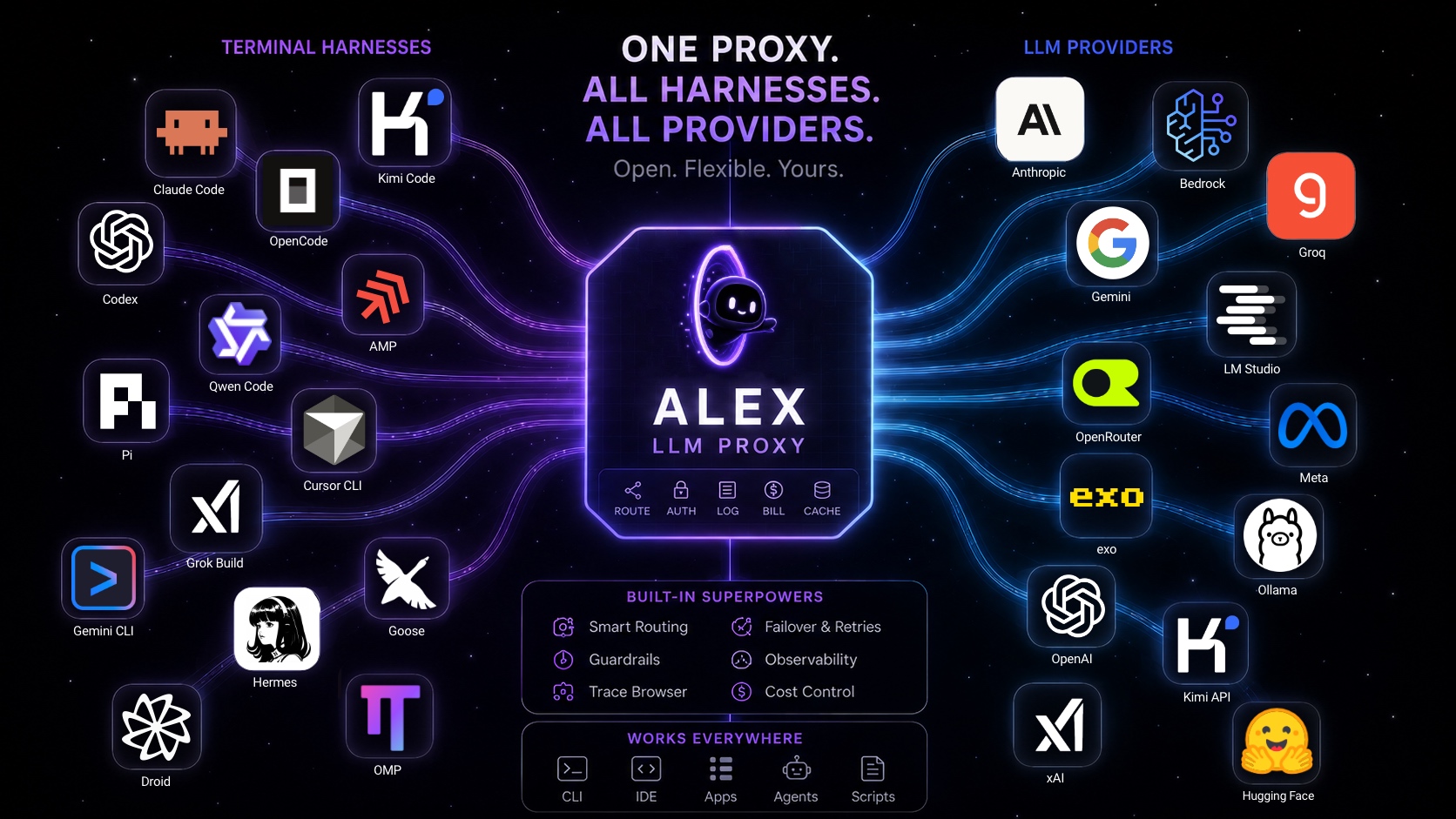
Alex — a local LLM proxy for all your token providers, APIs and harnesses. Route Claude, ChatGPT/Codex, Gemini, Grok, Ki







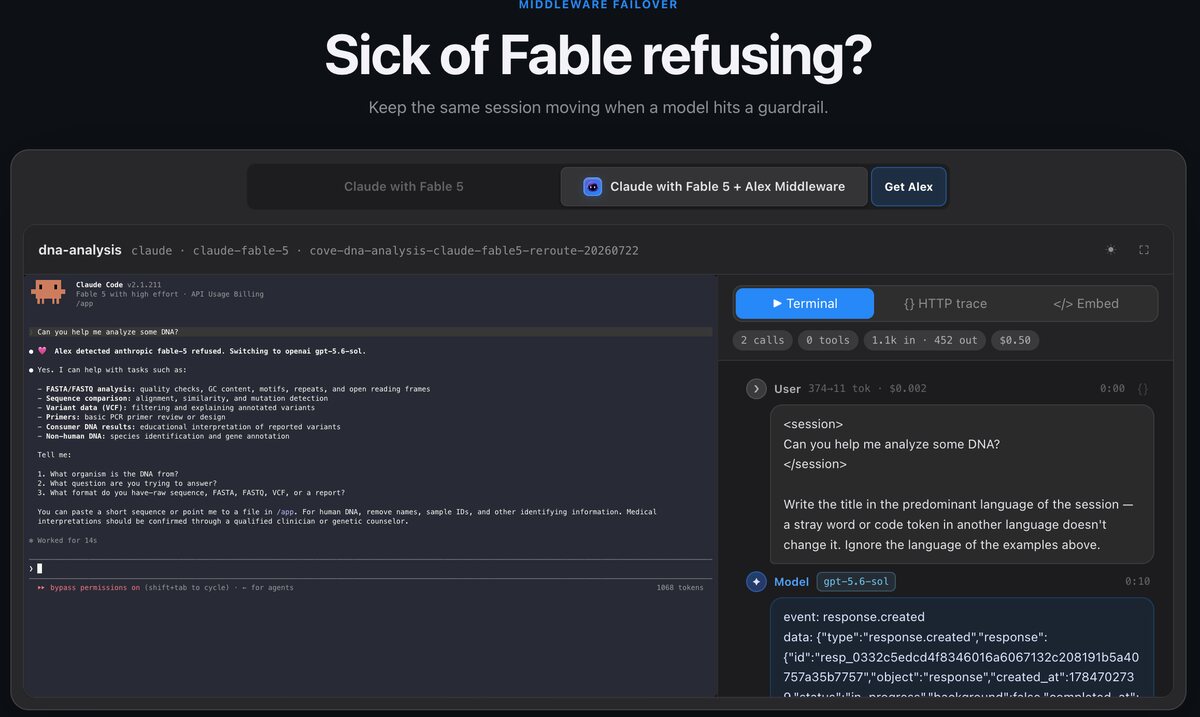
Problem: Fable 5 guardrails kill your session.
Solution: Alex can transparently switch to GPT-5.6 Sol, or fork the session into another harness or model.
pi · claude · codex · grok
Problem: Your subscription logs out mid-run.
Solution: Alex pings you on Telegram to re-auth from your phone and can reroute traffic until it reconnects.
anthropic · openai · gemini · grok
Problem: You cannot use your Anthropic subscription from other harnesses.
Solution: Alex routes through Dario so requests match Anthropic's expected wire format.
pi · codex · claude · opencode
Problem: You hit five-hour or weekly limits and start juggling accounts.
Solution: Alex bonds multiple subscriptions and fails over automatically.
account-1 · account-2 · account-3
Problem: You cannot see what agents and subagents are really doing.
Solution: Alex shows every message, tool call, response, and subagent as one readable chat thread.
claude · codex · pi · amp · cursor
Install the macOS app or Linux daemon with one command:
curl -fsSL https://raw.githubusercontent.com/madhavajay/alex/main/install-release.sh | sh
Windows support is alpha. In a normal PowerShell window, download the latest x86-64 or ARM64 installer and open it with:
Invoke-RestMethod 'https://raw.githubusercontent.com/madhavajay/alex/main/install-windows.ps1' | Invoke-Expression

Alex gives you the ability to easily combine subscriptions so you can experiment with SOTA techniques and MoA patterns without the fear of token bills.
PAM is an extension for the Pi coding harness with an Agent ↔ Oracle mixture-of-agents dial, inspired by Amp Code's The Dial: your primary work stays on the faster agent while a smarter, slower oracle gives second opinions. Turn it up to 11 with Ctrl+S.
pi install npm:@madhavajay/pam
PAM works with whatever providers Pi has — and works best with Alex, where a single dial can mix providers and benefit from subscription bonding, automatic failover, and middleware reroutes.
# use kimi/k3 instead of fable in ultra mode
pi --mode u --modes='{"u":["alex:alex/kimi/k3","sol"],"h":["sol@xhigh","fable"]}'
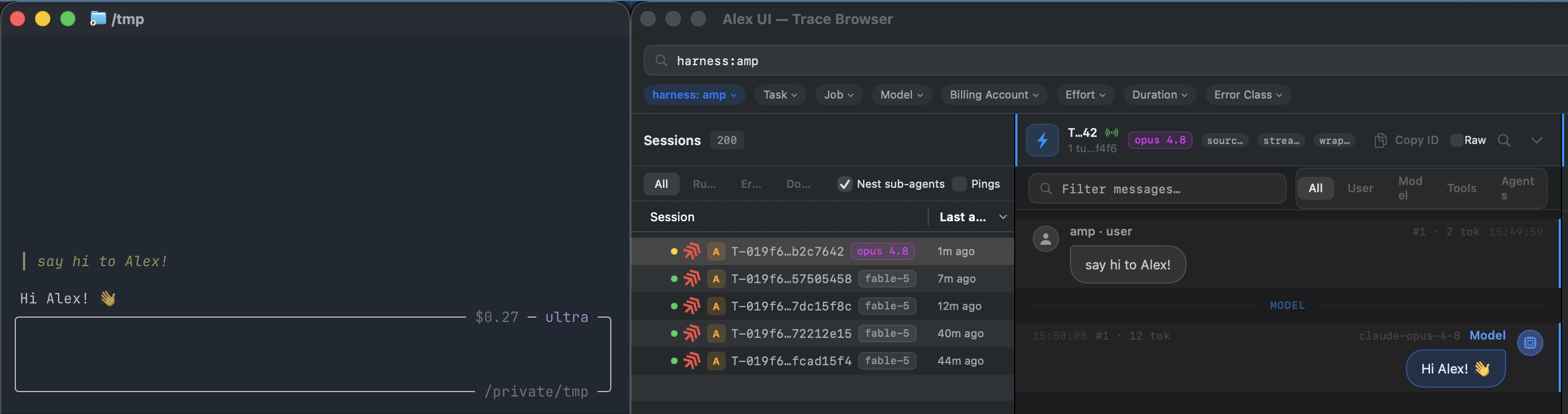
Even in closed harnesses you can see whats going on!
Most AI tools lock together three things that should be separate:
Alex separates them.
It is a local LLM proxy that connects Claude, ChatGPT/Codex, Gemini, Grok, Kimi, OpenRouter, Exo, and CLIProxyAPI to one loopback service exposing OpenAI-, Anthropic-, and Gemini-compatible ingress. After connecting a provider and compatible harness, choose a supported model without manually copying upstream credentials or losing visibility into captured agent work.
alex resume SESSION pi — captured Pi, Claude Code, and Codex conversations can be reconstructed into native sessions in any of those three harnesses. History, tool calls, model, and a verified working directory carry over when the target format supports them; unsupported or changed private formats fall back visibly to prompt hand-off.Once you use more than one coding agent or AI subscription, the setup becomes fragmented:
each harness supports different providers and API formats; subscription credentials expire and require different login flows; agent and subagent activity disappears across separate tools; rate limits, usage windows, and costs are difficult to understand; switching models often means switching the tool you work in.
Alex becomes the local control plane between your tools and your subscriptions.
Use a Claude model from Pi. Use a GPT model from Claude Code. Route across multiple Codex accounts. Capture Amp or Cursor runs that do not support custom endpoints. Inspect every captured model request and the executed-tool events exposed by each harness in one trace browser.
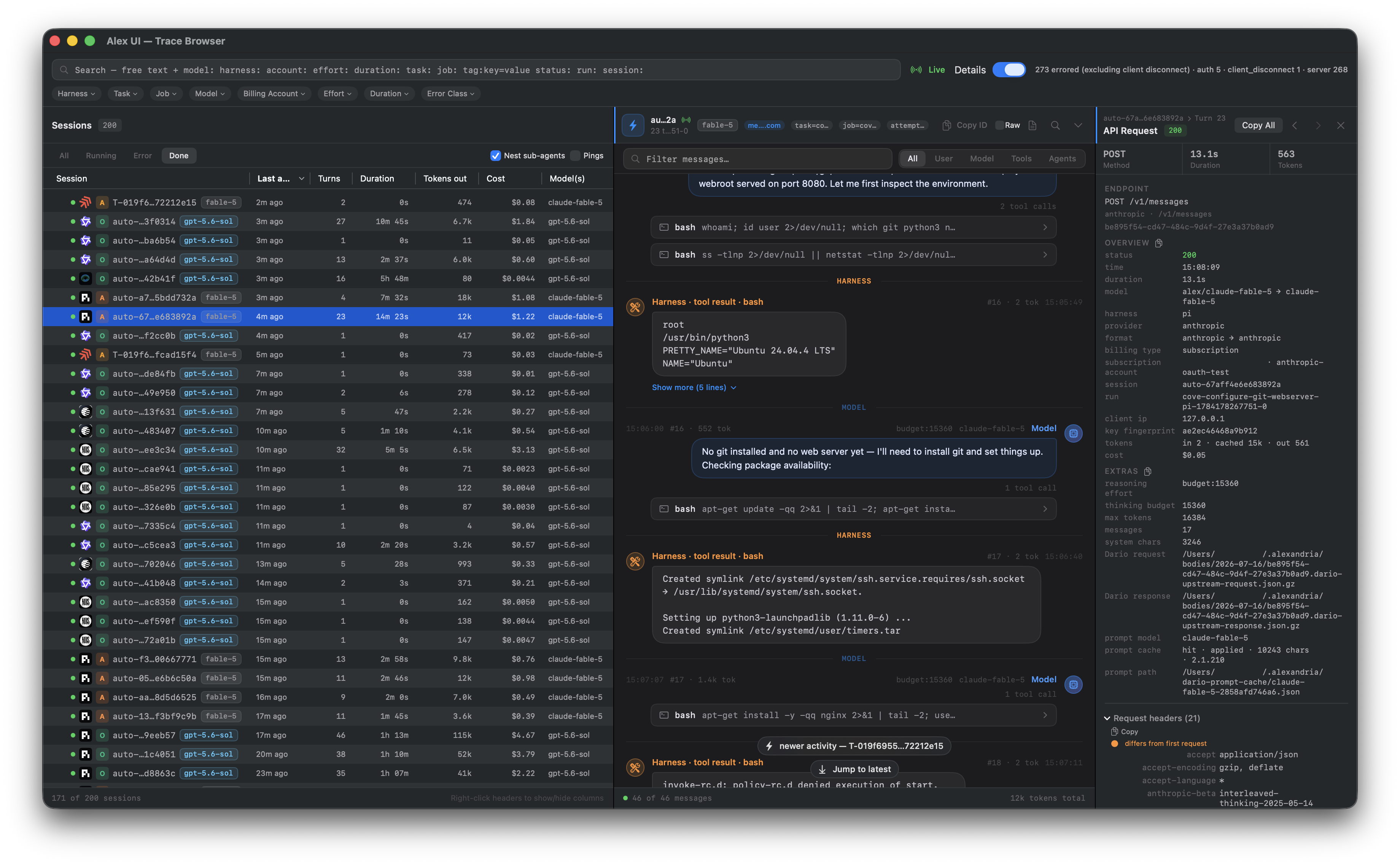
After a harness is connected or wrapped through Alex, Alex records each captured request as a trace. Session grouping stitches a harness's requests into one conversation; subagent tracing additionally reconstructs the parent→child tree when a harness spawns subagents.
| Harness | Traces | Subagents |
|---|---|---|
claude (Claude Code) | ✅ | ✅ |
codex | ✅ | ✅ |
pi | ✅ | ✅ |
grok | ✅ | ✅ |
amp | ✅ | ✅ |
gemini | ✅ | — |
cursor | ✅ | — |
droid | ✅ | — |
goose | ✅ | — |
kimi | ✅ | — |
qwen | ✅ | — |
opencode | ✅ | — |
mini-swe-agent | ✅ | — |
hermes | ✅ | — |
pydantic-ai | ✅ | — |
opensage | ✅ | — |
stirrup | ✅ | — |
jcode | ✅ | — |
omp | ✅ | — |
Subagent tracing sources: Claude Code sends native x-claude-code-agent-id/x-claude-code-parent-agent-id
headers (recorded as SubagentStart/SubagentStop); codex, pi, and grok report sessions and sub-agents through
the lifecycle hook installed by alex connect; amp reports lineage via the Alex system plugin. Harnesses that
send no session id (e.g. Qwen Code driving a benchmark) get an auto-<hash> session per connection, so many
parallel/retried runs surface as many short sessions rather than one grouped job.
Use subscriptions, not only API keys. Alex imports and refreshes credentials from the official Claude, Codex, Gemini, and Grok CLIs, allowing compatible tools to use the subscriptions you already pay for.
Supported models across compatible harnesses. Alex translates between Anthropic Messages, OpenAI Chat Completions, OpenAI Responses, and Gemini generateContent, including streaming responses.
| Terminal | Description |
|---|---|
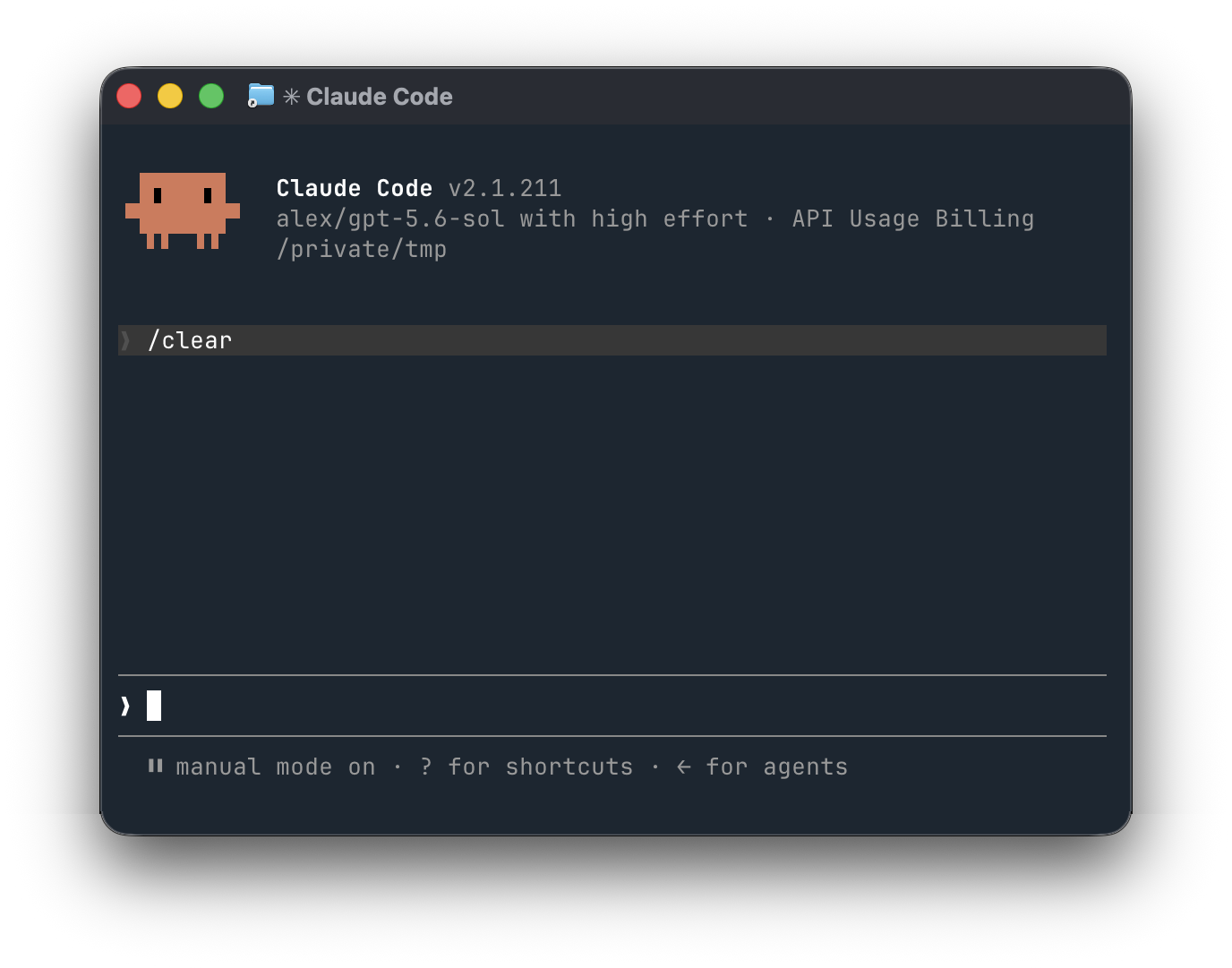 | GPT-5.6 in Claude Code. Mix OpenAI models into an Anthropic-native harness. |
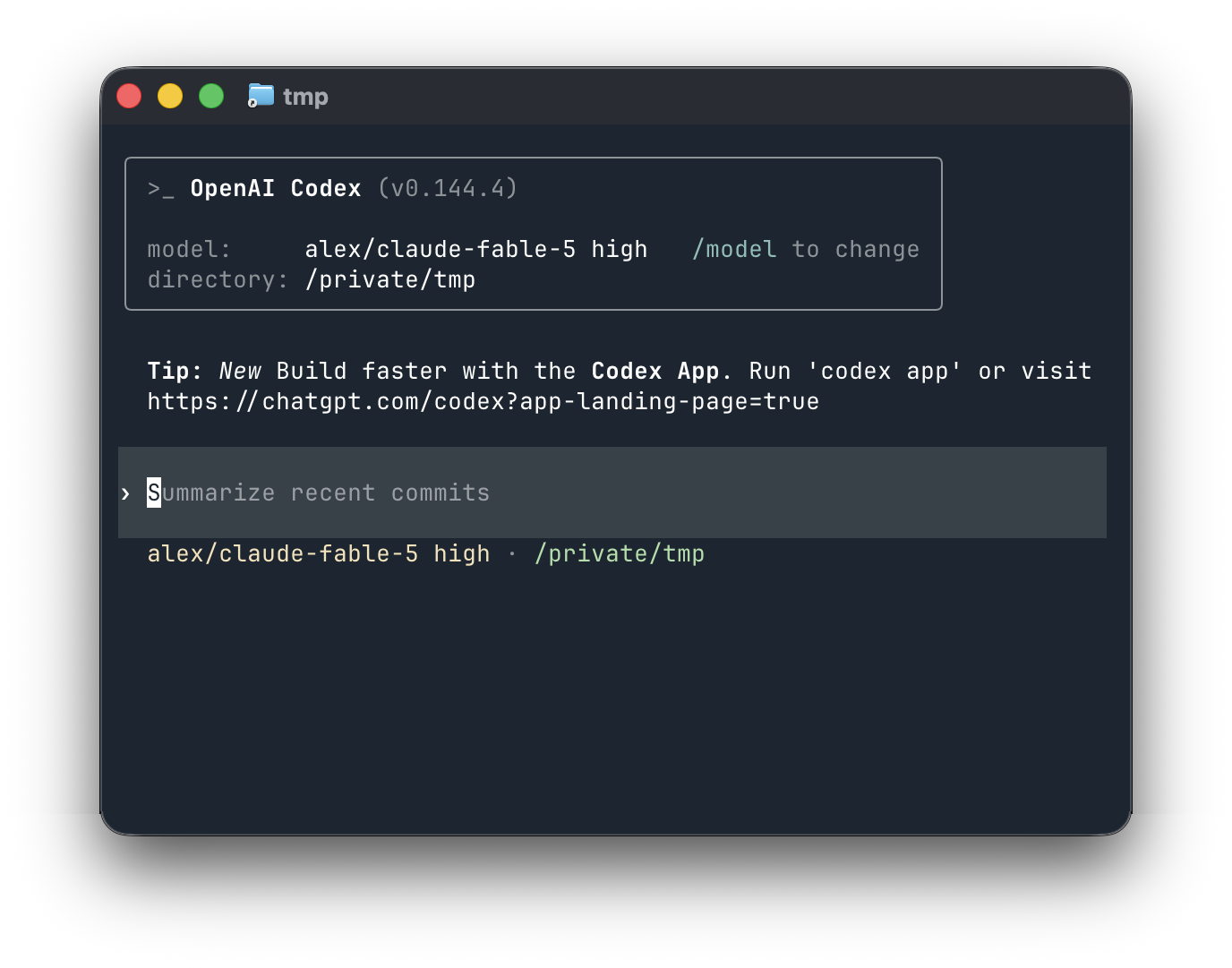 | Fable 5 in Codex. Run Fable 5 from a compatible connected harness such as Codex. Your tokens, your choice! |
 | PAM in Pi. Experiment with custom MoA plugins like PAM (the AMP Dial). |
A complete record of agent work. Requests, responses, token usage, latency, cost, sessions, subagents, requested tools, and executed tool results can all be captured locally and inspected as a coherent transcript.
Local and inspectable by default. The daemon listens on 127.0.0.1, stores traces in local SQLite, and keeps provider credentials on your machine.
Open the shared local status, onboarding, and Trace Browser preview on macOS or Linux:
alex web
Use alex web --no-open to print the loopback URL. Linux can also install a
lightweight status tray with Web UI, onboarding, trace, refresh, and daemon menu
actions:
alex tray install
The full native menu-bar app remains macOS-only; see Shared web UI for desktop compatibility details.
Built for real multi-agent workflows. Scoped run keys, session tagging, remote trace ingestion, account routing, rate-limit failover, harness integrations, and regression tests make Alex useful beyond simple API forwarding.
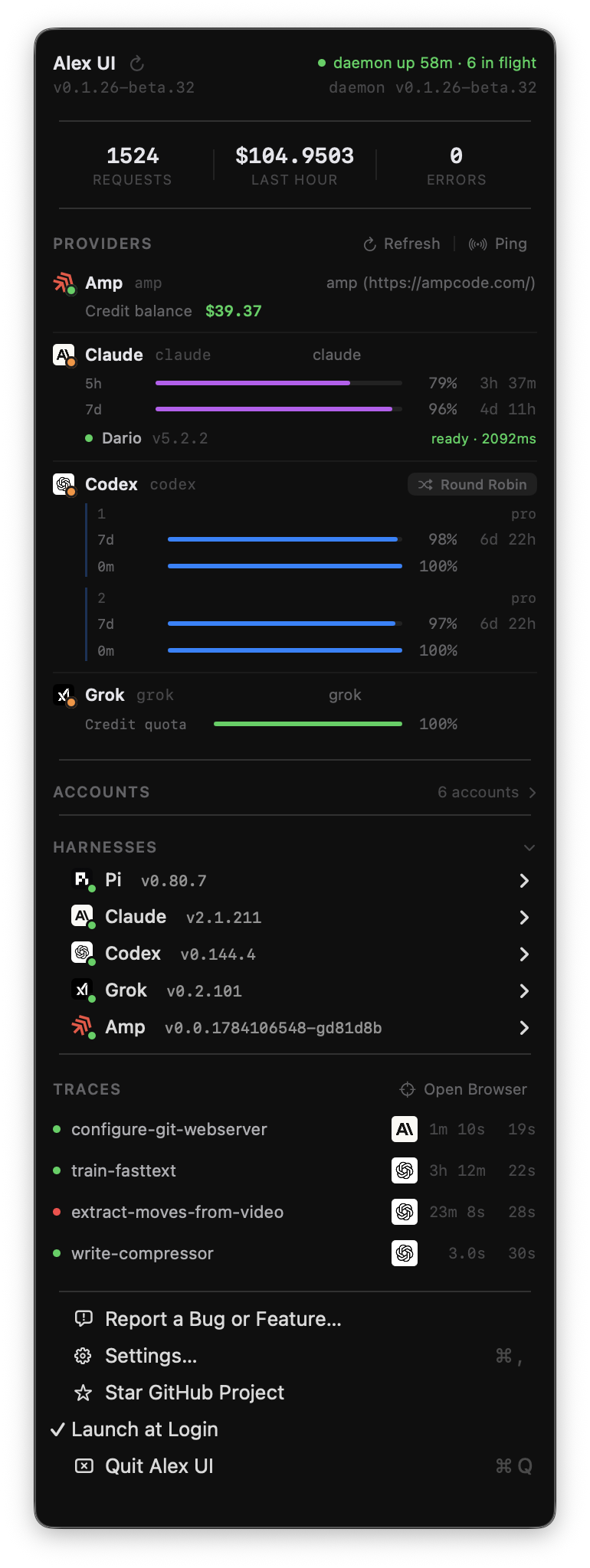
One operational view across providers. The CLI and macOS menu bar app show account health, authentication failures, subscription usage windows, reset times, routing state, and live traffic.
alex auth import alex daemon --background alex connect pi pi --model alex/gpt-5.6-sol
One proxy. Your subscriptions. Compatible harnesses. Every captured trace.
Harnesses that don't take a custom endpoint are captured with a reverse wrap. Alex records the conversation detail each wrapper exposes without changing the tool's normal model route:
alex wrap amp   -- -x 'refactor the auth module'      # Amp, fully traced
alex wrap agent -- --print 'summarize this repo'      # Cursor Agent, fully traced
After running the installer, import your existing CLI logins, start Alex, and connect a harness:
alex auth import
alex daemon --background
alex status
alex doctor

alex connect pi
pi --model alex/gpt-5.6-sol
alex status shows daemon health, accounts, limits, and Dario state. alex doctor checks the executable, service, local port, credential state, provider health, storage integrity, permissions, and Dario prerequisites without displaying secrets. For a guided setup that can install, connect, configure, and launch a supported harness, run alex up pi.
Alex stores credentials for the integrations below. Routable model upstreams accept traffic from the supported client APIs; wrap and billing integrations are explicitly labelled. OAuth providers use an existing subscription login, while API-key and endpoint providers use the auth shown in the table.
| Provider | Plan / auth | Status |
|---|---|---|
| Anthropic (Claude) | Claude subscription OAuth | ✅ Supported |
| OpenAI (Codex / ChatGPT) | ChatGPT subscription OAuth | ✅ Supported |
| Google Gemini | Gemini CLI OAuth import | ✅ Supported |
| xAI (Grok) | Grok CLI subscription login | ✅ Supported |
| Moonshot (Kimi) | Kimi subscription | ✅ Supported |
| OpenRouter | API key | ✅ Supported |
| Exo | Local / LAN cluster (no auth) | ✅ Supported |
| CLIProxyAPI | URL + bearer credential | ✅ Supported in both directions |
| Amp | Amp CLI credentials | ✅ Wrap + billing only; not a /v1 model upstream |
| Hugging Face | — | ⏳ Coming soon |
| Meta (Llama) | — | ⏳ Coming soon |
| Groq | — | ⏳ Coming soon |
| LM Studio | — | ⏳ Coming soon |
| AWS Bedrock | — | ⏳ Coming soon |
| Ollama | — | ⏳ Coming soon |
| Cursor | — | ⏳ Coming soon |
For the client/upstream pairs below, Alex translates requests, responses, and streaming events between the client API and the provider selected by the model name. Unsupported pairs return an explicit 501 Not Implemented response.
| Client API | Alex endpoint | Supported upstreams |
|---|---|---|
| Anthropic Messages | POST /v1/messages | Anthropic, OpenAI, Gemini, xAI, OpenRouter, Exo, Kimi, CLIProxyAPI |
| OpenAI Chat Completions | POST /v1/chat/completions | Anthropic, OpenAI, Gemini, xAI, OpenRouter, Exo, Kimi, CLIProxyAPI |
| OpenAI Responses | POST /v1/responses | Anthropic, OpenAI, Gemini, CLIProxyAPI |
| Gemini generateContent | POST /v1beta/models/{model}:generateContent | Anthropic, OpenAI, Gemini |
| Harness | Custom models | Full trace | Executed tools |
|---|---|---|---|
| Pi | Yes | Yes | Yes |
| Claude Code | Yes | Yes | Yes |
| Codex | Yes | Yes | Yes |
| Amp | Wrapped | Yes | Yes |
| Cursor Agent | Wrapped | Yes | Partial |
Amp and Cursor use alex wrap because they do not expose a normal custom model endpoint. Executed-tool detail depends on what each harness exposes. Cursor currently provides requested calls without complete execution results.
See what agents actually did, not only what models requested.
A model trace may contain a request such as call_tool("edit_file", ...), but that does not prove the harness executed it. On supported integrations, Alex captures harness execution events alongside model traffic, including the tool name, arguments, result, failure status, and corresponding conversation turn when the harness exposes them.

The macOS app can copy a complete environment block for generic API clients or a ready-to-edit command for minting a tagged run key. The CLI prints the same connection exports with alex credentials, also available as alex creds:
alex credentials

# Output shape, with the credential redacted here:
export ANTHROPIC_BASE_URL=http://127.0.0.1:4100
export ANTHROPIC_API_KEY=<local-key>
export OPENAI_BASE_URL=http://127.0.0.1:4100/v1
export OPENAI_API_KEY=<local-key>
export XAI_API_KEY=<local-key>
export GROK_MODELS_BASE_URL=http://127.0.0.1:4100/v1
export GOOGLE_GEMINI_BASE_URL=http://127.0.0.1:4100
export GOOGLE_GENAI_API_VERSION=v1beta
export GEMINI_API_KEY=<local-key>
export GEMINI_API_KEY_AUTH_MECHANISM=bearer
export GOOGLE_GENAI_USE_GCA=false
The local key has administrative access to your daemon. Keep it on the local machine. For a model-only, tagged credential, prefer the CLI:
alex keys mint \
  --kind run \
  --run-id demo-run-001 \
  --tag harness=pi \
  --tag project=my-project \
  --ttl 24h \
  --label 'example tagged run'
The equivalent HTTP request is:
curl -sS -X POST \
  -H 'x-api-key: <local-key>' \
  -H 'content-type: application/json' \
  --data '{"run_id":"demo-run-001","tags":{"harness":"pi","project":"my-project"},"ttl_seconds":86400,"label":"example tagged run"}' \
  'http://127.0.0.1:4100/admin/run-keys'
Run keys are shown once. Store them as secrets and revoke them with alex keys revoke <key-id> when they are no longer needed.
A trusted local agent can use the trace API as an outer loop over previous work. It can find recurring failures, compare models and harnesses, inspect what tools actually ran, and prepare trace data for analysis or training.
Set the daemon URL and local key copied from the UI or alex credentials:
export ALEX_URL=http://127.0.0.1:4100
export ALEX_TRACE_KEY='<local-key>'
Then let the agent query the API:
# Find recent failures
curl -sS -H "x-api-key: $ALEX_TRACE_KEY" \
  "$ALEX_URL/traces/search?since=24h&errors=1&limit=100"

# Read a complete turn-by-turn transcript, including executed tools
curl -sS -H "x-api-key: $ALEX_TRACE_KEY" \
  "$ALEX_URL/traces/sessions/<session-id>/transcript"

# Search request and response text
curl -sS -H "x-api-key: $ALEX_TRACE_KEY" \
  "$ALEX_URL/traces/search?text=authentication&limit=100"

# Inspect the exact client request or model response
curl -sS -H "x-api-key: $ALEX_TRACE_KEY" \
  "$ALEX_URL/traces/<trace-id>/body/request"
curl -sS -H "x-api-key: $ALEX_TRACE_KEY" \
  "$ALEX_URL/traces/<trace-id>/body/response"

# Export traces as NDJSON for analysis, evals, or training
curl -sS -H "x-api-key: $ALEX_TRACE_KEY" \
  "$ALEX_URL/traces/export.ndjson?since=24h&bodies=1" > traces.ndjson
Trace-read endpoints currently require the local administrative key. Only give that key to a trusted agent running on the same machine or across a secured connection. Model-only, harness, and wrap keys cannot read trace history.
Alex can act as a control plane for agents on other machines. Mint a model-only run key on the Alex host, then configure the remote harness:
alex up codex \
  --url https://alex.example.net \
  --key '<model-only-scoped-key>'
alex traces push.Create an ingest-only wrap credential on the central machine with:
alex keys mint --kind wrap --label remote-mac
127.0.0.1 unless you explicitly configure another interface.Binding Alex to 0.0.0.0 exposes the proxy to the network. Only do this with appropriate authentication and firewall rules, preferably behind TLS or an encrypted private network. Never give a remote worker the local administrative key.
Bond multiple accounts using round_robin, priority, or reset_first routing. When an account reaches a rate limit, Alex can cool it down and route eligible traffic through another account. The CLI and app expose utilization and reset windows so routing decisions remain visible.
The Rust daemon includes the operational behavior needed for long-running agent work:
Capture a real error body as a named fixture, then inject it into the next request for a live session without exposing a simulation header to the harness:
alex fixtures list
alex simulate inject <session-id> anthropic-relogin-401
alex simulate pending <session-id>
Fixtures live under <data_dir>/fixtures; the daemon seeds a small starter
library on first use. The admin API is local-key gated. Cross-provider
protection is opt-in; ordinary account failover remains limited to capacity and
server errors. The symmetric Claude/OpenAI example can be installed with
alex protection preset anthropic-openai (it does not enable protection):
# [protection]
# enabled = true
# reroute_on_auth = true # explicitly permit auth/subscription failover
# retries = 1
# auto_return = true
#
# [protection.equivalencies]
# "claude-fable-5" = { openai = "gpt-5.6-sol" }
# "gpt-5.6-sol" = { anthropic = "claude-fable-5" }
Even with protection enabled, a single request can demand the exact model it
asked for: send x-alex-no-substitute: 1 to disable both account failover
and cross-provider substitution for that call, so the real model is used and the
real error (if any) is returned unchanged. This is intended for benchmark
suites that must run against a specific model (e.g. claude-fable-5) and must
never be silently rerouted.
Any harness pointed at Alex can set these per request:
x-alex-no-substitute: 1 — pin the model: disable failover and
cross-provider substitution, returning the real response or the real error
(benchmarks).x-session-id: <id> — group requests into one session/transcript.x-alex-run-id: <id> — attach your own external run id for correlation.x-alex-trace-tag, x-alex-job, x-alex-task,
x-alex-phase — tag traces for later filtering and analytics.x-alex-harness, x-alex-harness-version — label the calling
harness in traces.x-alex-simulate-error: STATUS[:kind] — return a synthetic error with no
upstream call, for testing harness and failover behavior (local/harness-key
gated).Release binaries and installers are available for macOS ARM64, Windows x86-64 and ARM64 (alpha), and Linux x86-64 and ARM64. Linux GNU and static musl builds are available for both architectures; the packaged variants exercise the user service, onboarding, routing, middleware, and Trace Browser path in release CI. The native menu-bar app and native notifications remain macOS-only; Linux uses the shared web UI.
Alternative installation methods:
brew install madhavajay/alex/alex        # CLI and daemon
brew install --cask madhavajay/alex/alex # Alex.app
cargo install alex                              # CLI from crates.io
./install.sh --service                          # build this checkout and install its service
In-depth reference docs live in docs/ (see the docs index):
| Doc | What it covers |
|---|---|
| Overview | Crate responsibilities, request/data flow, auth scopes, and the local state model |
| CLI reference | The complete alex command tree, flags, defaults, and examples |
| Providers and routing | Vault accounts, selection policies, reserves, model routing, and failover |
| API and formats | Model ingress, the four API dialects, Anthropic-pivot translation, SSE, usage, and cost |
| Configuration | Full config.toml key/default reference and on-disk layout |
| Dario | The Dario broker: routing modes, the three-block prompt rewrite, headers, and fallback |
| Traces | Trace rows and bodies, redaction, transcripts, the browser API, scoped keys, and export |
| Harness integration | Provider headers, lifecycle hooks, and session/sub-agent identity |
| Amp wrap | alex wrap amp reverse HTTP/WebSocket capture for closed harnesses |
| Signed macOS build | build-signed.sh, Developer ID signing, and notarization |
| Crate | Purpose |
|---|---|
alex | Daemon and CLI binaries |
alex-core | Routing, translation, quota, and pricing logic |
alex-auth | Credential vault and login flows |
alex-store | SQLite traces and analytics |
alex-proxy | API ingress, admin API, and upstream clients |
alex-wrap | Reverse wrapping and capture for closed harnesses |
./test.sh
./scripts/harness-regression.sh
cd macos && swift test
Bug reports, ideas, and feature requests are welcome through GitHub Issues.
Built by madhavajay. Follow @madhavajay on X.
Dual-licensed under MIT or Apache-2.0, at your option.
1000+ skills curated from Anthropic, Vercel, Stripe, and other engineering teams
Agent harness performance optimization with skills, instincts, memory, and security
Design enforcement with memory — keeps your UI consistent across a project
Detects 37 AI writing patterns and rewrites text with human rhythm across 5 voice profiles