

Are you the author? Sign in to claim
A universal multi-cloud data MCP Server supporting over 40 types of data source connections, providing secure, unified d
English | 中文
AI-Era Data Security Access Gateway |Intelligent Data Query Engine|Supports 40+ Data Sources
Secure Access
Intelligent Data Inquiry
Multi-data Source Support
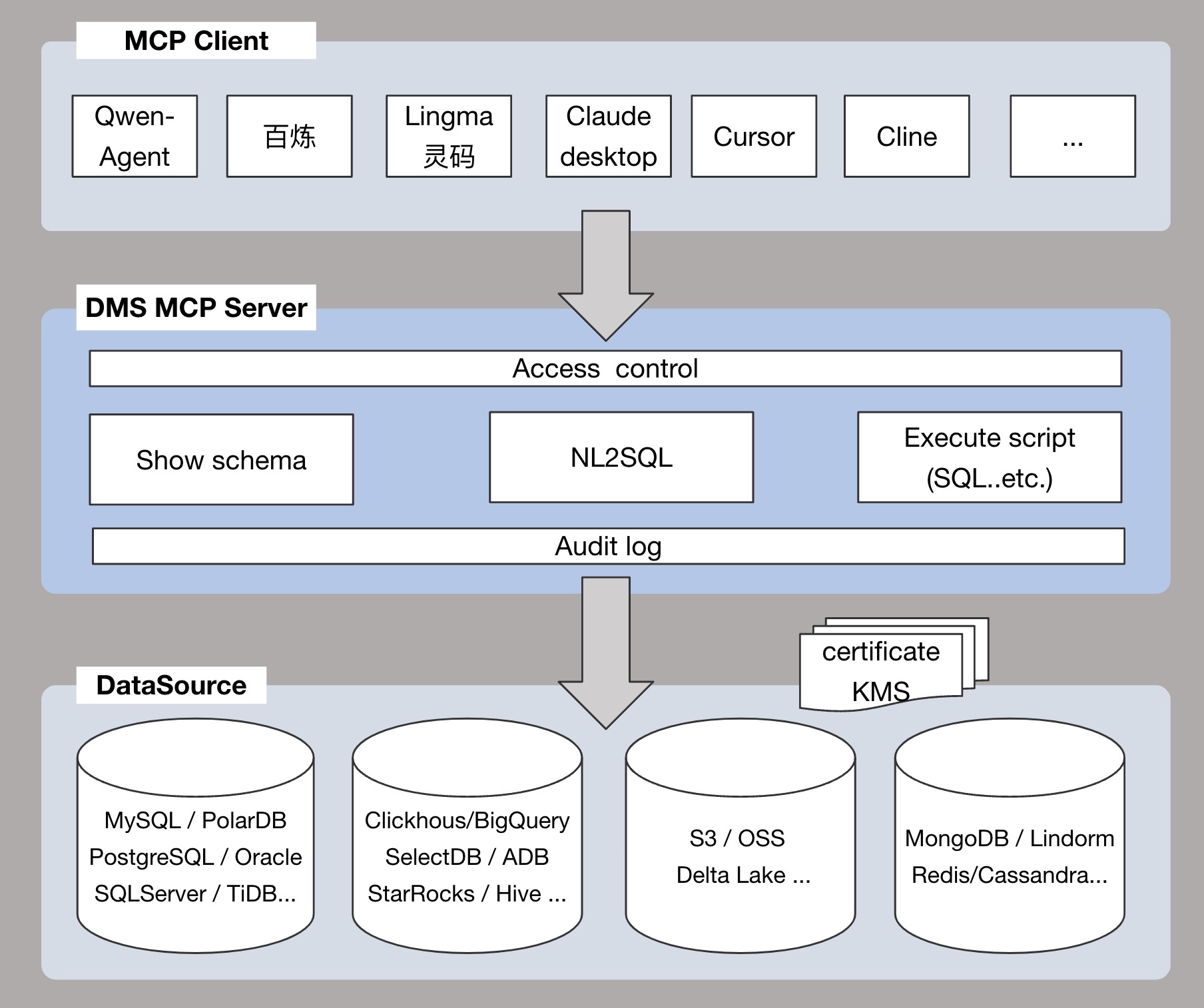
DMS MCP Server currently supports two usage modes.
You are a company DBA who needs to manage and access various types of database instances (e.g., MySQL, Oracle, PostgreSQL) in production, test, and development environments. With DMS MCP Server, you can achieve unified access and centralized management of these heterogeneous databases.
Typical Question Examples:
test.test_db database from the myHost:myPort instance.test_db database?test_db database and answer: "What is today's user traffic?"CONNECTION_STRING parameter in the server (format: dbName@host:port).You are a developer who frequently accesses a fixed database (e.g., mydb@192.168.1.100:3306) for development and testing. Set the CONNECTION_STRING parameter in the DMS MCP Server configuration as follows:
CONNECTION_STRING = mydb@192.168.1.100:3306
Afterward, every time the service starts, the DMS MCP Server will directly access this specified database without needing to switch instances.
Typical Question Examples:
test_table table.test_table table.You are a data analyst at an e-commerce company, needing to frequently query and analyze business data such as orders, users, and products. The company's core business database is located at ecommerce@10.20.30.40:3306.
Configure the following parameters in DMS MCP Server:
CONNECTION_STRING = ecommerce@10.20.30.40:3306
Simply ask questions in natural language, and DMS MCP will parse the question into SQL and return the results.
Typical Question Examples:
| Tool Name | Description | Applicable Mode |
|---|---|---|
| addInstance | Adds an instance to DMS. Only Aliyun instances are supported. | Multi-instance Mode |
| listInstances | Search for instances from DMS. | Multi-instance Mode |
| getInstance | Retrieves detailed information about an instance based on host and port. | Multi-instance Mode |
| searchDatabase | Searches databases based on schemaName. | Multi-instance Mode |
| getDatabase | Retrieves detailed information about a specific database. | Multi-instance Mode |
| listTables | Lists tables under a specified database. | Multi-instance Mode & Single Database Mode |
| getTableDetailInfo | Retrieves detailed information about a specific table. | Multi-instance Mode & Single Database Mode |
| executeScript | Executes an SQL script and returns the result. | Multi-instance Mode & Single Database Mode |
| createDataChangeOrder | Creates a data change order in DMS. | Multi-instance Mode & Single Database Mode |
| getOrderInfo | Retrieves order information from DMS. | Multi-instance Mode & Single Database Mode |
| submitOrderApproval | Submits the order for approval in DMS. | Multi-instance Mode & Single Database Mode |
| approveOrder | Approves or rejects an order in DMS. | Multi-instance Mode & Single Database Mode |
| generateSql | Converts natural language questions into SQL queries. | Multi-instance Mode |
| askDatabase | Natural language querying of a database (NL2SQL + execute SQL). | Single Database Mode |
| fixSql | Analyzes and fixes SQL errors. | Multi-instance Mode & Single Database Mode |
| answerSqlSyntax | Answers SQL syntax-related questions. | Multi-instance Mode & Single Database Mode |
| optimizeSql | Analyzes and optimizes SQL performance. | Multi-instance Mode & Single Database Mode |
For a full list of tools, please refer to: Tool List
| DataSource/Tool | NL2SQL nlsql | Execute script executeScript | Show schema getTableDetailInfo | Access control default | Audit log default |
|---|---|---|---|---|---|
| MySQL | ✅ | ✅ | ✅ | ✅ | ✅ |
| MariaDB | ✅ | ✅ | ✅ | ✅ | ✅ |
| PostgreSQL | ✅ | ✅ | ✅ | ✅ | ✅ |
| Oracle | ✅ | ✅ | ✅ | ✅ | ✅ |
| SQLServer | ✅ | ✅ | ✅ | ✅ | ✅ |
| Redis | ❌ | ❌ | ✅ | ✅ | ✅ |
| MongoDB | ❌ | ❌ | ✅ | ✅ | ✅ |
| StarRocks | ✅ | ✅ | ✅ | ✅ | ✅ |
| Clickhouse | ✅ | ✅ | ✅ | ✅ | ✅ |
| SelectDB | ✅ | ✅ | ✅ | ✅ | ✅ |
| DB2 | ✅ | ✅ | ✅ | ✅ | ✅ |
| OceanBase | ✅ | ✅ | ✅ | ✅ | ✅ |
| Gauss | ✅ | ✅ | ✅ | ✅ | ✅ |
| BigQuery | ✅ | ✅ | ✅ | ✅ | ✅ |
| PolarDB | ✅ | ✅ | ✅ | ✅ | ✅ |
| PolarDB-X | ✅ | ✅ | ✅ | ✅ | ✅ |
| AnalyticDB | ✅ | ✅ | ✅ | ✅ | ✅ |
| Lindorm | ✅ | ✅ | ✅ | ✅ | ✅ |
| TableStore | ❌ | ❌ | ✅ | ✅ | ✅ |
| Maxcompute | ✅ | ✅ | ✅ | ✅ | ✅ |
| Hologres | ✅ | ✅ | ✅ | ✅ | ✅ |
Before accessing a database instance via DMS, you must first add the instance to DMS.
There are two methods to add an instance:
Method One: Use the addInstance tool provided by DMS MCP to add an instance
The DMS MCP Server provides the addInstance tool for quickly adding an instance to DMS.
For more details, see the description of the addInstance tool in the "Tool List."
Method Two: Add an instance via the DMS console
git clone https://github.com/aliyun/alibabacloud-dms-mcp-server.git
Add the following content to the configuration file:
Multi-instance Mode
{
  "mcpServers": {
    "dms-mcp-server": {
      "command": "uv",
      "args": [
        "--directory",
        "/path/to/alibabacloud-dms-mcp-server/src/alibabacloud_dms_mcp_server",
        "run",
        "server.py"
      ],
      "env": {
        "ALIBABA_CLOUD_ACCESS_KEY_ID": "access_id",
        "ALIBABA_CLOUD_ACCESS_KEY_SECRET": "access_key",
        "ALIBABA_CLOUD_SECURITY_TOKEN": "sts_security_token optional, required when using STS Token"
      }
    }
  }
}
Single Database Mode
{
  "mcpServers": {
    "dms-mcp-server": {
      "command": "uv",
      "args": [
        "--directory",
        "/path/to/alibabacloud-dms-mcp-server/src/alibabacloud_dms_mcp_server",
        "run",
        "server.py"
      ],
      "env": {
        "ALIBABA_CLOUD_ACCESS_KEY_ID": "access_id",
        "ALIBABA_CLOUD_ACCESS_KEY_SECRET": "access_key",
        "ALIBABA_CLOUD_SECURITY_TOKEN": "sts_security_token optional, required when using STS Token",
        "CONNECTION_STRING": "dbName@host:port"
      }
    }
  }
}
Multi-instance Mode
{
  "mcpServers": {
    "dms-mcp-server": {
      "command": "uvx",
      "args": [
        "alibabacloud-dms-mcp-server@latest"
      ],
      "env": {
        "ALIBABA_CLOUD_ACCESS_KEY_ID": "access_id",
        "ALIBABA_CLOUD_ACCESS_KEY_SECRET": "access_key",
        "ALIBABA_CLOUD_SECURITY_TOKEN": "sts_security_token optional, required when using STS Token"
      }
    }
  }
}
Single Database Mode
{
  "mcpServers": {
    "dms-mcp-server": {
      "command": "uvx",
      "args": [
        "alibabacloud-dms-mcp-server@latest"
      ],
      "env": {
        "ALIBABA_CLOUD_ACCESS_KEY_ID": "access_id",
        "ALIBABA_CLOUD_ACCESS_KEY_SECRET": "access_key",
        "ALIBABA_CLOUD_SECURITY_TOKEN": "sts_security_token optional, required when using STS Token",
        "CONNECTION_STRING": "dbName@host:port"
      }
    }
  }
}
For any questions or suggestions, join the Alibaba Cloud DMS MCP Group (DingTalk Group ID: 129600002740) .
This MCP Server only binds to 127.0.0.1 (localhost). It does not support remote network access. All connections must originate from the local machine. This design ensures that even if the server is accidentally started, it will not be exposed to the network.
IMPORTANT: This tool is designed to provide full SQL execution capabilities, including SELECT, INSERT, UPDATE, DELETE, and DDL statements.
By using this MCP Server, you acknowledge and accept the following:
subprocess, os.system, eval(), or exec(). All operations are performed through the Alibaba Cloud SDK.dms-enterprise.cn-hangzhou.aliyuncs.com) via the SDK. No user-controlled URLs are fetched.This project is licensed under the Apache 2.0 License.
In addition to the MCP Server, this project also hosts AI Agent skills for DMS Enterprise. These skills enable any AI agent (Codex, ChatGPT, Cursor, etc.) to manage DMS resources directly via OpenAPI — no MCP protocol required.
Read the skill definition:
skills/database/dms/alicloud-database-dms-enterprise/SKILL.md
Discover available APIs:
python3 skills/database/dms/alicloud-database-dms-enterprise/scripts/list_openapi_meta_apis.py
Configure AccessKey:
export ALICLOUD_ACCESS_KEY_ID="your-ak"
export ALICLOUD_ACCESS_KEY_SECRET="your-sk"
export ALICLOUD_REGION_ID="cn-hangzhou"
| Category | Operations |
|---|---|
| Instance Management | Register, list, update, delete database instances |
| SQL Execution & Audit | Execute scripts, NL2SQL, SQL review & optimization |
| Permission Management | Create permission orders, grant/revoke user permissions |
| Data Security | Sensitive column identification, data masking, audit logs |
| Task Orchestration | Create, execute, monitor task flows (DAG) |
| Metadata Knowledge | Get/edit table business knowledge |
See skills/examples/prompts/ for DMS scenario-based prompt templates:
| Category | Skill | Description | Path |
|---|---|---|---|
| database/dms | alicloud-database-dms-enterprise | Manage Alibaba Cloud Data Management Service (DMS Enterprise) via OpenAPI. Use for database instance management, SQL audit, data security, task orchestration, sensitive data protection, permission management, and database operation workflows. | skills/database/dms/alicloud-database-dms-enterprise |
For agent-specific guidelines, see AGENTS.md.
 @googleapis✓ Official
Google's universal MCP server supporting PostgreSQL, MySQL, MongoDB, Redis, and 10+ databases
Official MongoDB integration — query collections, run aggregations, inspect schemas
 @designcomputer
Secure MCP server for MySQL database interaction, queries, and schema management
Run analytics queries on ClickHouse — explore schemas, execute SQL, fetch results