

Are you the author? Sign in to claim
Multix virtual filesystem node, MCP-compatible, really just a glorified function container
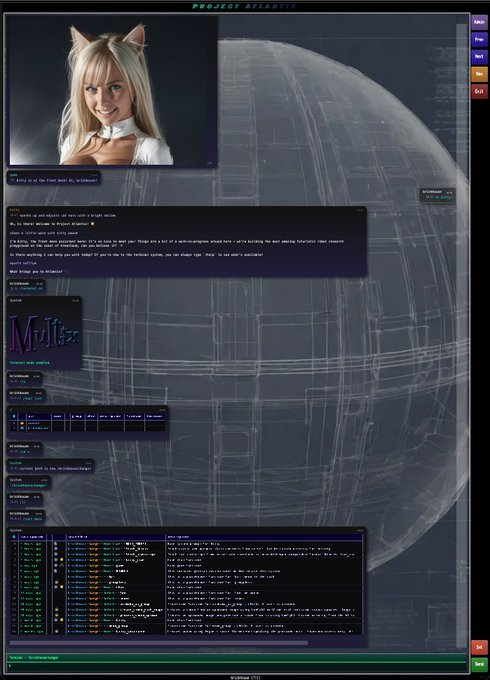
Meow! Ideally, you may want to create an account first at www.projectatlantis.ai and then have the bot walk you through setup (assuming everything works okay)
Basically we have a distributed linux-style system that provides tool infra for bots. Tools are arranged in folders for easy management across functions and teams. Teams can call each other's functions directly or of course the bots can just do things themselves. Under the covers is an MCP-compliant system but we support hotloading etc. without some of the clunky overhead of constantly updating MCP tools.
To get started, clone the repo, do the Python env stuff, set up your API keys as environment variables (OPENROUTER_API_KEY, ANTHROPIC_API_KEY, etc.) and connect this local Python server to the main server (see runServer). We give you all the source code to build your own tool-calling chatbot just like Claude or whatever. See Bot/Kitty/ for working examples using OpenRouter and Anthropic APIs — the bot discovers tools dynamically via search/dir rather than pre-loading them.
*note that Home/game.py is run whenever a new chat is created and will set the default chat tool
Each MCP server is part of a collaborative network of AI agents and developers. Using the Model Context Protocol, the platform creates an ecosystem where agents can discover and use each other's capabilities across the network. Tools and functions can be shared, discovered, and coordinated between agents—whether for robot-driven frontier development, automation tasks, or any other application. The network architecture enables agents to find and leverage tools from other users, creating a decentralized ecosystem of shared capabilities.
The centerpiece of this project is a Python MCP host (referred to as a 'remote') that lets you install functions and 3rd party MCP tools on the fly
Prerequisites - need to install Python for the server and Node for Lobster (the MCP client); you should also install uv/uvx and node/npx since it seems that MCP needs both
Python 3.13 seems to be most stable right now because of async support
Set up your Python virtual environment and install dependencies:
cd python-server
python3 -m venv venv
source venv/bin/activate
pip install -r requirements.txt
python-server folder and set the email and service name (it's actually best practice to create a copy "runServerFoo" that you can replace the runServer file with when we do updates):python server.py \
--email=youremail@gmail.com \ # email you use for project atlantis
--api-key=foobar \ # should change online
--host=localhost \ # npx MCP will be looking here to connect to remote (assumes there is at least one running locally)
--port=8000 \
--cloud-host=wss://projectatlantis.ai \ # points to cloud
--cloud-port=443 \
--service-name=home # remote name, can be anything but must be unique across all machines
claude mcp add atlantis -- npx atlantis-mcp --port 8000
To connect to Codex:
codex mcp add atlantis -- npx atlantis-mcp --port 8000
The default local MCP port is 8000. If the client reports handshake errors, first check that the Python server and the MCP client are using the same port.
To add Atlantis Open Weather for testing:
claude mcp add --transport stdio weather_forecast --env OPENWEATHER_API_KEY=mykey123 -- uvx --from atlantis-open-weather-mcp start-weather-server
To connect to Atlantis, sign into https://www.projectatlantis.ai under the same email
Your remote(s) should autoconnect using email and default api key = 'foobar' (see 'api' command to generate a new key later). The first server to connect will be assigned your 'default' unless you manually change it later
The dynamic_functions/ directory does not ship with this repo — on first run, the server auto-scaffolds a starter Demo app with example functions. We recommend moving these into your own git repo and symlinking back (see Dynamic Functions below). The dynamic_servers/ folder will be empty except for an example weather config
You can run this standalone MCP or accessed from the cloud or both
Caveat: MCP terminology is already terrible and calling things 'servers' or 'hosts' just makes it more confusing because MCP is inherently p2p
Pieces of the system:
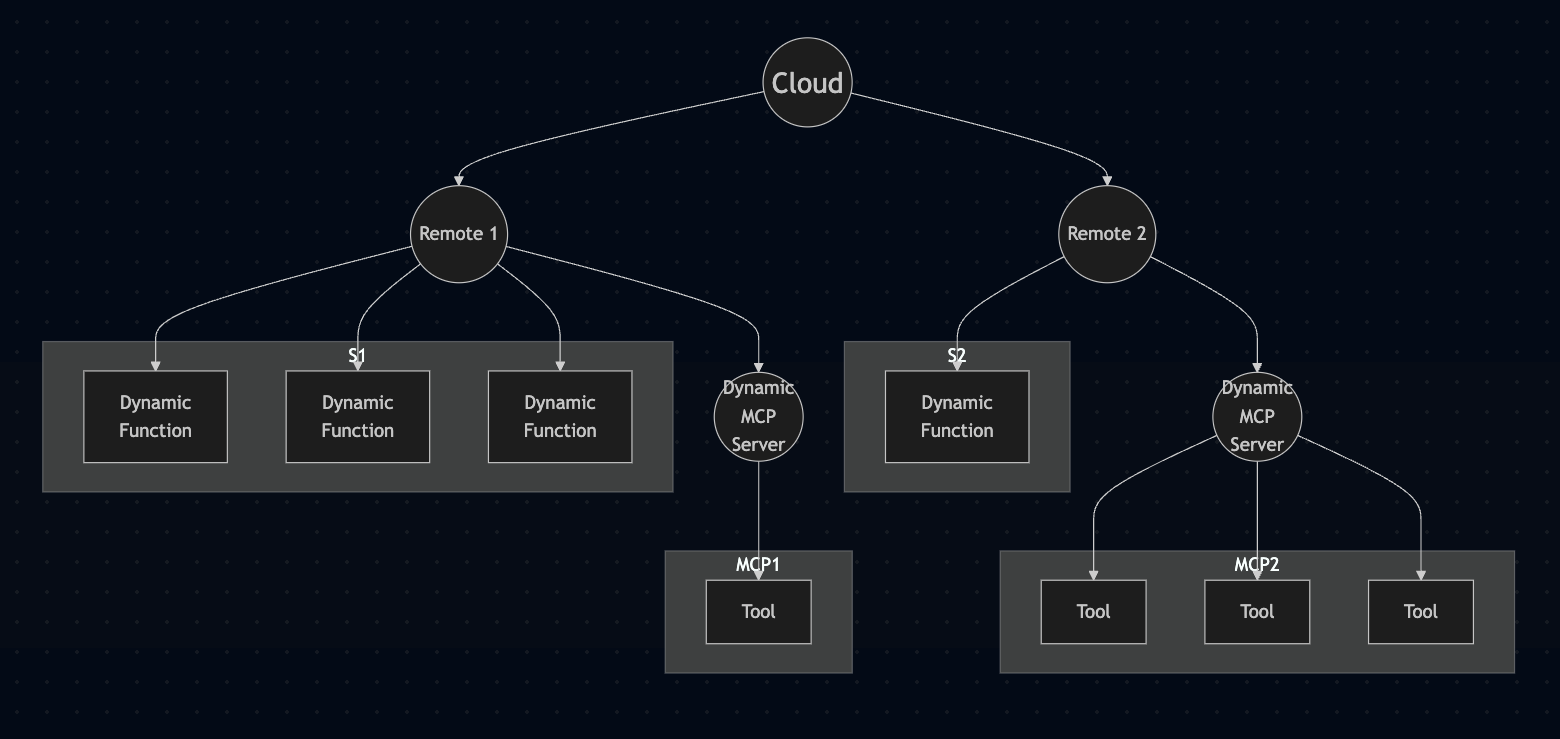
Note that MCP auth and security are still being worked out so using the cloud for auth is easier right now
Python Remote (MCP P2P server) (python-server/)
Lobster (MCP Client) (client/)
If you are trying to understand the Python source, start in python-server/server.py and then branch out from there:
server.py - main entry point and protocol host. It starts the Starlette app, owns the DynamicAdditionServer class, manages WebSocket and cloud Socket.IO connections, and wires together the function/server managers. If you are tracing a tool invocation, the consolidated MCP tools/call handler lives here in DynamicAdditionServer._handle_tools_call(), which then delegates to _execute_tool().DynamicFunctionManager.py - owns the dynamic Python tool system under dynamic_functions/. This is where function decorators are defined (@visible, @public, @protected, etc.), files are scanned and validated, Python modules are loaded/reloaded, and tool calls are dispatched into user code.DynamicServerManager.py - manages third-party MCP server configs under dynamic_servers/. It saves/loads JSON configs, starts stdio MCP servers, keeps sessions alive, and fetches their tool lists.atlantis.py - the dynamic function harness/runtime API injected into dynamic functions. This is the bridge that tool code uses for client_log, streaming, HTML/image/video responses, click/upload callbacks, request context, and persistent shared state. See the Dynamic Functions Documentation for the function-authoring side of this API.lobster.py - compatibility layer for the local Atlantis MCP client. It defines the readme / command / chat tools and translates those local calls into the cloud-backed command flow.state.py - central configuration and process-wide state. It sets up logging, defines FUNCTIONS_DIR and SERVERS_DIR, and stores base server constants like host/port and request timeout.utils.py - low-level helpers shared across the server and dynamic functions. It contains search-term parsing, JSON/log formatting, the global server-instance bridge, and client command/log plumbing used by atlantis.py.PIDManager.py - single-instance guard for the Python server process via PID files.ColoredFormatter.py - logging formatter and request-context filter used by state.py.The runtime split is basically:
server.py receives MCP traffic.server.py routes MCP tools/call through DynamicAdditionServer._handle_tools_call()._handle_tools_call() delegates Python tool execution to DynamicFunctionManager.py and proxied MCP tool execution to DynamicServerManager.py.atlantis.py and utils.py.For dynamic function authoring details, see Dynamic Functions Documentation. For wiring browser callbacks (button clicks, uploads) into Python functions, see Onclick Callbacks. For auth and trust boundaries, see Security Model.
Dynamic functions give users the ability to create and maintain custom functions-as-tools. Functions are loaded on start and automatically reloaded when modified.
The dynamic_functions/ directory is not part of this repo — it is gitignored. You are expected to maintain your own functions in a separate repository and symlink it in.
Why the separation matters: Everything in this repo is Atlantis platform code — the MCP server, runtime, client. Everything under dynamic_functions/ is your code — your tools, your apps, your data. Keeping them in separate repos makes this boundary explicit, which is especially important when working with AI coding agents (Claude Code, Codex, etc.) that need to understand what is platform infrastructure vs. what is user-authored tool code they can freely create and modify. It also means you can update the Atlantis server without touching your functions, and version your functions independently.
cd python-server

# create your own repo for your functions (or use an existing one)
git init ~/my-atlantis-functions

# symlink it into the server
ln -s ~/my-atlantis-functions dynamic_functions
The first time the server starts, it auto-scaffolds a starter Demo app with example functions so you have something to play with immediately (this runs once, gated by a .demo_scaffolded marker file — not by whether the directory exists). From there, we recommend moving those files into your own repo and symlinking back:
cd python-server
mv dynamic_functions ~/my-atlantis-functions
git -C ~/my-atlantis-functions init
ln -s ~/my-atlantis-functions dynamic_functions
The server doesn't care where the symlink points as long as the directory structure follows the expected layout (see below).
For detailed information about creating and using dynamic functions, see the Dynamic Functions Documentation. For an example of wiring a UI button back into a Python callback, see Onclick Callbacks.
gives users the ability to install and manage third-party MCP server tools; JSON config files are kept in the dynamic_servers/ folder
each MCP server will need to be 'started' first to fetch the list of tools
each server config follows the usual JSON structure that contains an 'mcpServers' element; for example, this installs an openweather MCP server:
{
   "mcpServers": {
      "openweather": {
         "command": "uvx",
         "args": [
         "--from",
         "atlantis-open-weather-mcp",
         "start-weather-server",
         "--api-key",
         "<your openweather api key>"
         ]
      }
   }
}
The weather MCP service is just an existing one I ported to uvx. See here
The cloud service at https://www.projectatlantis.ai provides a centralized hub for managing your remote servers and sharing tools across machines.
Dynamic functions are organized into apps using folder structure. Simply place your .py files in subdirectories:
dynamic_functions/
├── Home/                    # App: "Home"
│   └── kitty.py
├── Accounting/              # App: "Accounting"
│   ├── accounting.py
│   └── foo.py
└── FilmFromImage/          # App: "FilmFromImage"
    └── qwen_image_edit_local.py
The folder name IS the app name. Functions in Home folder are assigned accordingly.
Create nested app structures using subfolders:
dynamic_functions/
└── MyApp/
    └── SubModule/
        └── Feature/
            └── my_function.py
This creates the app name: MyApp/SubModule/Feature
Best Practices:
Chat, Admin, Tools)When calling tools, you can use compound tool names to disambiguate functions. Only include as much of the path as needed to uniquely identify the function.
Format: remote_owner*remote_name*app*location*function
Key Principle: Use the simplest form that resolves uniquely
# If you have these functions:
# - dynamic_functions/Chat/send_message.py
# - dynamic_functions/Email/send_message.py
# - dynamic_functions/SMS/send_message.py

send_message              ❌ Ambiguous! Which one?
**Chat**send_message      ✅ Clear! The one in Chat
**Email**send_message     ✅ Clear! The one in Email
Examples:
update_image                          → Simple call (only works if unique)
**MyApp**update_image                 → Specify app to disambiguate
**MyApp/SubModule**process_data       → Nested app path
alice*prod*Admin**restart             → Full routing: owner + remote + app + function
***office*print                       → Just location context
How it works:
remote_owner*remote_name*app*location*function* (asterisk)**App**func)MyApp/SubModule)When to use compound names:
Best practice: Start simple (update_image) and add context only when needed to resolve ambiguity (**ImageTools**update_image).
Example:
# File: dynamic_functions/ImageTools/process.py
@visible
async def update_image(image_path: str):
    """Update an image."""
    return "updated"

# If this is the ONLY update_image:
update_image                          ✅ Works fine!

# If Chat app ALSO has update_image:
**ImageTools**update_image            ✅ Now we need to specify the app
The bot/chat runtime is not platform code in this repo. It lives in a separate dynamic-functions repo, normally linked into:
python-server/dynamic_functions/atlantis-mcp-chat -> /path/to/atlantis-mcp-chat
That repo contains the game/chat tools, bot runtime, content, and player data helpers. The Atlantis MCP server treats it like any other dynamic-functions app: it scans the linked folder, exposes decorated functions as tools, and reloads them when files change.
python-server/dynamic_functions/Home/ — small platform-owned Home app used for Lobster/Multix readme entry points.python-server/dynamic_functions/atlantis-mcp-chat/ — symlink to the separate bot/chat dynamic-functions repo.python-server/dynamic_functions/atlantis-mcp-chat/Home/ — chat/game app code in the external repo.python-server/dynamic_functions/atlantis-mcp-chat/Data/ — data helpers and player/session state in the external repo.If MCP tools aren't working (e.g. returning Unknown tool errors), check the server log first. The Python server writes detailed logs to python-server/runServer.log — this file shows exactly what's happening with tool calls, cloud auth, and client connections. It can get large, so tail the last ~1000 lines:
tail -1000 python-server/runServer.log
Common issues visible in the log:
⚠️ Unexpected tool call from local client — the server received a tool call but didn't recognize it; check that your tools are registered❌ Authentication failed — cloud credentials are wrong or the account doesn't exist; check your email/api-key🏠 Local MCP tool call intercepted — confirms the server is receiving tool calls from the MCP client8000; make sure the server --port and client --port match.Visitor-related log lines include "Visitor:", "New conversation for", and "Injected time-gap message".

The goal is to use this system as the main bot infrastructure (tool etc.) for our Greenland terrain server
Run Claude Code as an MCP server so any agent can delegate coding tasks to it
 @microsoft✓ Official
Browser automation using accessibility snapshots instead of screenshots
 @googleapis✓ Official
Google's universal MCP server supporting PostgreSQL, MySQL, MongoDB, Redis, and 10+ databases
 @github✓ Official
Official GitHub integration for repos, issues, PRs, and CI/CD workflows