

Are you the author? Sign in to claim
MCP server for on-premises Azure DevOps Server (TFS) with TFVC support - shelvesets, changesets, Work Items, Git, Pipeli






Governed access to on-prem Azure DevOps (including TFVC) for AI agents and assistants, with typed tools, chainable workflows, and a server-side write-safety layer.
Query work items, repositories, and pipelines in natural language — running locally, no cloud proxy, no telemetry.
Coverage · TFVC · Profiles · Write Safety · Setup
| TFVC native | 10 dedicated tools — shelvesets (incl. shelved file content), changesets, diffs, work-item linkage. The reason this server exists. |
| Write safety | 6 layers — MCP annotations · confirmation directive · readonly kill switch · rate limit · dry-run on every write · audit log |
| Local / on-prem only | PAT auth, no cloud proxy, no third-party calls, no telemetry |
| 48 tools / 6 domains | Work Items · Git · TFVC · Pipelines · Wiki · Test Plans |
| Typed results | outputSchema + structuredContent on the 8 most-chained read tools — schema-validated results an agent can chain into the next tool without parsing prose |
@me token | owner / author / reviewer / assignedTo accept @me — resolved per tenant, stateless for multi-agent setups |
| PR review flow | /review_pull_request → structured advisory review → on request, published to the PR as file-anchored comments, each one confirmed first |
| Profile-based secrets | AZURE_DEVOPS_PROFILE=name → gitignored .env.<name>; no PAT in cloud-synced mcp.json. Multi-instance is a natural byproduct. |
| AI clients | Claude (Code/Desktop), GitHub Copilot, Cursor, Visual Studio Code — any MCP-compatible client |
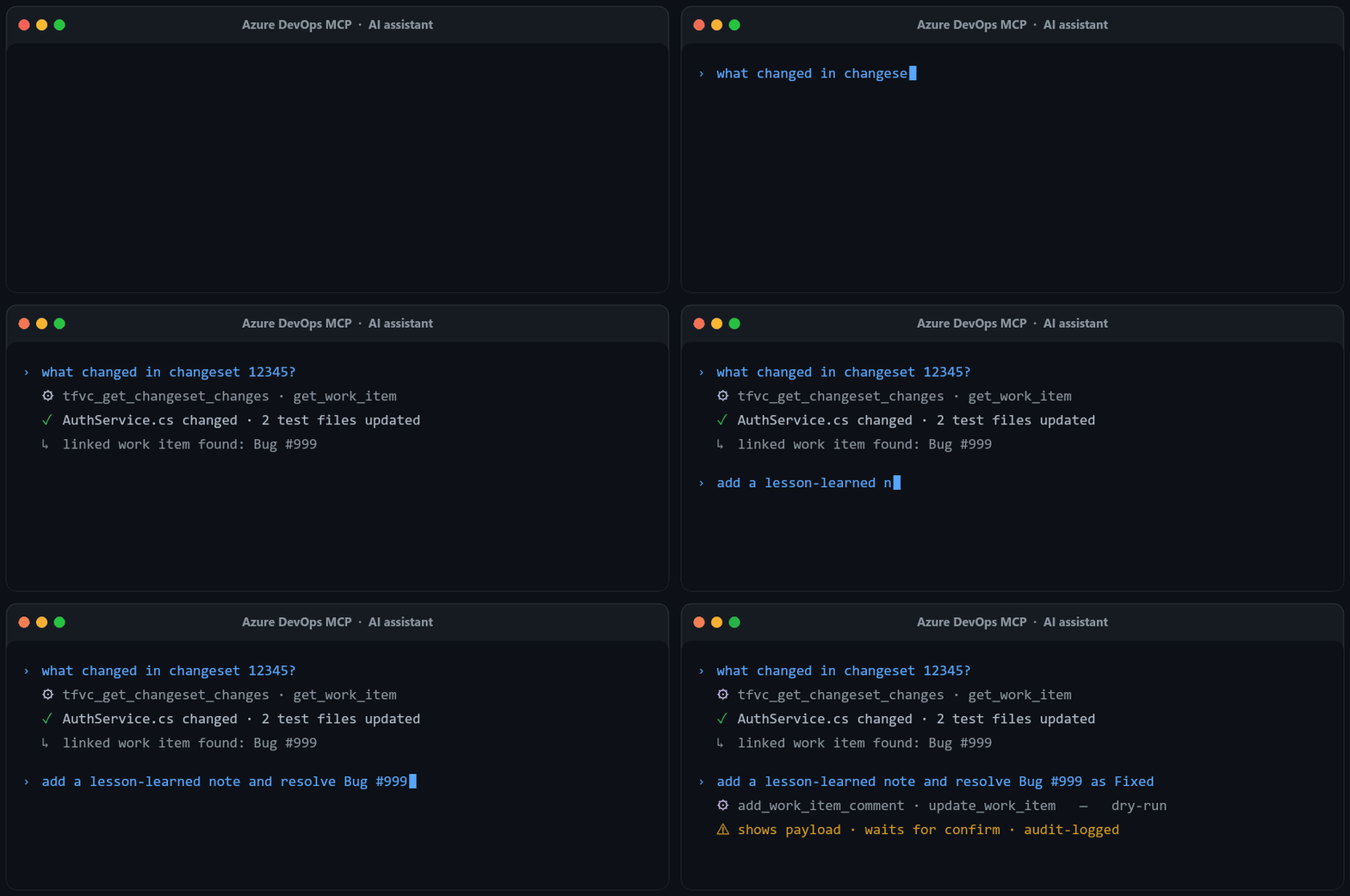
"Show me all active bugs assigned to me in this sprint" "What changed in changeset 12345?" "Review PR 123 and post the findings as comments" "List my latest shelvesets" "Trigger the nightly build on the release branch"
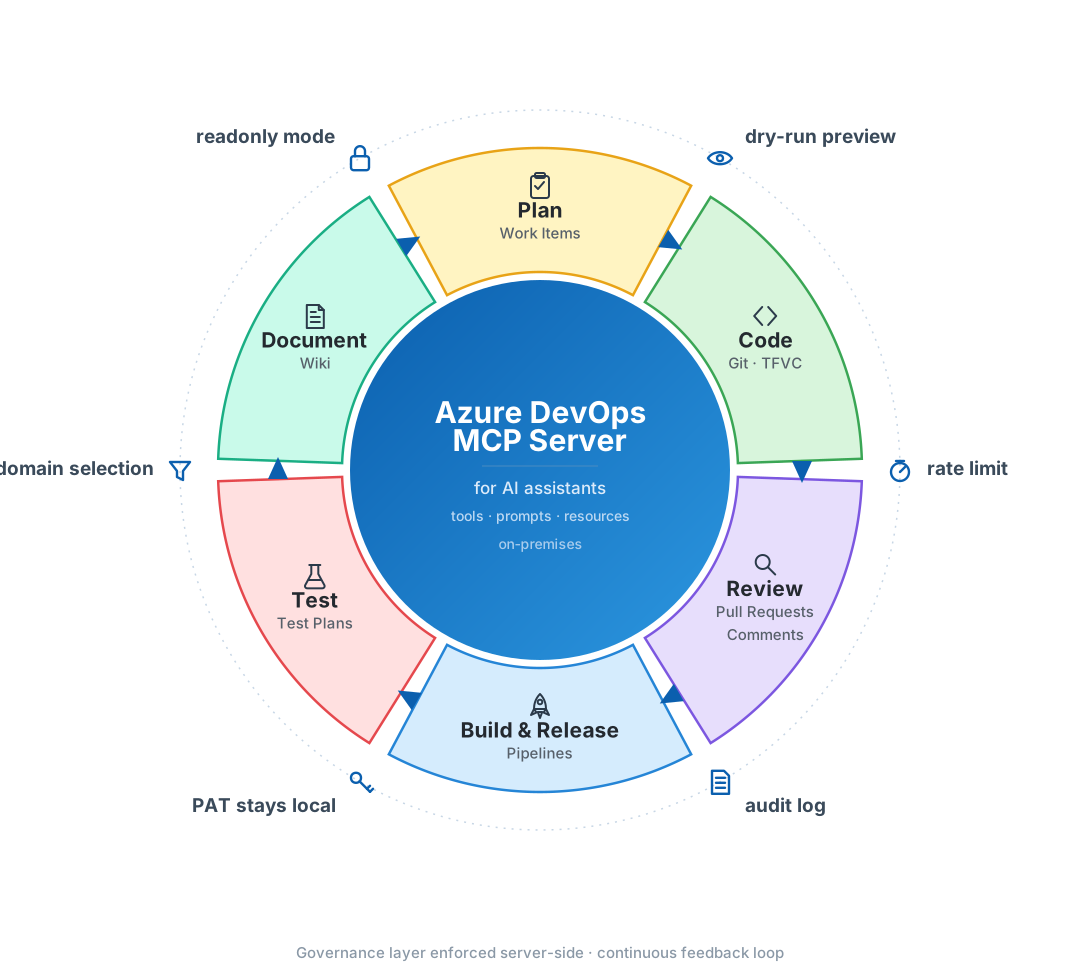
One server across the whole development cycle — Plan, Code, Review, Build & Release, Test, Document — with your own templates exposed as MCP resources alongside the built-in tools and prompts. Every write passes a server-side governance layer — readonly mode, dry-run preview, rate limit, and audit log (see Write Safety); tools can also be scoped per role (see Restrict tools per role below).
Full per-tool parameter reference: Tool Reference ↓
Set AZURE_DEVOPS_ENABLED_DOMAINS to a comma-separated list — disabled domains aren't registered, trimming the AI client's tool list and reducing tool-selection confusion. Default loads all 6. get_current_user is core and always registered.
| Role | Domains |
|---|---|
| Project manager | work_items,wiki |
| Developer (TFVC) | work_items,tfvc,pipelines |
| Developer (Git) | work_items,git,pipelines |
| QA / tester | work_items,test_plans,git |
| DevOps / release | work_items,pipelines,git,tfvc |
| Read-only / analyst | work_items,wiki |
Unknown domain names fail at startup — no silent typos. Startup log reports what loaded:
Enabled domains (3/6): work_items, tfvc, pipelines
Disabled domains: git, wiki, test_plans
The reason this server exists. Cloud Azure DevOps disabled new TFVC repos in February 2017, and Microsoft's official MCP server doesn't cover TFVC. If your team is still on Team Foundation Version Control, this is the only MCP server that exposes it natively to AI assistants.
10 dedicated TFVC tools:
tfvc_list_shelvesets, tfvc_get_shelveset (file changes + work item links), tfvc_get_shelveset_file (shelved, not-yet-checked-in file content — AI review before check-in, a workflow TFVC never had)tfvc_list_changesets, tfvc_get_changeset (incl. linked work items), tfvc_get_changeset_changestfvc_browse, tfvc_get_file (at any changeset version), tfvc_get_file_diff (changed hunks between two changesets)get_work_item_changesets (all TFVC changesets touching a work item, with file contents)Filters accept @me where relevant. Requires Code (read & write) PAT scope.
Prompts are reusable, advisory workflows surfaced as slash commands in the AI client. Each one instructs the model to gather evidence with the read tools and ground every claim in concrete IDs — producing the report never calls a write tool. One exception by design: review_pull_request can afterwards publish its findings as file-anchored PR comments, but only when you explicitly ask, with every comment confirmed before posting. Prompts load on the same domain axis as tools, so disabling a domain hides its prompts.
| Domain | Prompt | What it does |
|---|---|---|
git | lessons_learned_git | Root cause / detection / prevention report for a resolved bug, from its history and linked Git commits/PRs |
git | my_review_queue | Active PRs assigned to me as a reviewer, project-wide, oldest first (no arguments) |
git | summarize_pull_request | Plain-language "what this PR does" summary |
git | review_pull_request | Structured advisory review: risks, test gaps, maintainability, questions — on request, publishes findings to the PR as file-anchored comments |
git | analyze_commit_range | Release-notes style changelog between two branches |
tfvc | lessons_learned_tfvc | Root cause / detection / prevention report for a resolved bug, from its history and linked TFVC changesets |
tfvc | changeset_summary | Purpose, files, and scope/risk of a TFVC changeset |
work_items | work_item_report | Counts by area + monthly timeline + AI-grouped recurring themes for a work-item filter (titleContains/area/workItemTypes/days) |
lessons_learned is split per backend (Git vs. TFVC) so each variant names its own read tools; both need work_items enabled to read the bug itself.
The table lists 8; a 9th prompt, risk_impact_analysis, is conditional — it appears only when a risk-impact.md template is present (see External resources below).
Point AZURE_DEVOPS_RESOURCE_DIR at a folder and every *.md file in it is exposed as an MCP resource at template:<filename> (e.g. release-checklist.md → template:release-checklist; the filename is URI-encoded, so spaces are safe). Use this to share team templates and checklists with the AI without baking them into the server.
One template is wired to a prompt: dropping a risk-impact.md file in that folder enables the conditional risk_impact_analysis prompt, which fills the template from work-item evidence — optionally weighing an actual pending change via its shelvesetName argument. No template file → the prompt simply doesn't appear.
mcp.json configs sync to the cloud (Claude Desktop, VS Code Settings Sync), get pasted into tickets, end up in dotfile repos. Inlining AZURE_DEVOPS_PAT there is one git add . away from a public leak.
The convention: set AZURE_DEVOPS_PROFILE=name in mcp.json, keep credentials in a gitignored .env.<name> next to the binary. The server resolves the profile name to that file path; mcp.json stays free of secrets and is safe to commit.
.env.product-a (gitignored):
AZURE_DEVOPS_ORG_URL=https://tfs-1.example.com/tfs/ProductACollection
AZURE_DEVOPS_PROJECT=Product A
AZURE_DEVOPS_PAT=<pat-for-product-a>
# Optional per-profile domain restriction
AZURE_DEVOPS_ENABLED_DOMAINS=work_items,tfvc,pipelines
mcp.json (commitable):
{
  "mcpServers": {
    "ado-product-a": {
      "command": "node",
      "args": ["/path/to/dist/index.js"],
      "env": { "AZURE_DEVOPS_PROFILE": "product-a" }
    }
  }
}
Once profiles are in place, running multiple ADO instances side-by-side is just adding entries. Each one loads its own .env.<profile> — own PAT, own project, own domain restriction. Per-process state means audit logs, rate limit counters, and @me identity caches never cross between tenants.
{
  "mcpServers": {
    "ado-product-a": {
      "command": "node",
      "args": ["/path/to/dist/index.js"],
      "env": { "AZURE_DEVOPS_PROFILE": "product-a" }
    },
    "ado-product-b": {
      "command": "node",
      "args": ["/path/to/dist/index.js"],
      "env": { "AZURE_DEVOPS_PROFILE": "product-b" }
    }
  }
}
Tool names auto-prefix per server — mcp__ado-product-a__list_repositories vs mcp__ado-product-b__list_repositories.
Set in mcp.json | File loaded |
|---|---|
AZURE_DEVOPS_ENV_FILE=/abs/path | That exact path |
AZURE_DEVOPS_PROFILE=name | <projectRoot>/.env.name |
| (neither) | <projectRoot>/.env |
Variables set directly in mcp.json's env block always win over file contents.
Each instance's startup log line env file: ... confirms which file was loaded — handy for debugging "which profile did this tool actually call?".
Six layers. The LLM cannot bypass the server-side ones — they short-circuit before any API call fires.
| Layer | Scope | Enable |
|---|---|---|
| MCP annotations | All 48 tools tagged with readOnlyHint / destructiveHint / idempotentHint — clients can skip read confirmations, warn on destructive writes | Always on |
| Confirmation directive | Every write's description tells the LLM to show payload and ask before calling | Always on |
| Readonly mode | Server refuses all 8 write tools with a clear error; reads unaffected. CI, demos, sandbox, emergency stop | AZURE_DEVOPS_MODE=readonly |
| Rate limit | Global sliding 60s window across all writes — runaway-loop fence, not a throughput regulator | AZURE_DEVOPS_RATE_LIMIT_WRITES_PER_MIN=10 (default; 0 disables) |
| Dry-run | All 8 write tools — pass dryRun: true for the literal API payload without firing; update_work_item also returns the current values next to the intended ones | Per-call |
| Audit log | JSONL append per write: timestamp, tool, user, input, result, dryRun, ok, durationMs, blocked reason. Each process opens with a session_start header (version, mode, domains, rate limit) so the file interprets itself | AZURE_DEVOPS_AUDIT_LOG=/path/to/audit.jsonl |
Audit privacy: add AZURE_DEVOPS_AUDIT_REDACT=1 to keep numeric IDs and field shape but drop all string values (titles, comments, branch names). Useful when work-item content carries classified data.
Plus baseline hardening: WIQL injection sanitization, scrubbed errors (no internal paths/URLs/stack traces in client output), bounded pagination (1-1000).
The server runs entirely locally. ADO API calls go straight from your machine to your Azure DevOps Server. No telemetry, no phone-home, no cloud proxy, no shared analytics.
External destinations are limited to:
.env.| Data | Leaves your machine? |
|---|---|
| PAT | ❌ Never — stays in gitignored .env / .env.<profile> |
| Work items, code, commits, shelvesets | ➡ Your ADO Server, then back to your AI assistant |
| Server / URL / project names | ➡ Your AI assistant as part of tool outputs |
| Usage metrics, error logs | ❌ No collection |
Every network call is visible in src/ — they all route through azure-devops-node-api pointed at your configured URL.
Technically works against dev.azure.com, but this server isn't positioned for cloud:
@azure-devops/mcp for cloud — officially maintained, Entra ID, broader cloud-specific coverage.Use this server against cloud only if you specifically need @me, profile-based multi-tenant config, or a tool the official server lacks.
Pick one path:
| Scope | For |
|---|---|
| Work Items (read & write) | Work item tools, WIQL queries, statistics |
| Code (read & write) | Git tools, TFVC tools, PR creation |
| Build (read & execute) | Pipeline tools, queue_build |
| Release (read) | Release listing |
| Test Management (read & write) | Test plans, suites, runs, results; add test cases to a suite |
| Wiki (read) | Wiki tools |
Create the PAT at https://<your-tfs>/_usersSettings/tokens. Set an expiration ≤ 90 days and rotate regularly.
No public npm access? Skip to Enterprise Setup — it builds from source and can use an internal npm mirror.
1. Credential file — create ~/.azure-devops-mcp.env (Linux/macOS) or C:\Users\you\.azure-devops-mcp.env (Windows):
AZURE_DEVOPS_ORG_URL=https://your-tfs-server/tfs/YourCollection
AZURE_DEVOPS_PROJECT=YourProjectName
AZURE_DEVOPS_PAT=your_pat_token
# AZURE_DEVOPS_SSL_IGNORE=true   # uncomment for self-signed certs
2. Register with your AI client. Shortest paths:

claude mcp add azure-devops --env AZURE_DEVOPS_ENV_FILE=$HOME/.azure-devops-mcp.env -- npx -y @burcusg/azure-devops-mcp-onprem
JSON config — see Configure AI client below.
git clone https://github.com/burcusipahioglu/azure-devops-mcp-onprem.git
cd azure-devops-mcp-onprem
npm install
npm run build
cp .env.example .env       # copy .env.example .env on Windows
# fill in .env with your TFS details
npm start                  # smoke-test the connection — Ctrl+C to stop
Expected stderr on startup:
Azure DevOps MCP Server "CompanyOrg" running on stdio
env file: /path/to/.env
Enabled domains (6/6): work_items, git, tfvc, pipelines, wiki, test_plans
External resources loaded: 0
Authenticated as: Your Name (your.email@company.com)
Then point your AI client at dist/index.js (see below). No env block needed — the server reads .env from the repo root.
⚠ Never inline
AZURE_DEVOPS_PAT/AZURE_DEVOPS_ORG_URL/AZURE_DEVOPS_PROJECTin client configs. Client configs sync to the cloud (Claude Desktop sync, VS Code Settings Sync) or get pasted into tickets. UseAZURE_DEVOPS_ENV_FILE(Quick Start) or.envin the repo (Enterprise Setup). For multiple TFS instances see Profile-based secrets.
| Client | Path |
|---|---|
| VS Code | Includes .vscode/mcp.json. Copilot Chat → Agent mode (Ctrl+Shift+I) |
| GitHub Copilot CLI | /mcp add (interactive) or edit ~/.copilot/mcp-config.json |
| Claude Code | claude mcp add azure-devops -- node /path/to/dist/index.js |
| Claude Desktop | Edit %APPDATA%\Claude\claude_desktop_config.json (Windows) / ~/Library/Application Support/Claude/claude_desktop_config.json (macOS) |
| Cursor / Antigravity / Codex CLI | Standard MCP JSON config — same shape as Claude Desktop |
Enterprise Setup config template (any client):
{
  "mcpServers": {
    "azure-devops": {
      "command": "node",
      "args": ["/absolute/path/to/azure-devops-mcp-onprem/dist/index.js"]
    }
  }
}
Quick Start config template (npm + credential file):
{
  "mcpServers": {
    "azure-devops": {
      "command": "npx",
      "args": ["-y", "@burcusg/azure-devops-mcp-onprem"],
      "env": {
        "AZURE_DEVOPS_ENV_FILE": "C:\\Users\\you\\.azure-devops-mcp.env"
      }
    }
  }
}
Restart the client. All 48 tools appear in the tool picker. Server name is auto-detected from AZURE_DEVOPS_ORG_URL (e.g. https://dev.azure.com/acme → acme); override with AZURE_DEVOPS_SERVER_NAME.
Typed results (first wave): query_work_items, list_pull_requests, get_pull_request, get_build, list_builds, tfvc_get_changeset, tfvc_list_changesets, list_test_runs declare an MCP outputSchema and return structuredContent alongside the usual JSON text (text shape unchanged — existing clients see no difference). An agent can feed one tool's structuredContent straight into the next without parsing prose.
Dry-run: every write tool also accepts dryRun: true (not repeated in the tables below).
| Tool | Description | Key Parameters |
|---|---|---|
query_work_items | Execute a WIQL query (@Me, @CurrentIteration, @Today macros) | query, fields (projection per item), top |
get_work_item | Get work item by ID | id, expand (none/relations/fields/links/all) |
create_work_item | Create a new work item | type, title, description, assignedTo (accepts @me), areaPath, iterationPath, additionalFields |
update_work_item | Update work item fields (returns before/after diff) | id, fields (key-value map) |
get_work_item_comments | List comments (paginated, asc/desc, optional rendered HTML) | workItemId, top, order, includeRenderedText, continuationToken |
add_work_item_comment | Add a comment | workItemId, text |
link_work_items | Link two work items | sourceId, targetId, linkType |
get_work_item_history | Full change audit trail (who/what/when with old/new values) | workItemId, top, skip |
get_work_item_statistics | Work item counts by area path + monthly timeline (handles 20K+ items) | workItemTypes, days, states, areaPathPrefix, areaPathContains, titleContains, tags, iterationPath, groupByDepth, topAreas |
| Tool | Description | Key Parameters |
|---|---|---|
list_repositories | List all Git repos in project | — |
list_branches | List branches in a repo | repositoryId |
get_file_content | Get file content from repo | repositoryId, path, branch |
get_file_diff | Unified diff of one file between two branches/commits (changed hunks only) | repositoryId, path, baseVersion, targetVersion, contextLines |
list_pull_requests | List PRs; omit repositoryId for project-wide, filter by reviewer (accepts @me) | repositoryId, reviewer, status, top |
get_pull_request | Get PR details | repositoryId, pullRequestId |
get_pull_request_comments | List PR comment threads (file-anchored + general) | repositoryId, pullRequestId, includeSystem |
add_pull_request_comment | Comment on a PR — general, file-anchored (filePath+line), or reply (threadId) | repositoryId, pullRequestId, content, threadId, filePath, line |
create_pull_request | Create a new PR | repositoryId, title, sourceBranch, targetBranch |
| Tool | Description | Key Parameters |
|---|---|---|
list_commits | Commit history with filters | repositoryId, branch, author (accepts @me), fromDate, toDate, itemPath |
get_commit_changes | File changes in a commit | repositoryId, commitId |
compare_branches | Branch diff (ahead/behind + changed files) | repositoryId, baseBranch, targetBranch |
get_work_item_commits | Git commits & PRs linked to a work item | workItemId, includeChanges |
| Tool | Description | Key Parameters |
|---|---|---|
tfvc_browse | Browse files/folders at a TFVC path | scopePath, recursion |
tfvc_get_file | Get file content | path, version (changeset number) |
tfvc_get_file_diff | Unified diff of one TFVC file between two changesets (changed hunks only) | path, baseVersion, targetVersion, contextLines |
tfvc_get_changeset | Get changeset details | id, includeWorkItems, includeDetails |
tfvc_list_changesets | List changesets with filters | itemPath, author (accepts @me), fromDate, toDate, top |
tfvc_get_changeset_changes | List file changes in a changeset | changesetId, top |
tfvc_list_shelvesets | List shelvesets; pass name+owner to find one in a single call | name, owner (accepts @me), top |
tfvc_get_shelveset | Get shelveset details + changes | shelvesetId, includeWorkItems |
tfvc_get_shelveset_file | Get shelved (pending) content of one file in a shelveset | shelvesetId, path, maxBytes |
get_work_item_changesets | All TFVC changesets linked to a work item (with file changes) | workItemId, includeFileContent, maxFiles |
| Tool | Description | Key Parameters |
|---|---|---|
list_build_definitions | List pipeline definitions | name, top |
queue_build | Trigger a build | definitionId, sourceBranch, parameters |
get_build | Get build status | buildId |
list_builds | List recent builds | definitionId, status, top |
list_releases | List releases | definitionId, top |
| Tool | Description | Key Parameters |
|---|---|---|
get_current_user | Identity of the authenticated PAT owner (displayName, id, uniqueName) | — |
| Tool | Description | Key Parameters |
|---|---|---|
list_test_plans | List test plans | filterActivePlans, includePlanDetails |
get_test_plan | Get test plan details | planId |
list_test_suites | List suites in a test plan | planId, asTreeView |
list_test_cases | List test cases in a suite | planId, suiteId |
list_test_runs | List test runs (manual/automated) | planId, automated, top |
get_test_results | Test results with pass/fail and errors | runId, outcomes, top |
add_test_cases_to_suite | Link existing Test Case work items into a suite | planId, suiteId, testCaseIds |
| Tool | Description | Key Parameters |
|---|---|---|
list_wikis | List all wikis (project + code wikis) | — |
get_wiki_page | Get page content in Markdown | wikiIdentifier, path, includeChildren |
list_wiki_pages | All page paths (TOC) with view stats | wikiIdentifier, top, pageViewsForDays |
@me tokenSeveral filter parameters accept the magic token @me — the server resolves it to the authenticated PAT owner's identity via Azure DevOps ConnectionData (display name for author/owner filters, user id where the API requires one, e.g. reviewer). The identity is cached for the lifetime of the process.
Why: in multi-agent setups, sub-agents rarely know the human's display name. @me lets any agent filter to "my stuff" without needing identity context.
| Tool | Parameter |
|---|---|
tfvc_list_shelvesets | owner |
tfvc_list_changesets | author |
list_commits | author |
list_pull_requests | reviewer |
create_work_item | assignedTo |
// "Show me my latest shelveset"
tfvc_list_shelvesets({ owner: "@me", top: 1 })

// "Which commits did I push to feature/login this week?"
list_commits({ repositoryId: "my-repo", branch: "feature/login", author: "@me", fromDate: "2026-04-10" })
WIQL queries (
query_work_items) use Azure DevOps' native macros —@Me,@CurrentIteration,@Today— no server-side resolution needed. "My sprint items" is one query away:... WHERE [System.IterationPath] = @CurrentIteration AND [System.AssignedTo] = @Me.
Need the identity explicitly? Call get_current_user.
npm run dev      # watch mode
npm run build    # build once
npm start        # start the server
Released under the MIT License. Copyright (c) 2026 Burcu Sipahioglu Gokbulut.
Free to use, modify, and redistribute — commercial or personal — provided the copyright notice and license text are preserved.
Run Claude Code as an MCP server so any agent can delegate coding tasks to it
 @microsoft✓ Official
Browser automation using accessibility snapshots instead of screenshots
 @googleapis✓ Official
Google's universal MCP server supporting PostgreSQL, MySQL, MongoDB, Redis, and 10+ databases
 @github✓ Official
Official GitHub integration for repos, issues, PRs, and CI/CD workflows