

Are you the author? Sign in to claim
Unified MCP server combining Hunter.io and Apollo for B2B lead enrichment

Unified MCP server combining Hunter.io email finding with Apollo company intelligence. One connection, two data sources, built for Claude and Cursor.
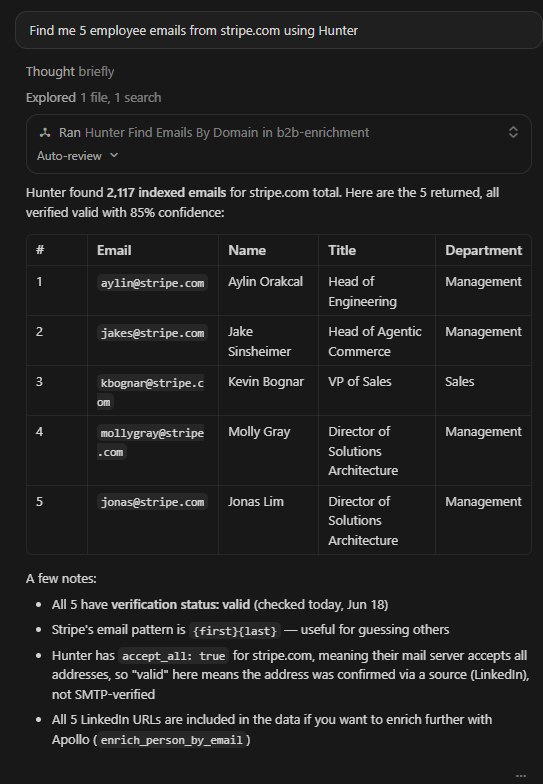
Lead generation workflows need two things: email addresses and company context. Most MCP servers handle one or the other. This one handles both — Hunter.io for finding and verifying emails, Apollo.io for firmographic data like headcount, funding, and tech stack. One server, one config, Claude orchestrates across both.
Hunter.io — email intelligence
hunter_find_emails_by_domain — get all emails at a company domain with names, titles, and confidence scoreshunter_find_email — find the most likely email for a specific person by name + domainhunter_verify_email — check whether an email is deliverable before sendinghunter_count_emails — count indexed emails for a domain (free, no credits)hunter_check_account — view remaining Hunter credits (free)Apollo.io — company & people intelligence
enrich_company — full firmographic profile: headcount, revenue, funding, tech stack, socialsenrich_person_by_email — complete B2B profile from a single email addressbulk_enrich_people — enrich up to 10 contacts in one API callenrich_person — profile lookup by name + domain, LinkedIn URL, or email
search_peopleandsearch_companiesare also included but require an Apollo Basic plan ($49/mo).
You can run real enrichment workflows without paying anything upfront:
| Service | Free allowance |
|---|---|
| Hunter.io | 50 requests/month + 50 verifications |
| Apollo.io | Company enrichment — unlimited on free plan |
No credit card required to start. Both services have free tiers that cover the most common use cases.
Requires Python 3.11+
git clone https://github.com/Aleksey-Panf/b2b-enrichment-mcp.git
cd b2b-enrichment-mcp

python -m venv .venv

# Windows
.venv\Scripts\Activate.ps1
# macOS / Linux
source .venv/bin/activate

pip install -e .
Copy the env template and add your keys:
cp .env.example .env
# .env
HUNTER_API_KEY=your_hunter_key_here
APOLLO_API_KEY=your_apollo_key_here
Get your API keys:
Edit claude_desktop_config.json — on Windows at %APPDATA%\Claude\claude_desktop_config.json:
{
  "mcpServers": {
    "b2b-enrichment": {
      "command": "C:\\path\\to\\b2b-enrichment-mcp\\.venv\\Scripts\\python.exe",
      "args": ["-m", "apollo_mcp.server"],
      "env": {
        "HUNTER_API_KEY": "your_hunter_key_here",
        "APOLLO_API_KEY": "your_apollo_key_here"
      }
    }
  }
}
Restart Claude Desktop. The tools will appear automatically.
Add to .cursor/mcp.json in your project root, or to global Cursor MCP settings:
{
  "mcpServers": {
    "b2b-enrichment": {
      "command": "C:\\path\\to\\b2b-enrichment-mcp\\.venv\\Scripts\\python.exe",
      "args": ["-m", "apollo_mcp.server"],
      "env": {
        "HUNTER_API_KEY": "your_hunter_key_here",
        "APOLLO_API_KEY": "your_apollo_key_here"
      }
    }
  }
}
On macOS / Linux replace the command path with .venv/bin/python.
Copy these into Claude or Cursor once the server is connected:
Find 10 emails of marketing directors at SaaS companies using Hunter.
Tell me everything about stripe.com — headcount, funding, tech stack —
and find 5 contacts there.
Verify whether john@acme.com is a valid email address.
Get the full company profile for openai.com.
I have a list of 8 people with names and company domains.
Enrich all of them for emails and job titles in one call.
PRs are welcome. Open an issue first for anything beyond small fixes.
git checkout -b feature/your-feature
# make changes
git commit -m "feat: describe your change"
git push origin feature/your-feature
MIT
Built by @Aleksey-Panf — available for custom MCP and AI automation work.
Contact: @Aleksey_Ai14
Run Claude Code as an MCP server so any agent can delegate coding tasks to it
 @microsoft✓ Official
Browser automation using accessibility snapshots instead of screenshots
 @googleapis✓ Official
Google's universal MCP server supporting PostgreSQL, MySQL, MongoDB, Redis, and 10+ databases
 @github✓ Official
Official GitHub integration for repos, issues, PRs, and CI/CD workflows