

Are you the author? Sign in to claim
A production-ready Claude Code setup. Global CLAUDE.md, coding rules, per-project memory, and token optimization.


A production-ready Claude Code setup. Global CLAUDE.md, coding rules, per-project memory, and token optimization.
git clone https://github.com/janmaaarc/basecamp.git
cd basecamp
bash setup.sh ~/Documents/your-vault
Then open ~/.claude/CLAUDE.md, fill in your stack, and follow Setup for tools and plugins.
After building multiple AI and software projects with Claude Code, I found myself repeating the same setup every time. This is that setup, packaged into a reusable foundation: engineering standards, project memory, coding rules, token optimization, and safety mechanisms. Built and refined through real projects, not a template made for show.
Most Claude Code setups are minimal. This one is not. It covers:
.claude/ config via agentshieldObsidian graph view (PROJECT, MISTAKES, CONTRACT linked)
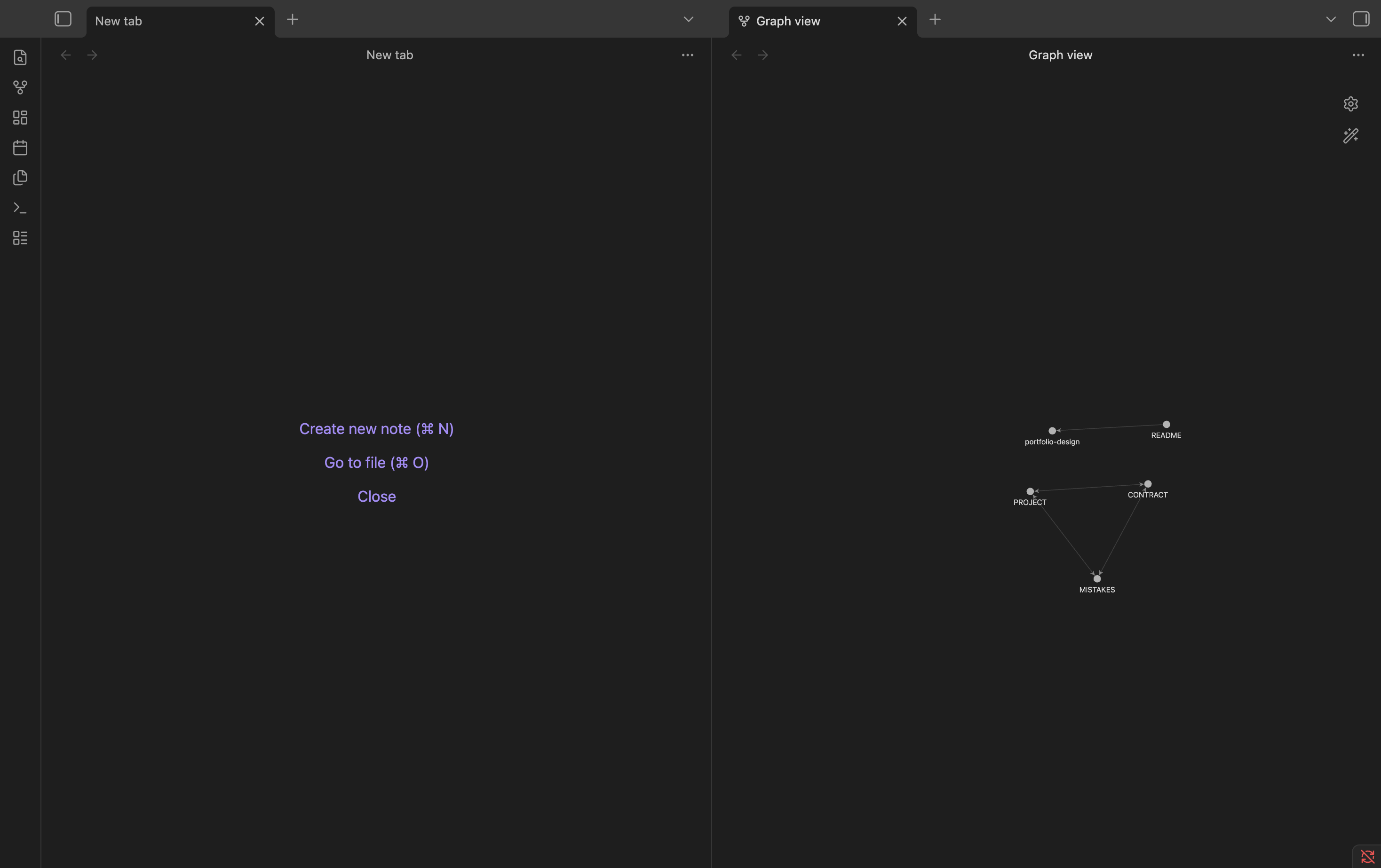
RTK token savings
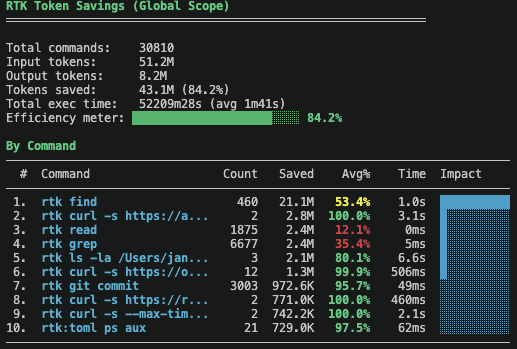
Coming soon. Full setup walkthrough covering: clone, setup.sh, filling in CLAUDE.md, Obsidian graph view, and token savings demo.
bash setup.sh ~/Documents/your-vault
This copies all files to ~/.claude/ and your Obsidian vault. Or do it manually:
mkdir -p ~/.claude/rules
cp CLAUDE.md ~/.claude/CLAUDE.md
cp RTK.md ~/.claude/RTK.md
cp -r rules/ ~/.claude/rules/
cp -r Templates/ ~/Documents/your-vault/Templates/
~/.claude/CLAUDE.md and fill in your stack, vault path, and defaultsCLAUDE.example.md for a filled-in reference@rules/typescript.md, @rules/security.md, @rules/web.md, @rules/ai-agents.md, @rules/data.md, or @rules/mobile.mdRTK (token savings 60-90%):
brew tap rtk-ai/tap && brew install rtk
Headroom (context compression):
Follow the official install guide: https://github.com/headroomlabs-ai/headroom
claude-mem (persistent memory):
npx claude-mem install
echo '(npx claude-mem start &>/dev/null &)' >> ~/.zshrc
agentshield (security scanner, no install needed):
npx ecc-agentshield scan
claude pluginis a command provided by ECC. Install ECC first using the two commands below, then restart Claude Code before installing the rest.
Core (recommended for everyone):
# ECC — agents, skills, hooks (install this first)
claude plugin marketplace add affaan-m/ECC
claude plugin install ecc@ecc

# Caveman — terse responses
claude plugin marketplace add JuliusBrussee/caveman
claude plugin install caveman@caveman

# Ponytail — YAGNI coding rules
claude plugin marketplace add DietrichGebert/ponytail
claude plugin install ponytail@ponytail

# Safety hooks — block dangerous commands, scan secrets
claude plugin marketplace add poshan0126/dotclaude
claude plugin install safety-hooks@dotclaude
Optional (install what fits your stack):
# n8n workflow skills
claude plugin marketplace add czlonkowski/n8n-skills
claude plugin install n8n-mcp-skills@n8n-mcp-skills

# PostgreSQL skills
claude plugin marketplace add timescale/pg-aiguide
claude plugin install pg@aiguide

# UI design rules and auditing
claude plugin marketplace add pbakaus/impeccable
claude plugin install impeccable@impeccable
Every project gets a folder in your Obsidian vault:
your-vault/
  Projects/
    my-app/
      PROJECT.md     <- what the project is, current status
      MISTAKES.md    <- recurring mistakes to avoid
      CONTRACT.md    <- plan for high-risk changes
  Templates/
    PROJECT.md
    MISTAKES.md
    CONTRACT.md
Claude reads these at session start automatically. Update PROJECT.md at end of each session (max 30 lines, current status only).
For schema migrations, auth changes, major refactors:
CONTRACT.md with plan, risks, rollback.| Tool | Purpose | Repo | License |
|---|---|---|---|
| RTK | Token-optimized CLI proxy | rtk-ai/rtk | Apache 2.0 |
| Headroom | Context compression proxy | headroomlabs-ai/headroom | Apache 2.0 |
| ECC | Agents, skills, hooks | affaan-m/ECC | MIT |
| Caveman | Terse response mode | JuliusBrussee/caveman | MIT |
| Ponytail | YAGNI coding rules | DietrichGebert/ponytail | MIT |
| claude-mem | Persistent session memory | thedotmack/claude-mem | Apache 2.0 |
| safety-hooks | Block dangerous commands, scan secrets | poshan0126/dotclaude | MIT |
| n8n-mcp-skills | n8n workflow skills (optional) | czlonkowski/n8n-skills | MIT |
| pg-aiguide | PostgreSQL skills (optional) | timescale/pg-aiguide | Apache 2.0 |
| impeccable | UI design rules and auditing (optional) | pbakaus/impeccable | MIT |
| agentshield | Scans .claude/ config for risky permissions, hooks, MCP setups | affaan-m/agentshield | MIT |
| code-review-graph | Codebase graph (MCP + CLI) for blast-radius analysis and token reduction on large-repo reviews (optional) | tirth8205/code-review-graph | MIT |
# Update plugins
claude plugin marketplace update ecc
claude plugin marketplace update caveman
claude plugin marketplace update ponytail
claude plugin marketplace update dotclaude

# Update tools
brew upgrade rtk
headroom update
npx claude-mem update
No. The per-project memory system works with any folder. Obsidian just adds graph view and backlinks. Point the vault path in CLAUDE.md to any directory.
Claude Code itself has limited Windows support. setup.sh requires bash. Linux is mostly supported. macOS is the primary platform.
Skip it. Remove the @RTK.md import from CLAUDE.md. The rest of the setup works without it.
No. Install what fits your workflow. ECC is the most useful. Caveman and Ponytail change how Claude responds. Safety hooks is optional but recommended.
Yes. Fill in Your Defaults in CLAUDE.md and import the relevant rules file: @rules/typescript.md, @rules/web.md, @rules/ai-agents.md, @rules/data.md, @rules/security.md, or @rules/mobile.md.
MIT
1000+ skills curated from Anthropic, Vercel, Stripe, and other engineering teams
Agent harness performance optimization with skills, instincts, memory, and security
Design enforcement with memory — keeps your UI consistent across a project
Detects 37 AI writing patterns and rewrites text with human rhythm across 5 voice profiles
