

Are you the author? Sign in to claim
Open-source AI customer support platform — RAG knowledge base, multi-provider LLM agents, embeddable chat widget. FastAP



English | 简体中文
Basjoo is an AI customer-support platform with three main parts:
frontend-nextjs/widget/ that talks to the backend over HTTP and SSEThe stack also uses SQLite for application data, Redis for rate limiting, Qdrant for vector search and document indexing, PostgreSQL for relational data, a Scrapling microservice for web content fetching, and nginx for Docker-based reverse proxying.
Basjoo runs as a set of Docker containers. All LLM inference and embedding calls are made to external APIs (OpenAI, DeepSeek, Anthropic, Gemini, Jina, SiliconFlow), so no GPU is required.
| Minimum | Recommended | |
|---|---|---|
| CPU | 2 vCPU | 2–4 vCPU |
| RAM | 4 GB | 8 GB |
| Disk | 20 GB | 50 GB |
| OS | Ubuntu 22.04+ / Debian 11+ | Ubuntu 22.04+ / Debian 12+ |
| Docker | 20.10+ | latest |
For a blank Ubuntu or Debian server, run:
curl -fsSL https://raw.githubusercontent.com/haoyiyin/basjoo/main/install-deploy.sh | sudo sh
If you already have this repository checked out locally, you can also run:
sudo sh install-deploy.sh
After deployment completes, the script prints a prominent summary with the admin dashboard URL. On local desktop environments (with DISPLAY or WAYLAND_DISPLAY set), it may automatically open the URL in your browser. On headless servers, copy the printed link into a browser.
The first registered admin becomes the workspace super administrator, who can create and manage multiple isolated AI agents within the same workspace.
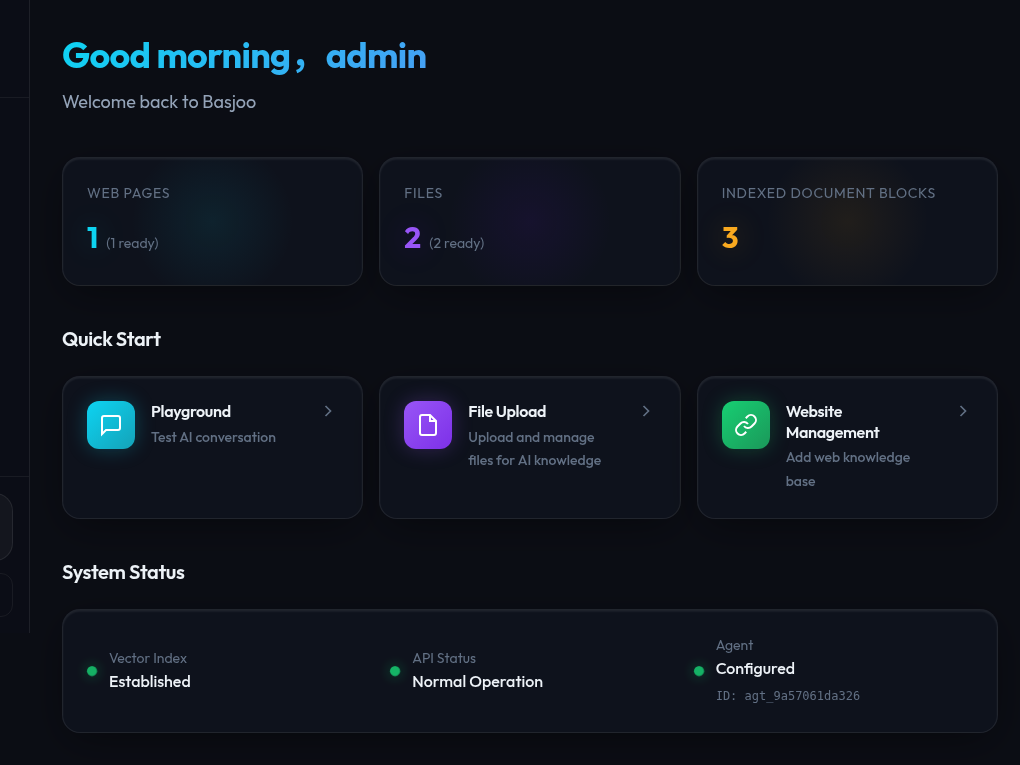
backend/ — FastAPI app, data models, chat APIs, auth, ingestion, indexing, testsfrontend-nextjs/ — active admin/dashboard UIwidget/ — embeddable chat widget bundlescrapling-service/ — standalone microservice for web content fetching (curl_cffi + readability)nginx/ — Docker nginx configdocker-compose.yml — dev/prod orchestrationThe admin dashboard is the operational center for configuring agents, reviewing knowledge coverage, and accessing the major management modules.
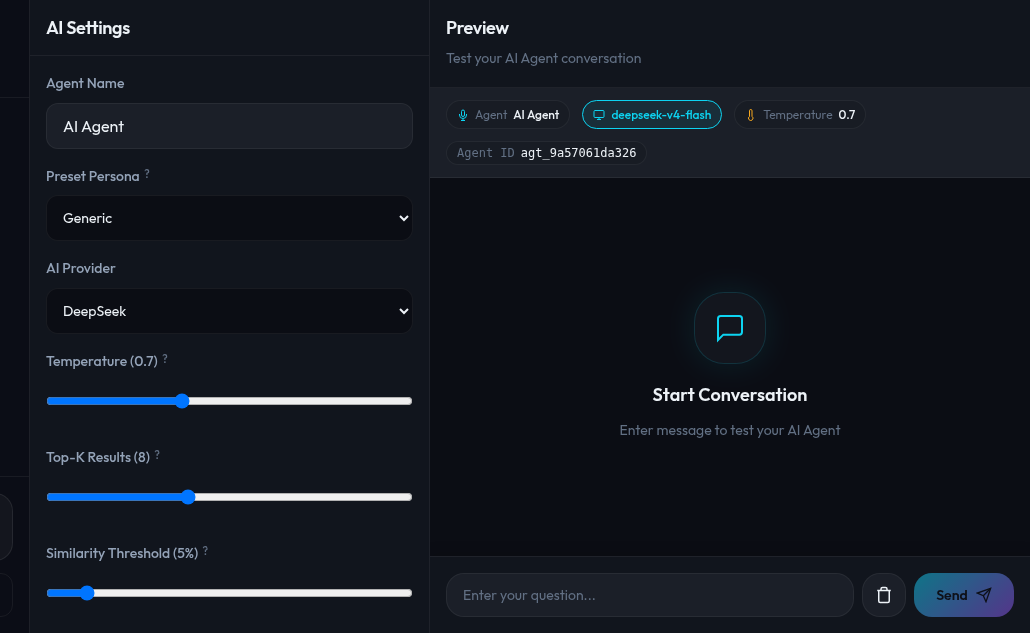
The Playground lets admins test replies, inspect retrieval behavior, and adjust model/provider settings from the same workflow.
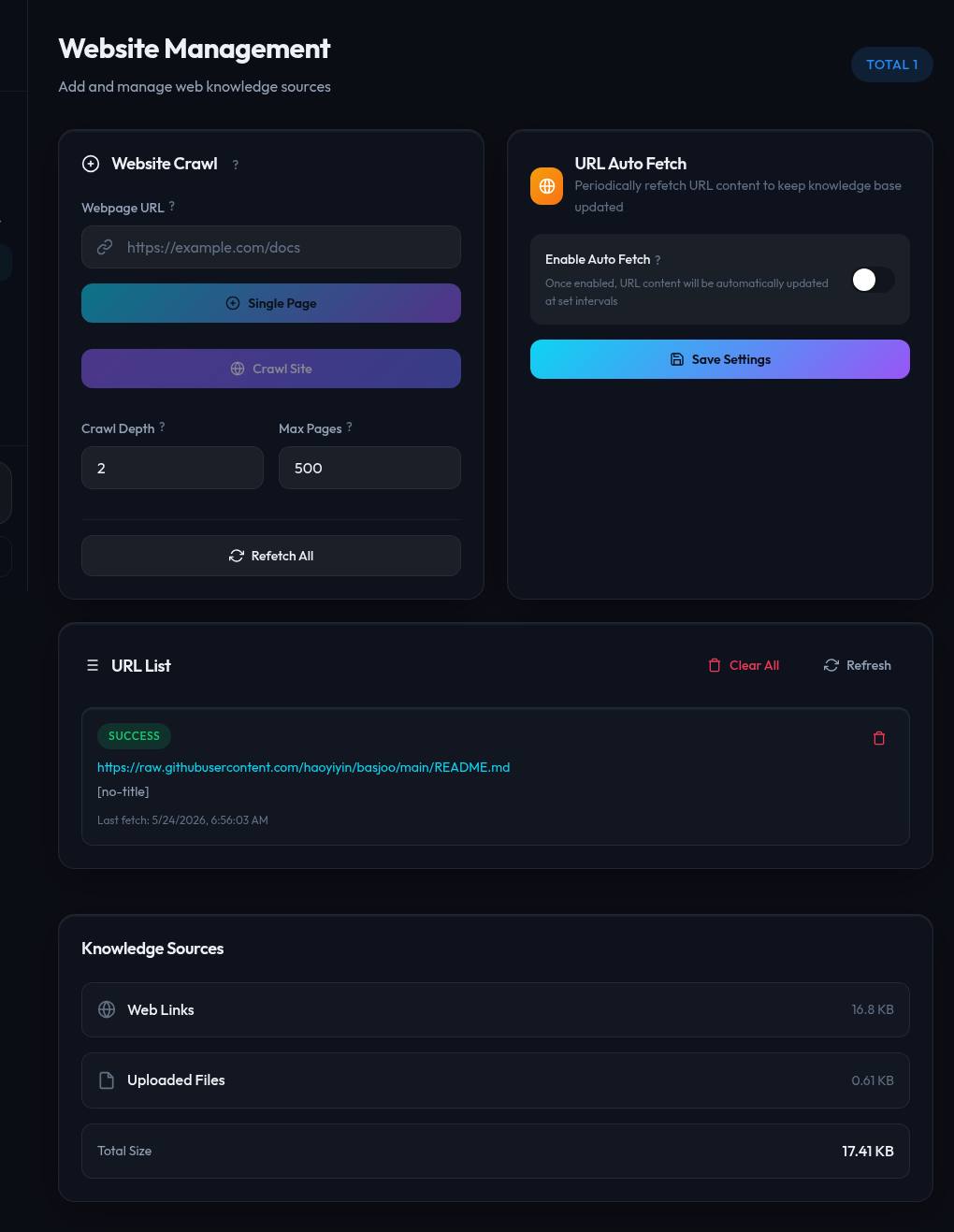
The Websites page handles URL ingestion, crawling, auto-fetch settings, and retraining/index-refresh workflows for web content.
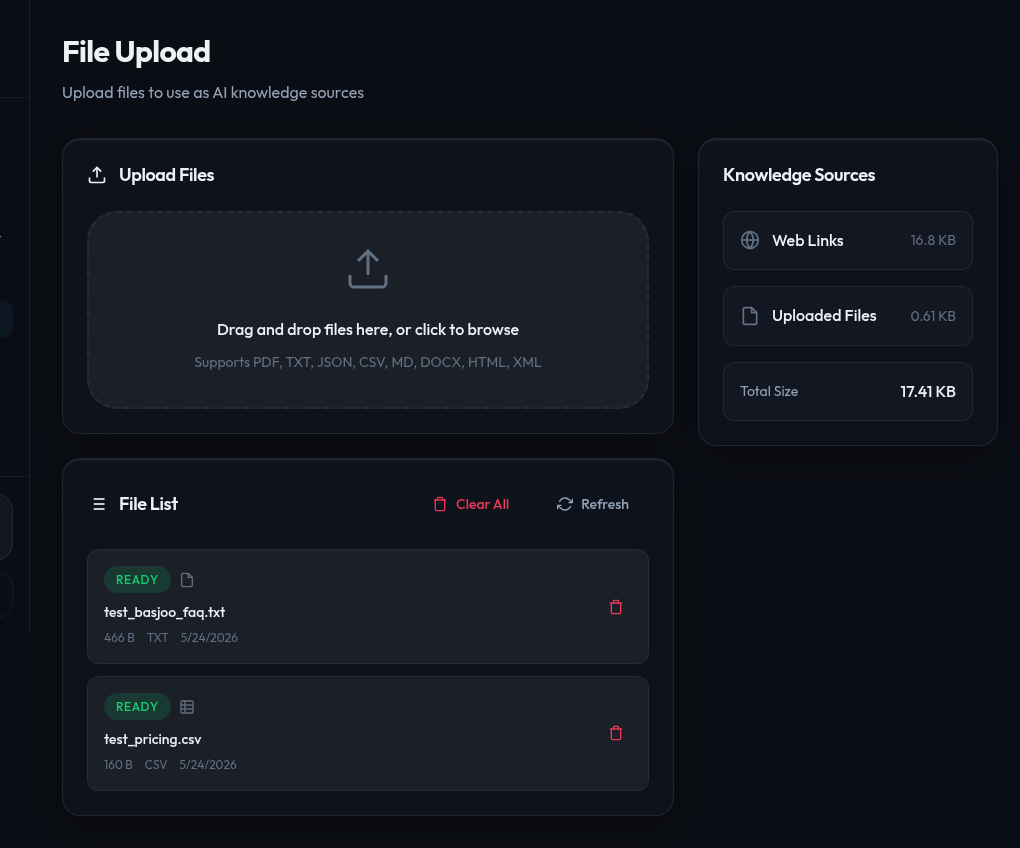
The File Upload page lets you drag-and-drop PDF, TXT, CSV, Markdown, DOCX and other files as knowledge sources for AI retrieval.
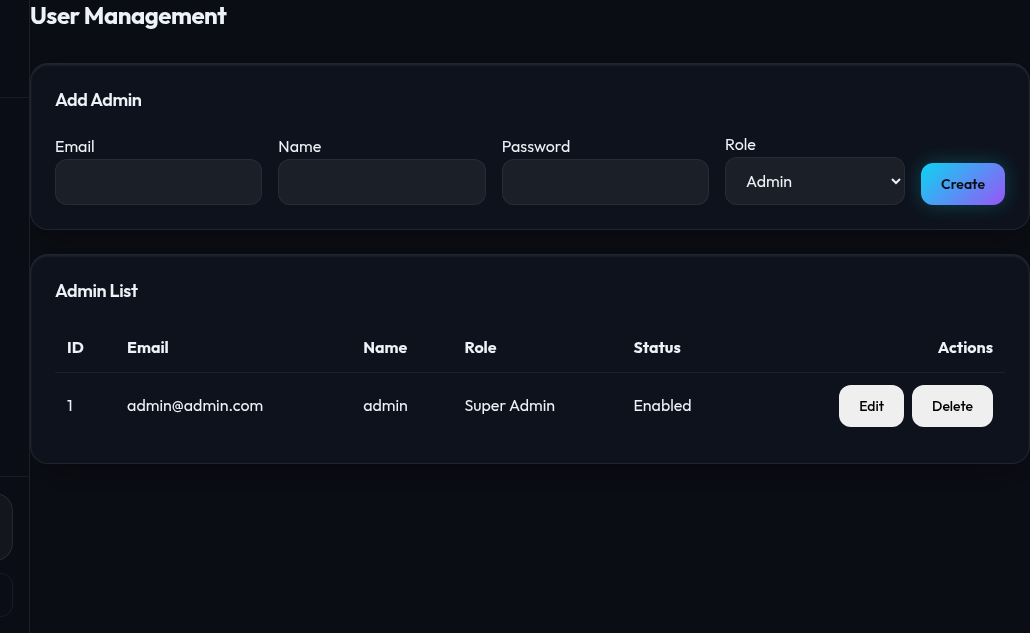
Manage admin accounts with role-based access control — Super Admin, Admin, and Support roles.
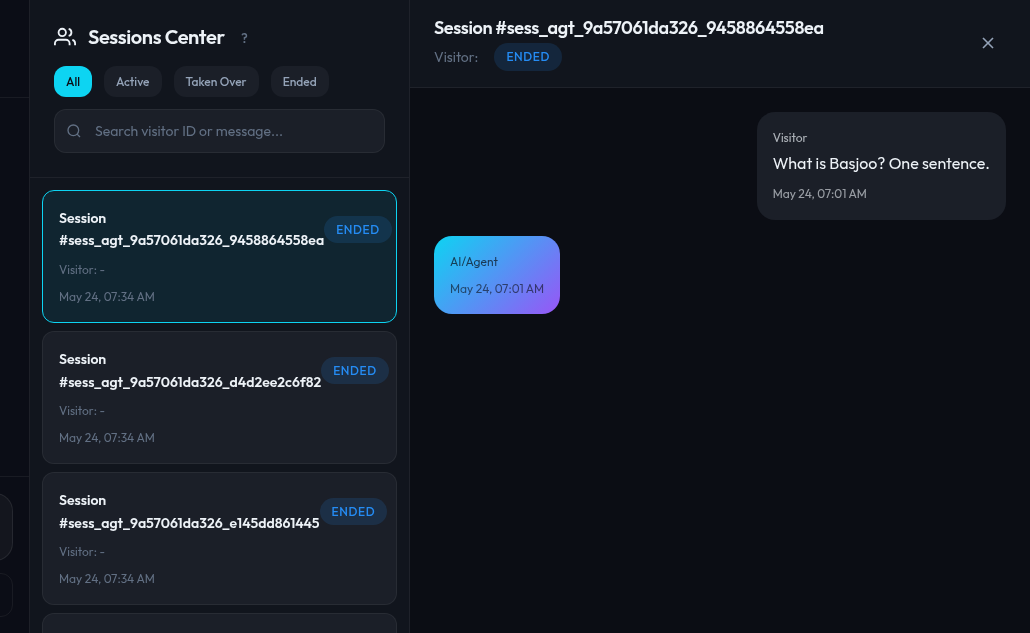
The Sessions page shows live conversations, supports human takeover, and gives operators a single place to monitor visitor activity.
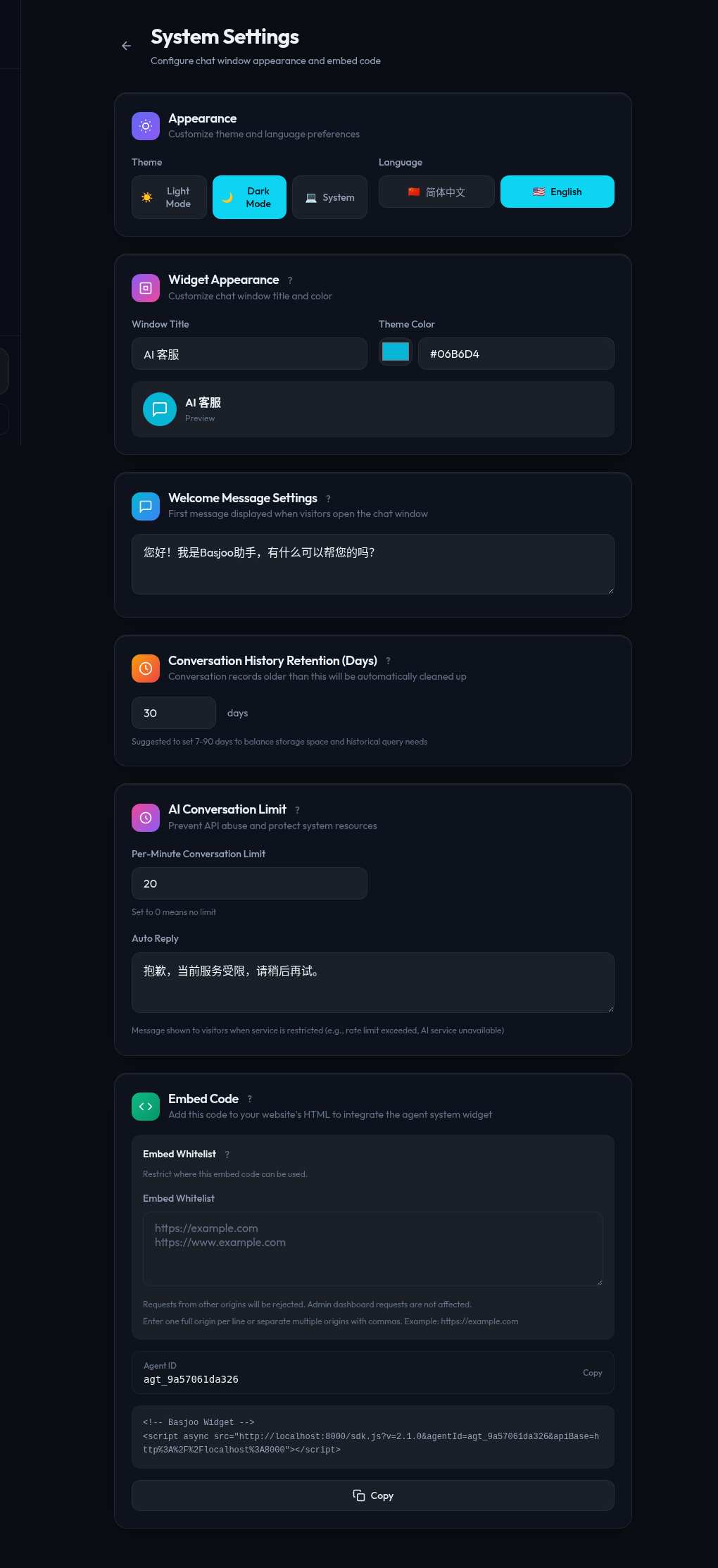
Agent Settings covers language/theme preferences, widget appearance, embed behavior, and other operational controls.
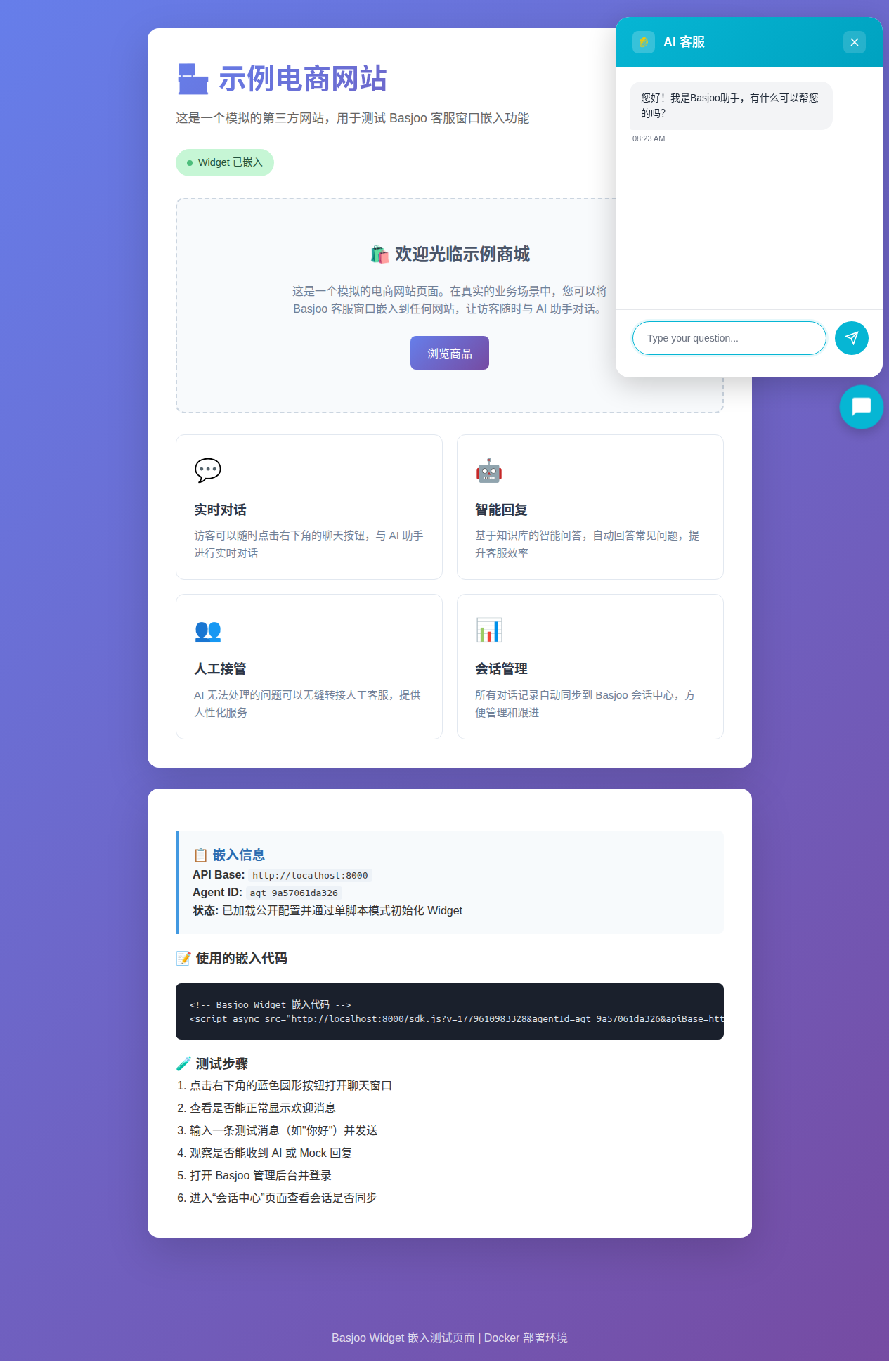
The widget provides the visitor-facing chat window with persisted sessions, multilingual copy, streaming responses, and knowledge-assisted replies.
Development stack:
docker compose --profile dev up -d
Production-style stack:
docker compose --profile prod up -d
Useful Docker commands:
docker compose logs -f backend-dev frontend-dev nginx
docker compose --profile dev up -d --build backend-dev frontend-dev
bash scripts/prod_stability_check.sh
Default dev ports:
http://localhost:3000http://localhost:8000http://localhost:6333127.0.0.1:5432127.0.0.1:6379The dev frontend and backend ports are bound as 3000:3000 and 8000:8000, so they are reachable from other devices that can access the host.
cd backend
python3 -m venv venv
source venv/bin/activate
pip install -r requirements.txt
python3 main.py
Backend health check:
curl http://localhost:8000/health
cd frontend-nextjs
npm install
npm run dev
cd widget
npm install
npm run dev
frontend-nextjs/)npm install
npm run dev
npm run build
npm run start # production build locally
npm run lint
npm run typecheck
npm run test # vitest
widget/)npm install
npm run dev # dev bundle + example server
npm run build # full build (typecheck + dev + prod bundles)
npm run build:dev # unminified ESM bundle (dist/basjoo-widget.js)
npm run build:prod # minified IIFE bundle (dist/basjoo-widget.min.js)
npm run typecheck
npm run test # vitest
backend/)pip install -r requirements.txt
python3 main.py
pytest
pytest tests/test_api.py
pytest tests/test_api.py::test_name
npm run test:e2e        # smoke tests (dev environment)
npm run test:e2e:all    # all Playwright test projects
npm run test:e2e:prod   # production-like E2E tests
npm run test:e2e:widget # widget cross-origin embed tests
npm run sync-widget     # sync widget bundle to backend
docker compose --profile dev up --watch
The backend reads settings from environment variables and .env via pydantic-settings.
Important runtime settings used in the current codebase include:
DATABASE_URLREDIS_URLQDRANT_URLSECRET_KEYSECRET_KEY_FILEDEFAULT_AGENT_IDJINA_API_KEYDEEPSEEK_API_KEYALLOWED_ORIGINSALLOWED_METHODSALLOWED_HEADERSRATE_LIMIT_PER_MINUTERATE_LIMIT_BURST_SIZELOG_LEVELSERVER_DOMAINENCRYPTION_KEY (optional; auto-generated and persisted if missing)ENCRYPTION_KEY_FILE (default /app/data/.encryption_key)REQUIRE_SECRET_KEY (set true in production to reject insecure secret keys)Notes:
SECRET_KEY is missing or insecure, the backend generates one and persists it to SECRET_KEY_FILE.DEFAULT_AGENT_ID can be used to restore or pin a known widget agent ID during migrations; see the deployment section below for the preservation workflow.ENCRYPTION_KEY is not set, the backend auto-generates a Fernet key and persists it to ENCRYPTION_KEY_FILE; stored provider API keys are encrypted with this key.cors_allow_null_origin (boolean, default false) controls whether Origin: null (e.g., file:// widget preview) receives wildcard CORS headers. Off by default for security.SERVER_DOMAIN is consumed by the nginx service in the production compose profile to enforce a canonical host and block direct IP/other-host access./app/data.backend/main.py builds the FastAPI app and wires together:
/api/admin/api/v1 (chat, agent config, sessions, quotas, task status)url_endpoints.py (URL ingestion, crawling), file_endpoints.py (file upload), and index_endpoints.py (index rebuild jobs) are protected at the router level via Depends(get_current_admin)/api/v1/chat, /api/v1/chat/stream, /api/v1/contexts, /api/v1/config:publicapply_cors_headers() helper for early responses (rate limit 429, body size 413)/sdk.jsThe main backend domains are:
backend/services/url_safety.pyThe main persistent entities in backend/models.py are:
WorkspaceAgentURLSourceKnowledgeFileChatSessionChatMessageWorkspaceQuotaIndexJobAdminUserThe retrieval/indexing pipeline spans:
backend/api/v1/url_endpoints.pybackend/api/v1/index_endpoints.pybackend/services/kb_service.pybackend/services/qdrant_service.pybackend/services/scraper.pybackend/services/crawler.pyThe LLM abstraction is in backend/services/llm_service.py. Provider selection is driven by Agent.provider_type. The current code supports OpenAI-compatible providers plus dedicated paths for OpenAI Native and Google.
Embedding settings are independent from the chat model provider. Admins can choose Jina or SiliconFlow for knowledge-base indexing/retrieval in Playground; the Websites and File Upload pages only require the API key for the currently selected embedding provider. SiliconFlow can use a dedicated SiliconFlow Embedding API key, with legacy fallback to the main SiliconFlow AI key when the AI provider is also SiliconFlow.
The active UI is the Next.js app in frontend-nextjs/.
frontend-nextjs/app/frontend-nextjs/src/views/frontend-nextjs/src/components/frontend-nextjs/src/context/AuthContext.tsxfrontend-nextjs/src/services/api.tswidget/src/BasjooWidget.tsx is a self-contained embeddable widget that:
apiBase from the script source URL, infers from dev port 3000 → backend 8000, or falls back to window.location.origin/api/v1/config:public on init to resolve default_agent_id, widget title/color, and welcome messagelocalStorage/api/v1/chat/stream via SSE with a 90-second read timeout and one automatic retry on network errors/api/v1/chat/messages?role=assistant at 3-second intervals during human takeover scenariosThe backend serves widget-related assets directly, including /sdk.js.
backend/services/url_safety.py validates all user-provided URLs. It blocks localhost, direct IP literals, URLs with embedded credentials, and hostnames that resolve to private/special-use IPs (loopback, RFC1918, link-local, cloud metadata). DNS resolution results are cached (512-entry LRU) to avoid repeated lookups during crawls.backend/middleware/rate_limit.py. Origin: null only receives wildcard CORS when cors_allow_null_origin is explicitly enabled. Requests without an Origin header do not receive CORS headers.SECRET_KEY, DEFAULT_AGENT_ID, and ENCRYPTION_KEY are auto-generated and persisted on first boot if not provided via environment variables, ensuring stable widget embed behavior and encrypted API key storage across redeployments.TaskLock service prevents conflicting operations (e.g., rebuild blocks fetch, fetch blocks rebuild) on the same agent.Backend tests are under backend/tests/.
Key testing behavior from backend/tests/conftest.py:
BASJOO_TEST_MODE=1backend/.pytest_dbs/Run all tests:
cd backend
pytest
Run a file:
pytest tests/test_api.py
Run a single test:
pytest tests/test_api.py::test_name
docker-compose.yml is the main orchestration entrypoint.install-deploy.sh is the one-command production installer/deployer for Ubuntu and Debian. It can auto-install Docker/Compose, clone the repo, and force-sync an existing clone to the chosen remote branch before deploying.client_max_body_size 12m so oversized requests can reach the backend and return JSON errors instead of nginx HTML errors../ssl.SERVER_DOMAIN can be set for the nginx service to enforce a canonical hostname. When set, nginx serves only that host, rejects direct IP or unexpected Host access with nginx 444, and keeps /health available for load balancer probes.SERVER_DOMAIN is not set, nginx keeps accepting requests by the incoming host as before./app/data/.agent_id. As long as the backend data volume is preserved, existing widget embed codes keep working after redeployments.DEFAULT_AGENT_ID=agt_xxxxxxxxxxxx before first boot of the new deployment.docker compose down -v or deleting the backend data volume unless you are intentionally rotating widget/embed identity./app/data persistence remains intact across redeployments.Recommended production workflow:
/app/data.docker compose --profile prod up -d --build.agentId, set DEFAULT_AGENT_ID before starting the backend./app/data/basjoo.db and /app/data/.agent_id.Example .env snippet for migration:
SECRET_KEY=
DEFAULT_AGENT_ID=agt_123456789abc
If the old data volume is lost and the old agentId is unknown, old widget embeds cannot be recovered automatically because the embed code references the previous agent ID directly.
Examples of backend endpoints present in the codebase:
/health/api/admin/login/api/admin/register/api/v1/chat/api/v1/chat/stream/api/v1/agent:default/api/v1/urls:create/api/v1/urls:list/api/v1/urls:refetch/api/v1/index:rebuild/api/v1/index:statusBasjoo is built on top of these amazing open-source projects:
This README reflects the repository as it exists now. If you change deployment flows, provider support, or package scripts, update this file alongside the code.
⚠️ Experimentelle Skill-Sammlung für deutsches Recht (Arbeits-, Gesellschafts-, Insolvenz-, Datenschutz-, Prozessrecht u
Manage multiple Claude Code agents from TUI or Web with tmux and git worktrees
Project management using GitHub Issues + Git worktrees for parallel agent execution
Core skills library for Claude Code with 20+ battle-tested skills including TDD, debugging, and brainstorming
