

Are you the author? Sign in to claim
Run your own agent org: talk to an orchestrator, it hires & supervises worker agents you can watch and steer. Self-hoste

Docs · Concepts · Behaviour · Extending · Architecture

Run your own agent org. You're the boss: you talk to an orchestrator agent, and it hires worker agents for your tasks, briefs them, and supervises — while you watch every agent-to-agent conversation and can step into any of them. Each worker runs in an isolated git worktree, so parallel work never collides. Self-hosted, on your box.
be-a-boss is a framework, and deliberately modular: the org logic is a transport-agnostic, backend-agnostic core. The surface you drive it from and the agent backend your workers run on are both pluggable adapters — nothing in the core knows which one it's talking to.
| Supported now | Next | |
|---|---|---|
| Surface — how you drive it | Telegram · Web (python -m beaboss.web) · CLI / TUI (boss-cli) | Slack · your own UI over the shared protocol |
| Agent backend — what workers run | Claude Code · Codex (BEABOSS_BACKEND=codex) | — |
The quickstart below covers all three surfaces; the orchestrator + workers
underneath are identical either way — swapping a surface or backend is an adapter,
not a rewrite. That's the whole point of the core. The CLI even ships an
agent-drivable --json mode (drive the whole org from a pipe) and a self-assembling
terminal cockpit (pip install be-a-boss[tui]).
flowchart LR
    H([You<br/>the boss]) <-->|"# General"| O["🧭 orchestrator"]
    O <-->|"brief / report<br/>(visible thread)"| C1["⚙️ Nova · myapp<br/>worktree A"]
    O <-->|"brief / report"| C2["⚙️ Kite · myapp<br/>worktree B"]
    H -.->|"interject any time —<br/>both see it"| C1
/approve. It's
code-rendered from state, not chatter.⚙️ Nova · myapp); the
orchestrator's instructions and the worker's work stream into that topic live —
you literally watch the manager drive the worker.worker/<name>) in
its own git worktree forked from the resolved default branch — same-repo
parallelism is safe. Dismissal refuses dirty worktrees, so uncommitted work
remains active and visible./new <path> gives you a classic
1-topic-=-1-session thread with no orchestrator in between — perfect for quick
hands-on work.bypassPermissions), resumable across restarts, and
runs always-on in Docker.One Telegram bot token carries all identities — speakers are rendered as header cards (🧭 orchestrator / ⚙️ worker name) since a bot account can't change its sender per message.
/new.worker/<name> branch;
parallel same-repo work never collides, and un-landed work is never deleted.gh pr create) when you've set up a remote + GH_TOKEN. How landing
is authorized is your call (DEPLOY_BRAVENESS): balanced (default) lets the
orchestrator land on your clear say-so ("merge it"); conservative requires an
explicit, revision-bound /approve. A failed run_checks blocks delivery in both../.beaboss-inbox/), and any session can
send photos/video/documents/messages back (see Media & agent tools).core/) speaks in Speaker/Outbound
abstractions; Telegram and a WebSocket surface (the web app) are adapters in
transports/. Slack is the next adapter — zero core changes.flowchart LR
U([You]) -->|"# General"| ENG[engine<br/>core, transport-agnostic]
U -. "interject in a worker topic" .-> ENG
ENG --> ORC["🧭 orchestrator session"]
ORC -->|"fleet tools:<br/>spawn / message / dismiss"| ENG
ENG -->|worktree + thread| C1["⚙️ worker session"]
C1 -->|"turn-end / blocked / done"| SUP[checkpoint inbox]
SUP -->|coalesced digest| ORC
ENG <-->|Transport contract| TG[telegram adapter<br/>topics ⇄ threads, header cards]
TG <--> U
A delegated task, end to end:
sequenceDiagram
    actor You
    participant O as 🧭 Orchestrator
    participant E as Engine
    participant C as ⚙️ Worker
    You->>O: "fix the login 500 in myapp"
    O->>E: spawn_worker(myapp, brief)
    E->>C: new worktree worker/nova + brief (posted in its topic)
    C->>C: work autonomously, commit on branch
    C-->>You: streams into its topic (you can watch)
    You-->>C: interjection: "check the TTL too"
    C-->>E: turn ends · STATUS: done
    E->>O: [fleet inbox] Nova done (+ your interjection)
    O-->>You: reports outcome in General
Worker sessions run on your chosen backend — by default the official
claude-agent-sdk driving
the standalone claude CLI, or the Codex CLI with BEABOSS_BACKEND=codex. See
docs/architecture.md for the full design and
AGENTS.md for internals.
~/.claude (see
Auth).Pick a surface — the orchestrator + workers underneath are identical on each:
boss-cli), and an agent-drivable --json
mode so a script or another agent can run the whole org from a pipe.BEABOSS_BACKEND=codex.)git clone https://github.com/Dri-water/be-a-boss.git
cd be-a-boss && uv sync
Start the server (binds to localhost only), then open a UI against it:
uv run python -m beaboss.web # serves the UI + WebSocket on http://127.0.0.1:8765
On start it prints a one-time connect URL with a token (http://…/?token=…) —
the same port serves the app shell over HTTP and the WebSocket, so there's no
file:// juggling. That token is required to open the socket, and every connection
is also checked for a same-origin Origin, so a random web page you visit can't
reach your local server (CSWSH). Set WEB_TOKEN to pin a stable token instead of a
fresh one each run.
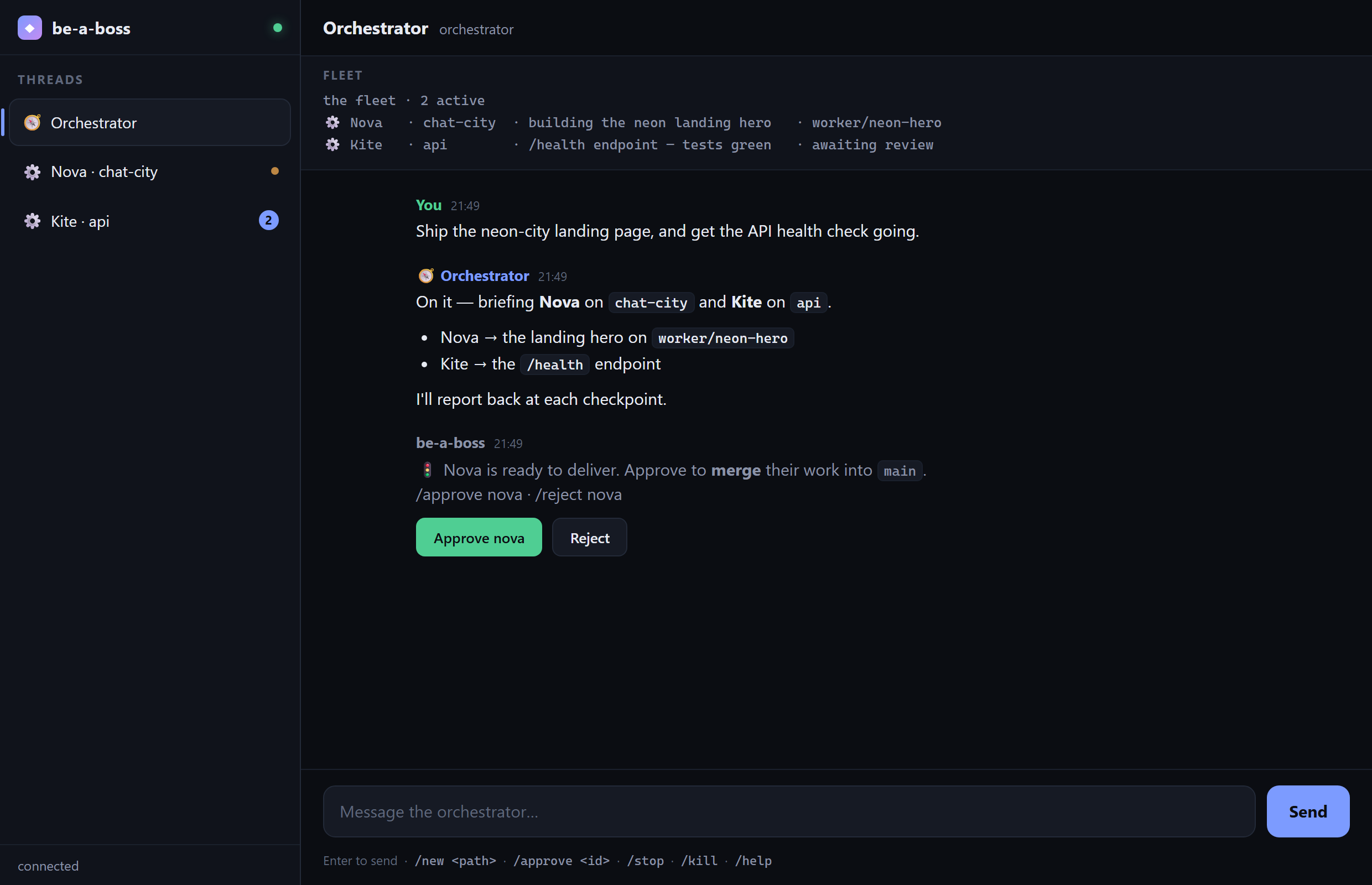
http://…/?token=… URL; it connects and drops you
in the orchestrator's thread. Type a goal.Two layers guard this surface: the localhost bind (a public bind is refused
unless you set WEB_ALLOW_INSECURE_BIND=1 and front it with your own auth) and
the per-connection token + Origin check above — so even other processes/pages on
your own machine can't drive it. Reach a remote box over an SSH tunnel. Set
PROJECTS_ROOT if you want bare project names to resolve somewhere other than your
home dir. (Change the bind with WEB_HOST / WEB_PORT; default 127.0.0.1:8765.)
Drive the org straight from a terminal:
uv run python -m beaboss.cli # or: boss-cli
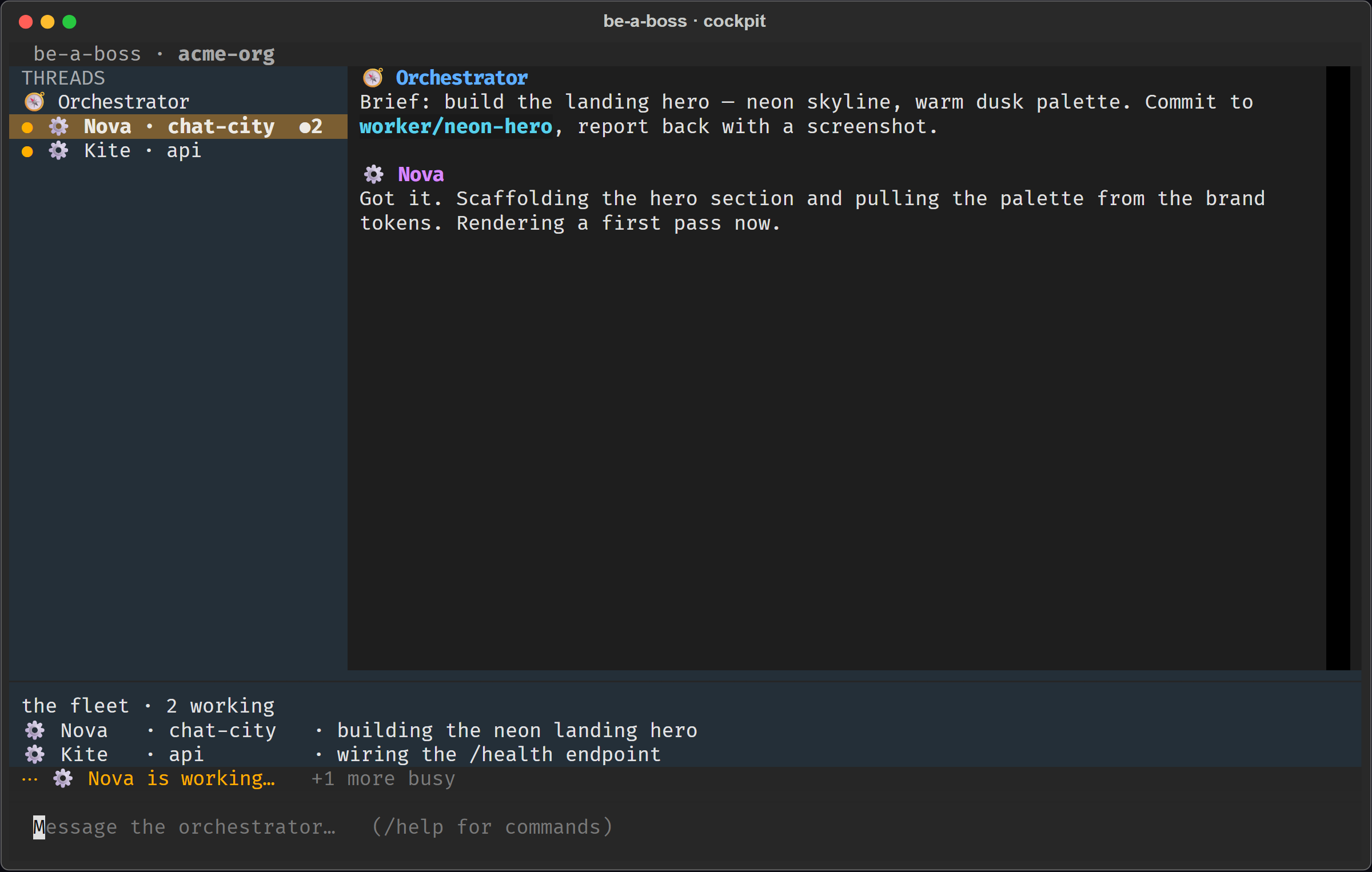
By default (a real terminal) it opens the cockpit — a TUI that assembles itself
as work happens (pip install "be-a-boss[tui]" for it; falls back to a plain
coloured stream otherwise).
Two more modes:
--json — newline-delimited JSON events on stdout, commands on stdin. This is how
an agent or script drives the whole org — the same event shapes the web surface
speaks. echo '{"type":"message","thread_id":"general","text":"..."}' | boss-cli --json--plain — a simple coloured line stream (good for logs / dumb terminals).Set PROJECTS_ROOT / STATE_DIR as for the web surface. No token needed — the CLI
runs locally, gated by who can run a process on the host.
Create the bot: @BotFather → /newbot → copy the
token. Add it as an Admin (with Manage Topics, and optionally Delete
Messages so /reset can also clear the #general/DM history) of a supergroup
that has Topics enabled. (Admins receive all messages — no need to touch privacy
mode.)
Configure: cp .env.example .env, set TELEGRAM_BOT_TOKEN and (for Docker)
HOST_DOCUMENTS + HOST_CLAUDE_DIR. Leave TELEGRAM_ALLOWED_USER_IDS blank
for now.
Run it — with no allowlist yet, it starts in setup mode (only /whoami
works, everything else is ignored):
docker compose up -d --build # always-on, auto-restarts; or, for dev: uv run boss
DM the bot /whoami. It replies with your numeric id — this works before
you're allowlisted, which is the whole point of setup mode. Put that id in
TELEGRAM_ALLOWED_USER_IDS, restart, and you're the boss. No third-party bot needed.
| Variable | Needed | Meaning |
|---|---|---|
TELEGRAM_BOT_TOKEN | ✅ | BotFather token |
TELEGRAM_ALLOWED_USER_IDS | after setup | Ids allowed to command the bot (blank ⇒ setup mode) |
HOST_DOCUMENTS | ✅ (Docker) | Host path to your projects, mounted as /workspace |
HOST_CLAUDE_DIR | ✅ (Docker) | Host path to your ~/.claude, mounted for auth |
BOT_NAME | – | Display persona (default Orchestrator) |
TELEGRAM_CHAT_ID | – | Pin the bot to one group (logged on first run) |
DEPLOY_BRAVENESS | – | How work lands: balanced (default; orchestrator merges on your say-so) or conservative (explicit /approve only) |
AGENT_MODEL, AGENT_MAX_TURNS | – | Backend-neutral session tuning (override per backend with CLAUDE_* / CODEX_*) |
Docker mounts HOST_DOCUMENTS → /workspace and sets PROJECTS_ROOT=/workspace,
so /new myapp targets /workspace/myapp. Use forward slashes on all platforms
(Windows: C:/Users/You/Documents).
Talk to the orchestrator — in Telegram's General topic, or the first thread of the web UI — plain language, no command:
"In myapp, reproduce the /login 500 and patch it. Separately, audit the deps in docs-site for anything unmaintained."
It hires workers (one per task), opens a thread for each, briefs them, and reports back. Open a worker's thread to watch the work; type there to steer.
Don't read the web surface as a lesser view: the web cockpit speaks the same slash-commands (below), renders markdown, turns the 🚦 delivery prompt into one-click Approve / Reject buttons, and takes attachments by 📎, drag-and-drop, or clipboard paste. The commands below work on Telegram, the web cockpit, and the CLI.
Commands in General:
| Command | Effect |
|---|---|
| (plain message) | A goal for the orchestrator |
/approve <id> · /reject <id> | Land or decline a worker's delivery (needed in conservative mode) |
/new <path> [name] | A direct session (no orchestrator) in <path> |
/list | All threads (orchestrator, workers, direct) + status |
/status | Bot health |
/setup | Check the group is configured right |
/reset | Factory reset — wipe all memory, state, worker topics, and the conversation itself: on web/CLI the log is cleared; on Telegram the #general/DM messages are deleted if I have the Delete-Messages right (asks to confirm) |
/whoami | Your Telegram id + the chat id (handy for the allowlist) |
In any session/worker topic:
| Command | Effect |
|---|---|
| (any message) | Sent to that session; in a worker topic the orchestrator sees it too |
| (a photo / file / video) | Saved to ./.beaboss-inbox/ and handed to the session (images also as vision) |
/stop | Interrupt the current turn |
/kill | End the session (a worker's clean worktree is removed; dirty ones kept) |
You → session. Send a photo, document, video, animation, audio, or voice note
into a thread (optionally with a caption) — on Telegram as an attachment, or in the
web cockpit via the 📎 button, drag-and-drop, or pasting an image straight from
the clipboard. It's saved under <repo>/.beaboss-inbox/ and handed to the session;
images in a model-supported format (PNG/JPEG/GIF/WebP) are additionally attached as
vision input so the agent can see them — other images are still saved as files it
can open by path. (Telegram fetches files up to 20 MB; the web accepts up to 8 MB per
file, 10 MB per message.)
Session → you. Each session gets in-process tools it can call to push content back into its own topic:
| Tool | Sends |
|---|---|
mcp__chat__send_photo(path, caption?) | an image, rendered inline |
mcp__chat__send_video(path, caption?) | a video |
mcp__chat__send_file(path, caption?) | any file, as a document |
mcp__chat__send_message(text) | an extra text message |
So you can ask a session to "screenshot the page and send it to me", "render the chart and send the PNG", or "build the report and send me the PDF" — and it will. Sends are confined to the session's workspace; uploads up to 50 MB.
Sessions authenticate as your Claude account. Two options:
~/.claude (compose does this). The
container reuses your existing login and persists session history for resume.
Trade-off: host and container share one credential.claude setup-token mints a long-lived, revocable
token — drop the ~/.claude mount and pass the token to the container instead.
Recommended if the box is shared or exposed. This also limits blast radius if a
session is ever prompt-injected.Please read SECURITY.md. In short, what keeps bypassPermissions
safe is the boundary around each surface plus the container. The Telegram bot
ignores anyone not in TELEGRAM_ALLOWED_USER_IDS; with an empty allowlist it runs in
setup mode — only /whoami works, everything else is refused — so it is never
open-to-all. The web surface binds to localhost, refuses a public bind
unless you explicitly opt in (WEB_ALLOW_INSECURE_BIND=1), and requires a
per-connection token + same-origin check so nothing else on the machine can drive
it. Worker subprocesses run with the bot's own secrets (TELEGRAM_BOT_TOKEN,
GH_TOKEN, WEB_TOKEN) scrubbed from their environment. How a change lands is
governed by DEPLOY_BRAVENESS: conservative requires an explicit human
/approve bound to the reviewed commit (the orchestrator can request but can't
merge by itself), while
balanced (the default) lets it land on your clear say-so — convenient, but a soft
gate; set conservative when you don't fully trust the inputs. A failed run_checks
blocks delivery either way. And whatever the mode, sessions can only touch what you
mount (/workspace), not the rest of your host.
uv sync
uv run boss            # run
Layout (core is transport-agnostic; adapters live in transports/):
src/beaboss/
  __main__.py            Telegram entrypoint (config → engine → telegram → poll)
  config.py              env-backed settings (transport-neutral)
  rendering.py           SDK message → text (pure, testable)
  core/
    ports.py             Transport / Speaker / Outbound / Inbound contracts
    session.py           CoreSession — one agent session, posts via a callback
    agent_backend.py     backend seam: Claude Code (default) | Codex
    engine.py            Engine — orchestrator, fleet tools, checkpoint inbox
    prompts.py           the org's system prompts (incl. the deploy-mode rules)
    worktrees.py         isolated git worktrees (fail-closed teardown)
    store.py             restart-proof thread/fleet state
    names.py             worker name pool
  transports/
    telegram.py          topics ⇄ threads, header-card identities, commands
    websocket.py         browser surface (any UI can speak this protocol)
    cli.py               CLI transport — emits the shared JSON event protocol
  web/                   `python -m beaboss.web` — serves the UI + WebSocket
    __main__.py          entrypoint; Origin + token gated
    static/              the app shell (index.html + client.js), served over HTTP
  cli/                   terminal surface: __main__.py (json/plain) + tui.py (cockpit)
Adding a transport = implement core.ports.Transport and feed the engine
InboundMessages. Nothing in core/ may import a chat platform.
Contributions welcome — keep session output plain text (chat entity parsing is
fragile) and verify SDK field names against the installed claude-agent-sdk.
See docs/architecture.md.
The promo video uses only free, license-clean assets:
MIT.
⚠️ Experimentelle Skill-Sammlung für deutsches Recht (Arbeits-, Gesellschafts-, Insolvenz-, Datenschutz-, Prozessrecht u
191 agents, 155 skills, and 82 plugins cross-compatible with Claude Code, Cursor, and Codex
Manage multiple Claude Code agents from TUI or Web with tmux and git worktrees
Project management using GitHub Issues + Git worktrees for parallel agent execution