

Are you the author? Sign in to claim
Local-first beat library for music producers. MCP server (Claude Code / Claude Desktop) for AI-driven cataloging, taggin

The operating system for beat producers.
A local-first library for every beat on your drive — catalog it once, run it as a native desktop app or in your browser, then ship it to every platform with an AI co-pilot doing the metadata grind for you.




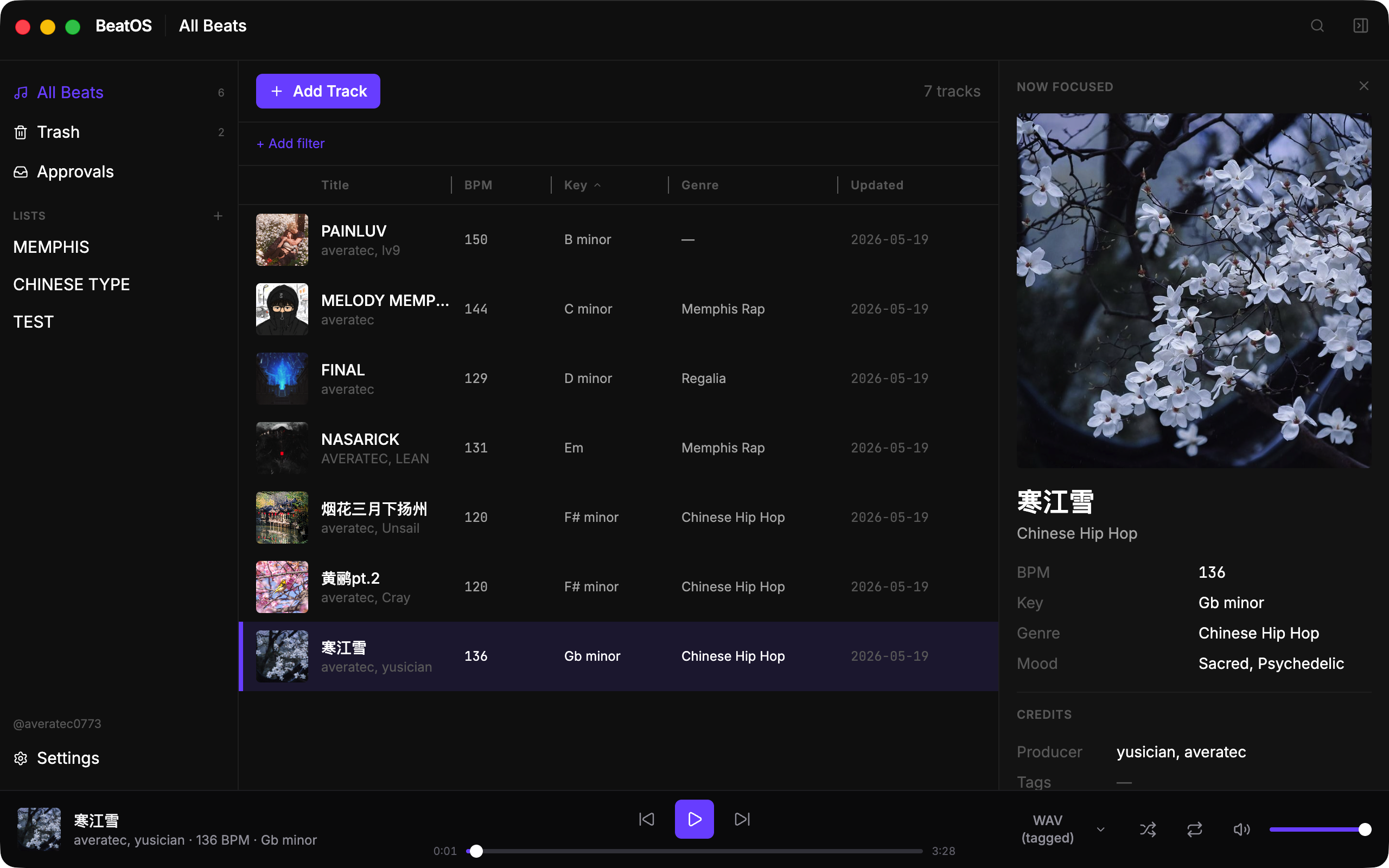
A working beat producer ends up with hundreds of WAV/MP3 files on disk, two versions of each (tagged + untagged), cover art that isn't always next to the file, and a different metadata vocabulary for every platform:
BeatOS fixes this by keeping one canonical catalog locally, then letting either you or an AI agent translate it into the per-platform metadata block on demand.
1. Local catalogA real SQLite database for every beat: title, BPM, key, genre (multi-value), mood (multi-value), producer credits, tags, license tiers + multi-currency pricing, description, audio assets (WAV/MP3 × tagged/untagged + loop + stems), cover art. Soft-delete trash with restore. Lists for curation. Rename + merge a producer across every track in one click. |
2. AI co-pilot (MCP)A first-class MCP (Model Context Protocol) server exposes the library to Claude Code, Claude Desktop, and any MCP client — 24 tools in the free build (29 with Pro): read your catalog, draft per-platform descriptions, rename producers, propose batch attachments. Every write goes through a |
3. Player + analysisSpotify-style bottom bar (Tone.js + Web Audio) that plays the FLOAT-32 WAVs your DAW actually exports — in the desktop app and the browser. Audio roles per track with instant switch; queue follows the visible filter; shuffle + repeat. On-demand BPM/key analysis via a pluggable engine — Essentia when the optional extra is installed, else the permissive librosa fallback — with per-field confidence scores. |
BeatOS ships as a native desktop app (Electron) and a browser app (a local web SPA served by the same Python sidecar). One React codebase builds both, so the two stay in lockstep: Electron-only capabilities (native file dialogs, Finder/Explorer integration, drag-out) route through a thin platform seam with a same-origin web implementation behind it.
| Desktop | The full native experience. make dev from source today; packaged installers at v0.1.0. |
| Browser | make web builds the SPA and serves it at http://127.0.0.1:8765 from the local sidecar — same backend, same library, near-identical UI, with zero native-packaging cost. Handy for cross-platform use without an Electron build. File picking uses a built-in local file browser; "reveal in Finder/Explorer" and downloads work because the backend is your own machine. |
Both are local-first and offline — the browser app talks only to 127.0.0.1. (Remote/LAN access and a mobile layout are on the roadmap.)
BeatOS is the first beat library built for the AI-agent era. The MCP surface is not a side feature — it's how publishing is going to scale to 10 platforms without manual labor.
Verified clients: Claude Code CLI · Claude Desktop · any MCP client speaking stdio JSON-RPC.
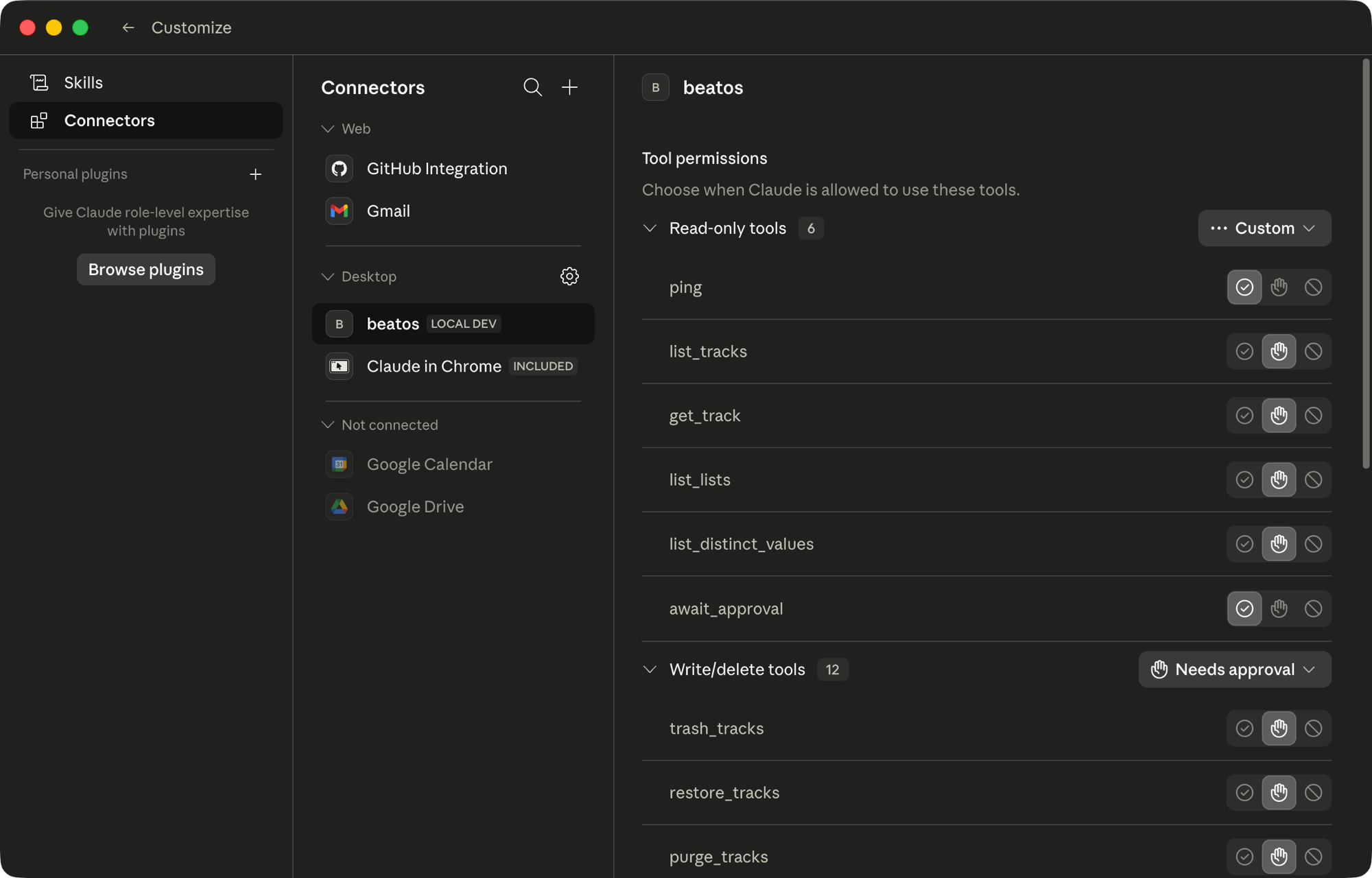
Tools shipping today (24 in the free build; the Pro build adds publish_track, publish_status, list_publish_platforms, publish_session_status + list_publish_jobs for 29):
| Surface | Tools |
|---|---|
| Read | list_tracks, get_track, search_tracks, list_lists, list_distinct_values, export_metadata, list_export_platforms, ping |
| Lifecycle | create_tracks, trash_tracks, restore_tracks, purge_tracks |
| Lists | create_list, update_list, delete_list, add_tracks_to_list, remove_tracks_from_list, reorder_list |
| Metadata | update_tracks, merge_metadata, set_license_tiers |
| Assets | attach_assets, detach_assets |
| Flow control | await_approval |
Why two-phase commit? Every write tool returns a token (preview only) — nothing touches the database. The token surfaces in the Agent Actions panel in BeatOS; you review the diff, then confirm. The agent calls await_approval to learn the outcome. By default an AI can never silently mutate your catalog, batch-edit your producer credits, or trash a track without you signing off — unless you deliberately switch the permission setting to auto-approve (or lock it to read-only).
Why batches? A folder-import of 50 tracks × 2 audio assets would otherwise be 100 approval clicks. create_tracks (≤100), attach_assets (≤500), detach_assets (≤500) all batch — one token, one click, atomic rollback if any file vanishes mid-approve.
Example flow (driven by Claude Code from your terminal):
You:    "Tag every beat above 140 BPM that has no genre with 'Trap' or 'Drill'
         based on the cover art and title. Show me the diff before applying."

Claude: [calls list_tracks(bpm_min=140) → 12 tracks]
        [reads metadata, drafts a patch]
        [calls update_tracks(items=[...]) → returns token abc123]

You:    [opens BeatOS Approvals panel, sees 12 proposed edits with rationale]
        [reviews 3, rejects 1, approves the batch]

Claude: [await_approval → status=approved, applies, reports back]
The same pattern drives on-demand per-platform metadata export today, and will drive publish drafts (Pro) and self-corpus RAG drafts (v0.3+).
| No server. | The sidecar binds 127.0.0.1 on a local port — and serves the browser front end from there too, same-origin. Nothing leaves the machine, including conversations with the MCP agent. |
| No account. | Single-user. No login, no sync, no cloud. |
| No telemetry. | Zero outbound calls from the app itself. |
| Your files stay put. | BeatOS references paths; nothing is moved or renamed unless you ask. |
| Your data is yours. | One SQLite file on your disk (~/Music/BeatOS/global.db by default). Open it with any tool. |
Packaged desktop installers will arrive at
v0.1.0together with the first publish adapter. Until then, run from source — see Develop. The browser front end needs no packaging:make weband open a tab.
Targets: macOS 12+ · Windows 10+ (desktop) · any modern browser (web). Linux works for development and the web front end, but isn't a supported desktop install target.
Prerequisites
uv — brew install uv (macOS) or pipx install uvSetup
make sync                              # resolve Python workspace
cd apps/desktop && npm install
Pro build (publishing). Publishing is a Pro feature in the private
packages/pro/submodule. With access to it:git submodule update --init packages/pro, thenuv pip install -e packages/pro/beatos-publish --no-deps+uv pip install "patchright>=1.40", then run withmake dev-pro(desktop) ormake web-pro(browser) — each reinstalls the engine afteruv sync, which the freemake dev/make webprune. Full steps inpackages/pro-mount-notes.md. Without it, the free build runs normally and greys out the publish entry.
make dev                               # desktop: Electron + sidecar (or: npm run dev:fresh)
make web                               # browser: build the SPA + serve it from the sidecar, open a tab
npm run logs:tail                      # follow main.log + sidecar.jsonl  (from apps/desktop)
No terminal? Double-click
start-beatos.bat(Windows) orstart-beatos.command(macOS) at the repo root — it checks/installs the prerequisites, then launches the browser or desktop app.
The MCP server lives at packages/beatos-mcp and speaks stdio. Add to your MCP client config:
{
  "mcpServers": {
    "beatos": {
      "command": "uv",
      "args": ["run", "--directory", "/absolute/path/to/beatos", "beatos-mcp"]
    }
  }
}
Then list_tracks and friends will be available as tools inside Claude.
cd apps/desktop
npx vitest run                         # renderer + main (Vitest)
npm run build && npm run smoke         # desktop end-to-end (Playwright _electron)
npm run build:web && npm run smoke:web # browser end-to-end (Playwright chromium)

uv run pytest packages/                # Python sidecar (core + http + mcp)
Electron 39 · React 19 · Vite · Tailwind · Radix UI · Zustand · TanStack Virtual · dnd-kit · Tone.js
Python 3.11 · FastAPI · aiosqlite · structlog · mcp (FastMCP) · librosa / essentia (optional) · Playwright
SQLite · Pydantic v2
The single React renderer builds to two targets — Electron (electron-vite) and a browser SPA (vite.config.web.ts) the FastAPI sidecar serves at /.
apps/desktop/              Electron shell + React renderer (also builds the browser SPA)
packages/
  beatos-core/             Pure Python business logic (no web/RPC deps)
  beatos-http/             FastAPI facade — serves the renderer API, /api/fs, and the web SPA
  beatos-mcp/              stdio MCP server for AI agents
  beatos-platforms/        Per-platform vocab maps
  pro/                     Private submodule — Pro features (platform publishing); absent in the free build
screenshots/               README assets
Currently in the dogfood phase — UI/UX patches land as 0.0.X.Y releases. The catalog, the AI/MCP surface, on-demand metadata export, and the desktop + browser front ends are shipped; platform publishing is a Pro module. Next up: the first packaged installer + publish adapter (NetEase Cloudmusic), and — for the web front end — remote/LAN access and a mobile layout.
Full plan: ROADMAP.md · Shipped history: CHANGELOG.md.
Apache License 2.0 — see LICENSE and NOTICE.
Copyright 2026 Scott Huang (averatec0773).
Made by averatec0773 · averatec.studio
Run analytics queries on ClickHouse — explore schemas, execute SQL, fetch results
Run Claude Code as an MCP server so any agent can delegate coding tasks to it
 @microsoft✓ Official
Browser automation using accessibility snapshots instead of screenshots
 @googleapis✓ Official
Google's universal MCP server supporting PostgreSQL, MySQL, MongoDB, Redis, and 10+ databases
