

Are you the author? Sign in to claim
An "LLM wiki" upgraded to a real database — typed entities, graph relations, HTTP API, and a built-in natural-language a

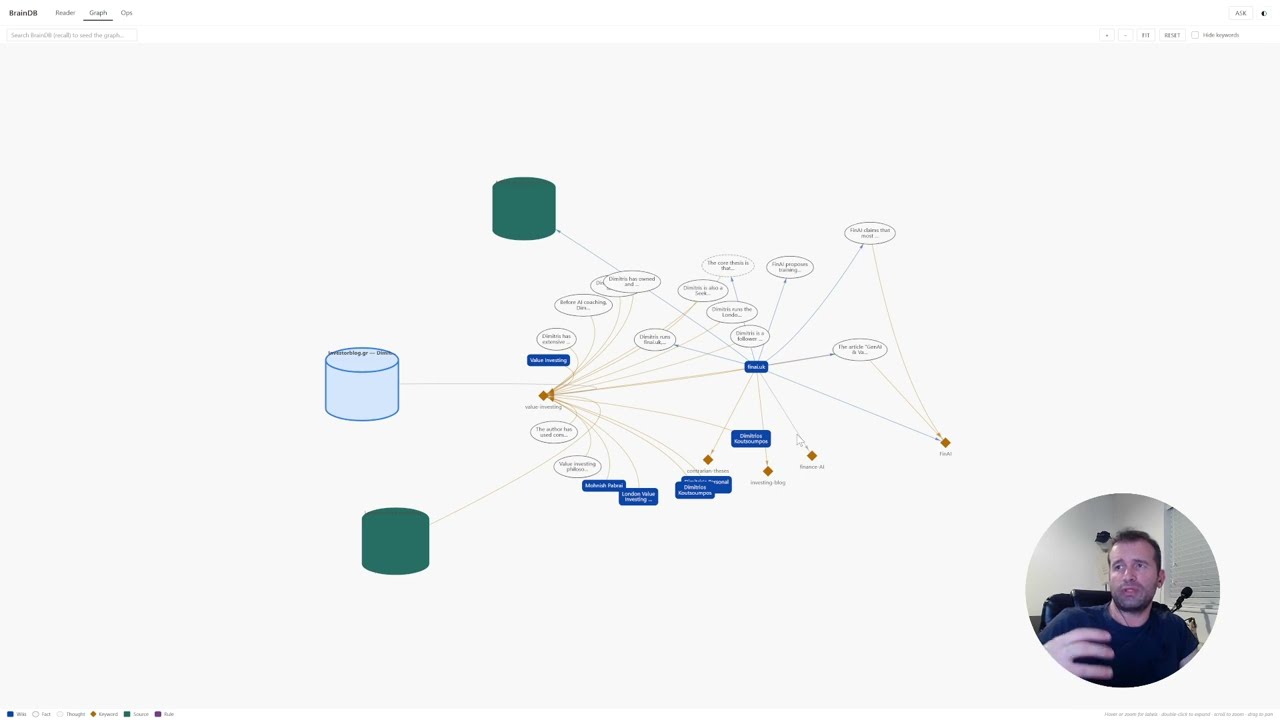
▶ Watch the walkthrough: youtu.be/AJ7iMOj4vvA — Karpathy's LLM wiki idea, on a SQL database, driven by REST APIs.
A memory database and REST API for LLM agents. Store and retrieve thoughts, facts, sources, documents, and behavioral rules — with fuzzy + semantic keyword search, graph traversal up to 3 hops, temporal decay, and always-on rule injection. Built to be driven externally by an LLM via HTTP calls.
It also ships with its own internal agent (OpenAI Agents SDK + LiteLLM with pluggable providers — DeepInfra is the recommended default, with NIM / local vLLM / others available via config) so external callers can talk to BrainDB in plain English via a single endpoint instead of orchestrating individual API calls.
Inspired by Karpathy's LLM wiki idea — give an LLM a persistent external memory it can read and write. BrainDB takes that further by adding structure, retrieval, and a graph on top of the "plain markdown files" baseline.
supports / contradicts / elaborates / derived_from / similar_to relations, combined fuzzy + semantic search, graph traversal up to 3 hops, and temporal decay so stale items fade while accessed ones stay sharp. Retrieval returns a ranked graph neighbourhood, not a pile of chunks.certainty, importance, emotional_valence), built-in text + pgvector search with geometric-mean scoring, always-on rule injection, automatic provenance, and runs on plain PostgreSQL + pg_trgm + pgvector — no new infrastructure to operate.derived_from; recall returns relevant nodes plus their graph neighbourhood; nothing needs to be read in full unless the agent asks for it.
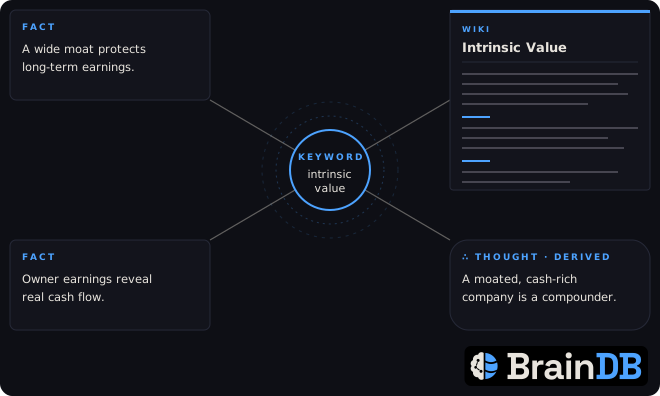
| Type | What it stores |
|---|---|
thought | Inferences, hypotheses, subjective observations |
fact | Objective information with certainty score |
source | URLs and external references |
datasource | Full documents or files |
rule | Behavioral guidelines (always_on rules inject into every context call) |
All entities share: keywords, importance, source (provenance: user-stated, agent-inference, document, third-party), notes, created_at, updated_at, access_count.
Relations connect any two entities with relation_type, relevance_score, importance_score, description, and notes.
BrainDB runs as Docker services — api, watcher (auto-ingests files), wiki_scheduler (auto-maintains wikis), and a read-only browser frontend — plus a database that is either bundled (default, zero install) or your own PostgreSQL. The two sidecars are hands-off: you never call the pipeline by hand.
git clone https://github.com/dimknaf/braindb.git
cd braindb
cp .env.example .env
.env.example ships with the internal DB enabled — a bundled Postgres (with pgvector) that starts as part of the stack. For most users there is nothing to do in this step.
The switch is one line in .env:
COMPOSE_PROFILES=internal-db # present = bundled DB starts automatically
Optional internal-DB knobs (defaults are fine): POSTGRES_PORT (host port for inspecting the DB with psql/adminer, default 5435), POSTGRES_DB, POSTGRES_USER, POSTGRES_PASSWORD. Note: these are baked into the data volume on first boot — to reset later: docker rm -f braindb_db && docker volume rm braindb_pgdata (wipes its data).
Bring your own Postgres instead? Remove the COMPOSE_PROFILES line and set DATABASE_URL — everything (host, port, db name, credentials) lives in that one URL:
Option A — Postgres running as another Docker container on the same network (e.g. a postgres_container):
DATABASE_URL=postgresql://postgres:password@postgres_container:5432/braindb
Make sure that container is attached to the local-network network from step 5.
Option B — Postgres running on your host machine (Docker Desktop's bridge lets the container reach the host):
DATABASE_URL=postgresql://postgres:password@host.docker.internal:5432/braindb
Option C — Remote Postgres (AWS RDS, Supabase, a home server, anything):
DATABASE_URL=postgresql://user:password@db.example.com:5432/braindb
External databases need the pg_trgm and pgvector extensions; the connecting user must be able to create them on first connection (migrations run CREATE EXTENSION IF NOT EXISTS on startup), or an admin pre-installs both.
The agent talks to any LiteLLM-supported backend. Recommended for new users: deepinfra with google/gemma-4-31B-it — fast (5–30s per agent call), cheap, validated end-to-end on the wiki/maintainer/writer pipeline. nim is a free-tier fallback (occasionally flaky). openai_compatible points the agent at any OpenAI-compatible /v1 endpoint (Ollama, LM Studio, copilot-api, a remote vLLM). The vllm_* profiles run a local model on your own GPU workstation — useful for offline / cost-free experiments, but require a running vLLM server reachable from the docker network (typically via SSH tunnel).
In .env:
LLM_PROFILE=deepinfra        # recommended default
DEEPINFRA_API_KEY=...        # if profile=deepinfra — get from https://deepinfra.com/
NVIDIA_NIM_API_KEY=...        # if profile=nim       — get from https://build.nvidia.com/
For a generic OpenAI-compatible endpoint (e.g. Ollama):
LLM_PROFILE=openai_compatible
AGENT_MODEL=openai/llama3.2:3b              # your served model, openai/ prefix
OPENAI_BASE_URL=http://host.docker.internal:11434/v1
OPENAI_API_KEY=                            # blank for local servers without auth
Only the key matching your chosen profile needs to be filled. Leave the others blank or absent.
Adding a third provider (Together, OpenAI, local vLLM, whatever) is a two-line entry in braindb/config.py::_LLM_PROFILES + an env var — no other code changes. See CONTRIBUTING.md for the recipe.
docker-compose.yml expects an external network called local-network so the containers can reach each other (and an external Postgres, if you use one) by DNS name:
docker network create local-network   # one-time, ignore error if it already exists
docker compose up -d --build
With the internal DB (default), this also starts the bundled Postgres and waits for it to be healthy before the API boots.
If you brought your own Postgres as a container (Option A in step 3), attach it to this network too:
docker network connect local-network postgres_container
curl http://localhost:8000/health
# {"status":"ok","embeddings":true}
API at http://localhost:8000. Swagger UI at http://localhost:8000/docs. Browser UI (read-only frontend) at http://localhost:8642. Database migrations run automatically on startup.
Drop a markdown file into data/sources/ and the watcher sidecar picks it up within ~7 seconds — see File Ingestion below.
| Method | Path | Description |
|---|---|---|
| POST | /api/v1/entities/thoughts | Save a thought |
| POST | /api/v1/entities/facts | Save a fact |
| POST | /api/v1/entities/sources | Save a source URL |
| POST | /api/v1/entities/datasources | Save a document |
| POST | /api/v1/entities/rules | Save a behavioral rule |
| GET | /api/v1/entities/{id} | Get any entity |
| PATCH | /api/v1/entities/{type}/{id} | Update entity |
| DELETE | /api/v1/entities/{id} | Delete entity |
| POST | /api/v1/relations | Create relation between entities |
| GET | /api/v1/entities | List/filter entities by type, keyword, source, importance |
| GET | /api/v1/entities/{id}/relations | View all relations for an entity |
| POST | /api/v1/entities/datasources/ingest | Read a file from disk and create a datasource entity |
| POST | /api/v1/memory/search | Fast fuzzy search |
| POST | /api/v1/memory/context | Full retrieval: fuzzy → graph → decay → rank |
| GET | /api/v1/memory/tree/{id} | Entity neighbourhood as a nested JSON tree |
| GET | /api/v1/memory/log | Activity log — when and how things happened |
| POST | /api/v1/memory/sql | Read-only SQL queries (SELECT/WITH only) |
| POST | /api/v1/memory/generate-embeddings | Batch-generate keyword embeddings |
| GET | /api/v1/memory/rules | All active rules |
| GET | /api/v1/memory/stats | Counts and activity |
| POST | /api/v1/agent/query | Natural language query — internal agent handles recall/save/relate |
See BRAINDB_GUIDE.md for full API reference with curl examples.
POST /api/v1/memory/context is the main endpoint. Keywords are the indexing layer — both the fuzzy and the embedding pathways match the query against keyword-entity content / embeddings, then entities surface via tagged_with edges. A keyword tagged on many entities is the hub; you don't need explicit elaborates / refers_to edges for an entity to be findable, as long as it has the right keywords.
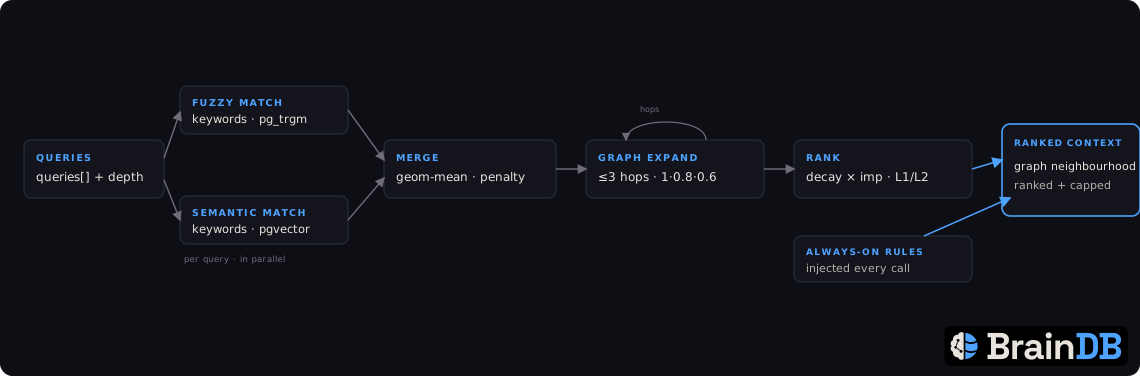
queries: ["topic1", "topic2"] to search multiple angles at once. Each query is matched against keyword entities by both pg_trgm trigram similarity AND query-embedding-vs-keyword-embedding cosine similarity; results are merged with the geometric mean (configurable missing_signal_penalty when only one signal fires)."Petros") reliably surface specific facts even when paired with broader semantic angles.user-profile tagging 100 facts) from monopolising top-N.relevance_score × importance_score; that product (< 1) compounds along the path, so distance fades naturally — weak-edge paths die fast, strong-edge paths persist.combined_score × effective_importance × accumulated_relevance, where accumulated_relevance is that compounded per-hop edge product (relevance × importance along the path; 1.0 for a direct hit). The LLM-visible cap stays at the caller's max_results (default 30); the scoring pool internally considers up to 500 candidates per query so narrow keywords are never excluded before they're evaluated.Single query (string) still works for backward compatibility.
Query strategy — prefer multiple short queries (a bare keyword + 1–2 broader phrases) over one long sentence. The keyword "Petros" matches the Petros keyword cleanly; the phrase "Petros person identity profile" matches the SAME keyword at a much lower score because pg_trgm dilutes against a longer query.
Instead of orchestrating individual API calls, you can talk to BrainDB in plain English via POST /api/v1/agent/query. The agent (built on the OpenAI Agents SDK + LiteLLM) decides which tools to call and returns a summary.
curl -X POST http://localhost:8000/api/v1/agent/query \
  -H "Content-Type: application/json" \
  -d '{"query":"What do you know about the user role and recent projects?"}'

# {"answer": "The user is ...", "max_turns": 20}
The agent has 21 tools — every single BrainDB endpoint plus delegate_to_subagent (which spawns a fresh agent in its own context for focused deep work) and final_answer (which ends the loop with a validated typed payload).
LLM provider — pluggable via .env:
LLM_PROFILE selects the backend. Profiles are defined in braindb/config.py (_LLM_PROFILES):
deepinfra — recommended default. Model google/gemma-4-31B-it. Fast (5–30s per agent call), cheap, validated end-to-end.nim — NVIDIA NIM, model google/gemma-4-31b-it. Free tier, occasionally flaky.openai_compatible — any OpenAI-compatible /v1 endpoint (Ollama, LM Studio, copilot-api, remote vLLM). Set AGENT_MODEL=openai/<model-id> (required — no default) and OPENAI_BASE_URL; OPENAI_API_KEY is optional for local servers without auth.vllm_workstation / vllm_workstation_qwen / vllm_workstation_gemma — local vLLM running on your own GPU (advanced / offline; needs the server reachable from the docker network, usually via SSH tunnel).Each profile is a model-prefix + env-var pair; adding a new one is a dict entry.
LLM_PROFILE=deepinfra         # or nim / openai_compatible / vllm_workstation
DEEPINFRA_API_KEY=...         # required if profile=deepinfra (https://deepinfra.com/)
NVIDIA_NIM_API_KEY=...        # required if profile=nim (https://build.nvidia.com/)
VLLM_API_KEY=...              # optional, only if local vLLM is started with --api-key
OPENAI_BASE_URL=...           # required if profile=openai_compatible (the server's /v1 URL)
OPENAI_API_KEY=...            # optional, only if that endpoint requires auth
AGENT_MODEL=                  # optional override; REQUIRED for openai_compatible
Verbose logging: set AGENT_VERBOSE=true in .env to log every tool call (entry args + exit elapsed/result) to stdout, visible via docker logs braindb_api -f.
This repo ships two Claude Code skills. Pick one (or install both):
| Skill | When to use |
|---|---|
skills/braindb/SKILL.md | Direct curl-based recall/save. Claude formulates queries, calls individual API endpoints, writes saves explicitly. More verbose context, full control. |
skills/braindb-agent/SKILL.md | Thin wrapper that delegates everything to POST /agent/query. Claude sends a natural-language request, the internal agent does the work. Cleaner conversation context. |
Both auto-detect when BrainDB is down and offer to start docker compose up -d themselves. No hooks, no settings.json editing.
Linux / macOS:
# Direct skill
mkdir -p ~/.claude/skills/braindb
cp skills/braindb/SKILL.md ~/.claude/skills/braindb/SKILL.md

# Agent skill
mkdir -p ~/.claude/skills/braindb-agent
cp skills/braindb-agent/SKILL.md ~/.claude/skills/braindb-agent/SKILL.md
Windows (PowerShell):
New-Item -ItemType Directory -Force -Path "$HOME\.claude\skills\braindb"
Copy-Item "skills\braindb\SKILL.md" "$HOME\.claude\skills\braindb\SKILL.md"
New-Item -ItemType Directory -Force -Path "$HOME\.claude\skills\braindb-agent"
Copy-Item "skills\braindb-agent\SKILL.md" "$HOME\.claude\skills\braindb-agent\SKILL.md"
Verify: open a new Claude Code session. Type /braindb or /braindb-agent — the skill should load.
The skill checks whether the repo copy has been updated (e.g. after git pull). If the repo version is newer than your personal copy, Claude will automatically copy the update and tell you. No manual re-install needed after the initial setup.
Single source of truth: the skill lives at
skills/braindb/SKILL.mdin this repo. If you edit your personal copy at~/.claude/skills/braindb/SKILL.md, also update the repo copy (and send a PR) so everyone benefits.
If you'd rather have BrainDB always running (even before any skill is invoked), add a SessionStart hook to your ~/.claude/settings.json:
{
  "hooks": {
    "SessionStart": [
      {
        "hooks": [
          {
            "type": "command",
            "command": "curl -sf http://localhost:8000/health > /dev/null 2>&1 || (cd /ABSOLUTE/PATH/TO/braindb && docker compose up -d > /dev/null 2>&1) || true",
            "async": true,
            "timeout": 30
          }
        ]
      }
    ]
  }
}
Replace /ABSOLUTE/PATH/TO/braindb with your repo path. The hook is async (non-blocking).
Use BrainDB as the memory backend for other agents. Hermes Agent (Nous Research) has a ready-made provider in integrations/hermes/: a native memory-provider plugin (braindb/) that gives the agent a braindb_ask gateway plus a braindb_ingest tool, and a hardened, tool-stripped Docker sandbox (sandbox/) for safely trying it on a throwaway host. Each folder's README has the setup.
Drop a file in data/sources/ — the always-on watcher sidecar picks it up within 7s, ingests it, and runs a chunked fact-extraction pipeline that saves atomic facts into the knowledge graph linked back to the source via derived_from relations. Processed files move to data/sources/ingested/, failures to data/sources/failed/ with an .error.txt sidecar.
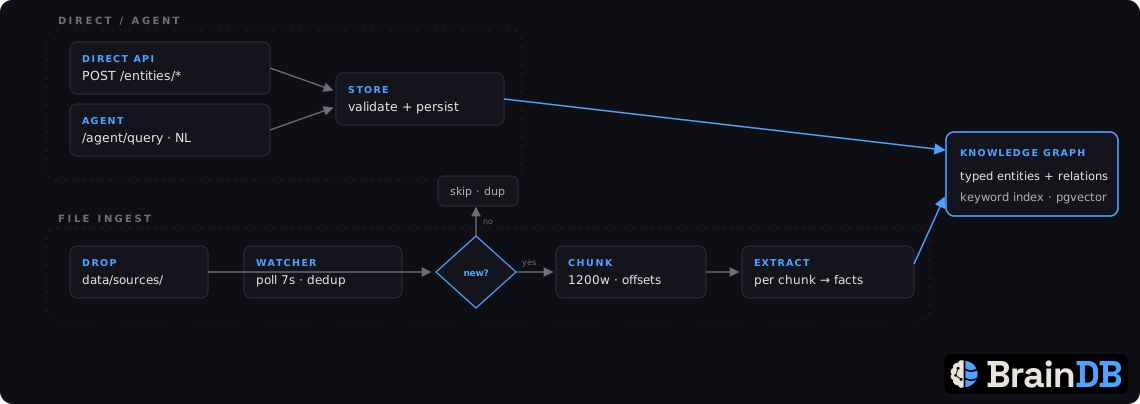
cp ~/some-article.md data/sources/
docker logs braindb_watcher -f   # watch the pipeline
If you prefer to trigger ingestion explicitly from code, the endpoint still works:
curl -X POST http://localhost:8000/api/v1/entities/datasources/ingest \
  -H "Content-Type: application/json" \
  -d '{"file_path": "data/sources/article.md", "keywords": ["topic"], "importance": 0.7, "source": "document"}'
It's idempotent by content hash — re-calling with the same bytes returns 200 (existing) instead of 201 (new).
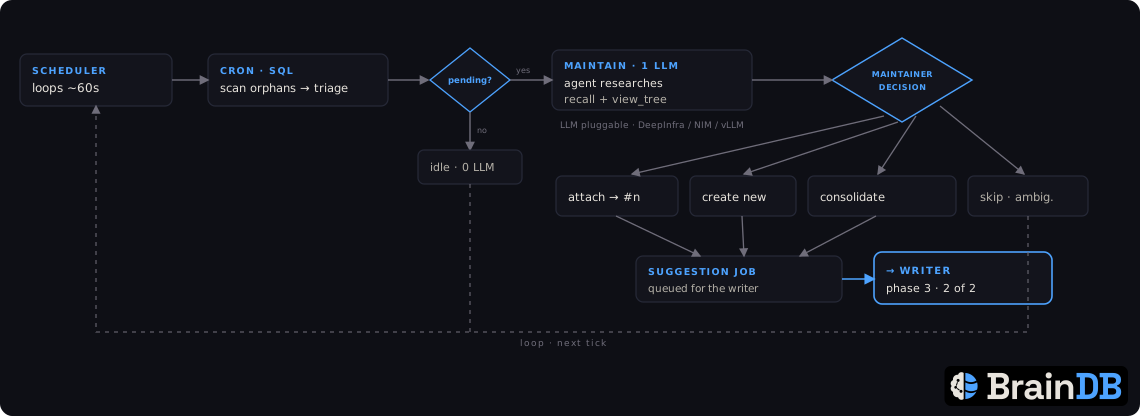
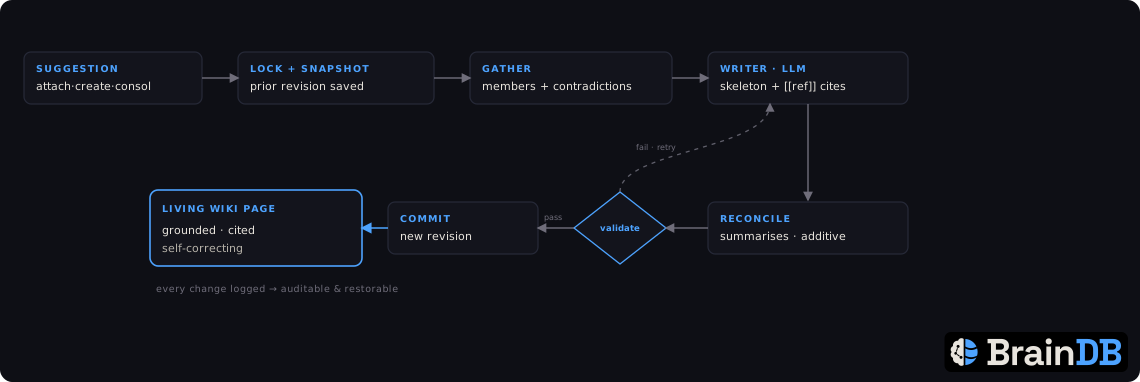
The second always-on sidecar, wiki_scheduler, makes the knowledge graph
self-organise into human-readable wiki pages with zero manual steps —
the same hands-off model as file ingestion. It loops in the background:
discovers entities not yet covered by a wiki, lets the in-house agent decide
where each belongs (attach to an existing wiki / create a new one / consolidate
duplicates / skip), and the writer agent researches and writes/maintains each
page, keeping it grounded and self-correcting. Started automatically by
docker compose up -d (like watcher); just watch it work:
docker logs braindb_wiki_scheduler -f   # the autonomous loop
docker logs braindb_api -f              # the agent doing the work
You do not drive this by hand. The POST /api/v1/wiki/{cron,maintain,write}
endpoints exist for debugging / inspection only — normal operation is the
sidecar. (Optional read-only review: docker compose exec api python -m braindb.tools.export_wikis writes a markdown snapshot of every wiki +
provenance to data/wiki_review/.)
Cost control: like the watcher, this sidecar drives the LLM
automatically. To run without it, bring the stack up excluding the service or
scale it to 0 (docker compose up -d --scale wiki_scheduler=0), exactly as
you would for the watcher; or point LLM_PROFILE at a local model.
A small vanilla-JS frontend ships under frontend/ — no build step — and is served by the stack itself: after docker compose up -d, open http://localhost:8642 (change the port with FRONTEND_PORT in .env). Three views (Reader for browsing wikis, Graph for visual exploration, Ops for watching the maintainer/writer pipeline) plus an Ask drawer that talks to the agent endpoint. The UI calls the BrainDB API at http://localhost:8000 from your browser.
Prefer no extra container? Any static file server over frontend/ works too, e.g. cd frontend && python -m http.server 8642. See frontend/README.md for the design notes.
pg_trgm and pgvectorsentence-transformers + Qwen/Qwen3-Embedding-0.6B for keyword embeddingsopenai-agents[litellm] + LiteLLM for the internal agent (DeepInfra / NIM / others pluggable via LLM_PROFILE)api + watcher + wiki_scheduler + frontend services, with a bundled Postgres (default) or your own⚠️ Experimentelle Skill-Sammlung für deutsches Recht (Arbeits-, Gesellschafts-, Insolvenz-, Datenschutz-, Prozessrecht u
Manage multiple Claude Code agents from TUI or Web with tmux and git worktrees
Project management using GitHub Issues + Git worktrees for parallel agent execution
Core skills library for Claude Code with 20+ battle-tested skills including TDD, debugging, and brainstorming