

Are you the author? Sign in to claim
Use Claude Code / Codex as multiple chiefs of staff
As you work with AI, your attention gets fragmented — driving multiple planning tasks while overseeing multiple implementation tasks. Chat quickly becomes the wrong UX for piloting a fleet of agents.
This skill lets you use Claude Code / Codex as multiple chiefs of staff (lieutenants). You get a web UI where you work together, as work items get done by independent agent sessions on a kanban board.
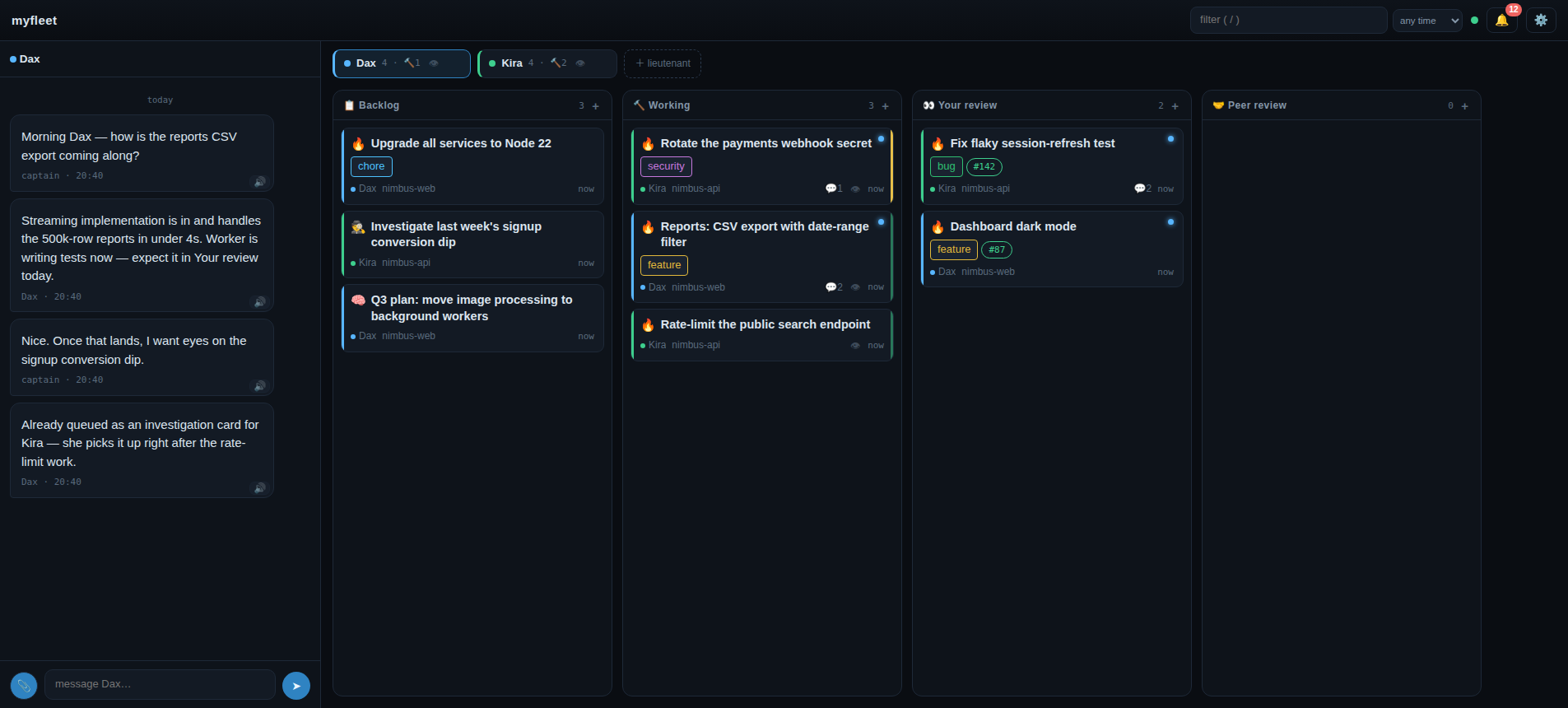
Just some dependencies and a new skill:
# dependencies
curl -fsSL https://kunchenguid.github.io/treehouse/install.sh | sh
curl -fsSL https://raw.githubusercontent.com/kunchenguid/no-mistakes/main/docs/install.sh | sh

# bridge-commander
npx skills add tonylampada/bridge-commander -g -y   # first /bridge-commander run clones the full tool
myfleet)claude in that folder, inside tmux (not optional — the lieutenant lives in the tmux session)/bridge-commanderhttp://localhost:4780/)The board region has three modes, toggled next to the filter (▦ / ☰ / 🧊):
Filtering is one shared control across all three: the topbar text input plus the funnel popup (status / type / owner / label / updated — every dimension multi-select, OR within a dimension, AND across). Clicking a label or owner anywhere toggles it as a filter chip; the funnel badge counts what's active.
node dev/ui-server.js (default 127.0.0.1:4790, --port/--host flags)
serves the real ui/ against an in-memory fixture board from dev/fixtures/ —
every endpoint faked, writes mutate and re-broadcast, nothing persists. Iterate
on the UI with realistic gnarly states (dead lieutenants, giant cards, a
paginated archive) without touching a live workspace.
tmux, gitgit worktree)no-mistakes-mode projects; the /no-mistakes skill appears after running no-mistakes init in the project--harness codex (optional)Per-workspace config lives in .bridge-commander/config.json:
| Key | Default | Meaning |
|---|---|---|
port | 4780 | server port (also --port N on init/open) |
host | 127.0.0.1 | bind address — see network exposure below |
harness | claude | default agent harness (claude | codex) |
voices | — | UI text-to-speech voice filter |
Env knobs (set on the server process):
| Variable | Default | Meaning |
|---|---|---|
BC_SUPERVISE_INTERVAL_MS | 30000 | supervision tick (lieutenant respawn, dead-worker detection); 0 disables |
BC_PRWATCH_INTERVAL_MS | 120000 | PR watch tick; 0 disables |
BC_UPLOAD_MAX_BYTES | 10485760 | per-file chat upload cap |
BC_WORKER_TTL_SECS | 600 | card status lease TTL — working/needs-you decays to idle past it |
BC_WORKTREE_TOOL | auto | treehouse | git — worker worktree provisioning |
BC_HARNESS_STATE | ~/.bridge-commander/harness | harness state dir (prompts, session ids, turn-end logs) |
BC_GH_CMD | gh | gh binary used by the PR watch |
BC_TURNEND_URL | — | default callback URL baked into installed turn-end hooks |
BC_SEND_RETRIES / BC_SEND_SLEEP_MS | 3 / 400 | verified-submit tuning for harness.send |
BC_HOOK_TIMEOUT_MS | 120000 | per-script timeout for workspace lifecycle hooks |
BC_SYSLOAD_MS | 2000 | monitoring panel (⚙️ → machine load) sample interval; the sampler runs only while the panel is open |
The workspace can react to card/worker lifecycle events with its own scripts: every
executable file in .bridge-commander/hooks/<event>/ runs on that event (alphabetical,
sequential, cwd = workspace root) with context in env — BC_EVENT, BC_CARD, BC_REPO,
BC_WORKTREE, BC_BRANCH. Events: worker-done, worker-died, card-archived (fires
before the worktree is released). Hooks are fire-and-forget — a failure or timeout never
blocks the lifecycle; results land on the card timeline (hook-ran / hook-failed).
Typical use: tearing down infrastructure a worker left running (dev containers, compose
stacks) when its card finishes.
The board has no application-level auth — whoever reaches the bind address fully controls the board, including starting workers (running code):
127.0.0.1).host to that interface's address; a loopback listener is
kept alongside. The mesh is your only auth boundary.0.0.0.0.How it works inside: ARCHITECTURE.md. The conceptual API (docs/api/overview.md) is the spec the implementation follows.
1000+ skills curated from Anthropic, Vercel, Stripe, and other engineering teams
Agent harness performance optimization with skills, instincts, memory, and security
Design enforcement with memory — keeps your UI consistent across a project
Detects 37 AI writing patterns and rewrites text with human rhythm across 5 voice profiles