

Are you the author? Sign in to claim
Bridgy- phone-driven bridge that lets you talk to Claude Code from anywhere via a Tailscale PWA. FastAPI + WebSocket, ru
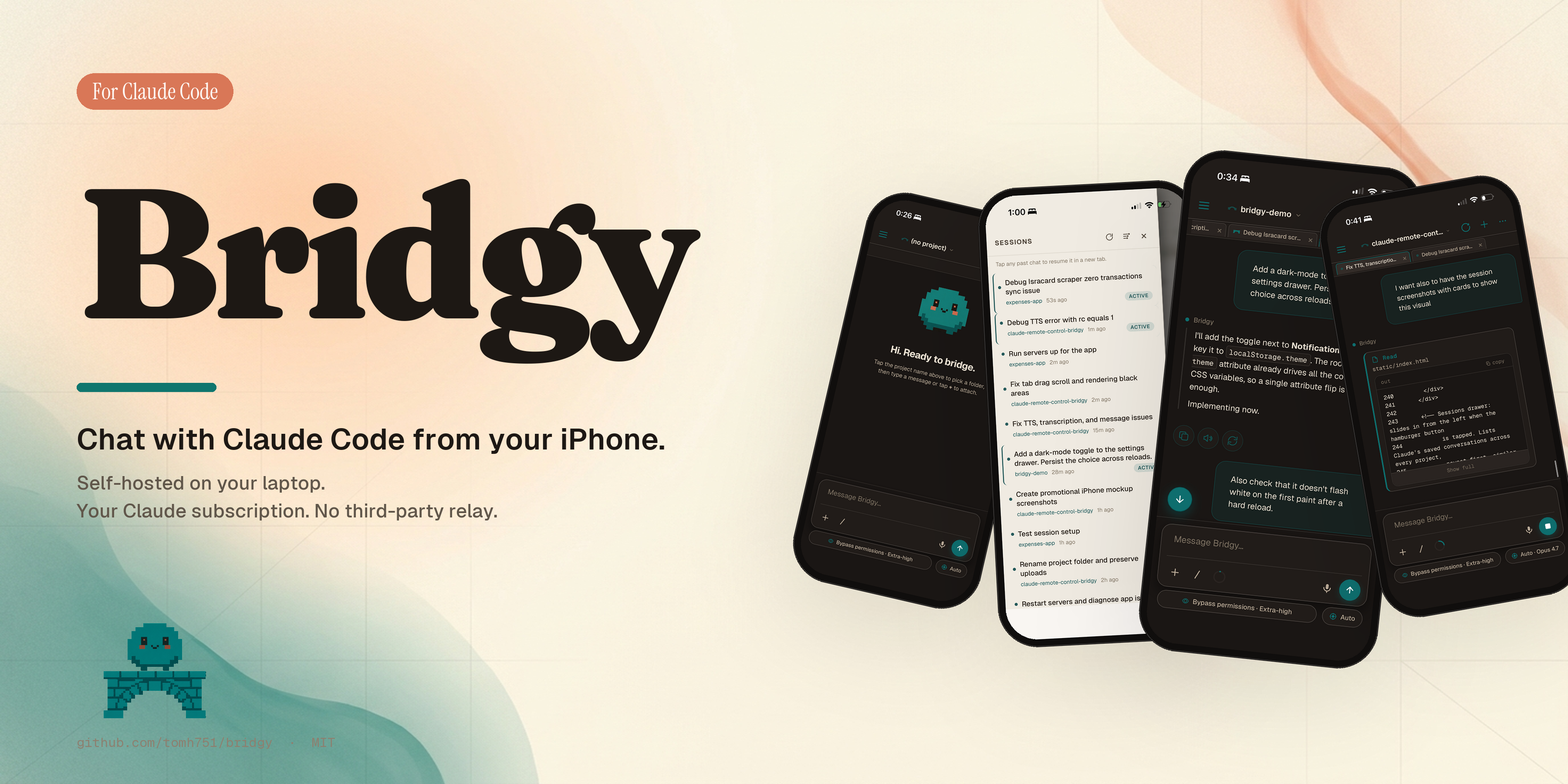
Self-hosted on your laptop · Your Claude subscription · No third-party relay
A self-hosted mobile bridge to Claude Code running on your laptop.
Use your iPhone (or any phone) to chat with Claude Code running on your Windows / macOS / Linux machine — over Tailscale (or any other tunnel you prefer), no public exposure, your own Claude subscription, no third-party relay. Drive multiple parallel conversations from a multi-tab PWA, watch your laptop's tool calls stream live, hand sessions off between your desktop and your phone.
⚠️ Read the Security warnings section before exposing this on any network. A connected client of this bridge can run arbitrary shell commands on your laptop.
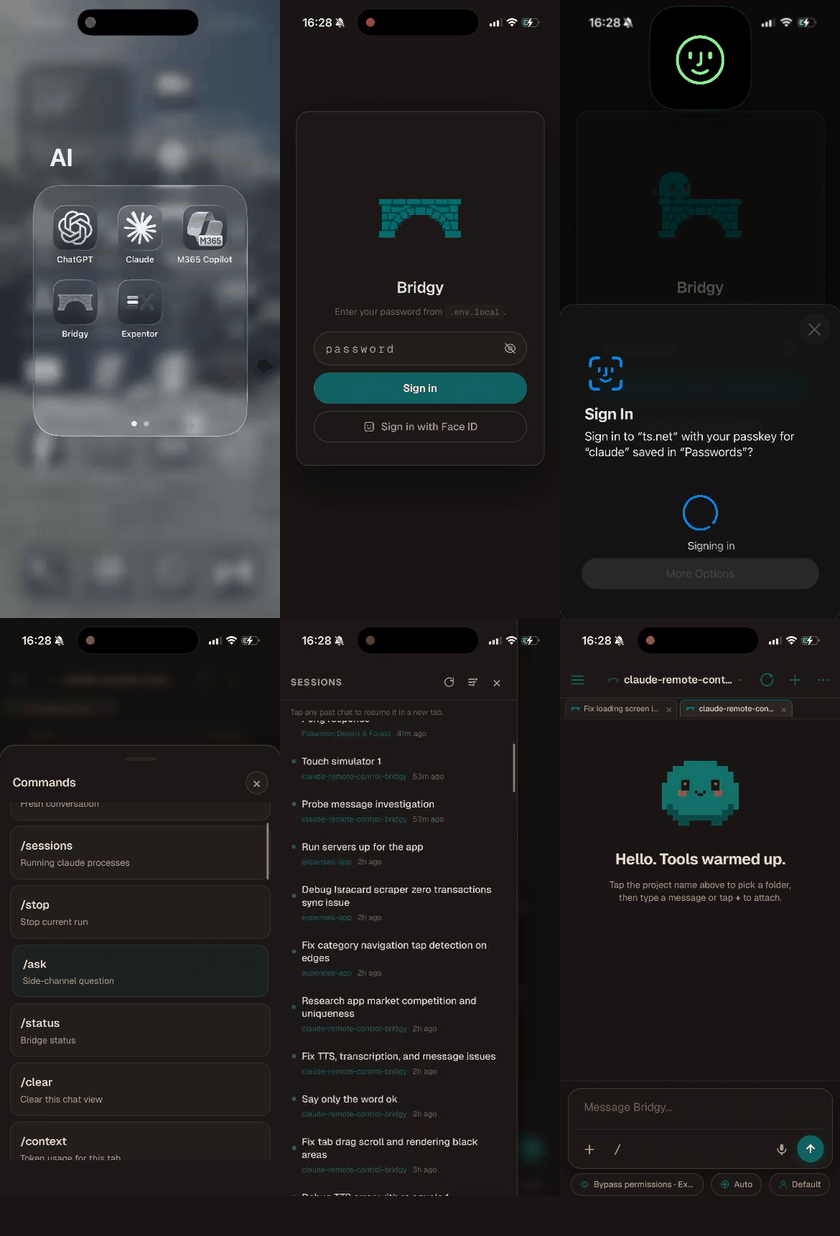
Real iPhone screen recording: switching tabs, dictating a prompt with the mic button, watching tool calls stream in, jumping back to a past chat from the Sessions drawer.
git clone <repo>; cd bridgy; .\scripts\setup.ps1git clone <repo>; cd bridgy; ./scripts/setup.sh.env.local — set PROJECTS_ROOT (folder holding your projects) and WEB_PASSWORD (min 10 chars, use a passphrase)..\scripts\start.ps1 (Windows) or ./scripts/start.sh (macOS / Linux).Everything else (HTTPS for mic + passkeys, alternative tunnels if you don't want Tailscale, environment knobs, security model) is covered in the sections below. No third-party accounts or API keys beyond your Claude CLI are needed — VAPID push keys auto-generate locally on first boot.
The official Claude Code mobile experience is claude remote-control (a.k.a. /rc), which pairs your laptop's interactive session with Anthropic's mobile app via their relay. It's great — when you want it. But it requires:
This project is the alternative for everything /rc doesn't cover:
Both can coexist. Use /rc when you want true same-session sync with VSCode; use this bridge for everything else.
┌──────────────┐         Tailscale HTTPS         ┌────────────────────┐
│  iPhone PWA  │ ◄────────────────────────────► │  FastAPI + WS      │
│  (Safari →   │                                 │  bridge on laptop  │
│   home tile) │                                 └──────────┬─────────┘
└──────────────┘                                            │
                                                            │ asyncio.create_subprocess_exec
                                                            ▼
                                                  ┌────────────────────┐
                                                  │  claude -p         │
                                                  │  (your local CLI)  │
                                                  └─────────┬──────────┘
                                                            │
                                                            ▼
                                                  ┌────────────────────┐
                                                  │  Your AI projects  │
                                                  │  under PROJECTS_   │
                                                  │  ROOT              │
                                                  └────────────────────┘
The bridge spawns claude -p per turn and streams its stream-json output back to the phone over WebSocket. If a Claude run writes an image or video into your project, the bridge auto-attaches the file to the chat. The watched subdirectory list is controlled by the WATCH_FOLDERS env var — see the Configuration reference below for the default + how to change it.
claude --version works, ~/.claude/.credentials.json is populated)MediaRecorder + getUserMedia over HTTPS (universal on iOS Safari 14+, modern Chrome, modern Firefox). Audio is captured on the phone and POSTed to the laptop, where local Whisper (faster-whisper) transcribes it in memory — no cloud APIs, no audio written to disk. The model auto-downloads to ~/.cache/huggingface on first use (~140 MB for the default base.en); tune via WHISPER_MODEL / WHISPER_DEVICE / WHISPER_COMPUTE_TYPE in .env.local.The bridge has been tested on Windows 11 with PowerShell. Launcher scripts for both Windows (scripts\setup.ps1 / scripts\start.ps1) and Unix-likes (scripts/setup.sh / scripts/start.sh) live in the scripts/ folder.
The bridge spawns the claude CLI as a subprocess — it doesn't depend on a particular IDE. You can have Claude Code installed via:
claude on PATH)…and the bridge works alongside all of them. The only constraint is that two processes can't hold the same session jsonl at the same time — so if VSCode has a Claude conversation open in a project, the phone can READ that session but not write to it until VSCode's panel is closed. Each new chat tab on the phone gets its own session UUID, so day-to-day parallel use is fine.
git clone https://github.com/tomh751/bridgy.git
cd bridgy
On Windows:
.\scripts\setup.ps1
On macOS / Linux:
./scripts/setup.sh
Either script creates .venv, installs requirements.txt, and copies .env.local.example to .env.local.
Open .env.local and at minimum set:
PROJECTS_ROOT=C:\path\to\your\projects        # the folder that contains your projects
WEB_PASSWORD=pick-a-strong-passphrase         # min 10 chars; use a passphrase, not a single word
Avoid putting PROJECTS_ROOT inside a cloud-sync folder (OneDrive / Dropbox / iCloud) — the bridge stores a passkey credentials file there and you don't want that synced. Everything else has sensible defaults — see .env.local.example for the full reference (watcher folders, resource caps, optional HTTPS URL).
iOS PWAs need HTTPS for the microphone API and Web Authentication (passkeys). The bridge itself does not terminate TLS — put a TLS proxy in front of it. The simplest path is Tailscale Serve:
tailscale serve --bg --https=8787 http://localhost:8787
This exposes the bridge at https://your-laptop.tailXXXX.ts.net:8787 with a valid cert. Once that's running:
CRC_HTTPS_URL=https://your-laptop.tailXXXX.ts.net:8787
CRC_COOKIE_SECURE=true
The CRC_HTTPS_URL lets the bridge's HTML auto-redirect HTTP visits to the HTTPS URL. CRC_COOKIE_SECURE=true ensures the auth cookie is only sent over HTTPS.
If you skip this, plain HTTP works on Tailscale (the tunnel encrypts everything anyway) but the phone misses mic + passkeys.
Windows:
.\scripts\start.ps1
macOS / Linux:
./scripts/start.sh
You'll see:
bridge online — projects_root=... web=on (web-only build)
web UI online: http://0.0.0.0:8787
iPhone (iOS Safari):
https://your-laptop.tailXXXX.ts.net:8787 (the Tailscale MagicDNS hostname, or whatever public URL your tunnel hands you).WEB_PASSWORD you set in step 2.Android (Chrome / Edge):
https://your-laptop.tailXXXX.ts.net:8787.WEB_PASSWORD you set in step 2.You're done. Pick a project from the topbar, type a prompt, and Claude runs it on your laptop with output streaming live to the phone.
The bridge is a normal FastAPI server listening on WEB_PORT (default 8787). It just needs to be reachable from your phone. You don't have to use Tailscale. Any of the options below works; pick the one that fits your tolerance for setup and your privacy preferences.
| Option | Setup effort | Cost | Notes |
|---|---|---|---|
| Same Wi-Fi only | Zero | Free | Use http://<laptop-LAN-IP>:8787 from the phone. Find the IP via ipconfig (Windows) or ifconfig / ip addr (Unix). Mic + passkeys need HTTPS, which plain LAN doesn't provide — fine for testing, limited for daily use. |
| Tailscale (recommended) | 5 min | Free for personal use | Install on phone + laptop, sign into the same tailnet, use MagicDNS hostname. Add tailscale serve --bg --https=8787 http://localhost:8787 for valid HTTPS. Mesh handles roaming networks automatically. |
Cloudflare Tunnel (cloudflared) | ~10 min | Free | Run cloudflared tunnel --url http://localhost:8787 on the laptop. Cloudflare hands you a public *.trycloudflare.com URL (or a custom domain). Set CRC_HTTPS_URL to that URL and you're done. Best non-VPN option. |
| ngrok | ~5 min | Free tier OK; paid for stable URLs | ngrok http 8787 → public URL. The bouncing free-tier URL means you re-enter it on every restart, so it's better for one-off demos than daily use. |
| WireGuard / Headscale | 30–60 min | Free + cheap VPS | Self-hosted VPN. Headscale is a drop-in open-source replacement for Tailscale's coordination server. Most "you own the entire path" option. |
| SSH reverse tunnel to a VPS | 30 min | ~$4/month VPS | ssh -R 8787:localhost:8787 user@vps, then point your phone at https://vps.example.com (with nginx + Let's Encrypt). Maximum control, more moving parts. |
Whichever you pick: always set WEB_PASSWORD to a strong passphrase, and set CRC_COOKIE_SECURE=true if you have any HTTPS terminator in front of the bridge (Tailscale Serve, cloudflared, nginx, etc.). The bridge's auth model assumes the network is the first wall; the password is the second.
See .env.local.example for the complete annotated config. Common knobs:
| Variable | Default | Purpose |
|---|---|---|
PROJECTS_ROOT | required | Parent folder; each subfolder = a project. Don't point at a cloud-sync folder. |
WEB_HOST | 0.0.0.0 | Listen interface. Use 127.0.0.1 for local-only (no LAN exposure). |
WEB_PORT | 8787 | Port for the PWA. |
WEB_PASSWORD | required | Login password for the phone. Min 10 chars; use a passphrase. |
WORKSPACE_ROOT_LOCK | true | When true (default), the workspace picker cannot browse outside PROJECTS_ROOT. Set to false to opt into the wider "browse the whole laptop" UX — that widens the attack surface of an authenticated session. |
CRC_HTTPS_URL | empty | Public HTTPS URL for auto-redirect (e.g. Tailscale Serve URL). |
CRC_COOKIE_SECURE | false | Set true when fronting with HTTPS (Tailscale Serve, cloudflared, etc.). |
CLAUDE_CMD | claude | Path / shell name for your Claude CLI. |
CLAUDE_MODEL | empty | Model override (claude-opus-4-7, claude-sonnet-4-6, etc.) — empty = CLI default. |
CLAUDE_DEFAULT_PERMISSION_MODE | auto | auto (bypass), plan, or edits. auto = arbitrary code execution by anyone who can log in. |
LAN_IP | auto-detected | Override the IP the bridge tells Claude when starting dev servers. |
WATCH_FOLDERS | assets,output,screenshots | Folders inside each project that the watcher monitors for new media. |
MAX_MEDIA_MB | 20 | Per-file cap for watcher uploads. |
MAX_CONCURRENT_RUNS | 6 | Global ceiling on simultaneous claude subprocesses. |
This bridge can run arbitrary code on your laptop. Read every item below before you start it on any non-isolated machine. The auth model is a single shared password + an HMAC-signed cookie, designed for the single-user, trusted-network case.
CLAUDE_DEFAULT_PERMISSION_MODE=auto passes --dangerously-skip-permissions to Claude Code, which auto-approves every tool call including Bash. If you don't want that, set the env to plan (read-only) or edits (auto-accept file edits, stall on bash) — but understand the bridge is not a sandbox..crc-passkeys.json) inside PROJECTS_ROOT. Don't put PROJECTS_ROOT inside OneDrive / Dropbox / iCloud — those files end up in cloud sync.WEB_HOST=0.0.0.0 binds to every interface — Tailscale's ACL keeps non-tailnet machines out.WEB_HOST=127.0.0.1 for local-only access, or expose the bridge through a VPN. The brute-force rate limit (5 attempts per IP per minute, 500ms delay) is not enough to defend against a LAN attacker who can rotate IPs.WEB_PORT directly on the public internet. Even with HTTPS, the bridge isn't designed for hostile traffic.CRC_COOKIE_SECURE=true so the auth cookie is HTTPS-only.WEB_PASSWORD. Changing the password instantly invalidates every outstanding cookie..env.local — your secrets. Gitignored. Never commit.*.key, *.pem, *.crt, *.cer — TLS certs (if you generate them for a local proxy). Gitignored. The .key is your private key..crc-passkeys.json — FIDO2 public-key credentials, stored at <PROJECTS_ROOT>/.crc-passkeys.json. Gitignored. Personally identifying — treat it like a session cookie.<PROJECTS_ROOT>/.web-uploads/<project>/ — every image or file you attach via the phone is saved here, centralized under a single top-level .web-uploads/ folder with one subfolder per project (e.g. <root>/.web-uploads/my-project/5a5899ad_screenshot.png). The bridge serves these on demand via /media/<token> (6h tokens, regenerated on every replay). Files are NOT auto-deleted — that's what lets your chat history still show the attachments after you close and reopen the PWA. Manage from inside the PWA via Menu → Manage uploads (per-project size breakdown + selective or bulk delete with confirm dialog), or delete files manually from disk (the chip will render as a greyed-out "no longer on disk" placeholder afterwards). Migration: any legacy <project>/.web-uploads/ from before this layout is moved automatically on bridge boot.If you find yourself running this on a public IP, stop and put it behind a VPN first.
This project is an open-source self-hosted wrapper around the Claude Code CLI. It does not resell, redistribute, or relay Claude itself — every Claude run executes on the user's own machine, under the user's own Anthropic account. Anthropic ships their own first-party equivalent (Remote Control in Claude Code), so the use case is explicitly supported by them.
That said, if you fork this and run it for other people — even for free — there are a few clauses in Anthropic's Consumer Terms, Commercial Terms, and Acceptable Use Policy that you and your users need to respect. By using this software, you and any users you grant access to agree to the following:
ANTHROPIC_API_KEY). Sharing one account's credentials across multiple users is prohibited by Anthropic's Consumer Terms ("You may not share your Account login information, Anthropic API key, or Account credentials with anyone else"). This bridge's architecture keeps credentials on each user's own laptop precisely so this stays clean — do not undermine that by setting up a shared ANTHROPIC_API_KEY.~/.claude/projects/. If you fork it and add server-side logging, you must NOT use those logs to train, fine-tune, or distill any AI model — that's explicitly prohibited by the AUP ("Utilization of inputs and outputs to train an AI model without prior authorization").usersafety@anthropic.com. Bugs or abuse of this bridge should be reported via the project's GitHub issues.For maintainers / forkers: the audit that produced this section concluded that the single-user-on-own-laptop design is unambiguously fine, and that a future multi-user cloud relay design (documented in CLAUDE.md) is also fine provided each user's claude -p runs under their own Anthropic account on their own machine. The moment you proxy one account's credentials on behalf of multiple users, you're in violation of the Consumer Terms. Don't do that.
Highlights:
bridge/sink.py defines a RunSink protocol; today the only implementation is WebSink (FastAPI WebSocket). The session manager is transport-agnostic — if you wanted to add a CLI client, a Discord bot, or an MCP channel, you'd write a new RunSink and the rest of the bridge wouldn't care.--output-format stream-json --include-partial-messages and forwards delta text to the phone token-by-token. Tool calls are surfaced as compact "IN/OUT" cards.~/.claude/projects/<encoded-cwd>/<uuid>.jsonl on disk). Switch between them like browser tabs; the bridge keeps separate state per tab.claude.exe jsonl-lock limitation. Hand off by closing VSCode's Claude panel, then phone takes over.)hello frame includes an asset_version string; the client compares to its baked-in version and surfaces a "tap to reload" banner if they diverge. Necessary escape hatch from iOS standalone PWA caching.These are deferred but planned. PRs welcome.
claude -p (one-shot) to interactive mode so the phone can answer mid-run promptsThe bridge runs claude.exe, and claude.exe is built for Anthropic's API. There's no built-in support for routing it to a local model. But it CAN be done via a translation proxy that pretends to be Anthropic.
The standard trick:
Run a proxy that exposes an OpenAI-compatible API translated to Anthropic's API shape. The most-used options are LiteLLM and claude-code-proxy.
Point the proxy at your local model server (Ollama at http://localhost:11434, LM Studio at http://localhost:1234, vLLM, etc.).
Set environment variables BEFORE starting the bridge so the spawned claude.exe talks to the proxy instead of Anthropic:
# In .env.local
ANTHROPIC_BASE_URL=http://localhost:4000     # your proxy's URL
ANTHROPIC_API_KEY=anything-non-empty         # most proxies don't actually check
CLAUDE_MODEL=llama-3.1-70b-instruct          # whatever model name your proxy expects
The bridge passes these through to claude.exe. Claude Code never knows it's not talking to Anthropic; the proxy translates each request to your local backend. The model picker in the UI is still hardcoded to Anthropic model names — for proxy-routed local models, leave the picker on Auto and let CLAUDE_MODEL decide.
⚠️ Quality varies. Local models below ~70B parameters typically don't do well with agentic tool calling (Bash, Edit, MultiEdit). Plan for some prompt-tuning, or use this for read-mostly workflows.
Open an issue first if you're planning something substantial. PRs that just polish the UI or tighten the docs are welcome without a heads-up.
A few conventions:
print() — use logging.getLogger(__name__)MIT. Do whatever you want with this; just keep the copyright notice in copies.
This project's own source is MIT. Some runtime dependencies have their own licenses you should be aware of:
pywebpush — MPL-2.0. File-level copyleft: if you ship modified copies of pywebpush's own files you must publish those modifications under MPL-2.0. Using it as a dependency in your own MIT-licensed code is fine.webauthn — BSD-3-Clause. Permissive; no copyleft obligations.fastapi, uvicorn, watchfiles, httpx, python-multipart, python-dotenv — all MIT/BSD.faster-whisper — MIT. The Whisper model weights themselves are MIT (OpenAI's choice). ctranslate2 (Whisper's runtime) is MIT.Adding new dependencies? Check the license of anything you pull in and re-evaluate this list.
Claude and Claude Code are products of Anthropic. This project is not affiliated with Anthropic.
1000+ skills curated from Anthropic, Vercel, Stripe, and other engineering teams
Design enforcement with memory — keeps your UI consistent across a project
Detects 37 AI writing patterns and rewrites text with human rhythm across 5 voice profiles
WCAG accessibility audit — automated scanning, manual review, remediation