

Are you the author? Sign in to claim
Local-first AI app-builder brain for Claude Code, Codex, and Cursor: archetypes, golden templates, UI/UX playbooks, and
Local-first AI app-builder brain for Claude Code, Codex, and Cursor.
Buildable gives your coding agent the product intelligence that hosted no-code builders (Lovable, Replit Agent, Base44, Emergent) hide behind their infrastructure — archetypes, golden templates, UI/UX playbooks, and a review loop — so it goes from a vague prompt to a polished prototype, using only a small slice of context per request.
It does not replace your agent or run as a hosted platform. It is a file-based skills/plugin package that runs locally. Buildable is independent and is not affiliated with, endorsed by, or sponsored by those products.





A raw coding agent starts every app from a blank slate. Hosted builders feel magical because they already know what a "todo app" or "CRM" should contain. Buildable packages that same knowledge locally:
plan selects per app and the agent composes, instead of reinventing each one.Buildable is a product-structure compiler, compact UI/UX brain, and quality gate for your coding agent: it decides what to build (archetype → screens, entities, features, states), selects reusable blocks, gives the app a selected designSystem, copies a runnable, build-verified starter, and reviews the result (build, layout, accessibility, state coverage, local-first). It is not a hosted builder.
| Buildable | Design plugins (e.g. Frontend Design) | Hosted builders (Lovable, v0, Replit) | |
|---|---|---|---|
| Decides product structure | ✅ | — | ✅ |
| Runnable, build-verified code | ✅ | — | hosted |
| Reviews / grades the output | ✅ | — | — |
| Local — your repo, your agent | ✅ | ✅ | — |
| Gives UI/UX direction | ✅ | ✅ | ✅ |
| Deep brand/art direction | guided | ✅ | ✅ |
Pairs with dedicated design skills: Buildable decides what to build, gives compact product-specific UI/UX direction, and proves it works; add a design skill when you want high-end brand exploration, custom art direction, or multiple visual concepts.
Proof it's real, not a prompt wrapper: every one of the 15 starters is built and type-checked in CI, the CLI is covered by 73 tests with zero runtime dependencies, and each plan loads only ~10% of the bundled brain. See it yourself — buildable eval --compare prints the numbers, and the generated screenshots are unedited single-prompt output.
Buildable is audit-first: before code is written, plan creates a reusable build contract with the chosen app type, target, template, selected micro-blocks, screens, entities, features, references, guardrails, design profile, mock-data needs, and review gates. If the prompt is vague, it stops and asks the product-direction question first. If the prompt is clear, it adds optional prompt-refinement questions with sensible defaults so the agent can keep momentum without oversteering.
buildable plan "Build me a CRM for tracking leads"
buildable design "Build me a CRM for tracking leads"
buildable generate "Build me a CRM for tracking leads"
cd leadflow
buildable review
What happens:
plan writes .buildable/phase-plan.md, .buildable/phase-plan.json, and .buildable/phase-plan.toon. These are decision/context files, not app source.plan also selects compatible appSpec.blocks; block docs are appended to appSpec.references, so agents load only the reusable building blocks this app actually needs.design turns the selected design system into concrete UI/UX tokens, page rules, component states, and realistic mockup-data guidance.generate creates the app folder. If the selected template is runnable, it copies build-verified starter source. If the selected template is planned-only, --plan-pack writes an implementation pack instead of source.review audits the generated app against the saved spec, local-first rules, UI completeness, accessibility signals, responsive layout, and optional build output.Behind the scenes this distinction is explicit: plan outputs a buildable-phase-plan with workflowStage: decision; generate writes a buildable-generated-project config with workflowStage: generated-files and sourcePlan set to either saved-phase-plan or inline-prompt-plan.
cd my-existing-app
buildable init --existing
buildable plan "Add a local-first customer notes workflow"
buildable design --page customer-notes --write
buildable generate "Add a local-first customer notes workflow" --augment
buildable review
What happens:
init --existing makes the current repo Buildable-aware without overwriting code.plan records the intended feature direction and selected references in .buildable/.design --page can be used mid-session for one screen or component.generate --augment writes Buildable implementation guidance for the existing app instead of copying a new starter over it.buildable plan "Use this screenshot for a CRM dashboard" --file ./crm-mockup.png
buildable design --write
buildable generate "Use this screenshot for a CRM dashboard"
Buildable stores explicit user files in appSpec.referenceInputs, so the agent inspects only those files plus the selected appSpec.references. It does not scan every template or every knowledge file.
The recommended flow is Plan > Design > Generate > Review, but the commands are interchangeable: use design before planning for visual exploration, after planning to sharpen the UI, or mid-build for a specific page. After plan or design, the agent should ask whether the user is satisfied. If not, revise the saved phase plan; if yes, continue to generate or implementation.
npm install
npm link
buildable check
buildable plan "Build me a task manager"
buildable design "Build me a task manager"
buildable generate "Build me a task manager"
cd taskflow
buildable review
With a screenshot or file reference:
buildable plan "Use this screenshot for a CRM" --file ./crm-mockup.png
buildable design --write
buildable generate "Use this screenshot for a CRM"
Prefer not to link a global command? Run through Node:
node ./bin/buildable.mjs check
node ./bin/buildable.mjs plan "Build me a mobile habit tracker"
See docs/install.md for Codex Desktop, Claude Code, Cursor, and CLI setup notes.
Buildable ships a plugin manifest (.claude-plugin/plugin.json) and a local marketplace (.claude-plugin/marketplace.json):
/plugin marketplace add suntay44/buildable-plugin-skills
/plugin install buildable@buildable
This auto-discovers the planner, web-builder, mobile-builder, and reviewer skills and registers these slash commands:
| Command | What it does |
|---|---|
/buildable-plan | Create or revise the audit-first phase plan, app spec, selected references, and prompt-refinement questions |
/buildable-design | Create a UI/UX-only brief from the prompt, saved plan, or current app spec |
/buildable-generate | Create local project files from the saved plan: copy a runnable starter, write an augment pack, or write a planned-template pack |
/buildable-review | Audit a prototype against the saved app spec (--build runs typecheck/build) |
/buildable-preview | Optional: render the running app, screenshot it, catch runtime errors |
/buildable-init | Make the current workspace Buildable-aware |
Use the slash commands in .cursor/commands/ plus the rule at .cursor/rules/buildable.mdc.
Load .codex-plugin/plugin.json when your Codex surface supports local plugins/skills. For desktop or tool clients that cannot run project slash commands directly, register the MCP bridge shown below.
| Command | Purpose |
|---|---|
buildable plan "<prompt>" [--file <path>] [--with-auth] [--no-write] | Create or revise the audit-first decision files: .buildable/phase-plan.md/json/toon. It classifies the prompt, preserves explicit screenshots/files, selects compatible micro-blocks, asks blocking product questions when needed, adds optional refinement questions with defaults, and selects only the references the agent should load. |
buildable design "<prompt>" [--page <surface>] [--dark] [--write] | Produce a UI/UX-only brief with concrete tokens (every profile ships light and dark palettes; --dark activates the dark theme), mockup-data guidance, and page/component rules; can use the current app spec |
buildable generate "<prompt>" [--out <dir>] | Create local project files from the saved plan. Runnable templates copy starter source; --plan-pack writes implementation files for planned templates; --augment writes guidance into an existing app. |
buildable review [path] [--build] | Audit the current app by default; optional path reviews another folder, optional --build runs typecheck/build |
buildable preview [path] --url <url> | Optional: render the running app in a headless browser; screenshot + catch runtime errors |
buildable init [--existing] | Create .buildable config for a workspace |
buildable mcp | Start the optional Buildable MCP stdio bridge for desktop/agent clients |
buildable check | Verify local assets, adapters, and template references |
buildable list | List archetypes and runnable/planned template status |
buildable eval [--compare] | Score classification, efficiency, and spec quality (--compare vs a raw prompt) |
plan emits an enhancedPrompt and appSpec with the selected archetype, target, stack, template, micro-blocks, design system, references, expected features, acceptance criteria, explicit user referenceInputs, audit-first planAudit, smart promptRefinement questions, and no-hosted-feature guardrails. Matching uses compact tags in core/archetype-registry.json, so the agent classifies against one small registry instead of reading every archetype file.
A few things worth knowing about the flow:
plan is the routing source. It classifies the prompt, picks the archetype/template/blocks, lists the exact references to load, and asks blocking questions only when product direction or architecture-changing choices are unclear. Not satisfied? Revise the saved .buildable/phase-plan.* and keep planning before you generate.generate reuses the saved plan. If .buildable/phase-plan.json matches the prompt, it builds from that audited plan instead of re-planning, then writes the compact .toon contract into the generated app. Use --augment to plan into an existing app instead of copying a new starter.review is a real gate. Add --build to run typecheck/build, and --strict to fail (not just warn) on local-first guardrail drift.buildable review audits the app spec, source representation, local-first guardrails, responsive-layout risk, accessibility signals, state coverage, design-token discipline (components that hard-code colors instead of using theme tokens get flagged), and — when persistence was requested — whether storage sits behind the repository seam. Add --build only when you also want it to run installed typecheck/build scripts. It is a static/local quality gate, not a replacement for manual QA, browser screenshots, or real device/simulator checks when visuals matter.
Design quality is graded against surface-specific rubrics, not taste: every plan loads the base web/mobile rubric plus a specialized one (content-marketing, data-dense, or forms-auth) selected by the app's design profile, backed by the shared token scales in core/design-system-registry.json (foundations). This is the part a hosted builder can't give you: design quality as an enforceable, local gate.
review also prints an advisory readiness section — an honest "what's left to productionize" list derived from the spec. It names what's intentionally mocked (in-memory vs local-persisted data, mock vs named-provider auth, no deploy) and points at the seam that makes each real (the persistence ladder, the auth seam). It is advice, not a gate: Buildable never auto-adds a backend — it tells you the local-first path to a real one.
Buildable is command-first. Use the lightest integration your agent surface supports:
buildable plan, buildable design, buildable generate, buildable review, and the other commands above./buildable-*; Cursor uses .cursor/commands/ and .cursor/rules/buildable.mdc; Codex can load the plugin manifest when local plugins are supported.buildable mcp only for desktop or agent tool clients that cannot run those project commands directly. The client sees local tools named buildable_plan, buildable_design, buildable_generate, buildable_review, buildable_init, buildable_list, buildable_check, buildable_eval, and buildable_preview.MCP does not load the whole Buildable brain. Each tool calls the same CLI engine, which returns a compact plan/spec and the exact appSpec.references the agent should inspect. Keep BUILDABLE_WORKSPACE pointed at the app folder you want the desktop client to work in.
Example local MCP config:
{
  "mcpServers": {
    "buildable": {
      "command": "node",
      "args": ["/absolute/path/to/buildable-plugin-skills/bin/buildable-mcp.mjs"],
      "env": {
        "BUILDABLE_WORKSPACE": "/absolute/path/to/your-app"
      }
    }
  }
}
Use that shape in Claude Desktop's local MCP settings, Cursor's .cursor/mcp.json / ~/.cursor/mcp.json, or the equivalent Codex MCP config. For Codex config TOML, the same server is typically:
[mcp_servers.buildable]
command = "node"
args = ["/absolute/path/to/buildable-plugin-skills/bin/buildable-mcp.mjs"]
env = { BUILDABLE_WORKSPACE = "/absolute/path/to/your-app" }
This makes the same Buildable actions available in desktop apps, but the UI may show them as tools instead of slash commands. If a desktop app already supports project slash commands or a local plugin install, prefer that; use MCP as the compatibility bridge.
Most of the time you can just open localhost yourself, and agents that already have a screenshot/preview tool (such as Claude Code's preview) should use that. buildable preview exists for the cases that have neither — a fully autonomous or CI run that still needs to know whether the page actually renders. Start the dev server, then:
buildable preview --url http://localhost:3000
It loads the page in a headless browser (Playwright — optional, resolved from the app or Buildable), writes .buildable/preview.png, and fails on a blank render or uncaught runtime errors — the visual issues tsc/build can't see. It is the only feature that needs a browser binary, so it stays optional and skips gracefully when Playwright is absent. It targets browser-rendered web apps today; native mobile visual checks would need a simulator and remain future work.
Golden templates are Buildable's approved starting points. They come in two levels:
IMPLEMENTATION_PLAN.md, buildable-app-spec.json, and reference list so Claude, Codex, Cursor, or another agent can implement the app without reading every template.Only templates marked ✅ runnable are copied by buildable generate without extra flags. Templates marked 📝 planned need buildable generate "<prompt>" --plan-pack; that writes instructions and specs, not runnable source.
Runnable coverage grows release over release (9 → 15 in v0.3; see the roadmap). Planned packs aren't stubs — they emit a full app spec, implementation plan, and scoped reference list, so the agent builds the long tail from a real contract instead of from scratch.
Real, unedited output — each rendered straight from a single prompt against its runnable starter:
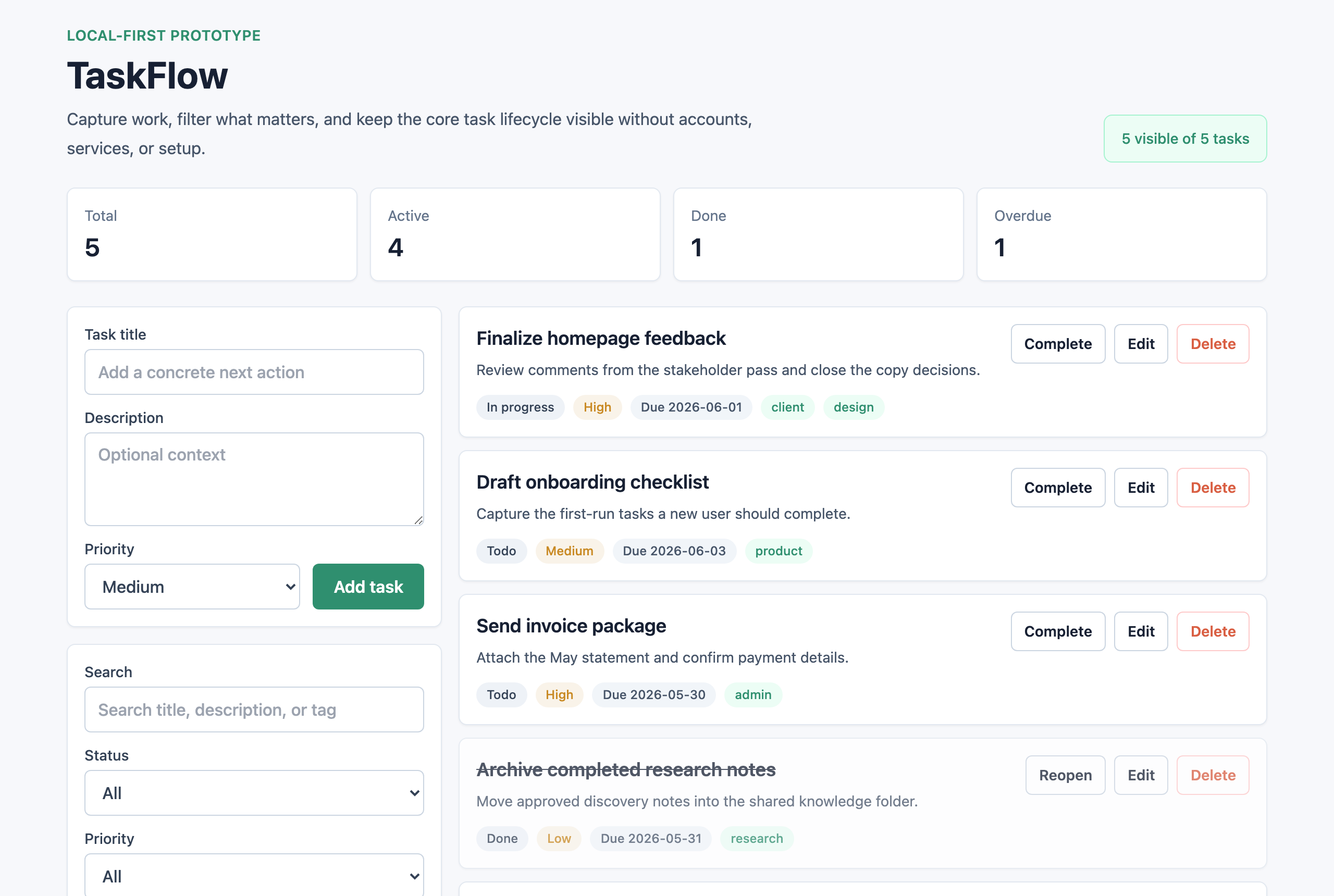 buildable generate "Build me a todo app" | 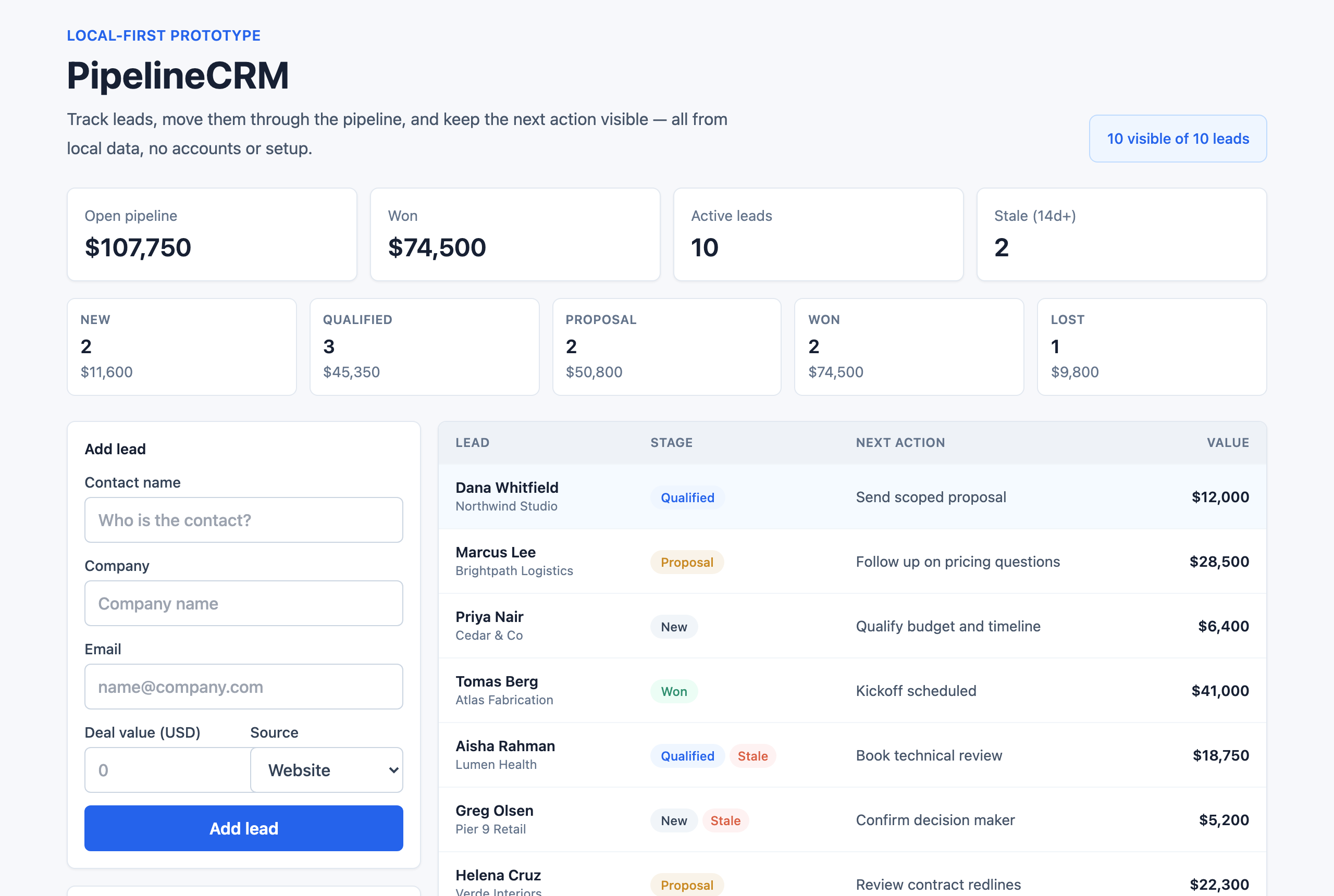 buildable generate "Build me a CRM for tracking leads" |
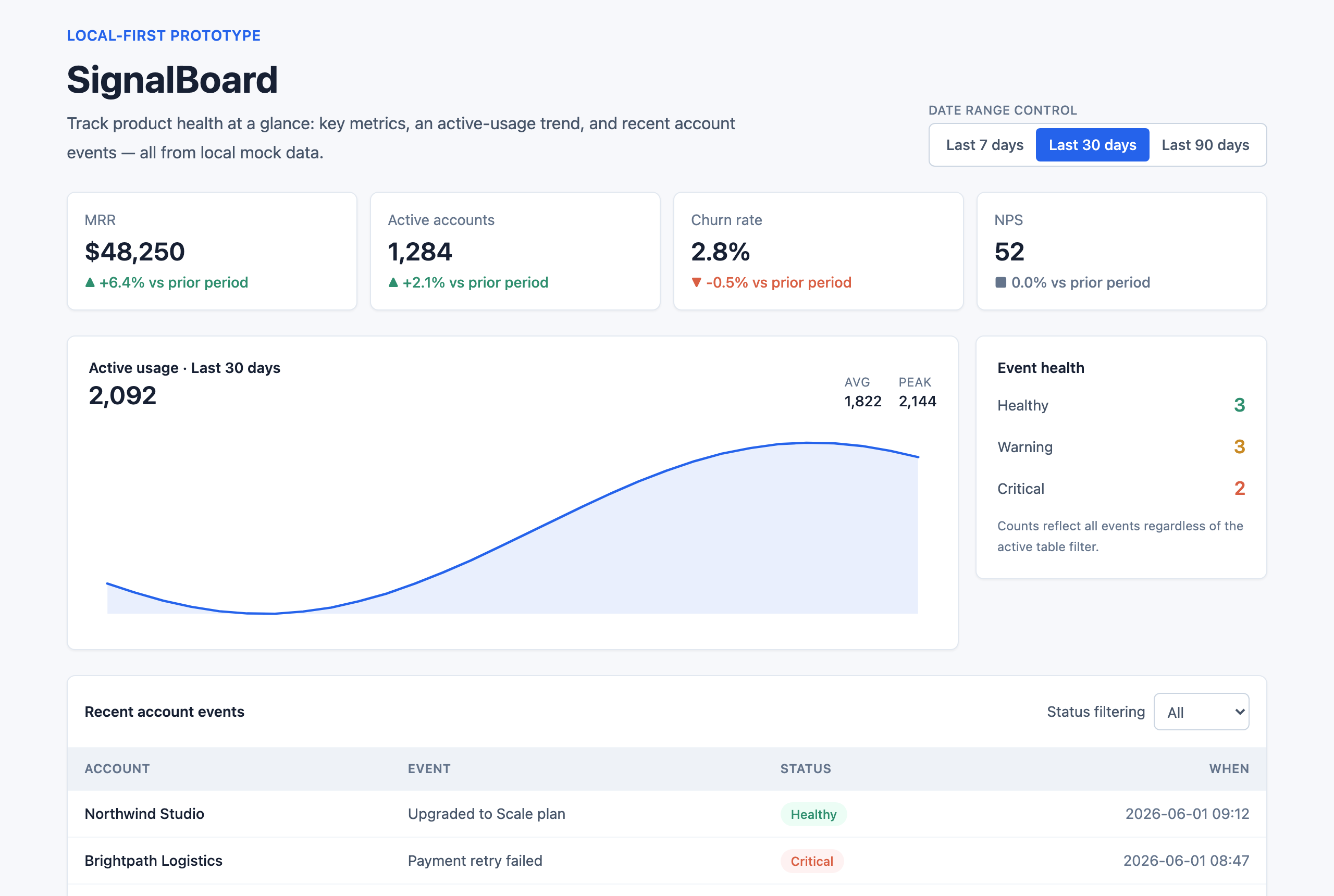 buildable generate "Build me a SaaS analytics dashboard" | 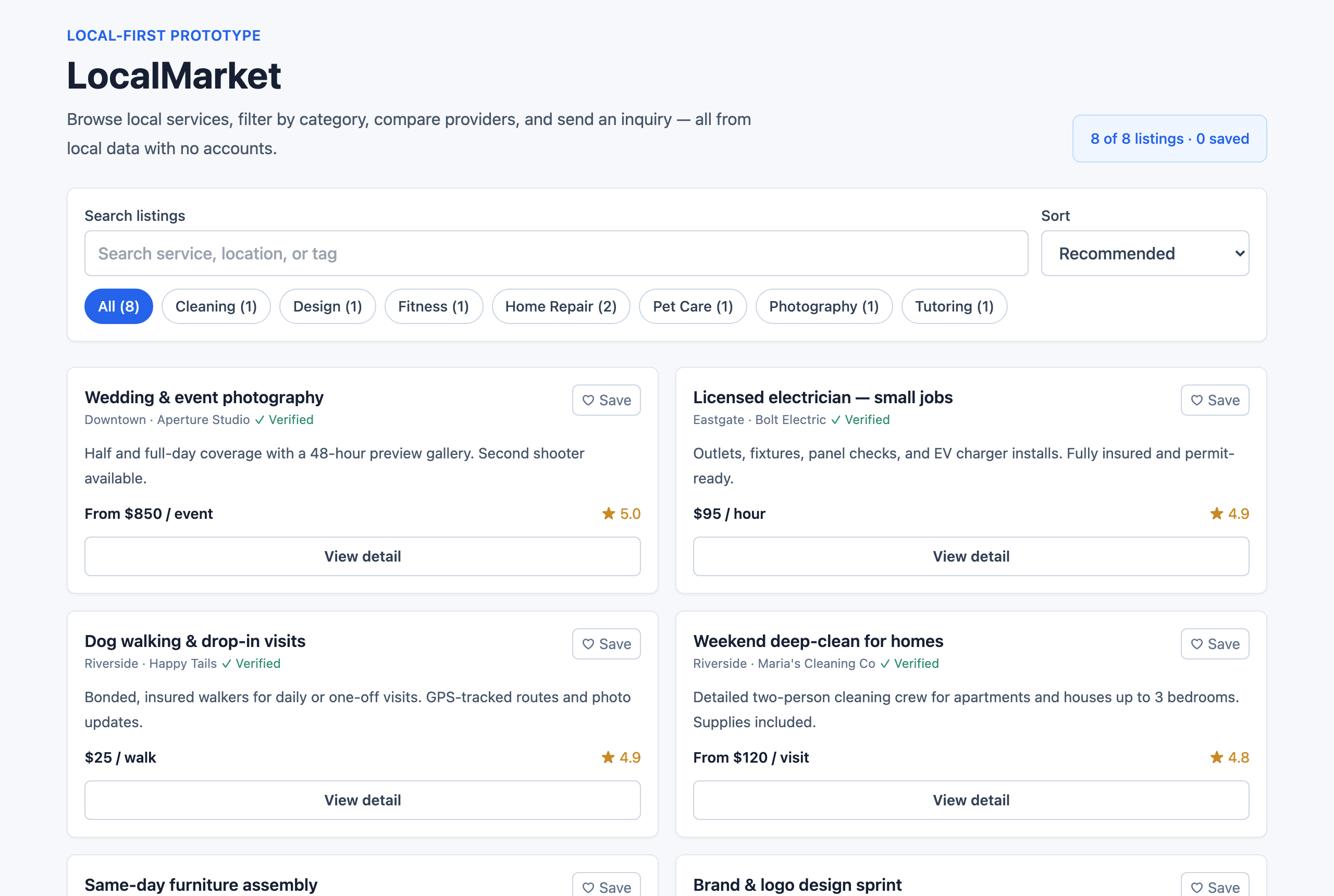 buildable generate "Build me a marketplace for local services" |
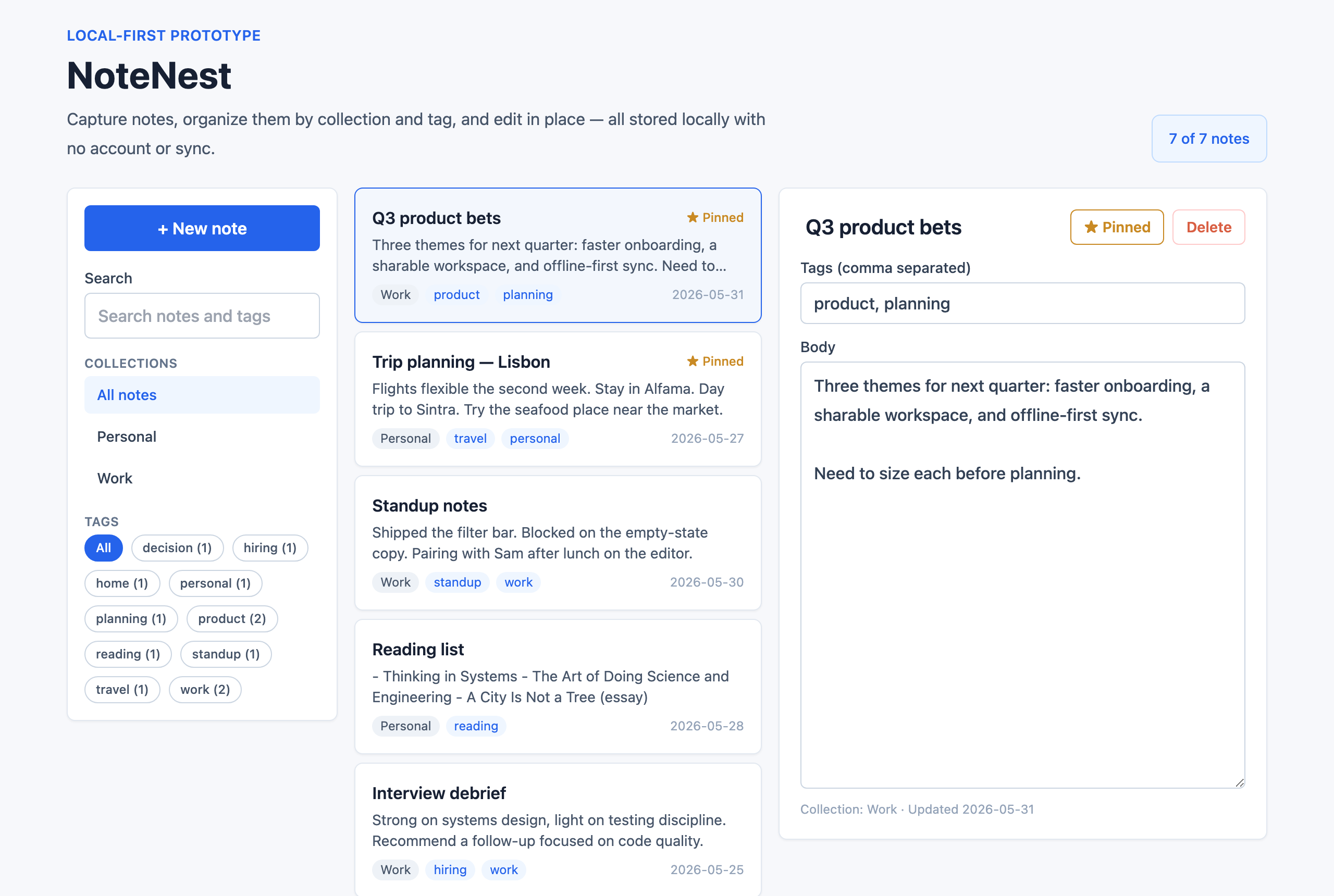 buildable generate "Build me a notes app for organizing ideas" | 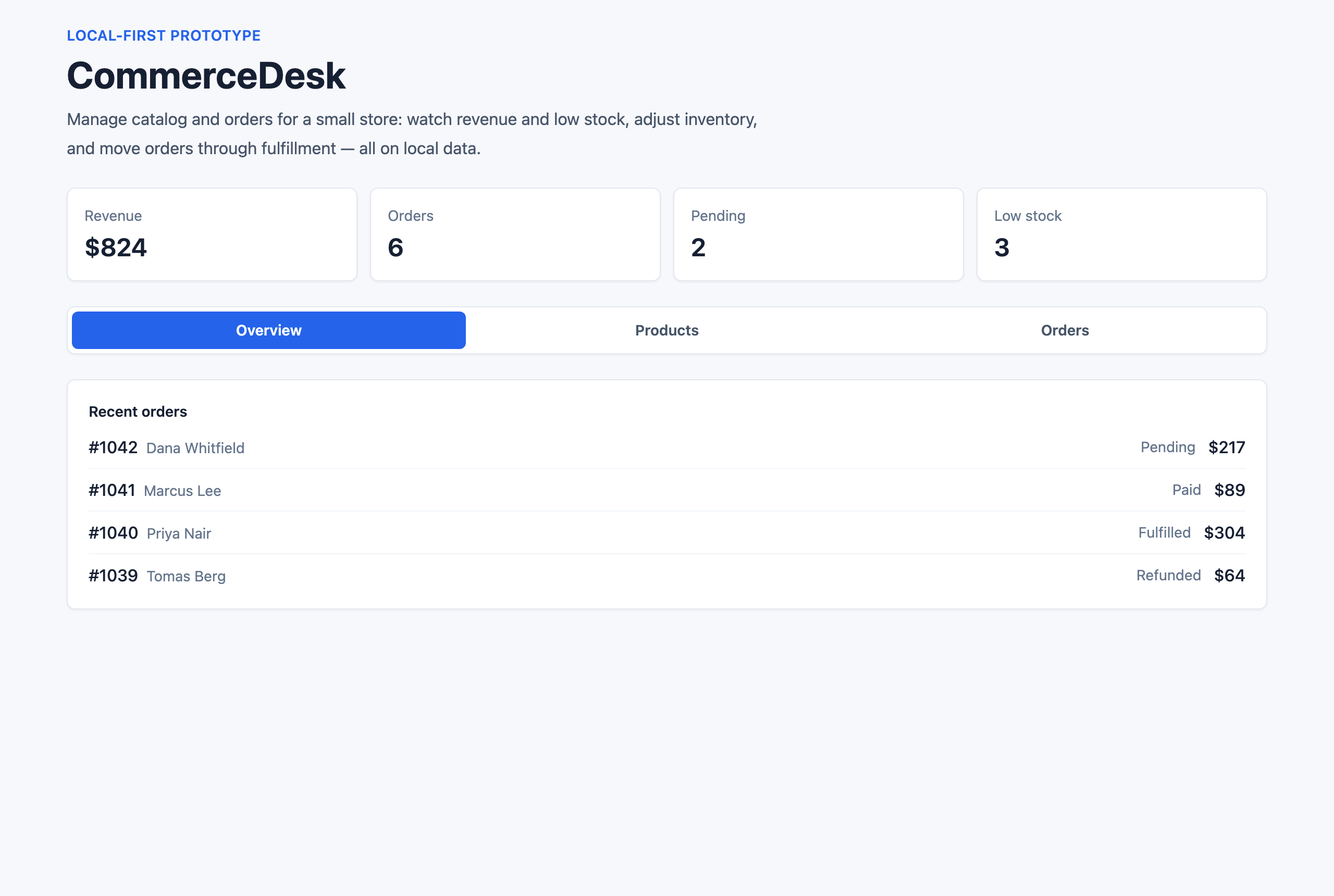 buildable generate "Build me an ecommerce admin to manage products and orders" |
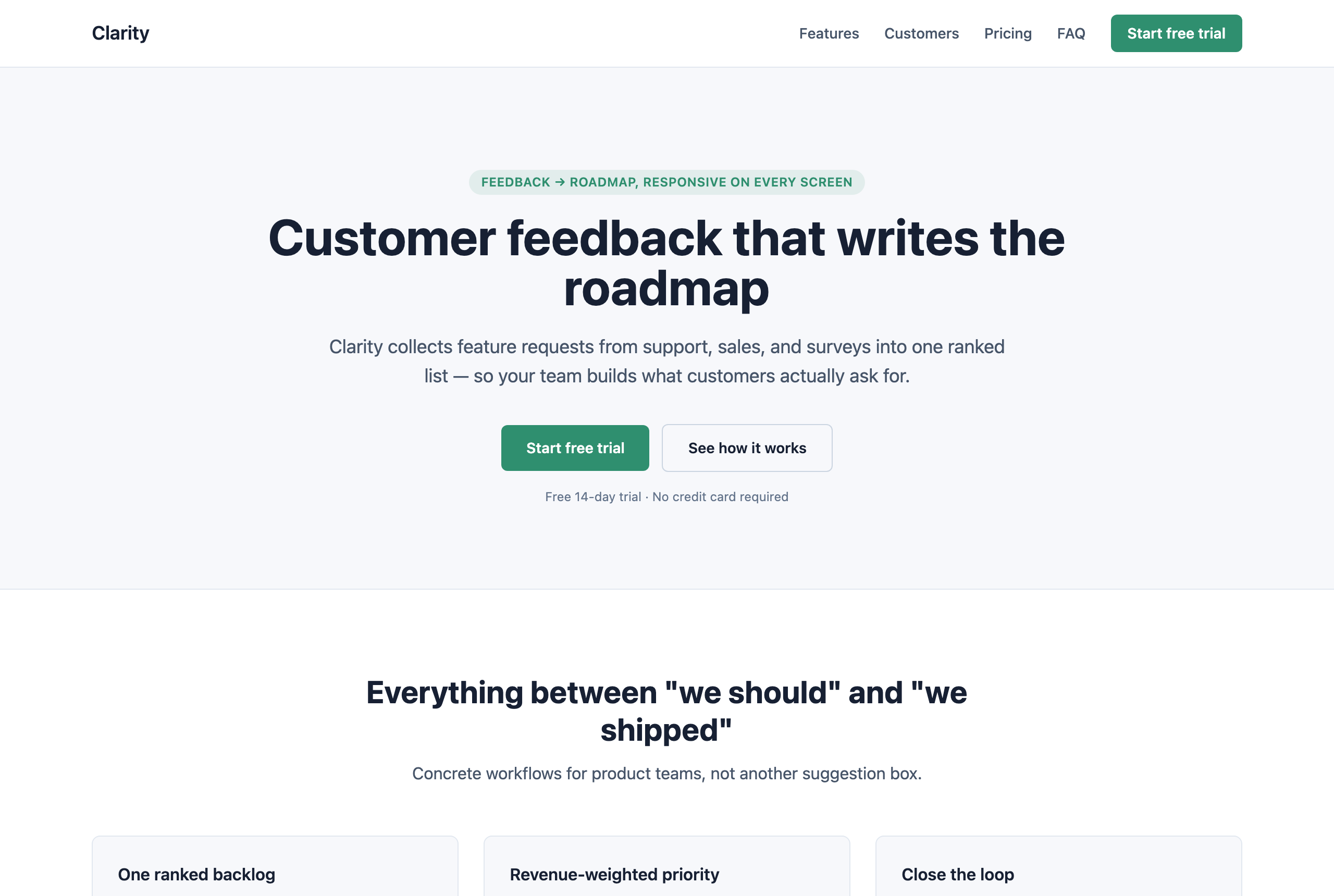 buildable generate "Build me a landing page for my startup" | 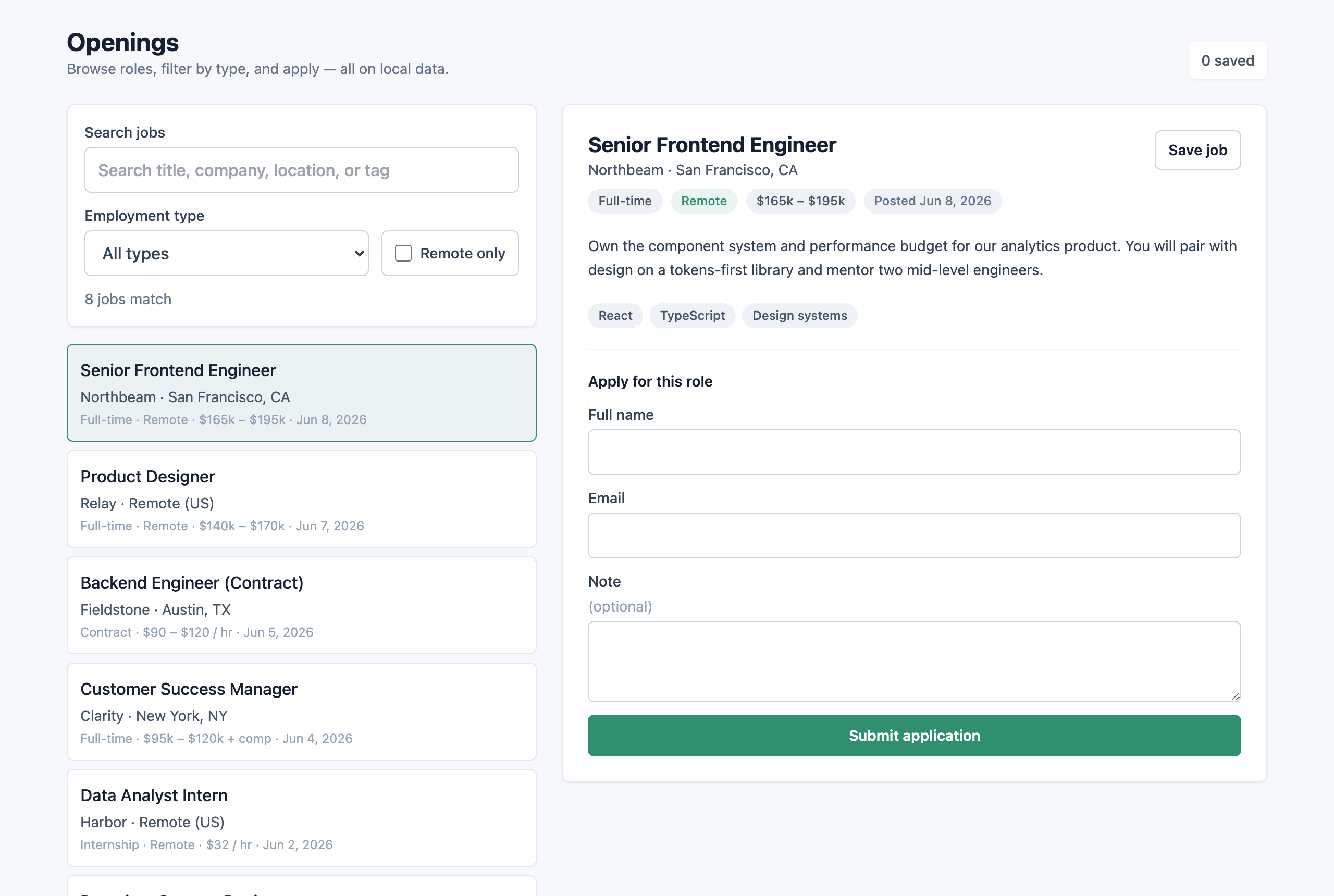 buildable generate "Build me a job board with apply forms" |
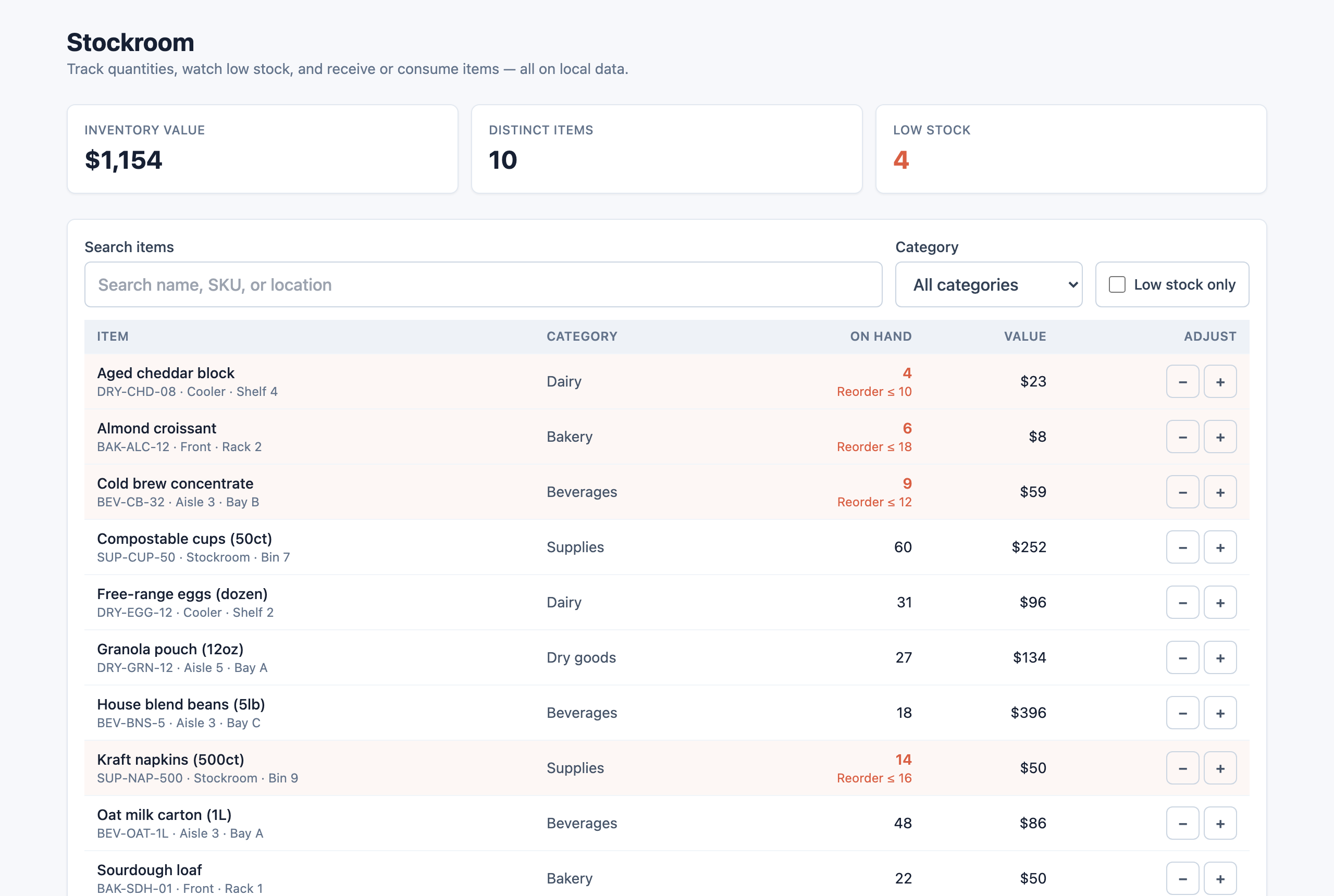 buildable generate "Build me an inventory manager with low-stock alerts" | 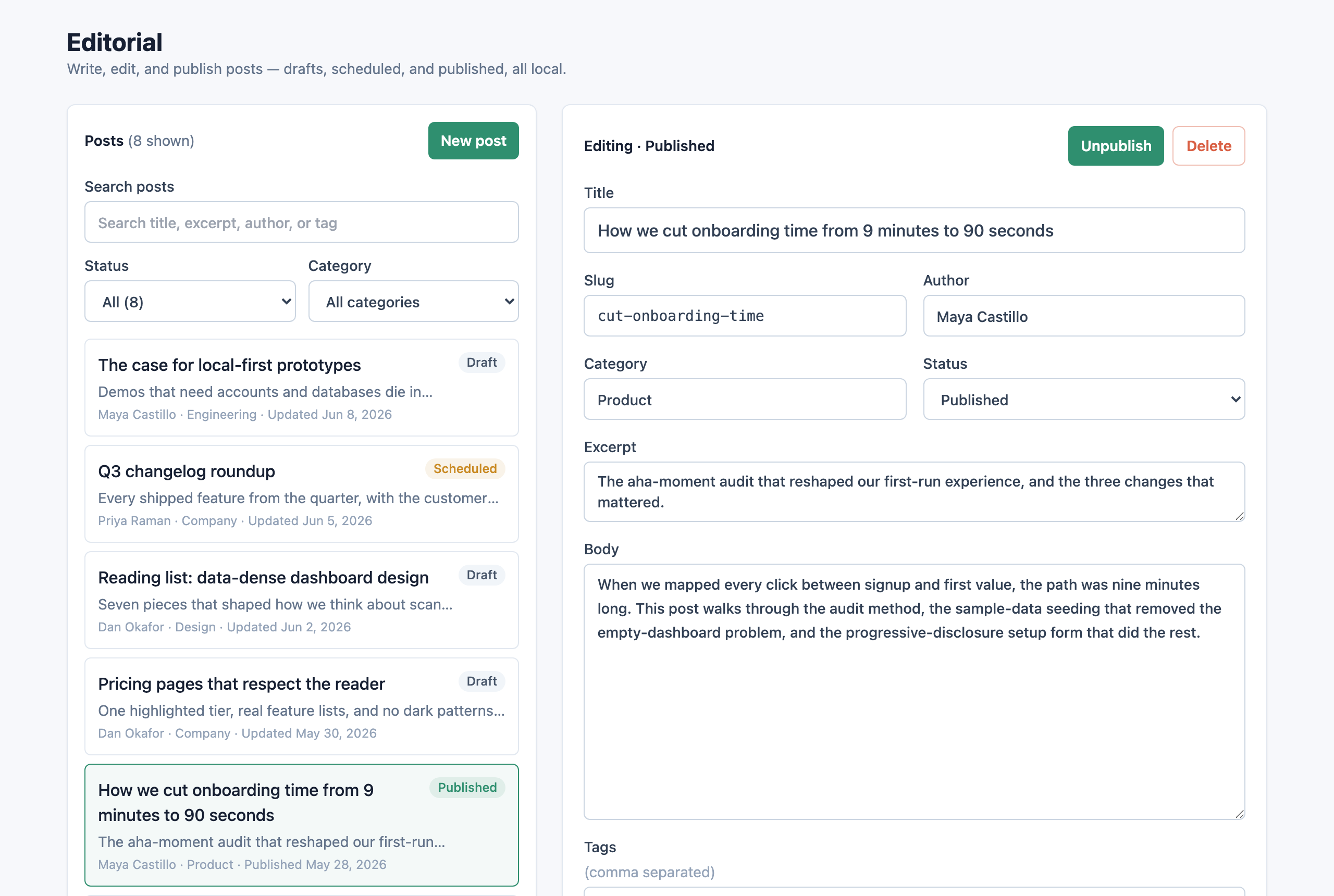 buildable generate "Build me a blog with a CMS editor" |
| Template | Target | Status |
|---|---|---|
templates/web/task-manager | web | ✅ runnable |
templates/web/crm | web | ✅ runnable |
templates/web/dashboard | web | ✅ runnable |
templates/web/marketplace | web | ✅ runnable |
templates/web/notes | web | ✅ runnable |
templates/web/ecommerce-admin | web | ✅ runnable |
templates/web/landing-page | web | ✅ runnable |
templates/web/portfolio | web | ✅ runnable |
templates/web/blog-cms | web | ✅ runnable |
templates/web/recipe-app | web | ✅ runnable |
templates/web/job-board | web | ✅ runnable |
templates/web/inventory-manager | web | ✅ runnable |
templates/mobile/habit-tracker | mobile | ✅ runnable |
templates/mobile/booking | mobile | ✅ runnable |
templates/mobile/task-manager | mobile | ✅ runnable |
templates/web/generic-app | web | 📝 planned fallback |
templates/mobile/expense-tracker | mobile | 📝 planned |
templates/mobile/travel-planner | mobile | 📝 planned |
templates/mobile/fitness-tracker | mobile | 📝 planned |
templates/mobile/meal-planner | mobile | 📝 planned |
templates/mobile/chat-app | mobile | 📝 planned |
templates/mobile/subscription-tracker | mobile | 📝 planned |
templates/mobile/maintenance-request | mobile | 📝 planned |
templates/mobile/field-service | mobile | 📝 planned |
templates/mobile/generic-app | mobile | 📝 planned fallback |
# Fresh: copy a runnable starter and an app spec
buildable generate "Build me a todo app"
cd taskflow
buildable review

# Existing: profile the app and get guidance without overwriting code
cd my-existing-app
buildable init --existing
buildable plan "Add a booking workflow to this app"
buildable review
Buildable applies three levels of guidance so it reduces blank-page ambiguity without overstepping.
appSpec.designSystem: visual tone, palette intent, typography mood, density, layout rules, component rules, motion, accessibility, and anti-patterns. Run buildable design only when you want a deeper UI/UX brief.appSpec.blocks: selected reusable UI/product guidance such as filterable tables, detail panels, stat cards, entity forms, mobile list filters, and empty states. Blocks are not automatic code composition; they are compact references the builder adapts to the selected template and entities.appSpec.mockData: 6-10 realistic local records per entity, domain-specific values, edge cases, and populated/empty/filtered/loading/error states so the design can be judged honestly before backend work exists.buildable plan "I have a restaurant" asks what kind of restaurant product to build; buildable generate pauses when architecture-changing choices appear in a prompt unless you force it.--with-auth, Buildable adds appSpec.auth and auth references. The default is local/mock auth behind a seam; named providers are treated as swappable adapters, not screen-level dependencies.appSpec.persistence and the knowledge/data-layer/ references: default to local browser/file storage behind a vendor-neutral repository seam, climbing to a hosted database only when the user names one — and buildable review then allows that one vendor while still flagging others.Agents load only the references a prompt needs (the appSpec.referenceLoadingContract), never the whole repo. Across the golden prompts, each plan loads ~10% of the bundled-brain reference bytes — about 90% less than loading the whole brain — while still specifying, on average, 6 features, 9 typed entity fields, and 4 acceptance criteria that a raw prompt gives you none of. (This measures Buildable's bundled context, not your total Claude/Codex session tokens.) Prove it yourself:
buildable eval --compare
Compact plan handoffs (TOON). The plan an agent reads back is itself token-optimized. Buildable serializes the build contract in TOON — a compact, dependency-free toon-style-v1 format (no install; it's built into the CLI). The same plan that is ~22 KB as full JSON is ~4.4 KB as TOON (~80% smaller), so:
buildable plan "<prompt>" --toon prints the compact contract; --compact prints slim JSON (drops the human planMarkdown render).verbose: true, the TOON contract via toon: true), so desktop/agent clients spend ~20–80% fewer tokens per plan with no loss of structured information.15 generate runnable, build-verified code today — task managers, CRMs, dashboards, marketplaces, notes, ecommerce admin, landing pages, portfolios, blogs, recipe apps, job boards, inventory, plus mobile habit-tracker / booking / task-manager. On top of that, 55 archetypes are recognized and planned (tag-matched via core/archetype-registry.json): the long tail still gets a full app spec + implementation plan, not a blank slate. See the full list and runnable status in CONTRIBUTING.md.
Buildable is and will remain a local plugin/skills layer for coding agents — not a hosted product. It does not include billing, accounts, cloud previews, managed databases, hosted deployments, telemetry, or a central template service, and it never sends your code anywhere. A user who names their own backend or auth provider is supported — but always behind a swappable local seam, never as a platform dependency. See Explicitly out of scope in the roadmap.
Buildable follows semantic versioning. As of 1.0, these are the stable public surfaces — they won't be renamed or removed without a major (2.0) release:
buildable plan/design/generate/review/init/preview/check/list/eval and the /buildable-* slash commands, plus their documented flags.appSpec (references, blocks, persistence, auth, designSystem, …), defined in core/schemas/app-spec.schema.json.buildable_* tool names and their documented arguments.Additive changes — new commands, optional flags, new appSpec fields, new blocks, new runnable starters — ship in minor/patch releases and won't break you. Renames and removals are reserved for a 2.0.
core/           Prompt classification, app spec, workflow, ask-vs-build policy
blocks/         Reusable micro-template packs (registry + per-block guidance)
knowledge/      Archetypes, data models, screen graphs, UI patterns, playbooks, rubrics
templates/      Golden templates (15 runnable starters + 10 planned specs)
skills/         Agent skills: planner, web-builder, mobile-builder, reviewer
commands/       Claude Code slash commands
adapters/       Codex, Claude, Cursor integration notes
bin/            Dependency-free CLI entrypoint
scripts/        Maintenance scripts (starter config sync)
.claude-plugin/ Claude Code plugin manifest + local marketplace
.codex-plugin/  Codex Desktop plugin manifest
.cursor/        Cursor rule and slash commands
evals/          Prompts, fixtures, and scoring rubric (buildable eval)
examples/       Generated reference apps
See CONTRIBUTING.md for the full list of archetypes, golden templates, UI/UX playbooks, rubrics, and simple contribution instructions.
MIT — see LICENSE.
1000+ skills curated from Anthropic, Vercel, Stripe, and other engineering teams
Design enforcement with memory — keeps your UI consistent across a project
Detects 37 AI writing patterns and rewrites text with human rhythm across 5 voice profiles
WCAG accessibility audit — automated scanning, manual review, remediation
