

Are you the author? Sign in to claim
BuyWhere MCP server — search and compare products from Singapore, SEA, and US markets via Model Context Protocol. Cross-
AI agents use BuyWhere to search, compare prices, and discover deals across 11M+ products in Singapore, Southeast Asia, and US markets — in real time.





Join the "Build With BuyWhere" AI Agent Developer Challenge! Use the BuyWhere MCP server to create AI agents that search, compare, and recommend products across Singapore, SEA, and US markets.
Product search API for AI agents via Model Context Protocol. Search & compare 11M+ products — built for AI agent commerce, not store management.
Works with Claude Desktop, Cursor, VS Code Copilot, Cline, Windsurf, OpenCode, Codex, Continue.dev, and any MCP-compatible client. Also supports Agent-to-Agent (A2A) protocol.
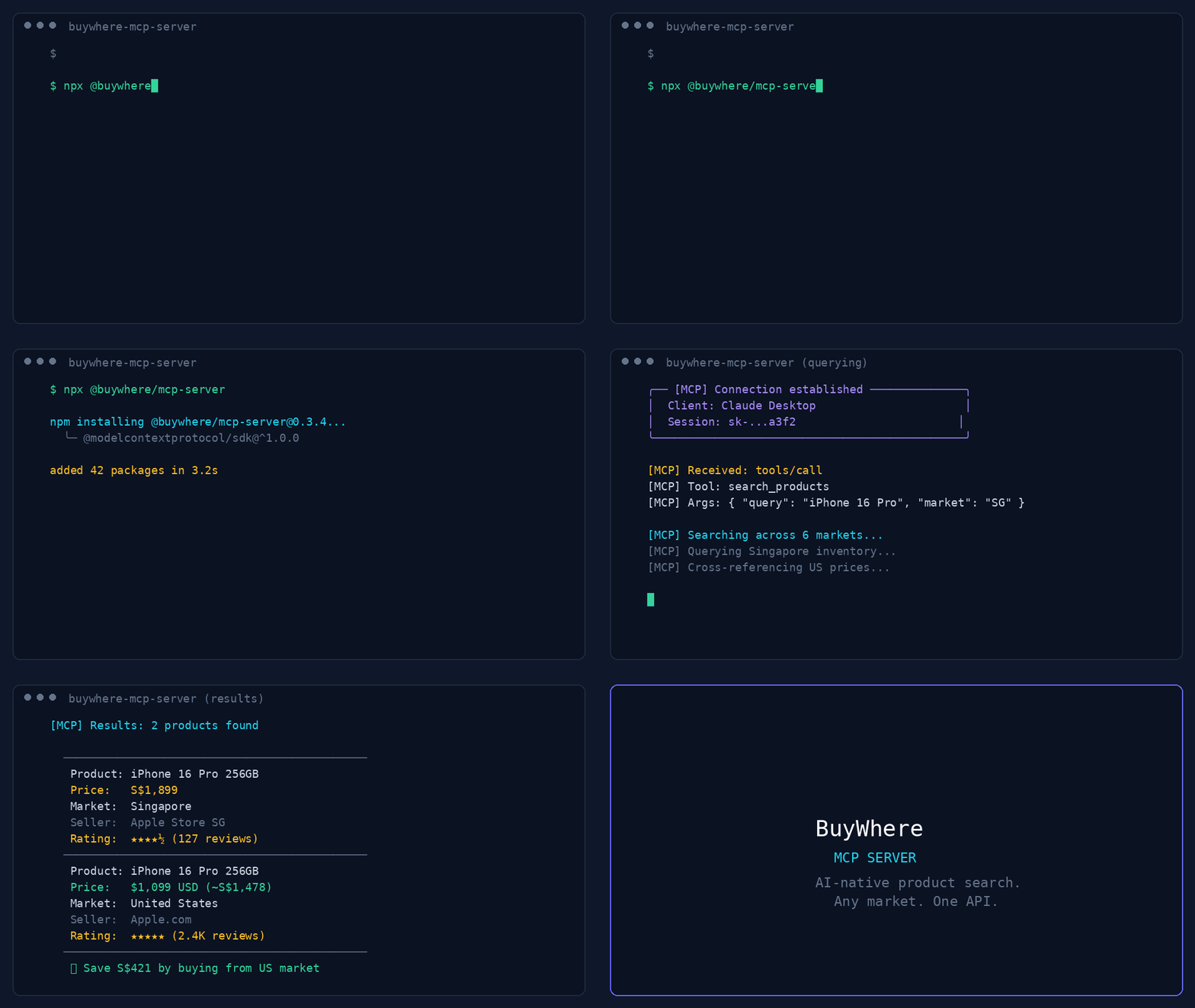
44-second demo: product search, deal discovery, price comparison, and multi-region support.
User:   "Find me wireless earbuds under $50 available in Singapore"
Agent:  [calls search_products → returns 5 matching products]

User:   "Compare the top 3"
Agent:  [calls compare_prices → side-by-side with best-value pick]
export BUYWHERE_API_KEY=bw_live_xxxx
npx -y @buywhere/mcp-server
Get your free API key → buywhere.ai/api-keys
Read the BuyWhere Engineering Blog for deep dives on MCP architecture, agent commerce, and the ecosystem.
| Tool | Description |
|---|---|
search_products | Search catalog by keyword, category, price, region |
get_product | Full product details by ID (prices, specs, images) |
compare_prices | Side-by-side comparison of 2–5 products |
get_price | Current prices across all merchants for one product |
get_affiliate_link | Click-tracked affiliate URL for a product |
get_catalog | Available product category taxonomy |
Add to claude_desktop_config.json:
{
  "mcpServers": {
    "buywhere": {
      "command": "npx",
      "args": ["-y", "@buywhere/mcp-server"],
      "env": { "BUYWHERE_API_KEY": "bw_live_xxxx" }
    }
  }
}
Add to your MCP settings file:
{
  "mcpServers": {
    "buywhere": {
      "command": "npx",
      "args": ["-y", "@buywhere/mcp-server"],
      "env": { "BUYWHERE_API_KEY": "bw_live_xxxx" }
    }
  }
}
Add to ~/.windsurf/mcp.json:
{
  "mcpServers": {
    "buywhere": {
      "command": "npx",
      "args": ["-y", "@buywhere/mcp-server"],
      "env": { "BUYWHERE_API_KEY": "bw_live_xxxx" }
    }
  }
}
Add to opencode.json:
{
  "mcpServers": {
    "buywhere": {
      "command": "npx",
      "args": ["-y", "@buywhere/mcp-server"],
      "env": { "BUYWHERE_API_KEY": "bw_live_xxxx" }
    }
  }
}
Add to ~/.continue/config.json:
{
  "experimental": {
    "mcpServers": {
      "buywhere": {
        "command": "npx",
        "args": ["-y", "@buywhere/mcp-server"],
        "env": { "BUYWHERE_API_KEY": "bw_live_xxxx" }
      }
    }
  }
}
Mastra is a TypeScript-first AI agent framework with native MCP support.
npm install @mastra/core @mastra/mcp
import { Mastra } from '@mastra/core';
import { MastraMCPClient } from '@mastra/mcp';

const buywhere = new MastraMCPClient({
  name: 'buywhere',
  server: {
    url: new URL('https://api.buywhere.ai/mcp'),
    requestInit: {
      headers: { 'Authorization': `Bearer ${process.env.BUYWHERE_API_KEY}` },
    },
  },
});

const agent = new Mastra({
  agents: {
    shoppingAgent: {
      instructions: 'You are a shopping assistant. Use BuyWhere to find and compare products.',
      tools: await buywhere.tools(),
    },
  },
});

const result = await agent.agents.shoppingAgent.generate(
  'Find me the best deal on a Sony WH-1000XM5 in Singapore'
);
Full guide: BuyWhere + Mastra Integration
Use BuyWhere tools in LangChain agents via the MCP adapter:
from langchain_mcp_adapters.client import MultiServerMCPClient
from langgraph.prebuilt import create_react_agent
from langchain_anthropic import ChatAnthropic

async def main():
    async with MultiServerMCPClient({
        "buywhere": {
            "url": "https://api.buywhere.ai/mcp",
            "transport": "streamable_http",
            "headers": {"Authorization": f"Bearer {BUYWHERE_API_KEY}"},
        }
    }) as client:
        tools = await client.get_tools()
        agent = create_react_agent(ChatAnthropic(model="claude-sonnet-4-5"), tools)
        result = await agent.ainvoke({"messages": [("user", "Find the cheapest Sony headphones in Singapore")]})
Connect BuyWhere via LlamaIndex MCP client:
from llama_index.tools.mcp import BasicMCPClient, McpToolSpec
from llama_index.agent.openai import OpenAIAgent

async def main():
    mcp_client = BasicMCPClient(
        command_or_url="https://api.buywhere.ai/mcp",
        headers={"Authorization": f"Bearer {BUYWHERE_API_KEY}"},
    )
    mcp_tool_spec = McpToolSpec(client=mcp_client)
    tools = mcp_tool_spec.to_tool_list()
    agent = OpenAIAgent.from_tools(tools)
    response = await agent.achat("Compare prices for iPhone 16 Pro across Singapore and US")
Use BuyWhere in a CrewAI agent with MCP tool integration:
from crewai import Agent, Task, Crew
from crewai_tools import MCPServerAdapter

buywhere_server = MCPServerAdapter(
    server_params={
        "url": "https://api.buywhere.ai/mcp",
        "headers": {"Authorization": f"Bearer {BUYWHERE_API_KEY}"},
        "transport": "streamable-http",
    }
)

shopping_agent = Agent(
    role="Shopping Research Analyst",
    goal="Find the best deals across Singapore and US markets",
    tools=[buywhere_server],
)

task = Task(
    description="Find the best price for Sony WH-1000XM5 headphones across all available markets",
    agent=shopping_agent,
    expected_output="Product comparison with prices and merchant links",
)

crew = Crew(agents=[shopping_agent], tasks=[task])
result = crew.kickoff()
| Variable | Default | Description |
|---|---|---|
BUYWHERE_API_KEY | (required) | API key from buywhere.ai/api-keys |
BUYWHERE_API_URL | https://api.buywhere.ai/mcp | Custom API base URL |
# Run directly (no install)
npx -y @buywhere/mcp-server

# Install globally
npm install -g @buywhere/mcp-server
buywhere-mcp
Developer's AI Agent (Claude, Cursor, etc.)
  │
  ├── MCP Protocol (stdio)
  │
  ├── @buywhere/mcp-server
  │     ├── search_products(q, category, min_price, max_price, country_code)
  │     ├── get_product(product_id)
  │     ├── compare_prices(product_ids[])
  │     ├── get_price(product_id)
  │     ├── get_affiliate_link(product_id, platform)
  │     └── get_catalog()
  │
  └── BuyWhere API (api.buywhere.ai)
        └── 11M+ products across SG, SEA, US
git clone https://github.com/BuyWhere/buywhere-mcp.git
cd buywhere-mcp
npm install
npm run build
npm start
BuyWhere is a product search API for AI agents. We aggregate 11M+ products from Singapore, Southeast Asia, and US markets into a single, agent-friendly interface — no store management, no Shopify integration. Just search and compare products in real time.
| Protocol | Support |
|---|---|
| MCP (Model Context Protocol) | Full support — 6 tools, stdio transport |
| A2A (Agent-to-Agent) | Multi-agent task delegation — Agent Card |
See CONTRIBUTING.md for how to report issues, submit PRs, and suggest features.
Learn more about MCP servers and the BuyWhere ecosystem:
If you find this project useful:
MIT
Run Claude Code as an MCP server so any agent can delegate coding tasks to it
 @microsoft✓ Official
Browser automation using accessibility snapshots instead of screenshots
 @googleapis✓ Official
Google's universal MCP server supporting PostgreSQL, MySQL, MongoDB, Redis, and 10+ databases
 @github✓ Official
Official GitHub integration for repos, issues, PRs, and CI/CD workflows
