

Are you the author? Sign in to claim
Canvas MCP Client is an open-source, self-hostable dashboard application built around an infinite, zoomable, and pannabl






A customizable infinite canvas dashboard with integrated Model Context Protocol (MCP) server support
Features • Quick Start • Documentation • Contributing • License
Canvas MCP Client is an open-source, self-hostable dashboard application built around an infinite, zoomable, and pannable canvas. It provides a unified interface for interacting with multiple MCP (Model Context Protocol) servers through a flexible, widget-based system.
Why Canvas MCP Client?
Perfect for AI power users, developers, content creators, and anyone who wants a customizable workspace for managing AI tools and services.
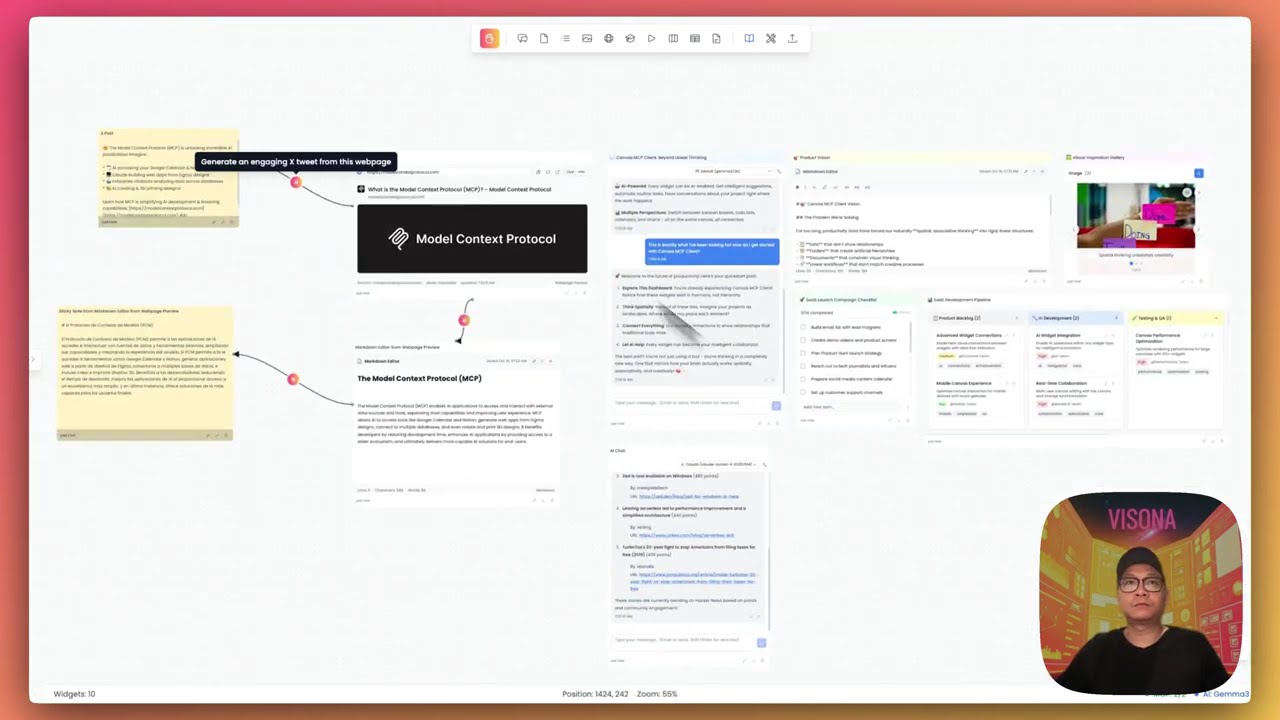
Click to watch the Canvas MCP Client demo video
🎨 Infinite Canvas Interface
🧩 Rich Widget System (12+ widgets)
🔌 MCP Server Management
🤖 AI LLM Configuration
📦 Template System
🎨 Customization
💾 Data Persistence
The fastest way to get started:
# Clone the repository
git clone https://github.com/n00bvn/CanvasMCPClient.git
cd CanvasMCPClient

# Start the application
docker-compose up -d

# Access the application
open http://localhost:3031
The application will be available at:
# Navigate to backend directory
cd backend

# Create and activate virtual environment
python -m venv venv
source venv/bin/activate  # On Windows: venv\Scripts\activate

# Install dependencies
pip install -r requirements.txt

# Create data directory
mkdir -p data

# Set environment variables
export DATABASE_URL="sqlite:///./data/canvas_mcp.db"
export CORS_ORIGINS="http://localhost:3031,http://127.0.0.1:3031"
export SECRET_KEY="your-secret-key-here"

# Start the backend
uvicorn main:app --reload --host 0.0.0.0 --port 8081
# Navigate to frontend directory (in a new terminal)
cd frontend

# Install dependencies
npm install

# Set environment variables
export NEXT_PUBLIC_API_URL="http://localhost:8081"

# Start the frontend
npm run dev
The application will be available at http://localhost:3031
Configure MCP Servers (Optional)
Set Up AI Providers (Optional)
Create Your First Dashboard
Explore Features
Canvas MCP Client is built with modern, proven technologies:
We welcome contributions from the community! Whether you're fixing bugs, adding features, improving documentation, or creating new widgets, your help is appreciated.
Ways to contribute:
Get started:
Before submitting a PR:
# Auto-fix formatting issues
./lint-fix.sh

# Check all linting rules
./lint.sh
See Linting Setup for detailed information.
Please read our Code of Conduct before contributing.
Security is a top priority. If you discover a security vulnerability, please follow our Security Policy to report it responsibly.
Security Features:
See the open issues for a full list of proposed features and known issues.
Canvas MCP Client is actively maintained and in stable development. We follow semantic versioning and maintain a CHANGELOG for all releases.
Current Version: 1.0.0 Status: Stable - Ready for self-hosting Last Updated: October 2025
This project is licensed under the MIT License - see the LICENSE file for details.
If you find Canvas MCP Client useful, please consider giving it a star! ⭐
Made with ❤️ by VISONA and the open source community
Run Claude Code as an MCP server so any agent can delegate coding tasks to it
 @microsoft✓ Official
Browser automation using accessibility snapshots instead of screenshots
 @googleapis✓ Official
Google's universal MCP server supporting PostgreSQL, MySQL, MongoDB, Redis, and 10+ databases
 @github✓ Official
Official GitHub integration for repos, issues, PRs, and CI/CD workflows
