

Are you the author? Sign in to claim
Multi-agent orchestration for Claude Code. Persistent memory, tasks, rules, and skills that make AI agents actually coor
  ██████╗ █████╗ ███████╗
 ██╔════╝██╔══██╗██╔════╝
 ██║     ███████║███████╗
 ██║     ██╔══██║╚════██║
 ╚██████╗██║  ██║███████║
  ╚═════╝╚═╝  ╚═╝╚══════╝
Multi-agent coding factory with persistent memory.


Factory · Context System · Quick Start · Installation · Architecture · Contributing
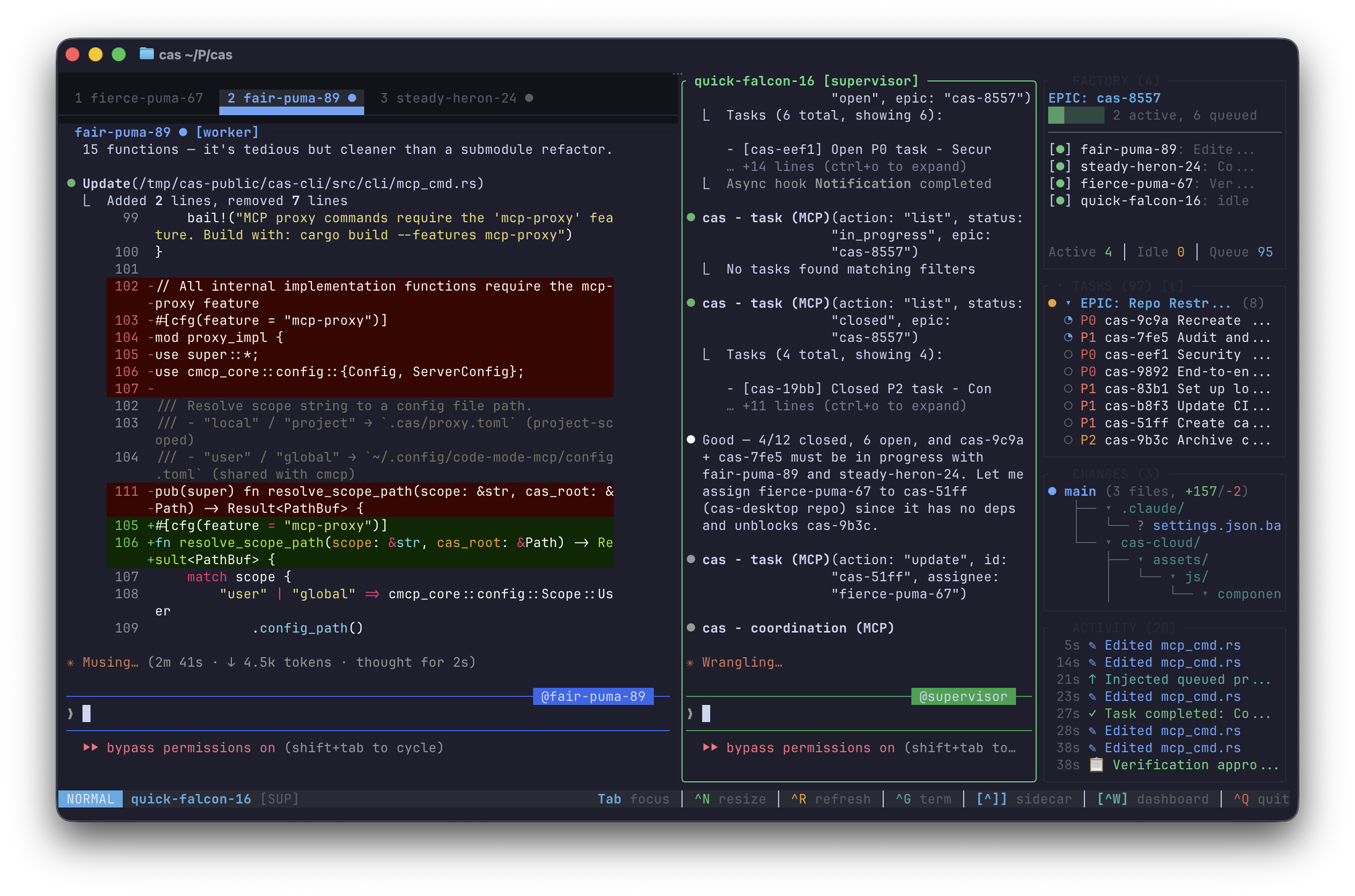
CAS is a multi-agent coding factory and persistent context system for AI agents. It has two core capabilities:
Factory — A terminal UI that orchestrates multiple Claude Code instances working in parallel on the same codebase, with a supervisor agent coordinating worker agents across isolated git worktrees.
Context System — An MCP server that gives agents persistent memory, task tracking, rules, and skills across sessions, backed by SQLite and full-text search.
Factory mode turns your terminal into a multi-agent coding operation. A supervisor agent breaks work into tasks while worker agents execute them in parallel — each in its own git worktree to avoid conflicts.
# Launch the factory TUI
cas

# Launch with 3 workers in isolated worktrees
cas -w 3
┌─────────────────────────────────────────────────────────┐
│  CAS Factory                                            │
├──────────────────────┬──────────────────────────────────┤
│                      │                                  │
│  Supervisor          │  Worker 1        Worker 2        │
│                      │                                  │
│  Plans EPICs,        │  Executes tasks  Executes tasks  │
│  breaks down work,   │  in isolated     in isolated     │
│  assigns tasks,      │  git worktree    git worktree    │
│  reviews & merges    │                                  │
│                      │                                  │
├──────────────────────┴──────────────────────────────────┤
│  Shared: CAS database (memories, tasks, rules, skills)  │
└─────────────────────────────────────────────────────────┘
| Feature | Description |
|---|---|
| Worktree isolation | Each worker gets its own git worktree and branch — parallel edits without conflicts |
| Task coordination | Supervisor assigns tasks with dependencies; workers claim, execute, and report back |
| Live TUI | Side-by-side or tabbed terminal views of all agents, with real-time status bar |
| Message passing | Push-based communication between supervisor and workers via prompt queue |
| Session management | Attach, detach, list, and kill factory sessions (cas attach, cas list, cas kill) |
| Desktop notifications | Optional alerts when tasks complete or workers hit blockers (--notify) |
| Session recording | Record terminal sessions for playback (--record) |
CAS runs as an MCP server that gives your agent persistent context across sessions — 50+ tools for memory, tasks, rules, skills, and search.
When your agent has CAS configured, it can:
# Remember something across sessions
mcp__cas__memory action=remember content="This project uses Zod for validation"

# Create and track tasks
mcp__cas__task action=create title="Implement auth" priority=1

# Search past context
mcp__cas__search action=search query="error handling patterns"

# Create a rule that auto-syncs to .claude/rules/
mcp__cas__rule action=create content="Always validate input at API boundaries"
| Feature | Description |
|---|---|
| Memory | Learnings, preferences, and observations that survive across sessions |
| Tasks | Work items with dependencies, priorities, and structured progress notes |
| Rules | Coding conventions that earn trust through use and auto-sync to your editor |
| Skills | Reusable agent capabilities with templates and usage tracking |
| Search | Fast full-text search (BM25) across all stored context |
# Install
curl -fsSL https://cas.dev/install.sh | sh

# Initialize in your project
cas init

# Launch the factory TUI
cas
curl -fsSL https://cas.dev/install.sh | sh
brew tap codingagentsystem/cas
brew install cas
git clone https://github.com/codingagentsystem/cas.git
cd cas
cargo build --release
# Binary at target/release/cas
cas                   # Launch the factory TUI
cas -w 3              # Launch with 3 workers
cas serve             # Start MCP server for Claude Code
cas init              # Initialize CAS in your project
cas attach            # Attach to a running factory session
cas list              # List running factory sessions
cas kill              # Kill a factory session
cas config list       # View all configuration options
cas doctor            # Run diagnostics
cas update            # Self-update to latest version
cas login             # Log in to CAS Cloud (optional)
cas cloud sync        # Sync data to/from cloud (optional)
Add to your Claude Code MCP config (.claude/settings.json or project .mcp.json):
{
  "mcpServers": {
    "cas": {
      "command": "cas",
      "args": ["serve"]
    }
  }
}
CAS stores all data locally in your project:
.cas/
├── cas.db          # SQLite — memories, tasks, rules, skills
├── config.yaml     # Project configuration
└── indexes/
    └── tantivy/    # Full-text search index
Storage tiers:
.cas/) — project-specific context~/.config/cas/) — cross-project preferences and learnings| Crate | Purpose |
|---|---|
cas-cli | CLI binary, MCP server, and factory TUI |
cas-factory | Multi-agent session lifecycle and coordination |
cas-factory-protocol | Message protocol between supervisor and workers |
cas-pty | PTY management for agent terminal sessions |
cas-mux | Terminal multiplexer layout and rendering |
cas-core | Core logic, hooks, and integrations |
cas-store | SQLite storage layer |
cas-search | Full-text search (BM25 via Tantivy) |
cas-mcp | MCP protocol handlers |
cas-types | Shared data types |
cas-code | Code analysis (tree-sitter) |
cas-diffs | Diff tracking and formatting |
cas-recording | Terminal session recording and playback |
ghostty_vt | Virtual terminal parser (based on Ghostty) |
CAS is configured via .cas/config.yaml in your project root. Run cas config list to see all options or cas config describe <key> for details on any setting.
CAS works fully offline. Optionally sync your context across devices:
cas login
cas cloud sync
Cloud sync is not required — all core features work locally with SQLite.
CAS is source-available under the MIT license. We welcome bug reports and feature suggestions through Issues and Discussions.
See CONTRIBUTING.md for details.
Manage multiple Claude Code instances in separate git worktrees simultaneously
⚠️ Experimentelle Skill-Sammlung für deutsches Recht (Arbeits-, Gesellschafts-, Insolvenz-, Datenschutz-, Prozessrecht u
Manage multiple Claude Code agents from TUI or Web with tmux and git worktrees
Project management using GitHub Issues + Git worktrees for parallel agent execution
