

Are you the author? Sign in to claim
See where it leaks, stop paying for it — a live Claude Code status line that prices every turn, your subagents, cache re


A live dashboard right in your status line — surfacing what Claude Code hides: the cost of every turn, what your subagents spend, how long your cache stays alive, plus the usual limits, context and git.
Stop overpaying for inefficiency you can't see. Spend your limits on purpose.
Install in one command:
curl -fsSL https://raw.githubusercontent.com/labzink/cc-probeline/main/scripts/install.sh | sh

Most status lines count things — tokens, turns, running agents. The probe prices them. Everything below comes out of your session's local log: data Claude Code has, but never shows you.
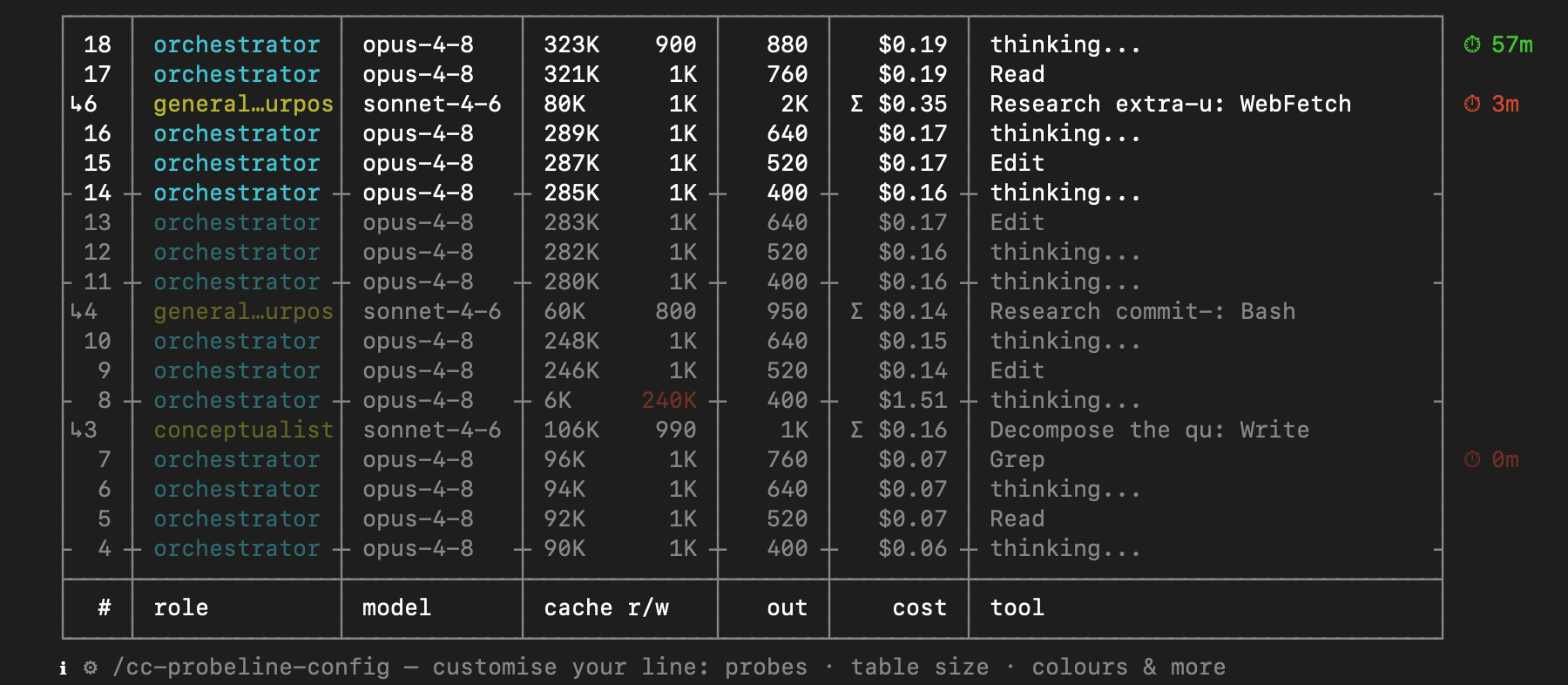 Every turn lands on its own line — orchestrator and subagents alike — priced as it happens. Finally you see where every dollar of your reasoning actually goes.
Built to fit your terminal. Don't like a segment, the colours, or the width? The /cc-probeline-config wizard walks you through it and writes the config for you — no hand-editing TOML. (That's the hint at the bottom of the dashboard above.)
 The moment you cross 100%, you'll see it — and the extra bill stays under your control.
 You get warned while there's still time to act — not after you've hit the wall.
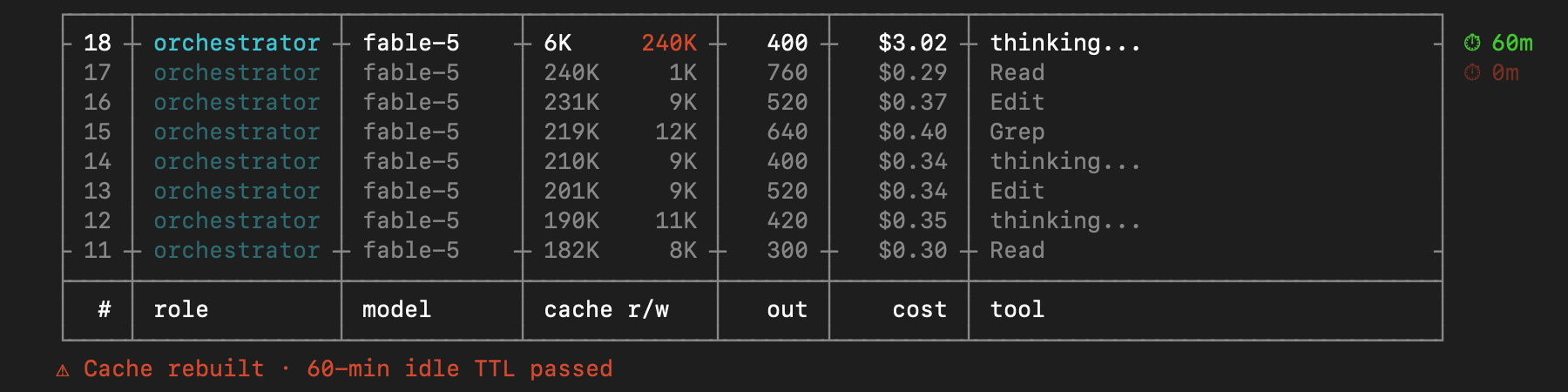 Cache rebuilds stop being silent — you see the price the moment they happen.
And nothing about your session ever leaves your machine — that's why it's called a probe.
A probe is an instrument of observation, not intervention. Everything cc-probeline does is read and display — it never reaches into your account or reports on you.
~/.claude/projects/…) and the status-line payload Claude Code pipes directly to it.gh attestation verify <file> --repo labzink/cc-probeline.Every channel below does the same thing: install the binary and wire it into
your Claude Code status line. After installing, restart Claude Code and you're
done — no extra commands. (If you already have a custom status line, it's left
untouched; switch to cc-probeline with cc-probeline install --merge-settings --force.)
Homebrew (macOS — it's a cask; on Linux use curl below):
brew install labzink/homebrew-tap/cc-probeline
curl (macOS / Linux — downloads the release archive for your OS, verifies SHA256, installs the binary):
curl -fsSL https://raw.githubusercontent.com/labzink/cc-probeline/main/scripts/install.sh | sh
Scoop (Windows, experimental):
scoop bucket add labzink https://github.com/labzink/scoop-bucket
scoop install cc-probeline
Claude Code plugin marketplace:
/plugin marketplace add labzink/cc-probeline
Then install the plugin from the /plugin menu (or /plugin install cc-probeline) and restart Claude Code — the slash commands below only show up after a restart.
Once restarted, run /cc-probeline-install: it detects your OS, installs the binary through the right channel (Homebrew / Scoop / curl) and wires the status line — asking before it runs anything. You can still install manually with any channel above. The plugin also gives you /cc-probeline-update to upgrade later and the /cc-probeline-config wizard.
Verify your installation:
cc-probeline --check
Prints Installation OK.
rate_limits in the status-line payload. On older versions the quota segment is hidden; everything else works normally.Run the interactive wizard from inside Claude Code:
/cc-probeline-config
It walks you through probes, table size and colours — and writes the TOML for you. Or edit ~/.config/cc-probeline/config.toml directly (validate with cc-probeline check-config):
[general]
table_rows = 10             # rows in the per-turn cost table (max 40)
no_color   = false          # true = plain monochrome output

[widgets]                   # flip any segment on/off
model = true
effort = true
cost = true
ctx = true
quota = true
git = true
project = true
email = true
time = true

[thresholds]
cost_budget_usd = 25        # turn the cost segment red past $25 (0 = off)

# Colour flips for the context bar — yellow / orange / red.
# Must strictly increase; bad values fall back to these defaults.
ctx_notice_ratio   = 0.50
ctx_warn_ratio     = 0.70
ctx_critical_ratio = 0.90

# Same three flips per rate-limit window. The 7d window mirrors these keys
# as quota_7d_notice_ratio / _warn_ratio / _critical_ratio.
quota_5h_notice_ratio   = 0.50
quota_5h_warn_ratio     = 0.70
quota_5h_critical_ratio = 0.90
Config is read in precedence order: CC_PROBELINE_CONFIG=/path (explicit override) → .cc-probeline.toml in the current repo (project-local) → ~/.config/cc-probeline/config.toml (global). Every field is optional; missing fields use the built-in defaults, and an invalid value never breaks the status line — it falls back to the default.
Full reference: scripts/config.toml.example.
When a newer release is out, the status line surfaces it: ↑ update: vX → vY — run /cc-probeline-update. Run that command inside Claude Code and it upgrades through whichever channel you installed with (and installs it for you if the binary is missing). Or update by hand:
brew upgrade labzink/homebrew-tap/cc-probeline                                                   # Homebrew
scoop update cc-probeline                                                                        # Scoop
curl -fsSL https://raw.githubusercontent.com/labzink/cc-probeline/main/scripts/install.sh | sh   # curl (re-runs latest)
The update notice comes from a once-a-day price/version check; turn it off with price_check = false (or in the /cc-probeline-config wizard) and cc-probeline stays fully offline. Updating keeps your status-line wiring intact.
Uninstalling restores the status line you had before (byte-for-byte, if cc-probeline replaced one) and removes the binary. Use the command for the channel you installed with — restart Claude Code afterwards:
brew uninstall cc-probeline                                                                            # Homebrew — also restores your previous status line
curl -fsSL https://raw.githubusercontent.com/labzink/cc-probeline/main/scripts/install.sh | sh -s -- --uninstall   # curl
Scoop (Windows): restore the status line first, then remove the binary — scoop uninstall can't run the restore step itself:
cc-probeline uninstall
scoop uninstall cc-probeline
To only un-wire the status line without removing the binary, run cc-probeline uninstall on its own.
cc-probeline is a personal experiment: can you hand programming over to AI entirely — every line of code, every design decision — and still end up with a product that matches the operator's vision exactly?
This is the answer. Claude wrote all of it; the operator never touched the code. What the operator owned was everything that decides whether it's any good: the vision, the spec, the design direction, and every single call — reviewed detail by detail until the result was exactly right. A few weeks of spare-time work — competitor research, a written spec, phased design and implementation. The commit history is public and reads like a build log: you can watch the product take shape, phase by phase.
Contributing: bug reports and ideas are welcome — open an issue. Code contributions are possible, but they're not the primary path: the codebase is developed through an AI pipeline in tight collaboration with the author, so pull requests need to fit that workflow. When in doubt, open an issue first.
If cc-probeline ends up saving you money, you can send a little of it back: GitHub Sponsors
MIT License.
1000+ skills curated from Anthropic, Vercel, Stripe, and other engineering teams
Agent harness performance optimization with skills, instincts, memory, and security
Design enforcement with memory — keeps your UI consistent across a project
Detects 37 AI writing patterns and rewrites text with human rhythm across 5 voice profiles
