

Are you the author? Sign in to claim
Mobile client for Codex and Claude — control coding agents from your phone via WebSocket bridge
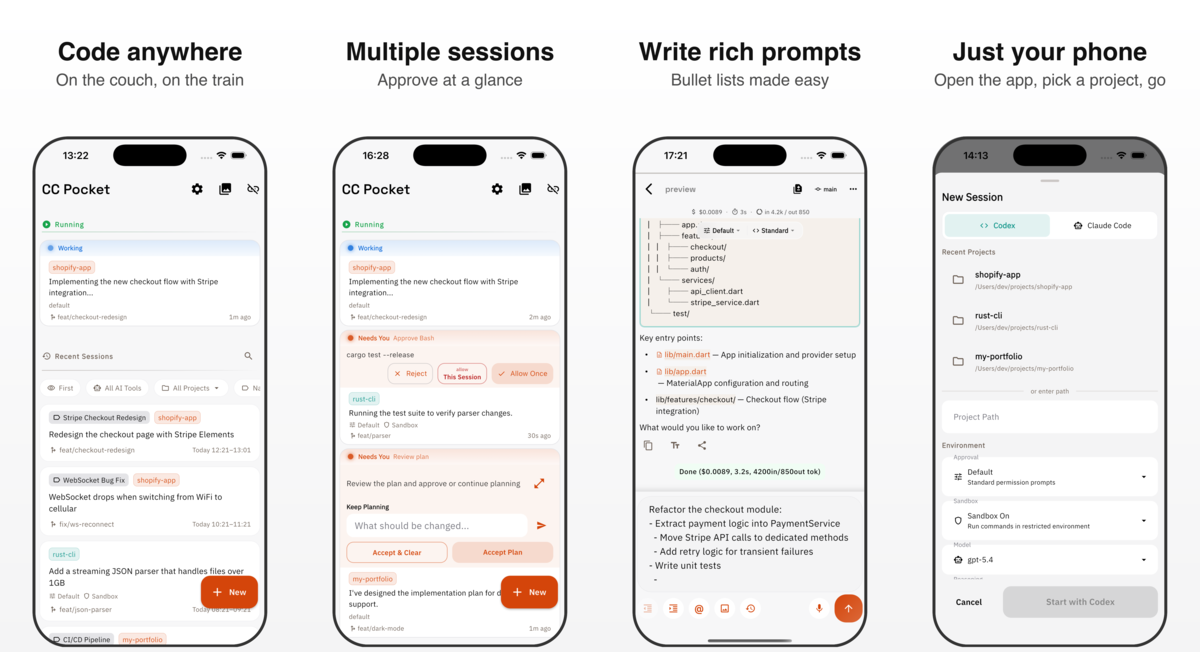
CC Pocket is a mobile and desktop app for controlling Codex and Claude coding-agent sessions. Run the agents through a self-hosted Bridge Server on your own Mac, Linux, or Windows machine, then start sessions, approve actions, answer questions, review changes, and pick up work from iPhone, iPad, Android, native macOS, or experimental Linux/Windows desktop builds. Experimental Linux and Windows desktop builds are also available from GitHub Releases.
日本語版 README | 简体中文版 README | 한국어 README
curl -fsSL https://chatgpt.com/codex/install.sh | sh.npx @ccpocket/bridge@latest
| Platform | Install |
|---|---|
| iOS / iPadOS |  |
| Android |  |
| macOS | Download the latest .dmg from GitHub Releases. Look for releases tagged macos/v*. You can also install using Homebrew Cask with brew install --cask cc-pocket. |
| Linux (experimental) | Download the latest .tar.gz from GitHub Releases. Look for releases tagged linux/v*. |
| Windows (experimental) | Download the latest .zip from GitHub Releases. Look for releases tagged windows/v*. |
CC Pocket is free to use. If it helps your workflow, please consider becoming a Supporter in the app. Supporter purchases help cover development and AI tooling costs.
New to mobile coding agents? See How to run Codex from iPhone or Android.
CC Pocket is MIT licensed so you can treat it as a starting point for your own agent workflow, not only as a finished app.
For a deeper implementation overview, see the technical stack page or the agent-readable Markdown.
CC Pocket has two parts:
CC Pocket app <-> Bridge Server on your machine <-> Codex / Claude
The app is the interface you use. The Bridge Server runs locally on the machine that has access to your projects, shell, git repository, and agent CLI. Your code stays on your own machine instead of moving into a hosted IDE.
On the same network, connect with the QR code, mDNS discovery, or a manual
ws:// / wss:// URL.
For access away from home or the office, Tailscale is the recommended setup:
ws://<host-tailscale-ip>:8765 from CC Pocket.For an always-on host, the Bridge Server can also be registered as a background service:
npx @ccpocket/bridge@latest setup
Service setup supports macOS launchd and Linux systemd.
For Bridge flags and persisted service settings such as BRIDGE_ALLOWED_DIRS,
see the Bridge package README.
@ccpocket/bridge 1.25.0 or newer and an ANTHROPIC_API_KEY.
Claude subscription login via /login is not supported for new Bridge installs.
See Claude authentication troubleshooting.git clone https://github.com/K9i-0/ccpocket.git
cd ccpocket
npm install
cd apps/mobile && flutter pub get && cd ../..
Common commands:
| Command | Description |
|---|---|
npm run bridge | Start Bridge Server in dev mode |
npm run bridge:build | Build the Bridge Server |
npm run dev | Restart Bridge and launch the Flutter app |
npm run test:bridge | Run Bridge Server tests |
cd apps/mobile && flutter test | Run Flutter tests |
cd apps/mobile && dart analyze | Run Dart static analysis |
For end-to-end checks with a local Bridge and mobile app, see Development Testing.
See CONTRIBUTING.md for contribution guidelines.
1000+ skills curated from Anthropic, Vercel, Stripe, and other engineering teams
Design enforcement with memory — keeps your UI consistent across a project
Detects 37 AI writing patterns and rewrites text with human rhythm across 5 voice profiles
WCAG accessibility audit — automated scanning, manual review, remediation