

Are you the author? Sign in to claim
Live top-style monitor for Claude Code sessions
Interactive top-style monitor for Claude Code sessions. Know at a glance what Claude is working on, how much context it has left, and which sessions are waiting for input.
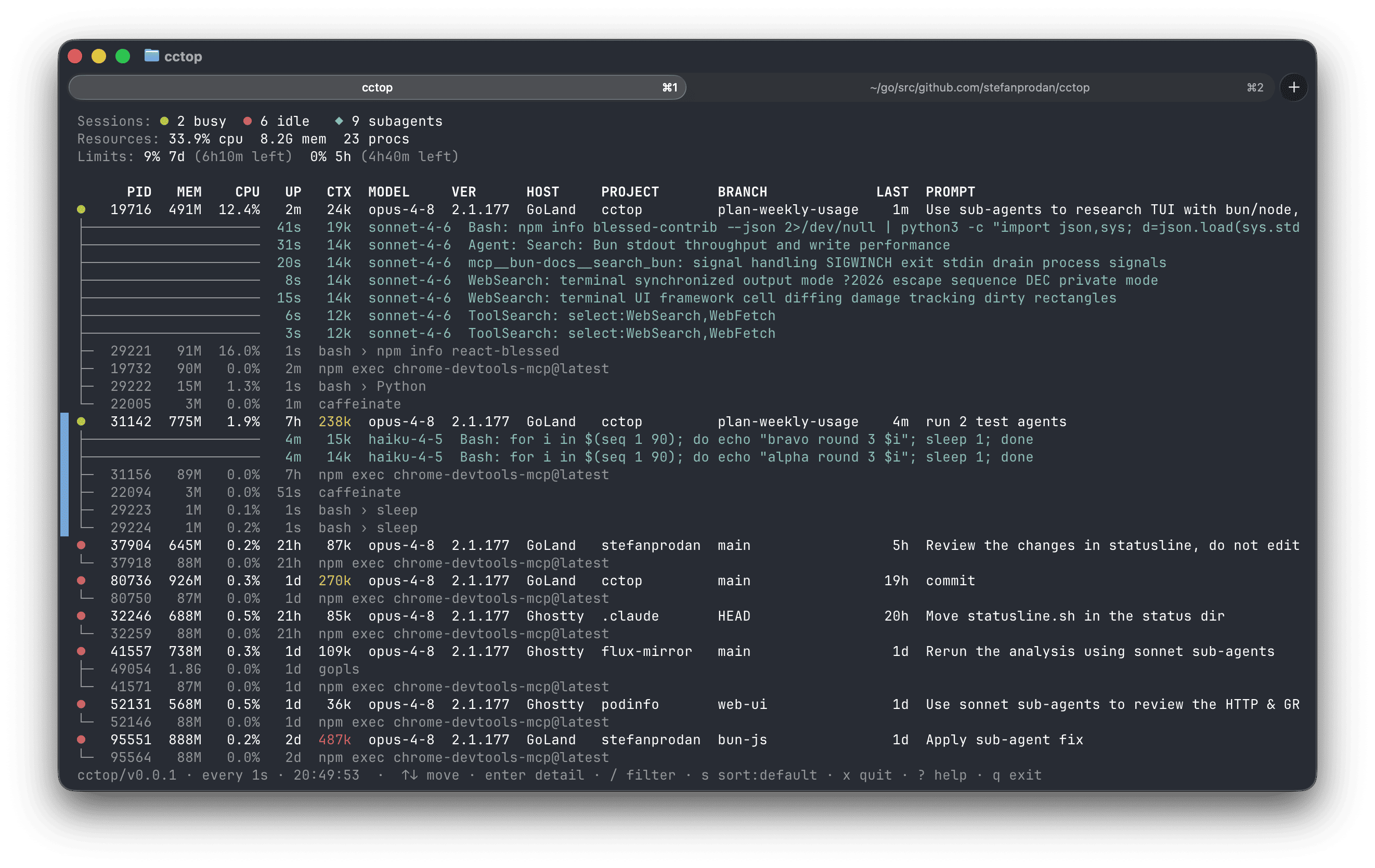
--once it prints a single frame.
The sort mode, refresh interval, and notifications toggle are remembered
across restarts.n and cctop
rings the terminal bell and raises a desktop notification (OSC 9, supported
by iTerm2, Ghostty, kitty, WezTerm, Windows Terminal) whenever a busy
session finishes its turn and waits for your input — so you can look away
while agents run. Works with tmux monitor-bell window flags too.○ for 30 seconds, the summary keeps naming the last one to
ding (Bell: ○ cctop · pid 1737989 · 4s ago) until you answer it, and b jumps
straight to it. A bell out of one of a dozen panes is never a mystery, even
if you were away when it rang — and it reads the same whether the bell came
from cctop's n notifier or from Claude Code itself.x → SIGTERM, with confirm), or
free ports held by a session's leftover dev server
(f in the detail view).h) — a dashboard over past sessions: a per-day
token-usage chart, recent sessions, and breakdowns by model, tool/MCP, and
project.~/.claude and the process table,
spawns no processes; the only files it writes are its own preferences and
usage cache under ~/.claude/cctop/. (The one exception is the explicit
cctop upgrade command, which fetches and replaces its own binary.)On macOS or Linux, install the latest standalone binary with the install
script — it downloads the build for your OS/arch, verifies its checksum, and
installs it to ~/.local/bin (override with PREFIX=...):
curl -fsSL https://raw.githubusercontent.com/stefanprodan/cctop/main/install.sh | sh
The binary is self-contained — it needs no Bun runtime. Re-run the same command
to update, or use the built-in updater (cctop upgrade, see Update).
To install a specific release, set CCTOP_VERSION=v0.5.0 (default: latest); to
install from a fork, set CCTOP_REPO=owner/name.
Or install it with Homebrew:
brew install stefanprodan/tap/cctop
Or as a script with Bun (requires Bun, and pins an explicit release):
bun install -g github:stefanprodan/cctop#v0.6.0
To display the subscription's rate-limit usage, add the following to your Claude Code status-line script:
input=$(cat)

# persist the account-wide 5h/7d rate limits
printf '%s' "$input" | cctop --capture-usage || true
With --capture-usage the rate limits stats are persisted to
~/.claude/cctop/usage.json from which the cctop TUI reads.
See docs/usage-limits.md for more details.
If you installed the standalone binary (via the install script above), update it in place with the built-in updater:
cctop upgrade
It fetches the latest release for your OS/arch, verifies its checksum, and swaps
the binary atomically; cctop upgrade --check only reports whether a newer
version is available. (Re-running the install script does the same thing.)
Swapping the binary leaves any already running cctop on the old version until it restarts — so a TUI running elsewhere notices its binary changed and says so in the footer. It checks by stat-ing its own file, never by calling home.
With Homebrew:
brew upgrade stefanprodan/tap/cctop
With Bun, reinstall pinned to the latest release:
bun rm -g cctop; bun install -g github:stefanprodan/cctop#v0.6.0
If you installed the standalone binary (the script or cctop upgrade), remove
it:
rm ~/.local/bin/cctop # or "$PREFIX/bin/cctop"
With Homebrew:
brew uninstall stefanprodan/tap/cctop
Or with Bun:
bun uninstall -g cctop
If you enabled usage limits, also remove the cctop --capture-usage line from
your Claude Code status-line script.
On an interactive terminal cctop runs as a live TUI (like top); when piped,
redirected, or run with --once it prints a single frame and exits.
While the TUI is running:
| Key | Action |
|---|---|
↑/k ↓/j | move the selection |
PgUp/PgDn | jump 10 rows |
g / G | jump to top / bottom |
b | jump to the session that rang last (the one on the Bell: line) |
enter | open the detail view for the selected session |
h | open the session history dashboard (↹ tabs, r rescan) |
esc | leave the detail view / close an overlay |
/ | filter sessions (type, enter to apply) |
s | cycle the sort column (default, cpu, mem, ctx, pid) |
n | toggle notifications (bell + desktop when a session needs input) |
x | quit the selected session (SIGTERM, with confirm) |
f | reclaim the detail view's orphan ports (SIGTERM, with confirm) |
? | toggle the help overlay |
q / Ctrl-C | quit cctop |
cctop [filter] [options]
cctop upgrade [--check]

  filter                 only show sessions whose project, host, branch,
                         model, or session id contains this
  upgrade [--check]      update the standalone binary to the latest release
  -w, --watch[=seconds]  set the refresh interval (default: 1s, min 0.25s)
  --once                 render once and exit (default when piped)
  --json                 print full session details as JSON
  -v, --version          show version
  -h, --help             show this help
Examples:
cctop flux         # start filtered to sessions matching "flux"
cctop --watch=0.5  # refresh twice a second
cctop --once       # single frame, then exit
cctop --json       # machine-readable snapshot
cctop is open source and contributions are welcome — open an issue or send a
pull request on GitHub. See
docs/CONTRIBUTING.md to get set up.
⚠️ Experimentelle Skill-Sammlung für deutsches Recht (Arbeits-, Gesellschafts-, Insolvenz-, Datenschutz-, Prozessrecht u
Manage multiple Claude Code agents from TUI or Web with tmux and git worktrees
Project management using GitHub Issues + Git worktrees for parallel agent execution
Core skills library for Claude Code with 20+ battle-tested skills including TDD, debugging, and brainstorming