

Are you the author? Sign in to claim
ChatGPT and Claude history exploration
Browse and export your ChatGPT and Claude conversations locally.
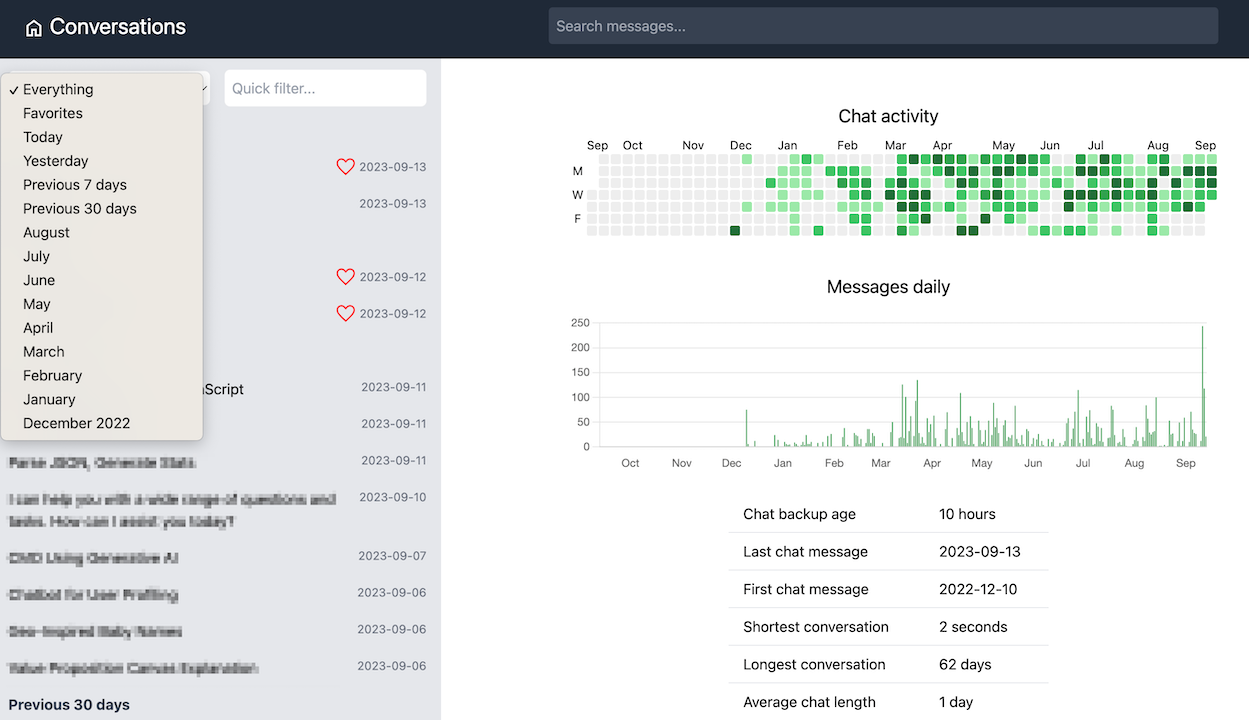
Requires Python 3.11+ and uv.
Export your chats from ChatGPT or Claude (Settings → Export data). Both services send a ZIP file by email.
Create a folder for your chat history, save the ZIP there, and open a terminal in that folder. The wizard will store all data inside it.
Run the setup wizard:
uvx chat-history
The wizard finds your export files, configures everything, and opens the browser.
Next time, run uvx chat-history in the same folder to start browsing.
To update to the latest version, run uvx chat-history install.
To export all conversations as markdown (useful for feeding to other AI tools):
uvx chat-history export
All commands work as uvx chat-history <command> or, if installed locally, chat-history <command>.
| Command | Description |
|---|---|
| (none) | Start server if configured, otherwise run setup wizard |
init | Run the interactive setup wizard |
serve | Start the web server |
export | Export conversations to markdown |
inspect | Print conversation and message counts |
install | Reinstall chat-history via uvx --reinstall chat-history |
uvx chat-history serve [--host 127.0.0.1] [--port 8080] [--no-browser]
uvx chat-history export [--provider chatgpt|claude|all] [--out DIR] [--clean]
                        [--exclude-system] [--exclude-tool]
                        [--exclude-thinking] [--exclude-attachments]
--clean removes old export files before writing (scoped to --provider if set)./data/export/{chatgpt|claude}/uvx chat-history init [--path DIR]
Scans the current folder and ~/Downloads for export ZIPs, validates them,
extracts to ./data/, writes ./data/.env, and offers to start the server.
Supports adding a second provider to an existing setup.
All config lives in ./data/.env (created by the wizard or manually):
| Variable | Default | Description |
|---|---|---|
CHAT_HISTORY_DATA_DIR | data | Root directory for derived data |
CHAT_HISTORY_CHATGPT_PATH | — | Path to ChatGPT export folder or conversations.json |
CHAT_HISTORY_CLAUDE_PATH | — | Path to Claude export folder or conversations.json |
CHAT_HISTORY_OPENAI_ENABLED | false | Enable semantic search |
OPENAI_API_KEY | — | Required if semantic search is enabled |
OPENAI_ORGANIZATION | — | Optional OpenAI org |
OPENAI_EMBEDDING_MODEL | text-embedding-3-small | Embedding model for semantic search |
CHAT_HISTORY_SETTINGS_DB_PATH | — | Override path for settings SQLite DB |
make install    # uv sync
make dev        # uvicorn with hot-reload on :8080
make test       # run tests
Install as a global command from the local repo (editable, changes reflected immediately):
make tool-install         # uv tool install -e .
chat-history              # works from any directory
make tool-uninstall       # uv tool uninstall chat-history
--clean is used.⚠️ Experimentelle Skill-Sammlung für deutsches Recht (Arbeits-, Gesellschafts-, Insolvenz-, Datenschutz-, Prozessrecht u
Manage multiple Claude Code agents from TUI or Web with tmux and git worktrees
Project management using GitHub Issues + Git worktrees for parallel agent execution
Core skills library for Claude Code with 20+ battle-tested skills including TDD, debugging, and brainstorming