

Are you the author? Sign in to claim
A Claude Code Skill for browser automation via Chrome extension WebSocket — navigate, click, type, screenshot, multi-tab
A Claude Code Skill for browser automation via WebSocket communication with the Chrome extension, enabling web navigation, interaction, screenshots, and page snapshots.
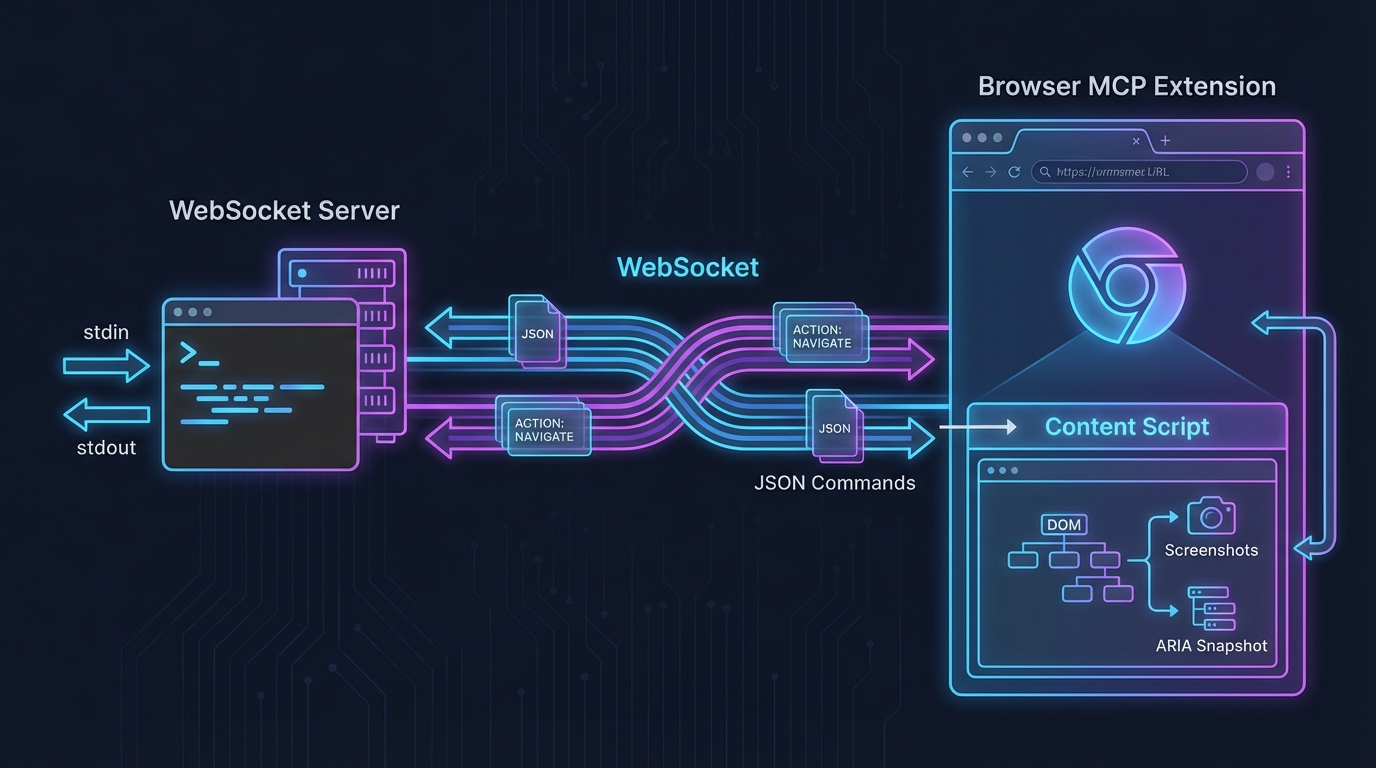
The server communicates with the Browser MCP Chrome extension over WebSocket. Commands are sent as JSON via stdin, and results are returned via stdout.
| Requirement | Details |
|---|---|
| Python | 3.8+ |
| Chrome | With Browser MCP extension installed |
| OS | Windows / macOS / Linux |
| persistent-shell-skill | Recommended for Claude Code to keep the server running |
git clone https://github.com/Tonyhzk/chrome-agent-skill.git
chrome://extensions/ in Chrome.zip extension package from src/browser-chrome-agent/assets/, then click "Load unpacked" and select the unzipped directory; or load the src/browser-mcp-crx/ source directory directlypip3 install websockets
If you use a shared .claude configuration across projects:
python3 setup_claude_dir.py
This creates a symlink from the project's .claude directory to your shared configuration.
python3 src/browser-chrome-agent/scripts/server.py --port 9009
Click the Browser MCP extension icon in Chrome and click Connect.
Send JSON commands via stdin (one per line):
{"action": "navigate", "params": {"url": "https://example.com"}}
{"action": "snapshot", "params": {}}
{"action": "click", "params": {"ref": "s1e5"}}
{"action": "screenshot", "params": {"savePath": "./screenshot.png"}}
| Action | Params | Description |
|---|---|---|
navigate | {"url": "..."} | Navigate to URL |
go_back | {} | Go back |
go_forward | {} | Go forward |
click | {"ref": "s1e5"} or {"x": 500, "y": 100} | Click element (ref or coordinates) |
hover | {"ref": "s1e5"} | Hover over element |
type | {"ref": "s1e5", "text": "...", "submit": false} | Type text |
select_option | {"ref": "s1e5", "values": ["..."]} | Select dropdown option |
drag | {"startRef": "s1e5", "endRef": "s1e8"} | Drag element |
press_key | {"key": "Enter"} | Press key |
get_coordinates | {"ref": "s1e5"} | Get element coordinates |
find_element | {"keyword": "search"} | Search elements by keyword, return matching refs |
find_and_locate | {"keyword": "search", "index": 0} | Search element and get coordinates immediately |
get_text | {} or {"max_length": 5000} | Get page plain text content |
wait | {"time": 2} | Wait (seconds) |
screenshot | {} or {"savePath": "path"} | Capture screenshot |
snapshot | {} or {"snapshot_file": "path"} | Get ARIA page snapshot. Supports snapshot_file to save to file, inline: true to return content directly, max_length to control truncation |
get_html | {"savePath": "path"} | Get full page HTML source and save to file |
xpath_query | {"xpath": "//h1"} | Execute XPath query on page. Supports save_path to save full results, max_length to control display length |
get_console_logs | {} | Get console logs |
list_tabs | {} | List all tabs |
new_tab | {"url": "..."} | Open new tab (url optional) |
switch_tab | {"tabId": 123456} | Switch to specified tab |
close_tab | {"tabId": 123456} | Close specified tab |
status | - | Check connection status |
quit | - | Shut down server |
Interactive actions (click, hover, type, etc.) use ref values from the ARIA snapshot to target elements. Use find_element or find_and_locate to search elements by keyword and get their refs or coordinates directly. Use snapshot only when you need to inspect the full page structure.
chrome-agent-skill/
├── src/browser-chrome-agent/
│   ├── SKILL.md              # Skill definition
│   ├── scripts/
│   │   ├── server.py         # WebSocket server (main entry)
│   │   ├── context.py        # WebSocket connection manager
│   │   ├── tools.py          # Browser automation tools
│   │   ├── utils.py          # Utility functions
│   │   ├── batch_resolve_urls.py  # Batch URL resolver
│   │   └── requirements.txt  # Python dependencies
│   └── assets/               # Chrome extension packages
├── src/browser-mcp-crx/      # Modified Chrome extension source code
├── upstream/                 # Original Browser MCP extension & source archive
├── 0_Doc/                    # Documentation
├── 0_Design/                 # Design resources
├── setup_claude_dir.py       # Shared config symlink tool
├── CHANGELOG.md              # English changelog
└── CHANGELOG_CN.md           # Chinese changelog
This project is a Python rewrite of Browser MCP (originally TypeScript/Node.js), adapted as a Claude Code Skill with a WebSocket-based stdin/stdout control interface.
Tonyhzk
1000+ skills curated from Anthropic, Vercel, Stripe, and other engineering teams
Design enforcement with memory — keeps your UI consistent across a project
Detects 37 AI writing patterns and rewrites text with human rhythm across 5 voice profiles
WCAG accessibility audit — automated scanning, manual review, remediation