

Are you the author? Sign in to claim
Operate existing Chrome tabs through a local MCP server and extension
chrome-bridge is a Chrome extension and HTTP MCP server that lets LLM agents operate every tab in the Chrome browser you use every day.
It operates your existing Chrome through accessibility snapshots, strict element references, and a virtual cursor, with the following principles:
chrome-bridge can record one requested operation from its initial page state through
its visible result, without foregrounding the target tab. Add video_filename to a
wait, input, upload, or navigation/history tool and the extension saves a silent WebM
below Downloads/chrome-bridge/, including 500 ms before and after the operation.
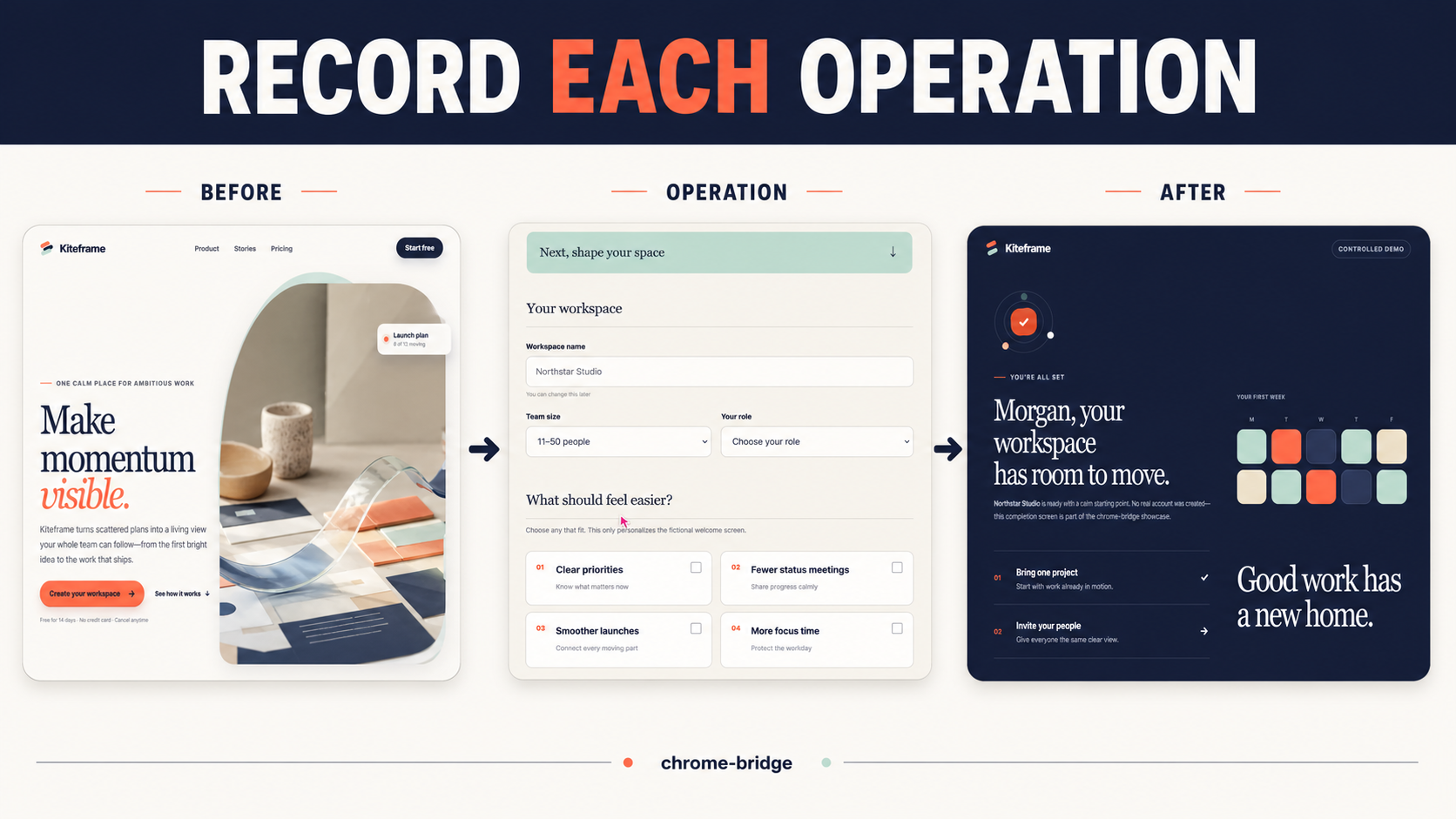
The 27-second showcase uses the self-contained, fictional Kiteframe demo; it contains no real user, browser, account, or machine data. For example, after taking a current snapshot and obtaining the button ref:
browser_click(
    element="Create my workspace button",
    ref="s12e7",
    video_filename="signup-submit.webm",
)
Omit video_filename to preserve the tool's original return value and avoid recording
overhead. The standalone browser_record_video tool records a bounded hold without
performing another page action.
The current vertical slice supports simultaneous connections from multiple Chrome profiles and provides the following 24 tools. When multiple browsers are connected, use browser_instances to find their IDs and pass browser_id to each tool. It may be omitted when only one browser is connected.
| Tool | Function |
|---|---|
browser_instances | List IDs and labels of connected browser instances |
browser_tabs | List tabs across all windows |
browser_tab_open | Open an HTTP(S) URL or a blank tab, targeting it when no target exists |
browser_tab_close | Close a tab by tab ID |
browser_tab_select | Select the page-operation target without foregrounding Chrome UI |
browser_tab_activate | Select the page-operation target and foreground its window |
browser_snapshot | Return the target's accessibility snapshot or dominant browser-dialog state |
browser_dialog_respond | Accept or dismiss the exact browser dialog returned in PageState |
browser_click | Click a snapshot ref, optionally record the operation, and return a post-operation snapshot |
browser_hover | Move to a snapshot ref, optionally record the operation, and return a post-operation snapshot |
browser_type | Type into a snapshot ref, optionally record the operation, and return a post-operation snapshot |
browser_upload_file | Assign local files to the chooser opened by a snapshot ref, optionally recording through the resulting snapshot |
browser_select_option | Select values in a snapshot ref, optionally record, and return a post-operation snapshot |
browser_press_key | Send a key or chord to the target tab, optionally recording the operation |
browser_navigate | Navigate to an HTTP(S) URL, creating a background target tab when needed, optionally recording through the post-operation snapshot |
browser_go_back | Go back in history, optionally recording through the post-operation snapshot |
browser_go_forward | Go forward in history, optionally recording through the post-operation snapshot |
browser_wait | Wait for a specified number of seconds, optionally recording the target during the wait |
browser_wait_for | Wait up to 10 seconds for accessible text to become visible or hidden, optionally record, and return a fresh snapshot |
browser_download_file | Trusted-click a strict ref, wait up to 60 seconds for its target download, and return sanitized metadata plus a fresh snapshot |
browser_record_video | Record the target tab as a bounded silent WebM below Downloads/chrome-bridge |
browser_screenshot | Capture the target tab's viewport as PNG image content |
browser_get_console_logs | Retrieve up to 100 console entries and exceptions from the target tab |
browser_drag | Drag between two snapshot refs, optionally record, and return a post-operation snapshot |
This feature comparison is based on public documentation available as of 2026-07-18. Because each project has a different scope, the table is intended as a guide for choosing a tool, not as a simple ranking.
| Item | chrome-bridge | Browser MCP | mcp-chrome |
|---|---|---|---|
| Existing Chrome login state | Uses it | Uses it | Uses it |
| MCP transport | Streamable HTTP | stdio | Streamable HTTP and stdio |
| Operation target | Lists all windows/tabs and selects a persistent target | The current single tab connected through the extension popup | Tab-ID addressing and cross-tab operations |
| Background-tab operation | Target selection does not foreground; only explicit activation does | Operates the connected tab | background option on some tools (best effort) |
| Simultaneous routing to multiple Chrome profiles | Stable ID per installation | Not mentioned in public setup documentation | Not mentioned in public README |
| Element discovery and operation | Accessibility YAML and generation-scoped strict refs | Accessibility snapshot and element specification | Accessibility-like tree, refs, selectors, and coordinates |
| Local file upload | 1–20 files to the chooser opened by a strict ref | Not mentioned in public tool documentation | Not mentioned in public tool documentation |
| Operation-scoped video recording | Standalone bounded recording plus optional recording around wait, input, upload, and navigation/history operations | Not mentioned in public documentation or changelog | Not listed in the current public tool reference |
| Screenshot | Target viewport, orientation-aware Full HD bound | Connected tab | Viewport/full page/element, configurable size |
| Console logs | Up to 100 console entries/exceptions from the target | Supported | Supported |
| Network monitoring/arbitrary requests | Out of scope | Not mentioned in public tool documentation | Supported |
| History/bookmark management | Out of scope | Not mentioned in public tool documentation | Supported |
| Semantic cross-tab search | Out of scope | Not mentioned in public tool documentation | Supported |
Sources: Browser MCP server setup, Browser MCP extension setup, Browser MCP changelog, mcp-chrome README, mcp-chrome tool reference.
apps/
└── extension/  # Manifest V3 Chrome extension
packages/
├── mcp/        # Python FastMCP + Streamable HTTP + WebSocket bridge
└── sdk/        # Direct API Python SDK and managed-server launcher
The MCP client connects to http://127.0.0.1:8765/mcp. The Chrome extension makes an outbound connection to ws://127.0.0.1:8765/extension and returns results from Chrome API operations.
Python applications can instead use chrome-bridge-sdk without an MCP client. Its
exclusive session is enforced by the shared server across processes, so target and
snapshot refs cannot be changed by another SDK workflow while the session is active.
from chrome_bridge_sdk import ChromeBridge

chrome = ChromeBridge()

async with chrome.session() as session:
    tabs = await session.browser_tabs()
    await session.browser_tab_select(tab_id=tabs[0].id)
    snapshot = await session.browser_snapshot()
session() reuses a compatible server or starts a shared managed server automatically.
There are no public open, close, or restart methods; an SDK-started server exits
after five idle minutes. High-level operations return typed immutable models; call()
remains available when an integration needs the raw Direct API JSON result.
uv tool install chrome-bridge-mcp
chrome-bridge-mcp
For Python SDK use, install both distributions through the SDK dependency:
uv add chrome-bridge-sdk
http://127.0.0.1:8765/mcp.For source setup and Load unpacked development, see the
development guide.
For repeatable testing of the exact release ZIP, run
uv run python scripts/prepare_unpacked_extension.py and select the generated,
gitignored unpacked-extension/ directory in Chrome once.
A typical Streamable HTTP configuration looks like this. Adjust field names for your MCP client.
{
  "mcpServers": {
    "chrome-bridge": {
      "transport": "streamable-http",
      "url": "http://127.0.0.1:8765/mcp"
    }
  }
}
Connectivity check:
curl http://127.0.0.1:8765/health
uv run pytest
Local CI-equivalent validation:
uv sync --all-groups --locked
uv run ruff check packages/mcp packages/sdk scripts
uv run ruff format --check packages/mcp packages/sdk scripts
uv run pytest
uv run python scripts/validate_static.py
npm --prefix apps/extension ci
npm --prefix apps/extension run lint
npm --prefix apps/extension test
To run isolated E2E without using your everyday Chrome profile or default port 8765, install bundled Chromium once and invoke the test explicitly.
npm --prefix apps/extension exec playwright install --no-shell chromium
npm --prefix apps/extension run test:e2e
GitHub Actions runs the same gates with Python 3.11/3.12, Node 20, and bundled Chromium.
Build reproducible extension ZIP and Python wheel/sdist artifacts with SHA-256 checksums, then run a clean-install smoke test:
uv run python scripts/build_release.py
uv run python scripts/validate_release.py
uv run python scripts/check_release_reproducible.py
The verified extension ZIP is also the Chrome Web Store submission artifact; do not create a separate Store build. See the Chrome Web Store submission guide for the Unlisted-first rollout, listing assets, privacy declarations, permission justifications, reviewer instructions, and update automation. The public privacy policy describes extension data handling.
The one-time Public visibility migration and API authentication bootstrap are complete. The tag workflow uploads a changed extension ZIP through Chrome Web Store API v2 and enables automatic 100% publication after review. Python-only tags detect the already-published extension version and skip Store mutation.
See docs/development.md for detailed procedures, docs/api.md for the tool API, docs/architecture.md for design, docs/release.md for distribution, and SPEC.md for the normative specification. docs/operations.md is canonical for routine operation, configuration, logging, and incident response. User-visible changes are tracked separately for the extension, MCP server, and Python SDK.
chrome-bridge is licensed under the MIT License. Playwright-derived extension code remains under Apache-2.0; see THIRD_PARTY_NOTICES.md for provenance and license details.
Run Claude Code as an MCP server so any agent can delegate coding tasks to it
 @microsoft✓ Official
Browser automation using accessibility snapshots instead of screenshots
 @googleapis✓ Official
Google's universal MCP server supporting PostgreSQL, MySQL, MongoDB, Redis, and 10+ databases
 @github✓ Official
Official GitHub integration for repos, issues, PRs, and CI/CD workflows