

Are you the author? Sign in to claim
Self-hosted AI coding agents that live in Slack — run Claude Code or Codex in your own infra, ship PRs, and keep every c
Your own AI engineering teammate, self-hosted, living in Slack.
@mention it or DM it and ask for real engineering work (investigate a bug, dig through CloudWatch logs, fix code, open a PR) and Citio runs Claude Code or OpenAI Codex inside your own infrastructure to do it. Slack is the interface, a controlled MCP tool layer is the safety boundary, and every credential stays in your own infrastructure.
No Team or Enterprise plan required. Citio runs on an individual Claude Max/Pro or ChatGPT Go/Plus/Pro (Codex) subscription, the agent you already pay for, now working from Slack.







Quickstart · How it works · Compare · Configuration · Customize · Architecture · Contributing · Security
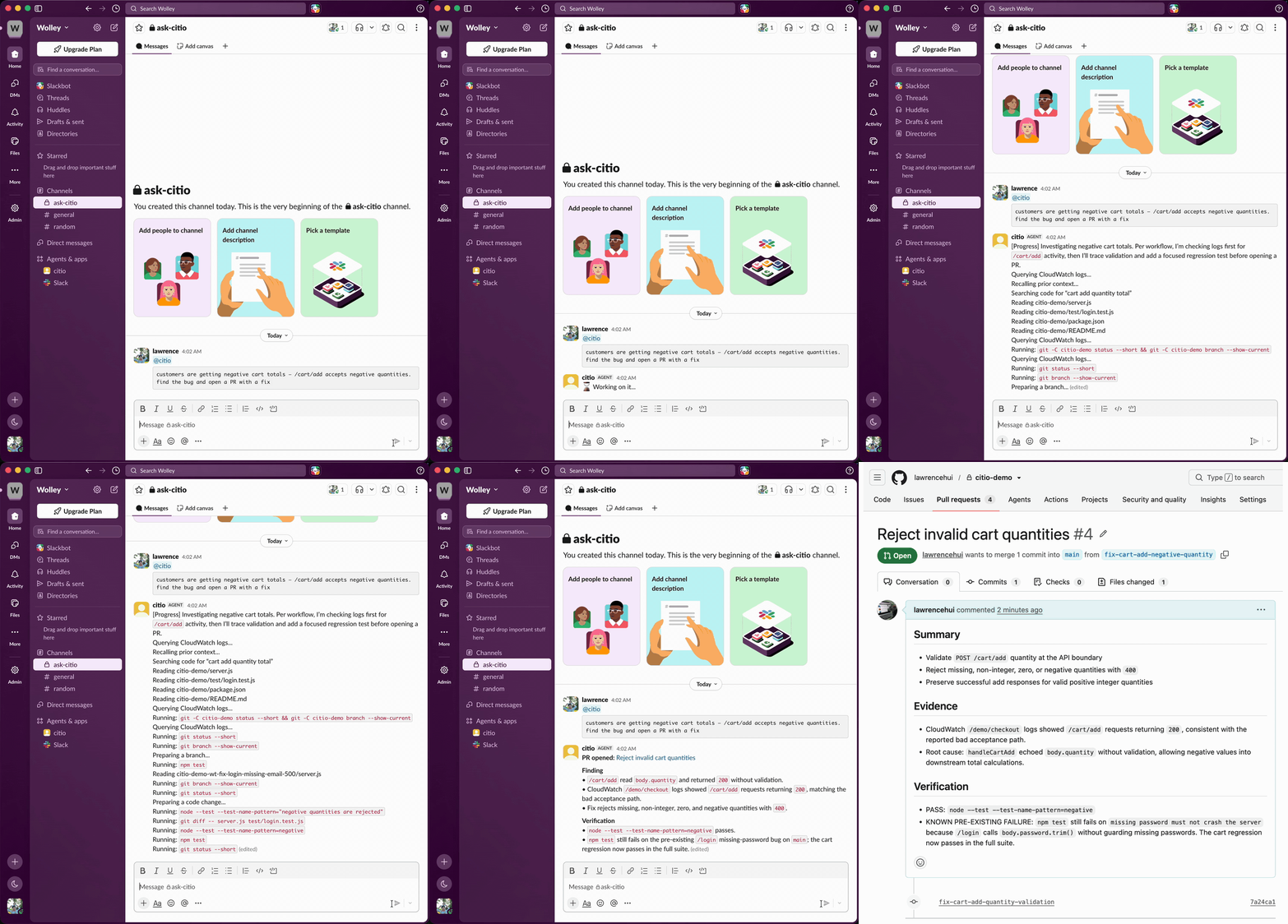
A Slack message becomes an investigated, tested pull request, without leaving the thread.
Most teams can already chat with an LLM. The harder problem is letting a team ask for real engineering work from Slack without handing a raw shell and a pile of credentials directly to the model.
Citio closes that gap:
@mention it in a channel.The result is something that can investigate bugs, inspect logs, edit code, and open pull requests, without a human sitting in the middle of every request.
Where it runs. Citio is a self-hosted container. This first version ships a native one-command AWS Fargate deploy (on Fargate Spot by default, ~$5–11/month, or
citio pauseto $0 when idle). Running on other hosts (a cheap VPS, Fly.io / Railway, or your own homelab) and a pay-per-use serverless mode are on the roadmap.
Anthropic's Claude Tag (June 2026) popularized exactly this idea (@mention an AI teammate in Slack and it does the work in-thread), but it's an Anthropic-hosted service gated to Claude Team and Enterprise plans, Claude-only. Citio takes the self-hosted, bring-your-own-subscription path:
| Citio | Claude Tag | |
|---|---|---|
| Hosting | Your AWS account, your infra | Anthropic-hosted SaaS |
| Plan required | Individual Claude Max/Pro or ChatGPT Go/Plus/Pro | Claude Team or Enterprise |
| Providers | Claude Code or OpenAI Codex | Claude only |
| Credentials | Stay with you, behind an MCP allowlist | Managed by the vendor |
| Best for | Solo devs & small teams who self-host | Orgs already on Team/Enterprise |
If you already pay for a Claude or ChatGPT subscription, Citio puts that same agent to work from Slack, no per-seat enterprise upgrade, no handing your code and credentials to someone else's cloud.
investigate_codebase, read_file, write_file, create_branch, create_pr, run_command (allowlisted), check_ci_status, query_logs, recall_context, and more.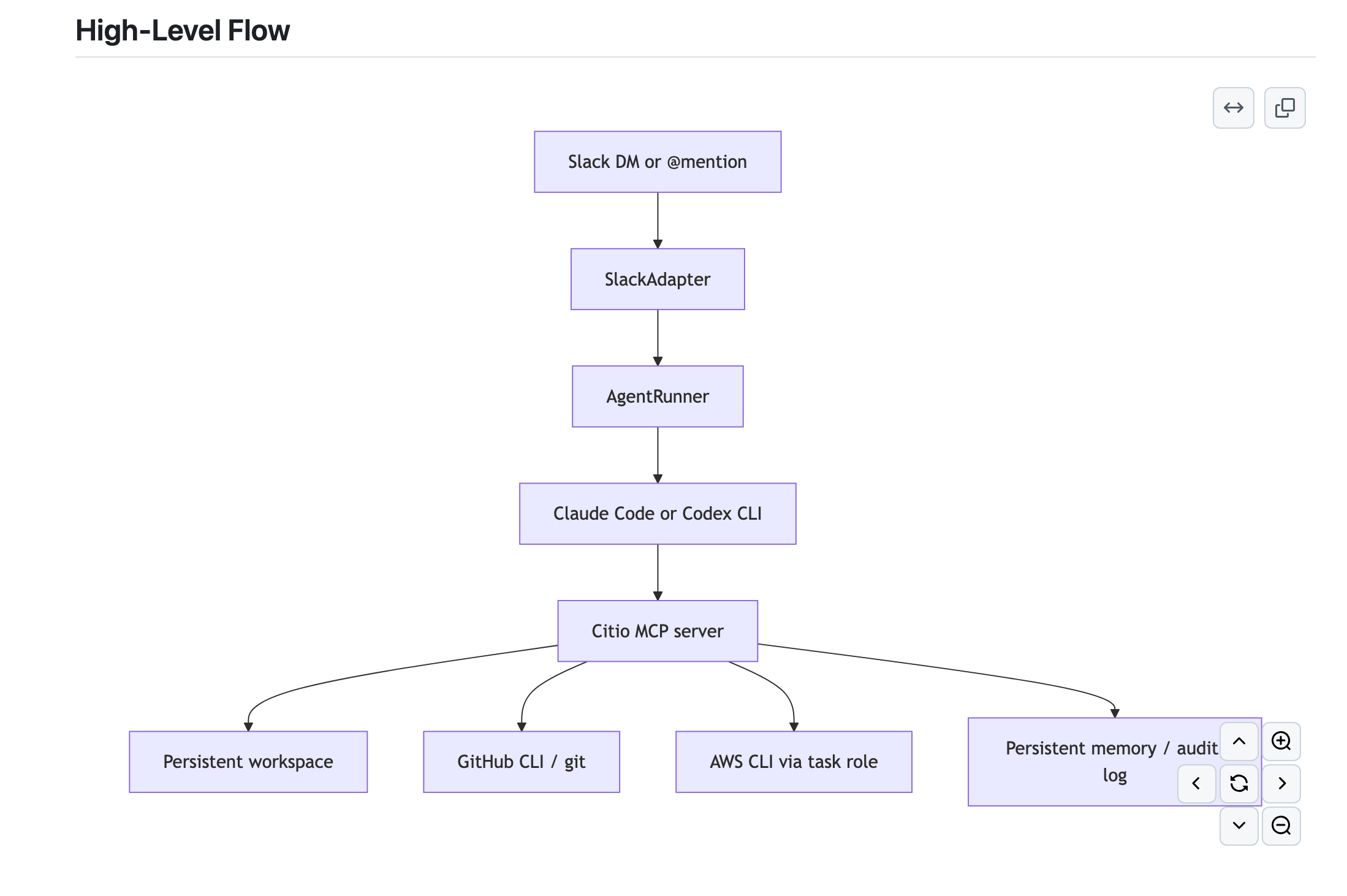
Runtime shape:
--mcp-config.More detail: docs/ARCHITECTURE.md
On your machine (the installer hard-checks for Docker, AWS CLI, and Git):
| Tool | Version / note |
|---|---|
| Node.js | ≥ 22 |
| Docker | Running. The image is built linux/amd64: on Apple Silicon, Docker Desktop's buildx cross-builds it. |
| AWS CLI | v2, authenticated with a profile that has the permissions below, see Setting up your AWS profile. |
| Git | Any recent version. |
The agent CLIs (
claude,codex),gh, andjqship inside the container image: you don't install them on the host.
Accounts & tokens
contents: write + pull_requests: write on the repos you want worked on.Citio deploys into your own AWS account. This takes about 10 minutes from "no AWS CLI" to "ready to install". If aws sts get-caller-identity already prints your account ID, skip to Permissions.
| OS | Command |
|---|---|
| macOS | brew install awscli |
| Ubuntu/Debian | sudo apt install awscli (or the official v2 installer) |
| Windows | MSI installer |
Verify with aws --version (v2.x recommended).
No AWS account yet? Create one at aws.amazon.com. Then pick one route:
Option A: IAM user + access key (simplest for a personal account)
citio-admin)aws configure --profile citio
# AWS Access Key ID: AKIA...
# AWS Secret Access Key: ...
# Default region name: eu-west-2 # any region you like
# Default output format: json
Option B: IAM Identity Center / SSO (if your org uses it)
aws configure sso                  # follow the browser prompts
aws sso login --profile citio
Verify either way: this must print your account ID:
aws sts get-caller-identity --profile citio
The installer lists your profiles automatically and re-runs this check before it touches anything.
The deploy creates an ECR repository, an ECS cluster/service/task definition, an IAM task role, a security group, CloudWatch log groups, a Secrets Manager secret, and (optionally) an EFS filesystem.
| Service | What Citio does with it |
|---|---|
| ECR | Pushes the Citio container image to a private repo. |
| ECS | Creates the cluster, task definition, and Fargate service that runs the agent. |
| EC2 | Creates one security group in your default VPC. |
| IAM | Creates the task role the container runs as (scoped to role/citio*). |
| Secrets Manager | Stores your Slack / GitHub / provider tokens in citio/runtime: never as plaintext task-definition env vars. |
| CloudWatch Logs | Container logs, plus the agent's query_logs tool. |
| EFS (optional) | Persists agent credentials and workspace across restarts. |
Simplest (personal/sandbox account): attach the AWS-managed AdministratorAccess policy to your IAM user and skip the JSON below.
Least-privilege (shared or work account): attach this policy instead; it is scoped to exactly what the installer calls, and nothing more.
{
  "Version": "2012-10-17",
  "Statement": [
    { "Sid": "STS",  "Effect": "Allow", "Action": ["sts:GetCallerIdentity"], "Resource": "*" },
    { "Sid": "ECR",  "Effect": "Allow", "Action": ["ecr:GetAuthorizationToken", "ecr:CreateRepository", "ecr:DescribeRepositories", "ecr:BatchCheckLayerAvailability", "ecr:InitiateLayerUpload", "ecr:UploadLayerPart", "ecr:CompleteLayerUpload", "ecr:PutImage", "ecr:BatchGetImage", "ecr:GetDownloadUrlForLayer"], "Resource": "*" },
    { "Sid": "ECS",  "Effect": "Allow", "Action": ["ecs:CreateCluster", "ecs:RegisterTaskDefinition", "ecs:CreateService", "ecs:UpdateService", "ecs:DescribeServices", "ecs:DescribeTasks", "ecs:ListTasks", "ecs:RunTask"], "Resource": "*" },
    { "Sid": "EFS",  "Effect": "Allow", "Action": ["elasticfilesystem:CreateFileSystem", "elasticfilesystem:DescribeFileSystems", "elasticfilesystem:CreateMountTarget", "elasticfilesystem:DescribeMountTargets"], "Resource": "*" },
    { "Sid": "EC2",  "Effect": "Allow", "Action": ["ec2:DescribeVpcs", "ec2:DescribeSubnets", "ec2:DescribeSecurityGroups", "ec2:CreateSecurityGroup", "ec2:AuthorizeSecurityGroupIngress"], "Resource": "*" },
    { "Sid": "Logs", "Effect": "Allow", "Action": ["logs:CreateLogGroup", "logs:DescribeLogGroups", "logs:GetLogEvents", "logs:FilterLogEvents", "logs:StartLiveTail"], "Resource": "*" },
    { "Sid": "Secrets", "Effect": "Allow", "Action": ["secretsmanager:CreateSecret", "secretsmanager:PutSecretValue", "secretsmanager:DescribeSecret", "secretsmanager:DeleteSecret"], "Resource": "arn:aws:secretsmanager:*:*:secret:citio/*" },
    { "Sid": "IAM",  "Effect": "Allow", "Action": ["iam:CreateRole", "iam:GetRole", "iam:PutRolePolicy", "iam:AttachRolePolicy", "iam:PassRole"], "Resource": "arn:aws:iam::*:role/citio*" }
  ]
}
The one people miss:
iam:PassRolescoped torole/citio*. Without it the ECS task can't assume the role the installer just created, and the deploy fails withAccessDenied.
Use whichever region is closest to you. The installer auto-detects your CLI's default and offers it. All Citio resources land in one region; remember which, for teardown.
Fastest: one command (uses the published package, no clone, no build):
npx @lawrencehui/citio
Installed globally (npm i -g @lawrencehui/citio) the command is just citio, citio status, citio destroy.
Or build from source (to read/modify the code first, or to contribute):
git clone https://github.com/lawrencehui/Citio.git
cd Citio
npm ci
npm run build
npm run init
Both launch the same guided installer, which will:
citio.yamlCitio runs on Fargate Spot by default, roughly 70% cheaper than on-demand. Fargate bills per second, so cost tracks how long the task actually runs.
Task size (citio.yaml → deploy.aws) | Spot (default) | On-demand | Good for |
|---|---|---|---|
0.5 vCPU / 1 GB (task_cpu: 512, task_memory: 1024) | ~$5/mo | ~$18/mo | light/personal, small repos |
| 1 vCPU / 2 GB (default) | ~$11/mo | ~$36/mo | most use; bump memory if a big repo OOMs |
2 vCPU / 8 GB (task_cpu: 2048, task_memory: 8192) | ~$26/mo | ~$85/mo | large monorepos / heavy tasks |
Plus pennies for ECR storage and EFS (~$0.30/GB-mo). Not free-tier.
You rarely pay the monthly figure. Two ways to keep it near zero:
citio pause      # scale to 0 tasks, compute charges stop, deployment + EFS stay
citio resume     # back in ~1–2 min

citio destroy -- --yes --delete-efs    # remove everything
A one-hour demo session costs well under $1.
Spot note: AWS can reclaim a Spot task (rare, 2-minute warning). Citio posts a "restarting, please re-send" notice and comes back automatically, fine for a single-instance bot. Want no interruptions? Set
deploy.aws.use_spot: falseincitio.yamlfor on-demand.
citio destroy -- --yes --delete-efs
Or by hand, if you'd rather see every call:
aws ecs update-service --cluster citio --service citio --desired-count 0
aws ecs delete-service --cluster citio --service citio
aws ecs delete-cluster --cluster citio
aws ecr delete-repository --repository-name citio --force
aws secretsmanager delete-secret --secret-id citio/runtime --force-delete-without-recovery
# if you enabled EFS (find the ID first):
aws efs describe-file-systems --creation-token citio-memory --query 'FileSystems[0].FileSystemId'
aws efs delete-file-system --file-system-id <fs-...>   # delete mount targets first if prompted
The installer generates a local citio.yaml. The committed citio.example.yaml shows the full shape:
name: citio
engine:
  default_provider: claude        # or "codex"
  max_concurrent_sessions: 1
slack:
  bot_token: ${SLACK_BOT_TOKEN}
  app_token: ${SLACK_APP_TOKEN}
  channel_id: C0123456789
workspace:
  repos:
    - url: https://github.com/your-org/your-repo.git
      branch: main
  rules:
    - Always create PRs for code changes. Never push directly to main.
deploy:
  provider: aws
  aws:
    region: eu-west-2
    ecr_repo: citio                # AWS resource names are yours to choose
⚠️
citio.yamlholds local machine state (and is.gitignored). Don't commit it.
Runtime environment variables
| Variable | Purpose |
|---|---|
CITIO_CONFIG | Path to the config file (default citio.yaml) |
CITIO_CONFIG_B64 | Base64-encoded config (used by ECS, no file mount) |
CITIO_WORKSPACE | Workspace path (default /workspace) |
CITIO_MEMORY | Memory/audit path (default /memory) |
🔐 Tokens are not stored as plaintext env vars. Your Slack, GitHub, and provider tokens are written to an AWS Secrets Manager secret (
citio/runtime) and injected into the container by ECS at start, so they are not readable viaecs:DescribeTaskDefinition. The values above are non-sensitive runtime config only.
Yes, a Citio instance is configured almost entirely through citio.yaml (the installer writes it for you, and you can hand-edit then redeploy). The main knobs:
| Setting | Where | What it controls |
|---|---|---|
| Provider | engine.default_provider | claude or codex |
| Agent rules | workspace.rules[] | Plain-English guardrails injected into the agent ("always open PRs", "check logs before editing", your own policies) |
| Repos | workspace.repos[] | Which repos (and branches) the agent may clone and work on |
| Who can use it | slack.authorized_users[] / admin_users[] | Restrict channel @mentions and DMs to specific Slack user IDs (empty = everyone) |
| Session limits | engine.max_session_duration_minutes, max_concurrent_sessions | How long a task can run; how many run at once (1 = strictly serialized) |
| Skills | skills.installed[] | Optional community skill packs the agent can use |
| Commit identity | workspace.git.user_name / user_email | Author on commits the agent makes |
| Bot name | Slack app manifest (set at install) | The @name it answers to |
| AWS sizing & names | deploy.aws.task_cpu, task_memory, ephemeral_storage_gb, ecr_repo, ecs_cluster, ecs_service, region | Container resources and the names of the resources Citio provisions |
The fastest way to change behavior is usually workspace.rules: those instructions shape how the agent investigates, edits, and reports. After editing citio.yaml, re-run npm run init (or restart the container) to apply.
See citio.example.yaml for the full annotated shape.
| Area | Support |
|---|---|
| Providers | Claude Code, OpenAI Codex |
| Deploy | AWS ECS / Fargate, AWS ECR |
| Persistence | Optional AWS EFS for workspace, memory, and provider auth |
Citio is currently AWS-first. Multi-cloud support is not part of the current public release.
npm run typecheck   # tsc --noEmit
npm run build       # compile to dist/
npm run test        # node:test suite
npm run dev         # run locally with tsx
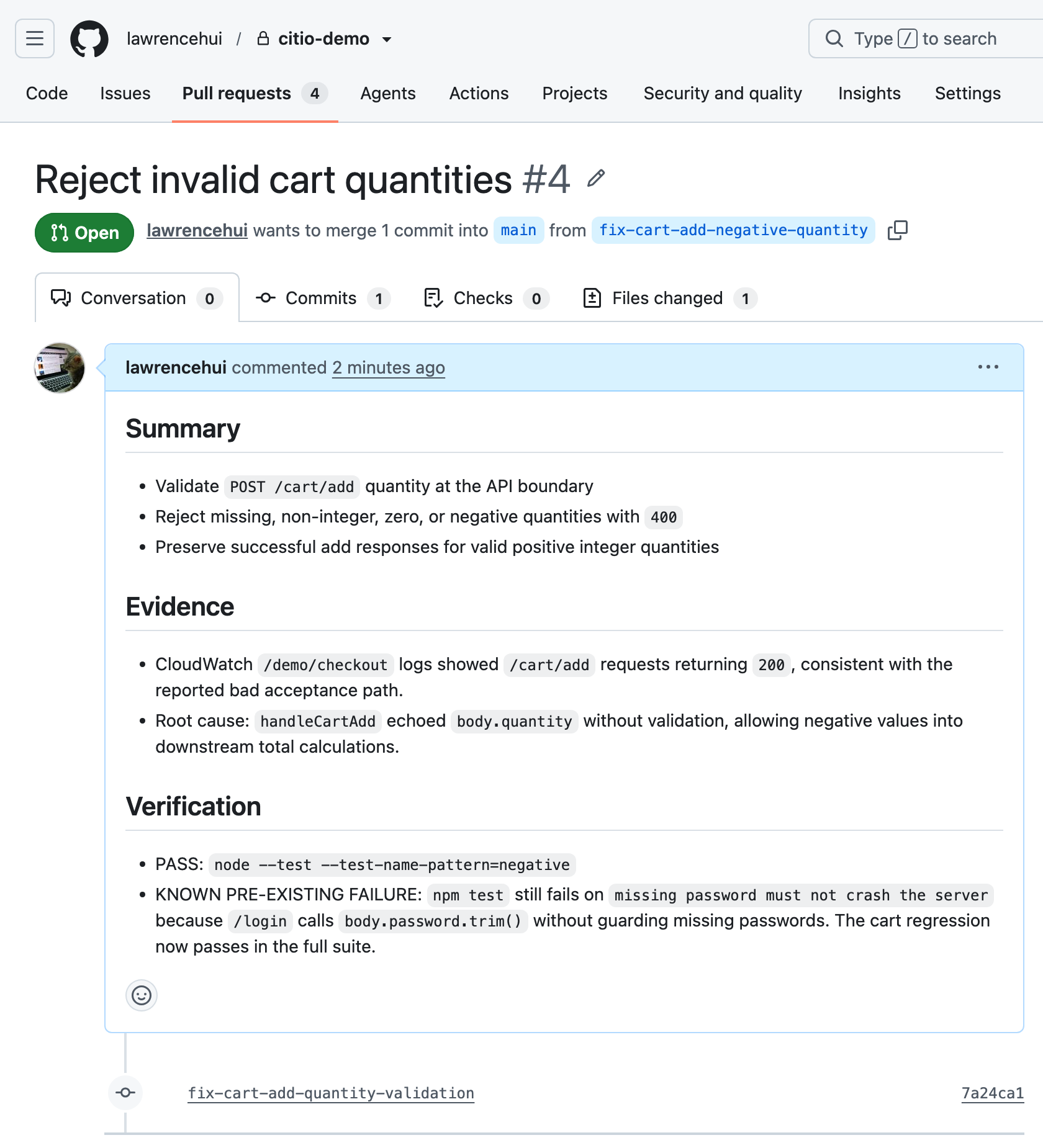
The PR Citio opened (real, reviewable work on GitHub):
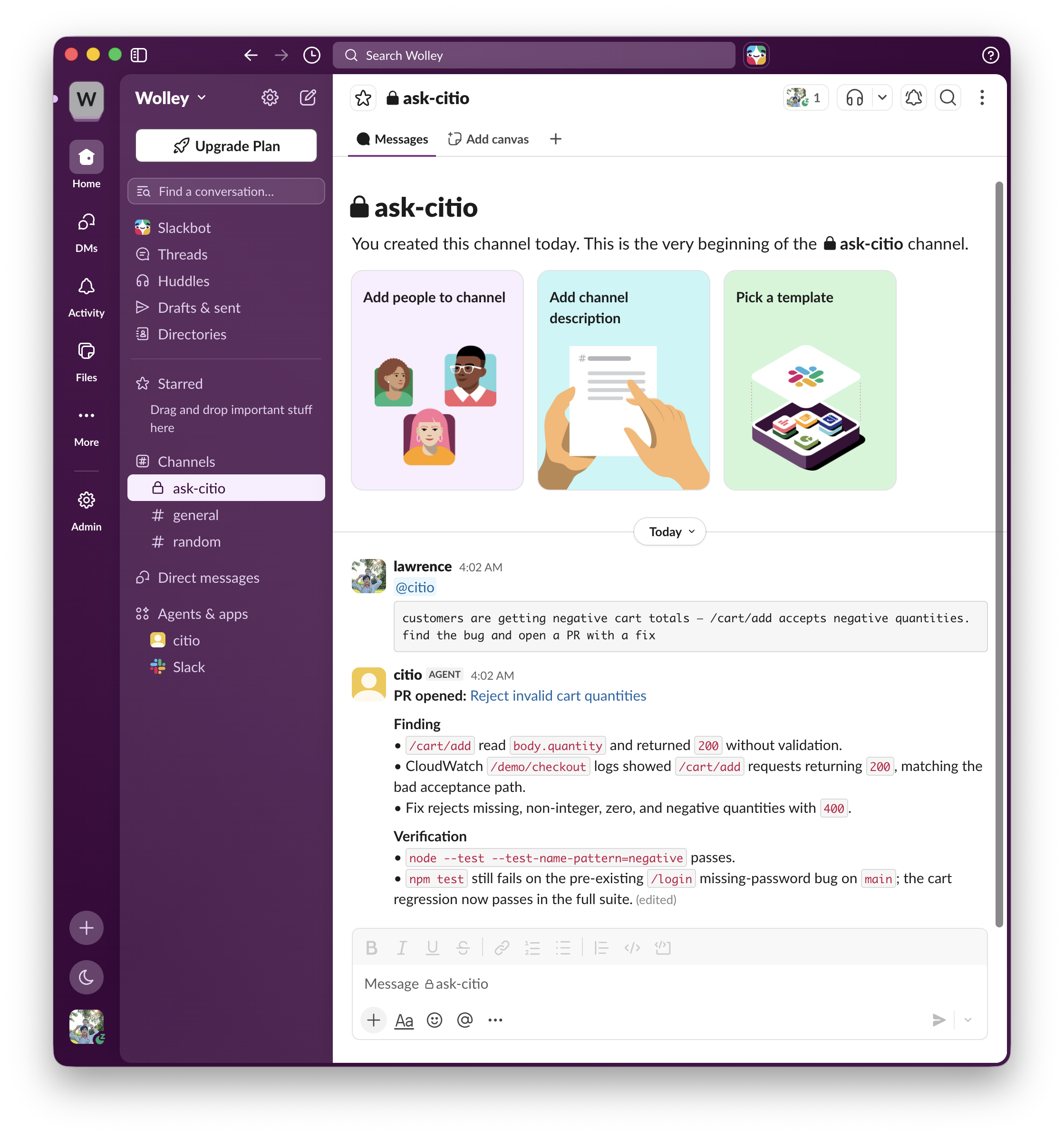
Working in a channel: @mention it where your team already talks:
The installer: one guided command from zero to deployed:
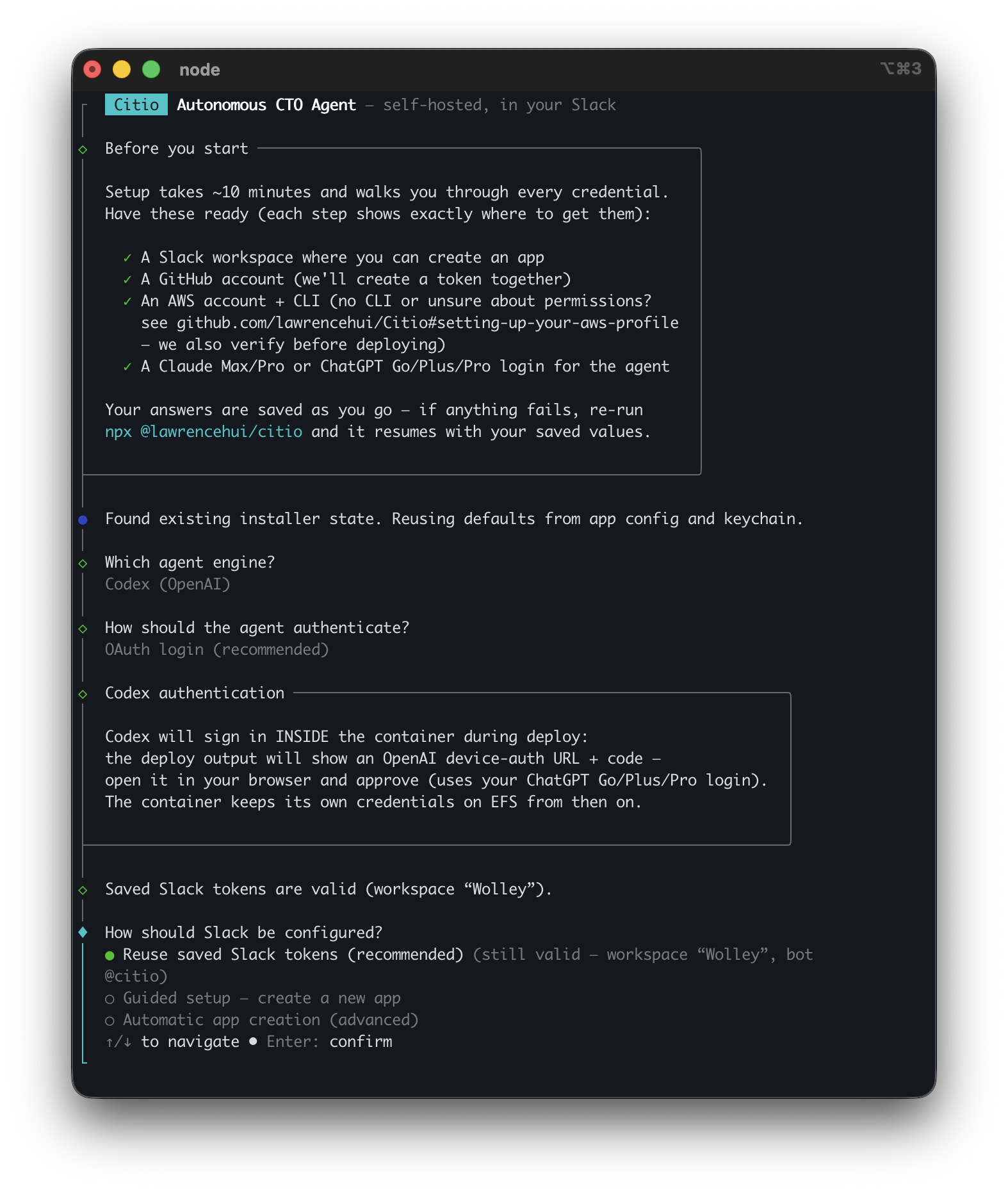
Citio is pre-1.0. This release deploys natively to AWS Fargate (Spot by default for low cost); the container itself is host-agnostic, so more deploy targets are coming.
citio pause / citio resume / citio destroy for cost controlCitio is not a fully hardened multi-cloud platform yet. Treat this release as AWS-first and pre-1.0. Read this before deploying anywhere sensitive.
Security and isolation
Runtime and sessions
Providers
CLAUDE_CODE_OAUTH_TOKEN or an API key; Codex OAuth depends on a persisted ~/.codex/auth.json.--mcp-config.Installer and deployment
citio.yaml is local machine state, don't commit it.| Symptom | Fix |
|---|---|
Unable to locate credentials | Run aws configure --profile citio: see Setting up your AWS profile. |
ExpiredToken / SSO session expired | aws sso login --profile citio |
AccessDenied on iam:PassRole | Your profile is missing the IAM statement. Attach the least-privilege policy: this is the most common failure. |
AccessDenied on secretsmanager:* | Same cause: add the Secrets statement. Citio stores tokens in citio/runtime, not in plaintext env vars. |
Docker push fails: no basic auth credentials | The installer logs into ECR for you. By hand: aws ecr get-login-password | docker login --username AWS --password-stdin <account>.dkr.ecr.<region>.amazonaws.com |
| Deploy succeeds but Slack is silent | Check the app has assistant_thread_started events subscribed, re-paste the manifest from citio manifest. |
| Costs higher than expected | You may be on on-demand. Confirm deploy.aws.use_spot isn't false in citio.yaml, and use citio pause when idle. |
Contributions are welcome; see CONTRIBUTING.md. Keep diffs small, prefer runtime-safe behavior over clever abstractions, and don't commit local machine state.
How credentials are handled
citio/runtime): never as plaintext task-definition environment variables, and never baked into the Docker image.run_command is allowlisted and rejects shell metacharacters.What Citio is not
It is not a hardened sandbox. The provider CLIs keep native shell access inside the container; see Known limitations. Deploy it into an account you're comfortable letting an agent act in.
Reporting
Found a vulnerability? Report it privately; see SECURITY.md. Please don't open a public issue for credential handling, auth bypass, shell injection, or sandbox escape.
Run Claude Code as an MCP server so any agent can delegate coding tasks to it
 @microsoft✓ Official
Browser automation using accessibility snapshots instead of screenshots
 @googleapis✓ Official
Google's universal MCP server supporting PostgreSQL, MySQL, MongoDB, Redis, and 10+ databases
 @github✓ Official
Official GitHub integration for repos, issues, PRs, and CI/CD workflows