

Are you the author? Sign in to claim
Full-featured GUI for Claude Code CLI in VS Code — Windows (no WSL) & macOS. Third-party API, MCP plugins, Skills, Hooks
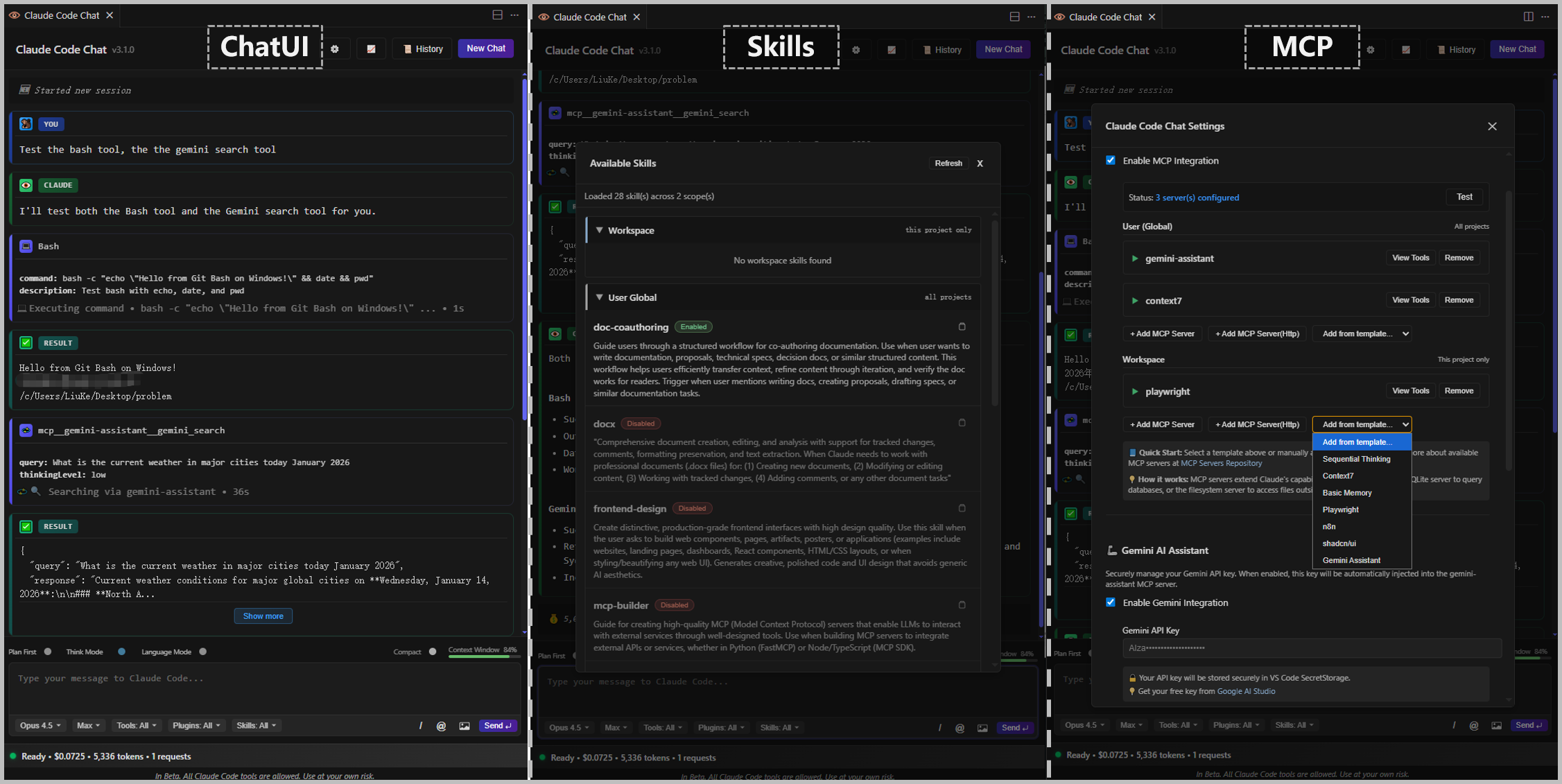
Claude Code ChatUI is a full-featured GUI extension for Claude Code CLI in VS Code and Cursor. Works natively on Windows (no WSL required) and macOS. Supports both official Anthropic accounts and third-party API providers with GUI configuration. Key features: MCP plugin management, Skills system, Hooks system, real-time token & cost tracking, AI Assistant integration (Gemini + Grok), and multi-language UI (English, 简体中文, 繁體中文). Actively maintained with 236+ commits.







🌐 Languages: English | 简体中文 | 繁體中文
Note: This extension automates the official
claudeinteractive CLI to provide a GUI. It does not modify authentication, proxy network traffic, or touch your credentials — it reuses your already-logged-in subscription. Please review and comply with Anthropic's Terms of Service.
| Feature | Official Claude Code | Claude Code GUI (MaheshKok) | Claude Code UI (AuraTech) | This Project |
|---|---|---|---|---|
| Windows No WSL | ❌ Requires setup | ❌ Requires CLI config | WSL path mapping | ✅ Native |
| Third-party API GUI Config | ❌ | ❌ | ❌ | ✅ Exclusive |
| MCP Plugin GUI Management | CLI-level only | ✅ MCP Hub | ✅ MCP commands | ✅ GUI config (Global + Workspace) |
| Skills System GUI | CLI-level only | ❌ | ❌ | ✅ Exclusive |
| Hooks System GUI | CLI-level only | ❌ | ❌ | ✅ Exclusive |
| AI Assistant Integration | ❌ | ❌ | ❌ | ✅ Gemini + Grok |
| Real-time Token Tracking | ❌ | ✅ Usage meter | ✅ Cost tracking | ✅ |
| macOS Support | ✅ | ✅ | ✅ | ✅ |
| npm + Native Installer | ✅ | ✅ | ✅ | ✅ |
| Actively Maintained | ✅ | ✅ | ✅ | ✅ (236+ commits) |
| Version | Date | Highlights |
|---|---|---|
| v5.0.5 | 2026-06-15 | Fixes messages being silently swallowed after a /compact or a session switch (the provider-wide compact-mode flag now resets on every session switch, and a send during compaction is visibly rejected instead of lost). Also shrinks the oversized QUESTION option-card title (.ask-question-header 14px→13px) so it no longer towers over the conversation badges |
| v5.0.4 | 2026-06-15 | Packaging fix — the v5.0.3 VSIX shipped with zero node_modules (--no-dependencies dropped the native node-pty runtime), so it installed but the chat panel wouldn't open. node-pty's win32-x64 binaries are now bundled correctly |
| v5.0.3 | 2026-06-15 | Interactive option cards — Claude emits a fenced ```ask block (native AskUserQuestion disabled) that renders as clickable single/multi-select cards; clicking injects the chosen label as the next turn. Fixes the "still processing" lock when an ask block follows a tool call (stop_reason: null), plus card layout/typography polish |
| v5.0.2 | 2026-06-14 | First-turn image vision via staged PTY injection — pasted/selected images arrive as a native [Image #N] multimodal attachment (0 Read, no "I don't see an image"); idempotent under the reinject watchdog; graceful degrade to Read if no chip; CJK/space paths + multi-image verified |
| v5.0.1 | 2026-06-13 | PTY interactive driver replaces claude -p (usage bills against your subscription); output read from transcript JSONL; permission mode setting; optional Stop hook completion fallback; win32-x64 only |
| v4.1.3 | 2026-06-02 | Claude Opus 4.8 model support; Opus 4.7 demoted to Previous; Opus 4.5 hidden from UI (kept for history & pricing) |
| v4.1.2 | 2026-05-18 | Security: npm audit 23→5 vulns; tsconfig strict checks (noImplicitReturns, noUnusedParameters); code dedup: unified escapeHtml, centralized MODEL_DISPLAY_NAMES, generic openModal/closeModal |
| v4.1.1 | 2026-04-21 | Gemini Vertex AI ADC mode; MCP env backfill fix (APPDATA/PATH/proxy); Windows node stdio wrapper fix; hierarchical auth UI |
| v4.1.0 | 2026-04-16 | Opus 4.7 model support; xHigh thinking intensity; /ultrareview command; Compute Mode restore bug fix |
| v4.0.10 | 2026-04-13 | Cursor history crash fix; history panel XSS fix |
| v4.0.9 | 2026-04-02 | Project metadata & README rewrite for AI search discoverability |
| v4.0.8 | 2026-04-02 | Codex MCP template, CLAUDE.md conditional injection |
| v4.0.7 | 2026-04-02 | Stream parser upgrade: 6 bug fixes, new CLI message types |
| v4.0.5 | 2026-03-30 | AI Assistant Panel: Grok + Vertex AI support; macOS scroll fix |
| v4.0.2 | 2026-03-28 | Hooks GUI management panel with 26 event types, 4 hook types, 5 templates |
| v3.1.9 | 2026-03-29 | CSP security policy, XSS fixes, Windows orphan process cleanup |
| v3.1.8 | 2026-03-12 | Grok MCP template, default model → Sonnet 4.6, cost bubble dedup |
| v3.1.7 | 2026-02-18 | Claude Sonnet 4.6 model support, Compute Mode upgrade |
| v3.1.4 | 2026-01-29 | macOS platform support added |
| v3.1.0 | 2026-01-13 | Skills panel: copy, enable/disable toggle, plugin protection |
| v2.1.0 | — | MCP integration, HTTP/SSE transport, server templates |
| v2.0.0 | — | Complete UI redesign, statistics dashboard, custom API endpoint |
See CHANGELOG.md for full details.
setx SHELL "C:\Program Files\Git\bin\bash.exe"
After restarting, open a new terminal window:
npm install -g @anthropic-ai/claude-code
⚠️ VPN Users: Please ensure TUN mode is enabled throughout the installation and usage process, otherwise you may not be able to connect to Claude services.
claude
A browser window will open for authorization. Log in and copy the token back to the terminal.
If you're using a third-party API, configure it in the extension:
Ctrl+Shift+C to open the chat interfacesk-ant-xxxxxxxxxx)https://v3.codesome.cn)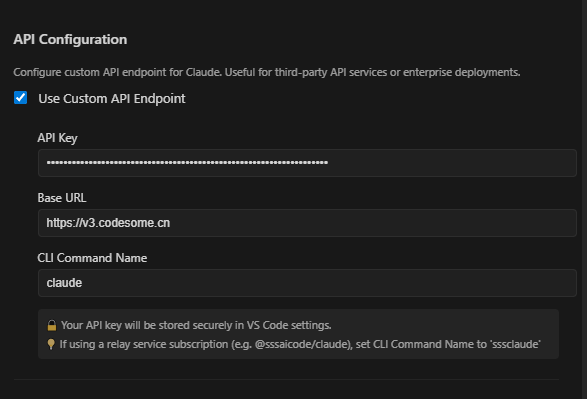
Switch back to official account: Uncheck "Use Custom API Endpoint".
💡 Tips:
- If the API key is incorrect, chat will show "processing" until timeout
- You can switch between official account and third-party API anytime via the toggle
💡 This extension supports various third-party API services (e.g., v3.codesome.cn, openrouter.ai). Please consult your API provider for the specific URL.
Ctrl+Shift+X to open ExtensionsClaude-Code ChatUI or lkbabaDirect Link: ➡️ VS Code Marketplace
.vsix fileCtrl+Shift+P, select "Extensions: Install from VSIX..."git clone https://github.com/LKbaba/Claude-code-ChatInWindows.git
cd Claude-code-ChatInWindows
npm install
npm run package
# The generated .vsix file is in the project root, install using Method 2
Ctrl+Shift+Csetx SHELL "C:\Program Files\Git\bin\bash.exe"If the problem persists, try:
C:\Program Files\Git\cmdClaude Code CLI sometimes needs to be initialized in the command line first. Run in PowerShell:
Set-ExecutionPolicy -Scope Process -ExecutionPolicy Bypass -Force
$Env:ANTHROPIC_API_KEY  = "sk-xxxxxxxxxxxxxxxxxxxxxxxx"
$Env:ANTHROPIC_BASE_URL = "https://v3.codesome.cn"
claude
If the problem persists, try updating Claude Code CLI:
npm install -g @anthropic-ai/claude-code@latest
Environment variables $Env:ANTHROPIC_API_KEY and $Env:ANTHROPIC_BASE_URL are temporary and will be lost after restart.
Two solutions:
Option 1: Reset after each restart
$Env:ANTHROPIC_API_KEY  = "your API Key"
$Env:ANTHROPIC_BASE_URL = "https://v3.codesome.cn"
claude
Option 2: Set as permanent environment variables (run as administrator)
setx ANTHROPIC_API_KEY "your API Key"
setx ANTHROPIC_BASE_URL "https://v3.codesome.cn"
# Restart computer for changes to take effect
This is optional and doesn't affect normal usage. If you want to install ripgrep for better search performance:
# In Git Bash:
curl -L https://github.com/BurntSushi/ripgrep/releases/download/14.1.0/ripgrep-14.1.0-x86_64-pc-windows-msvc.zip -o ripgrep.zip
unzip ripgrep.zip && mkdir -p ~/bin
cp ripgrep-14.1.0-x86_64-pc-windows-msvc/rg.exe ~/bin/
echo 'alias rg="~/bin/rg"' >> ~/.bashrc && source ~/.bashrc
Note: The extension's built-in Grep tool works fine without ripgrep.
This error occurs when VS Code/Cursor's auto-save feature modifies files between Claude's Read and Edit operations.
Solution: Disable auto-save
Add this to your VS Code/Cursor settings (settings.json):
"files.autoSave": "off"
Or use a less aggressive option:
"files.autoSave": "onWindowChange"
Why this happens:
Other settings that can cause this issue:
editor.formatOnSave: true - Formatters modify file content on savefiles.trimTrailingWhitespace: true - Removes trailing spaces on savefiles.insertFinalNewline: true - Adds newline at end of fileIf you need these features, consider disabling them temporarily when using Claude Code.
Welcome all AI engineers, developers, and geeks on Windows!
This project is licensed under the MIT License. See LICENSE for details.
Hook-based token compressor for 5 AI CLI hosts (Claude Code, Copilot CLI, OpenCode, Gemini CLI, Codex CLI). Up to 95% ba
Context window optimization for AI coding agents — sandboxes tool output for 98% token reduction
Claude Code hook that writes a forward-only why-block (decisions, trade-offs, assumptions, limitations) into your PR des
One command to install 6 essential safety hooks in 10 seconds — zero dependencies
