

Are you the author? Sign in to claim
Real-time monitoring for Claude Code agents through simple hook event tracking.
Real-time monitoring and visualization for Claude Code agents through comprehensive hook event tracking. Watch the latest deep dive on multi-agent orchestration with Opus 4.6 here. With Claude Opus 4.6 and multi-agent orchestration, you can now spin up teams of specialized agents that work in parallel, and this observability system lets you trace every tool call, task handoff, and agent lifecycle event across the entire swarm.
This system provides complete observability into Claude Code agent behavior by capturing, storing, and visualizing Claude Code Hook events in real-time. It enables monitoring of multiple concurrent agents with session tracking, event filtering, and live updates.
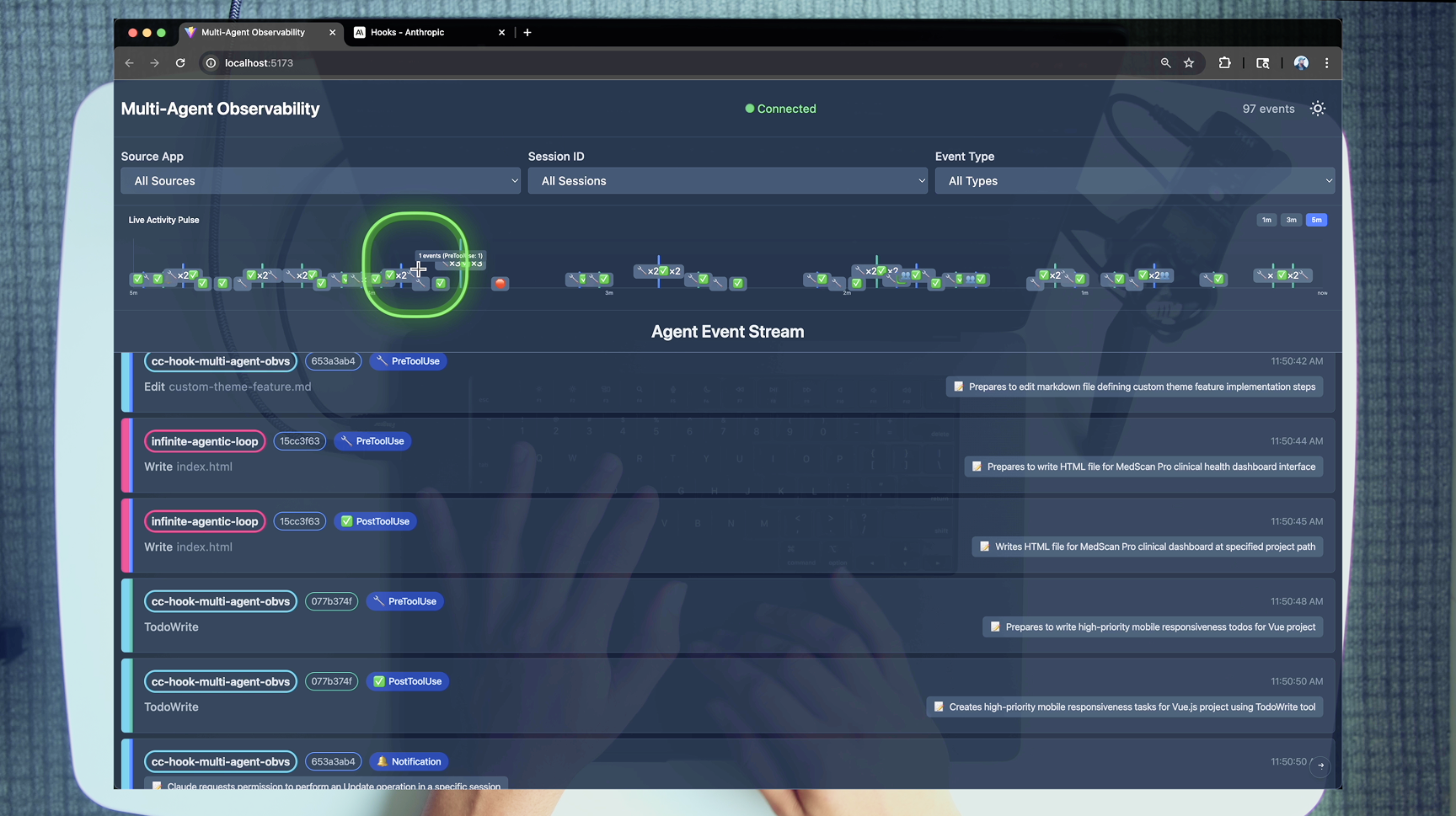
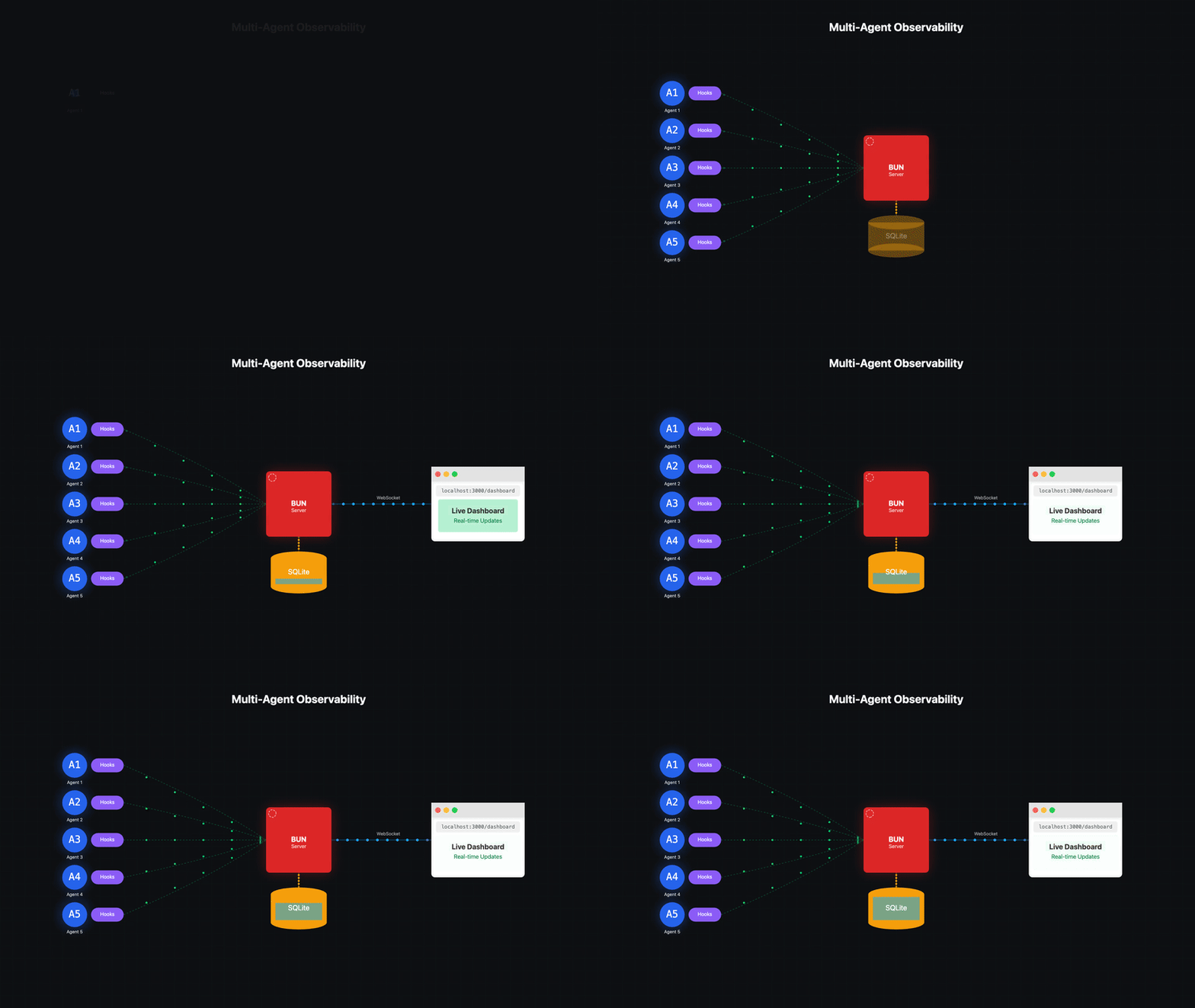
Claude Agents → Hook Scripts → HTTP POST → Bun Server → SQLite → WebSocket → Vue Client
Before getting started, ensure you have the following installed:
ANTHROPIC_API_KEY environment variableTo setup observability in your repo,we need to copy the .claude directory to your project root.
To integrate the observability hooks into your projects:
Copy the entire .claude directory to your project root:
cp -R .claude /path/to/your/project/
Update the settings.json configuration:
Open .claude/settings.json in your project and modify the source-app parameter to identify your project:
{
  "hooks": {
    "PreToolUse": [{
      "matcher": "",
      "hooks": [
        {
          "type": "command",
          "command": "uv run .claude/hooks/pre_tool_use.py"
        },
        {
          "type": "command",
          "command": "uv run .claude/hooks/send_event.py --source-app YOUR_PROJECT_NAME --event-type PreToolUse --summarize"
        }
      ]
    }],
    "PostToolUse": [{
      "matcher": "",
      "hooks": [
        {
          "type": "command",
          "command": "uv run .claude/hooks/post_tool_use.py"
        },
        {
          "type": "command",
          "command": "uv run .claude/hooks/send_event.py --source-app YOUR_PROJECT_NAME --event-type PostToolUse --summarize"
        }
      ]
    }],
    "UserPromptSubmit": [{
      "hooks": [
        {
          "type": "command",
          "command": "uv run .claude/hooks/user_prompt_submit.py --log-only"
        },
        {
          "type": "command",
          "command": "uv run .claude/hooks/send_event.py --source-app YOUR_PROJECT_NAME --event-type UserPromptSubmit --summarize"
        }
      ]
    }]
    // ... (similar patterns for all 12 hook events: Notification, Stop, SubagentStop,
   //      SubagentStart, PreCompact, SessionStart, SessionEnd, PermissionRequest, PostToolUseFailure)
  }
}
Replace YOUR_PROJECT_NAME with a unique identifier for your project (e.g., my-api-server, react-app, etc.).
Ensure the observability server is running:
# From the observability project directory (this codebase)
./scripts/start-system.sh
Now your project will send events to the observability system whenever Claude Code performs actions.
You can quickly view how this works by running this repository's .claude setup.
# 1. Start both server and client
just start          # or: ./scripts/start-system.sh

# 2. Open http://localhost:5173 in your browser

# 3. Open Claude Code and run the following command:
Run git ls-files to understand the codebase.

# 4. Watch events stream in the client

# 5. Copy the .claude folder to other projects you want to emit events from.
cp -R .claude <directory of your codebase you want to emit events from>
just (Recommended)A justfile provides convenient recipes for common operations:
just              # List all available recipes
just start        # Start server + client
just stop         # Stop all processes
just restart      # Stop then start
just server       # Start server only (dev mode)
just client       # Start client only
just install      # Install all dependencies
just health       # Check server/client status
just test-event   # Send a test event
just db-reset     # Reset the database
just hooks        # List all hook scripts
just open         # Open dashboard in browser
claude-code-hooks-multi-agent-observability/
│
├── apps/                    # Application components
│   ├── server/             # Bun TypeScript server
│   │   ├── src/
│   │   │   ├── index.ts    # Main server with HTTP/WebSocket endpoints
│   │   │   ├── db.ts       # SQLite database management & migrations
│   │   │   └── types.ts    # TypeScript interfaces
│   │   ├── package.json
│   │   └── events.db       # SQLite database (gitignored)
│   │
│   └── client/             # Vue 3 TypeScript client
│       ├── src/
│       │   ├── App.vue     # Main app with theme & WebSocket management
│       │   ├── components/
│       │   │   ├── EventTimeline.vue      # Event list with auto-scroll
│       │   │   ├── EventRow.vue           # Individual event display
│       │   │   ├── FilterPanel.vue        # Multi-select filters
│       │   │   ├── ChatTranscriptModal.vue # Chat history viewer
│       │   │   ├── StickScrollButton.vue  # Scroll control
│       │   │   └── LivePulseChart.vue     # Real-time activity chart
│       │   ├── composables/
│       │   │   ├── useWebSocket.ts        # WebSocket connection logic
│       │   │   ├── useEventColors.ts      # Color assignment system
│       │   │   ├── useChartData.ts        # Chart data aggregation
│       │   │   └── useEventEmojis.ts      # Event type emoji mapping
│       │   ├── utils/
│       │   │   └── chartRenderer.ts       # Canvas chart rendering
│       │   └── types.ts    # TypeScript interfaces
│       ├── .env.sample     # Environment configuration template
│       └── package.json
│
├── .claude/                # Claude Code integration
│   ├── hooks/             # Hook scripts (Python with uv)
│   │   ├── send_event.py          # Universal event sender (all 12 event types)
│   │   ├── pre_tool_use.py        # Tool validation, blocking & summarization
│   │   ├── post_tool_use.py       # Result logging with MCP tool detection
│   │   ├── post_tool_use_failure.py # Tool failure logging
│   │   ├── permission_request.py  # Permission request logging
│   │   ├── notification.py        # User interaction events (type-aware TTS)
│   │   ├── user_prompt_submit.py  # User prompt logging & validation
│   │   ├── stop.py               # Session completion (stop_hook_active guard)
│   │   ├── subagent_stop.py      # Subagent completion with transcript path
│   │   ├── subagent_start.py     # Subagent lifecycle start tracking
│   │   ├── pre_compact.py        # Context compaction with custom instructions
│   │   ├── session_start.py      # Session start with agent type & model
│   │   ├── session_end.py        # Session end with reason tracking
│   │   └── validators/           # Stop hook validators
│   │       ├── validate_new_file.py     # Validate file creation
│   │       └── validate_file_contains.py # Validate file content sections
│   │
│   ├── agents/team/       # Agent team definitions
│   │   ├── builder.md     # Engineering agent with linting hooks
│   │   └── validator.md   # Read-only validation agent
│   │
│   ├── commands/          # Custom slash commands
│   │   └── plan_w_team.md # Team-based planning command
│   │
│   ├── status_lines/      # Status line scripts
│   │   └── status_line_v6.py # Context window usage display
│   │
│   └── settings.json      # Hook configuration (all 12 events)
│
├── justfile               # Task runner recipes (just start, just stop, etc.)
│
├── scripts/               # Utility scripts
│   ├── start-system.sh   # Launch server & client
│   ├── reset-system.sh   # Stop all processes
│   └── test-system.sh    # System validation
│
└── logs/                 # Application logs (gitignored)
.claude/hooks/)If you want to master claude code hooks watch this video
The hook system intercepts Claude Code lifecycle events:
send_event.py: Core script that sends event data to the observability server
--add-chat flag for including conversation historytool_name, tool_use_id, agent_id, notification_type, etc.) as top-level properties for easier queryingEvent-specific hooks (12 total): Each implements validation and data extraction
pre_tool_use.py: Blocks dangerous commands, validates tool usage, summarizes tool inputs per tool typepost_tool_use.py: Captures execution results with MCP tool detection (mcp_server, mcp_tool_name)post_tool_use_failure.py: Logs tool execution failurespermission_request.py: Logs permission request eventsnotification.py: Tracks user interactions with notification_type-aware TTS (permission_prompt, idle_prompt, etc.)user_prompt_submit.py: Logs user prompts, supports validation with JSON {"decision": "block"} patternstop.py: Records session completion with stop_hook_active guard to prevent infinite loopssubagent_stop.py: Monitors subagent task completion with transcript path trackingsubagent_start.py: Tracks subagent lifecycle start eventspre_compact.py: Tracks context compaction with custom instructions in backup filenamessession_start.py: Logs session start with agent_type, model, and source fieldssession_end.py: Logs session end with reason tracking (including bypass_permissions_disabled)apps/server/)Bun-powered TypeScript server with real-time capabilities:
POST /events - Receive events from agentsGET /events/recent - Paginated event retrieval with filteringGET /events/filter-options - Available filter valuesWS /stream - Real-time event broadcastingapps/client/)Vue 3 application with real-time visualization:
Visual Design:
Features:
VITE_MAX_EVENTS_TO_DISPLAY)Tool Emoji System:
Live Pulse Chart:
settings.json configurationsend_event.py sends JSON payload to server via HTTP POST| Event Type | Emoji | Purpose | Color Coding | Special Display |
|---|---|---|---|---|
| PreToolUse | 🔧 | Before tool execution | Session-based | Tool name + tool emoji & details |
| PostToolUse | ✅ | After tool completion | Session-based | Tool name + tool emoji & results |
| PostToolUseFailure | ❌ | Tool execution failed | Session-based | Error details & interrupt status |
| PermissionRequest | 🔐 | Permission requested | Session-based | Tool name & permission suggestions |
| Notification | 🔔 | User interactions | Session-based | Notification message & type |
| Stop | 🛑 | Response completion | Session-based | Summary & chat transcript |
| SubagentStart | 🟢 | Subagent started | Session-based | Agent ID & type |
| SubagentStop | 👥 | Subagent finished | Session-based | Agent details & transcript path |
| PreCompact | 📦 | Context compaction | Session-based | Trigger & custom instructions |
| UserPromptSubmit | 💬 | User prompt submission | Session-based | Prompt: "user message" (italic) |
| SessionStart | 🚀 | Session started | Session-based | Source, model & agent type |
| SessionEnd | 🏁 | Session ended | Session-based | End reason (clear/logout/exit/other) |
The UserPromptSubmit hook captures every user prompt before Claude processes it. In the UI:
Prompt: "user's message" in italic textCopy the event sender:
cp .claude/hooks/send_event.py YOUR_PROJECT/.claude/hooks/
Add to your .claude/settings.json:
{
  "hooks": {
    "PreToolUse": [{
      "matcher": ".*",
      "hooks": [{
        "type": "command",
        "command": "uv run .claude/hooks/send_event.py --source-app YOUR_APP --event-type PreToolUse"
      }]
    }]
  }
}
Already integrated! Hooks run both validation and observability:
{
  "type": "command",
  "command": "uv run .claude/hooks/pre_tool_use.py"
},
{
  "type": "command",
  "command": "uv run .claude/hooks/send_event.py --source-app cc-hook-multi-agent-obvs --event-type PreToolUse"
}
# System validation
./scripts/test-system.sh

# Quick test event via just
just test-event

# Check server/client health
just health

# Manual event test
curl -X POST http://localhost:4000/events \
  -H "Content-Type: application/json" \
  -d '{
    "source_app": "test",
    "session_id": "test-123",
    "hook_event_type": "PreToolUse",
    "payload": {"tool_name": "Bash", "tool_input": {"command": "ls"}}
  }'

# Test a hook script directly
just hook-test pre_tool_use
Copy .env.sample to .env in the project root and fill in your API keys:
Application Root (.env file):
ANTHROPIC_API_KEY – Anthropic Claude API key (required)ENGINEER_NAME – Your name (for logging/identification)OPENAI_API_KEY – OpenAI API key (optional)ELEVENLABS_API_KEY – ElevenLabs API key (optional, for TTS)FIRECRAWL_API_KEY – Firecrawl API key (optional, for web scraping)Client (.env file in apps/client/.env):
VITE_MAX_EVENTS_TO_DISPLAY=100 – Maximum events to show (removes oldest when exceeded)4000 (HTTP/WebSocket)5173 (Vite dev server)This project supports Claude Code Agent Teams for orchestrating multi-agent workflows. Teams are enabled via the CLAUDE_CODE_EXPERIMENTAL_AGENT_TEAMS environment variable in .claude/settings.json.
.claude/agents/team/builder.md): Engineering agent that executes one task at a time. Includes PostToolUse hooks for ruff and ty validation on Write/Edit operations..claude/agents/team/validator.md): Read-only validation agent that inspects work without modifying files. Cannot use Write, Edit, or NotebookEdit tools.Use the /plan_w_team slash command to create team-based implementation plans:
/plan_w_team "Add a new feature for X"
This generates a spec document in specs/ with task breakdowns, team member assignments, dependencies, and acceptance criteria. Plans are validated by Stop hook validators that ensure required sections are present.
Execute a plan with:
/build specs/<plan-name>.md
The true constraint of agentic engineering is no longer what the models can do — it's our ability to prompt engineer and context engineer the outcomes we need, and build them into reusable systems. Multi-agent orchestration changes the game by letting you spin up teams of specialized agents that each focus on one task extraordinarily well, work in parallel, and shut down when done. See the official Claude Code Agent Teams documentation for the full reference.
The full multi-agent orchestration lifecycle follows this pattern:
TeamCreate sets up the coordination layerTaskCreate builds the centralized task list that drives all workTask deploys specialized agents (builder, validator, etc.) into their own Tmux panes with independent context windowsSendMessageTeamDelete cleans up all coordination stateWhen you have multiple agents running in parallel — each with their own context window, session ID, and task assignments — you need visibility into what's happening across the swarm. Without observability, you're vibe coding at scale. With it, you can:
This is what separates engineers from vibe coders: understanding what's happening underneath the hood so you can scale compute to scale impact with confidence.
rm -rf commands via deny_tool() JSON pattern (allowed only in specific directories).env, private keys)stop_hook_active guard in stop.py and subagent_stop.py prevents infinite hook loopsAnd prepare for the future of software engineering
Learn tactical agentic coding patterns with Tactical Agentic Coding
Follow the IndyDevDan YouTube channel to improve your agentic coding advantage.
Blocks dangerous git and shell commands from being executed by AI coding agents
One command to install 6 essential safety hooks in 10 seconds — zero dependencies
Give Claude Code memory that evolves with your codebase via hooks and LLM-compiled knowledge
Rule enforcement plugin — save rules with natural language, enforce with 17 lifecycle hooks