

Are you the author? Sign in to claim
Configurable status bar for Claude Code: usage limits with pacing markers, context window, git state, live activity, ses
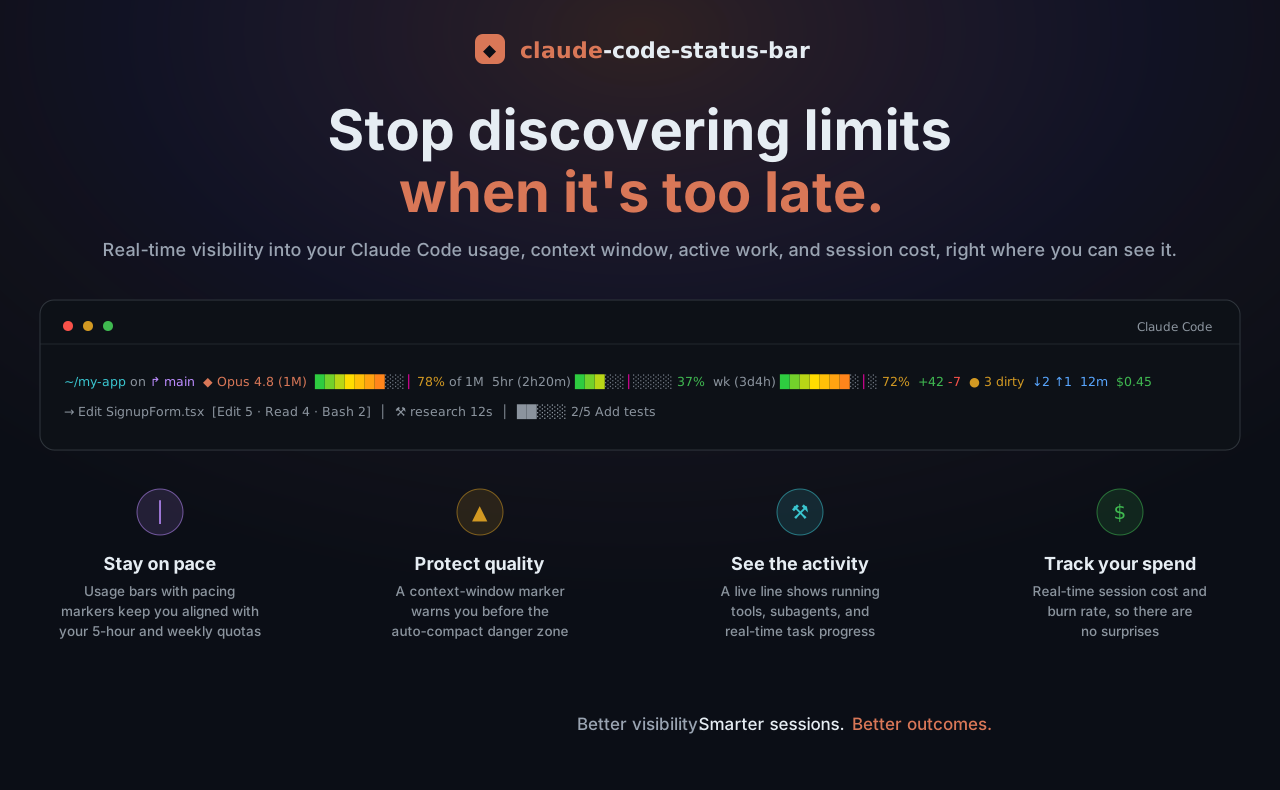






Your quota burn, context fill, git state, and live activity, visible under every response.
Claude Code warns you about your rate limit and your full context window only once it's already too late to act gracefully. This status bar keeps those numbers, plus your git state, session cost, and what Claude is doing right now, under every response:

~/my-app on ↱ main  ◆ Opus 4.8 (1M)  ███████░░│ 78% of 1M  5hr (2h20m) ███░░│░░░░ 37%  wk (3d4h) ███████░│░ 72%  +42 -7  ● 3 dirty  ↓2 ↑1  12m  $0.45
→ Edit SignupForm.tsx  [Edit 5 · Read 4 · Bash 2]  │  ⚒ research 12s  │  ██░░░ 2/5 Add tests
Line 1: dir · branch · model · context fill · 5h + weekly quota · git state · duration · cost • Line 2: live tool · tool counts · subagent · todos
Pure bash, no jq, no compiled binaries, one-line install, eight colour themes. Works on macOS, Linux, and Windows (Git Bash); every network call runs in the background, so the bar itself never blocks. Backed by 171 automated tests on all three platforms (plus ShellCheck) in CI.
macOS / Linux (or Git Bash on Windows):
curl -fsSL https://raw.githubusercontent.com/briansmith80/claude-code-status-bar/main/install.sh | bash
Windows (PowerShell):
irm https://raw.githubusercontent.com/briansmith80/claude-code-status-bar/main/install.ps1 | iex
The status bar appears after the next Claude Code response (not immediately). It needs only bash and curl, both already required by Claude Code on every OS; git and Node.js are optional and just light up extra segments. Re-running either installer is always safe, and it's also how you update.
Pick a theme (optional): set colour_theme in ~/.claude/statusline.conf or run /claude-code-status-bar:configure, and preview all eight with bash ~/.claude/statusline-command.sh --demo.
statusline-command.sh, the two optional Node.js helpers (statusline-helper.js for the activity line, statusline-subagent.js for the agent panel rows), and the version file into ~/.claude/.~/.claude/settings.json with a statusLine entry (plus a subagentStatusLine entry when Node.js is available), or merge the missing entries into your existing file without touching your other settings. The bash installer merges using node, python3, or python; the PowerShell installer does it natively.statusLine and subagentStatusLine entries are left untouched, with one exception: commands this installer itself wrote in an older format (MSYS-style /c/... or unquoted paths, which fail under some spawn shells on Windows) are upgraded in place on re-run. Migrating from another status line? Remove your old entry first, then re-run the installer.settings.json yourself.The status bar runs through Git for Windows, which Claude Code on Windows already requires; the PowerShell installer checks for bash and tells you what to do if it is missing. Avoid piping curl.exe output straight into bash from PowerShell: PowerShell 5.1 re-encodes pipeline data between native programs and can corrupt the script. If you prefer the bash installer from PowerShell, run it as one unit instead: bash -c "curl -fsSL https://raw.githubusercontent.com/briansmith80/claude-code-status-bar/main/install.sh | bash"
If you prefer the Claude Code plugin system:
/plugin marketplace add briansmith80/claude-code-status-bar
/plugin install claude-code-status-bar
/claude-code-status-bar:setup
The plugin ships two slash commands:
| Command | What it does |
|---|---|
/claude-code-status-bar:setup | Guided install: copies the files from the plugin cache (no network download), configures settings.json (asking before replacing an existing statusLine entry), runs a smoke test, and offers to set a theme and toggles. |
/claude-code-status-bar:configure | Interactive editor for ~/.claude/statusline.conf: themes, segment toggles, display options, and grouping, written as a minimal diff against the defaults. |
~/.claude/:curl -fsSL https://raw.githubusercontent.com/briansmith80/claude-code-status-bar/main/statusline-command.sh -o ~/.claude/statusline-command.sh
curl -fsSL https://raw.githubusercontent.com/briansmith80/claude-code-status-bar/main/VERSION -o ~/.claude/.statusline-version
# Optional: live activity line (requires Node.js)
curl -fsSL https://raw.githubusercontent.com/briansmith80/claude-code-status-bar/main/statusline-helper.js -o ~/.claude/statusline-helper.js
chmod +x ~/.claude/statusline-command.sh~/.claude/settings.json:{
"statusLine": {
"type": "command",
"command": "bash ~/.claude/statusline-command.sh"
}
}
Jump to: Configuration · Colour themes · Segments · CLI flags · Updating · Troubleshooting
▲ warning within 20k tokens of it, on any window size.│ on each usage bar shows where your usage should be for even consumption, so "37% used" becomes "37% used and comfortably under pace".▲time-to-limit warning (e.g. ▲1h20m). It stays quiet while you're under pace, so it only speaks up when it matters.wk:Fable (3d17h) ███░░ 36% — because that's the limit that will actually throttle you.tok/s burn rate for every running Task-tool subagent.There are a lot of Claude Code status lines now. Here's where this one is different from the most popular ones, focused on the things that actually bite you in daily use:
| this | claude-hud | ccstatusline | claude-powerline | |
|---|---|---|---|---|
| Native Windows / Git Bash (one codebase) | ✅ | ⚠️ known bugs | ⚠️ needs Node | ⚠️ needs Node |
| No required runtime (pure bash; Node optional) | ✅ | ❌ Node | ❌ Node | ❌ Node |
Runs nothing extra on every render (no npx/node in the hot path) | ✅ | ❌ | ❌ | ❌ |
Pacing marker + burn-rate forecast (▲time-to-limit) | ✅ | ❌ | ❌ | ❌ |
| Claude API status early-warning (degraded badge from status.claude.com) | ✅ | ❌ | ❌ | ❌ |
| Warns before auto-compact (real CC compact maths) | ✅ | ⚠️ counter | ⚠️ counter | ⚠️ threshold |
| Stdin-native limits with OAuth fallback for older CC | ✅ | ⚠️ | ⚠️ | ⚠️ vanishes w/o hook data |
Checksum-verified self-update (per-release SHA256SUMS) | ✅ | ❌ | ❌ | ❌ |
| Live activity (tools/subagents/todos) that degrades w/o Node | ✅ | ✅ (Node-only) | ⚠️ | ⚠️ |
Guided in-Claude config wizard (/configure) | ✅ | ⚠️ | ✅ TUI | ✅ wizard + web |
| Automated tests + CI across macOS / Linux / Windows | ✅ 187 | ❌ | ❌ | ❌ |
Snapshot of public docs, June 2026; the others are good tools and evolve quickly — check their repos for the latest. ✅ yes · ⚠️ partial/caveated · ❌ no.
By default the bar is two lines — line 1 the metrics bar (directory, branch, model, context, usage limits, git state, duration, cost) and line 2 the live activity line. Since v2.19.0 you can rearrange that across up to three lines, putting any segment on any line, in any order.
Pick a preset with layout=:
| Preset | Line 1 | Line 2 | Line 3 |
|---|---|---|---|
classic (default) | all metrics | live activity | — |
three-line | model · context · usage · duration · cost | dir · branch · git state | live activity |
stacked | dir · branch · model · context · usage · cost | git state · duration | live activity |
Or hand-build each line with a space-separated list of segment tokens (these override the preset, per line). Quote any value with spaces — statusline.conf is sourced as shell:
# ~/.claude/statusline.conf
line1="model context usage_5h usage_7d duration cost"
line2="dir branch lines_changed ahead_behind dirty stash pr"
line3="activity"
Reorder freely (e.g. activity on top), and set a line to "" to hide that row. Tokens: dir branch model context usage_5h usage_7d lines_changed dirty ahead_behind stash pr duration worktree cost cost_rate vim agent effort fast_mode tokens update activity. A token still obeys its show_* toggle, unknown tokens are ignored, a segment lives on the first line that lists it, and segments you don't list anywhere won't show. The default (no layout/line* set) is byte-identical to previous versions.
icon_set=classic (the default) keeps the original glyphs; icon_set=modern switches to a more coherent set — directory ↱, branch ⑂, lines-changed ⇄, and a duration ⏱ that fills a previously-empty slot (model ◆ is unchanged). use_icons=false removes all icons regardless of the set.
Active work pops in theme colours while history recedes into dim text:
⠙ Bash npm test 1m24s │ → Edit SignupForm.tsx [Edit 5 · Read 4 · Bash 2] │ ⚒ research 12s │ ██░░░ 2/5 Add tests
| You see | It means |
|---|---|
⠙ Edit main.ts... | Tools running right now (up to the last two), in the theme's warning colour behind a spinner; elapsed time appears once a tool runs over 5 seconds and is heat-coloured (green under 30s, yellow under 2m, red beyond, so "stuck" is visible at a glance) |
→ Edit main.ts | The last completed tool, shown when nothing is running; flashes bright green with a ✓ for its first ~5 seconds |
✗ Bash npm test | The most recent tool failure, in red, shown for five minutes |
[Edit 5 · Read 4 · Bash 2] | The top three tool counts for the session |
⚒ research 12s | A running subagent (warning colour) with its heat-coloured elapsed time |
⚒ research ✓ (2) | Finished subagents (and how many) |
██░░░ 2/5 Add tests | Todo progress; filled cells shade through a per-theme gradient |
The spinner advances each time the bar re-renders, so it animates faster with a lower refreshInterval (see Label style). When the cached activity ages past activity_fresh_seconds (default 45) the colours drop back to all-dim, so stale data reads as stale. Set activity_colour=false for the classic all-dim line; NO_COLOR and the mono theme degrade to plain text automatically.
activity_ttl_seconds (default 120, chosen to stay above typical refreshInterval values) and reappears once the helper has re-parsed the transcript.$COLUMNS) so it never wraps.PATH, the statusline-helper.js file (installed by default), and a Claude Code version that sends transcript_path (2.1+). If any of those are missing, line 2 silently stays off and everything else works.show_activity=false in your config.The bar shows your Anthropic usage limits as colour-coded progress bars with reset labels:
5hr (2h20m) ███│░░░░░░ 37% wk (3d4h) ███████│░░ 72%
wk:Fable (model-scoped swap, on by default): some plans have a per-model weekly cap alongside the all-models one — the "Fable" or "Opus" row on claude.ai's usage page. When that scoped cap is running higher than the all-models one, it binds first, so the weekly bar swaps to it and names the model. Under or at the all-models level, the plain wk bar stays. Pacing marker, countdown, and burn-rate forecast all compute on whichever limit is shown. Set usage_scoped=false for the plain all-models bar always.│ pacing marker: where your usage should be for even consumption across the window. Bar past the marker means you are ahead of pace and may hit the limit early; behind it means you have headroom.~ suffix (e.g. 37%~): the data came from the OAuth cache and is stale (more than two refresh intervals old).By default the label counts down the time remaining (5hr (2h20m), wk (3d4h)). Set usage_label=clock to show the reset moment instead (5hr (2pm), wk (fri,3am)).
refreshIntervalThe bar re-renders when Claude Code triggers it (after responses and state changes), so a countdown can sit stale while you are away. Claude Code can also re-run the bar on a timer via refreshInterval (seconds) on the statusLine block. Fresh installs set refreshInterval: 60 automatically; the installer only sets it when it first writes the statusLine block, so an existing value is never overwritten. Tune or remove it in ~/.claude/settings.json:
{
  "statusLine": {
    "type": "command",
    "command": "bash ~/.claude/statusline-command.sh",
    "refreshInterval": 60
  }
}
On Windows the script takes ~285ms to run, so keep refreshInterval at 2 or higher there; a value below the script's own runtime can blank the bar. Animated effects (activity_pulse, activity_scanner) need a low odd value such as 3 to animate.
rate_limits directly in the JSON it pipes to the bar. Real-time, zero network requests, no configuration. The 5h and all-models weekly numbers always come from here when available.api.anthropic.com/api/oauth/usage in a background subshell, cached for 10 minutes (usage_cache_seconds); on repeated failures it backs off exponentially, up to 30 minutes (tracked in ~/.claude/.statusline-usage-backoff). For older Claude Code versions this supplies the 5h/7d numbers themselves; on current versions it is only read for the model-scoped weekly limit (usage_scoped), which Claude Code doesn't forward on stdin. It reads your existing Claude Code token, so nothing extra is needed:| Platform | Credential source |
|---|---|
| macOS | Keychain (Claude Code-credentials), falling back to ~/.claude/.credentials.json |
| Linux | ~/.claude/.credentials.json |
| Windows / MSYS2 | ~/.claude/.credentials.json |
The token must have the user:profile scope, which browser sign-in grants automatically. Tokens created with claude setup-token only have user:inference and will not work; quit all Claude Code instances and restart to trigger a fresh browser OAuth login.
Everything about the OAuth path is fail-silent: no usable token (API-key sessions, CI) means the fetch quietly backs off and the bar renders from stdin exactly as before — no prompt, no error, no delay. If neither source has data, the usage segments are hidden. Run --dump-stdin (see CLI flags) to check which fields your Claude Code version sends.
The installers create ~/.claude/statusline.conf on first install: a fully commented copy of statusline.conf.example with every option and its default. Uncomment and edit the lines you want; it's never overwritten by updates. Confirm resolved values any time with --dump-config. A few common ones:
# ~/.claude/statusline.conf
colour_theme=default        # default | nord | dracula | solarized | tokyo-night | catppuccin | matrix | mono
bar_gradient=true           # true = theme ramp | false = flat | heat = fixed green→red
usage_label=countdown       # countdown (2h20m) | clock (2pm)
dir_style=auto              # auto (responsive) | full | basename
show_cost_rate=false        # opt-in: $/hr burn rate
auto_update=false           # opt-in: install new versions in the background
The full list (every segment toggle, the activity-line options, grouping, and timing) lives in statusline.conf.example.
bar_gradient, on by default): each filled cell is interpolated along the theme's gradient (the default theme uses a green→red heat ramp). false gives flat bars; heat forces green→red on any theme. No-op under mono/NO_COLOR. Preview with --demo.context_warn_threshold=auto (default) the │ marker sits at that point and ▲ fires within 20k tokens of it. Honours CLAUDE_CODE_AUTO_COMPACT_WINDOW, the autoCompactWindow setting, and DISABLE_AUTO_COMPACT; set a number to use a fixed percentage instead.activity_pulse, activity_scanner): need a low odd refreshInterval such as 3 to animate, otherwise they sit static. /claude-code-status-bar:configure can set it for you.show_claude_status, off by default): a degraded-only early-warning badge fed by the public status.claude.com page. It polls in the background (never on the render path, so it can't slow or block the bar) and appears only when Claude is degraded — claude_status_min=major (default) shows major/critical outages, minor also surfaces minor degradation and maintenance windows. It's an early warning, not ground truth: a status page is reactive and can lag a live incident.enable_truncation=true (default) low-priority segments drop tier by tier (update notice first, directory and branch last), after dir_style=auto has already collapsed the path to its basename.use_groups=true brackets related segments: [model + context] [usage bars] [git stats] [duration + cost]..bashrc and only put your own settings in it. (show_usage_weekly still works as an alias for show_usage_7d.)Eight built-in themes, spread across a saturation/temperature ladder so no two read alike. Each preview is a real render of the bar in that theme (the same output --demo prints):
default · bold, bright primary heat gradient

dracula · neon, electric

tokyo-night · deep midnight blue + neon

catppuccin · soft warm pastel

solarized · earthy, vintage

nord · muted, cool steel

matrix · monochrome phosphor green

mono · greyscale, no colour

The named themes render in 24-bit truecolour when your terminal supports it (force with STATUSLINE_TRUECOLOR=1/0), falling back to the nearest 256-colour. default tracks your terminal's own ANSI palette; matrix is a monochrome phosphor-green tribute (removals are dim green, not red); mono and NO_COLOR drop all colour. Set colour_theme in statusline.conf (or run /claude-code-status-bar:configure); it takes effect on the next render, and --dump-config | grep colour_theme confirms it applied.
When a new version is available you'll see ↑ <version> in the bar (e.g. ↑ 2.18.1), clickable through to that release's notes. The check runs in the background every 6 hours. The simplest way to update is the built-in self-update:
bash ~/.claude/statusline-command.sh --update
It downloads the latest script and helpers, swaps them in only once every file has downloaded, bumps the version, and leaves your settings.json entries alone. It also refreshes statusline.conf.example and, only if you don't have a statusline.conf yet, creates one from it; your existing config is never overwritten. Run --check-update first to see what's current versus latest. (Too old to have --update? Re-running the installer also updates in place.)
Set auto_update=true in statusline.conf and the bar installs new versions for you: once the background check flags a newer release, it runs the same self-update in a detached background process (it never blocks rendering), serialised with a lock so parallel sessions don't all download at once. A failed or interrupted download changes nothing, and statusline.conf/settings.json are never touched. It stays off by default so the tool never replaces its own executable without you asking.
bash ~/.claude/statusline-command.sh --uninstall
It lists what will be deleted and asks for confirmation, prompts separately before removing statusline.conf (so you can keep your config for a reinstall), and reminds you to remove the statusLine block from ~/.claude/settings.json yourself.
rm -f ~/.claude/statusline-command.sh
rm -f ~/.claude/statusline-helper.js
rm -f ~/.claude/statusline-subagent.js
rm -f ~/.claude/.statusline-version
rm -f ~/.claude/.statusline-update-cache
rm -f ~/.claude/.statusline-usage-cache
rm -f ~/.claude/.statusline-usage-backoff
rm -f ~/.claude/.statusline-activity-cache
rm -f ~/.claude/.statusline-activity-cache.*
rm -f ~/.claude/.statusline-claude-status-cache
rm -rf ~/.claude/.statusline-transcript-cache
rm -f ~/.claude/statusline.conf   # your config; skip this line to keep it
Then remove the "statusLine" block from ~/.claude/settings.json.
All segments are on by default except token counts, cost rate, and the Claude API status badge. Zero-valued segments auto-hide (configurable via auto_hide), and segments whose data is missing are simply omitted, so your actual bar is usually shorter than the full list.
| Segment | Looks like | Toggle | Notes |
|---|---|---|---|
| Directory | ~/my-app | show_directory | Prefers workspace.current_dir, falls back to cwd; home shown as ~ |
| Branch | on ↱ main | show_branch | Short commit hash when detached; truncate long names with branch_max_length |
| Vim mode | NORMAL | show_vim_mode | Only when Claude Code sends vim.mode |
| Model | ◆ Opus 4.8 (1M) | show_model | Tier colours: Haiku green, Sonnet yellow, Opus orange, Fable purple (theme-aware); the redundant " context" is trimmed from the name |
| Agent name | ▸ my-agent | show_agent | Only when running with an agent |
| Effort level | eff:xhigh | show_effort | Reasoning effort, when Claude Code sends effort.level (CC 2.1.133+) |
| Fast mode | ⚡ fast | show_fast_mode | Only when fast mode is on; yellow because it bills at a higher rate |
| Context bar | ███████░│░ 78% of 200k | show_context_bar | Green under 50%, yellow 50-79%, red 80%+. The │ marker sits at the auto-compact point; ▲ appears within 20k tokens of it |
| Token counts | 45k in 12k out | show_tokens (off) | Tokens in the current context (cumulative session totals before CC 2.1.132) |
| 5-hour usage | 5hr (2h20m) ███│░░░░░░ 37% | show_usage_5h | Rolling 5-hour window with countdown to reset and pacing marker |
| Weekly usage | wk (3d4h) ███████│░░ 72% | show_usage_7d | Rolling 7-day window with countdown to reset and pacing marker. Swaps to a per-model weekly cap (wk:Fable … 36%) when that cap is the binding one; usage_scoped=false disables |
| Lines changed | +42 -7 | show_lines_changed | Session lines added (green) and removed (red) |
| Dirty count | ● 3 dirty | show_dirty_count | Staged + unstaged + untracked files |
| Ahead/behind | ↓2 ↑1 | show_ahead_behind | Commits behind/ahead of upstream; hidden when there is no upstream |
| Stash count | ≡ stash:2 | show_stash | Git stash entries |
| Pull request | PR #1234 | show_pr | Open PR for the branch (CC 2.1.145+); colour = review state: green approved, yellow pending, red changes requested, dim draft. Clickable in terminals with OSC 8 support; pr_link=false disables |
| Duration | 12m / 1h23m | show_duration | Session duration |
| Worktree | ⊞ hotfix | show_worktree | Worktree name; covers --worktree sessions and any linked git worktree (CC 2.1.145+) |
| Cost | $0.45 | show_cost | Green under $1, yellow $1-5, red $5+ |
| Cost rate | $2.10/hr | show_cost_rate (off) | Burn rate; appears once the session is over a minute old |
| Claude API status | ● Claude: major outage | show_claude_status (off) | Opt-in early-warning badge; shows only when Claude is degraded (polls status.claude.com in the background, never on the render path). claude_status_min=major (default) shows major/critical, minor adds minor + maintenance; links to the status page when pr_link=true |
| Update notice | ↑ 2.18.1 | (automatic) | Background version check against GitHub every 6 hours; shows the new version, links to its release notes, and --update installs it |
| Live activity | (its own line by default; place anywhere via layout) | show_activity | Running tools, tool counts, subagents, todo progress; activity_colour=false for the classic all-dim look |
Every segment above is also a layout token you can assign to a specific line. Most token names match the toggle's show_* suffix (e.g. usage_5h, lines_changed), but a few are shorter — vim (show_vim_mode), context (show_context_bar), dirty (show_dirty_count). The token list under Layouts is the source of truth.
Before the first API response of a session, the bar shows a dim Starting... placeholder. That is normal; the real segments appear as soon as Claude Code sends model and context data.
The script normally runs with no arguments, fed JSON on stdin by Claude Code. The flags are for setup, diagnostics, and removal; the handy ones are --update, --demo, --check-update, and --uninstall.
| Flag | Description |
|---|---|
--help, -h | Show usage info and exit. |
--version, -v | Print the installed version and exit. |
--check-update | Clear the update cache and synchronously check GitHub for a newer version. Prints current and latest, plus the --update command if an update exists. |
--update | Download and install the latest version in place: overwrites statusline-command.sh and the two Node helpers, bumps .statusline-version, and clears the update cache. Each file is staged and only swapped in once every download succeeds, so a failed fetch changes nothing. Never touches statusline.conf or settings.json. |
--open-config | Open ~/.claude/statusline.conf in your editor, creating it from the commented example template first if it doesn't exist yet. Editor preference: $STATUSLINE_EDITOR, then VS Code (code), then $VISUAL/$EDITOR, then the platform's default opener (open/xdg-open/cygstart/start). |
--dump-config | Print the resolved configuration (defaults merged with your statusline.conf) as sorted key=value lines. The fastest answer to "why isn't my override taking effect?" |
--dump-stdin | Echo the JSON Claude Code sends (pretty-printed when a working python3 is on PATH) plus a YES/NO report of detected fields: rate_limits, transcript_path, nested model, nested context_window. Pipe JSON in: echo '<json>' | bash ~/.claude/statusline-command.sh --dump-stdin |
--benchmark [N] | Time N end-to-end runs (default 5) against a realistic canned payload and report min/avg/max, for picking a safe refreshInterval. Needs GNU date %N (Linux/MSYS2). Add STATUSLINE_PROFILE=1 to any run for a per-phase breakdown on stderr. |
--demo [theme] | Preview a theme with a realistic canned payload, e.g. --demo tokyo-night. With no argument (or all) it cycles all eight themes, each labelled. Renders without touching your statusline.conf. |
--uninstall | Interactively remove all installed files. See Uninstall. |
While Task-tool subagents run, Claude Code shows an agent panel below the prompt. The optional statusline-subagent.js renderer (wired automatically when Node.js is available) restyles those rows to match the status bar and adds live numbers:
⚒ Audit the usage parsing code  1m24s · 12.4k tok · 354 tok/s ▄▅▆▇▇▆█
✓ Verify the rate-limit fix     3m2s · 48.1k tok
✗ security review               41s · 2k tok
⚒ running (yellow), ✓ done (green), ✗ failed (red), ◌ queued (dim), using your colour_theme and honouring NO_COLOR.tok/s rate plus a small sparkline, so a runaway agent is visible before it finishes.subagent_rows=false in statusline.conf to keep the defaults permanently.The installer wires this into settings.json when Node.js is present, leaving any existing entry untouched. On Windows it writes a quoted Windows-native path instead of ~ (e.g. node "C:/Users/name/.claude/statusline-subagent.js"), because Claude Code may spawn the command via PowerShell or cmd, which don't expand ~ or resolve MSYS /c/... paths for node.
{
  "subagentStatusLine": {
    "type": "command",
    "command": "node ~/.claude/statusline-subagent.js"
  }
}
~/.claude/settings.json has the statusLine entry (the installer skips this step if any statusLine entry already exists, including one from a different status line). Then wait for the next Claude Code response; the bar renders after responses, not on launch.refreshInterval. Claude Code aborts an in-flight statusLine run when the next one starts, and an aborted run blanks the bar. If the interval is below the script's runtime, every run is aborted and nothing ever renders. Measure with --benchmark (~285ms on Windows under MSYS bash, well under 100ms on macOS/Linux), then pick an interval comfortably above it: 2+ on Windows, 1 elsewhere.Starting... Normal. It means Claude Code hasn't sent model or context data yet, which happens at the start of every session.--dump-config to confirm your override took effect, and --dump-stdin to see which fields your Claude Code version actually sends.rm -f ~/.claude/.statusline-usage-cache ~/.claude/.statusline-usage-backoff. After repeated failures the script waits up to 30 minutes before retrying.~ after the percentage. The OAuth data is stale. Usually transient; if it persists, clear the two cache files above.PATH, ~/.claude/statusline-helper.js, and a Claude Code version that sends transcript_path (--dump-stdin reports this as YES/NO). It also lags one refresh behind and hides when its cache is older than activity_ttl_seconds (default 120).--check-update shows an old version right after a release. GitHub's raw CDN caches for a few minutes. Try again shortly.Points that matter for a tool that runs on every response and can read your OAuth token:
npx/npm exec that resolves a moving version on every keystroke. The only network calls are the opt-in update check and the usage-API fallback, both run in detached background subshells and never on the critical path.umask 077 (owner-readable only).--config - on stdin, so it never appears in the process list. The wget fallback writes the bearer header to a 0600 temp file passed via --config (never on argv, where ps aux could read it) and runs with --max-redirect=0 to prevent token leakage on redirects; curl is still strongly preferred.--update and the opt-in auto_update) and the installers (install.sh / install.ps1, which double as the update path) verify every downloaded file against a per-release SHA256SUMS before installing it, and abort on any mismatch leaving the install untouched. The update source can only be set by a real environment variable, never by statusline.conf.printf '%s' (never %b), so escape text embedded in an untrusted field (for example a maliciously named directory) is shown literally and can never decode into a live terminal control sequence.~/.claude/statusline.conf is sourced as bash; it has the same trust level as your .bashrc. The helper stores activity summaries, not transcript content (tool names, file basenames, and short snippets, 30-50 chars at most).Claude Code pipes a JSON payload to the script on every refresh. The script parses it with bash regex (no jq), builds the segments, and prints one to three lines per your layout. Everything slow happens in background subshells that write caches; the bar only ever reads caches, so it never waits on the network or on transcript parsing.
flowchart LR
    CC["Claude Code"] -->|"JSON on stdin"| S["statusline-command.sh"]
    S --> L["Lines 1–3 (per layout)"]
    S -.->|"background, every 6h"| U["Version check (GitHub)"]
    S -.->|"background, only without stdin limits"| O["OAuth usage API"]
    S -.->|"background, every refresh"| H["statusline-helper.js parses the transcript"]
    U & O & H -.->|"write"| C["caches in ~/.claude/"]
    C -.->|"read next refresh"| S
Files at ~/.claude/ after install:
| File | Purpose | Overwritten on update? |
|---|---|---|
statusline-command.sh | The script Claude Code runs | Yes |
statusline-helper.js | Node.js transcript parser (optional) | Yes |
statusline-subagent.js | Node.js subagent panel renderer (optional) | Yes |
.statusline-version | Installed version | Yes |
statusline.conf | Your config overrides | Never |
.statusline-update-cache | Update check cache | Cleared on update |
.statusline-usage-cache | OAuth usage cache | Auto-refreshes |
.statusline-usage-backoff | OAuth failure backoff state | Auto-expires |
.statusline-activity-cache.<id> | Live activity cache (one per session) | Auto-refreshes, swept after a day |
.statusline-transcript-cache/ | Parsed transcript cache | Auto-invalidates |
All caches are created with umask 077, so they are readable only by you.
claude-code-status-bar/
├── README.md
├── CHANGELOG.md                  # release history
├── LICENSE                       # MIT
├── VERSION                       # single source of truth for the version
├── install.sh                    # one-line installer / updater (macOS, Linux, Git Bash)
├── install.ps1                   # one-line installer / updater (Windows PowerShell)
├── statusline-command.sh         # the status bar (pure bash, installed to ~/.claude/)
├── statusline-helper.js          # optional Node.js transcript parser (live activity line)
├── statusline-subagent.js        # optional Node.js renderer for the subagent panel rows
├── docs/
│   ├── assets/                   # README images + generators (hero, animated demo, per-theme previews under themes/)
│   └── enhancement-backlog.md    # backlog, parked ideas, competitive landscape, principles
├── commands/
│   ├── setup.md                  # /claude-code-status-bar:setup
│   └── configure.md              # /claude-code-status-bar:configure
├── .claude-plugin/
│   ├── plugin.json               # plugin manifest
│   └── marketplace.json          # marketplace catalog for /plugin marketplace add
├── .github/workflows/
│   ├── shellcheck.yml            # lint (pushes to main, PRs)
│   └── tests.yml                 # BATS suite on Linux, macOS, Windows (MSYS2)
├── tests/                        # 146 BATS tests across 15 files
└── CLAUDE.md                     # project guide for working on this repo with Claude Code
A BATS suite under tests/ covers schema parsing, segments, all eight themes (truecolour, 256-colour fallback, and NO_COLOR), config overrides, context window formatting and compaction awareness, the live activity helper, the colourful activity line, the git segments, the styling options, the PR link, the self-update and auto_update paths, and the subagent panel renderer. Each test runs in a sandboxed HOME, so your real config and credentials are never touched. CI runs the suite on Linux, macOS, and Windows (MSYS2), plus ShellCheck.
brew install bats-core            # macOS
sudo apt-get install -y bats      # Debian / Ubuntu
# Windows (Git Bash / MSYS2): no pacman package; clone bats-core
git clone --depth 1 https://github.com/bats-core/bats-core.git ~/bats-core

bats tests/                       # macOS / Linux
~/bats-core/bin/bats tests/       # Windows
See tests/README.md for layout details.
Full release history lives in CHANGELOG.md. Recent highlights:
wk:Fable (3d17h) ███░░ 36%. On by default, fail-silent, usage_scoped=false to disable.▲time-to-limit warning when you're on track to hit a limit before it resets — plus a guided /configure wizard, and a fix so stale todos no longer linger on the activity line.SHA256SUMS) self-update and installers, a line-1 control-sequence-injection fix, restored never-block guarantees, and opt-in git_untracked / git_timeout knobs for large or network-mounted repos.layout presets plus line1/line2/line3 token overrides (up to three lines), and a refreshed icon_set=modern.dir_style=auto that collapses a long path before any segment is dropped, and a commented statusline.conf the installers create.MIT, see LICENSE.
1000+ skills curated from Anthropic, Vercel, Stripe, and other engineering teams
Agent harness performance optimization with skills, instincts, memory, and security
Design enforcement with memory — keeps your UI consistent across a project
Detects 37 AI writing patterns and rewrites text with human rhythm across 5 voice profiles
