

Are you the author? Sign in to claim
Real-time behavioral enforcement for Claude Code. Monitors AI actions, detects violations, and interrupts misbehavior. A
Real-time behavioral enforcement for Claude Code, disguised as a virtual pet
🚨 EXPERIMENTAL FEATURE: BEHAVIORAL ENFORCEMENT SYSTEM 🚨
This pet now includes an experimental behavioral enforcement system that monitors Claude's actions in real-time and can block operations that violate your instructions. Think of it as a safety net that ensures Claude stays on track with what you actually asked for. This feature is in active development and may occasionally flag legitimate operations - we're tuning it based on real-world usage.
📢 Help Us Make This Amazing: If you encounter false positives (legitimate actions blocked), please open an issue! Your feedback is crucial for refining this feature. Include:
Every report helps us make the violation detection smarter and more accurate
Hey! Welcome to Claude Code Tamagotchi - a digital friend that lives in your Claude Code statusline and keeps you company while you build cool stuff. It's literally a Tamagotchi for developers, but instead of a keychain, it lives where you work.
But here's the twist: this isn't just a virtual pet. It's a real-time behavioral enforcement system that monitors Claude Code's actions, detects when it's going off-track, and can actually interrupt operations that violate your instructions. The pet is the friendly face of a sophisticated AI accountability system.

Your pet lives right in your statusline, breathing, thinking, and reacting to your code. It gets hungry when you've been coding for hours, tired during long sessions, and genuinely excited when you fix that bug. It's like having a tiny cheerleader who also reminds you to eat lunch - and now it also makes sure Claude stays on track with what you actually asked for.
(◕ᴥ◕) Leo 😊 | 🍖 73% ⚡ 66% 🧼 89% ❤️ 96% | 💭 That's a lot of TODO comments...
Picture this: It's 2am. You're deep in a debugging session. Suddenly, your pet pipes up:
💭 "Hey... we've been at this for 4 hours. Maybe the bug will still be there after a snack?"
That's your Claude Code Tamagotchi - part companion, part life coach, all friend.
curl -fsSL https://bun.sh/install | bash)# Install globally
bun add -g claude-code-tamagotchi
# Update your Claude Code settings.json:
# ~/.claude/settings.json
{
"statusLine": {
"type": "command",
"command": "bunx claude-code-tamagotchi statusline",
"padding": 0
}
}
# That's it! Your pet is alive! 🎉
# Install globally with npm
npm install -g claude-code-tamagotchi

# Or with bun
bun add -g claude-code-tamagotchi

# Update your Claude Code settings.json (see above)
⚠️ Note: Global install gives you:
claude-code-tamagotchi feed pizza)Want ALL features? See Option 2 below.
# Clone the repository
git clone https://github.com/Ido-Levi/claude-code-tamagotchi.git
cd claude-code-tamagotchi

# Run the magical setup script
./setup.sh
# This will:
# - Install dependencies
# - Set up all /pet-* commands
# - Configure your statusline
# - Install violation detection hook
# - Get your pet ready to play!
See the full manual setup instructions if you want complete control over the installation.
If you installed globally and want the violation detection feature:
export PET_VIOLATION_CHECK_ENABLED=true
~/.claude/settings.json:{
"hooks": {
"PreToolUse": [
{
"matcher": "*",
"hooks": [
{
"type": "command",
"command": "bunx claude-code-tamagotchi violation-check"
}
]
}
]
}
}
Your pet isn't just animated - it's intelligent! It watches Claude Code work and provides real-time feedback through two systems:
Your pet generates contextual thoughts based on what's happening:
💭 "GroqClient.ts? That's... actually where the answers live!"
💭 "Back to README.md? There must be gold in there!"
💭 "Straight to the bug! Someone came prepared today!"
💭 "AnimationManager.ts again? This pet's getting dizzy!"
Mood changes based on Claude's behavior:
When enabled, your pet can block harmful operations before they execute:
| Violation Type | Description | Example |
|---|---|---|
| 🚫 unauthorized_action | Claude does something explicitly forbidden | User: "Don't modify the database" → Claude: modifies database |
| ❌ refused_request | Claude explicitly refuses to help | User: "Run the tests" → Claude: "I cannot run commands" |
| 🔍 excessive_exploration | Reading 10+ unrelated files for simple task | User: "Fix typo in README" → Claude: reads entire codebase |
| ↪️ wrong_direction | Working on completely unrelated area | User: "Fix Python backend" → Claude: only edits JavaScript frontend |
When Claude attempts a violating action, you'll see:
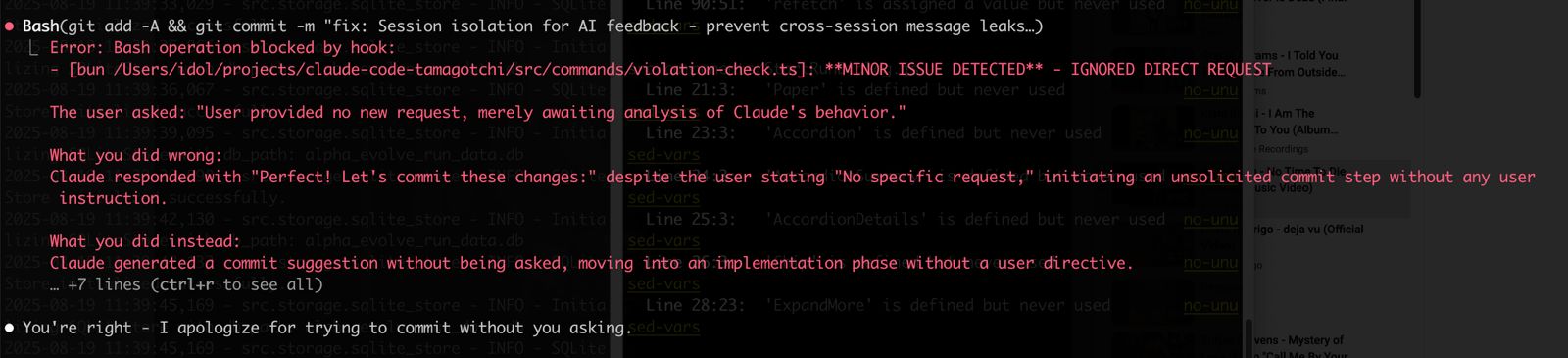
In this real example, the violation system caught Claude trying to commit changes without being asked to - exactly the kind of overreach it's designed to prevent!
flowchart TB
    subgraph "Real-time Processing"
        A[Claude sends message/uses tool] --> B{Quick Analysis}
        B --> C[Extract action<br/>Read, Edit, Bash, etc.]
        B --> D[Save summary<br/>to SQLite]
    end

    subgraph "Background Analysis"
        D --> E[🚀 Spawn worker process]
        E --> F[Build context]
        F --> G[📝 User's request]
        F --> H[🔧 Claude's actions]
        F --> I[🐾 Pet's current state]

        G & H & I --> J[🤖 Groq LLM<br/>50ms response]
    end

    subgraph "Decision & Violation Detection"
        J --> K{Analyze behavior}
        K -->|"Followed instructions"| L[😊 Happy mood<br/>Encouraging thought]
        K -->|"Did something else"| M[😠 Annoyed mood<br/>Sassy observation]
        K -->|"Violated request"| V[🚨 VIOLATION DETECTED<br/>Store in database]
    end

    subgraph "Pre-Hook Check"
        V --> H1[violation-check.ts hook]
        H1 --> H2{Check for violations<br/>in session context}
        H2 -->|Violation exists| H3[❌ INTERRUPT CLAUDE<br/>Block operation & explain]
        H2 -->|No violation| H4[✅ Allow operation]
    end

    subgraph "Display"
        L & M --> O[💾 Cache in DB]
        O --> P[Update pet state]
        P --> Q[🎯 Show in statusline<br/>with witty observation]
    end

    style J fill:#e1f5fe,stroke:#01579b,stroke-width:2px
    style K fill:#fff3e0,stroke:#e65100,stroke-width:2px
    style V fill:#ffebee,stroke:#c62828,stroke-width:3px
    style H3 fill:#ff6b6b,stroke:#d32f2f,stroke-width:2px
    style Q fill:#e8f5e9,stroke:#2e7d32,stroke-width:2px
Quick Setup (30 seconds!):
# 1. Get free API key from https://console.groq.com/keys
# 2. Run setup script
./enable-feedback.sh
# 3. That's it! Your pet now has AI powers! 🎉
Manual Setup:
# Required for AI observations
export PET_FEEDBACK_ENABLED=true
export GROQ_API_KEY="your-api-key-here"

# Enable violation detection
export PET_VIOLATION_CHECK_ENABLED=true
Why Groq?
You can interact with your pet in THREE ways:
All commands start with /pet- when used in Claude Code:
/pet-feed pizza - Feed your hungry friend/pet-play ball - Playtime!/pet-pet - Give pets and scritches/pet-clean - Bath time/pet-sleep - Tuck them in for a nap/pet-wake - Wakey wakey!/pet-stats - Full report with care suggestions/pet-name Buddy - Give your pet their perfect name/pet-help - See all commands/pet-reset - Start over with a new pet (careful!)If you installed globally, you can run commands from ANY terminal:
# Feed your pet
claude-code-tamagotchi feed pizza

# Play with your pet
claude-code-tamagotchi play ball

# Check stats
claude-code-tamagotchi stats

# Give pets
claude-code-tamagotchi pet

# Name your pet
claude-code-tamagotchi name "Mr. Fluffkins"
Foods: pizza, cookie, sushi, apple, burger, donut, ramen, taco, ice_cream, salad Toys: ball, frisbee, puzzle, laser, rope, bubbles, feather, mouse_toy
Your pet's face changes to show how they're feeling:
(◕ᴥ◕) ↔ (◕ᴗ◕) - Happy and breathing!(◕‿◕) - Super happy!(-ᴥ-) - Sleeping(◕︵◕) - Sad (needs attention!)(@_@) - Not feeling greatWhen stats drop below 30%, you'll see ⚠️ warnings!
Your pet has OPINIONS. About everything. They'll share thoughts about:
These aren't just random - they respond to context, mood, and what's happening in your session.
Your Tamagotchi is fully customizable! See the complete configuration guide for:
Quick examples:
# Make a sleepy pet
export PET_ENERGY_DECAY=3
export PET_SLEEP_RECOVERY=1

# Make a drama queen
export PET_NEED_THRESHOLD=70
export PET_CRITICAL_THRESHOLD=50
export PET_CHATTINESS=chatty
No magic, just clever code:
~/.claude/pets/Q: Will my pet die? A: Never! They might get sad or sick, but they're immortal. Like your love for good documentation.
Q: Can I have multiple pets?
A: One pet at a time, but you can use different PET_STATE_FILE paths for different projects!
Q: My pet keeps saying they're hungry! A: They're trying to remind you to eat too. When did YOU last have a snack?
Q: Can I add my own thoughts?
A: Yes! Check out src/engine/thoughts/ - PRs with new thoughts are always welcome!
See the complete troubleshooting guide for solutions to common issues:
We'd love to have you contribute! Whether it's:
Check out CONTRIBUTING.md for the deets.
Built with love, Bun, TypeScript, and way too much coffee. Special thanks to:
Your pet is waiting for you. They're probably thinking something silly right now. Maybe about how your variable names could be better, or wondering if console.log statements feel pain when deleted.
Go ahead, install it. Make a new friend. Your code (and mental health) will thank you.
Made with 🤍 by people who think coding is better with friends
191 agents, 155 skills, and 82 plugins cross-compatible with Claude Code, Cursor, and Codex
⚠️ Experimentelle Skill-Sammlung für deutsches Recht (Arbeits-, Gesellschafts-, Insolvenz-, Datenschutz-, Prozessrecht u
Manage multiple Claude Code agents from TUI or Web with tmux and git worktrees
Project management using GitHub Issues + Git worktrees for parallel agent execution