

Are you the author? Sign in to claim
Unofficial D&D 5e Dungeon Master for Claude Code — persistent campaigns, full 5e mechanics, and an optional cinematic di
Ruleset: D&D 5e — 2014 (SRD 5.1) by default; 2024 (SRD 5.2) opt-in per campaign. Choose at
/dm:dnd newtime; legacy campaigns are auto-prompted to migrate (with backup) on first load. See the Ruleset section for mechanic differences and dataset details.
Claude runs the game. You play. The TV shows the story. Your phone is your controller.
An unofficial D&D 5e (2014 ruleset / SRD 5.1) Dungeon Master skill for Claude Code — persistent campaigns, full 5e mechanics, and an optional cinematic display companion that streams typewriter narration, dice rolls, and live character stats to any screen — TV via Chromecast, tablet, phone, or second monitor — while players submit their actions from a phone or tablet.
Built for groups who want a real DM experience without needing one at the table.
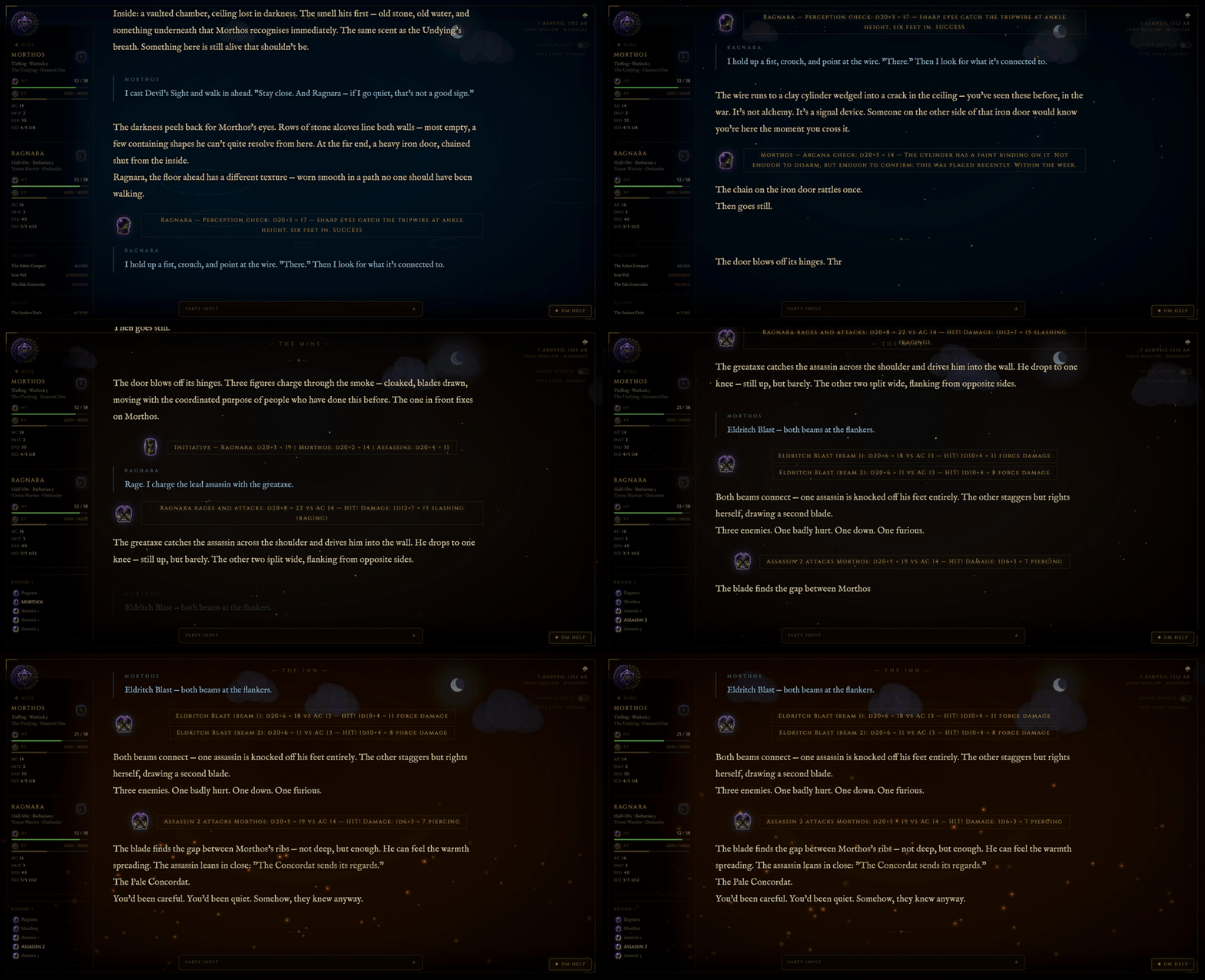
You run /dm:dnd load my-campaign in Claude Code. Claude becomes your DM — rolling dice, voicing NPCs, tracking HP and XP, and running combat. If you have a TV or tablet nearby, the cinematic display companion puts the narration on screen in real time — typewriter effect, atmospheric backgrounds that shift with the scene, a dynamic sky canvas, and a live party stat sidebar. Open it on any device on your network and everyone at the table can follow along. Players submit their actions from their phones; Claude picks them up automatically and runs the next turn.
There are two ways to play, and they serve different needs:
Improvised campaigns — Claude generates the world from scratch and auto-creates a committed three-act narrative arc from the setting, factions, and threats it just built. The arc gives the story a defined shape without scripting what happens — beats are defined by consequence ("what changes") not by event, so Claude stays flexible on how each beat lands while committing to the fact that it must. The arc advances across sessions, can be revised when players redirect the story, and continues into a new arc when all six beats resolve. This is Claude as a full creative collaborator: world-builder, improv partner, and story architect in one.
Structured campaigns — Use /dm:dnd import to drop in a pre-written source (official WotC modules, published third-party campaigns, or a custom DM-written document in PDF, markdown, DOCX, or plain text format). Claude reads and chunks the source, extracts the structure type (linear, hub-and-spoke, or faction-web), and builds all campaign files automatically — acts, chapters, key story beats, telegraph scenes, NPCs, factions, locations, and quest hooks. The campaign runs with enforced deterministic structure: required beats must land in each chapter, Claude telegraphs before delivering them, and steers with world pressure rather than walls when players drift. Drop in the Lost Mine of Phandelver and Claude will run it chapter by chapter with the same twelve DM standards applied to every scene.
Both modes share the same DM engine. The twelve applied behavioral standards are enforced as hard constraints in every session regardless of which mode you're in — improvised or structured, the DM improvises within situations, lets choices matter, makes every NPC a person, and controls pace deliberately.
It also manages a deep web of campaign data without overloading the LLM — coherent and complete, without burning tokens on context that isn't needed yet:
state.md anchors faction stances, player cover, and NPC dispositions; re-read at any claim to keep world continuity grounded in source files rather than Claude's increasingly lossy impression of themA campaign can run dozens of sessions deep — with coherent recall of past events, NPC attitudes, and long-tail consequences — without the context bloat that forces other implementations to summarize, forget, or reset.
It is not an official Wizards of the Coast product. It uses Claude as the DM engine. It takes the rules seriously and the storytelling even more seriously.
This skill is built specifically for Claude Code. If you want to run the same framework on a different model — local inference, OpenRouter, or any OpenAI-compatible endpoint — check out open-tabletop-gm, the model-agnostic version extracted from this repo. It trades some Claude-specific integration depth for broader model support and includes a probe tool for benchmarking narration quality across models.
If you'd rather skip the install entirely and play in a browser, neuralinitiative.ai is the hosted version — same design DNA, sign in with Google, top up an account balance, play. Trades self-hosting (and lower per-session cost) for zero setup and a more refined GUI.
If you're on Claude Code, you're in the right place.
 Persistent campaigns — state, NPCs, quests, and characters survive across sessions in plain markdown files
 Two campaign modes — improvised (Claude generates world + dynamic arc) or structured (import pre-written material and enforce its beats)
 Dynamic narrative arc — auto-generated at
 /dm:dnd new from the world's threat, factions, and setting; three acts, six beats defined by consequence not event; arc tracked across sessions, revised when players redirect the story, continued into a new arc when complete Campaign relationship graph — typed-edge graph alongside the markdown campaign files, with verbatim source-anchors on every edge;
 scene-context query auto-pulled at /dm:dnd load to surface who-knows-whom in the current scene without re-reading full NPC files; designed to hold long-session continuity when context compaction strips files out of scope. Background research and the A/B replay study that motivated it: docs/research/graph/ Campaign import —
 /dm:dnd import accepts PDF, markdown, DOCX, or plain text; extracts structure type, acts, chapters, key beats, telegraph scenes, NPCs, factions, and quest hooks; builds all campaign files automatically Portable characters — bring your character into any campaign; level up, grow your stat tree, and carry your inventory and loot — or start fresh each time
 Full D&D 5e mechanics — initiative, attacks, saving throws, spell slots, XP, levelling up, short/long rests
 Atmospheric DM — dark fantasy tone, distinct NPC voices, hidden rolls, a world that reacts to choices Cinematic display companion — typewriter narration on your TV, scene-reactive backgrounds, dynamic sky canvas, live party sidebar; cast, mirror, or open on any screen on your network
 Dynamic sky canvas — sun arc, moon, twinkling stars, and cloud density rendered in real time from world time data; transitions with time of day and weather
 Player input from the companion UI — players submit actions from phone/tablet with a one-tap send and a live Your move → Sent → ✓ DM has your move → narrating status strip; Claude picks them up automatically in autorun mode Enforced roll handling — choose at game start whether players roll their own d20s (DM calls for the roll and waits) or the DM rolls openly; per-character override from the phone; the DM never silently auto-rolls a PC Reading controls — per-player text-size stepper (legible across the room from a Chromecast) and a narration-length slider that sets the DM's per-turn word budget
 Autorun / taxi mode — Claude drives the turn loop without DM input; a pie countdown shows the next auto-fire window
 LAN party support — serve the companion over your local network; every device in the room sees the same display TLS / HTTPS — self-signed cert generation included; required for full browser feature support over LAN 17 scene types — auto-detected from narration keywords — tavern, dungeon, ocean, crypt, arcane, glacier, and more Clickable character sheets — tap any sidebar card to open a full character sheet modal (attacks, features, inventory); works on phones and tablets via LAN SRD spell/feature lookup — click any spell or feature name in a character sheet to view its full description; bundled 5e dataset with supplemental entries for non-SRD content (Xanathar's, Tasha's, subclass features); wikidot fallback link shown for anything not in the local data DM Help button — click the ◈ button on the display for an on-demand contextual hint or warning; generated from the current scene without per-turn token overhead
 Tutor / learning mode — enable per-session for automatic hint blocks after every scene, decision point, and roll; ideal for players new to D&D Browser-side sound effects — 12 SFX types synthesized on demand via numpy and played through Web Audio API; works on any device with the tab open, including phones over LAN Couch co-op — multiple characters, shared display, turn order visible to everyone in the room Combat tracker — auto-rolled initiative,
 ▶ turn pointer, HP bars, inline dice math sent to display Helper scripts — dice rolling, ability scores, combat, character stat derivation, conditions/tracker, calendar, SRD data sync, SRD lookup, supplemental data builder
Claude Code CLI ──→ /dm:dnd commands ──→ campaign files (~/.claude/dnd/)
state.md · world.md · npcs.md
session-log.md · characters/
Display pipeline (autorun mode):
Players (phone/tablet) ──→ Companion UI ──→ Flask SSE server (localhost:5001)
↓
autorun_wait.py
↓
Claude processes turn
↓
send.py / push_stats.py ──→ TV display
The Flask server receives narration text, player actions, dice results, and character stats via HTTP POST. It broadcasts everything in real time to connected browsers via Server-Sent Events. The browser renders narration as a typewriter effect over a scene-reactive gradient background with a live character sidebar. In autorun mode Claude polls for player submissions and processes each turn automatically.
pip3 install flask flask-cors numpy cryptography (display companion; numpy required for sound effects, cryptography for LAN TLS)Install it as a Claude Code plugin:
/plugin marketplace add neuralinitiative/claude-dnd-skill
/plugin install dm@neural-initiative
Then invoke it as /dm:dnd (plugin skills are namespaced plugin:skill — the dm plugin provides the dnd skill), or just describe what you want once a campaign is loaded. Update with /plugin update dm.
# Optional — install the display-companion dependencies (one-time).
# Core gameplay works without these; they power the live screen + audio.
pip3 install flask flask-cors numpy cryptography
Upgrading from a v1 standalone install? As of v2.0.0 the skill is plugin-only — the old
~/.claude/skills/dndstandalone (/dnd) is replaced by the plugin (/dm:dnd). Your campaigns and characters are untouched — they live under~/.claude/dnd/(or$DND_CAMPAIGN_ROOT), entirely separate from the skill code. Install the plugin above, then run the one-time helper to carry over device pairings / TLS certs and retire the old install:python3 <plugin>/skills/dnd/scripts/migrate_v1_to_v2.py. Full guide: MIGRATING.md.
The skill tracks releases via a top-level VERSION file and per-release notes in CHANGELOG.md. The current version is in VERSION; significant changes — new commands, new mechanics, behavior changes — get a CHANGELOG entry.
To check for updates:
/dm:dnd update --check    # shows local vs. remote version + commit diff, no pull
/dm:dnd update            # pulls if you're behind (fast-forward only; refuses on dirty tree)
Plugin installs update through the plugin manager — run /plugin update dm instead. /dm:dnd update detects a plugin install and points you there rather than git-pulling under the manager's tracked state.
The --check output includes both sides' version strings so you can see at a glance whether you've fallen behind. After updating, restart Claude Code so the new SKILL.md and command procedures load.
The skill follows semantic versioning: MAJOR.MINOR.PATCH. Breaking changes that require campaign-data migration bump MAJOR; new opt-in features bump MINOR; bug fixes bump PATCH. Active campaigns continue to work across MINOR/PATCH bumps without action.
Improvised campaign — Claude builds the world and generates a narrative arc:
/dm:dnd new my-campaign         # generates world seed, factions, NPCs, dynamic story arc
/dm:dnd character new           # create a character
/dm:dnd load my-campaign        # start a session
Structured campaign — import a pre-written or published module:
/dm:dnd import my-campaign path/to/module.pdf   # extract structure and build campaign files
/dm:dnd load my-campaign                        # start a session — Claude enforces the arc
Once loaded, type naturally — no /dm:dnd prefix needed. The DM interprets everything as in-game action.
| Command | Description |
|---|---|
/dm:dnd new <name> | Create a new campaign — generates world seed, NPCs, starting location, and dynamic narrative arc |
/dm:dnd import <name> <source> | Import a pre-written campaign from PDF, markdown, DOCX, or plain text; extracts structure and builds all campaign files |
/dm:dnd load <name> | Load an existing campaign and enter DM mode |
/dm:dnd save | Write session events to log, update state and character files |
/dm:dnd end | Save session, append recap, stop display companion |
/dm:dnd abandon | Exit without saving — discards all unsaved changes from this session |
/dm:dnd list | List all campaigns with last session date and count |
/dm:dnd recap | In-character 3–5 sentence recap of the last session |
/dm:dnd world | Display world lore |
/dm:dnd quests | Show active quests and open threads |
/dm:dnd arc status | Show the current narrative arc, completed beats, and steering notes |
/dm:dnd arc advance <beat> | Mark a beat complete and update arc tracking (dynamic arcs only) |
/dm:dnd arc revise | Revise outstanding beats when a player choice significantly redirects the story |
/dm:dnd arc new | Generate a new arc from the consequences of a completed one |
/dm:dnd autorun on [seconds] | Enable autorun mode — Claude drives the turn loop automatically |
/dm:dnd autorun off | Return to manual mode |
/dm:dnd tutor on | Enable tutor / learning mode for this session |
/dm:dnd tutor off | Disable tutor / learning mode |
/dm:dnd data sync | Rebuild bundled SRD dataset from upstream sources (only needed for new upstream content) |
/dm:dnd data status | Show current dataset record counts and upstream SHA |
/dm:dnd update | Pull latest skill changes from origin/main (refuses on dirty tree, fast-forward only) |
/dm:dnd update --check | Show local-vs-remote version and commit-diff without pulling |
/dm:dnd path [<new>|reset] | View or relocate campaign storage via DND_CAMPAIGN_ROOT |
/dm:dnd graph init | Initialize the campaign relationship graph (proposes seed nodes + edges; asks for approval) |
/dm:dnd graph scene-context --place <id> [--present id1,id2] | Focused subgraph for the current scene; primary in-session query |
/dm:dnd graph add-edge --from <id> --to <id> --type T --since N | Record a relationship shift mid-session |
/dm:dnd graph close-edge --id <id> --at-session N | Mark an edge as ended (alliance broke, NPC moved away, etc.) |
/dm:dnd graph extract [--last-session-only] | Run a Haiku pass over session-log to propose new edges (review-then-apply) |
Both campaign modes use the same six-beat three-act structure tracked in state.md. The arc type determines how it's populated and enforced.
The dynamic arc draws from several overlapping frameworks in story structure and tabletop adventure design:
Generated automatically at /dm:dnd new from the world's threat, factions, and Three Truths. Beats are defined by what_changes — the narrative consequence that must land — not by a specific event. This gives the DM flexibility on how each beat arrives while committing to that it must.
| Act | Beat | What it marks |
|---|---|---|
| 1 | Inciting Incident | The threat becomes personal |
| 1 | Complication | The problem is bigger than it first appeared |
| 2 | Midpoint Shift | What the party thought they were doing changes |
| 2 | All Is Lost | A genuine setback — something fails or collapses |
| 3 | Final Confrontation | The decisive moment the campaign turns on |
| 3 | Resolution | What's different about the world and characters after |
Arc beats are tracked at /dm:dnd end and marked complete via /dm:dnd arc advance. When a major player choice redirects the story, /dm:dnd arc revise updates outstanding beats to fit the new direction. When all six beats resolve, /dm:dnd arc new generates a new arc from the consequences of the first — same world, new story question.
Populated by /dm:dnd import from the source material. Acts contain chapter-level key beats, telegraph scenes (setup scenes that naturally constrain choices toward each beat), and branching notes. Claude telegraphs before delivering any required beat, steers with world pressure rather than hard walls when players drift, and marks beats complete as each chapter resolves.
The two arc types are mutually exclusive per campaign and fully compatible with all other systems — combat, XP, NPC attitudes, and display all behave identically regardless of arc type.
| Command | Description |
|---|---|
/dm:dnd character new | Create a character — guided point buy or rolled stats |
/dm:dnd character sheet [name] | Display a character sheet |
/dm:dnd level up [name] | Level up a character — applies class features, HP roll |
The creation flow walks through:
character.pycharacters/<name>.md/dm:dnd combat start
Goblin attacks: d20(14) + 4 = 18 vs AC 16 — hit! 1d6(3) + 2 = 5 piercing
players mode the DM calls for each PC roll by name and waits; under auto it rolls them openly. The DM always resolves NPC/monster rolls.During combat the sidebar shows a live turn order with a ▶ pointer:
— COMBAT — Round 2
▶ Aldric
  Skeleton
  Mira
The pointer advances after each turn. HP bars update in real time when damage is taken. Combat ends with --turn-clear.
How a player's own d20s (attacks, checks, saves, death saves) get rolled is chosen at game start and stored as roll_mode in state.md → ## Session Flags. Both /dm:dnd new and /dm:dnd load ask "Dice rolls?" so you confirm it each session.
| Mode | Behavior |
|---|---|
players (default) | The DM calls for each PC d20 by name and waits for the player's result — it never rolls a player's character for them. If a roll doesn't come back (e.g. the physical-dice phone server is down) the DM asks for the number out loud rather than silently auto-rolling. |
auto | The DM rolls PC d20s openly with full math shown inline (Piper — Perception: d20+5 = 18), no waiting. Good for solo or fast play. |
Initiative is always DM-rolled for every combatant (PCs and NPCs) regardless of mode, as are all NPC/monster rolls.
Per-player override — a player can flip just their own character via the phone Settings → Rolls toggle. That POSTs to /roll-pref, and the DM honors a [[<Char> roll mode: …]] directive for that character, overriding the campaign default. Precedence: per-character toggle > campaign roll_mode.
This replaces the older always-"players roll their own" assumption: the DM no longer falls back to an auto-rolled
[auto]result for a PC when the dice server is unavailable. Roll handling is now explicit and enforced.
/dm:dnd npc Osk             # portray an existing NPC or generate a new one
/dm:dnd npc attitude Osk friendly   # shift attitude on the 5-step scale
Every NPC gets: role, stat block, demeanor, motivation, secret, and a speech quirk. Attitudes shift on a 5-step scale: hostile → unfriendly → neutral → friendly → allied. Changes are logged with reason and date in npcs.md.
/dm:dnd rest short    # 1 hour — spend Hit Dice, recharge some features
/dm:dnd rest long     # 8 hours — full HP, half Hit Dice back, all spell slots
Long rests advance the in-world clock in state.md.
An optional local web server (display/dnd-display-app.py) that renders DM narration on any screen — TV, tablet, phone, or second monitor. Cast it, mirror it, or open it on any device on your local network.
pip3 install flask flask-cors numpy cryptography
The display starts automatically when you answer y at the /dm:dnd load prompt. Or start it manually:
# Local only (Mac/same machine) — HTTP, no cert setup
bash ${CLAUDE_SKILL_DIR}/display/start-display.sh

# LAN mode — HTTP, accessible to phones/tablets on your network
bash ${CLAUDE_SKILL_DIR}/display/start-display.sh --lan

# LAN mode with TLS — for public or untrusted networks
bash ${CLAUDE_SKILL_DIR}/display/start-display.sh --lan --tls
Then open http://localhost:5001 in your browser. HTTP is the default — no certificate warnings. For LAN devices use the IP URL printed at startup (e.g. http://192.168.1.x:5001). Use --tls only when the network is public or untrusted.
Open the display URL in a browser, then choose how to show it:
| Option | How |
|---|---|
| TV — Cast tab | Chrome → three-dot menu → Cast → Cast tab; select your Chromecast or smart TV |
| TV — Screen mirror | macOS: Control Centre → Screen Mirroring → Apple TV / AirPlay receiver |
| iPad / tablet | Start with --lan, open http://<your-ip>:5001 in Safari or Chrome; works in landscape |
| Second monitor | Open http://localhost:5001 in a browser window and drag it to the second display |
HTTP is the default. Use --tls only when the network is public or untrusted. When --tls is passed to start-display.sh:
cert.pem is not already present:8080 to serve cert.pem for downloadFor iOS: open http://<your-ip>:8080/cert.pem in Safari → tap Allow → Settings → General → VPN & Device Management → install profile → Certificate Trust Settings → enable full trust.
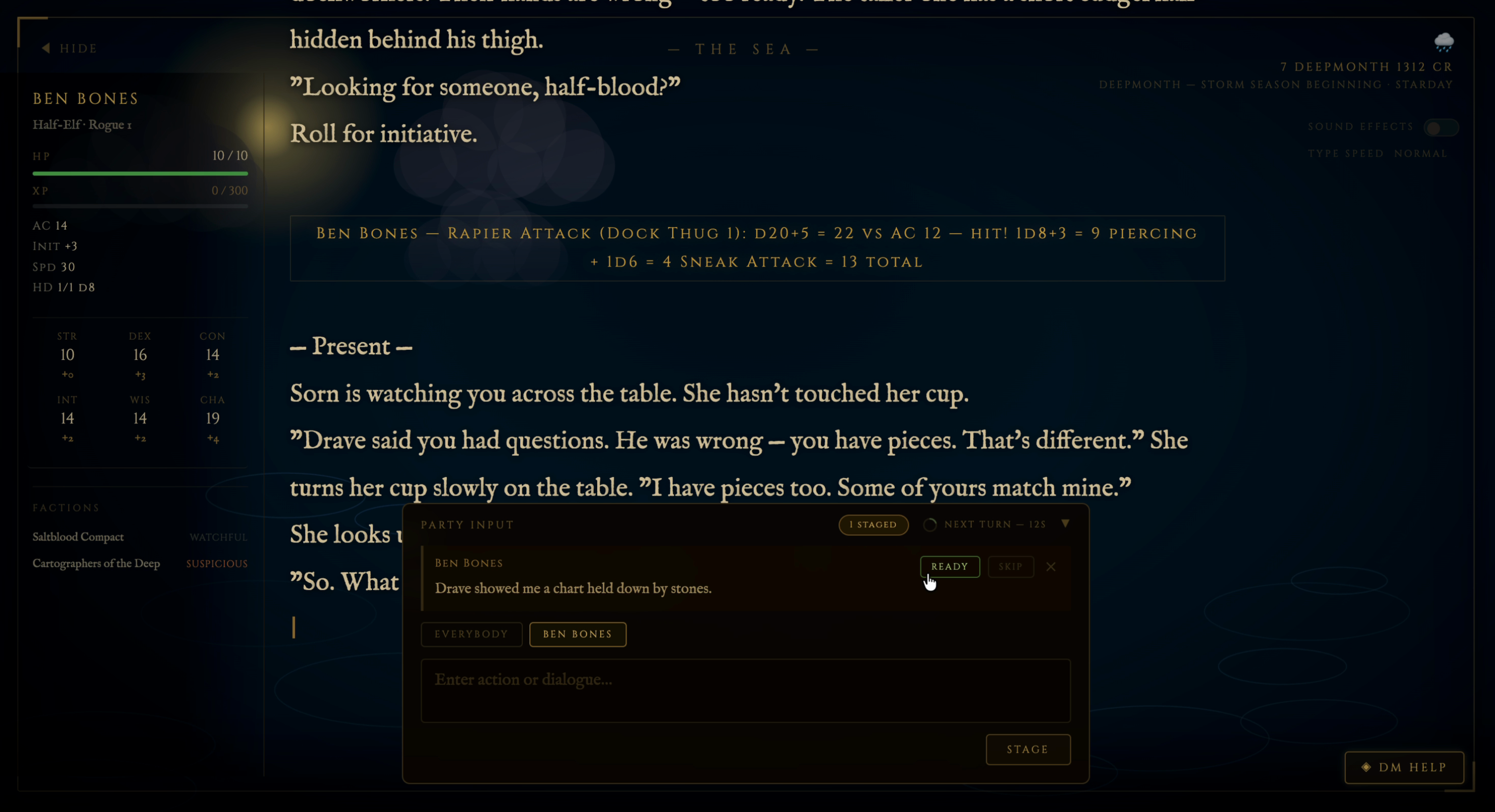
Players open the companion in their phone browser. Each device binds to a party character, and the input view shows that player's turn flow as a plain status strip so they always know where their turn stands:
Your move → Sending… → Sent to the DM → ✓ The DM has your move → The DM is narrating… → Your move
✓ The DM has your move toast the moment the DM actually picks the action up off the queue (not just when it's staged), then The DM is narrating…, then back to Your move. This closes the loop so a player can always tell whether their turn is in.The panel shows a "Next Turn" countdown pie clock that loops at the configured autorun interval.
Device approval defaults to trusting any device on your LAN — convenient for a casual home network. Set DND_REQUIRE_APPROVAL=1 to restore the per-device approve/deny gate for public or untrusted networks.
Each device has a Settings view with controls that tune the experience for that player or the whole table:
| Control | What it does |
|---|---|
Text Size (A− / A+, click the % to reset) | Scales the reading column via a font-size multiplier (font size, not page zoom) so narration stays legible across the room from a Chromecast. Persists per-browser (localStorage), applied anti-FOUC. |
| Narration slider (250–2500 words) | Sets the word-count target the DM aims for each turn. POSTs to /narration-pref; the next queued action carries a [[Narration length…]] directive the DM honors as a hard per-turn budget. Quick "keep turns short" knob for time-pressed tables. |
| Rolls toggle (shown when the device is bound to a PC) | Flips that character between Players (you roll your own d20s) and Auto-roll (the DM rolls them openly), overriding the campaign default for that one character. See Dice & Roll Handling. |
| Sound Effects toggle | Enables browser-side SFX (see Sound Effects). |
Autorun is the primary way to run sessions with the companion UI. Once enabled, Claude drives the turn loop without requiring the DM to press Enter between each turn.
/dm:dnd autorun on          # enable — 60s default countdown
/dm:dnd autorun on 45       # enable with 45-second countdown
/dm:dnd autorun off         # return to manual mode
The countdown is configurable per-campaign by setting autorun_interval: N in state.md → ## Session Flags. To interrupt autorun from the Claude Code CLI, press Ctrl+C during the wait.
N-player threshold — by default autorun fires when all known players are ready. For multi-device groups you can require only N players:
python3 ${CLAUDE_SKILL_DIR}/display/push_stats.py --autorun-threshold 2  # fire when 2 ready
python3 ${CLAUDE_SKILL_DIR}/display/push_stats.py --autorun-threshold 0  # reset to player count
There are two ways to surface hints and warnings on the display — an on-demand button and a per-session automatic mode.
DM Help button (◈) — a ◈ DM Help button sits in the bottom-right corner of the display at all times. Click it and within a few seconds a contextual hint or warning is generated from the current scene and pushed to the display — no CLI command needed, no per-turn token overhead. The button reads the last 8 display blocks and current campaign state, calls Claude in non-interactive mode, and sends the result as a hint block via the normal SSE pipeline. Shows "Thinking…" while in flight; resets automatically when the block arrives. Multiple simultaneous clicks only trigger one execution.
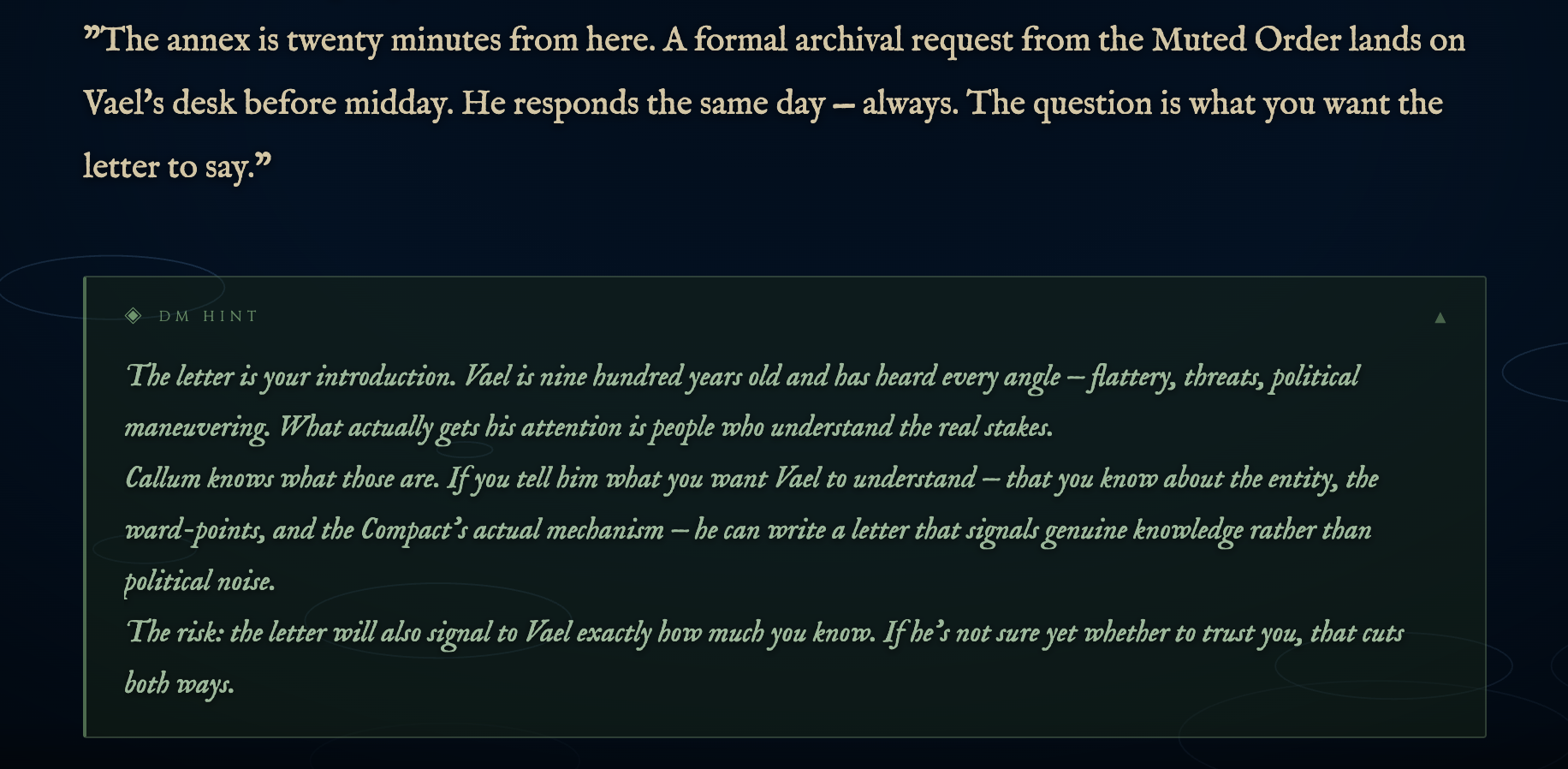
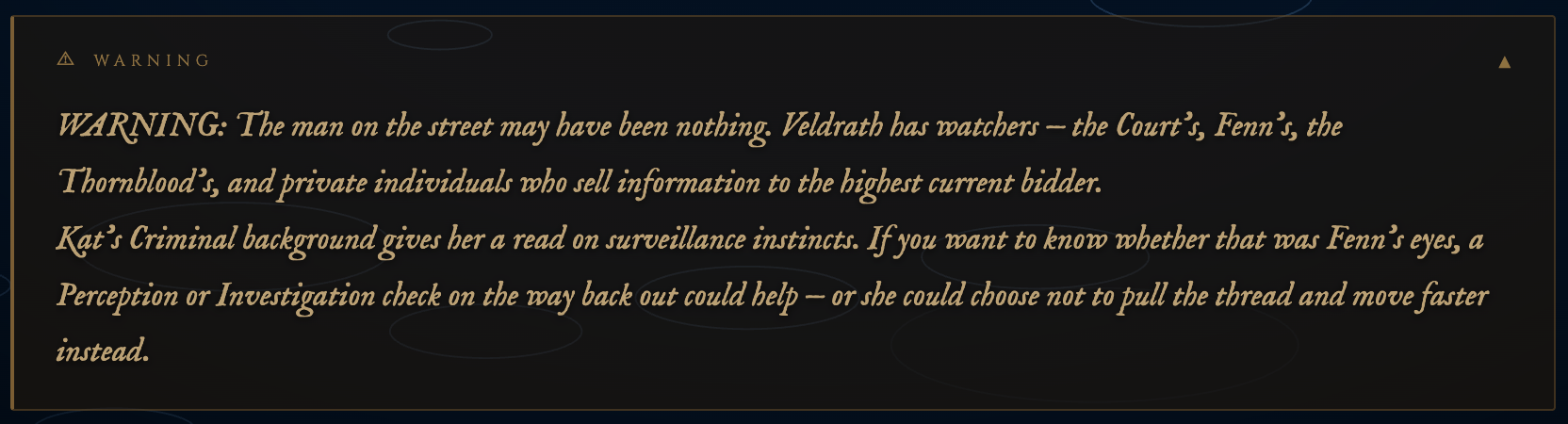
Hint blocks are collapsed by default — click or tap the header to expand. Warnings use an amber border:
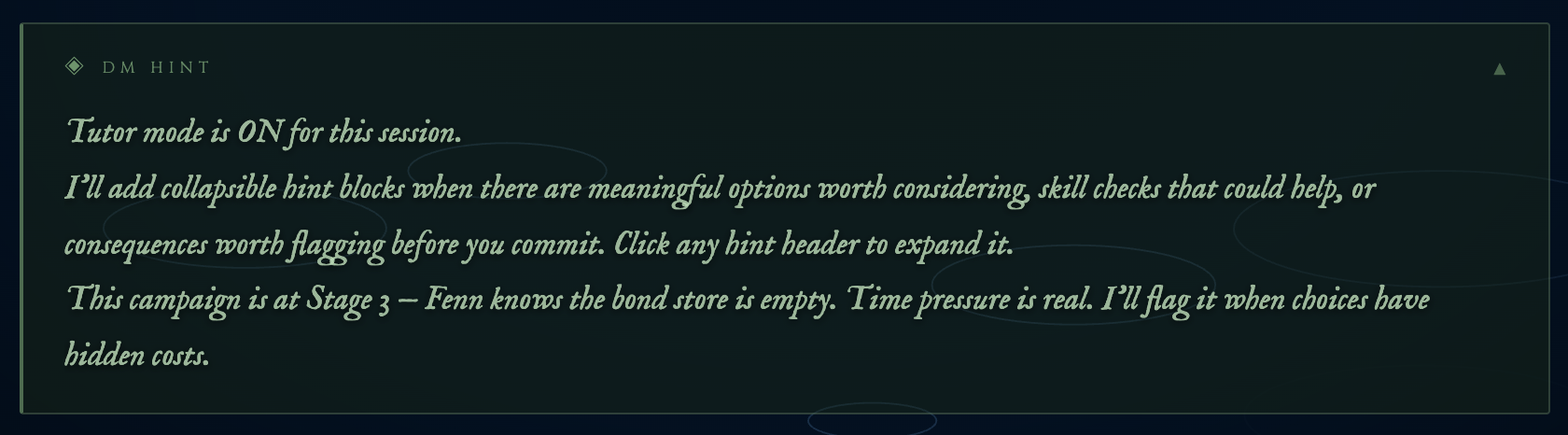
Hints can surface contextual NPC and situation knowledge the DM would naturally flag:
Warnings use an amber border to distinguish high-stakes choices:
Tutor mode (per-session) — for new players who want continuous guidance, enable automatic hint blocks after every scene, decision point, and roll — no button needed. Adds ~10–20% token overhead per turn. Use the DM Help button instead for on-demand hints without the ongoing cost.
/dm:dnd tutor on    # enable for this session
/dm:dnd tutor off   # disable
Tutor mode is session-scoped — does not persist to the next /dm:dnd load unless set again.
The two are independent — the ◈ button is always available regardless of whether tutor mode is on.
The server scans narration text for keywords and crossfades the background gradient and particle type to match the current environment. Scenes change automatically as the story moves.
| Scene | Trigger Keywords | Particles |
|---|---|---|
| Tavern | inn, hearth, ale, tallow, barkeep | embers |
| Dungeon | corridor, torch, portcullis, dank | dust |
| Ocean / Docks | dock, harbour, wave, tide, ship | ripples |
| Forest | tree, canopy, moss, thicket, grove | leaves |
| Crypt | tomb, undead, skeleton, burial | smoke |
| Arcane | ritual, rune, sigil, incantation | sparks |
| Mountain | glacier, frost, blizzard, ridge | snow |
| Cave | stalactite, grotto, echo, drip | mist |
| Night | midnight, moon, constellation | stars |
| City / Town | market, cobble, district, crowd | rain |
| Swamp | swamp, bog, marsh, mire | mist |
| + 6 more | mine, castle, ruins, desert, fire, temple | — |
Scene transitions crossfade over ~2.5 seconds. The server maintains a 20-chunk rolling window for detection so scenes don't flicker on single keyword matches.
A canvas layer rendered above the scene background shows a live sky that reacts to world_time data pushed via push_stats.py:
Push world time data after loading a campaign and after any rest or time advance:
python3 ${CLAUDE_SKILL_DIR}/display/push_stats.py --world-time \
  '{"date":"7 Deepmonth 1312 CR","day_name":"Starday","time":"morning","season":"Deep Winter","weather":"overcast"}'
Valid time values: dawn, morning, midday, afternoon, evening, dusk, night
Valid weather values: calm, clear, overcast, rainy, stormy
Narration text is scanned server-side for 12 SFX trigger categories. When a match is found, the browser fetches a synthesized WAV file and plays it via Web Audio API — no server audio output, works on any device with the tab open.
impact · sword · arrow · shout · thud · magic · coins · door · low_hum · fire · breath
SFX synthesis uses numpy — if numpy is not installed the feature degrades silently. Enable via the Sound Effects toggle in the top-right of the display.
| Narration text | SFX |
|---|---|
| "...strikes the shield..." | impact |
| "...draws her blade..." | sword |
| "...looses an arrow..." | arrow |
| "...he roars across the dock..." | shout |
| "...collapses to the floor..." | thud |
| "...arcane energy crackles..." | magic |
| "...coins spill across the table..." | coins |
| "...the door creaks open..." | door |
| "...the altar hums with energy..." | low_hum |
| "...the torch flares..." | fire |
| "...a sharp exhale..." | breath |
The browser caches each WAV after first fetch. SFX trigger naturally alongside the typewriter animation since both are driven by the same narration chunks.
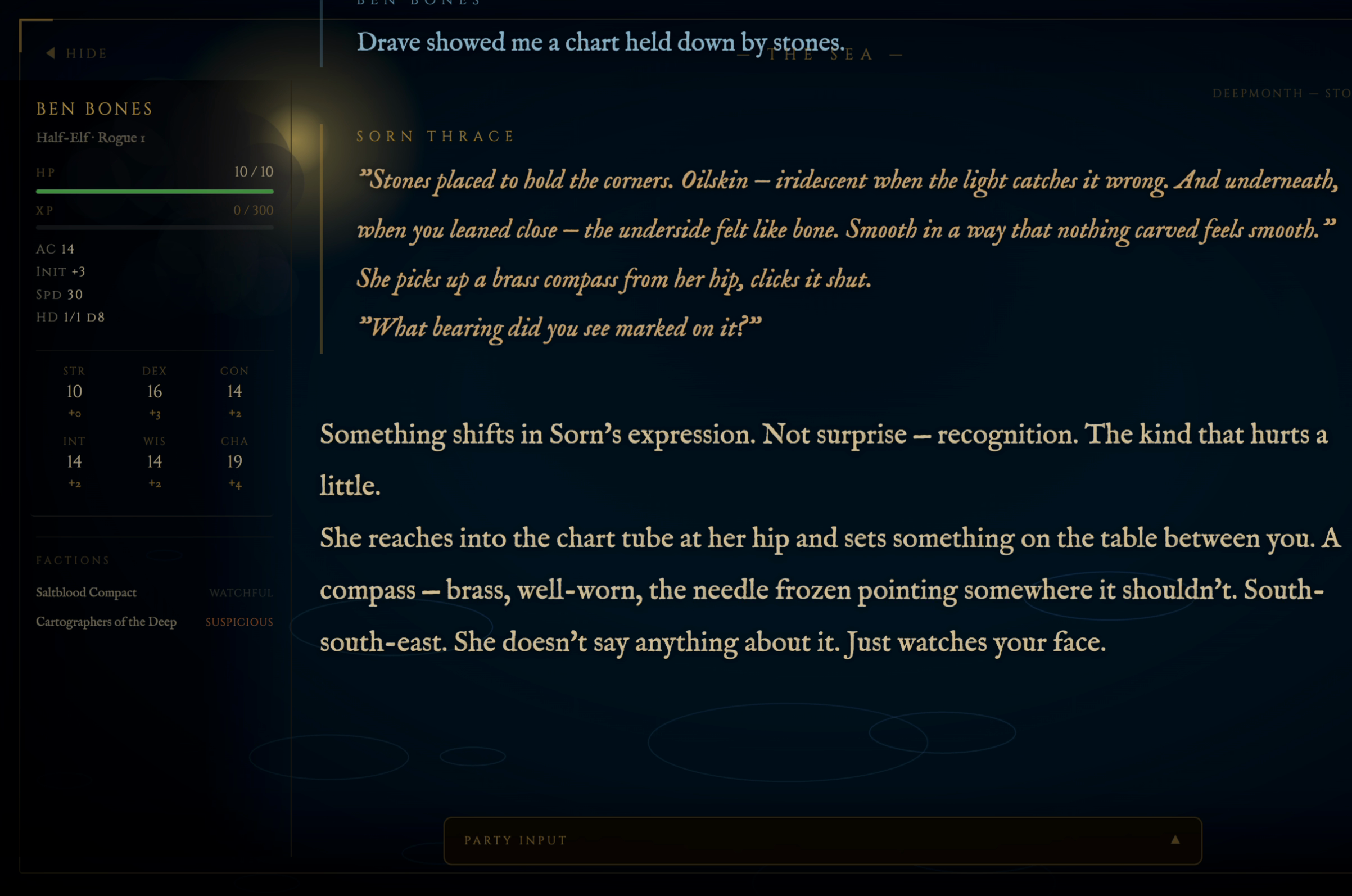
A fixed left sidebar shows live stats for all party members, updated automatically as play progresses.
# Push full stats on campaign load (clears stale characters from previous campaigns)
python3 ${CLAUDE_SKILL_DIR}/display/push_stats.py --replace-players --json '{
  "players": [{
    "name": "Aldric", "race": "Human", "class": "Fighter", "level": 2,
    "hp": {"current": 14, "max": 18}, "xp": {"current": 220, "next": 300},
    "ac": 17, "initiative": "+1", "speed": 30,
    "hit_dice": {"remaining": 2, "max": 2, "die": "d10"},
    "ability_scores": {
      "str": {"score": 16, "mod": "+3"}, "dex": {"score": 12, "mod": "+1"},
      "con": {"score": 15, "mod": "+2"}, "int": {"score": 10, "mod": "+0"},
      "wis": {"score": 11, "mod": "+0"}, "cha": {"score": 13, "mod": "+1"}
    }
  }]
}'

# Partial updates during play
python3 ${CLAUDE_SKILL_DIR}/display/push_stats.py --player Aldric --hp 10 18
python3 ${CLAUDE_SKILL_DIR}/display/push_stats.py --player Aldric --xp 270 300
python3 ${CLAUDE_SKILL_DIR}/display/push_stats.py --player Aldric --conditions-add "Poisoned"
python3 ${CLAUDE_SKILL_DIR}/display/push_stats.py --player Aldric --slot-use 2

# Or bundle stat changes directly with a narration send (no separate push_stats.py call needed):
python3 ${CLAUDE_SKILL_DIR}/display/send.py \
  --stat-hp "Aldric:10:18" \
  --stat-condition-add "Aldric:Poisoned" \
  --stat-slot-use "Aldric:1" << 'EOF'
The goblin's blade catches Aldric across the ribs...
EOF

# Combat turn order
python3 ${CLAUDE_SKILL_DIR}/display/push_stats.py \
  --turn-order '{"order":["Aldric","Skeleton","Mira"],"current":"Aldric","round":1}'

# Advance turn pointer
python3 ${CLAUDE_SKILL_DIR}/display/push_stats.py --turn-current "Skeleton"

# Combat ended
python3 ${CLAUDE_SKILL_DIR}/display/push_stats.py --turn-clear

# World time clock
python3 ${CLAUDE_SKILL_DIR}/display/push_stats.py --world-time \
  '{"date":"7 Deepmonth 1312 CR","day_name":"Starday","time":"morning","season":"Deep Winter","weather":"overcast"}'
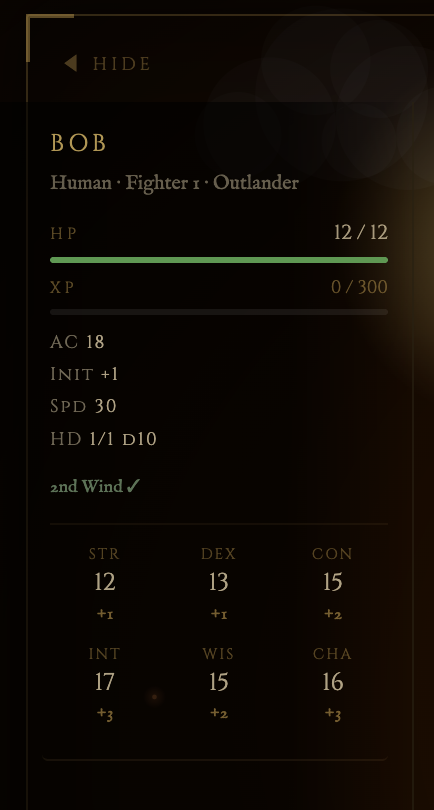
Click or tap any character card in the sidebar to open a full character sheet modal — attacks, features, and inventory at a glance. Works on desktop and on phones/tablets connected via LAN.
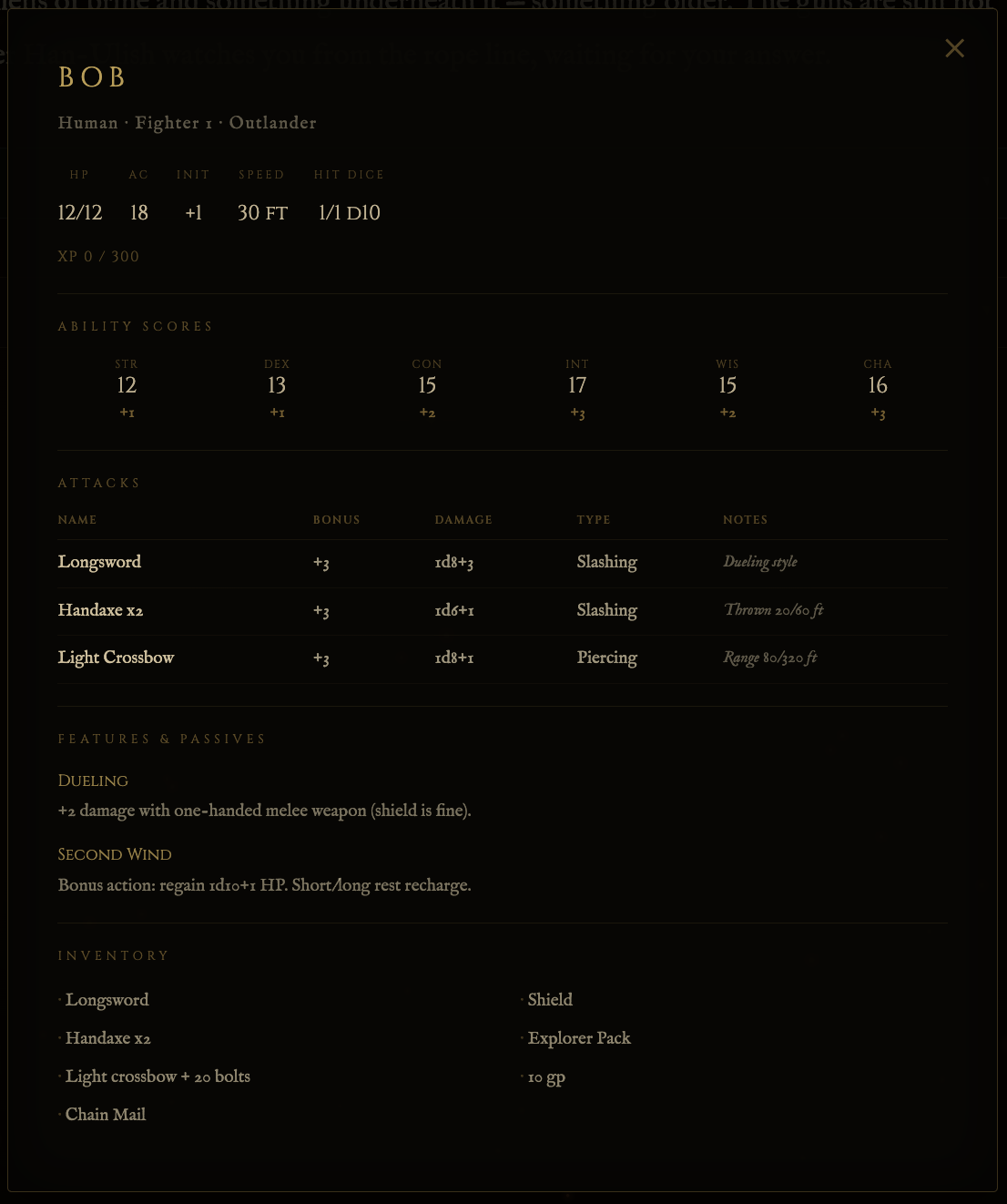
Include the sheet field when pushing stats on /dm:dnd load to populate the full sheet:
python3 ${CLAUDE_SKILL_DIR}/display/push_stats.py --replace-players --json '{
  "players": [{
    "name": "Aldric",
    ...
    "sheet": {
      "attacks": [
        {"name": "Longsword", "bonus": "+5", "damage": "1d8+3", "type": "Slashing", "notes": "Versatile (1d10)"}
      ],
      "features": [
        {"name": "Second Wind", "text": "Bonus action: regain 1d10+level HP. Short/long rest recharge."}
      ],
      "inventory": ["Longsword", "Chain Mail", "Shield", "Explorer'\''s Pack", "15 gp"]
    }
  }]
}'
If sheet is omitted, the modal still opens but shows only the stats visible in the sidebar. Close with Esc, clicking outside the panel, or the ✕ button.
Clicking a spell or feature name inside the sheet opens a description modal sourced from the bundled SRD dataset. Scaling progressions (e.g. Sneak Attack damage) automatically collapse to the character's current level. If a spell or feature isn't in the core SRD dataset, a link to the relevant page on D&D 5e Wiki is shown instead. To extend the local dataset with non-SRD content from a character file:
python3 ${CLAUDE_SKILL_DIR}/scripts/build_supplemental.py --character ~/.claude/dnd/campaigns/<name>/characters/<charname>.md
This fetches descriptions from dnd5e.wikidot.com for any missing entries and writes them to data/dnd5e_supplemental.json. Run it once after creating or importing a character. A pre-built supplemental covering Circle of Spores, Thief archetype features, and several Xanathar's spells ships with the skill.
The sidebar:
stats.json)/dm:dnd new (fresh campaign)The server buffers the last 60 text chunks to disk (text_log.json). Reconnecting browsers (Chromecast drop, tab refresh) replay the full session history automatically — no narration is lost.
All scripts live in ${CLAUDE_SKILL_DIR}/scripts/.
dice.py — All dice rollspython3 scripts/dice.py d20+5
python3 scripts/dice.py 2d6+3
python3 scripts/dice.py d20 adv # advantage
python3 scripts/dice.py d20+3 dis # disadvantage + modifier
python3 scripts/dice.py 4d6kh3 # keep highest 3 (ability score roll)
python3 scripts/dice.py d20 --silent # integer only (for hidden rolls)
Flags nat 20 (CRITICAL HIT) and nat 1 (FUMBLE) automatically.
ability-scores.py — Character creationpython3 scripts/ability-scores.py roll # 3 arrays to choose from
python3 scripts/ability-scores.py pointbuy # print cost table
python3 scripts/ability-scores.py pointbuy --check STR=15 DEX=10 CON=15 INT=8 WIS=11 CHA=12
python3 scripts/ability-scores.py modifiers STR=15 DEX=10 CON=15 INT=8 WIS=11 CHA=12
combat.py — Initiative and attack resolution# Roll initiative for all combatants and print tracker
python3 scripts/combat.py init '[
{"name":"Aldric","dex_mod":1,"hp":18,"ac":17,"type":"pc"},
{"name":"Skeleton","dex_mod":2,"hp":13,"ac":13,"type":"npc"}
]'
# Reprint tracker from saved state
python3 scripts/combat.py tracker '<state_json>' <round_num>
# Resolve a single attack
python3 scripts/combat.py attack --atk 5 --ac 13 --dmg 1d8+3
init outputs a STATE_JSON: line — save this to state.md under ## Active Combat for persistence between turns.
build_supplemental.py — Extend the SRD dataset with non-SRD contentRun after creating or importing a character to fetch descriptions for spells and features not in the core SRD:
# Scan a character file and fetch anything missing
python3 scripts/build_supplemental.py --character ~/.claude/dnd/campaigns/<name>/characters/<charname>.md

# Scan all characters in a campaign at once
python3 scripts/build_supplemental.py --campaign <campaign-name>

# Add a specific entry by name
python3 scripts/build_supplemental.py --add "Toll the Dead" spell
python3 scripts/build_supplemental.py --add "Halo of Spores" feature

# See what's currently cached
python3 scripts/build_supplemental.py --list

# Preview what would be fetched without writing
python3 scripts/build_supplemental.py --campaign <name> --dry-run
Fetches from dnd5e.wikidot.com with a polite request delay. Uses Python stdlib only — no extra dependencies. Writes to data/dnd5e_supplemental.json, which lookup.py merges at load time.
character.py — Stat derivation and levelling# Full stat block from raw scores
python3 scripts/character.py calc --class fighter --level 2 \
STR=16 DEX=12 CON=15 INT=10 WIS=11 CHA=13 \
--proficient STR CON Athletics Intimidation Perception Survival
# Level-up
python3 scripts/character.py levelup --class fighter --from 2 --hp-roll 8 --con-mod 2
# XP tracking
python3 scripts/character.py xp --level 2 --gained 150
${CLAUDE_SKILL_DIR}/
├── SKILL.md                  # Skill definition and DM instructions
├── SKILL-scripts.md          # Script and tool syntax reference
├── SKILL-commands.md         # /dm:dnd command procedures
├── README.md                 # This file
├── data/
│   ├── dnd5e_srd.json        # Bundled 5e SRD dataset (1453 records — spells, features, equipment, monsters)
│   └── dnd5e_supplemental.json  # Non-SRD content (Xanathar's, subclass features, etc.)
├── scripts/
│   ├── dice.py
│   ├── ability-scores.py
│   ├── combat.py
│   ├── character.py
│   ├── tracker.py
│   ├── calendar.py
│   ├── lookup.py             # SRD + supplemental query API
│   ├── build_srd.py          # Fetches upstream 5e data and builds dnd5e_srd.json
│   ├── sync_srd.py           # Checks upstream SHAs; rebuilds only on new commits
│   └── build_supplemental.py # Fetches non-SRD entries from wikidot for a character or campaign
├── display/
│   ├── dnd-display-app.py    # Flask SSE server
│   ├── audio.py              # SFX synthesis and browser trigger (numpy)
│   ├── autorun_wait.py       # Blocking wait for autorun mode (TCC-safe, pure python)
│   ├── check_input.py        # Non-blocking player input queue poll (mid-turn check)
│   ├── send.py               # Direct send for narration/dice/player actions
│   ├── push_stats.py         # Character and combat stat updates
│   ├── setup_tls.py          # Self-signed TLS cert generator for LAN mode
│   ├── start-display.sh      # One-command display startup
│   ├── dm_help.py            # On-demand DM hint generator (◈ button)
│   ├── wrapper.py            # PTY wrapper (legacy — autorun preferred)
│   ├── requirements.txt
│   └── templates/
│       └── index.html        # Browser frontend
└── templates/
    ├── character-sheet.md
    ├── state.md
    ├── world.md
    ├── npcs.md
    └── session-log.md

~/.claude/dnd/campaigns/<name>/
├── state.md                  # Current location, party status, active quests, arc tracking
├── world.md                  # World lore, setting details, adventure nodes
├── npcs.md                   # NPC index with stat blocks and attitudes
├── session-log.md            # Session history and recaps (last 2 sessions; older archived)
├── session-log-archive.md    # Full session history archive
├── session_tail.json         # Last session's display tail — replayed on load
└── characters/
    ├── Aldric.md
    └── Mira.md
The skill is designed around a set of hard constraints, not aspirational notes:
Each campaign declares its ruleset on the state.md header line: **Ruleset:** 2014 (SRD 5.1) or **Ruleset:** 2024 (SRD 5.2). /dm:dnd new asks for the ruleset at creation time; /dm:dnd load reads the field on every session. Legacy campaigns (predating the field) default to 2014 and are offered a one-time migration with a timestamped backup.
data/dnd5e_srd.json — built from 5e-bits/5e-database (main branch, 2014 SRD) and foundryvtt/dnd5e (master branch). 1,453 records: 319 spells, 237 equipment, 362 magic items, 15 conditions, 334 monsters, 186 features.
data/dnd5e_srd_2024.json — built from 5e-bits/5e-database (src/2024/en/), foundryvtt/dnd5e (packs/_source/spells24/, packs/_source/actors24/, packs/_source/classfeatures24/). All foundry content is CC-BY-4.0, with _source and _license provenance preserved on every record. Approximately 1,420+ records: 341 native 2024 spells, 376 native 2024 monsters, 8 weapon mastery properties, 9 species, 24 subspecies, 17 origin/general/fighting-style feats, 4 backgrounds, plus equipment / magic items / features. Build with python3 scripts/build_srd.py --ruleset 2024 (one-time, ~3 min).
| Mechanic | 2014 | 2024 |
|---|---|---|
| Subclass timing | varies by class (1/2/3) | level 3 universally |
| ASI source | race | background |
| Origin feat | n/a | granted at level 1 by background |
| Weapon mastery | n/a | 8 properties (Vex, Topple, Sap, Cleave, Graze, Nick, Push, Slow) |
| Exhaustion | 6-level table with varied effects | 1 stack = -2 to all d20 rolls (cumulative); death at level 6 |
| Stealth disadvantage on heavy armor | yes | yes (unchanged) |
| Healing word range | 60 ft | 60 ft (unchanged) |
Combat resolution, dice rolling, initiative, AC/HP derivation, XP tables, cantrip damage scaling, and rest recovery are identical between editions and require no per-ruleset branching in the engine.
Existing campaigns continue to load unchanged. The first time a legacy campaign is loaded under the new code path, migrate_ruleset.py detects the missing **Ruleset:** field and prompts the DM. The migrator:
state.md to state.md.backup-pre-ruleset-<timestamp> before any write--check mode for non-mutating detection (used by /dm:dnd load)Character files inherit ruleset from their campaign at runtime via paths.campaign_ruleset(); no per-character migration is required. The display companion auto-detects the campaign's ruleset and surfaces it as a small badge in the world-clock cluster.
If you want to switch a legacy campaign to 2024, run the migrator manually:
python3 scripts/migrate_ruleset.py <campaign-name> --ruleset 2024 --yes
Note: switching an in-progress 2014 campaign to 2024 mid-arc is not recommended — character builds (origin feats, background ASIs, weapon mastery for martial classes) were locked in under 2014 rules. The migrator simply stamps the field; rebuilding characters under 2024 is a separate manual exercise.
AGPL-3.0-or-later. Copyright (c) 2026 Neural Initiative LLC.
Self-hosting and modification are explicitly welcome — fork, run, change as you like. The AGPL specifically protects against re-hosting this as a closed-source SaaS without sharing modifications back. For most users this distinction never matters.
1000+ skills curated from Anthropic, Vercel, Stripe, and other engineering teams
Agent harness performance optimization with skills, instincts, memory, and security
Design enforcement with memory — keeps your UI consistent across a project
Detects 37 AI writing patterns and rewrites text with human rhythm across 5 voice profiles