

Are you the author? Sign in to claim
Claude Code usage limits in the macOS menu bar. Wakes Claude overnight for a fresh window by morning. Plus a gachi sound


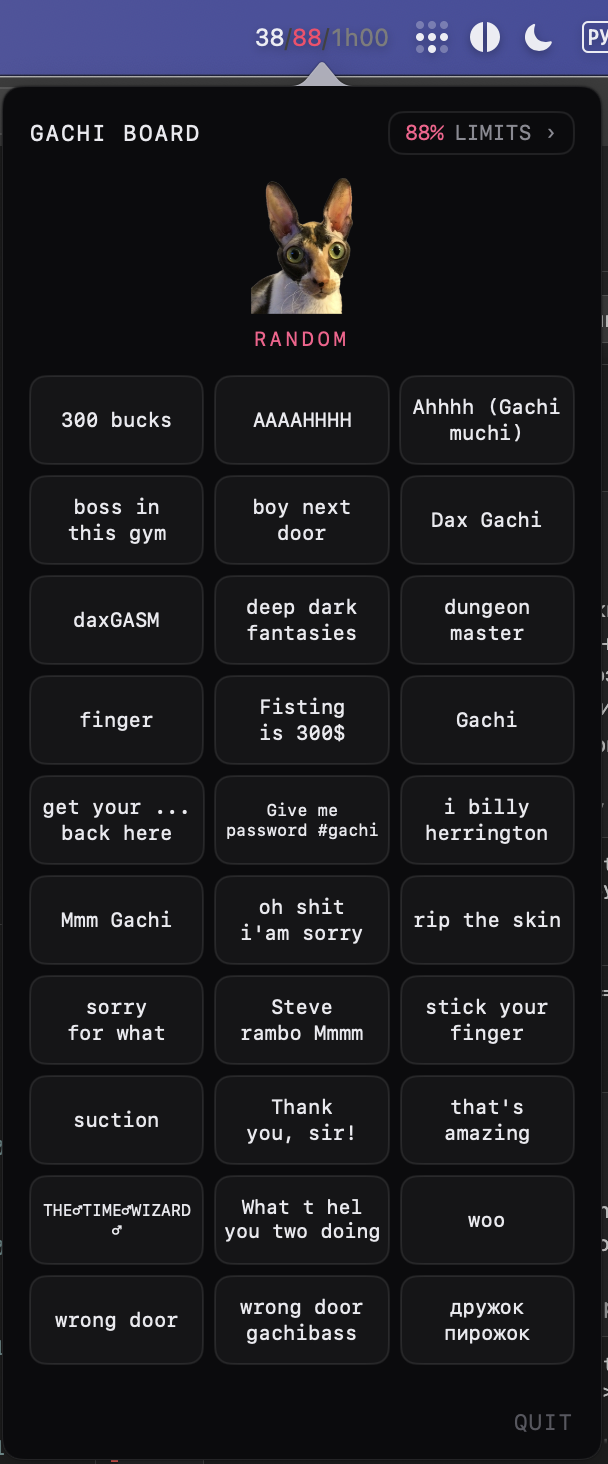
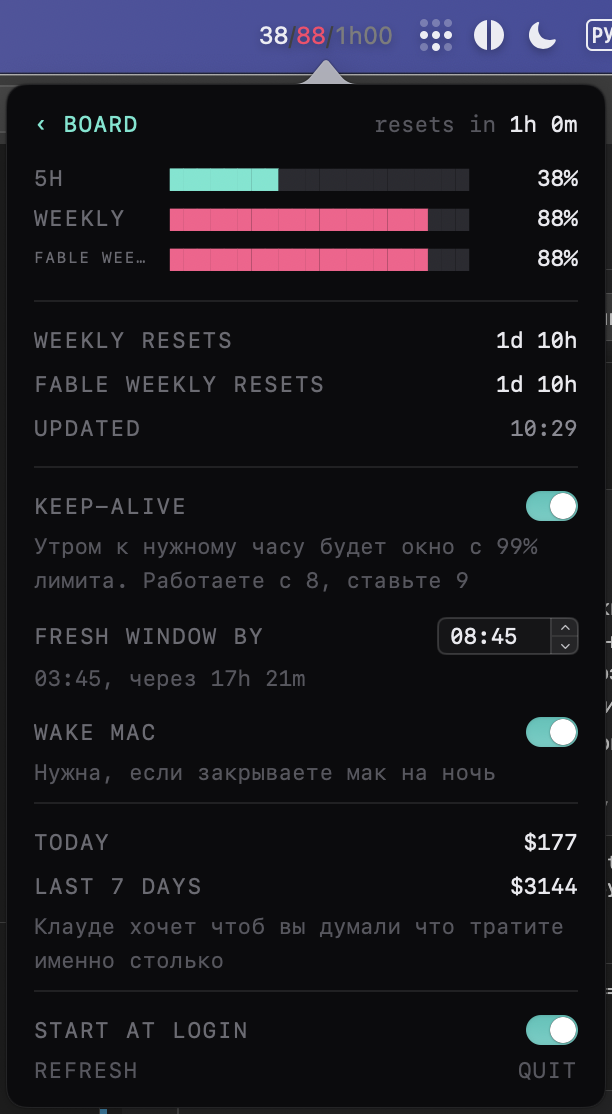
Гачи-саундборд в строке меню макоса. Заодно показывает лимиты Claude Code и умеет будить Claude ночью, чтобы к твоему пробуждению у тебя было 99% 5часового лимита и час до закрытия окна.
Строка меню всегда показывает лимиты. По клику открывается борд, лимиты вторым экраном. Зайдёшь в лимиты хоть раз, дальше открывается сразу на них.
через brew:
brew trust marblecake88/tap
brew install --cask marblecake88/tap/claude-limits-gachi-soundboard
trust нужен один раз, свежий homebrew иначе не грузит каски из сторонних тапов.
или руками: взять LimitNotifier.zip из релизов, распаковать, перетащить в /Applications.
нужен macos 14 и установленный залогиненный Claude Code, цифры берутся из него. когда выходит новая версия, приложение само пишет об этом в углу панели.
если нет ни brew, ни claude code, всё ставится одной пачкой:
# homebrew
/bin/bash -c "$(curl -fsSL https://raw.githubusercontent.com/Homebrew/install/HEAD/install.sh)"

# claude code, без него цифр не будет
brew install --cask claude-code

# войти в аккаунт: откроется браузер
claude

# само приложение
brew trust marblecake88/tap
brew install --cask marblecake88/tap/claude-limits-gachi-soundboard
open /Applications/LimitNotifier.app
homebrew в конце установки печатает пару команд про PATH, их надо выполнить, иначе brew не найдётся в новой вкладке терминала.
если brew не стоит, обновление одной пачкой в терминале:
pkill -f LimitNotifier.app
cd ~/Downloads
curl -L -o LimitNotifier.zip https://github.com/marblecake88/claude-limits-gachi-soundboard/releases/latest/download/LimitNotifier.zip
unzip -oq LimitNotifier.zip
rm -rf /Applications/LimitNotifier.app
mv LimitNotifier.app /Applications/
open /Applications/LimitNotifier.app
настройки лежат отдельно и переустановку переживают. ссылка всегда ведёт на свежий релиз.
./make-app.sh release install
нужен только xcode command line tools, зависимостей нет.
код под MIT, звуки принадлежат их авторам.
Gachi soundboard for the macOS menu bar. It also shows your Claude Code limits and wakes Claude overnight so by the time you wake up you have 99% of the 5-hour limit and an hour before the window closes.
The menu bar always shows limits. Click opens the board, limits are the second screen. Once you open limits, next time it opens straight to them.
via brew:
brew trust marblecake88/tap
brew install --cask marblecake88/tap/claude-limits-gachi-soundboard
trust is a one-time thing, recent homebrew won't load casks from third-party taps otherwise.
or by hand: grab LimitNotifier.zip from releases, unzip, drag to /Applications.
needs macos 14 and Claude Code installed and logged in, the numbers come from it. when a new version ships, the app says so in the corner of the panel.
no brew, no claude code, one paste:
# homebrew
/bin/bash -c "$(curl -fsSL https://raw.githubusercontent.com/Homebrew/install/HEAD/install.sh)"

# claude code, the numbers come from it
brew install --cask claude-code

# sign in, opens a browser
claude

# the app itself
brew trust marblecake88/tap
brew install --cask marblecake88/tap/claude-limits-gachi-soundboard
open /Applications/LimitNotifier.app
homebrew prints a couple of PATH commands at the end, run them, otherwise brew won't be found in a new terminal tab.
no brew, no problem, one paste in the terminal:
pkill -f LimitNotifier.app
cd ~/Downloads
curl -L -o LimitNotifier.zip https://github.com/marblecake88/claude-limits-gachi-soundboard/releases/latest/download/LimitNotifier.zip
unzip -oq LimitNotifier.zip
rm -rf /Applications/LimitNotifier.app
mv LimitNotifier.app /Applications/
open /Applications/LimitNotifier.app
settings live elsewhere and survive the reinstall. the link always points at the newest release.
./make-app.sh release install
only xcode command line tools, no dependencies.
code is MIT, sounds belong to their authors.
⚠️ Experimentelle Skill-Sammlung für deutsches Recht (Arbeits-, Gesellschafts-, Insolvenz-, Datenschutz-, Prozessrecht u
Manage multiple Claude Code agents from TUI or Web with tmux and git worktrees
Project management using GitHub Issues + Git worktrees for parallel agent execution
Core skills library for Claude Code with 20+ battle-tested skills including TDD, debugging, and brainstorming
