

Are you the author? Sign in to claim
Team memory sharing for claude-mem — sync AI memories across developers, with Claude Code plugin, github action and know
Team memory sharing for claude-mem — sync AI memories across developers via git.
claude-mem gives Claude persistent memory across sessions, storing observations (decisions, bugfixes, discoveries) in a local SQLite database. But it's designed for single-user, per-machine usage.
When a team works on the same project:
claude-mem-sync bridges this gap with filtered, scored, deduplicated team memory sharing using git as the transport layer.
Developer A                    GitHub (shared repo)              Developer B
┌──────────┐    export         ┌──────────────────┐    import   ┌──────────┐
│ claude-   │ ──────────────►  │ contributions/   │  ◄───────── │ claude-  │
│ mem.db    │    (filtered)    │   dev-A/         │  (merged)   │ mem.db   │
│           │                  │   dev-B/         │             │          │
│           │    import        │                  │   export    │          │
│           │ ◄──────────────  │ merged/          │ ──────────► │          │
│           │    (deduped)     │   latest.json    │  (filtered) │          │
└──────────┘                   └──────────────────┘             └──────────┘
                                    ▲
                               GitHub Action
                               (merge + dedup + cap)
                                    │
                          ┌─────────┴──────────┐
                          ▼                    ▼
                    ┌────────────┐      ┌────────────┐
                    │  profiles/ │      │ distilled/ │
                    │  per-dev   │      │ rules.md   │
                    │  metrics   │      │ kb.md      │
                    └────────────┘      └────────────┘
                    (deterministic)     (LLM-powered)
Features:
This guide walks you through the complete setup of claude-mem-sync, from zero to a fully working team memory sharing pipeline. Follow each step in order.
Before you start, make sure you have these tools installed on your machine.
You need one of these runtimes. Bun is recommended because it's faster and has built-in SQLite.
Option A: Install Bun (recommended)
# macOS / Linux
curl -fsSL https://bun.sh/install | bash

# Windows (PowerShell)
powershell -c "irm bun.sh/install.ps1 | iex"

# Verify it works
bun --version   # Should print 1.x.x or higher
# macOS (Homebrew)
brew install git

# Ubuntu/Debian
sudo apt install git

# Windows — download from https://git-scm.com/

# Verify it works
git --version
# macOS (Homebrew)
brew install gh

# Ubuntu/Debian
sudo apt install gh

# Windows (winget)
winget install GitHub.cli

# Log in to GitHub
gh auth login

# Verify it works
gh --version
claude-mem-sync reads from claude-mem's database. You need claude-mem installed and already generating observations.
Follow the claude-mem installation guide to set it up.
After installation, verify you have a database file at:
~/.claude-mem/claude-mem.db# Check the file exists
ls -la ~/.claude-mem/claude-mem.db
Don't have observations yet? Use Claude Code for a few sessions first. claude-mem automatically records decisions, bugfixes, and discoveries as you work.
This single step installs both the plugin (PostToolUse hook for access tracking) and the CLI tool (mem-sync command) automatically.
# Add the claude-mem-sync marketplace
claude plugin marketplace add lopadova/claude-mem-sync

# Install the plugin (this also installs the mem-sync CLI globally)
claude plugin install claude-mem-sync@claude-mem-sync
The setup hook will automatically:
mem-sync CLI globally via npm linkmem-sync is already availableNote: The setup hook runs via
node(seehooks.json), so you must have Node.js ≥ 18 installed and on yourPATH, even if you primarily use Bun. Without Node ≥ 18, the automatic CLI installation will fail. Verify everything is working:
# Check the plugin is active
claude plugin list
# You should see claude-mem-sync@claude-mem-sync with status: ✔ enabled

# Check the CLI is available
mem-sync --help
Local development: If you cloned the repo locally, you can add it as a local marketplace instead:
hljs language-bashclaude plugin marketplace add /path/to/claude-mem-sync claude plugin install claude-mem-sync@claude-mem-sync
Already installed the CLI manually? No problem — the setup hook detects existing installations and skips automatically.
What does the hook do? Every time Claude reads a memory (via the
mcp__plugin_claude-mem_mcp-search__*tools), the hook records which observations were accessed. This data is used to compute more accurate eviction scores — memories that are actually used by Claude get higher scores and survive longer.
If the automatic setup doesn't work, you can install the CLI manually:
# Option A: Install from GitHub (Bun)
bun add -g @lopadova/claude-mem-sync

# Option B: Install from GitHub (npm — requires GitHub Packages auth)
# 1. Create a PAT at github.com/settings/tokens with read:packages scope
# 2. Configure registry:
echo "@lopadova:registry=https://npm.pkg.github.com" >> ~/.npmrc
echo "//npm.pkg.github.com/:_authToken=YOUR_TOKEN" >> ~/.npmrc
# 3. Install:
npm install -g @lopadova/claude-mem-sync
The interactive wizard creates your configuration file at ~/.claude-mem-sync/config.json.
mem-sync init
The wizard will ask you:
Your developer name — a unique identifier (e.g., alice, bob). This appears in contribution file paths and exported JSON.
claude-mem database path — press Enter to accept the default (~/.claude-mem/claude-mem.db), or provide a custom path if you installed claude-mem elsewhere.
Project configuration — for each project you want to sync:
my-app, backend-api)owner/name format (e.g., my-org/dev-memories)yes to push directly, no to create Pull Requests for reviewHere's what a typical config looks like after the wizard:
{
  "global": {
    "devName": "alice",
    "claudeMemDbPath": "~/.claude-mem/claude-mem.db",
    "evictionStrategy": "passive",
    "evictionKeepTagged": ["#keep"],
    "mergeCapPerProject": 500,
    "exportSchedule": "friday:16:00",
    "logLevel": "info",
    "profiles": { "enabled": false, "anonymizeOthers": true },
    "distillation": { "enabled": false, "allowExternalApi": false }
  },
  "projects": {
    "my-app": {
      "enabled": true,
      "remote": {
        "type": "github",
        "repo": "my-org/dev-memories",
        "branch": "main",
        "autoMerge": true
      },
      "export": {
        "types": ["decision", "bugfix", "feature", "discovery"],
        "keywords": ["architecture", "breaking"],
        "tags": ["#shared"]
      }
    }
  }
}
Tip: You can edit
~/.claude-mem-sync/config.jsonmanually at any time to change settings.
You need a private repository where all team members push their memory exports.
setup-repomem-sync setup-repo my-team-memories
This interactive wizard will:
contributions/, merged/, profiles/, distilled/)gh repo create.gitignoreIf you prefer to set things up manually:
# Create a new private repo
gh repo create my-org/dev-memories --private --description "Shared AI memories"
gh repo clone my-org/dev-memories
cd dev-memories

# Create directories (works on all platforms — Windows, macOS, Linux)
node -e "['contributions','merged','profiles','distilled'].forEach(d=>{require('fs').mkdirSync(d,{recursive:true});require('fs').writeFileSync(d+'/.gitkeep','')})"
Important: This repo should be private. Observations can contain code snippets, internal URLs, and technical decisions you don't want public.
If you used
mem-sync setup-repoin Step 4, workflows are already in place — skip to Step 6.
GitHub Actions will automatically merge contribution files when developers push exports.
This workflow triggers every time a developer pushes a contribution file. It merges all contributions, deduplicates, applies eviction caps, and generates developer profiles.
# Make sure you're in the shared repo directory
cd dev-memories

# Create the workflows directory
node -e "require('fs').mkdirSync('.github/workflows',{recursive:true})"

# Download the merge workflow
curl -sL https://raw.githubusercontent.com/lopadova/claude-mem-sync/main/templates/github-action/merge-memories.yml -o .github/workflows/merge-memories.yml

# Download the gitignore
curl -sL https://raw.githubusercontent.com/lopadova/claude-mem-sync/main/templates/.gitignore.example -o .gitignore
The merge workflow will:
contributions/mem-sync ci-merge to merge + dedup + cap at 500 observationsprofiles/If you want LLM-powered knowledge distillation (extracting rules and knowledge docs from merged observations), add the distillation workflow:
curl -sL https://raw.githubusercontent.com/lopadova/claude-mem-sync/main/templates/github-action/distill-knowledge.yml -o .github/workflows/distill-knowledge.yml
Choose your LLM provider:
| Provider | Secret needed | Setup |
|---|---|---|
| GitHub Copilot (recommended) | GITHUB_TOKEN (built-in) | Edit the workflow: replace ANTHROPIC_API_KEY: ${{ secrets.ANTHROPIC_API_KEY }} with GITHUB_TOKEN: ${{ secrets.GITHUB_TOKEN }} |
| Anthropic API | ANTHROPIC_API_KEY | Add the secret to your repo: gh secret set ANTHROPIC_API_KEY --repo my-org/dev-memories |
git add -A
git commit -m "chore: initial setup for team memory sharing"
git push
Add team members as collaborators:
gh repo edit my-org/dev-memories --add-collaborator teammate-username
Each team member needs to:
claude /install-plugin lopadova/claude-mem-syncmem-sync init — using the same repo but their own devNameNow let's export your memories to the shared repo.
Always preview first to make sure your filters are working correctly:
mem-sync preview --project my-app
This shows you:
If nothing matches, check your filter config in ~/.claude-mem-sync/config.json. Make sure export.types includes the types you want (e.g., ["decision", "bugfix"]).
mem-sync export --project my-app
This will:
contributions/my-app/alice/2026-03-19T18-30-00.jsonGo to https://github.com/my-org/dev-memories and check:
contributions/my-app/your-name/merged/my-app/latest.json should be updatedOnce other team members have exported their memories and the merge bot has processed them, you can import the merged result into your local database.
# Import for a specific project
mem-sync import --project my-app

# Or import all enabled projects at once
mem-sync import --all
This will:
merged/my-app/latest.jsonAfter importing, Claude will have access to your teammates' discoveries, decisions, and bugfixes during your sessions.
Developer profiles analyze each team member's contributions and compute metrics like knowledge spectrum, concept coverage, and contribution quality. No LLM needed — fully deterministic, zero cost.
Open ~/.claude-mem-sync/config.json and set:
{
  "global": {
    "profiles": {
      "enabled": true,
      "anonymizeOthers": true
    }
  }
}
# Preview what profiles would be generated
mem-sync profile --project my-app --dry-run

# Generate all profiles
mem-sync profile --project my-app

# Generate just your profile
mem-sync profile --project my-app --dev alice

# Also generate markdown (human-readable)
mem-sync profile --project my-app --format md
This creates files in profiles/my-app/:
profiles/
  my-app/
    alice/
      profile.json       # Your full profile data
      profile.md          # Human-readable version
    bob/
      profile.json
    team-overview.json    # Team aggregate stats
Each profile contains:
Note: Profiles are automatically generated in CI after each merge if you followed Step 5. You can also run them locally anytime.
Knowledge distillation uses Claude (via the Anthropic API) to analyze your team's merged observations and extract:
Cost: approximately $0.33 per run for 500 observations. See the cost estimation table.
sk-ant-)Open ~/.claude-mem-sync/config.json and set:
{
  "global": {
    "distillation": {
      "enabled": true,
      "allowExternalApi": true,
      "model": "claude-sonnet-4-20250514",
      "minObservations": 20
    }
  }
}
Both
enabledandallowExternalApimust betrue. This double opt-in is intentional — it ensures you consciously decide to send observation data to the Anthropic API.
# Set your API key (or pass it with --api-key)
export ANTHROPIC_API_KEY=sk-ant-your-key-here

# Preview without making an API call
mem-sync distill --project my-app --dry-run
This shows you:
mem-sync distill --project my-app
This creates files in distilled/my-app/:
distilled/
  my-app/
    rules.md                    # CLAUDE.md-compatible rules
    knowledge-base.md           # Grouped knowledge documentation
    distillation-report.json    # Run metadata (tokens, cost, stats)
    feedback.json               # Rule accept/reject tracking
Open distilled/my-app/rules.md to see the extracted rules. Each rule has:
Rules are suggestions — they are never auto-merged into your CLAUDE.md. Review them, and copy the ones you agree with into your project's CLAUDE.md manually.
If you added the distillation workflow in Step 5.2, it runs automatically after each merge and creates a Pull Request with the distilled output. This PR needs human review before merging.
The web dashboard gives you a visual overview of everything: observations, profiles, team insights, distilled knowledge, and more.
mem-sync dashboard
Open your browser at http://localhost:3737.
The dashboard has 9 tabs:
| Tab | What you'll see |
|---|---|
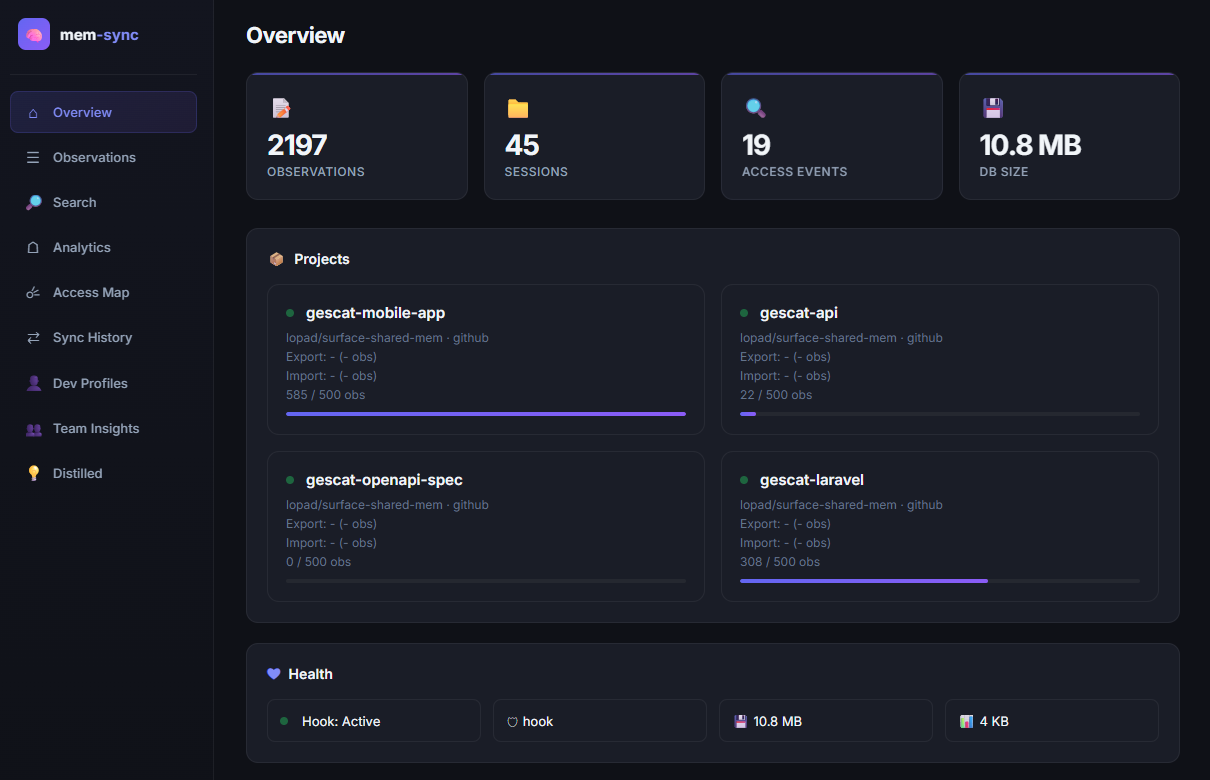
| Overview | Total observations, sessions, access events, DB size, project health cards |
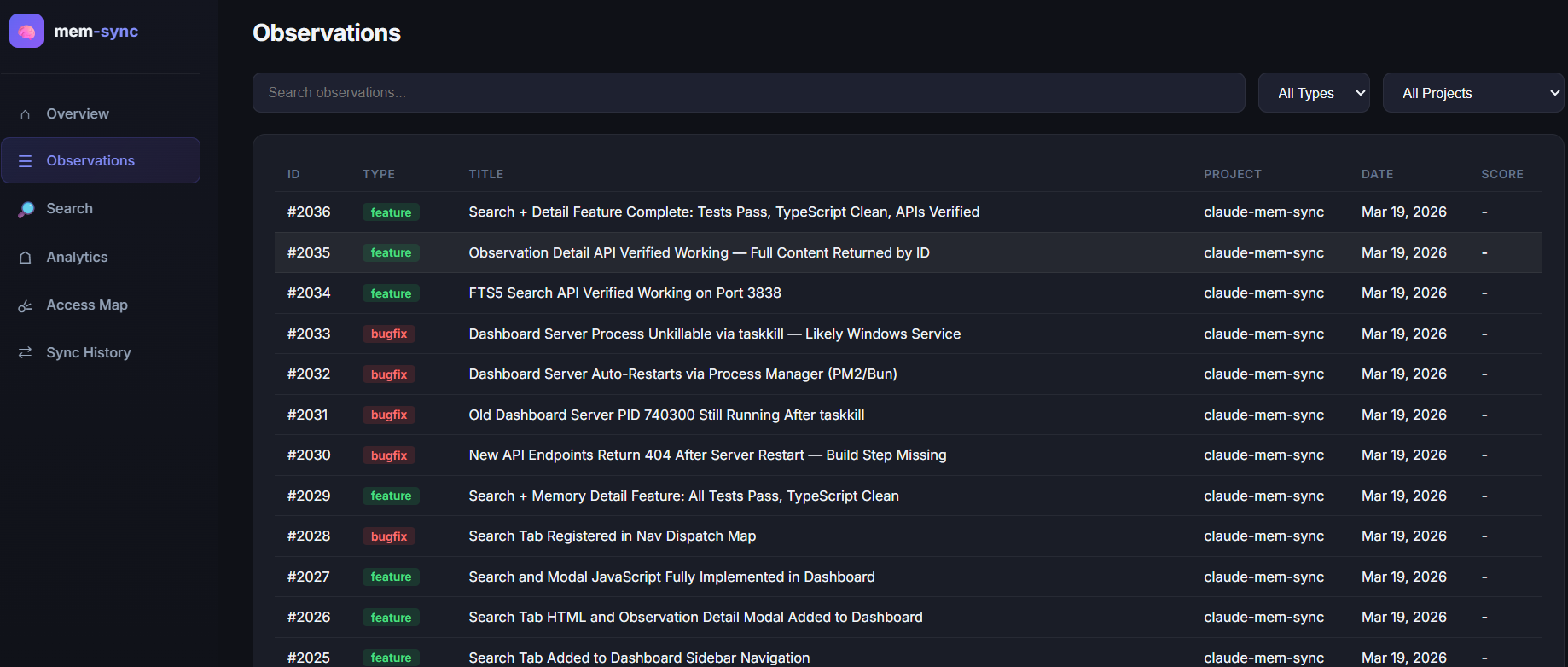
| Observations | Searchable table of all observations, click any row to see details |
| Search | Full-text search (supports AND, OR, NOT, "exact phrases") |
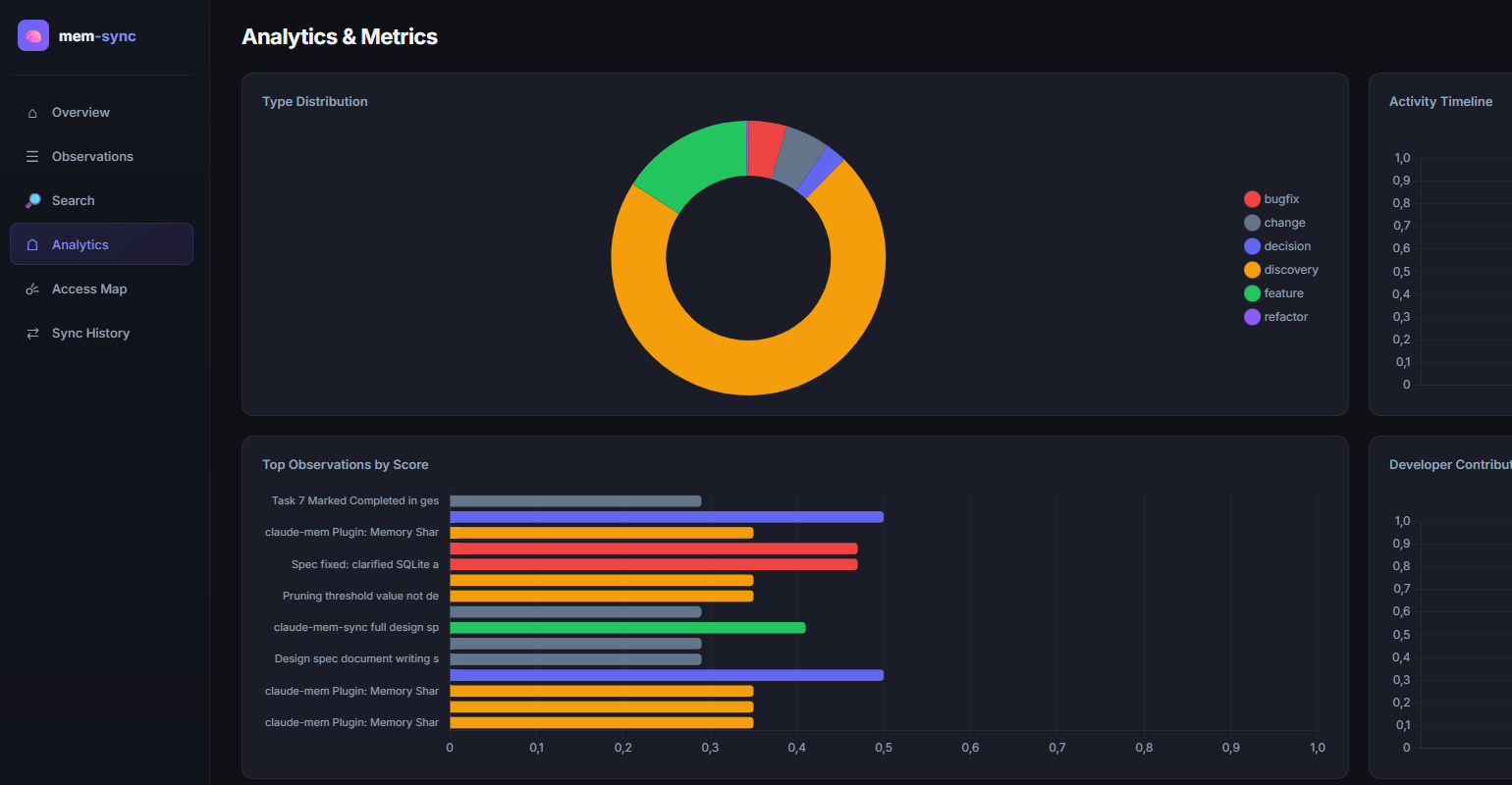
| Analytics | Charts: type distribution, activity timeline, top scored, dev contributions |
| Access Map | GitHub-style heatmap showing when memories are accessed |
| Sync History | Export/import history with charts and tables |
| Dev Profiles | Select a developer to see their knowledge spectrum, concepts, file coverage, activity patterns |
| Team Insights | Team averages, concept coverage chart, knowledge gap detection (bus-factor risks) |
| Distilled | Distilled rules, knowledge base, report stats, API cost tracking |
To use a custom port:
mem-sync dashboard --port 8080
Instead of running mem-sync export and mem-sync import manually, you can schedule them to run automatically.
# Detect your OS and install scheduled tasks
mem-sync schedule install

# To remove them later
mem-sync schedule remove
# Export every Friday at 16:00
0 16 * * 5 mem-sync export --all >> ~/.claude-mem-sync/logs/export.log 2>&1

# Import every Saturday at 09:00
0 9 * * 6 mem-sync import --all >> ~/.claude-mem-sync/logs/import.log 2>&1

# Monthly maintenance (1st of month at 03:00)
0 3 1 * * mem-sync maintain >> ~/.claude-mem-sync/logs/maintain.log 2>&1
mem-sync schedule install creates plist files in ~/Library/LaunchAgents/.
schtasks /create /tn "claude-mem-sync-export" /tr "mem-sync export --all" /sc weekly /d FRI /st 16:00 /rl LIMITED /f
schtasks /create /tn "claude-mem-sync-import" /tr "mem-sync import --all" /sc weekly /d SAT /st 09:00 /rl LIMITED /f
schtasks /create /tn "claude-mem-sync-maintain" /tr "mem-sync maintain" /sc monthly /d 1 /st 03:00 /rl LIMITED /f
Config file location: ~/.claude-mem-sync/config.json
Created by mem-sync init or manually. See templates/config.example.json for a full example.
| Field | Type | Default | Description |
|---|---|---|---|
devName | string | required | Your developer identifier |
evictionStrategy | "hook" | "passive" | "passive" | Default eviction strategy |
evictionKeepTagged | string[] | ["#keep"] | Tags that protect observations from eviction |
maintenanceSchedule | "weekly" | "biweekly" | "monthly" | "monthly" | Auto-maintenance frequency |
maintenancePruneOlderThanDays | number | 90 | Max age for low-value observations |
maintenancePruneScoreThreshold | number | 0.3 | Score threshold for pruning |
mergeCapPerProject | number | 500 | Max observations in merged output |
exportSchedule | string | "friday:16:00" | Default export schedule |
logLevel | string | "info" | Log verbosity |
claudeMemDbPath | string | ~/.claude-mem/claude-mem.db | Path to claude-mem's database |
contributionRetentionDays | number | 30 | Days to keep processed contribution files before auto-cleanup |
profiles.enabled | boolean | false | Enable developer knowledge profile generation |
profiles.anonymizeOthers | boolean | true | Show "your data vs team average" — never name other devs |
distillation.enabled | boolean | false | Enable LLM-powered knowledge distillation |
distillation.model | string | "claude-sonnet-4-20250514" | Anthropic model for distillation |
distillation.schedule | "after-merge" | "weekly" | "manual" | "after-merge" | When to run distillation |
distillation.excludeTypes | string[] | [] | Observation types to exclude from distillation |
distillation.minObservations | number | 20 | Minimum observations required to run distillation |
distillation.reviewers | string[] | [] | GitHub usernames to request review on distillation PRs |
distillation.maxTokenBudget | number | 100000 | Max estimated tokens per API call |
distillation.allowExternalApi | boolean | false | Must be true to send data to Anthropic API |
| Field | Type | Default | Description |
|---|---|---|---|
enabled | boolean | true | Whether this project participates in sync |
memProject | string | key name | Project name in claude-mem's DB |
remote.type | "github" | "gitlab" | "bitbucket" | "github" | Git provider |
remote.repo | string | required | Repo in owner/name format |
remote.branch | string | "main" | Branch to push/pull |
remote.autoMerge | boolean | true | Push directly or create PR/MR |
remote.host | string | auto | Custom host for self-hosted instances (e.g., git.company.com) |
export.types | string[] | [] | Observation types to export |
export.keywords | string[] | [] | Keywords to match |
export.tags | string[] | [] | Tags to match (e.g., #shared) |
export.schedule | string | inherits global | Per-project schedule override |
Filters are combined with OR. An observation is exported if it matches any criterion:
exported = matchesType(obs, types) OR matchesKeyword(obs, keywords) OR matchesTag(obs, tags)
If all filter arrays are empty, nothing is exported (safe default — you won't accidentally leak data).
claude-mem has no native tag system. Tags like #shared and #keep work via free-text search across the title, narrative, and text fields of observations.
#shared — mark observations for team export#keep — protect observations from eviction (score = Infinity)| Command | Description |
|---|---|
mem-sync init | Interactive setup wizard |
mem-sync config | Show current configuration |
mem-sync setup-repo [name] | Scaffold a shared team memory repository |
mem-sync add-project | Add a new project to existing config |
mem-sync update-project [--project X] | Update an existing project's config |
mem-sync export [--project X] [--all] [--dry-run] | Export filtered memories to git |
mem-sync import [--project X] [--all] | Import merged memories from git |
mem-sync preview [--project X] [--all] | Dry-run: show what would be exported |
mem-sync maintain | Database maintenance (backup, prune, vacuum) |
mem-sync status | Health check (DB sizes, counts, hook status) |
mem-sync schedule install | Install OS scheduled tasks |
mem-sync schedule remove | Remove scheduled tasks |
mem-sync ci-merge | CI-only: merge contribution files |
mem-sync dashboard [--port N] | Web dashboard (default: http://localhost:3737) |
mem-sync profile [--dev X] [--project X] [--format md|json] | Generate developer knowledge profiles |
mem-sync distill --project X [--api-key KEY] [--dry-run] | LLM-powered knowledge distillation |
Launch a local web dashboard to visualize your team's shared memories, access patterns, profiles, and distilled knowledge.
mem-sync dashboard              # http://localhost:3737
mem-sync dashboard --port 8080  # custom port
| Tab | What it shows |
|---|---|
| Overview | Stat cards (observations, sessions, access events, DB size), project cards with merge cap progress bars, health indicators |
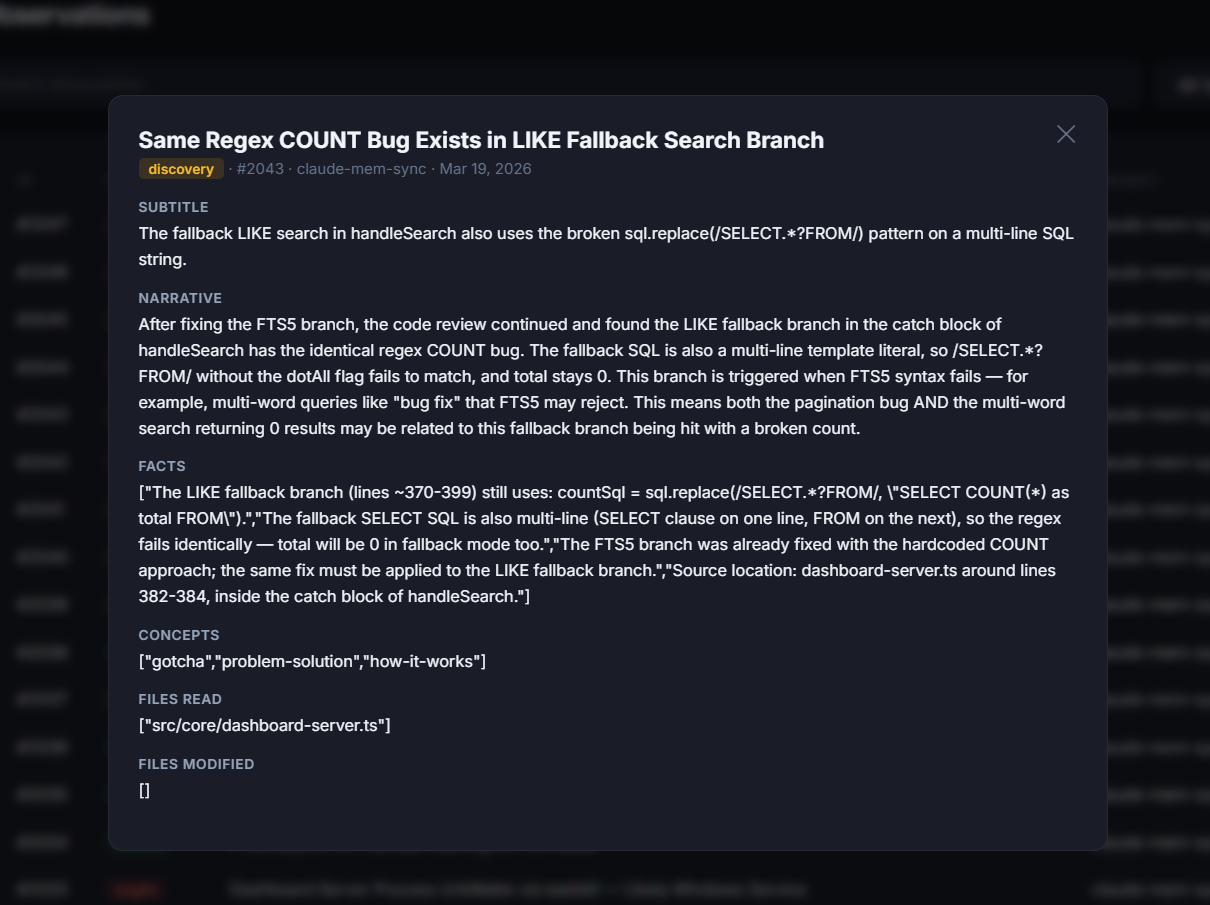
| Observations | Full-text search, type/project filters, paginated table with eviction scores, click-to-detail modal |
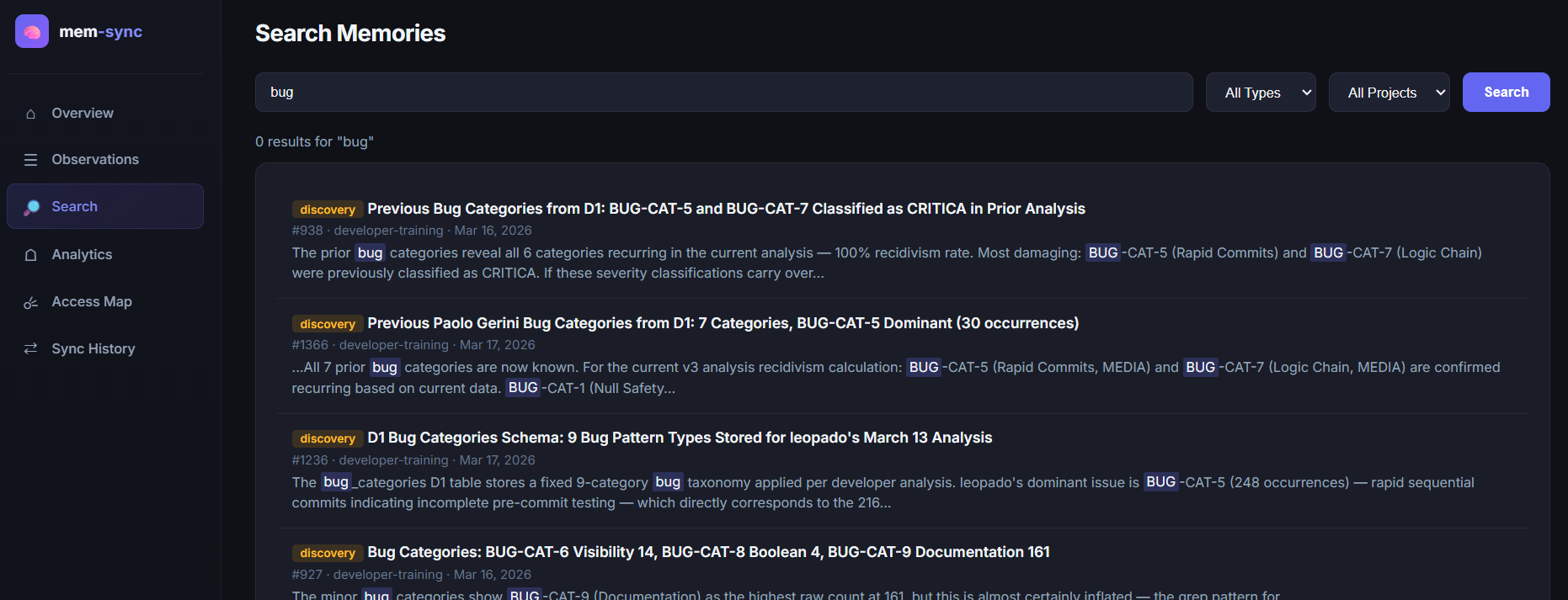
| Search | FTS5 full-text search with AND, OR, NOT, "exact phrase" syntax, type/project filters, snippet highlighting |
| Analytics | Type distribution (doughnut chart), activity timeline (line chart), top observations by score (horizontal bar), developer contributions (grouped bar) |
| Access Map | GitHub-style heatmap of daily access patterns (6 months), top 20 most accessed observations with bar indicators |
| Sync History | Monthly export/import stacked bar chart, recent exports table, recent imports table |
| Dev Profiles | Developer selector dropdown, knowledge spectrum doughnut chart (your types vs team average), top concepts bar chart (you vs team), monthly activity line chart, file coverage bar chart, KPI cards (total obs, concept coverage %, survival rate %, avg/week) |
| Team Insights | Team KPI cards (devs, avg obs/dev, avg survival rate, avg concept coverage), team type distribution doughnut, concept coverage bar chart (red = knowledge gaps), knowledge gaps table with bus-factor risk indicators |
| Distilled | Distilled rules rendered as markdown, knowledge base content, report KPI cards (rules generated, avg confidence, knowledge sections, API cost + token usage) |
| Endpoint | Method | Description |
|---|---|---|
/api/overview | GET | Overview stats, project list, DB sizes |
/api/observations | GET | Paginated observations with search/filter |
/api/observations/:id | GET | Single observation detail |
/api/search | GET | FTS5 search with pagination |
/api/analytics/types | GET | Type distribution counts |
/api/analytics/timeline | GET | Monthly sync timeline |
/api/analytics/scores | GET | Observation eviction scores |
/api/analytics/devs | GET | Developer contribution stats |
/api/access/top | GET | Most accessed observations |
/api/access/heatmap | GET | Daily access heatmap data |
/api/sync/history | GET | Export/import history |
/api/profiles/devs | GET | List of developer names |
/api/profiles/:devName | GET | Developer profile data |
/api/team/overview | GET | Team aggregate metrics |
/api/team/concepts | GET | Team concept coverage + knowledge gaps |
/api/distilled/rules | GET | Distilled rules markdown |
/api/distilled/kb | GET | Knowledge base markdown |
/api/distilled/report | GET | Distillation report + feedback |
/api/distilled/feedback | POST | Submit rule accept/reject feedback |
Generate per-developer analytics from contribution and merged data — no LLM required, zero API cost, fully deterministic.
Each developer profile contains 5 metrics:
| Metric | What it measures |
|---|---|
| Knowledge Spectrum | Type distribution (decision/bugfix/feature/discovery/refactor/change) with counts, percentages, and comparison against team average |
| Concept Map | Frequency table of concepts extracted from observations, highlighting concepts the dev hasn't covered vs the team (knowledge gaps) |
| File Coverage | Directories and files touched, with a specialization index (1 = concentrated in few dirs, 0 = spread across many) |
| Temporal Pattern | Observations per week/month with average and consistency score (1 = steady, 0 = sporadic) |
| Contribution Survival Rate | Percentage of the dev's exported observations that survived into the merged set — a natural quality proxy |
When profiles are generated for multiple developers, a team-overview.json is also produced with:
The team concepts analysis identifies knowledge bus-factor risks — concepts known by only 1 developer. Visible in the dashboard's Team Insights tab and available via the /api/team/concepts endpoint.
enabled: false default)anonymizeOthers is enabled, all comparisons use anonymized team averagesAnalyze merged team observations with an LLM to extract actionable rules and knowledge documentation. Produces CLAUDE.md-compatible rules and grouped knowledge patterns.
| Artifact | Description |
|---|---|
rules.md | CLAUDE.md-compatible rules with rationale, confidence scores, source evidence counts, and dev diversity metrics. Grouped by category (architecture, testing, security, performance, conventions, workflow, data, dependencies). |
knowledge-base.md | Knowledge documentation grouped by concept clusters. Each section includes patterns, anti-patterns, and descriptions synthesized from observations. |
distillation-report.json | Machine-readable metadata: input stats, rules/sections generated, confidence distribution, token usage, estimated cost, model used, date range. |
feedback.json | Rule feedback tracking: proposed/accepted/rejected/modified status per rule. Used by the dashboard for interactive rule review. |
merged/{project}/latest.jsondistillation.excludeTypes)rules.md, knowledge-base.md, distillation-report.json, and feedback.json| Observations | Input Tokens (est.) | Output Tokens (est.) | Cost per run | Monthly (weekly) |
|---|---|---|---|---|
| 100 | ~10K | ~5K | ~$0.11 | ~$0.44 |
| 300 | ~30K | ~8K | ~$0.21 | ~$0.84 |
| 500 | ~50K | ~10K | ~$0.33 | ~$1.32 |
Costs based on Claude Sonnet 4 pricing ($3/MTok input, $15/MTok output).
Each distilled rule includes:
Rules below 0.5 confidence are not included. Rules are suggestions requiring human review — they are never auto-merged into CLAUDE.md.
The dashboard's Distilled tab provides accept/reject/modify buttons for each rule. Feedback is stored in distilled/{project}/feedback.json and can be incorporated into future distillation runs (the next run can exclude rejected rules).
allowExternalApi: false by default — must be explicitly enabledexcludeTypes)Without eviction, databases grow unboundedly. A team of 12 developers sharing weekly would accumulate thousands of observations per project within months.
Uses real access data from the PostToolUse hook:
score = (type_weight * 0.3) + (recency_weight * 0.2) + (access_weight * 0.5)
| Component | Formula | Range |
|---|---|---|
type_weight | Fixed per type (decision=1.0, bugfix=0.9, feature=0.7, discovery=0.5, refactor=0.4, change=0.3) | 0–1 |
recency_weight | 1 / (1 + ln(1 + days_old / 150)) | 0–1 |
access_weight | accesses / max_accesses (normalized) | 0–1 |
No hook required. Uses diffusion across developers as a value proxy:
score = (type_weight * 0.4) + (recency_weight * 0.3) + (diffusion_weight * 0.3)
diffusion_weight = devs_who_have_it / total_devs
Observations with #keep in their title, narrative, or text get score = Infinity and are never pruned.
"eviction": {
  "strategy": "hook",
  "scoring": {
    "typeWeight": 0.3,
    "recencyWeight": 0.2,
    "thirdWeight": 0.5
  }
}
Weights must sum to 1.0.
One repo per team/org for all project memories. Clean separation, one Action to maintain.
Memories stored in .shared-memories/ inside each project repo. Simpler but adds JSON to code repos.
Dedicated repo with a pointer file (.claude-mem-sync.json) in each project repo.
| Dedicated repo | In-project | Hybrid | |
|---|---|---|---|
| Separation | Clean | Mixed | Clean |
| Setup | Extra repo | Zero | Extra repo + pointer |
| Scalability | Excellent | Per-project Actions | Excellent |
| Best for | Teams of 3+ | Solo / small teams | Large orgs |
mem-sync maintain Doesclaude-mem.db.backup#keep)ANALYZE and VACUUMcp ~/.claude-mem/claude-mem.db.backup ~/.claude-mem/claude-mem.db
Only observations matching your configured filters (types, keywords, tags) are exported. Empty filters = nothing exported.
mem-sync preview before your first exportautoMerge: false for human reviewprofiles.enabled is false by defaultanonymizeOthers: true (default): comparisons use "team average", never naming other developersdistillation.enabled and distillation.allowExternalApi must be explicitly trueexcludeTypes keeps sensitive observation types out of API payloadsbun:sqlite on BunPRAGMA busy_timeout = 5000 on all connections for WAL contention handlingchild_process.spawn with array args (no shell injection)fetch to Anthropic Messages API (no SDK dependency), Zod-validated structured outputThis package is published automatically to GitHub Packages every time a GitHub Release is created. No custom tokens are needed — the workflow uses the built-in GITHUB_TOKEN.
release-package workflow triggers automatically@lopadova/claude-mem-syncThe release script updates the version in all files (package.json, plugin.json, .claude-plugin/plugin.json, .claude-plugin/marketplace.json), commits, tags, pushes, and creates a GitHub Release — all in one step.
# Interactive — prompts for major/minor/patch
bun run release

# Or pass the bump type directly
bun run release patch   # bug fixes, small tweaks
bun run release minor   # new features, backward compatible
bun run release major   # breaking changes
If you prefer to do it step by step:
# 1. Note the current version
cat package.json | grep '"version"'

# 2. Update the version in ALL these files:
#    - package.json
#    - plugin.json
#    - .claude-plugin/plugin.json
#    - .claude-plugin/marketplace.json (under plugins[0].version)

# 3. Commit
git add package.json plugin.json .claude-plugin/plugin.json .claude-plugin/marketplace.json
git commit -m "Bump version from X.X.X to Y.Y.Y"

# 4. Tag
git tag vY.Y.Y

# 5. Push commit and tag
git push && git push --tags

# 6. Create the GitHub Release (triggers the publish workflow)
gh release create vY.Y.Y --title "vY.Y.Y" --generate-notes
The workflow runs at .github/workflows/release-package.yml.
Run mem-sync init to create the config file.
Install the CLI for your provider:
Or set autoMerge: true to use direct push instead of PR/MR mode.
Check your filter config. Use mem-sync preview to see what matches. All empty filters = nothing exported (safe default).
Verify the plugin is installed: claude /plugin list. The hook matches tools prefixed with mcp__plugin_claude-mem_mcp-search__.
Both distillation.enabled and distillation.allowExternalApi must be true in your config. This double opt-in is intentional for privacy.
Make sure the contributions/ directory exists and contains exported JSON files. Run mem-sync export first, or check that the shared repo has been cloned to the current directory.
MIT
Made with ❤️ in Florence
Blocks dangerous git and shell commands from being executed by AI coding agents
One command to install 6 essential safety hooks in 10 seconds — zero dependencies
Give Claude Code memory that evolves with your codebase via hooks and LLM-compiled knowledge
Rule enforcement plugin — save rules with natural language, enforce with 17 lifecycle hooks