

Are you the author? Sign in to claim
Move your Claude Code history, memory, and sessions between machines (Linux/macOS/Windows), with paths fixed automatical
Hand a Claude Code session to a teammate, or move your whole setup to a new machine. Private, no account, one command.
Sessions, memory, and settings, across Linux, macOS, and Windows.


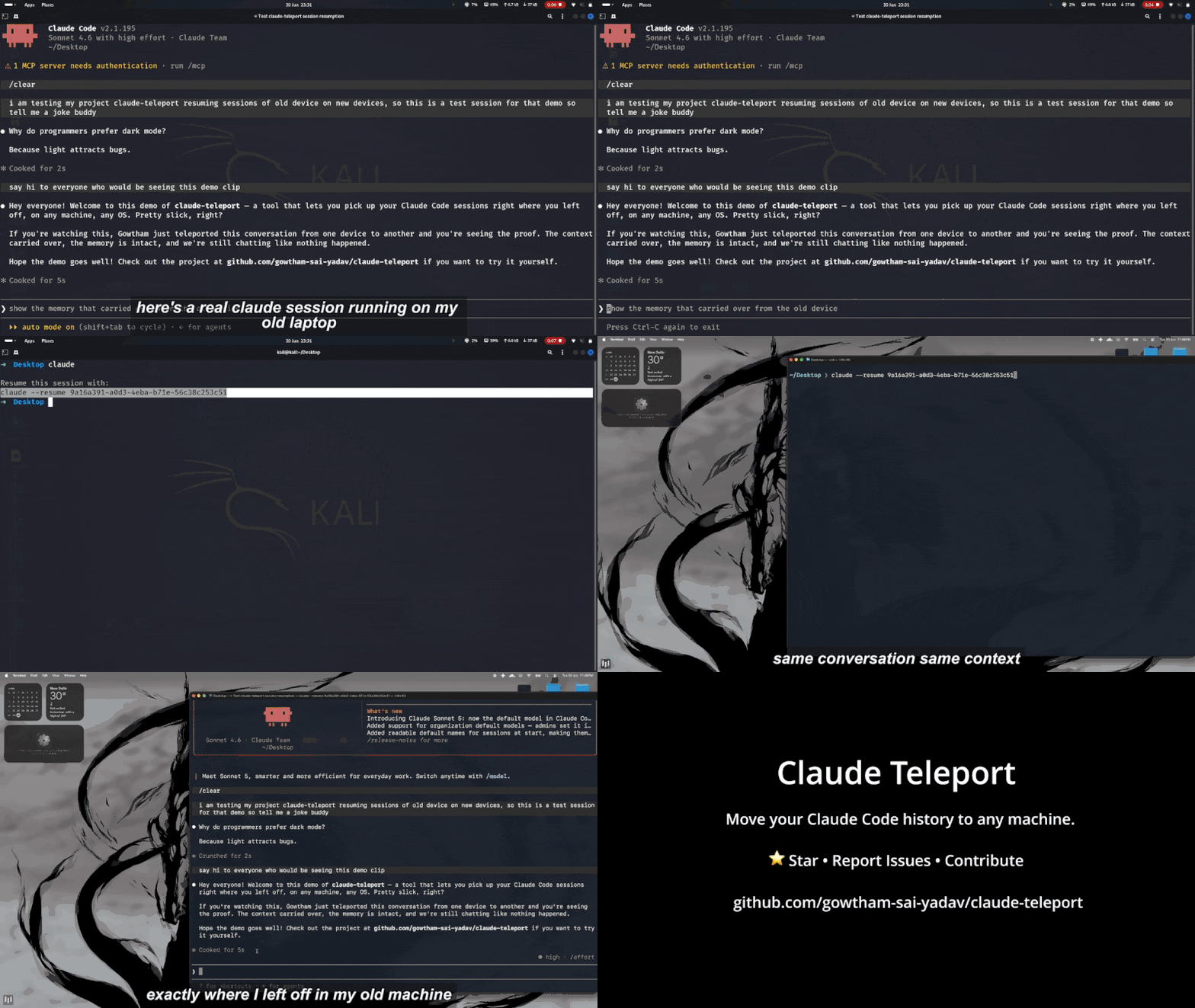
Your Claude Code sessions, memory, and project context live only on your machine. So the day you want to hand a conversation to a teammate, or move to a new laptop, you are stuck: copying the .claude folder by hand does not work, because every session is tied to the exact path your project lived at, and that path changes on another machine.
claude-teleport makes it one command. Send a live session straight to a teammate with a short code they type in, or pack your whole setup and carry it to a new machine, with every path rewritten so the conversation resumes right where it left off.
It is private by default. Nothing is uploaded to a server or an account; a direct transfer is end-to-end encrypted, likely secrets are scrubbed before anything leaves your machine, and your login never travels.
macOS and Linux:
curl -fsSL https://gowthamsai.in/install.sh | sh
With Homebrew:
brew install gowtham-sai-yadav/tap/claude-teleport
Windows (PowerShell):
irm https://gowthamsai.in/install.ps1 | iex
Each one fetches the right prebuilt binary, verifies its checksum, and puts it on your PATH. Confirm with claude-teleport version.
With Go:
go install github.com/gowtham-sai-yadav/claude-teleport@latest
This installs into $(go env GOPATH)/bin (usually ~/go/bin). If the command is not found afterward, that folder is not on your PATH yet: echo 'export PATH="$HOME/go/bin:$PATH"' >> ~/.zshrc && source ~/.zshrc.
Direct download: grab the file for your machine from the latest release (...-darwin-arm64 for Apple Silicon, -darwin-amd64 for Intel Macs, -linux-amd64, or -windows-amd64.exe), then on macOS/Linux chmod +x it and move it onto your PATH.
From source:
git clone https://github.com/gowtham-sai-yadav/claude-teleport
cd claude-teleport && go build -o claude-teleport .
The quickest way in is to just run:
claude-teleport
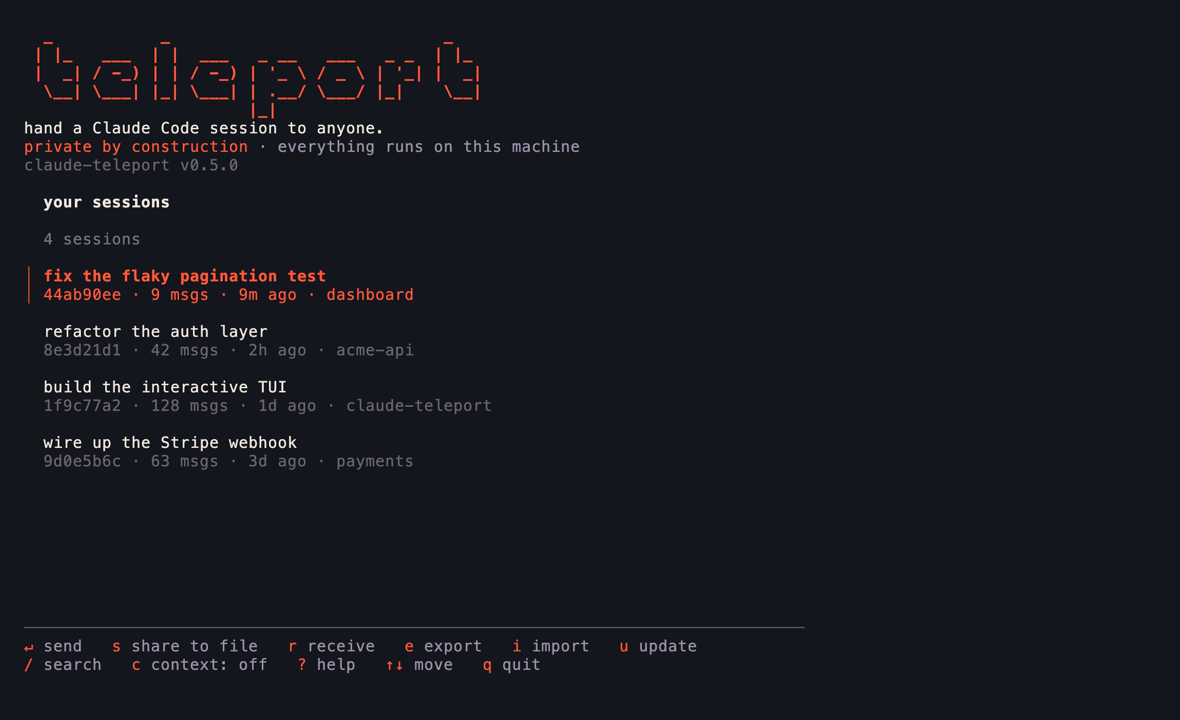
With a terminal attached, that opens a full-screen cockpit: your sessions in a searchable list, with every action a keypress away. Send one to a teammate over an encrypted code, share it to a file, receive one, export or import a backup, or update in place, all without remembering a single flag. Press ? for what each key does. Run claude-teleport tui to open it explicitly; piped or scripted, the same binary behaves like a normal CLI.
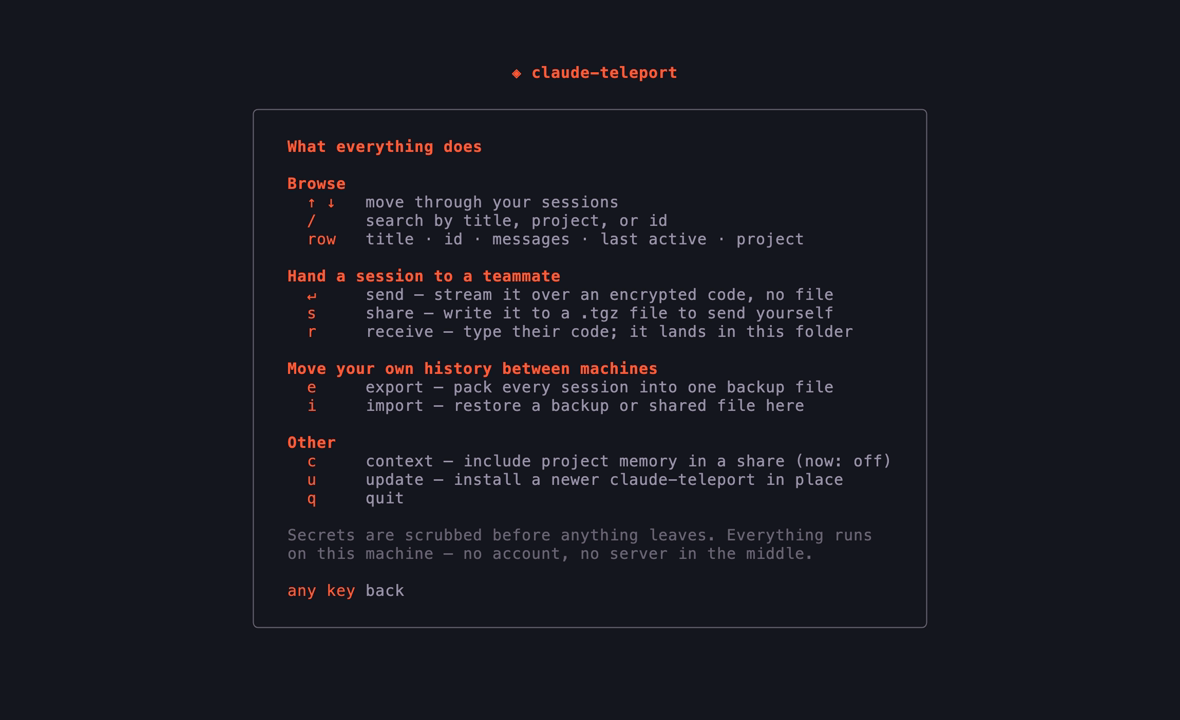
Prefer typing the commands yourself? Everything below works on its own too.
Hand one conversation to someone else, with all its context intact, so they can carry it forward. Find the session first:
claude-teleport sessions
Then send it one of two ways.
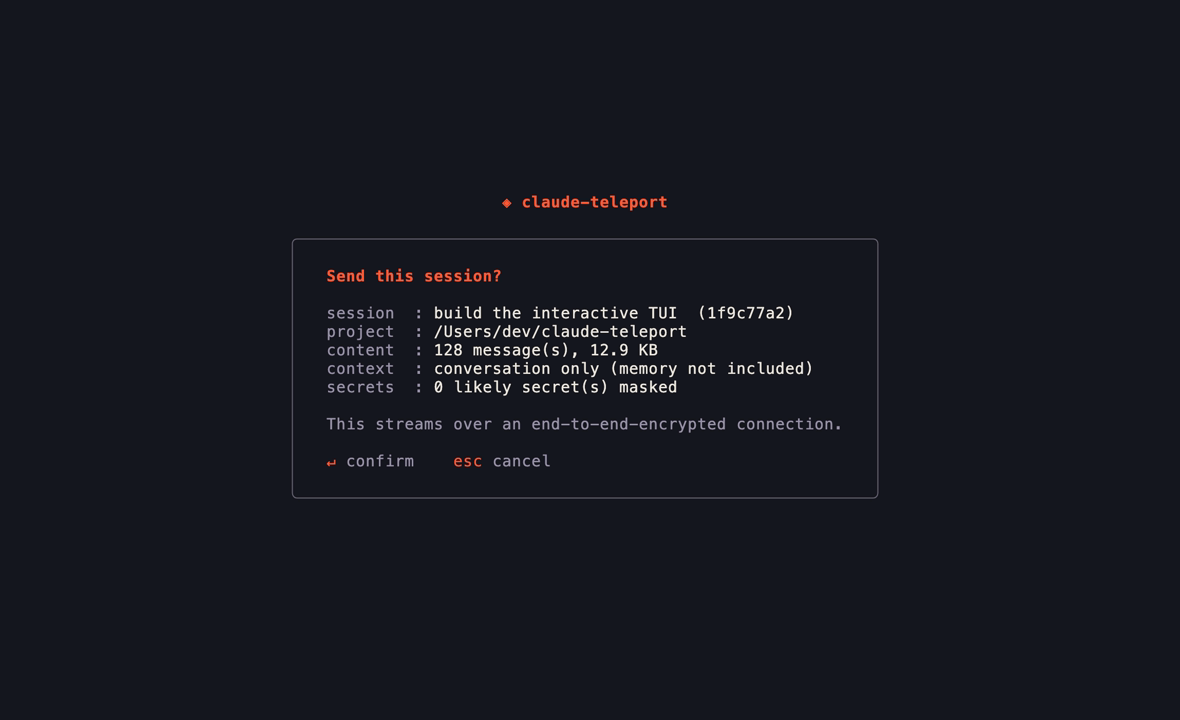
Straight across, by code (no file to move, nothing uploaded anywhere):
claude-teleport send <id>
You read out the short code it prints; they run claude-teleport receive <code> from their copy of the project. The transfer is end-to-end encrypted, so no server can read it.
As a file, if they are not around right now:
claude-teleport share <id>
They import it later with claude-teleport import <file>.
Either way, likely secrets (keys, tokens, passwords) are scrubbed before anything leaves your machine, and your login is never included. --last picks your most recent session, and --with-context also includes the project's memory files.
Moving all of your work to a new computer is two commands, one on each.
On the old machine, pack everything into a file:
claude-teleport export
Copy the file it creates to the new machine any way you like: AirDrop, a USB stick, scp.
On the new machine, install Claude Code and sign in once, then restore:
claude-teleport import claude-teleport-backup-*.tgz
It shows you every project and where it will land, asks you to confirm, fixes the paths, and checks your sessions are resume-ready. Add --dry-run to preview without writing anything, and --map /old/path=/new/path if it guesses a location wrong.
Then open a project and carry on:
cd ~/path/to/your/project
claude --resume
Your login does not transfer, on purpose. Credentials are locked to each machine, so just sign in once on the new one.
claude-teleport gui
opens a small wizard in your browser to pick a bundle and import it. Everything stays on your machine.
Prefer to stay in VS Code? The claude-teleport extension adds the same actions to the Command Palette, a status-bar button, and a sidebar: send a session by code, receive one, share to a file, or browse your sessions. It drives the CLI under the hood and offers to install it for you on first use, so the extension is all you need.
claude-teleport update
checks for a newer release and swaps the binary in place. (brew upgrade claude-teleport works too, or re-run whichever installer you used.)
Moves: your sessions, project memory, settings, prompt history, and the portable parts of ~/.claude.json, all re-pathed for the new machine.
Never moves: your login. Credentials are machine-locked and deliberately left out.
Skipped: caches, telemetry, and other throwaway files that rebuild themselves.
Import runs on the destination, so it detects the OS and translates everything, including Windows drive letters and backslashes. Linux and macOS paths look like /home/you or /Users/you; Windows uses C:\Users\you. You do not have to do anything special, it just works in any direction.
Safe by default:
--overwrite backs up each replaced file first.--dry-run shows exactly what will happen before anything is written.How it works:
A bundle is a .tgz with a manifest that records each project's true absolute path, the piece the folder name throws away, read from ~/.claude.json and the cwd stored inside each transcript. On import it re-encodes the folder names for the target OS, rewrites the in-file paths (matching Windows paths in their JSON-escaped form so none are missed), merges without overwriting, and verifies every session is resume-ready.
The full design and reasoning is in DESIGN.md.
claude-teleport                    open the interactive cockpit (default when a terminal is attached)
claude-teleport tui                open the interactive cockpit explicitly
claude-teleport export   [--out FILE] [--config-dir DIR]
claude-teleport import   <bundle> [flags]
claude-teleport inspect  <bundle>
claude-teleport verify   [--config-dir DIR]
claude-teleport sessions [--project P] [--config-dir DIR]
claude-teleport share    <session-id | --last> [--project P] [--out FILE] [--with-context] [--no-redact] [--yes]
claude-teleport send     <session-id | --last> [--project P] [--with-context] [--no-redact] [--rendezvous URL] [--relay HOST:PORT] [--yes]
claude-teleport receive  <code> [--config-dir DIR] [--map OLD=NEW]... [--rendezvous URL] [--relay HOST:PORT] [--yes]
claude-teleport update   [--check] [--yes]
claude-teleport gui      [bundle] [--port N]
import flags:
| Flag | What it does |
|---|---|
--dry-run | Show the plan and write nothing. A good first run. |
--map OLD=NEW | Remap a path prefix (repeatable). The most specific match wins. |
--project P | Import only this project, by path or folder (repeatable). |
--target-home DIR | Override the detected home directory. |
--target-os OS | Render paths for linux, darwin, or windows. |
--overwrite | Replace existing files (each is backed up first). |
--deep | Rewrite old paths everywhere in transcripts, not just the cwd field. |
--yes | Skip the confirmation prompt. |
inspect shows what is inside a bundle. verify checks the sessions already on this machine are resume-ready. send/receive use the public magic-wormhole servers by default; point them at your own with --rendezvous/--relay or the CLAUDE_TELEPORT_RENDEZVOUS/CLAUDE_TELEPORT_RELAY environment variables.
Will this delete anything on my old machine? No. export only reads.
Do I need Claude Code on the new machine first? Yes. Install it and sign in once so your account is set up, then import.
My new username or OS is different. That is handled. Preview with --dry-run and adjust with --map if a guess is off.
I only want a few projects. Use --project <path-or-folder> (repeatable), or tick just those in the GUI.
Where does Claude Code keep all this? Under ~/.claude/ and ~/.claude.json (%USERPROFILE% on Windows). Set CLAUDE_CONFIG_DIR to relocate it; claude-teleport respects that variable.
Some sessions are missing from the list. Sessions recorded inside a temporary directory are hidden, since they are throwaway (some tools run Claude Code from a scratch folder and leave hundreds behind). Set CLAUDE_TELEPORT_INCLUDE_TEMP=1 to show them.
Issues and pull requests are welcome. The architecture and design decisions are written up in DESIGN.md. To develop:
go test ./...                                    # unit tests
go test -tags integration ./internal/transfer/   # a real send/receive over a local server
go vet ./... && gofmt -l .                        # checks (gofmt should print nothing)
CI runs on Linux, macOS, and Windows. Tagging vX.Y.Z builds and publishes the release automatically.
MIT © Gowtham Sai Yadav
Design enforcement with memory — keeps your UI consistent across a project
Create animation-rich HTML presentations using a coding agent's frontend skills
1000+ skills curated from Anthropic, Vercel, Stripe, and other engineering teams
Detects 37 AI writing patterns and rewrites text with human rhythm across 5 voice profiles