

Are you the author? Sign in to claim
A native macOS menu bar app that shows your Claude.ai usage at a glance — colour-coded icon, live counter, reset timer.
A native macOS menu-bar app that tracks your Claude.ai usage in real time — no API key needed.

seven_day_omelette bucket from the API/v1/code/routines/run-budget), plan limits are read directly from the API — no hardcoding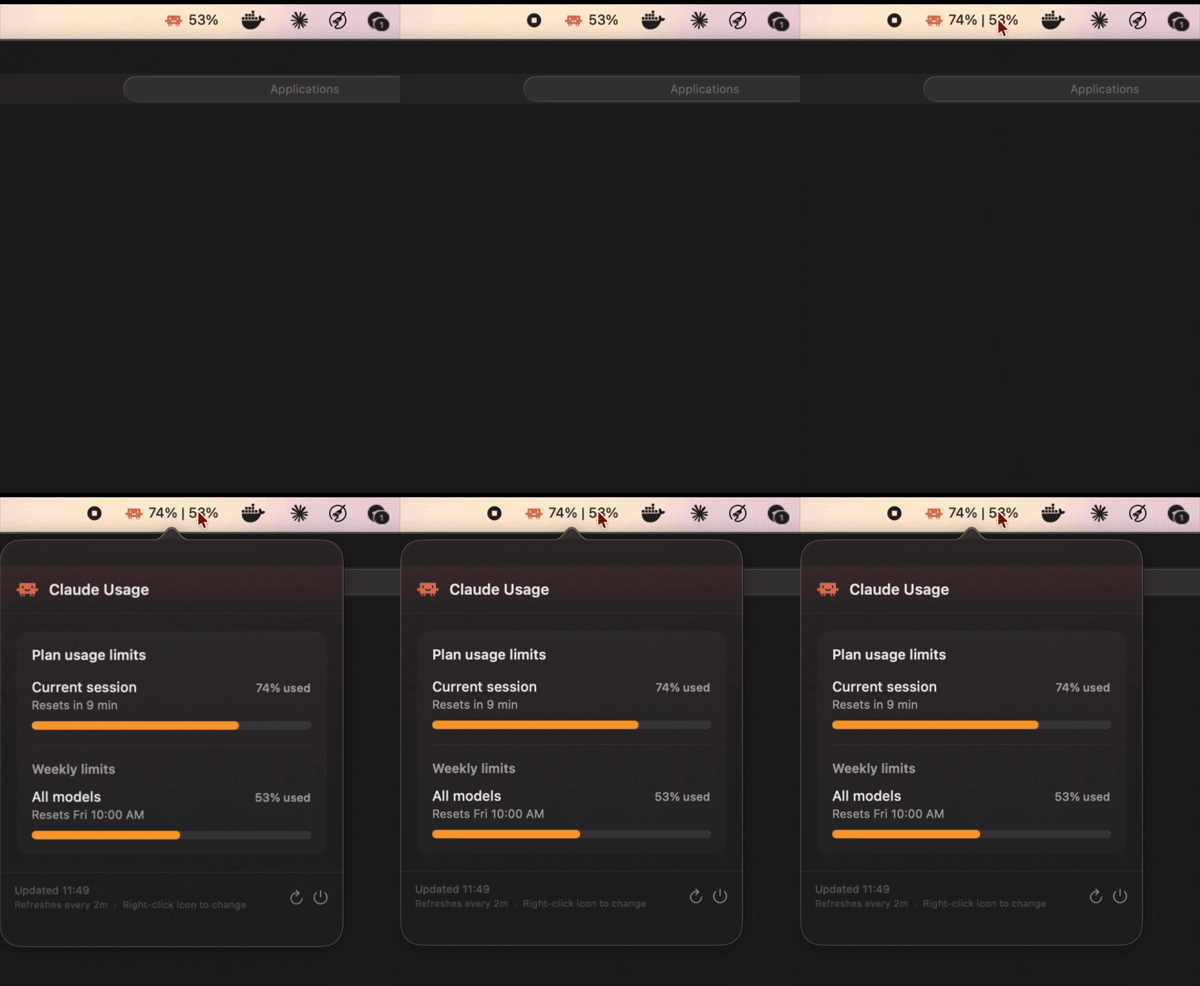
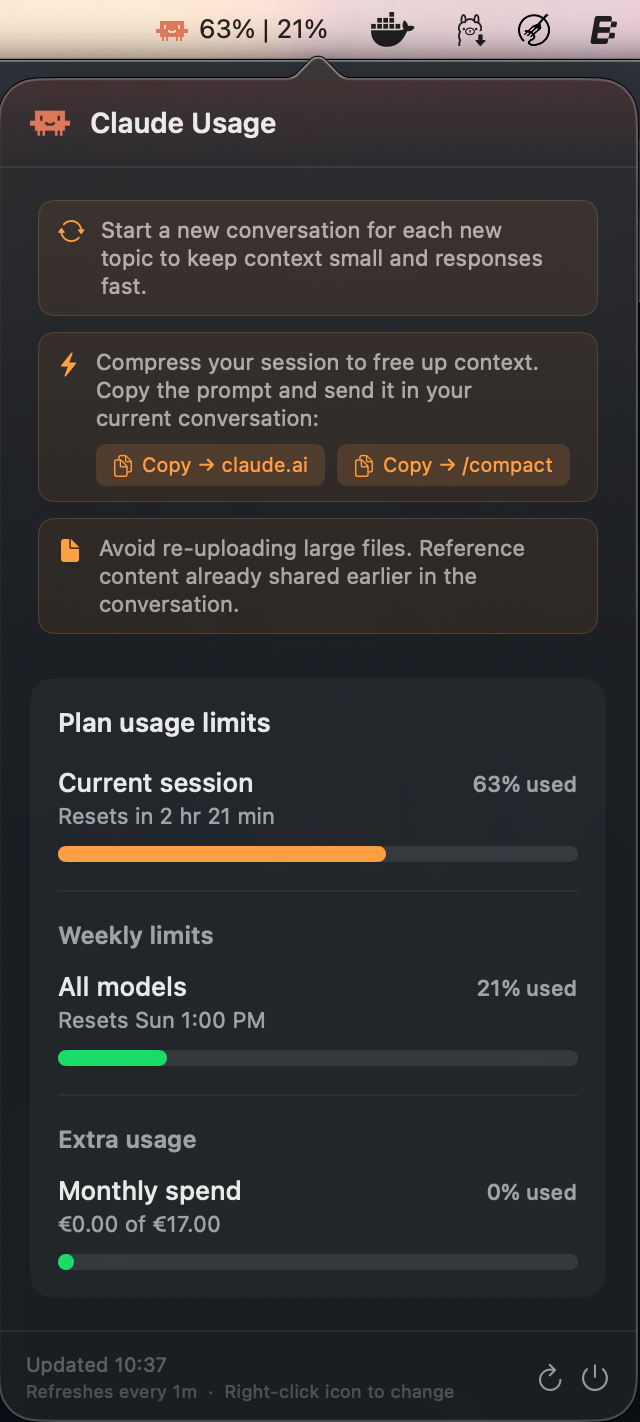
~45min left | 42%) based on actual usage pace; falls back to percentage when idleRequires macOS 13 Ventura or later.
Download the latest ClaudeUsageMonitor.dmg from the Releases page.
ClaudeUsageMonitor.dmg to mount itBecause the app is ad-hoc signed (not yet notarized with an Apple Developer ID), macOS will block it on first open.
Do this once:
Right-click ClaudeUsageMonitor.app → Open → Open
Or via Terminal:
xattr -cr /Applications/ClaudeUsageMonitor.app
open /Applications/ClaudeUsageMonitor.app
You will not need to do this again after the first successful launch.
A browser window opens automatically on first run. Log in to your Claude.ai account normally. The window closes by itself when login succeeds and the app icon appears in your menu bar.
brew tap theDanButuc/tap
brew install --cask claude-usage-monitor
| Element | Meaning |
|---|---|
Green 12% | 24% | Plenty of messages left (< 50 % used) |
Orange ~45min left | 62% | Burn rate active — estimated time left shown |
Red ~8min left | 91% | Almost out — act fast |
Grey ⚠ ~45min left | 24% | Data is stale (last update > 10 min ago) |
The left value shows estimated time left (burn rate) when active, or Current session % when idle. The right value is always Weekly limits %.
Left-click the icon to open the popover:
Right-click the icon for a quick context menu:
You need Xcode Command Line Tools (free) — full Xcode is not required.
xcode-select --install # if not already installed
Clone and build:
git clone https://github.com/theDanButuc/Claude-Usage-Monitor.git
cd Claude-Usage-Monitor

bash scripts/build.sh             # native arch (arm64 or x86_64)
bash scripts/build.sh --universal # universal binary (arm64 + x86_64)
Produces dist/ClaudeUsageMonitor-vX.X.X.dmg ready to install.
swift scripts/make_icon.swift
# Produces /tmp/AppIcon.icns — copy to ClaudeUsageMonitor/Assets/AppIcon.icns
The app calls Claude's internal REST API directly:
GET /api/organizations — resolves your organisation ID (cached after first call)GET /api/organizations/{org_id}/usage — returns utilization percentages and reset timestamps for all windows (five_hour, seven_day, seven_day_sonnet, seven_day_omelette, extra_usage)GET /v1/code/routines/run-budget — returns daily routine run budget (used / limit); called automatically after each usage refreshAuth is via the sessionKey cookie, extracted from the login WKWebView after OAuth and stored in UserDefaults. All subsequent requests are plain URLSession calls — no WKWebView or JS injection at runtime.
On first launch a browser window opens so you can log in to Claude.ai. The sessionKey cookie is extracted and stored locally. If the session expires, the login window reappears automatically.
| Symptom | Fix |
|---|---|
| "Cannot be opened because the developer cannot be verified" | Right-click → Open, or run xattr -cr /Applications/ClaudeUsageMonitor.app |
| Login window keeps appearing | Your Claude session expired — log in again |
| All bars show 0% | Session key may be invalid — quit, delete the app from Applications, reinstall and log in again |
| Sonnet bar not visible | Only shown on Max plan accounts |
| Extra usage bar not visible | Only shown when Extra Usage is enabled on your Claude account |
| Routine runs bar not visible | Only shown when your plan includes Claude Code Routines (Pro, Max, Team, Enterprise) |
| Claude Design bar not visible | Only shown when your plan includes a Claude Design allocation and usage is above 0% |
| Icon missing from menu bar | Quit via the popover's Quit button and re-open the app |
| App won't launch after macOS update | Rebuild from source with the updated SDK |
ClaudeUsageMonitor/
├── ClaudeUsageMonitor/
│   ├── ClaudeUsageMonitorApp.swift   # @main entry point
│   ├── AppDelegate.swift             # Status bar, popover, refresh timer
│   ├── LoginWindowController.swift   # Full-screen login WebView
│   ├── Models/
│   │   └── UsageData.swift           # Data model + computed helpers
│   ├── Services/
│   │   ├── ClaudeAPIService.swift    # URLSession-based API client (replaces WebScrapingService)
│   │   ├── NotificationService.swift # Usage threshold & reset notifications
│   │   └── UpdateService.swift       # GitHub Releases update check
│   ├── Views/
│   │   ├── ContentView.swift         # Popover UI (two-bar dashboard)
│   │   └── CircularProgressView.swift
│   ├── Assets/
│   │   └── AppIcon.icns              # All 10 icon sizes
│   ├── Info.plist
│   └── ClaudeUsageMonitor.entitlements
├── scripts/
│   ├── build.sh                       # Local build + DMG script
│   └── make_icon.swift               # Icon generator (Swift script)
├── screenshots/
│   └── popover.png                   # App screenshot
├── .github/workflows/
│   ├── release.yml                   # CI: build & publish DMG on git tag
│   └── update-homebrew-tap.yml       # CI: update Homebrew cask after release
├── project.yml                        # XcodeGen spec
└── .gitignore
MIT License. Feel free to use Claude Usage Monitor and contribute.
 | DukeOfCheese — proposed the migration from DOM scraping to direct API calls, the Sonnet usage bar, and the extra usage bar (PR #3). These ideas shaped v2.0.0. |
⚠️ Experimentelle Skill-Sammlung für deutsches Recht (Arbeits-, Gesellschafts-, Insolvenz-, Datenschutz-, Prozessrecht u
Manage multiple Claude Code agents from TUI or Web with tmux and git worktrees
Project management using GitHub Issues + Git worktrees for parallel agent execution
Core skills library for Claude Code with 20+ battle-tested skills including TDD, debugging, and brainstorming