

Are you the author? Sign in to claim
Claude Code CLI integration for Nova (Panic) via WebSocket MCP protocol
Integrate Claude Code CLI with Nova (by Panic) through the WebSocket MCP protocol — the same protocol used by the official VS Code and JetBrains extensions.


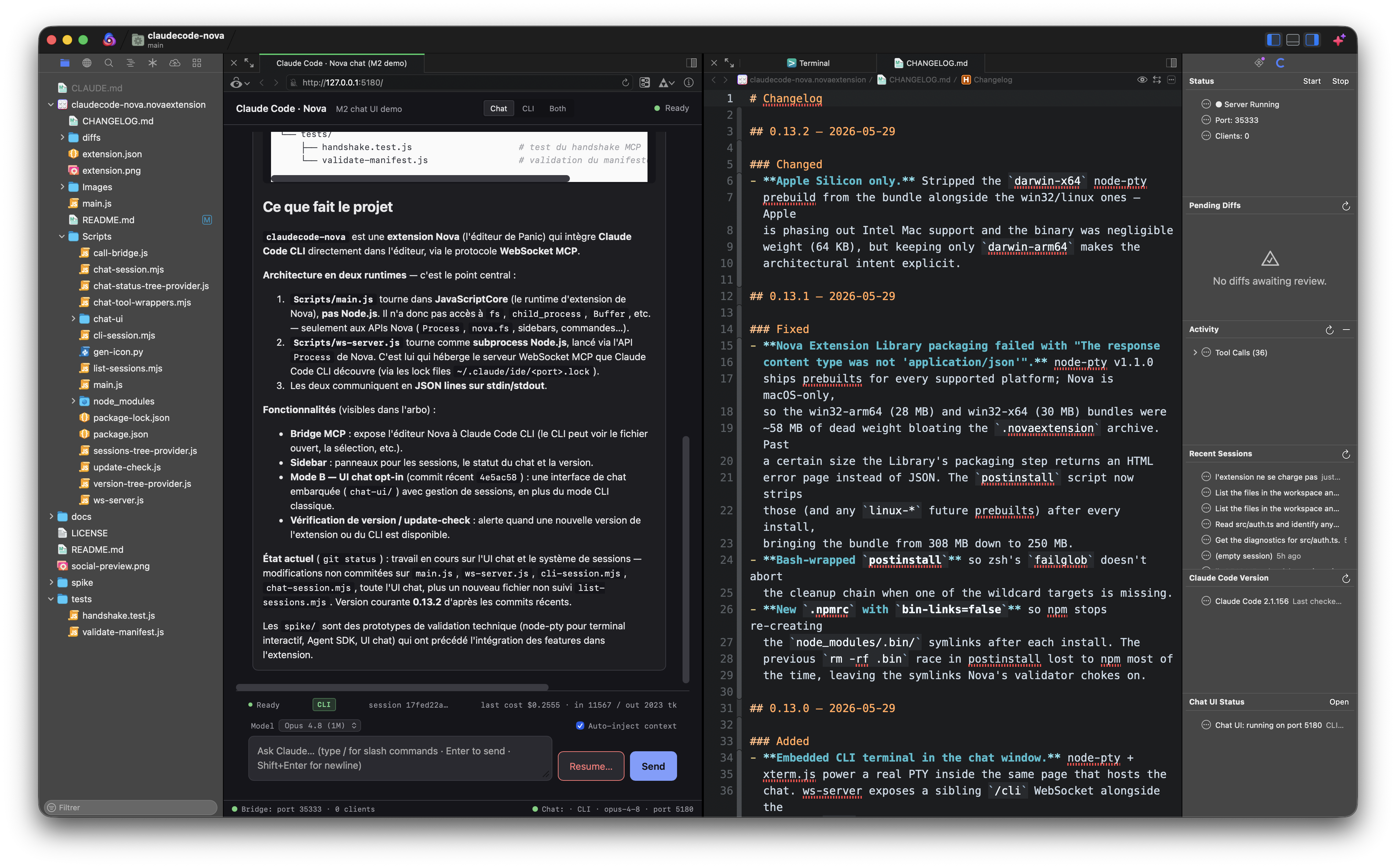
Claude Code has official IDE integrations for VS Code and JetBrains, but nothing for Nova. If you love Nova's native macOS experience and want Claude Code's full agentic capabilities — context sharing, inline diffs, selection tracking — this extension bridges the gap.
The approach was pioneered by coder/claudecode.nvim for Neovim. This project brings the same idea to Nova using its JavaScript extension API.
The Nova extension (main.js) spawns a Node.js subprocess (ws-server.js) that runs a WebSocket server implementing the MCP (Model Context Protocol). Claude Code CLI discovers it through a lock file at ~/.claude/ide/<port>.lock — the same mechanism used by the official VS Code / JetBrains extensions. JSON-RPC 2.0 over WebSocket on localhost only, gated by a UUID token. The opt-in chat panel runs a second HTTP/WebSocket server (default 127.0.0.1:5180) that shares the same workspace context.
claude CLI subprocess backend) and a real PTY-backed terminal panel, both running on a single localhost HTTP server/explain, /refactor, /test, /doc, /fix, /review, /optimize, /simplify, /types, /security, /rename), git-driven (/commit, /changelog, /pr), workspace (/explain-error, /why, /search, /find), conversation (/plan, /recap, /clear), documentation (/spec, /readme, /api-doc)~/.claude/projects/<workspace>/*.jsonlIn addition to the traditional Mode A (Claude Code CLI in an external terminal talking to Nova through the MCP bridge), v0.6+ ships an opt-in browser-based chat surface and v0.13+ embeds a real terminal inside the same window. Both run on a single localhost HTTP server (default http://127.0.0.1:5180/) spawned by the extension.
A pure HTML/CSS/JS chat UI served by the bundled chat-session.mjs. Two backends are auto-selected:
@anthropic-ai/claude-agent-sdk in-process. You get streaming text, custom tool calls (24 Nova editor + workspace operations exposed as MCP tools), and the SDK's full event stream (thinking_delta, tool_use, tool_result, cost / usage). Billed against the API key.claude -p ... --output-format stream-json --include-partial-messages as a subprocess. Uses the user's existing Claude Code OAuth session (Pro / Max / Enterprise), so usage is covered by the subscription. Multi-turn via --resume <session_id>. The chat UI label badge says CLI instead of SDK so you know which one is active.What both modes have in common:
/explain, /refactor, /test, /doc, /fix, /review, /optimize, /simplify, /types, /security, /rename/commit (Conventional Commits draft from the current diff), /changelog (Keep-A-Changelog from commits since last tag), /pr (full PR template)/explain-error (stack-trace triage), /why (intent behind selected code), /search (literal grep), /find (symbol-definition regex)/plan (decompose a task into steps), /recap (summarize the session), /clear (frontend-only history wipe)/spec, /readme, /api-doc💭 Reasoning… collapsible block while Claude thinks before answering~/.claude/projects/<encoded-cwd>/*.jsonl, click replays the full transcript and continues with --resumeprefers-color-scheme) with a manual override setting (claudecode.chat.theme) if Nova's locked to a different modeAn embedded terminal inside the chat page powered by xterm.js (client) + node-pty (server, real PTY via posix_spawnp). Spawns claude with the user-configured CLI command and args (claudecode.claudeCommand / claudecode.claudeArgs) and pipes input/output/resize over a WebSocket at /cli.
This isn't a polished terminal emulator — it's literally claude running with a PTY backend. You get:
claude features that depend on TTY detection (interactive prompts, vim-style keybindings, Esc+Enter multiline)~/.claude/projects/<encoded-cwd>/*.jsonl history Claude Code uses elsewhere — so a session you start here can be resumed from any other terminal and vice-versa/architecture review, sub-agents, hooks) — because the runtime is the real claude CLIThree positions in the chat-page topbar:
A single Anthropic conversation can span both panels in Both mode: ask Claude something in the chat, watch it use tools, then drop into the CLI to follow up — both surfaces share the same Claude Code session via --resume.
Three buttons in the "Open Claude Chat" command's action panel:
Cmd+Shift+H shows it in Nova's WebKit Preview, drag the tab to dock side-by-side with your code (closest approximation to VS Code's beside-panel webview that Nova's API allows)| Dependency | Minimum Version |
|---|---|
| Nova | 10.0 |
| Node.js | 18.0 |
| Claude Code CLI | Latest |
git clone https://github.com/okapi-ca/claudecode-nova.git
cp -r claudecode-nova/claudecode-nova.novaextension \
  ~/Library/Application\ Support/Nova/Extensions/
git clone https://github.com/okapi-ca/claudecode-nova.git
ln -s "$(pwd)/claudecode-nova/claudecode-nova.novaextension" \
  ~/Library/Application\ Support/Nova/Extensions/claudecode-nova.novaextension
Then enable Extension Development in Nova: Preferences → General → Extension Development.
claudecode.terminalApp setting) with the workspace cwd and IDE-bridge env vars already set./ide.If you prefer to drive the terminal yourself, set claudecode.terminalApp to clipboard and run:
cd /your/project
CLAUDE_CODE_SSE_PORT=<port> ENABLE_IDE_INTEGRATION=true claude
The port is shown in the Show Claude Code Status command. Inside Claude, /ide triggers discovery if the env vars weren't picked up.
Two surfaces use tools:
claude CLI internally) — matches the protocol used by the official VS Code / JetBrains extensions.| Tool | Status | Bridge | Chat SDK | Description |
|---|---|---|---|---|
openFile | ✅ Full | ✓ | ✓ | Open a file with optional line navigation |
openDiff | ✅ Full | ✓ | ✓ | Diff via temp file + accept/reject notification. User edits in the proposed-changes tab are preserved on Accept and signalled back to Claude (see Known Limitations §1 for the side-by-side caveat). |
getCurrentSelection | ✅ Full | ✓ | ✓ | Current editor selection with file path and range |
getLatestSelection | ✅ Full | ✓ | ✓ | Most recently recorded selection |
getOpenEditors | ✅ Full | ✓ | ✓ | List all open editor tabs with metadata |
getWorkspaceFolders | ✅ Full | ✓ | ✓ | Workspace folder paths |
checkDocumentDirty | ✅ Full | ✓ | ✓ | Check for unsaved changes in a file |
saveDocument | ✅ Full | ✓ | ✓ | Save a document |
getDiagnostics | ⚠️ Partial | ✓ | ✓ | Requires LSP extension cooperation (see Limitations) |
closeAllDiffTabs | ⚠️ Best-effort | ✓ | ✓ | Removes our temporary proposed_* files; cannot close Nova editor tabs because Nova has no public tab-management API |
getGitDiff | ✅ Full | — | ✓ | git diff in the workspace (optional staged / range / stat, 64 KB cap). Drives /commit, /changelog, /pr. |
getGitLog | ✅ Full | — | ✓ | git log with range, limit, format (oneline / subject / full). Drives /changelog, /pr. |
workspaceSearch | ✅ Full | — | ✓ | Recursive grep (skips .git, node_modules, dist, …) with optional regex + glob. Drives /search, /find. |
applyEditAtSelection | ✅ Full | — | ✓ | Replace the active editor's current selection with new text — skips the diff review flow for self-contained rewrites (/refactor, /simplify, /rename). |
runShellCommand | ✅ Full | — | ✓ | Spawn /bin/sh -c <command> with stdout/stderr caps + timeout. Drives ad-hoc shell ops (build, test, git push, inspection). |
writeFile | ✅ Full | — | ✓ | Create or overwrite a file via nova.fs.open. Modes w / a / wx (safe-create). Optional createDirs for mkdir -p parent. Safer than heredoc-via-shell. |
fileExists | ✅ Full | — | ✓ | Stat a path and return {exists, isFile, isDirectory, isSymlink, size, mtime}. Returns {exists:false} cleanly when nothing's there. |
notify | ✅ Full | — | ✓ | Push a non-blocking Nova notification (info / warning / error). Useful for completion signals on long-running tasks. |
askUser | ✅ Full | — | ✓ | Block on a native Nova modal — action panel (2–4 button options) or input palette (free text). Returns {selectedIndex, selectedValue} / {text} / {cancelled}. |
listDirectory | ✅ Full | — | ✓ | nova.fs.listdir + stat. Optional recursive walk (skips .git, node_modules, …). Faster than runShellCommand('ls') for browsing. |
insertAtCursor | ✅ Full | — | ✓ | Insert text at the cursor without replacing the selection. Complement to applyEditAtSelection. |
replaceInFile | ✅ Full | — | ✓ | On-disk find/replace inside a specific file. Literal or regex, optional maxReplacements cap. |
clipboardWrite | ✅ Full | — | ✓ | Put text on the macOS clipboard via nova.clipboard.writeText. |
openNewTextDocument | ✅ Full | — | ✓ | Open an unsaved Nova document with optional content + syntax hint. Scratch-draft surface. |
getOpenDocuments | ✅ Full | — | ✓ | Lists every TextDocument Nova has open (including background tabs). Distinct from getOpenEditors. |
close_tab | ❌ Not supported | — | — | Nova exposes no public API to close an editor tab — see Known Limitations §6. Not advertised in tools/list. |
executeCode | ❌ Not supported | — | — | Nova has no Jupyter kernel integration. Not advertised in tools/list. |
The Claude Code sidebar exposes six sections:
getCurrentSelection, getOpenEditors, …).~/.claude/projects/<encoded-cwd>/*.jsonl. Click an entry to choose where to resume: web chat (full transcript replay) · CLI panel · external Terminal · copy claude --resume <id> to clipboard.disabled / no_key / starting / running / failed / stopped) including port, model, and key source. Header button opens the chat in your browser or Nova's Preview tab.Buffers are bounded (50 activity events, 100 tool calls). Header Refresh re-renders, Clear empties both buffers. Auto-refresh every 30 s keeps relative timestamps accurate.
Access these from Extensions → Claude Code Bridge or the Command Palette:
| Command | Description |
|---|---|
| Start Claude Code Bridge | Start the WebSocket MCP server |
| Stop Claude Code Bridge | Stop the server and disconnect clients |
| Restart Claude Code Bridge | Stop + restart (useful after settings changes) |
| Send Selection to Claude | Push the current selection as context (also ⌃⌘L) |
| Add Current File to Claude | Send the entire active file as context (also ⌃⌘A) |
| Show Claude Code Status | Display connection status and server info |
| Launch Claude Code (with IDE integration) | Open Claude Code in your terminal of choice (iTerm or Terminal) with the IDE bridge env vars pre-set. Falls back to clipboard for unsupported terminals — see claudecode.terminalApp setting. |
| Open Claude Chat in Browser | Open the chat UI URL in your default browser (or use the action panel to pick Nova Preview / copy URL) |
| Set Claude Chat API Key (Keychain) | Store an Anthropic API key in macOS Keychain — survives reinstalls and isn't readable from Nova settings |
| Clear Claude Chat API Key (Keychain) | Remove the stored key |
| Check for Claude Code Updates | Force a check of the configured npm dist-tag (stable / next) |
| Key | Default | Description |
|---|---|---|
claudecode.portMin | 10000 | Minimum port for the bridge WebSocket server |
claudecode.portMax | 65535 | Maximum port |
claudecode.autoStart | true | Start the bridge automatically on activation |
claudecode.trackSelection | true | Broadcast selection changes in real time |
claudecode.nodePath | node | Path to the Node.js executable used by the server helper |
claudecode.diffTimeoutMinutes | 30 | Auto-reject pending diffs after N minutes so Claude isn't stuck waiting on a dead requestId. Set to 0 to disable. |
claudecode.terminalApp | auto | Where Launch Claude Code opens the CLI: auto, iTerm, Terminal, or clipboard. Other terminals (Warp, Ghostty, Hyper) fall back to clipboard automatically. |
claudecode.updateCheck.autoCheck | true | Daily background check of npm for new Claude Code CLI versions |
claudecode.updateCheck.channel | stable | stable (npm latest) or next (npm @next pre-releases) |
claudecode.chat.enabled | false | Opt-in to the embedded chat UI (Mode B). When enabled, the chat HTTP server starts on claudecode.chat.port. |
claudecode.chat.port | 5180 | Fixed port for the chat HTTP server (so Nova's Preview URL stays stable) |
claudecode.chat.model | claude-sonnet-4-6 | Default chat model — Sonnet 4.6 / Haiku 4.5 / Opus 4.7 / Opus 4.8 (1M ctx). Switchable mid-conversation in the UI. |
claudecode.chat.theme | auto | auto follows prefers-color-scheme. Set to dark or light if Nova is locked to a theme that doesn't match macOS. |
claudecode.chat.keychainService | ca.okapi.claudecode-nova | macOS Keychain service identifier for the API key. Point to another service (e.g. com.anthropic.claudefordesktop) to reuse an existing entry. |
claudecode.chat.keychainAccount | anthropic-api-key | Account name within the Keychain service above |
claudecode.chat.apiKey1PassRef | (empty) | 1Password CLI reference like op://Private/Anthropic API Key/credential. Requires an active op signin session. |
claudecode.chat.apiKey | (empty) | Plain-text API key — last-resort fallback when both Keychain and 1Password are empty. Prefer the Keychain. |
| Key | Default | Description |
|---|---|---|
claudecode.claudeCommand | claude | Command to launch Claude Code CLI |
claudecode.claudeArgs | (empty) | Extra args appended to the Claude command on launch (e.g. --continue, --model claude-opus-4-7, --dangerously-skip-permissions) |
The following limitations exist due to Nova's extension API boundaries:
Diff viewer — Nova does not expose a native diff API like VS Code's vscode.diff. Proposed changes are shown by opening a temporary file alongside the original, with an accept/reject notification. Edits the user makes in the proposed-changes tab before clicking Accept are preserved (the actual content of the temp file is what gets saved) and signalled back to Claude via userEdited: true in the response. A future version may leverage Nova's built-in Git comparison view for side-by-side rendering.
Diagnostics — Nova does not provide a global API for reading LSP diagnostics from third-party extensions. The getDiagnostics tool currently returns an empty list. Full support would require cooperation with language server extensions or a shared IssueCollection.
No native WebSocket server — Nova's JavaScript runtime does not include WebSocket server or raw TCP socket APIs. The workaround is a Node.js subprocess, which adds a dependency but works reliably.
No HTTP preview integration — Nova's built-in web preview is not accessible through the extension API, so Claude cannot interact with the preview pane.
Selection line numbers — Nova's Range is character-offset based. Line number mapping in selection tracking is approximate. A future version will use TextDocument line-counting methods for precise ranges.
No tab-management API — Nova exposes no method on TextEditor or Workspace to close an editor tab from an extension. As a consequence:
close_tab (tool 11 in claudecode.nvim PROTOCOL.md) is not advertised in our tools/list — Claude will not call it.closeAllDiffTabs only removes the temporary proposed_* files staged in extension storage; the corresponding tabs in Nova remain open until the user closes them manually (Cmd+W).No Jupyter kernel integration — executeCode (tool 12 in PROTOCOL.md) is unsupported. Nova does not expose a notebook runtime, and exposing one would be a separate product. Not advertised in tools/list.
claudecode-nova.novaextension/
├── extension.json              # Manifest (commands, sidebar, config)
├── main.js                     # (kept in sync with Scripts/main.js — Nova loader quirk)
├── Scripts/
│   ├── main.js                 # Extension entry point — Nova APIs ↔ subprocesses
│   ├── ws-server.js            # MCP bridge (WebSocket server, Node subprocess)
│   ├── chat-session.mjs        # Chat backend (/ws) — SDK + CLI subprocess modes
│   ├── cli-session.mjs         # CLI panel backend (/cli) — node-pty PTY bridge
│   ├── chat-tool-wrappers.mjs  # In-process MCP tools exposed to the chat SDK
│   ├── list-sessions.mjs       # Parses ~/.claude/projects/<cwd>/*.jsonl
│   ├── sessions-tree-provider.js
│   ├── chat-status-tree-provider.js
│   ├── version-tree-provider.js
│   ├── update-check.js         # npm dist-tag polling for Claude Code CLI
│   ├── call-bridge.js          # Standalone CLI client for invoking bridge tools
│   └── chat-ui/                # HTML / CSS / JS chat client (served by chat-session.mjs)
├── Images/                     # Sidebar + extension icons
├── CHANGELOG.md
└── README.md
main.js) spawns ws-server.js as a child processws-server.js binds a WebSocket server on 127.0.0.1:<random_port>~/.claude/ide/<port>.lock with connection info/ide commandws-server.js forwards them to main.js via stdout JSON linesmain.js executes the tool using Nova APIs and sends the result back via stdinws-server.js wraps the result in MCP format and returns it over WebSocket{
"port": 12345,
"authToken": "a1b2c3d4-e5f6-4a7b-8c9d-0e1f2a3b4c5d",
"version": "0.2.0",
"ideName": "Nova",
"ideVersion": "1.0.0",
"workspaceFolders": ["/Users/you/project"],
"pid": 54321
}
127.0.0.1 only (no network exposure)x-claude-code-ide-authorization headerFor the full version history, see CHANGELOG.md.
thinking.budget_tokens)IssueCollectionContributions are welcome! This project exists because the community (notably coder/claudecode.nvim) proved that third-party IDE integrations with Claude Code are fully achievable.
git checkout -b feature/amazing-thing)git commit -m 'Add amazing thing')git push origin feature/amazing-thing)ws-server.js subprocess logs are piped through — check the console for both layersclaude --ide from an external terminal to test connections
LCI Education
Proudly supporting open-source development
LCI Education is an international educational community comprising 12 higher education institutions
operating across 17 campuses on 5 continents, dedicated to accessible, quality education worldwide.
MIT — See LICENSE for details.
1000+ skills curated from Anthropic, Vercel, Stripe, and other engineering teams
Design enforcement with memory — keeps your UI consistent across a project
Detects 37 AI writing patterns and rewrites text with human rhythm across 5 voice profiles
WCAG accessibility audit — automated scanning, manual review, remediation
