

Are you the author? Sign in to claim
a Claude Code usage limit monitor
Unofficial Windows desktop HUD for Claude Code usage limits.
Tiếng Việt bên dưới — xem bản tiếng Việt.
Unofficial. Not affiliated with or endorsed by Anthropic.
Nine looks, switchable any time from the tray menu (right-click the tray icon → RICE). All of them show the same numbers — only the presentation differs.
| Classic | Rowline | Bento Box |
|---|---|---|
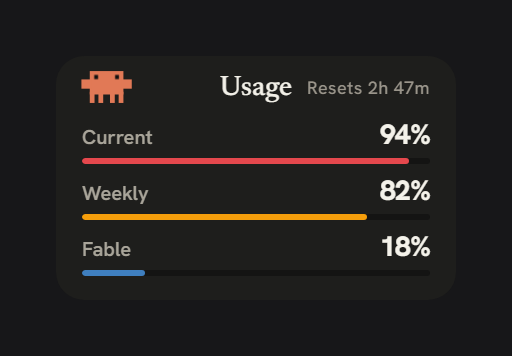 | 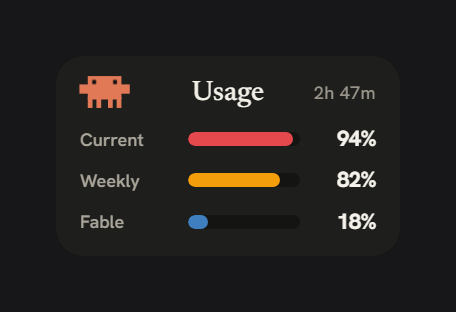 | 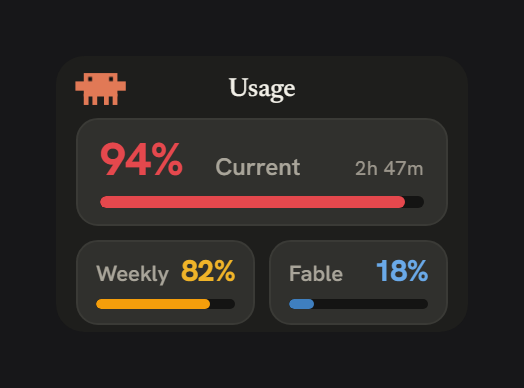 |
| Current, Weekly, and Fable each as a label, percentage, and threshold underline under a centered title — the default. | The same three as labelled bars; the most compact card, its labels becoming 5H / 7D / FBL when shrunk. | Current as a hero percentage with its own bar, and Weekly and Fable in their own cells. |
| ClawdBoy — Table | ClawdBoy — Menu | ClawdBoy — Quad |
|---|---|---|
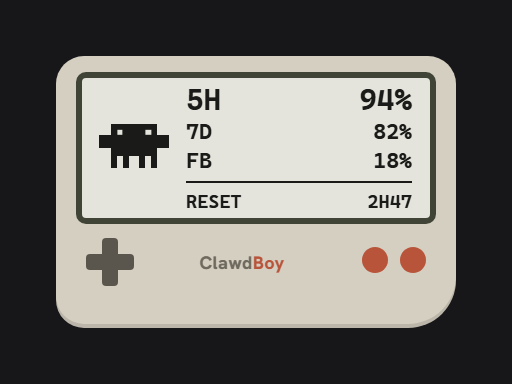 | 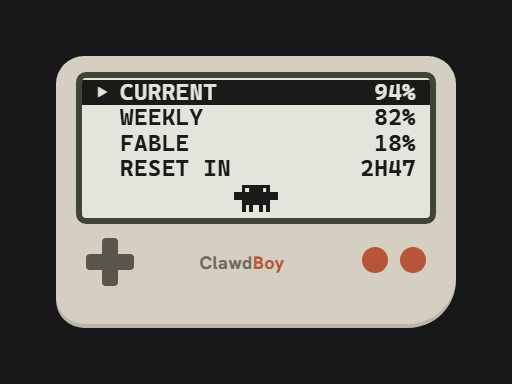 | 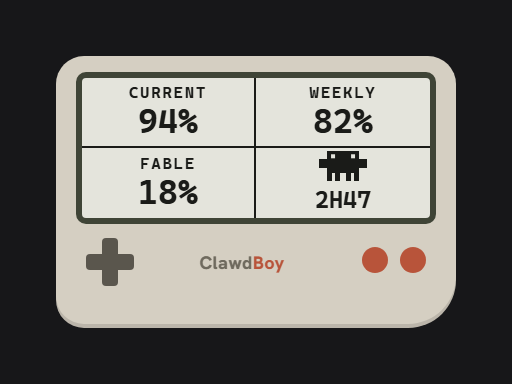 |
| A handheld console whose screen is a true two-color panel — one glass tone, one ink tone, nothing else. Clawd sits left of a Current / Weekly / Fable table, reset time below a rule. | The same four values as a pause-menu list; the active window is inverted, which is the only highlight a two-color panel has. | Four hairline cells, one value each, with clawd taking the label slot in the cell it shares with the reset countdown. |
| Audiowave Orb — LED Bloom | Audiowave Orb — Bars | Audiowave Orb — Peak hold |
|---|---|---|
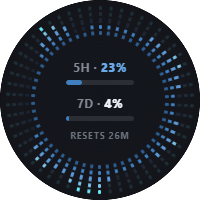 | 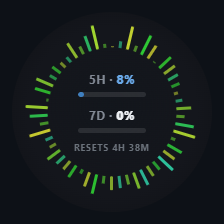 | 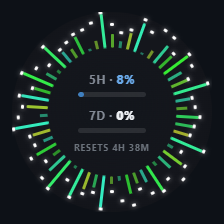 |
| 5-segment LED rungs per bar, colored by usage zone, with kick/snare/hat hits blooming outward across their own bass-to-treble arc. | A ring of 54 spectrum bars around the 5-hour and 7-day percentages. | Same ring, plus peak caps that hang at each bar's high point and fall back down. |
Clawdometer_<version>_x64-setup.exe) from the
latest release.If you already have your own statusline, the HUD won't touch it — use the
CLI (clawdometer.exe, from the same release if attached, or built from
source) to chain it: see "Getting started" below.
Requires Rust (the MSVC toolchain is pinned via rust-toolchain.toml) and
tauri-cli:
cargo build --release -p clawdometer-cli   # -> target/release/clawdometer.exe (CLI)
cd app/src-tauri && cargo tauri build      # -> HUD app + NSIS installer
Claude Code sends usage data (rate-limit percentages, reset times, model,
context window) to your statusline command on every API response. Clawdometer
installs itself as that statusline command (automatically on first HUD launch
if you have no statusline configured), records the latest snapshot to
~/.clawdometer/state.json, and shows the 5-hour and 7-day percentages in a
small always-on-top HUD and a system-tray tooltip (5h X% · 7d Y%).
When the snapshot goes stale (you're using claude.ai web/mobile or the
desktop app instead of a statusline-fed terminal session), the HUD refreshes
by running the official CLI headlessly — claude -p /usage — and
parsing the report Claude Code itself prints (about once a minute while no
fresher data is coming in, or on demand via tray → Refresh usage).
Those are the only two data sources, and both are official Claude Code surfaces — Clawdometer makes zero network requests of its own and never touches your credentials. (Earlier versions polled Anthropic's usage endpoint with Claude Code's OAuth token; that was removed: Anthropic's Consumer Terms of Service prohibit using OAuth tokens from Claude accounts in third-party tools, and this app should never put your account at risk.)
The HUD header shows a countdown to the 5-hour window reset (limits are account-wide, so a model name would add nothing). When a window's reset time passes while your machine is idle, the HUD derives the truthful 0% locally — no network needed. (Usage made on claude.ai web/mobile only shows up on the next Claude Code response.)
If you already had a statusline configured, the HUD leaves it alone —
run clawdometer install (CLI) to chain it: your original statusline still
renders its output (with a 2-second timeout), and uninstall restores it
exactly.
Clawdometer never asks for, reads, or stores any credential, and makes no
network requests of any kind — every binary (hook, CLI, HUD) is compiled
under a cargo-deny ban on all HTTP/TLS crates, so this is provable from the
build, not a promise. There is no telemetry. Usage data arrives only via
Claude Code's own surfaces: its statusline hook (Claude Code runs the hook
and pipes it a JSON snapshot), and a periodic headless claude -p /usage
run whose plain-text output the HUD parses — in both cases Claude Code
itself fetches the numbers with its own sign-in, and the only process
Clawdometer spawns for it is the official claude binary. The webview
receives only usage percentages and reset times over
one-way events, runs under a strict CSP, has no invokable backend commands,
and no filesystem or shell capabilities. (The webview also receives a single
working boolean for the activity animation, and — only while an Audiowave Orb
skin is selected — a stream of 36 audio spectrum magnitudes for the
ring. The backend derives both locally; neither carries usage data, and the
spectrum bands are bar heights, not audio: nothing is recorded or stored.)
For that activity flag the HUD also reads (never writes) Claude Code's
transcript files under ~/.claude/projects/, to tell when a session is
generating. It inspects only the last message's turn state locally — no network,
nothing leaves the process.
This design is deliberate: Anthropic's Consumer Terms of Service prohibit using OAuth tokens from Claude Free/Pro/Max accounts in any third-party tool, so Clawdometer only consumes what Claude Code itself hands to its documented statusline interface — nothing is impersonated, nothing extra is requested.
Don't trust — verify. Everything above is checkable in this repository:
cargo deny check bans proves no HTTP/TLS crate is compiled into any
binary (config in deny.toml) — and the source contains no
network code to begin with (grep it: no sockets, no curl, no URLs).app/src-tauri/capabilities/default.json
— events and window-dragging, nothing else.Writes: only ~/.clawdometer/ and the statusLine key of
~/.claude/settings.json (during install/uninstall, or the HUD's
one-time auto-install when no statusline exists — a full backup is taken
first either way). Exception: the tray's "Start with Windows" toggle writes
the standard HKCU Run registry key, only when you click it.
Two things worth knowing:
clawdometer install saves a full backup of your settings.json to
~/.clawdometer/backups/ before touching it. If your settings contain
secrets (an env block with API keys, an apiKeyHelper command), those
are in the backups too — delete ~/.clawdometer/backups/ when you no
longer need them, or use uninstall --purge.install/uninstall while a Claude Code session is actively
changing settings — both edit settings.json, and the last writer wins.%CLAUDE_CONFIG_DIR% if you've relocated ~/.claude.)Clawdometer.exe). A tray icon appears and the HUD
window shows up. If Claude Code has no statusline yet, the HUD claims it
automatically (one-time, settings backed up first) — no CLI step
required. Use Claude Code and the percentages appear with every response,
with your statusline showing [Model] 5h X% · 7d Y%. Launching the HUD a
second time just brings the existing one to the front (single instance).clawdometer install in a terminal. This chains your original statusline
(its output still renders) while also feeding the HUD.claude /usage now), RICE, Compact size, Opacity, Start with
Windows (check mark reflects the actual HKCU Run key state), and Quit.~/.claude/projects/ — locally, no network — and stays lit through long
"thinking" pauses, stopping the moment a turn completes. Respects
prefers-reduced-motion (the mascot holds still, no motion).clawdometer install # backs up settings.json, sets/wraps statusLine
clawdometer status # print the latest snapshot + capture time
clawdometer uninstall # restores the original statusLine (or removes the key)
clawdometer uninstall --purge # also deletes ~/.clawdometer/
install writes a timestamped backup of your settings.json to
~/.clawdometer/backups/ before touching anything, and never overwrites
an existing backup.install is idempotent; re-running after moving the binary updates the
stale path in place.statusLine yourself after installing, uninstall refuses
to touch it and tells you where your original is preserved.--settings <path> (for install/uninstall) targets a non-default
settings.json — mainly for testing.clawdometer uninstall --purge, then uninstall
the HUD app from Windows Apps & features — its uninstaller also removes
the "Start with Windows" autostart entry. If you run a portable or
from-source build (no installer), toggle Start with Windows off in the
tray menu before deleting the binary; otherwise the HKCU Run registry
value it created is left pointing at a deleted exe.Everything lives in ~/.clawdometer/:
| File | Purpose |
|---|---|
state.json | last statusline snapshot (written by the hook) |
live.json | last refresh snapshot (written by the HUD after a headless claude /usage run) |
wrapped.json | your original statusline command, chained + restored on uninstall |
ui.json | HUD window position, opacity, compact mode |
statusline-autoinstall.done | marker: the HUD offered to claim a free statusLine once (so removing it later sticks) |
backups/ | timestamped copies of settings.json taken before each install (may contain secrets from your settings — see Security) |
See "Install → From source" above. Additionally:
cargo test --workspace     # full test suite
cargo deny check bans      # verify the no-network-crates invariant
/usage inside Claude Code.claude /usage about once a minute, so usage
made on claude.ai web/mobile still shows up. It also zeroes a window
locally once its reset time passes.MIT
HUD không chính thức cho Windows, hiển thị giới hạn sử dụng của Claude Code.
Không chính thức. Không liên kết với và không được Anthropic bảo trợ.
Chín kiểu hiển thị, đổi lúc nào cũng được từ menu khay (chuột phải vào biểu tượng khay → RICE). Cả chín đều hiện cùng một dữ liệu — chỉ khác cách trình bày.
| Classic | Rowline | Bento Box |
|---|---|---|
| | |
| Mỗi mục Current, Weekly, Fable là một nhãn, phần trăm, và gạch chân theo ngưỡng dưới tiêu đề căn giữa — giao diện mặc định. | Cùng ba mục đó dưới dạng thanh có nhãn; thẻ gọn nhất, nhãn thành 5H / 7D / FBL khi thu nhỏ. | Current là phần trăm chính kèm thanh riêng, Weekly và Fable trong ô riêng. |
| ClawdBoy — Table | ClawdBoy — Menu | ClawdBoy — Quad |
|---|---|---|
| | |
| Máy chơi game cầm tay với màn hình đúng nghĩa hai màu — một tông kính, một tông mực, không có màu thứ ba. Clawd nằm bên trái bảng Current / Weekly / Fable, thời gian reset dưới một đường kẻ. | Vẫn bốn giá trị đó nhưng dưới dạng danh sách menu tạm dừng; dòng đang chạy được đảo màu — cách làm nổi bật duy nhất mà màn hai màu có. | Bốn ô chia bằng nét mảnh, mỗi ô một giá trị, clawd thế chỗ nhãn trong ô dùng chung với đồng hồ đếm ngược reset. |
| Audiowave Orb — LED Bloom | Audiowave Orb — Bars | Audiowave Orb — Peak hold |
|---|---|---|
| | |
| Mỗi thanh là 5 đoạn LED, đổi màu theo ngưỡng sử dụng, nở rộng theo từng cú đánh bass/snare/hat trong cung riêng của nó. | Vòng 54 thanh phổ bao quanh phần trăm 5 giờ và 7 ngày. | Cùng vòng đó, thêm chóp đỉnh treo ở mức cao nhất của mỗi thanh rồi rơi dần xuống. |
Clawdometer_<version>_x64-setup.exe) từ
release mới nhất.Nếu bạn đã có statusline riêng, HUD sẽ không động vào — hãy dùng CLI
(clawdometer.exe, tải từ cùng release nếu có đính kèm hoặc tự biên dịch)
để nối chuỗi: xem mục "Bắt đầu" bên dưới.
Cần Rust (toolchain MSVC, ghim qua rust-toolchain.toml) và
tauri-cli:
cargo build --release -p clawdometer-cli   # -> target/release/clawdometer.exe (CLI)
cd app/src-tauri && cargo tauri build      # -> ứng dụng HUD + bộ cài NSIS
Claude Code gửi dữ liệu sử dụng (phần trăm giới hạn, thời điểm reset, model,
context window) tới lệnh statusline của bạn sau mỗi phản hồi API. Clawdometer
tự cài mình làm lệnh statusline đó (tự động ở lần chạy HUD đầu tiên nếu bạn
chưa cấu hình statusline nào), ghi ảnh chụp mới nhất vào
~/.clawdometer/state.json, và hiển thị phần trăm 5 giờ / 7 ngày trong một
cửa sổ HUD nhỏ luôn nổi trên cùng cùng tooltip ở khay hệ thống
(5h X% · 7d Y%).
Khi ảnh chụp bị cũ (bạn đang dùng claude.ai web/mobile hoặc desktop app thay
vì phiên terminal có statusline), HUD tự làm mới bằng cách chạy CLI chính
thức ở chế độ headless — claude -p /usage — và parse báo cáo mà chính
Claude Code in ra (khoảng mỗi phút một lần khi không có dữ liệu mới hơn,
hoặc theo yêu cầu qua menu khay → Refresh usage).
Đó là hai nguồn dữ liệu duy nhất, và cả hai đều là bề mặt chính thức của Claude Code — Clawdometer không tự thực hiện request mạng nào và không bao giờ động vào thông tin đăng nhập của bạn. (Các phiên bản trước truy vấn endpoint usage của Anthropic bằng OAuth token của Claude Code; tính năng đó đã bị gỡ bỏ: Điều khoản Dịch vụ Người dùng của Anthropic cấm dùng OAuth token của tài khoản Claude trong công cụ bên thứ ba, và app này không được phép đặt tài khoản của bạn vào rủi ro.)
Phần đầu HUD hiển thị đếm ngược tới lúc reset cửa sổ 5 giờ. Khi thời điểm reset của một cửa sổ trôi qua trong lúc máy rảnh, HUD tự suy ra con số trung thực 0% ngay tại chỗ — không cần mạng. (Mức sử dụng phát sinh trên claude.ai web/mobile chỉ hiện ra ở phản hồi Claude Code kế tiếp.)
Nếu bạn đã có statusline cấu hình sẵn, HUD sẽ không động vào — hãy chạy
clawdometer install (CLI) để nối chuỗi: statusline gốc vẫn hiển thị output
của mình (với timeout 2 giây), và uninstall khôi phục lại chính xác.
Clawdometer không bao giờ yêu cầu, đọc, hay lưu trữ bất kỳ thông tin đăng
nhập nào, và thực hiện zero request mạng dưới mọi hình thức — mọi binary
(hook, CLI, HUD) đều được biên dịch với lệnh cấm (qua cargo-deny) toàn bộ
crate HTTP/TLS, nên điều này chứng minh được từ chính bản build, không phải
lời hứa. Hoàn toàn không có telemetry. Dữ liệu sử dụng chỉ đến qua các
bề mặt của chính Claude Code: hook statusline (Claude Code chạy hook và
truyền cho nó một ảnh chụp JSON), và lần chạy claude -p /usage headless
định kỳ mà HUD parse output dạng text — trong cả hai trường hợp, chính
Claude Code lấy số liệu bằng đăng nhập của nó, và tiến trình duy nhất
Clawdometer khởi chạy cho việc này là binary claude chính thức. Webview
chỉ nhận phần trăm sử dụng và thời điểm reset qua sự kiện một chiều,
chạy dưới CSP nghiêm ngặt, không có lệnh backend nào gọi được từ giao diện,
và không có quyền truy cập file hay shell. (Webview cũng nhận một biến boolean
working cho hiệu ứng hoạt động, và — chỉ khi một giao diện
Audiowave Orb đang được chọn — một luồng 36 giá trị độ lớn phổ âm thanh cho
vòng orb. Backend suy ra cả hai tại chỗ; không cái nào mang dữ liệu sử dụng, và
các dải phổ là chiều cao thanh chứ không phải âm thanh: không có gì được ghi
lại hay lưu trữ.)
Cho cờ hoạt động đó, HUD còn đọc (không bao giờ ghi) các file transcript
của Claude Code trong ~/.claude/projects/, để biết khi nào một phiên đang tạo
phản hồi. Nó chỉ xem trạng thái lượt của tin nhắn cuối tại chỗ — không mạng,
không gì rời khỏi tiến trình.
Thiết kế này là chủ đích: Điều khoản Dịch vụ Người dùng của Anthropic cấm dùng OAuth token của tài khoản Claude Free/Pro/Max trong bất kỳ công cụ bên thứ ba nào, nên Clawdometer chỉ tiêu thụ những gì Claude Code tự trao cho giao diện statusline được tài liệu hóa của nó — không giả danh gì, không request thêm gì.
Đừng tin — hãy kiểm chứng. Mọi điều ở trên đều kiểm tra được ngay trong repository này:
cargo deny check bans chứng minh không crate HTTP/TLS nào được biên dịch
vào bất kỳ binary nào (cấu hình trong deny.toml) — và mã
nguồn vốn không chứa dòng code mạng nào (grep thử: không socket, không
curl, không URL).app/src-tauri/capabilities/default.json
— chỉ sự kiện và kéo cửa sổ, không gì khác.Ghi dữ liệu: chỉ vào ~/.clawdometer/ và khóa statusLine trong
~/.claude/settings.json (khi install/uninstall, hoặc khi HUD tự cài
một-lần-duy-nhất lúc chưa có statusline nào — cả hai đều sao lưu toàn bộ
settings trước). Ngoại lệ: nút "Start with Windows" trong menu khay ghi khóa
registry HKCU Run tiêu chuẩn, chỉ khi bạn bấm vào.
Hai điều nên biết:
clawdometer install sao lưu toàn bộ settings.json vào
~/.clawdometer/backups/ trước khi chỉnh sửa. Nếu settings của bạn chứa
bí mật (khối env có API key, lệnh apiKeyHelper), chúng cũng nằm trong
bản sao lưu — hãy xóa ~/.clawdometer/backups/ khi không cần nữa, hoặc
dùng uninstall --purge.install/uninstall khi một phiên Claude Code đang chủ động
thay đổi settings — cả hai đều sửa settings.json, và bên ghi sau cùng
sẽ thắng.%CLAUDE_CONFIG_DIR% nếu bạn đã di dời ~/.claude.)Clawdometer.exe). Biểu tượng khay xuất hiện cùng cửa sổ
HUD. Nếu Claude Code chưa có statusline, HUD tự nhận vị trí đó (một lần
duy nhất, sao lưu settings trước) — không cần bước CLI nào. Dùng Claude
Code là phần trăm hiện ra theo từng phản hồi, statusline hiển thị
[Model] 5h X% · 7d Y%. Chạy HUD lần thứ hai chỉ đưa HUD hiện có lên
trước (một phiên bản duy nhất).clawdometer install trong
terminal. Lệnh này nối chuỗi statusline gốc của bạn (output của nó vẫn
hiển thị) đồng thời cấp dữ liệu cho HUD.claude /usage headless ngay lập tức), RICE, Compact size,
Opacity, Start with Windows (dấu tích phản ánh đúng trạng thái khóa
HKCU Run hiện tại), và Quit.~/.claude/projects/ — tại chỗ, không mạng — và vẫn sáng suốt các quãng "suy
nghĩ" dài, dừng ngay khi một lượt kết thúc. Tôn trọng prefers-reduced-motion
(linh vật đứng yên, không chuyển động).clawdometer install # sao lưu settings.json, đặt/nối chuỗi statusLine
clawdometer status # in ảnh chụp mới nhất + thời điểm ghi nhận
clawdometer uninstall # khôi phục statusLine gốc (hoặc xóa khóa)
clawdometer uninstall --purge # đồng thời xóa ~/.clawdometer/
install ghi bản sao lưu có dấu thời gian của settings.json vào
~/.clawdometer/backups/ trước khi động vào bất cứ thứ gì, và không bao
giờ ghi đè bản sao lưu đã có.install chạy lại vô hại; chạy lại sau khi di chuyển binary sẽ cập nhật
đường dẫn cũ tại chỗ.statusLine sau khi cài, uninstall sẽ từ chối động vào
và cho biết bản gốc được lưu ở đâu.--settings <path> (cho install/uninstall) nhắm tới settings.json
không mặc định — chủ yếu để kiểm thử.clawdometer uninstall --purge, rồi gỡ app HUD
trong Apps & features của Windows — trình gỡ cài đặt cũng xóa mục tự
khởi động "Start with Windows". Nếu bạn dùng bản portable hoặc tự build
(không qua installer), hãy tắt Start with Windows trong menu khay
trước khi xóa binary; nếu không, giá trị registry HKCU Run mà nó tạo
sẽ trỏ tới một exe đã bị xóa.Mọi thứ nằm trong ~/.clawdometer/:
| File | Mục đích |
|---|---|
state.json | ảnh chụp statusline mới nhất (do hook ghi) |
live.json | ảnh chụp refresh mới nhất (HUD ghi sau mỗi lần chạy claude /usage headless) |
wrapped.json | lệnh statusline gốc của bạn, được nối chuỗi + khôi phục khi gỡ |
ui.json | vị trí cửa sổ HUD, độ mờ, chế độ compact |
statusline-autoinstall.done | đánh dấu: HUD đã đề nghị nhận khóa statusLine trống một lần (nên gỡ ra sau đó sẽ được tôn trọng) |
backups/ | bản sao settings.json có dấu thời gian trước mỗi lần cài (có thể chứa bí mật từ settings — xem mục Bảo mật) |
Xem "Cài đặt → Từ mã nguồn" ở trên. Ngoài ra:
cargo test --workspace     # toàn bộ bộ kiểm thử
cargo deny check bans      # kiểm chứng lệnh cấm crate mạng
/usage bên trong Claude Code.claude /usage headless khoảng mỗi phút một lần, nên mức sử
dụng trên claude.ai web/mobile vẫn hiện ra. HUD cũng tự đưa một cửa sổ về 0%
khi thời điểm reset của nó trôi qua.MIT
1000+ skills curated from Anthropic, Vercel, Stripe, and other engineering teams
Agent harness performance optimization with skills, instincts, memory, and security
Design enforcement with memory — keeps your UI consistent across a project
Detects 37 AI writing patterns and rewrites text with human rhythm across 5 voice profiles