

Are you the author? Sign in to claim
ClawTouch MCP server — exposes a real USB-HID keyboard/mouse (Raspberry Pi Pico 2) as Model Context Protocol tools for a
English | 简体中文
Give your AI agent real hands. An MCP server that turns any MCP-compatible client — Claude Desktop, Cline, Continue, Cursor, OpenClaw, Hermes Agent and any other — into something that can move a real mouse and press real keys through a USB HID device.




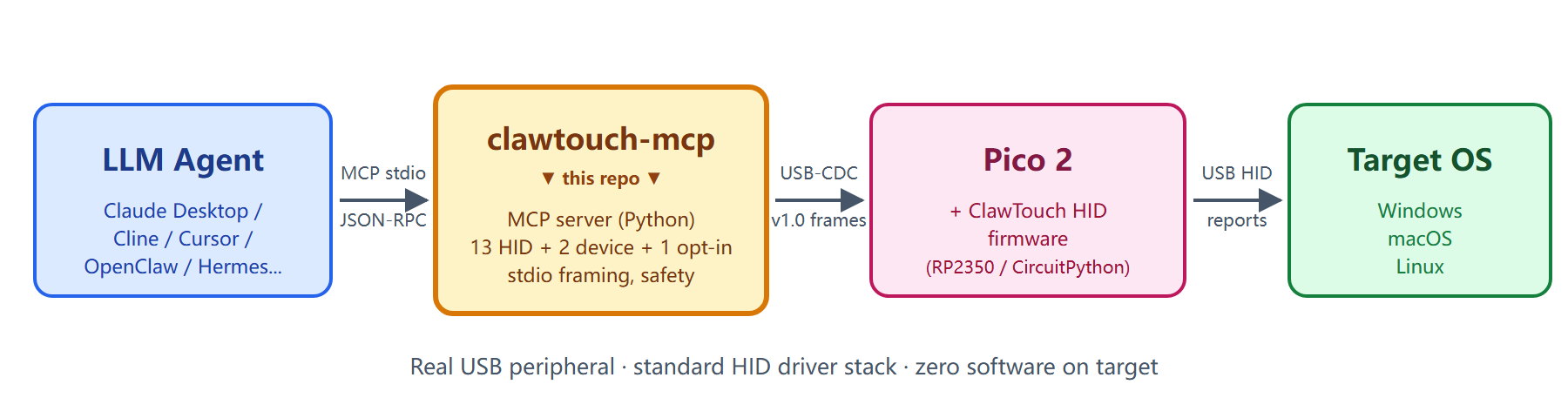
A standalone Python process that speaks Model Context Protocol (MCP) over
stdio and exposes mouse / keyboard primitives — hid.click, hid.type,
hid.scroll, key combos, hid.screenshot — to whatever AI agent you already
use. Under the hood it talks over USB serial to a ClawTouch HID device (a
Raspberry Pi Pico 2 running the open ClawTouch HID firmware, or any
turnkey ClawTouch box) and translates each tool call into a real USB HID report.
The target OS sees a genuine physical keyboard and mouse — input arrives on
the same driver path as any plugged-in peripheral, not as a software-injected
synthetic event.
📦 MIT-licensed. No ClawTouch backend, no LLM, no agent loop on top — just the raw HID plumbing so other agent stacks can talk to real hardware.
⚠️ This gives an agent real keyboard / mouse reach over a machine — the same reach as a person at the keyboard. Read Safety first.
Software automation (PyAutoGUI, OS-level input APIs, multimodal click-the-screen models) injects synthetic input events into a session — which requires an agent process running on the target machine, in that user session, with focus. A USB HID peripheral works the other way around: it emits real HID reports that travel the standard OS HID driver stack, exactly like a plugged-in keyboard or mouse. The OS recognizes the Pico natively as a standard USB HID class device and needs no mouse / keyboard driver and no HID agent process on the input side of the target. That difference is the whole point of this project — every other section below just builds on it.
Local mode is the common case (agent + clawtouch-mcp + Pico + the screen
all on one PC; the clawtouch-mcp process lives there because it's the agent's
host, but the input side needs no driver). Cross-host control — agent on one
machine driving a target on another over USB HID — is an additional capability
the same hardware unlocks; see Deployment modes.
Good for:
Not for:
For standard desktop apps (browser, IDE, office suites) the software-only path is already enough — the hardware is just an extra option there, not a requirement. Its irreplaceable value is the cases above, where the target can't host an agent, must show the OS a genuine physical HID device, or has to be driven across machines. For the compliance boundary on the "not for" cases, see Acceptable use.
⚠️ Before you start: read Safety — a connected agent can operate this machine like a person at the keyboard.
pip install clawtouch-mcp                     # minimal (serial only)
pip install 'clawtouch-mcp[screenshot]'       # + mss + Pillow (JPEG, Retina resize)
pip install 'clawtouch-mcp[screenshot-min]'   # mss only — no native deps, works
                                              # under hardened-runtime hosts
Platform-specific setup guides (recommended on first install):
docs/windows-setup.md: dual
COM port enumeration, VS Code Claude extension .mcp.json config,
full window restart required, display-scaling notes.docs/macos-setup.md: Keyboard
Setup Assistant dialog on first plug-in, dual USB-CDC ports, Screen
Recording permission, Pinyin IME punctuation gotchas.# 1. Auto-detect HID board AND auto-detect screen size (v0.2.3+)
clawtouch-mcp
# 2. Explicit port (Windows), screen still auto-detected
clawtouch-mcp --port COM7
# 3. Pin screen size manually (e.g. clamp to one monitor in a multi-monitor setup)
clawtouch-mcp --screen 1920x1080
# 4. No hardware — everything is logged, nothing moves (dev/CI mode)
clawtouch-mcp --mock --log-level INFO
v0.2.3+ auto-detects the primary monitor's physical pixel size on startup so coordinates clamp to the actual screen rather than a hard-coded
1920x1080. Usedevice.infofrom your MCP client to see what was detected (screen.sourceis"detected"/"explicit"/"unset").
Add to ~/Library/Application Support/Claude/claude_desktop_config.json
(macOS) or %APPDATA%\Claude\claude_desktop_config.json (Windows):
{
  "mcpServers": {
    "clawtouch": {
      "command": "clawtouch-mcp",
      "args": ["--port", "COM7", "--screen", "1920x1080"]
    }
  }
}
Restart Claude Desktop. You should see clawtouch show up in the MCP server
list with 16 tools available (14 HID + 2 device; +1 if you pass
--allow-screenshot). Try:
Take a screenshot of my screen, find the search box, click it, and type "hello world".
(Requires --allow-screenshot to enable the hid.screenshot tool — off by
default for privacy.)
Copy-pasteable config for 7 verified clients (Claude Desktop / Code,
Cursor, OpenClaw, Hermes Agent, ChatGPT Desktop / Codex CLI,
Cherry Studio, Trae IDE) — see
examples/integrations/INTEGRATIONS.md.
PRs adding new clients welcome.
Is the agent on the same machine as the screen? clawtouch-mcp covers the input side only (agent tool call → HID report → real input). The visual side (agent reads the screen to decide what to do next) is not in this repo — how you wire the two sides together depends on where the agent runs.
Local mode — the common case. agent + clawtouch-mcp + Pico + the controlled screen all on one PC. hid.screenshot captures that same screen, so the visual feedback loop closes naturally; the Pico is a standard USB HID device needing no driver. Good for accessibility, single-machine RPA, compatibility testing, in-machine kiosk self-service.
Cross-host mode — input supported, visual is your problem. agent + clawtouch-mcp on machine A; the Pico and the controlled screen on machine B. This repo fully covers the input side (A → B over USB HID), but hid.screenshot still captures A's screen, not B's — HID carries input one-way only; reverse screen capture isn't in the spec. Pick a visual path: HDMI capture card (B stays truly software-free, needs capture hardware) · VNC / RDP (open, no vendor lock-in, but B is no longer software-free) · API / log verification (check progress at checkpoints, not real-time; fixed-flow RPA only) · blind operation (pre-baked command sequence, no feedback; fully deterministic macros only). Good for industrial PCs that can't run a modern OS, strictly isolated embedded test targets, QA-lab phone farms.
Read this before connecting an autonomous agent. The runtime limits above are flood / typo guards, not a security boundary against a misbehaving agent.
--screen WxH so an agent can't move the mouse
to bogus pixel positions.hid.type is for ASCII / US-keyboard-layout text. Control
characters (newline / tab / etc.) are stripped by default so an
agent's multi-line draft isn't accidentally submitted — send Enter with
hid.key("enter") and Tab with hid.key("tab"). Non-ASCII text (CJK,
emoji) is typed through the US layout and generally will not work;
drive the host IME or a clipboard path from your agent for those.--ops-per-sec (default 20). This
counts tool calls, not individual HID reports — one call such as
hid.drag or a long hid.type emits many reports, so the effective
HID-report rate is higher. It is a flood / typo guard, not a security
throttle.hid.screenshot is disabled unless you pass --allow-screenshot.hid.release_all exposed for use as a panic-stop tool from the agent.clawtouch-mcp turns your agent's tool calls into real USB HID input — the
same property that makes the legitimate use cases work (kiosks, accessibility,
compatibility testing, cross-host RPA) carries a symmetric risk:
An autonomous agent connected here has, in practice, the same reach over the
host as a person sitting at the keyboard. It can open any application, run
commands in a terminal, install or remove software, and read, move, or delete
files. Because the input arrives as ordinary HID, a confirmation prompt is not
by itself a reliable barrier — treat any consent dialog as something the agent
may act on. clawtouch-mcp does not inspect intent or content; it
faithfully forwards each call to the hardware.
This can happen without you intending it, because the agent decides what to do. The usual triggers:
This is an unintended failure mode, not a supported use — deliberately
using HID input to defeat a system's security controls is out of scope under
Acceptable use below. It is also distinct from software bugs in
SECURITY.md: none of those cover an agent acting against your
own intent. The MIT "AS IS / no warranty" clause is a liability disclaimer, not
an informed-risk notice; responsibility for running an autonomous agent safely
sits with you as the deployer. This notice is provided for information only —
it does not modify, narrow, or expand the MIT License, create any warranty or
duty of care, or shift liability to Tinqiao; the MIT no-warranty / no-liability
terms continue to govern in full.
Treat an agent driving HID input like giving a capable but not-fully-trusted operator real hands on the machine. Recommended:
hid.release_all releases every held key and
button from the agent side; physically unplugging the HID device's USB cable
is the most reliable stop and removes the agent's input path entirely.If you deploy this on behalf of others (accessibility, managed RPA), inform those end users of these risks and obtain their consent.
Seventeen tools register: fourteen always-on hid.* input tools, plus
hid.screenshot (opt-in — off unless you pass --allow-screenshot), plus
two read-only device.* diagnostics. That matches the startup log line
14 HID tools + 2 device tools registered (the --allow-screenshot flag adds
hid.screenshot on top, for 17).
| Tool | Since | Purpose |
|---|---|---|
hid.click | v1.0 | Click at (x, y) |
hid.move | v1.0 | Move the mouse to (x, y) |
hid.hover | v1.0 | Move to (x, y), then idle |
hid.type | v1.0 | Type a UTF-8 string |
hid.scroll | v1.0 | Wheel scroll up / down |
hid.key | v1.0 | Press a named key or shortcut (enter, ctrl+c, …) |
hid.release_all | v1.0 | Panic stop — release every held button and key |
hid.mouse_button_down | v1.1 | Press a mouse button without releasing (drag start) |
hid.mouse_button_up | v1.1 | Release a held mouse button (drag end) |
hid.drag | v1.1 | Drag from one point to another while holding a button |
hid.key_press | v1.1 | Press a key/shortcut without releasing |
hid.key_release | v1.1 | Release a held key (no args = release everything) |
hid.hold_key | v1.1 | Press, wait, then release |
hid.batch | v0.4.0 | Run a pre-planned sequence of ≤10 HID actions in one call (strict order) |
hid.screenshot | v1.0 | Screenshot the primary monitor — JPEG q80 default, format='png' for lossless (opt-in, requires --allow-screenshot) |
device.list | v1.0 | List candidate HID board ports |
device.info | v1.0 | Active connection info |
Coordinates & behavior. Click / move / hover are absolute by default:
the server queries the OS cursor position (Win32 / CoreGraphics / X11), computes
the offset to your target, and sends a relative delta to the firmware — so
{"x": 640, "y": 360} lands at that screen pixel. Pass relative=true to skip
the OS query and send a raw pixel delta instead. Where the OS cursor can't be
read (Wayland, or any OS-query failure) the call returns an explicit error —
it never silently guesses and clicks the wrong place. hid.drag composes
mouse_button_down → glided move → mouse_button_up; the v1.1 button/key
hold pair (mouse_button_*, key_press / key_release, hold_key) maps onto
the Computer-Use Anthropic (CUA) action set. hid.batch runs a short,
pre-planned list of these actions (≤10) in one call, in strict order —
a transport convenience for action lists you already know (e.g. several
fixed coordinates a solver computed), not a control-flow / "act →
observe → decide" layer; for that you still issue separate calls.
Consecutive clicks are auto-spaced by a small default gap (~50 ms) so the
OS doesn't merge or drop them; override per op with delay_ms (set 0 to
opt out).
Tool selection. The server ships built-in selection guidance so an agent
reaches for physical HID only when it's the right answer: an MCP instructions
field in the initialize response, plus a per-tool HID_PREFIX prepended to
every hid.* description (so the cue survives even if a client ignores the
server-level field). Both say the same thing — prefer hid.* only as a
fallback, when no file / browser / OS API can do the job, or when the user
explicitly asks for physical keyboard / mouse input. The read-only device.*
tools carry no prefix.
Most agents reach clawtouch-mcp through an MCP client (Claude Desktop / Code, Cursor, and others) — copy-pasteable configs for the verified clients are in examples/integrations/INTEGRATIONS.md.
If you're building your own Computer Use loop instead, examples/computer_use/ has two reference implementations that route agent actions through ClawTouch HID:
client.beta.messages.stream with the computer_20251124 toolcomputer-use-previewFor per-application LLM guidance, clawtouch-skills is a companion repo of markdown operator manuals an LLM can load before driving a specific app. Skills are soft guidance — the LLM still decides what to do.
Start the server against your bridge, then any MCP client (Claude
Desktop, Cline, or your own loop) speaks plain MCP tools/call over
stdio. Each call becomes a real USB-CDC frame to real hardware —
nothing synthetic.
$ clawtouch-mcp --port COM7
[INFO] connected to Pico 2 on COM7 (serial: E660ABCD12345678)
[INFO] screen auto-detected: 2560x1440 (Windows SM_CXSCREEN/SM_CYSCREEN)
[INFO] 14 HID tools + 2 device tools registered; listening on stdio

# client → server : one click, then one typed string
#                   (the cursor and keys actually move)
→ tools/call  hid.click  {"x": 640, "y": 360}
← result       "clicked at (640, 360)"

→ tools/call  hid.type   {"text": "Hello from MCP"}
← result       "typed 14 chars in 0.42s"
This server is built for legitimate uses — accessibility, RPA, test automation, cross-machine workflows where the target machine must stay clean. This project does not support, document, or assist with use cases that:
These statements describe the scope of our maintainer support and documentation — they are not additional restrictions on the MIT License, which continues to govern all use, modification, and redistribution of the source code. Users are independently responsible for evaluating their specific use case against applicable laws and the target platform's ToS.
clawtouch-mcp exposes hardware HID actions (mouse / keyboard / scroll
/ key combos / screenshot) as MCP tools. It does not generate,
synthesize, recommend, or otherwise produce text, image, audio, or
video content. The calling LLM agent is the content-generating party
and is solely responsible for any generated content and for
compliance with any content-labeling or content-moderation
obligations applicable in its jurisdiction (e.g. PRC AI Generated
Content Labeling Measure effective 2025-09-01).
This server can talk to:
The wire protocol is the same for both — the server doesn't care which one it talks to.
Does this need a ClawTouch account / API key / cloud service? No. This server only speaks USB serial to the HID board. There's no network call. No data leaves your machine.
Can I use this without buying ClawTouch hardware? Yes — buy an $8 Raspberry Pi Pico 2, flash the open-source clawtouch-hid firmware, and the server will talk to it the same way as the turnkey device.
How is this different from the closed-source ClawTouch desktop app?
This MCP server is the bottom HID primitive layer. The desktop product
is a separate closed-source agent on top of the same hardware; contact
support@tinqiao.com for details.
Is there a JavaScript / TypeScript version?
Not yet. clawtouch-bridge-sdk (Python + Node) is planned — see the
Open source roadmap.
hid.screenshot fails with ImportError: dlopen(... _imaging ...) code signature ... different Team IDs?
Your host Python has a hardened runtime with library validation, which only
allows native extensions signed with the host's own Team ID — so it blocks
Pillow's _imaging (some bundled/launcher Pythons do this). The server
auto-detects this and falls back to the no-native mss-png backend,
returning a PNG with an explanatory note in the metadata — you don't have to
do anything. mss itself is pure-Python (ctypes → CoreGraphics, a platform
framework that's exempt), so it loads fine; only Pillow's compiled extension
is blocked. To force it, pass --screenshot-backend mss-png or install the
lean pip install 'clawtouch-mcp[screenshot-min]' (mss only). To keep Pillow
(JPEG + higher-quality resize), run clawtouch-mcp from a Python without
library validation, or grant the host Python the
com.apple.security.cs.disable-library-validation entitlement. Either way the
screenshot's backend field and scale_x/scale_y tell the agent what it
got — always divide click coordinates by scale_x/scale_y.
The MCP / Computer-Use ecosystem already has projects that hand an LLM agent control of a desktop, in two camps. Software-only MCP servers on the target PC — domdomegg/computer-use-mcp, AB498/computer-control-mcp, the various mcp-pyautogui implementations, and ByteDance's UI-TARS — call PyAutoGUI / OS input APIs in-process: lowest friction, but the agent shares the target's OS / session / focus, and a crash disrupts the user's actual desktop. Hardware-bridge servers decouple the two: sunasaji/mcp-serial-hid-kvm (a CH9329 / CH9350L USB-HID ASIC plus capture card) is the closest direct peer in architecture, and CMU's HIDAgent (Bigham et al., 2026-01; < $30 RP2040 + HDMI-to-USB + CH340 serial bridge, shipped as a Python library) the closest academic peer. clawtouch-mcp follows the same decoupling but pairs with the open-firmware clawtouch-hid stack, so the wire protocol is user-extensible and the firmware is auditable — not a fixed-function ASIC.
ClawTouch's irreplaceable edge is the genuine hardware HID path: the OS sees a real physical keyboard / mouse. In local mode — the common case — that real HID plus zero driver on the input side is exactly what makes it work for accessibility, compatibility testing, and apps that reject synthetic input; if you only need synthetic input on one machine and the app doesn't care where input comes from, the software-only servers above are simpler. Cross-host mode is an additional capability on top: it can drive a target that can't host an agent or must stay physically isolated — something a software-only server can't do at all.
Open-core model. Hardware and protocol primitives are open; the integrated commercial product stays closed.
| Component | Status |
|---|---|
| clawtouch-mcp (this repo) | ✅ Released |
| clawtouch-hid — firmware + protocol module, wire epoch 1 | ✅ Released |
| clawtouch-skills — markdown skill files for LLM agents | ✅ Released |
| clawtouch-bridge-sdk — Python + Node HID SDK | 🔵 Future |
| Backend / desktop app / adapters / vision models | 🔒 Closed — support@tinqiao.com |
PRs welcome for: new MCP tools mapping to existing HID primitives, bug fixes, client-integration examples, doc improvements, non-English README translations.
Not taking PRs for: agent-loop logic or application-level features (intentionally out of scope — see Acceptable use) or adapters for specific applications (those live in the closed-source desktop app).
clawtouch-mcp is maintained by Tinqiao Technology — the team behind ClawTouch (clawtouch.cn).
MIT © Tinqiao Technology (Beijing) Co., Ltd. — see LICENSE (English, authoritative) and LICENSE.zh-CN.md (non-official Chinese translation, for reference).
Third-party dependencies and their licenses are listed in NOTICE. Trademarks (ClawTouch, Tinqiao, and third-party marks referenced in this repository) are covered separately in TRADEMARKS.md — the MIT License does not grant any trademark rights.
For commercial deployments at scale, enterprise support, or OEM hardware
discussion: support@tinqiao.com.
flowchart LR
    A["<b>LLM Agent</b><br/><sub>Claude Desktop / Cline /<br/>Cursor / OpenClaw / Hermes / ...</sub>"]
        -->|"stdio<br/>JSON-RPC<br/>MCP 2024-11-05"| B["<b>clawtouch-mcp</b><br/><sub><i>this repo</i><br/>MCP server + 14 HID + 2 device tools</sub>"]
    B -->|"USB-CDC<br/>v1.0 framed bytes"| C["<b>Pico 2</b><br/><sub>+ ClawTouch HID firmware<br/>(RP2350 / CircuitPython)</sub>"]
    C -->|"USB HID<br/>reports"| D["<b>Target OS</b><br/><sub>Windows / macOS / Linux<br/>standard HID driver stack</sub>"]
    classDef this fill:#fef3c7,stroke:#d97706,stroke-width:3px,color:#78350f;
    class B this;
This repo is the MCP-server hop: it translates MCP tool calls into framed bytes over USB-CDC; the firmware turns them into standard USB HID reports. For how it fits the larger Perception → Decision → Action loop and how the closed-source desktop app layers on these open HID primitives, see the official technical documentation: system architecture & data flow and data security & compliance.
Run Claude Code as an MCP server so any agent can delegate coding tasks to it
 @microsoft✓ Official
Browser automation using accessibility snapshots instead of screenshots
 @googleapis✓ Official
Google's universal MCP server supporting PostgreSQL, MySQL, MongoDB, Redis, and 10+ databases
 @github✓ Official
Official GitHub integration for repos, issues, PRs, and CI/CD workflows