

Are you the author? Sign in to claim
Framework and toolkits for building and evaluating collaborative agents that can work together with humans.

Latest News 🔥
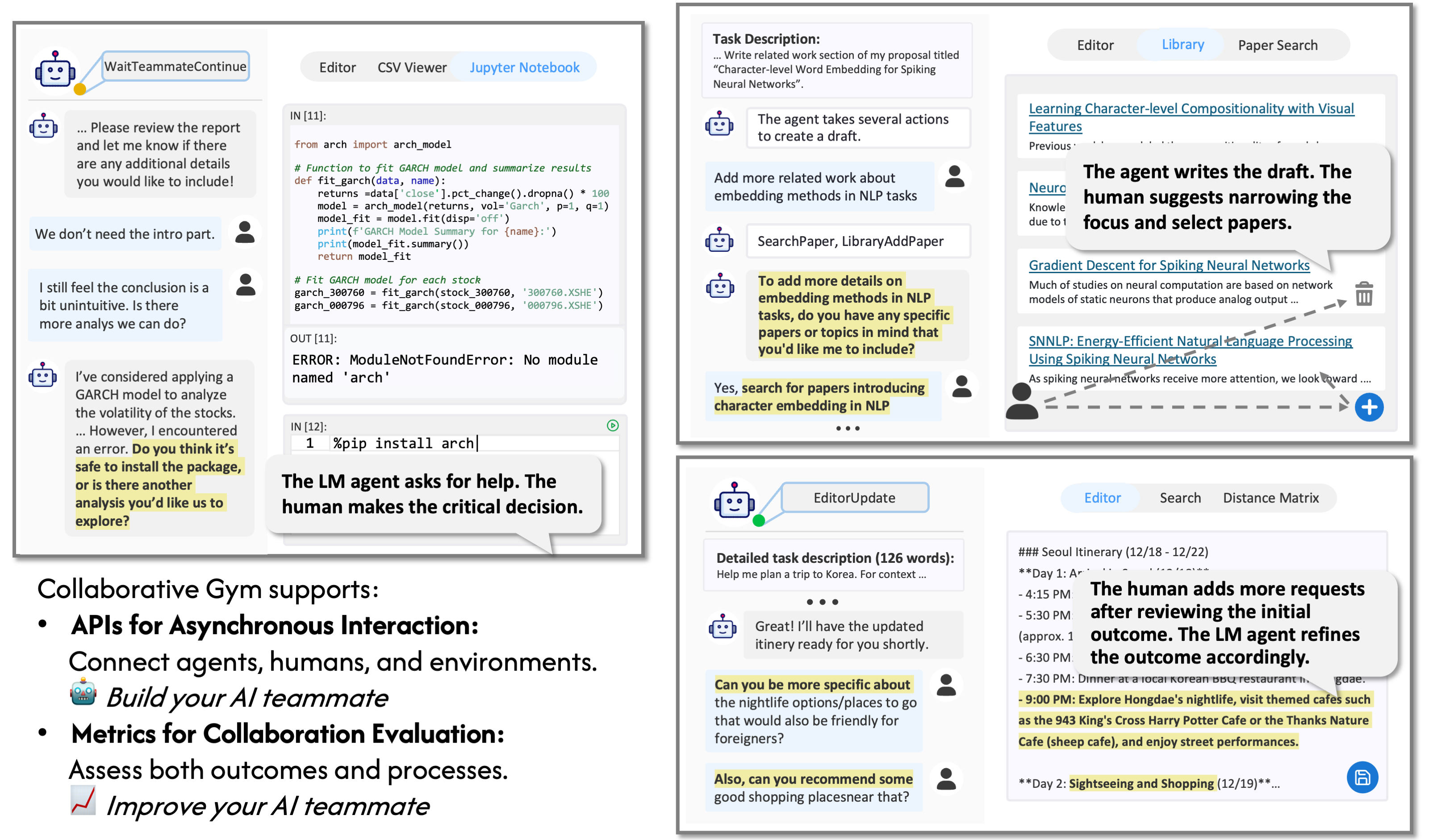
Collaborative Gym (Co-Gym) is a framework for enabling and evaluating Human-Agent Collaboration. Unlike traditional chatbots, Co-Gym allows both human users and AI agents to not only exchange messages but also take actions in a shared workspace. Additionally, unlike autonomous agents that take a sequence of actions on its own, Co-Gym expects the agents to engage in the collaboration process where the human user can intervene in real-time.
Our vision is to leverage Co-Gym for improving collaborative agents and evaluating human-agent collaboration.
We view Co-Gym as a framework for building and evaluating collaborative agents that take initiative at the correct time and work together with humans in parallel. Below, we provide a quick start guide to run Co-Gym locally to reproduce our experiments.
conda create -n cogym python=3.11
conda activate cogym
pip install -r requirements.txt
secrets.example.toml from the root directory and rename it to secrets.toml. Complete the required fields by following the instructions provided in the comment.cd docker
docker build -f Dockerfile_cpu -t cogym-jupyter-cpu-image .
The Co-Gym API models the environment where humans and agents can work together as Python CoEnv classes. We currently support three task environments:
CoTravelPlanningEnv(CoEnv): Collaborative environment for planning travel itineraries, supporting several search functionalities, distance matrix, and editing travel plans.CoLitSurveyEnv(CoEnv): Collaborative environment for conducting literature survey (e.g., writing Related Work section for research), supporting searching for papers, taking notes, and writing/polishing a related works section.CoAnalysisEnv(CoEnv): Collaborative environment for analyzing tabular data in csv format, supporting executing code in Jupyter notebook and documenting findings.Creating environment instances and interacting with them is simple - here's an example using CoTravelPlanningEnv:
from collaborative_gym.envs import EnvFactory
env = EnvFactory.make(
  name="travel_planning",
  team_members=["agent", "human"],
  env_id="env_1234",
  use_simulated_dataset=False,
  query="Help me plan a 5-day trip to Vancouver in December for a single person."
)

# In asynchronous collaboration, at a certain timestamp,
# agent can choose to take a task action like the following
obs, reward, terminated, private, info = env.step(
  role="agent",
  action="EDITOR_UPDATE(text=\"This is a placeholder.\")"
)

# If private is True, the notification protocol will only notify the action taker;
# otherwise, the change will be broadcast to all team members.
To support asynchronous interaction between agents, humans, and task environments, we use Redis for cross-process communication, and wrap each environment class with TaskEnvNode. See collaborative_gym/nodes for other supported nodes (i.e., agents, real humans, simulated humans).
We provide a Runner class to handle the lifecycle of human-agent collaboration sessions, including launching these node processes and ensuring proper cleanup on exit.
Co-Gym supports two experimental conditions: Co-Gym (Simulated) and Co-Gym (Real)
We use TravelPlanner subset, arXiv CS paper subset curated in this work, DiscoveryBench subset for the simulated experiments on Travel Planning, Related Work, Tabular Analysis tasks respectively. See datasets/README.md for dataset details.
We use gpt-4o to simulate human behavior in our paper.
To reproduce our paper experiments:
docker run -d --name redis-stack -p 6379:6379 -p 8001:8001 redis/redis-stack:latest
sudo permission):
apt-get install redis
systemctl start redis-server
python -m scripts.fully_auto_agent_exp \
  --task {"travel_planning" or "related_work" or "tabular_analysis"} \
  --start-idx {start_idx_of_simualted_dataset} \
  --end-idx {end_idx_of_simulated_dataset} \
  --team-member-config-path {configs/teams/auto_agent_team_config_xxx.toml} \
  --result-dir-tag {result_dir_tag}
work_dir/{task}/{result-dir-tag}/results.python -m scripts.collaborative_agent_exp \
--task {"travel_planning" or "related_work" or "tabular_analysis"} \
--start-idx {start_idx_of_simualted_dataset} \
--end-idx {end_idx_of_simulated_dataset} \
--team-member-config-path {"configs/teams/basic_coagent_simulated_user_team_config_xxx.toml" or "configs/teams/coagent_with_situational_planning_simulated_user_team_config_xxx.toml"} \
--result-dir-tag {result_dir_tag}
work_dir/{task}/{result-dir-tag}/results.You can try out collaborative agents directly through our live research preview. Each session randomly pairs you with collaborative agent. Help us evaluate different agents by sharing your ratings and feedback - and discover some surprises along the way!
We've open-sourced our collaborative interface in frontend/workbench. For setup instructions, please refer to frontend/workbench/README.md.
Co-Gym supports the evaluation of collaborative agents across both collaboration outcomes and processes.
We assess the collaboration outcome with both Delivery Rate and Task Performance (requires specifying a task-specific scoring function to evaluate the outcome).
Co-Gym defines the Collaborative Score to jointly considering outcome delivery and quality:
\text{Collab Score} = 1_{\text{Delivered}}\times\text{Task Performance}
To see the aggregated results, run the following command:
python scripts/report_simulated_result.py --result-dir {result_dir_that_include_result_folder_for_each_instance}
Co-Gym analyzes the collaboration process along the following dimensions:
python -m collaborative_gym.eval.initiative_analysis --result-dir {result_dir_that_include_result_folder_for_each_instance}python -m collaborative_gym.eval.controlled_autonomy --result-dir {result_dir_that_include_result_folder_for_each_instance}The current codebase supports three agents in demo_agent/:
demo_agent/auto_agent: Fully Autonomous Agent that uses ReAct-style prompting and only considers task action space.demo_agent/basic_collaborative_agent: Collaborative Agent that uses ReAct-style prompting and considers both task action space and collaboration acts (i.e., SendTeammateMessage, WaitTeammateContinue).demo_agent/collaborative_agent_with_situational_planning: Collaborative Agent with Situational Planning which employs a two-stage decision-making approach when processing notifications. See Appendix B of our paper for details.The simplest way to integrate an agent into Co-Gym is by ensuring compatibility with the AgentNode interface. AgentNode manages notifications from the environment and sends agent actions back via Redis, allowing you to focus on designing the agent's policy. To work with AgentNode, your agent should implement the following methods:
start(self, name: str, team_members: List[str], task_description: str, action_space: dict, example_question: str, example_trajectory: List) -> None
name is the name of the agent.team_members is a list of team members in the session.task_description is a string describing the task.action_space is a list of actions. Each action is specified as a dictionary with the following keys:
max_length, min_lengthpattern: Important for the agent to know what the format of the action should be.params: Important for the agent to know what parameters are expected in the action.machine_readable_identifier: A unique identifier for the action.human_readable_name: A human-readable name for the action.human_readable_description: A more detailed description of the action.example_question is a string representing an example question for this task (if provided by the task environment).example_trajectory is a list of Thought/Action/Updated Observation tuples representing an example trajectory for this task (if provided by the task environment). example_question and example_trajectory can help the LM agent understand the task.get_action(self, observation: Dict) -> str
observation is a dictionary containing event_log and other task-specific observations.action_space.end(self, result_dir: str) -> None
The agent can be implemented using any framework of your choice. Feel free to check out our example agents for reference.
The supported task environments are under collaborative_gym/envs. To add a new task environment:
collaborative_gym/envs that inherits from CoEnv. Register your environment class with @EnvFactory.register("id_for_your_task").self.task_description in natural language.self.example_question and self.example_trajectory if you want to add task demo when running demo agents.self.step() to define the environment logic.To integrate your task into the user interface, see frontend/workbench/README.md.
If you have any questions or suggestions, please feel free to open an issue or pull request. We welcome contributions to add more task environments & agents and improve the codebase!
Contact person: Yijia Shao, Vinay Samuel, and Yucheng Jiang
The development of Co-Gym won't be possible without these open-source projects:
We are very grateful to the following amazing designers who have contributed to this project:
Please cite our paper if you use this code or part of it in your work:
@misc{shao2025collaborativegym,
      title={Collaborative Gym: A Framework for Enabling and Evaluating Human-Agent Collaboration},
      author={Yijia Shao and Vinay Samuel and Yucheng Jiang and John Yang and Diyi Yang},
      year={2025},
      eprint={2412.15701},
      archivePrefix={arXiv},
      primaryClass={cs.AI},
      url={https://arxiv.org/abs/2412.15701},
}
⚠️ Experimentelle Skill-Sammlung für deutsches Recht (Arbeits-, Gesellschafts-, Insolvenz-, Datenschutz-, Prozessrecht u
Manage multiple Claude Code agents from TUI or Web with tmux and git worktrees
Project management using GitHub Issues + Git worktrees for parallel agent execution
Core skills library for Claude Code with 20+ battle-tested skills including TDD, debugging, and brainstorming