

Are you the author? Sign in to claim
ConcoLLMic: the first language- and theory-agonistic concolic execution engine via LLM agents


Paper: IEEE S&P 2026
ConcoLLMic is the first language- and theory-agnostic concolic executor powered by LLM agents. Unlike traditional symbolic execution tools that require language-specific implementations and struggle with constraint solving, ConcoLLMic:
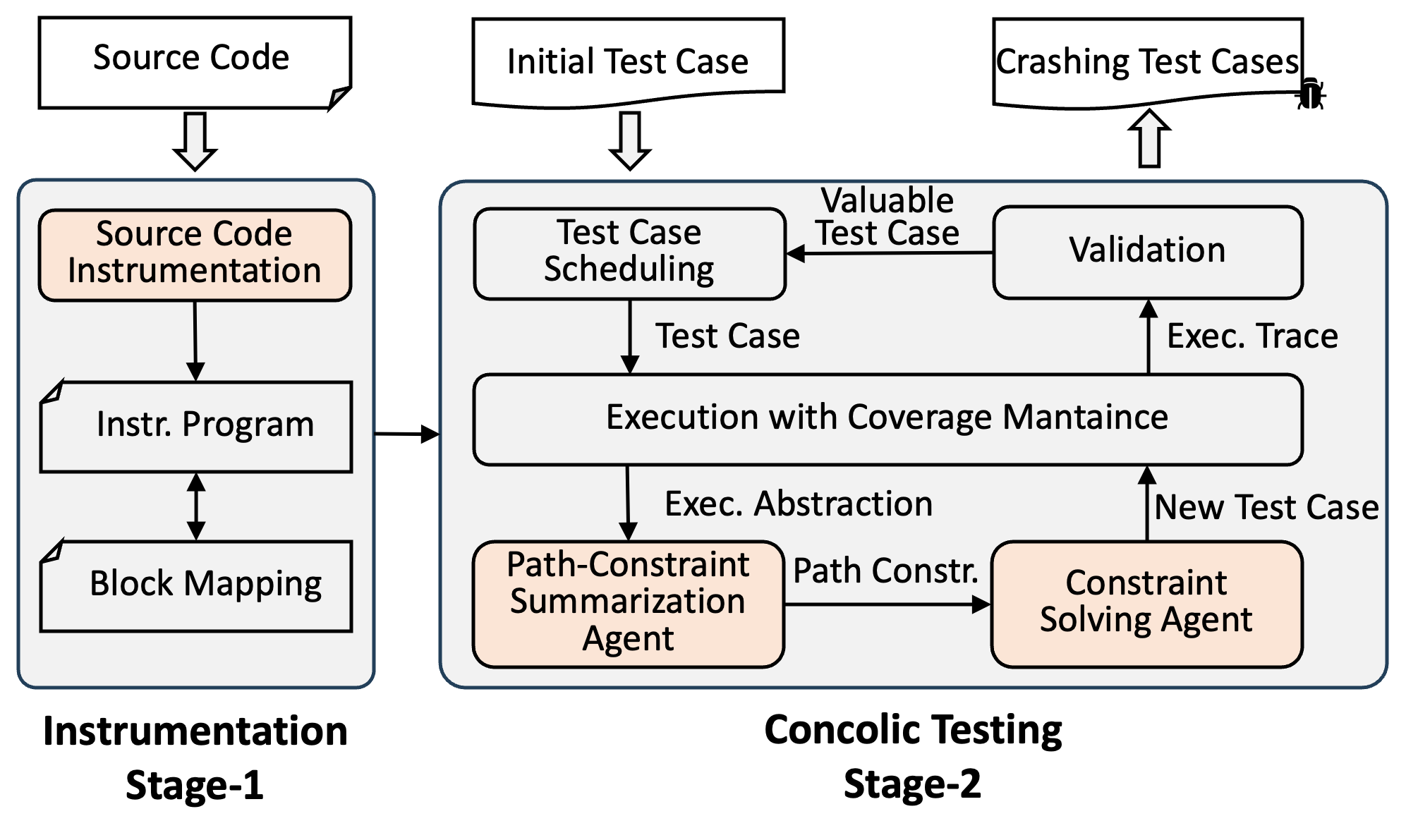
How it works: ConcoLLMic uses LLM agents to
fprintf(stderr, ...);This eliminates the need for hand-crafted language-specific symbolic interpreters and environment modeling as well as expensive constraint solving.
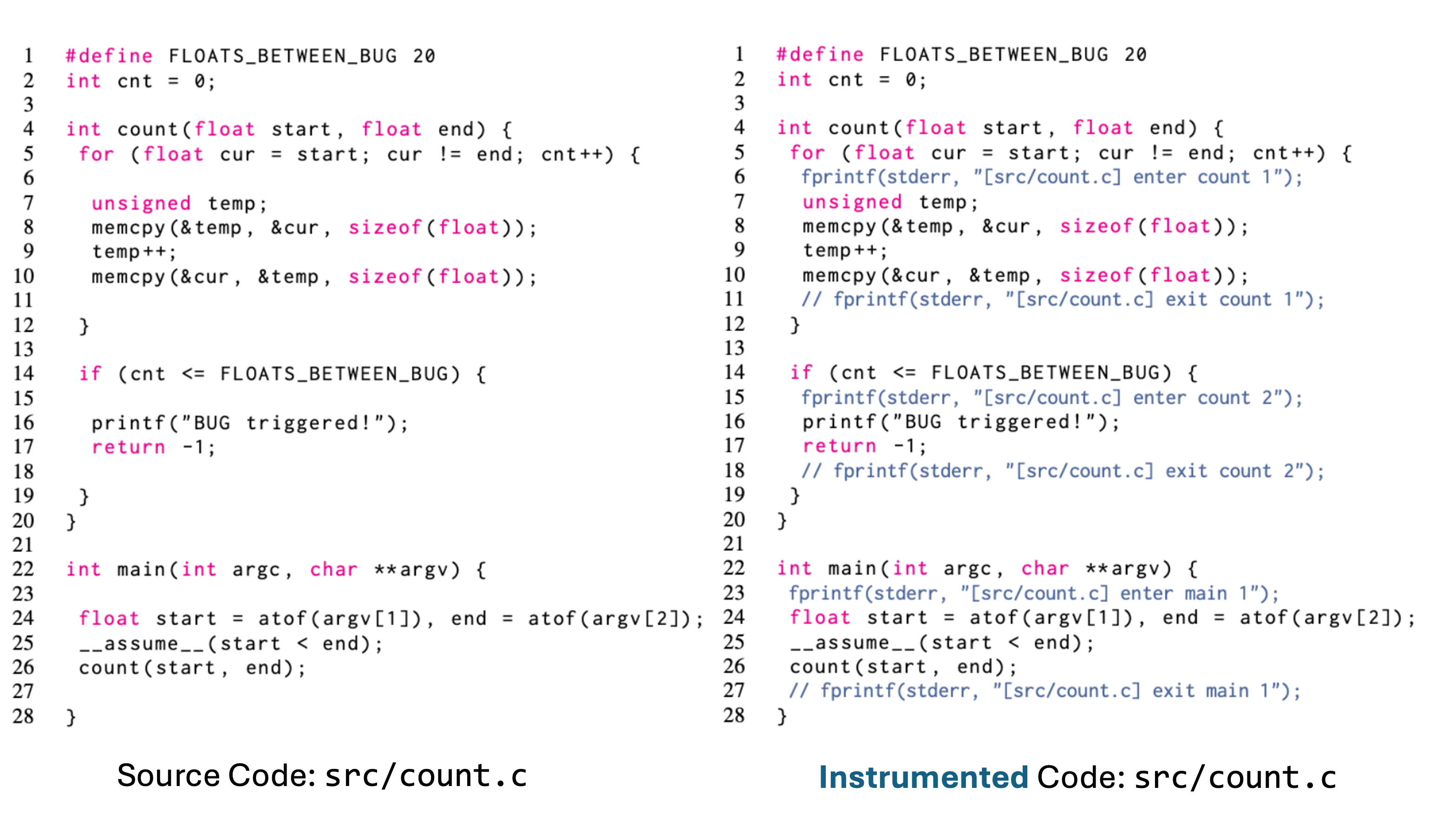
Example instrumentation of src/count.c from FP-Bench, by inserting fprintf at key points in the execution. Output in stderr allows us to reconstruct the dynamic execution path.
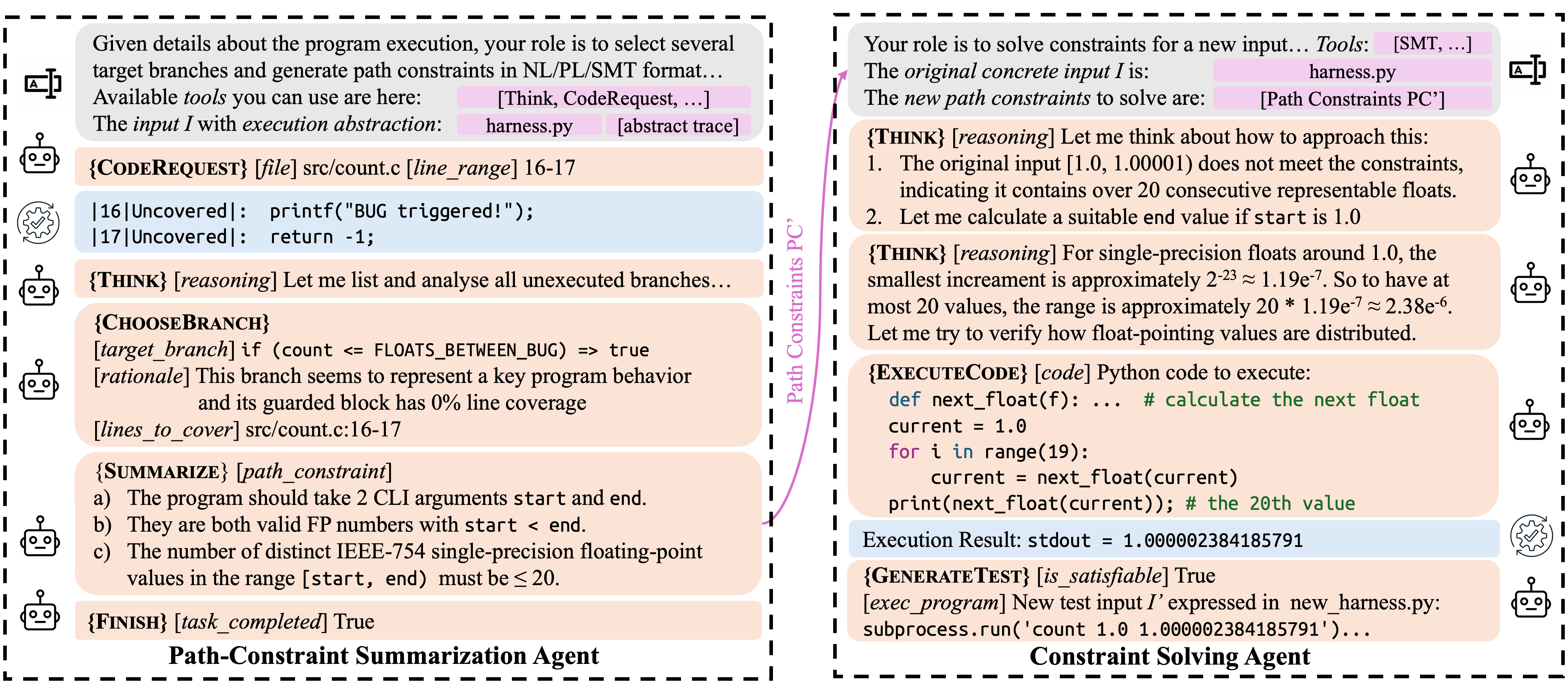
This shows one round of concolic execution with ConcoLLMic. Compared to conventional tools with verbose, implementation-level formulas:
start = atof(I[0]) ∧ end = atof(I[1]) ∧ start < end ∧ cur[0] = start ∧
(∀ 0 ≤ i < cnt, cur[i] ≠ end) ∧ cur[cnt] = end ∧ cnt ≤ 20
ConcoLLMic summarizes the path constraints concisely using high-level natural-language:
The number of representable FP values in the range must be ≤ 20.
git clone https://github.com/ConcoLLMic/ConcoLLMic.git
cd ConcoLLMic
pip install -r requirements.txt
pip install -r requirements-dev.txt # optional
export ANTHROPIC_API_KEY="your_api_key_here"
By default, ConcoLLMic uses Claude 4.5 Sonnet. You can configure other models in ACE.py (see setup_model()).
ConcoLLMic's workflow consists of two main steps: instrumentation & compilation and concolic execution. Below are two examples to get started:
A simple bracket matching validation program that checks if brackets are balanced.
Step 1: Instrumentation & Compilation
Instrumented code is already available in code_example/instr/validate_brackets.cpp.
To instrument from scratch:
rm ./code_example/instr/validate_brackets.cpp

python3 ACE.py instrument \
    --src_dir ./code_example/src/ \
    --out_dir ./code_example/instr/ \
    --instr_languages c,cpp,python,java
Note: The --instr_languages flag is only used for filtering files by extension. No additional language-specific support is needed.
Compile the instrumented code normally:
g++ -o ./code_example/instr/validate_brackets ./code_example/instr/validate_brackets.cpp
Step 2: Concolic Execution
Run the concolic execution agent with the provided test harness code_example/harness/validate_brackets.py, which is a Python function that prepares program input and executes the program:
python3 ACE.py run \
    --project_dir ./code_example/instr/ \
    --execution ./code_example/harness/validate_brackets.py \
    --out ./out/ \
    --rounds 2 \
    --parallel_num 3
Command Parameters Explained:
--project_dir: Directory containing the instrumented code and the compiled program--execution: Test harness (a Python script that executes the target program and returns stderr + exit code)--out: Output directory for generated test cases and logs--rounds: Number of concolic execution rounds (default: unlimited until coverage plateau)--parallel_num: Maximum number of concurrent test case generations per roundTip: To observe the agent's step-by-step workflow more clearly (e.g., for demos or debugging), set
--parallel_num 1so that each phase runs sequentially.
Output:
./out/ConcoLLMic_*.log — detailed execution log./out/queue/id:*.yaml — generated test cases with metadataStep 3: View Statistics (Optional)
Analyze testing statistics (tokens used, costs):
python3 ACE.py run_data --out_dir ./out/
Step 4: Replay & Measure Coverage (Optional)
# Compile with coverage
cd ./code_example/src/
g++ --coverage -o validate_brackets validate_brackets.cpp
lcov -z -d .
cd ../../

# Replay test cases
python3 ACE.py replay \
    ./out/ \
    ./code_example/src/ \
    ./coverage.csv \
    --cov_script ./code_example/src/coverage.sh
Output:
./coverage.csv — time-series coverage data for each test case./code_example/src/validate_brackets.cpp.gcov — line-by-line coverage reportA program from FP-Bench that counts representable floating-point values in a range.
Step 1: Instrumentation & Compilation
Instrumented code is already available in code_example/instr/count.c.
To instrument from scratch:
rm ./code_example/instr/count.c

python3 ACE.py instrument \
    --src_dir ./code_example/src/ \
    --out_dir ./code_example/instr/ \
    --instr_languages c,cpp,python,java
Note: The --instr_languages flag is only used for filtering files by extension. No additional language-specific support is needed.
Compile the instrumented code normally:
gcc -o ./code_example/instr/count ./code_example/instr/count.c
Step 2: Concolic Execution
Run the concolic execution agent with the provided test harness code_example/harness/count.py, which is a Python function that prepares program input and executes the program:
python3 ACE.py run \
    --project_dir ./code_example/instr/ \
    --execution ./code_example/harness/count.py \
    --out ./out/ \
    --rounds 2 \
    --parallel_num 3
Command Parameters Explained:
--project_dir: Directory containing the instrumented code and the compiled program--execution: Test harness (a Python script that executes the target program and returns stderr + exit code)--out: Output directory for generated test cases and logs--rounds: Number of concolic execution rounds (default: unlimited until coverage plateau)--parallel_num: Maximum number of concurrent test case generations per roundTip: To observe the agent's step-by-step workflow more clearly (e.g., for demos or debugging), set
--parallel_num 1so that each phase runs sequentially.
Output:
./out/ConcoLLMic_*.log — detailed execution log./out/queue/id:*.yaml — generated test cases with metadataExpected cost: ~$0.40 for 2 rounds with Claude-3.7-Sonnet
Step 3: View Statistics (Optional)
Analyze testing statistics (tokens used, costs):
python3 ACE.py run_data --out_dir ./out/
Step 4: Replay & Measure Coverage (Optional)
# Compile with coverage
cd ./code_example/src/
gcc --coverage -o count count.c
lcov -z -d .
cd ../../

# Replay test cases
python3 ACE.py replay \
    ./out/ \
    ./code_example/src/ \
    ./coverage.csv \
    --cov_script ./code_example/src/coverage.sh
Output:
./coverage.csv — time-series coverage data for each test case./code_example/src/count.c.gcov — line-by-line coverage reportThe gcov report will show that the bug at line 67 has been triggered.
ConcoLLMic provides a unified CLI interface:
python3 ACE.py <command> [options]
| Command | Description |
|---|---|
instrument | Instrument source code for tracing |
run | Execute concolic testing |
replay | Replay generated test cases |
instrument_data | Analyze instrumentation statistics |
run_data | Display testing statistics and costs |
For detailed options, run:
python3 ACE.py <command> --help
Or visit the documentation.
To reproduce the paper's evaluation results or run ConcoLLMic on real-world benchmarks, see the experiments/README.md.
We provide Docker-based setups for:
This project is dual licensed:
For full license details, see LICENSE.
For commercial licensing inquiries, contact:
@inproceedings{luo2026concollmic,
  title={Agentic Concolic Execution},
  author={Luo, Zhengxiong and Zhao, Huan and Wolff, Dylan and Cadar, Cristian and Roychoudhury, Abhik},
  booktitle={2026 IEEE Symposium on Security and Privacy (S\&P)},
  pages={1--19},
  year={2026},
  organization={IEEE}
}
⚠️ Experimentelle Skill-Sammlung für deutsches Recht (Arbeits-, Gesellschafts-, Insolvenz-, Datenschutz-, Prozessrecht u
Manage multiple Claude Code agents from TUI or Web with tmux and git worktrees
Project management using GitHub Issues + Git worktrees for parallel agent execution
Core skills library for Claude Code with 20+ battle-tested skills including TDD, debugging, and brainstorming