

Are you the author? Sign in to claim
⚡ A beautiful, fully customizable statusline for Claude Code - Starship-style TOML config, themeable colours, Nerd Font





A beautiful, fully customizable statusline for Claude Code
Starship-style TOML config, themeable colours, Nerd Font glyphs, and tunable cost/context/usage thresholds.
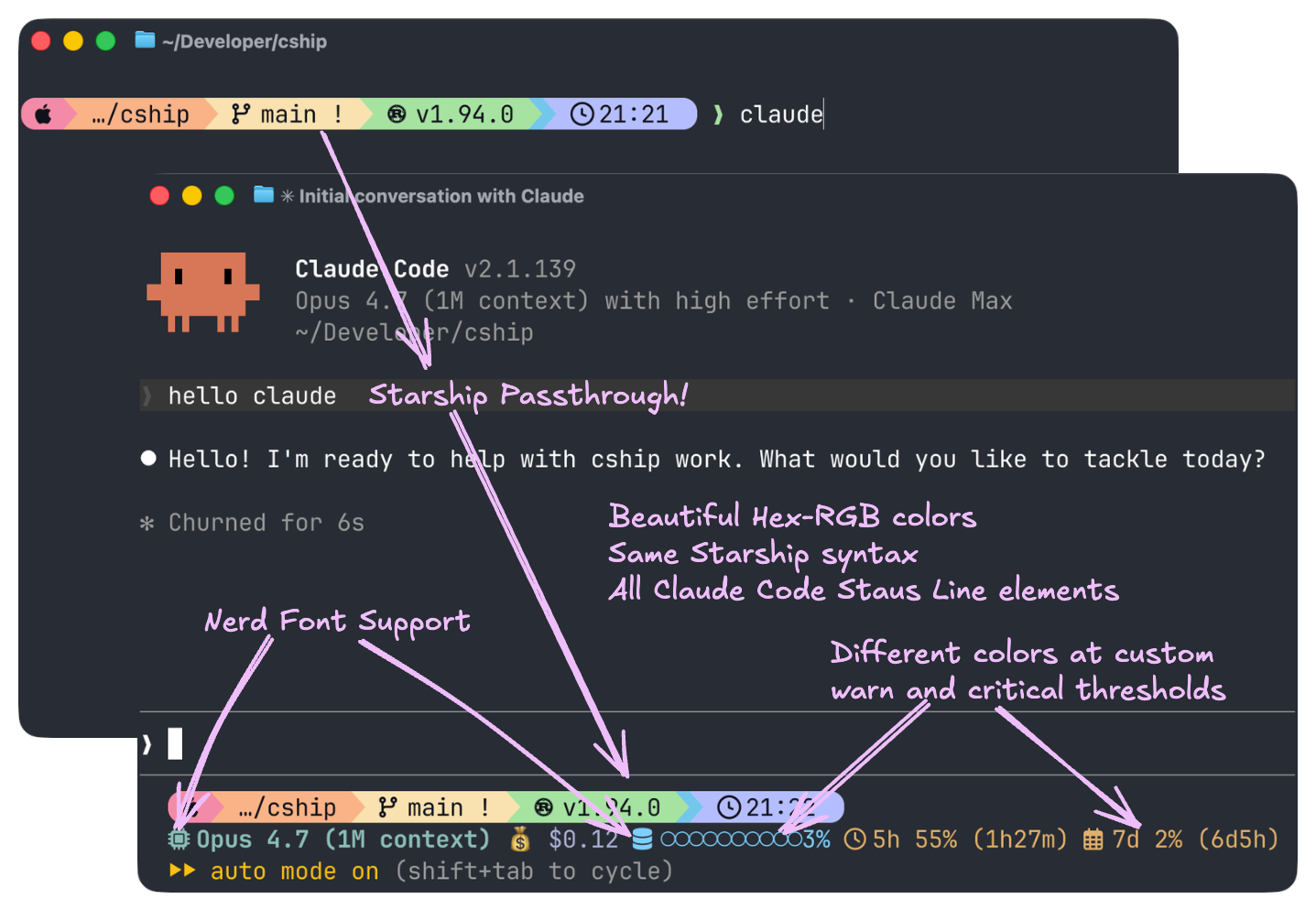
cship renders a live statusline for Claude Code sessions, showing session cost, context window usage, model name, API usage limits, and more — all configurable via a simple TOML file.
curl -fsSL https://cship.dev/install.sh | bash
Auto-detects your OS and architecture (macOS arm64/x86_64, Linux x86_64/aarch64), downloads the binary to ~/.local/bin/cship, creates a starter config at ~/.config/cship.toml, and wires the statusLine entry in ~/.claude/settings.json.
Optional dependencies (Starship for passthrough modules, and libsecret-tools on Linux for usage limits) are handled as follows:
--yes / -y — auto-installs all optional deps without prompting:
curl -fsSL https://cship.dev/install.sh | bash -s -- --yes
RUN, CI pipelines, no TTY) — optional deps are skipped automatically; the installer prints instructions for manual installation.Run this one-liner in PowerShell (5.1 or later):
irm https://cship.dev/install.ps1 | iex
Installs to %USERPROFILE%\.local\bin\cship.exe, writes config to %USERPROFILE%\.config\cship.toml, and registers the statusline in %USERPROFILE%\.claude\settings.json.
You can inspect the script before running: install.ps1
Requires the Rust toolchain.
cargo install cship
After installing with cargo on macOS / Linux, wire the statusline manually in ~/.claude/settings.json:
{
  "statusLine": { "type": "command", "command": "cship" }
}
After installing with cargo on Windows, wire the statusline manually in %APPDATA%\\Claude\\settings.json:
{
  "statusLine": { "type": "command", "command": "cship" }
}
~/.config/cship.toml (on Windows: %USERPROFILE%\.config\cship.toml).cship.toml in your project root for per-project overrides.lines array defines the rows of your statusline.$cship.<module> tokens (native cship modules) with Starship module tokens (e.g. $git_branch).~/.config/cship.toml.Everything in the Claude Code status line documentation is available as a $cship.<module> token for you to mix and match in the lines format strings. Here are the most popular ones:
| Token | Description |
|---|---|
$starship_prompt | Full rendered Starship prompt (all configured modules in one row) |
$cship.model | Claude model name |
$cship.cost | Session cost (configurable currency; default $X.XX) |
$cship.context_bar | Visual progress bar of context window usage |
$cship.context_window | Context window tokens (used/total) |
$cship.context_window.used_tokens | Real token count in context with percentage (e.g. 8%(79k/1000k)) |
$cship.cost.total_lines_added | Lines added this session |
$cship.cost.total_lines_removed | Lines removed this session |
$cship.usage_limits | API usage limits (5hr / 7-day, plus per-model and extra-usage when available) |
$cship.usage_limits.per_model | 7-day per-model breakdown (opus / sonnet / cowork / oauth) |
$cship.usage_limits.extra_usage | Extra-credits section with {active} indicator |
$cship.account | Authenticated Anthropic account (work/personal); map org names via labels |
$cship.peak_usage | Peak-time indicator (US Pacific business hours) |
$cship.agent | Sub-agent name |
$cship.effort | Reasoning effort level (low/medium/high/xhigh/max) |
$cship.session | Session identity info |
$cship.workspace | Workspace/project directory |
Full configuration reference: https://cship.dev
Run cship explain to inspect what cship sees from Claude Code's context JSON — useful when a module shows nothing or behaves unexpectedly.
cship explain
To check the installed binary version:
cship --version # or: cship -v
Ready-to-use configurations — from the recommended full-featured setup down to a minimal single-line bar. Each can be dropped into ~/.config/cship.toml.
My personal setup, end to end. Top row: $starship_prompt running Starship's Catppuccin Powerline preset. Bottom row: model, effort, cost, context bar, 7-day per-model usage, extra credits, peak-hours indicator — thresholds escalate cool → warn → critical as budgets fill.
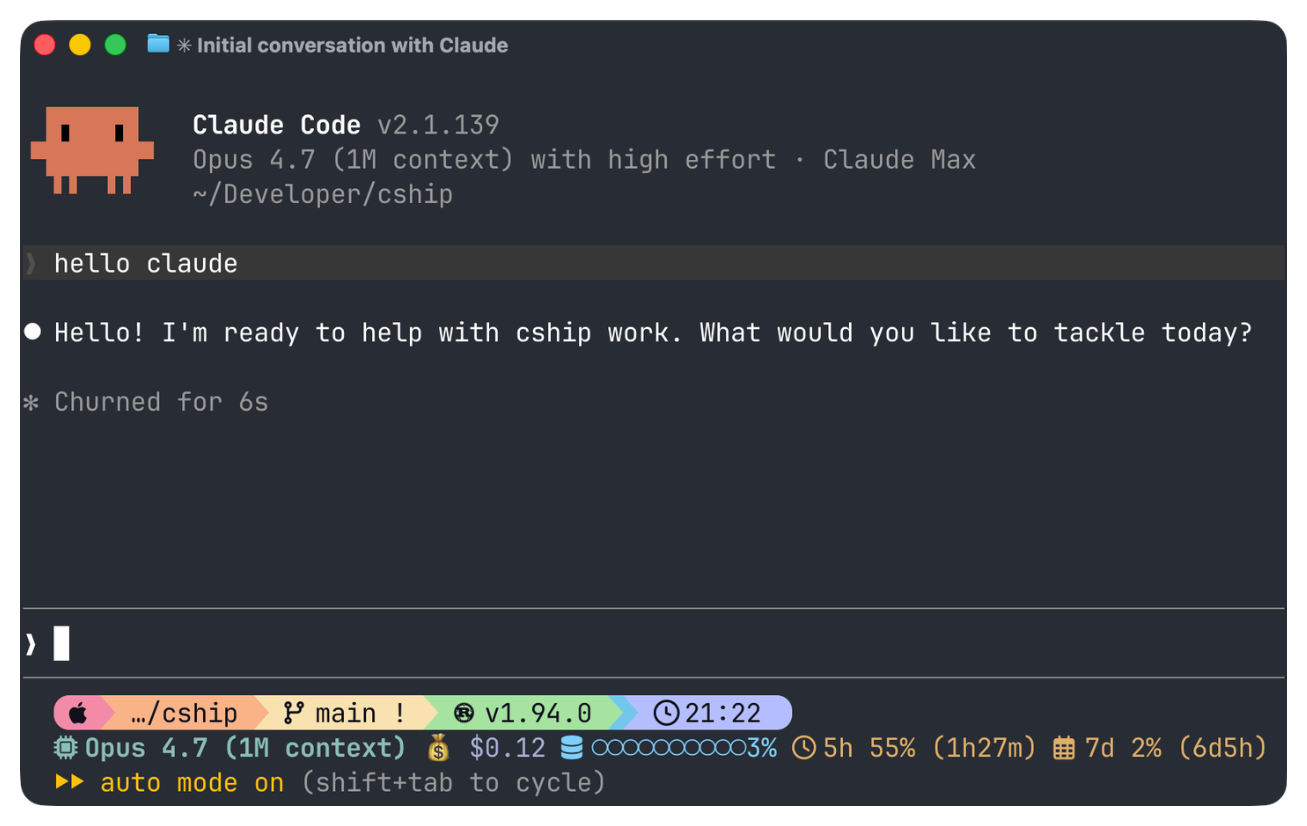
~/.config/cship.toml
[cship]
lines = [
"$starship_prompt",
"$cship.model $cship.effort $cship.cost $cship.context_bar $cship.usage_limits $cship.peak_usage",
]
[cship.model]
symbol = " "
style = "bold cyan"
[cship.effort]
symbol = "⚡ "
style = "fg:#7dcfff"
high_style = "fg:#e0af68"
xhigh_style = "bold fg:#e0af68"
max_style = "bold fg:#f7768e"
[cship.context_bar]
symbol = " "
filled_char = "●"
empty_char = "○"
format = "[$symbol$value]($style)"
width = 10
style = "fg:#7dcfff"
warn_threshold = 40.0
warn_style = "fg:#e0af68"
critical_threshold = 70.0
critical_style = "bold fg:#f7768e"
[cship.cost]
symbol = "💰 "
style = "fg:#a9b1d6"
warn_threshold = 10
warn_style = "fg:#e0af68"
critical_threshold = 50
critical_style = "bold fg:#f7768e"
[cship.usage_limits]
five_hour_format = " 5h {pct}% ({reset})"
seven_day_format = " 7d {pct}% ({reset})"
separator = " "
warn_threshold = 50.0
warn_style = "fg:#e0af68"
critical_threshold = 80.0
critical_style = "bold fg:#f7768e"
~/.config/starship.toml — Starship's Catppuccin Powerline preset:
"$schema" = 'https://starship.rs/config-schema.json'
format = """
[](red)\
$os\
$username\
[](bg:peach fg:red)\
$directory\
[](bg:yellow fg:peach)\
$git_branch\
$git_status\
[](fg:yellow bg:green)\
$c\
$rust\
$golang\
$nodejs\
$php\
$java\
$kotlin\
$haskell\
$python\
[](fg:green bg:sapphire)\
$conda\
[](fg:sapphire bg:lavender)\
$time\
[ ](fg:lavender)\
$cmd_duration\
$line_break\
$character"""
palette = 'catppuccin_mocha'
[os]
disabled = false
style = "bg:red fg:crust"
format = "[$symbol ]($style)"
[os.symbols]
Macos = ""
# (full OS symbol list trimmed for brevity — see the preset link above)
[username]
show_always = false
style_user = "bg:red fg:crust"
style_root = "bg:red fg:crust"
format = '[ $user]($style)'
[directory]
style = "bg:peach fg:crust"
format = "[ $path ]($style)"
truncation_length = 3
truncation_symbol = "…/"
[directory.substitutions]
"Documents" = " "
"Downloads" = " "
"Music" = " "
"Pictures" = " "
"Developer" = " "
[git_branch]
symbol = ""
style = "bg:yellow"
format = '[[ $symbol $branch ](fg:crust bg:yellow)]($style)'
[git_status]
style = "bg:yellow"
format = '[[($all_status$ahead_behind )](fg:crust bg:yellow)]($style)'
[nodejs]
symbol = ""
style = "bg:green"
format = '[[ $symbol( $version) ](fg:crust bg:green)]($style)'
[rust]
symbol = ""
style = "bg:green"
format = '[[ $symbol( $version) ](fg:crust bg:green)]($style)'
[golang]
symbol = ""
style = "bg:green"
format = '[[ $symbol( $version) ](fg:crust bg:green)]($style)'
[python]
symbol = ""
style = "bg:green"
format = '[[ $symbol( $version)(\(#$virtualenv\)) ](fg:crust bg:green)]($style)'
[conda]
symbol = " "
style = "fg:crust bg:sapphire"
format = '[$symbol$environment ]($style)'
ignore_base = false
[time]
disabled = false
time_format = "%R"
style = "bg:lavender"
format = '[[ $time ](fg:crust bg:lavender)]($style)'
[line_break]
disabled = true
[character]
success_symbol = '[❯](bold fg:green)'
error_symbol = '[❯](bold fg:red)'
vimcmd_symbol = '[❮](bold fg:green)'
[cmd_duration]
show_milliseconds = true
format = "⏳ $duration "
style = "bg:lavender"
show_notifications = true
min_time_to_notify = 45000
# Catppuccin Mocha palette — full palette + frappe/latte/macchiato variants
# omitted for brevity. Grab them from the preset link above.
[palettes.catppuccin_mocha]
rosewater = "#f5e0dc"
flamingo = "#f2cdcd"
pink = "#f5c2e7"
mauve = "#cba6f7"
red = "#f38ba8"
maroon = "#eba0ac"
peach = "#fab387"
yellow = "#f9e2af"
green = "#a6e3a1"
teal = "#94e2d5"
sky = "#89dceb"
sapphire = "#74c7ec"
blue = "#89b4fa"
lavender = "#b4befe"
text = "#cdd6f4"
crust = "#11111b"
One clean row. Model, cost with colour thresholds, context bar.

[cship]
lines = ["$cship.model  $cship.cost  $cship.context_bar"]

[cship.cost]
style              = "green"
warn_threshold     = 2.0
warn_style         = "yellow"
critical_threshold = 5.0
critical_style     = "bold red"

[cship.context_bar]
width              = 10
warn_threshold     = 40.0
warn_style         = "yellow"
critical_threshold = 70.0
critical_style     = "bold red"
Two rows: Starship git status on top, Claude session below. Starship passthrough ($directory, $git_branch, $git_status) requires Starship to be installed. Each Claude family gets its own colour via haiku_style / sonnet_style / opus_style so you can tell which model you're talking to at a glance.

[cship]
lines = [
  "$directory$git_branch$git_status",
  "$cship.model  $cship.cost  $cship.context_bar",
]

[cship.model]
symbol       = "🤖 "
haiku_style  = "bold green"
sonnet_style = "bold cyan"
opus_style   = "bold magenta"

[cship.cost]
warn_threshold     = 2.0
warn_style         = "yellow"
critical_threshold = 5.0
critical_style     = "bold red"

[cship.context_bar]
width              = 10
warn_threshold     = 40.0
warn_style         = "yellow"
critical_threshold = 70.0
critical_style     = "bold red"
Shows cost, lines changed, rolling API usage limits, and a peak-time indicator. Colour escalates as budgets fill. Displays the cost in GBP via currency_symbol + conversion_rate — thresholds are evaluated against the converted display value, so restate them in your display currency.

[cship]
lines = [
  "$cship.model $cship.cost +$cship.cost.total_lines_added -$cship.cost.total_lines_removed",
  "$cship.context_bar $cship.usage_limits $cship.peak_usage",
]

[cship.model]
style = "bold purple"

[cship.cost]
currency_symbol    = "£"
conversion_rate    = 0.79
warn_threshold     = 0.8     # thresholds are in the display currency (GBP)
warn_style         = "bold yellow"
critical_threshold = 2.4
critical_style     = "bold red"

[cship.context_bar]
width              = 10
warn_threshold     = 40.0
warn_style         = "yellow"
critical_threshold = 70.0
critical_style     = "bold red"

[cship.usage_limits]
ttl                = 60        # cache TTL in seconds; increase if running many concurrent sessions
five_hour_format   = "5h {pct}%"
seven_day_format   = "7d {pct}%"
separator          = " "
warn_threshold     = 70.0
warn_style         = "bold yellow"
critical_threshold = 90.0
critical_style     = "bold red"

[cship.peak_usage]
style = "bold yellow"
Every style value is a fg:#rrggbb hex colour — no named colours anywhere. Amber warns, coral criticals. Uses filled_char / empty_char to swap the default blocky bar for dotted glyphs (● / ○).

[cship]
lines = [
  "$cship.model $cship.cost",
  "$cship.context_bar $cship.usage_limits",
]

[cship.model]
style = "fg:#c3e88d"

[cship.cost]
style              = "fg:#82aaff"
warn_threshold     = 2.0
warn_style         = "fg:#ffcb6b"
critical_threshold = 6.0
critical_style     = "bold fg:#f07178"

[cship.context_bar]
width              = 10
filled_char        = "●"
empty_char         = "○"
style              = "fg:#89ddff"
warn_threshold     = 40.0
warn_style         = "fg:#ffcb6b"
critical_threshold = 70.0
critical_style     = "bold fg:#f07178"

[cship.usage_limits]
five_hour_format   = "5h {pct}%"
seven_day_format   = "7d {pct}%"
separator          = " "
warn_threshold     = 70.0
warn_style         = "fg:#ffcb6b"
critical_threshold = 90.0
critical_style     = "bold fg:#f07178"
Three-row layout for polyglot developers. Starship handles language runtimes and git; cship handles session data. Styled with the Tokyo Night colour palette.
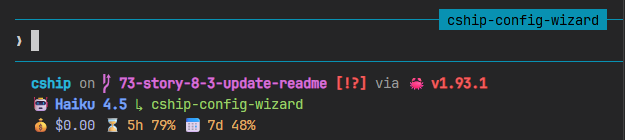
[cship]
lines = [
  """
  $directory\
  $git_branch\
  $git_status\
  $python\
  $nodejs\
  $rust
  """,
  "$cship.model $cship.agent",
  "$cship.context_bar $cship.cost $cship.usage_limits",
]

[cship.model]
symbol = "🤖 "
style  = "bold fg:#7aa2f7"

[cship.agent]
symbol = "↳ "
style  = "fg:#9ece6a"

[cship.context_bar]
width              = 10
style              = "fg:#7dcfff"
warn_threshold     = 40.0
warn_style         = "fg:#e0af68"
critical_threshold = 70.0
critical_style     = "bold fg:#f7768e"

[cship.cost]
symbol             = "💰 "
style              = "fg:#a9b1d6"
warn_threshold     = 2.0
warn_style         = "fg:#e0af68"
critical_threshold = 5.0
critical_style     = "bold fg:#f7768e"

[cship.usage_limits]
five_hour_format   = "⌛ 5h {pct}%"
seven_day_format   = "📅 7d {pct}%"
separator          = " "
warn_threshold     = 70.0
warn_style         = "fg:#e0af68"
critical_threshold = 90.0
critical_style     = "bold fg:#f7768e"
Requires a Nerd Font in your terminal. Icons are embedded as symbol values on each module and as literal characters in the format string for Starship passthrough rows. You can use format to control how the symbol and value are combined for each module exactly like you'd do with Starship. Enables show_per_model = true to append the 7-day per-model breakdown to $cship.usage_limits, with a custom sonnet_format row.

[cship]
lines = [
"""
$directory\
$git_branch\
$git_status\
$python\
$nodejs\
$rust
""",
"$cship.model $cship.cost $cship.context_bar $cship.usage_limits",
]
[cship.model]
symbol = " "
style = "bold fg:#7aa2f7"
[cship.cost]
symbol = "💰 "
style = "fg:#a9b1d6"
warn_threshold = 2.0
warn_style = "fg:#e0af68"
critical_threshold = 5.0
critical_style = "bold fg:#f7768e"
[cship.context_bar]
symbol = " "
format = "[$symbol$value]($style)"
width = 10
style = "fg:#7dcfff"
warn_threshold = 40.0
warn_style = "fg:#e0af68"
critical_threshold = 70.0
critical_style = "bold fg:#f7768e"
[cship.usage_limits]
five_hour_format = "⌛ 5h {pct}%"
seven_day_format = "📅 7d {pct}%"
sonnet_format = "🎼 {pct}%"
separator = " "
show_per_model = true
warn_threshold = 70.0
warn_style = "fg:#e0af68"
critical_threshold = 90.0
critical_style = "bold fg:#f7768e"
Complete configuration reference, format string syntax, all module options, and examples.
If you found this project useful, please give us a star ⭐ on GitHub!
If you find bugs or have suggestions, open an issue or submit a pull request. Contributions are very welcome!
Before submitting a PR, run the following to match what CI checks:
cargo fmt && cargo clippy -- -D warnings && cargo test && cargo build --release
See CONTRIBUTING.md for full details.
Apache-2.0
Project management using GitHub Issues + Git worktrees for parallel agent execution
Core skills library for Claude Code with 20+ battle-tested skills including TDD, debugging, and brainstorming
Coding agent session manager supporting Claude Code, Gemini CLI, Codex, and more
191 agents, 155 skills, and 82 plugins cross-compatible with Claude Code, Cursor, and Codex
