

Are you the author? Sign in to claim
Demo of a customer service agent (Cymbal Air) using LangGraph, Tools, and RAG to interact with Google Cloud Databases vi

[!NOTE] This project is for demonstration only and is not an officially supported Google product.
If you're a Googler using this demo, please fill up this form. If you're interested in using our hosted version, please fill up this form.
This project provides a production-quality reference implementation for building Agentic applications that use Agents and Retrieval Augmented Generation (RAG) to query and interact with data stored in Google Cloud Databases.
This demonstration features Cymbal Air, a fictional airline. The application showcases a customer service assistant that helps travelers manage flights and find information about San Francisco International Airport (SFO), Cymbal Air's hub. The agent can answer questions like:
One of the best tools for reducing hallucinations is to use Retrieval Augmented Generation (RAG). RAG is the concept of retrieving some data or information, augmenting your prompt to the agent, and allowing it to generate more accurate responses based on the data included in the prompt. This grounds the model’s response, making it less likely to hallucinate. This technique is also useful for allowing the agent to access data it didn’t have when it was trained. And unlike fine-tuning, the information retrieved for RAG does not alter the model or otherwise leave the context of the request - making it more suitable for use cases where information privacy and security are important.
Cloud databases provide a managed solution for storing and accessing data in a scalable and a reliable way. By connecting an agent to a cloud database, developers can give their applications access to a wider range of information and reduce the risk of hallucinations.
This application uses an Agent-based orchestration model. Instead of a static
chain of calls, the LLM acts as an intelligent Agent that decides which tools to
use and in what order. It is given a set of available tools, each with a
specific function (e.g., find_flights, list_amenities). Based on the user's
query, the agent reasons about the best tool to use to find the answer. This
"thought process" allows the agent to handle a wider variety of queries and to
break down complex questions into smaller, manageable steps.
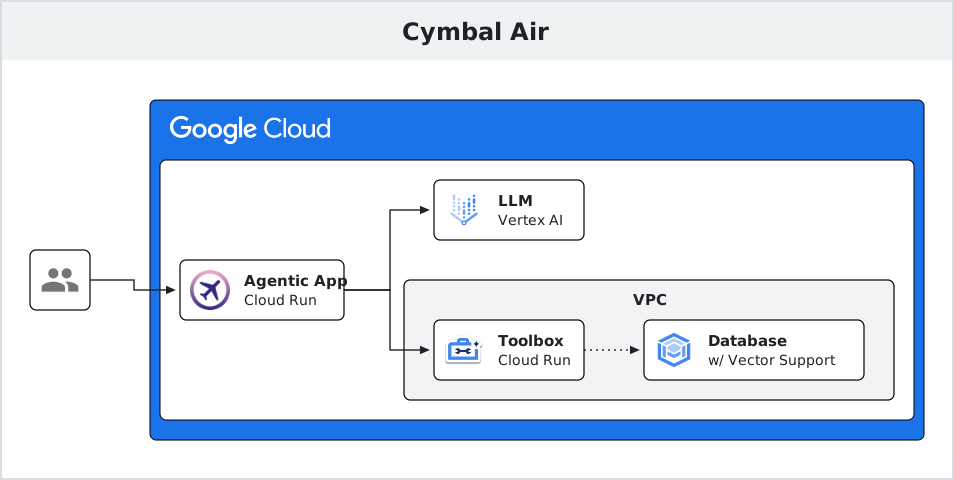
The architecture consists of three main components:
Using the Toolbox as an intermediary offers several advantages:
Head over to the official MCP Toolbox docs for more details.
Deploying Cymbal Air app is a three-step process. You will first download the necessary tools, then perform a one-time setup for your database and Toolbox configuration, and finally launch the Toolbox server and the app.
First, clone this repository and download the MCP Toolbox binary.
Clone the repository:
git clone https://github.com/GoogleCloudPlatform/cymbal-air-toolbox-demo.git
cd cymbal-air-toolbox-demo
Download MCP Toolbox binary:
Follow these steps to download the binary. This involves running the following commands:
# See the releases page for the latest version
export VERSION=0.8.0
curl -O https://storage.googleapis.com/genai-toolbox/v$VERSION/linux/amd64/toolbox
chmod +x toolbox
Next, you must perform a one-time setup to create your database instance,
populate it with data, and create the tools.yaml configuration file. This
process uses the Toolbox binary you just downloaded.
[!IMPORTANT] For detailed, step-by-step instructions, follow the Database Setup Guide.
[!NOTE] If you have already configured your own database, you can skip this section.
After your database is initialized and your tools.yaml file is created, you
must run the Toolbox server so the agentic app can connect to it. You can either
run it locally for development or deploy it to Cloud Run for a more robust
setup.
For local development and testing, you can run the Toolbox server directly from your terminal. This is the quickest way to get started.
For instructions, follow the guide to running the Toolbox locally.
The basic command will be:
./toolbox --tools-file "tools.yaml"
For a scalable and production-ready setup, you can deploy the Toolbox as a service on Google Cloud Run. This provides a stable, shareable endpoint for your application.
For instructions, follow the guide to deploying the Toolbox on Cloud Run.
Instructions for running app locally
Instructions for cleaning up resources
This demo can serve as a starting point for building your own Agentic applications. You can customize the tools available to the agent by modifying the MCP Toolbox configuration file.
Please refer to the MCP Toolbox documentation for more information on creating and configuring tools.
 @googleapis✓ Official
Google's universal MCP server supporting PostgreSQL, MySQL, MongoDB, Redis, and 10+ databases
Official MongoDB integration — query collections, run aggregations, inspect schemas
 @designcomputer
Secure MCP server for MySQL database interaction, queries, and schema management
Run Claude Code as an MCP server so any agent can delegate coding tasks to it
 @codeguilds-knight