

Are you the author? Sign in to claim
🚀 MCP server for Dynamics 365 Finance & Operations with standard and custom indexed X++ objects. Provides IntelliSense-
26 AI tools that know every X++ class, table, form, and EDT in your D365FO codebase




Grounded AI development for Dynamics 365 Finance & Operations — works with GitHub Copilot and Claude Code


One-click install connects to an already-deployed server — VS Code asks for the URL, Cursor installs a placeholder to edit. Visual Studio & Claude Code: see Quick Start.
AI assistants excel at C#, Python, and JavaScript. X++ is different: your D365FO codebase is private, deeply customized, and invisible to every model — so AI confidently generates code that doesn't compile.
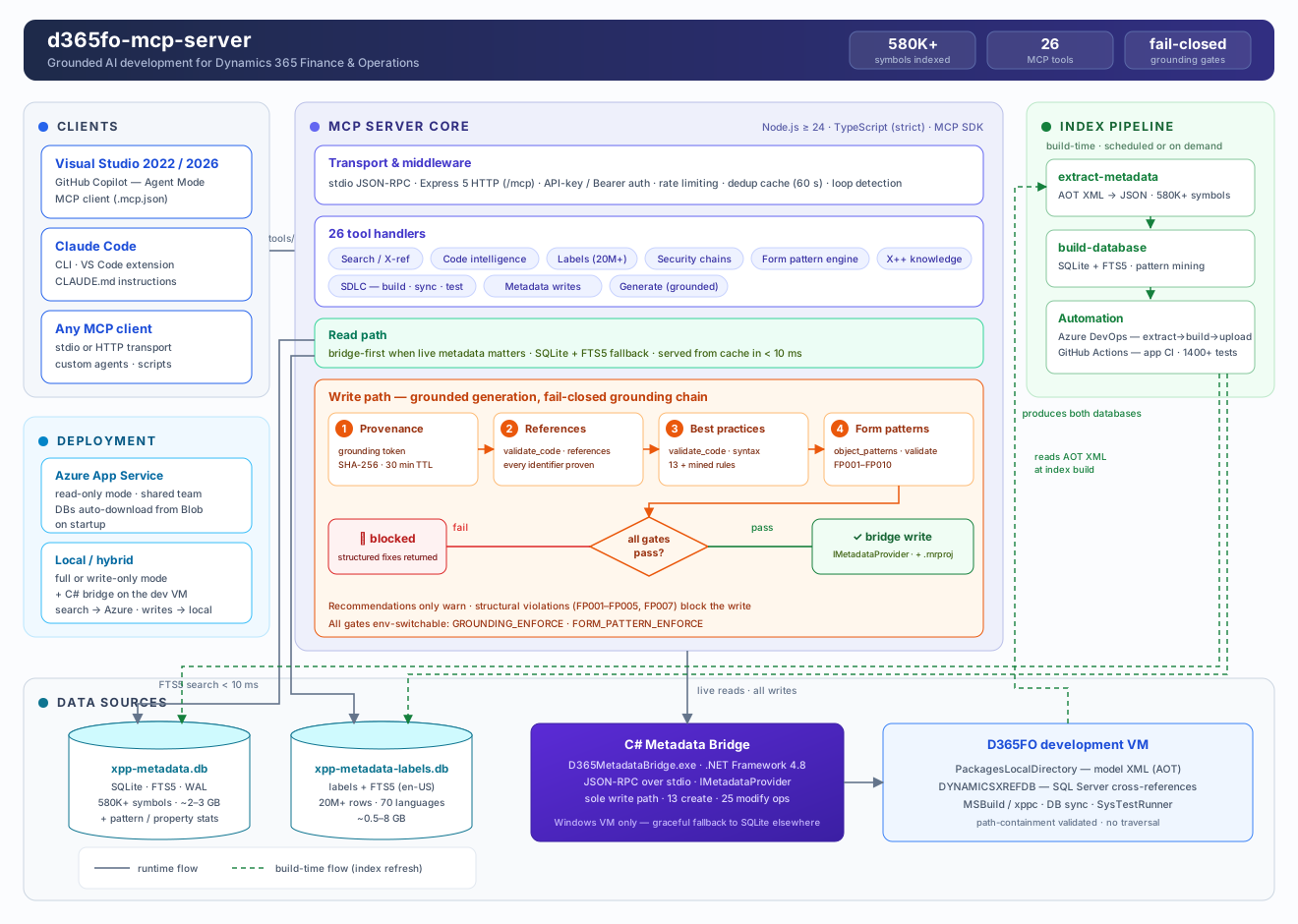
This server pre-indexes your entire D365FO installation (580 000+ symbols across standard, ISV, and custom models) and exposes it as 26 specialized MCP tools. Every signature, every CoC wrapper, every label, every form pattern — verified against your real metadata before the AI writes a single line.
| Task | Without this server | With this server |
|---|---|---|
| Method signatures | Guessed → compile errors | Exact, from your codebase |
| Existing CoC wrappers | Manual AOT search | extension_info(mode="coc") in < 50 ms |
| New forms | Hand-written XML, broken patterns | Cloned from reference forms, validated against the pattern catalog |
| Labels | Hardcoded strings | Right @SYS/@MODULE key found instantly |
| Security chains | Hours of manual tracing | Role → Duty → Privilege → Entry Point in one call |
| Generated code | Hallucinated fields and types | Every reference proven against the index, gated before write |
| Feature | Description |
|---|---|
| 🔍 Full-codebase intelligence | 580K+ symbols indexed: classes, tables, forms, EDTs, enums, labels (20M+ rows), security artifacts — FTS5 search in < 10 ms |
| 🛡️ Grounded generation | Fail-closed gates: prepare issues grounding tokens, validate_code(mode="references") proves every identifier, validate_code(mode="syntax") enforces best practices — hallucinated code never reaches disk |
| 🧩 Form pattern engine | Complete catalog of Microsoft form patterns and sub-patterns: recommends the right pattern, clones reference forms with datasource re-binding, validates structure and blocks invalid writes |
| ✍️ Safe metadata writes | C# bridge uses Microsoft's own IMetadataProvider — no string-replacement XML corruption, automatic .rnrproj registration, one-call undo |
| 🏗️ SDLC integration | MSBuild compilation with structured diagnostics, DB sync, xppbp best practices, SysTestRunner — all from chat |
| 📐 X++ knowledge base | Queryable rules: select grammar, CoC authoring, SysDa, FormRun lifecycle, AX2012→D365FO migration — prevents deprecated APIs |
Forms are the hardest artifact to generate correctly — each pattern dictates required containers, ordering, and allowed sub-patterns. The form pattern engine makes it a guided pipeline:
flowchart LR
    A["object_patterns<br/>(domain=form, action=analyze)"] --> B["object_patterns<br/>(domain=form, action=spec)"]
    B --> C["generate_object<br/>objectType=form, cloneFrom"]
    C --> D["object_patterns<br/>(domain=form, action=validate) FP001–FP010"]
    D -->|clean| E["d365fo_file<br/>(action=create) write + project"]
    D -->|errors| C
Structural violations (wrong order, missing container, disallowed control) block the write — recommendations only warn. Mined pattern statistics from your own environment ground every suggestion in reality.
Pick your path:
| Path | Who | Install effort |
|---|---|---|
| A — Azure client | Team member, server already deployed | .mcp.json only — 2 minutes |
| B — Hybrid (recommended for teams) | Azure search + local writes on your VM | Clone + build, no indexing |
| C/E — Local | Single developer, everything on the VM | Clone + build + index (~15 min) |
Full walkthrough with all scenarios: docs/QUICK_START.md
# Local / hybrid install (on the D365FO VM)
git clone https://github.com/dynamics365ninja/d365fo-mcp-server.git K:\d365fo-mcp-server
cd K:\d365fo-mcp-server
npm install
cd bridge\D365MetadataBridge; dotnet build -c Release; cd ..\..   # C# bridge — required for writes
npm run build

# Local only — build the metadata index (skip for hybrid)
copy .env.example .env            # set PACKAGES_PATH, CUSTOM_MODELS
npm run extract-metadata
npm run build-database
UDE / Power Platform Tools? Run
npm run select-configinstead of editingPACKAGES_PATH.
%USERPROFILE%\.mcp.json:{
"servers": {
"d365fo-azure": { "url": "https://your-server.azurewebsites.net/mcp/" },
"d365fo-local": {
"command": "node",
"args": ["K:\\d365fo-mcp-server\\dist\\index.js"],
"env": {
"MCP_SERVER_MODE": "write-only",
"D365FO_SOLUTIONS_PATH": "K:\\repos\\MySolution\\projects",
"D365FO_WORKSPACE_PATH": "K:\\AosService\\PackagesLocalDirectory\\YourPackage\\YourModel"
}
}
}
}
Copy-Item -Path ".github" -Destination "C:\source\repos\" -Recurse
All options: docs/MCP_CONFIG.md
claude mcp add-json --scope user d365fo-mcp-tools '{"type":"http","url":"https://your-server.azurewebsites.net/mcp/","alwaysLoad":true}'
Copy-Item "K:\d365fo-mcp-server\CLAUDE.template.md" "C:\source\repos\CLAUDE.md"
Stdio variant and troubleshooting: docs/CLAUDE_CODE_SETUP.md
Open the AI chat (Copilot Agent Mode / Claude Code) and ask:
What tables contain "CustAccount" field?
A search tool call returning results from your codebase = you're connected.
One shared instance for the whole team — the metadata index lives in Blob Storage and downloads automatically on startup.
Deployment guide: docs/SETUP_AZURE.md · CI/CD automation: docs/PIPELINES.md
| Getting started | Reference | Operations |
|---|---|---|
| Quick Start — 5 steps to running | All 26 tools | Azure deployment |
| Setup scenarios A–F | .mcp.json reference | DevOps pipelines |
| Claude Code setup | Architecture | Testing |
| Usage examples — real tool chains | C# Bridge | Custom / ISV models |
| Workspace detection | SQLite vs Bridge |
MIT
40+ tools for querying dashboards, alerts, datasources, and logs in Grafana
Run Claude Code as an MCP server so any agent can delegate coding tasks to it
 @microsoft✓ Official
Browser automation using accessibility snapshots instead of screenshots
 @googleapis✓ Official
Google's universal MCP server supporting PostgreSQL, MySQL, MongoDB, Redis, and 10+ databases
