

Are you the author? Sign in to claim
Diagrams that move — a Claude AI skill that generates animated flowcharts & architecture diagrams as self-contained HTML
English | 简体中文

Diagrams that move. A Claude AI skill that turns a plain-English description — or a Mermaid source — into an animated technical diagram: a self-contained HTML/SVG file where dashed connectors stream in the direction of execution and light dots travel through the system like requests in flight. The style you see on modern infra landing pages (Diagrid, Temporal, Inngest).
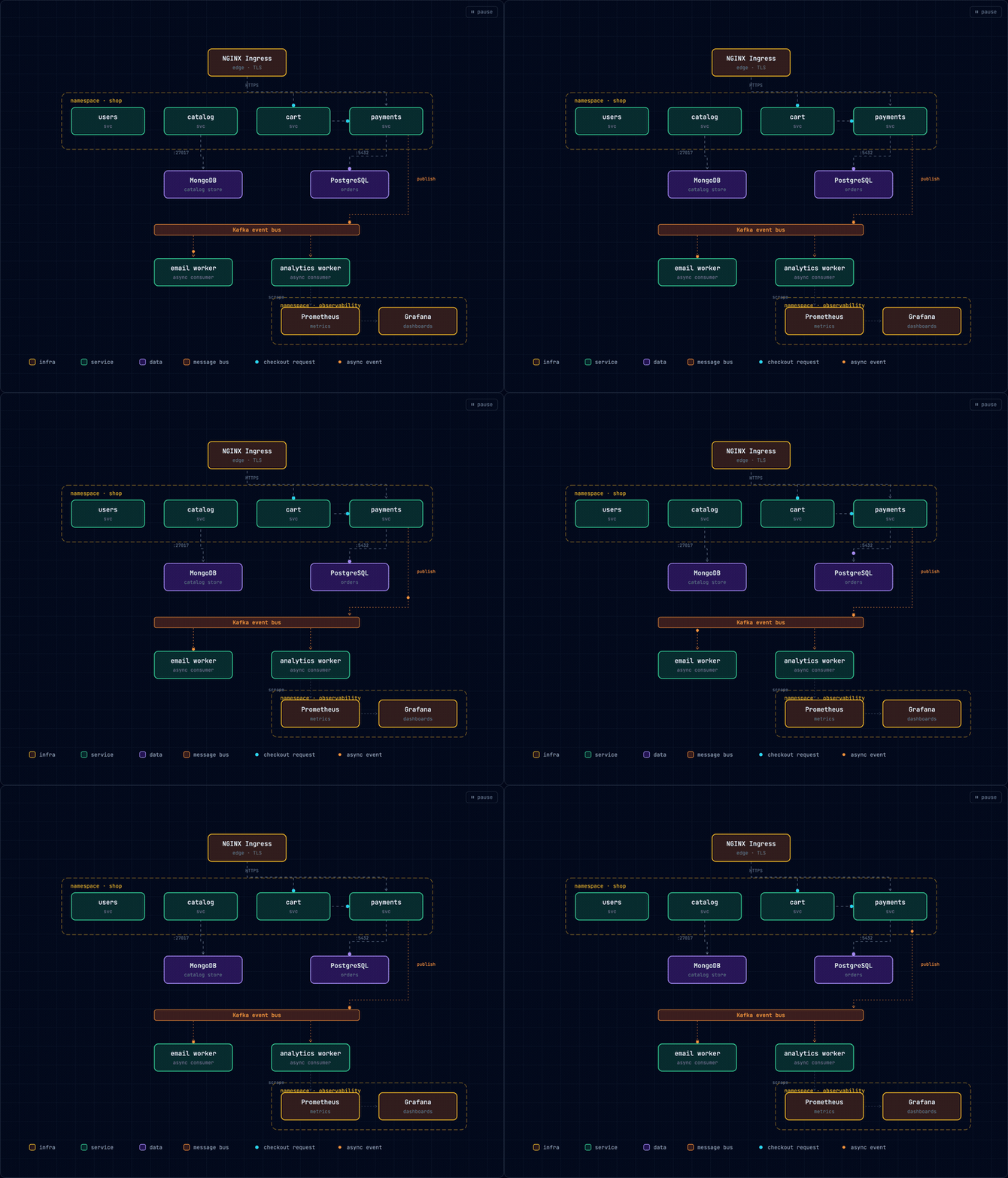
▶ Watch real diagrams run live → — unedited skill output, not a video.
Two modes — describe a workflow or a system in plain English (or paste Mermaid), and get one self-contained HTML file that's already moving:
| Flow mode | Architecture mode |
|---|---|
 | |
Describe a workflow or a system — in plain English, or paste a Mermaid diagram — and Claude hands back a single .html file that's already moving. The name is the implementation: stroke-dashoffset offset animation + animateMotion paths — no libraries, no GIF rendering, no design tools.
flowchart / graph / stateDiagram-v2 source — the same animated result either way.Needs a Claude plan that includes skills (Pro, Max, Team, or Enterprise).
Claude Code — one command. -g installs it globally (every project sees it); drop -g to install into the current project only (./.claude/skills/):
npx skills add csthink/dashmotion -a claude-code -g
-a claude-code, and global vs. project?-a claude-code writes a plain copy (into ~/.claude/skills/ with -g, or ./.claude/skills/ without). The bare npx skills add csthink/dashmotion makes a symlink instead, and Claude Code's symlink handling is rough — the link may not get created, a symlinked skill doesn't appear in /skills (claude-code#14836), and npx skills update won't refresh it. A copy lists in /skills and updates cleanly. If the CLI ever prompts copy-vs-symlink, choose copy (or pass --copy). Other agents (Cursor, Codex, …) read ~/.agents/skills/ directly and work fine with the bare command.-g) lives in ~/.claude/skills/, available everywhere. Project-local (no -g) lives in ./.claude/skills/ — scoped to that one directory, and handy to commit alongside a repo so your team gets the skill.Prefer the zip on Claude Code? rm -rf ~/.claude/skills/dashmotion && unzip dashmotion.zip -d ~/.claude/skills/ — clear the folder first when upgrading so old files don't linger.
claude.ai — download dashmotion.zip from Releases, then Settings → Capabilities → Skills → + Add → upload → toggle on.
No Claude client tells you when a skill has a new version — you pull updates yourself. On Claude Code, one command refreshes it in place:
npx skills update dashmotion -g -y
Name the skill: a bare npx skills update -g -y updates every globally-installed skill, not just dashmotion — which may pull updates into others you didn't mean to touch. Drop -g for a project-local install; re-running the install command works too. On claude.ai there's no in-place update — delete the old skill and upload the new dashmotion.zip.
Check which version you're on — it lives in the skill's SKILL.md; compare it against the latest release (npx skills list shows the path, not the version):
grep '^version:' ~/.claude/skills/dashmotion/SKILL.md # project-local: ./.claude/skills/dashmotion/SKILL.md
Add a SessionStart hook so Claude Code refreshes the skill each time it starts. In ~/.claude/settings.json:
{
  "hooks": {
    "SessionStart": [
      { "matcher": "startup", "hooks": [
        { "type": "command", "command": "npx skills update dashmotion -g -y >/dev/null 2>&1 || true" }
      ] }
    ]
  }
}
It costs a short network call at startup and silently keeps you on the latest tag. Widen the command to npx skills update -g -y to auto-update all your global skills.
Uninstall:
npx skills remove dashmotion -g         # installed via the skills CLI (drop -g if project-local)
rm -rf ~/.claude/skills/dashmotion      # installed by unzipping (use ./.claude/... for project-local)
Then just ask — one sentence is enough to see it work:
Use dashmotion to draw a simple 3-step login flow.
The two longer prompts below generated the demos at the top — paste either to reproduce it:
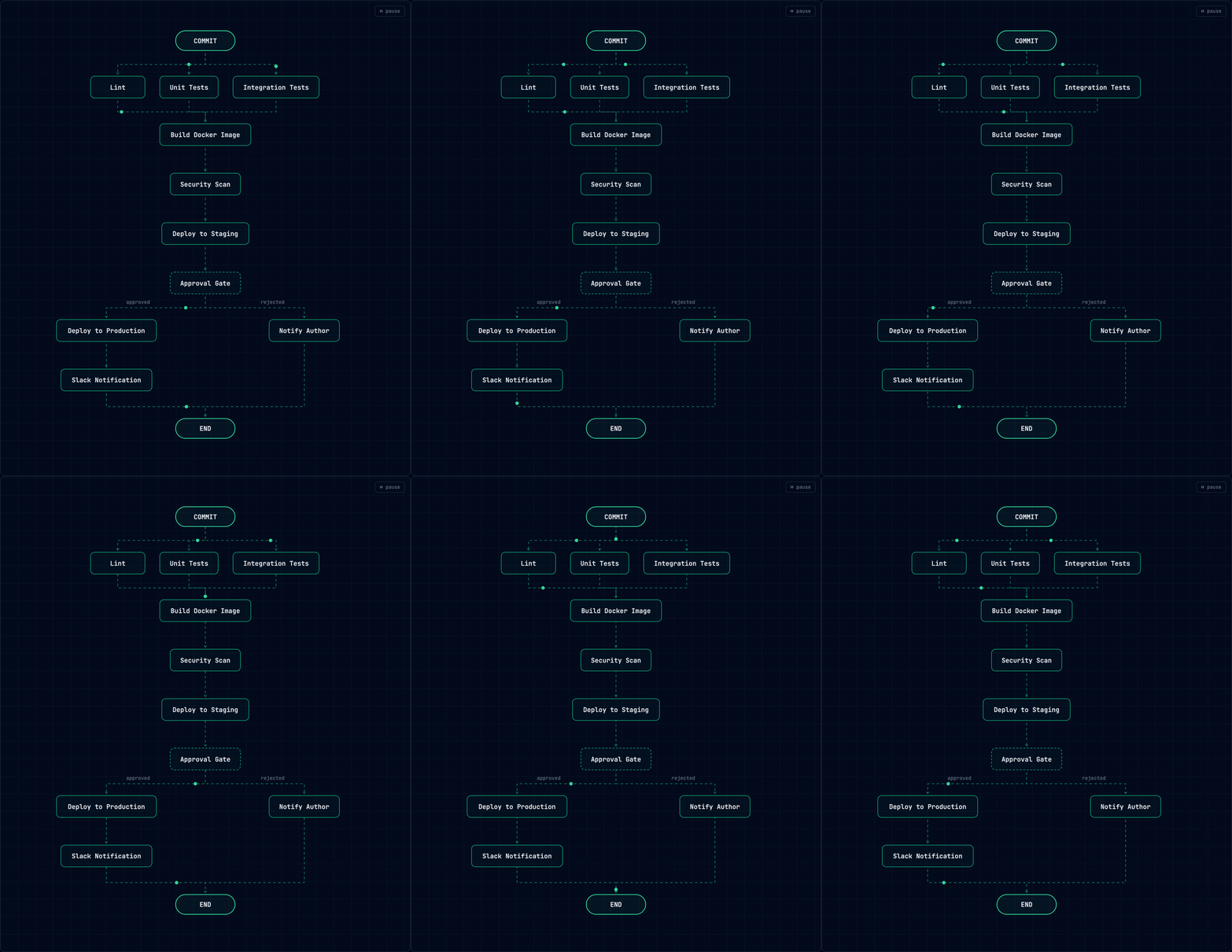
Flow — the left demo:
Use dashmotion to visualize our CI/CD pipeline: a commit runs lint, unit tests and integration tests in parallel; all three merge into building a Docker image; then a security scan; then a deploy to staging; then a manual approval gate — approved deploys to production and posts a Slack notification, rejected notifies the author and ends.
Architecture — the right demo:
Use dashmotion to draw our Kubernetes microservices platform and animate the main request path: an NGINX ingress in front; users, catalog, cart and payments services in the 'shop' namespace; a Kafka bus between the services and two async workers (email worker, analytics worker); PostgreSQL for orders and MongoDB for the catalog; Prometheus and Grafana in an observability namespace. Animate a checkout request from ingress through cart and payments to PostgreSQL, plus an async event from payments through Kafka to the email worker.
A few things worth knowing:
docs/design.md") or just ask for a flowchart / architecture diagram of what you're building.Already have the diagram as Mermaid? Paste it — dashmotion turns a static flowchart/graph or stateDiagram-v2 source into the same moving diagram, no redrawing. Topology and labels are kept exactly; only the layout and colors are recomputed.
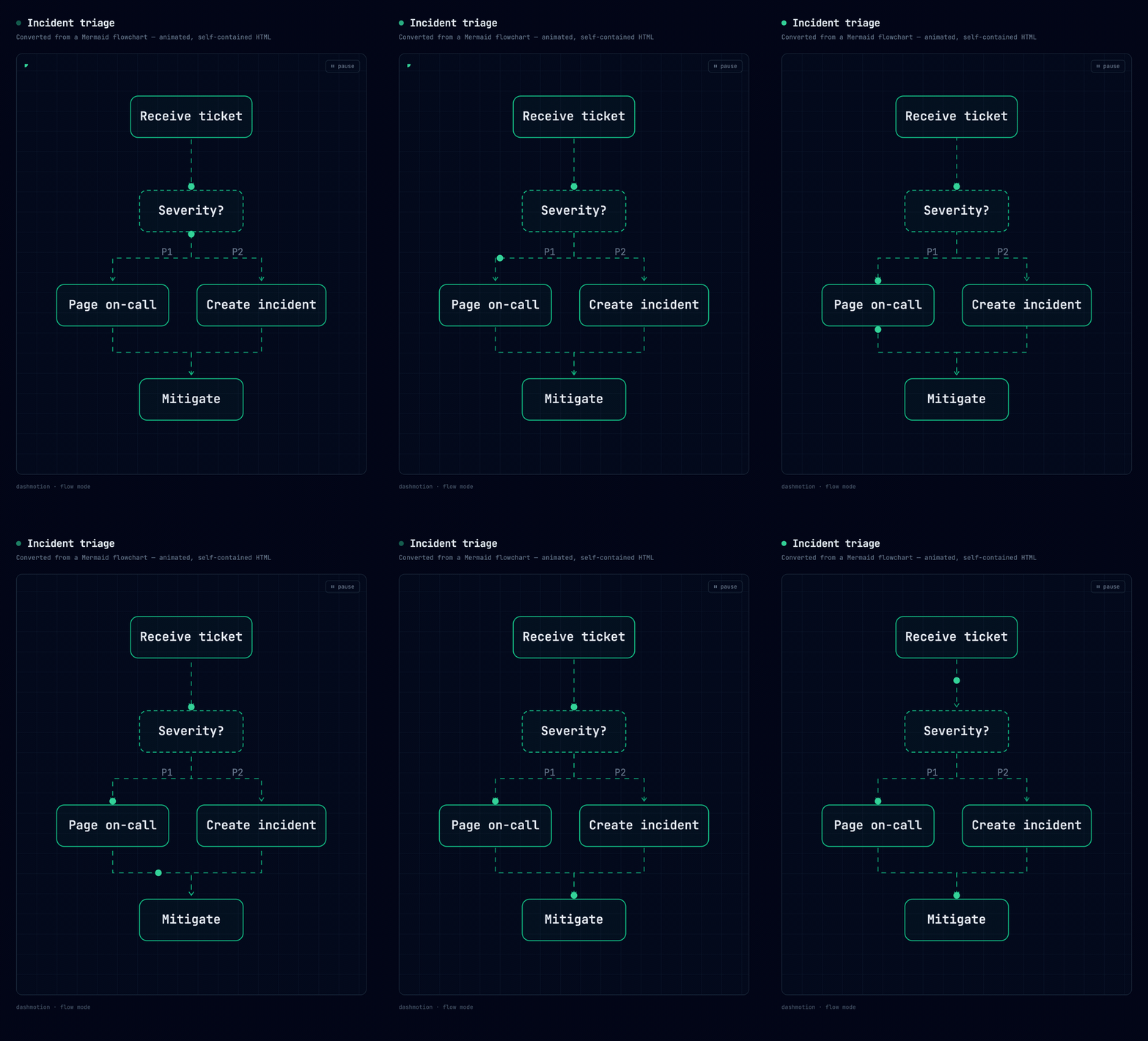
Use dashmotion to animate this mermaid diagram:

```mermaid
flowchart TB
    A[Receive ticket] --> B{Severity?}
    B -->|P1| C[Page on-call]
    B -->|P2| D[Create incident]
    C --> E[Mitigate]
    D --> E
```
…becomes a moving flowchart — dashed connectors stream from Receive ticket through the Severity? decision, fan out, and merge into Mitigate, with a dot riding the path:
What to expect:
--> animates, -.-> becomes a dotted async edge, ==> marks the main path and gets the traveling dot.LR sources are re-laid out; structure is preserved, geometry is not) and colors (classDef/style/linkStyle are replaced by dashmotion's semantic palette).| GIF | Dashmotion (SVG/CSS) | |
|---|---|---|
| File size | MBs | KBs |
| Sharpness | fixed resolution | vector, infinite zoom |
| Editable | re-render everything | ask Claude to change one box |
| Loop | frame-perfect work | free |
| Convert to GIF later | — | one command (timecut) or screen-record |
All CSS animation is gated behind @media (prefers-reduced-motion: no-preference); SMIL dots are removed by script under reduced motion; every diagram ships a visible pause/play toggle and role="img" + <title>/<desc>.
Can I install this alongside architecture-diagram-generator? Yes — tested side by side. Animation intent ("make the request path move") routes to dashmotion; plain static architecture requests stay with Cocoon's skill. No file conflicts.
The animation technique, the deterministic layout engine, the repo layout, and exporting to GIF/MP4 are in docs/how-it-works.md. Version history is in CHANGELOG.md.
Skill packaging pattern and the static architecture design system build on Cocoon-AI/architecture-diagram-generator (MIT). Visual style inspired by the workflow animations on diagrid.io.
MIT
WCAG accessibility audit — automated scanning, manual review, remediation
Playwright testing toolkit — test generation, flaky test fix, migration helpers
Parallel development with git worktrees — port isolation, env sync, cleanup
1000+ skills curated from Anthropic, Vercel, Stripe, and other engineering teams
