Are you the author? Sign in to claim
"DeepCode: Open Agentic Coding (Paper2Code & Text2Web & Text2Backend)"
|
    ██████╗ ███████╗███████╗██████╗  ██████╗ ██████╗ ██████╗ ███████╗
    ██╔══██╗██╔════╝██╔════╝██╔══██╗██╔════╝██╔═══██╗██╔══██╗██╔════╝
    ██║  ██║█████╗  █████╗  ██████╔╝██║     ██║   ██║██║  ██║█████╗
    ██║  ██║██╔══╝  ██╔══╝  ██╔═══╝ ██║     ██║   ██║██║  ██║██╔══╝
    ██████╔╝███████╗███████╗██║     ╚██████╗╚██████╔╝██████╔╝███████╗
    ╚═════╝ ╚══════╝╚══════╝╚═╝      ╚═════╝ ╚═════╝ ╚═════╝ ╚══════╝
|
 DeepCode: Open Agentic Coding






🖥️ CLI InterfaceTerminal-Based Development 
🚀 Advanced Terminal Experience
⚡ Fast command-line workflow 🔧 Developer-friendly interface 📊 Real-time progress tracking Professional terminal interface for advanced users and CI/CD integration |
🌐 Web InterfaceVisual Interactive Experience 
🎨 Modern Web Dashboard
🖱️ Intuitive drag-and-drop 📱 Responsive design 🎯 Visual progress tracking Beautiful web interface with streamlined workflow for all skill levels |
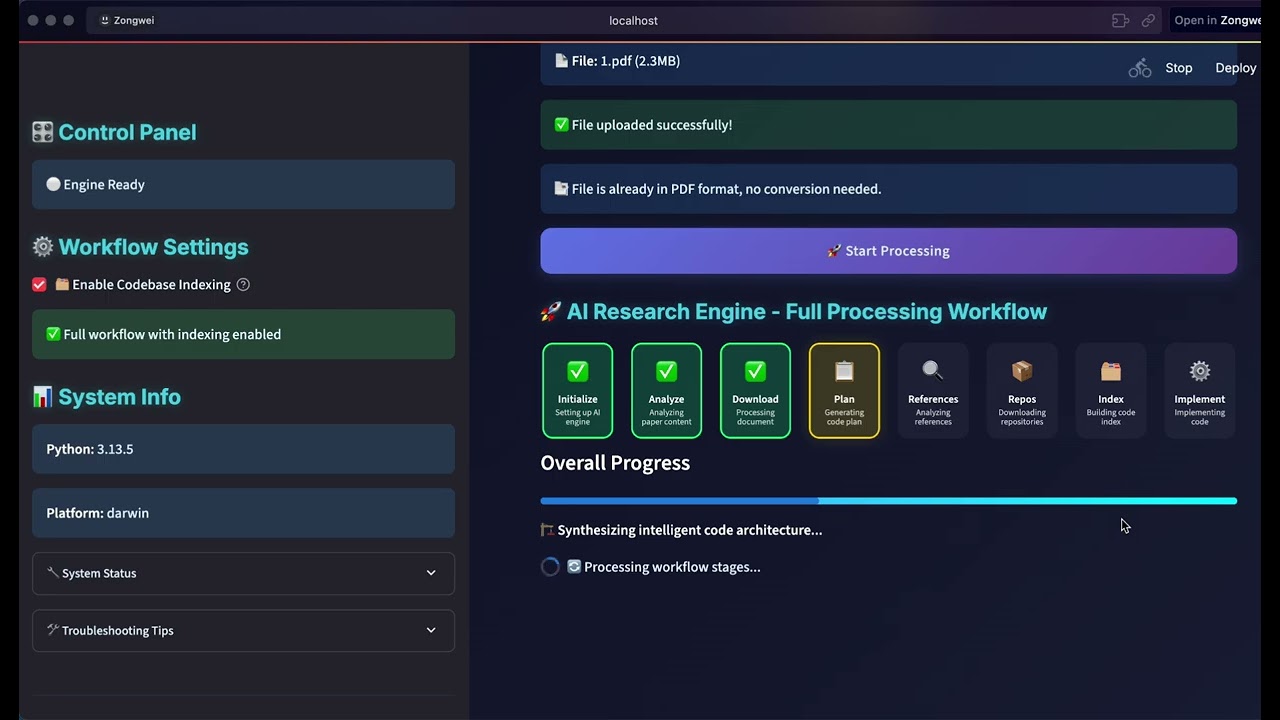
🎯 Watch our complete introduction - See how DeepCode transforms research papers and natural language into production-ready code

"Where AI Agents Transform Ideas into Production-Ready Code"
🧭 [2026-05-01] OpenRouter model selector, session cleanup & workflow UX hardening
https://openrouter.ai/api/v1/models, cache it locally, and expose searchable model selectors for the Default, Planning, and Implementation phases. Use exact OpenRouter model ids such as z-ai/glm-5.1 without editing JSON by hand.deepcode_config.json and reloads the in-process LLM runtime so newly started workflows pick up the selected provider/model combination immediately.deepcode_lab/tasks/<task_id>/ workspaces, while preserving shared uploads/ source files. Sessions with pending, running, or waiting_for_input tasks are blocked with a clear 409 Conflict.🗂️ [2026-04-28] Persistent sessions & dual-layer logging
~/.deepcode/sessions/<id>/ (override with DEEPCODE_SESSIONS_DIR). Sessions are JSONL — tail -f session.jsonl works out of the box. List / inspect / branch them with python cli/main_cli.py session list|show <id>|new|resume <id>|delete <id>, or via GET /api/v1/sessions from the backend.--session <id> to the CLI or session_id to POST /api/v1/workflows/paper-to-code (or chat-planning). Backend restarts no longer drop task history; running tasks left over from a crash are surfaced as interrupted./resume opens a numbered session picker, /new [title] creates and switches sessions, /session shows the active session, and /help lists commands. You can also paste inline inputs directly at the menu prompt with @/path/to/paper.pdf, @"C:\path with spaces\paper.pdf", or @https://....logs/server-YYYYMMDD.jsonl; per-task logs at deepcode_lab/tasks/<task_id>/logs/{system,llm,mcp}.jsonl. Every loguru.logger call automatically picks up the active task_id via a contextvar — business code did not have to change. Configure via the new logger.{globalFile,taskFile,llm} block in deepcode_config.json./ws/tasks/{task_id}/logs?channel=llm, or merge every task in a session via /ws/sessions/{session_id}/logs. The legacy /ws/logs/{session_id} endpoint that silently ignored its parameter has been removed.utils/simple_llm_logger.py, utils/dialogue_logger.py, and the in-memory services/session_service.py implementation are gone (the latter is now a thin re-export of core.sessions.SessionStore).🛠️ [2026-04-17] Stability, Windows compatibility & secrets hygiene update
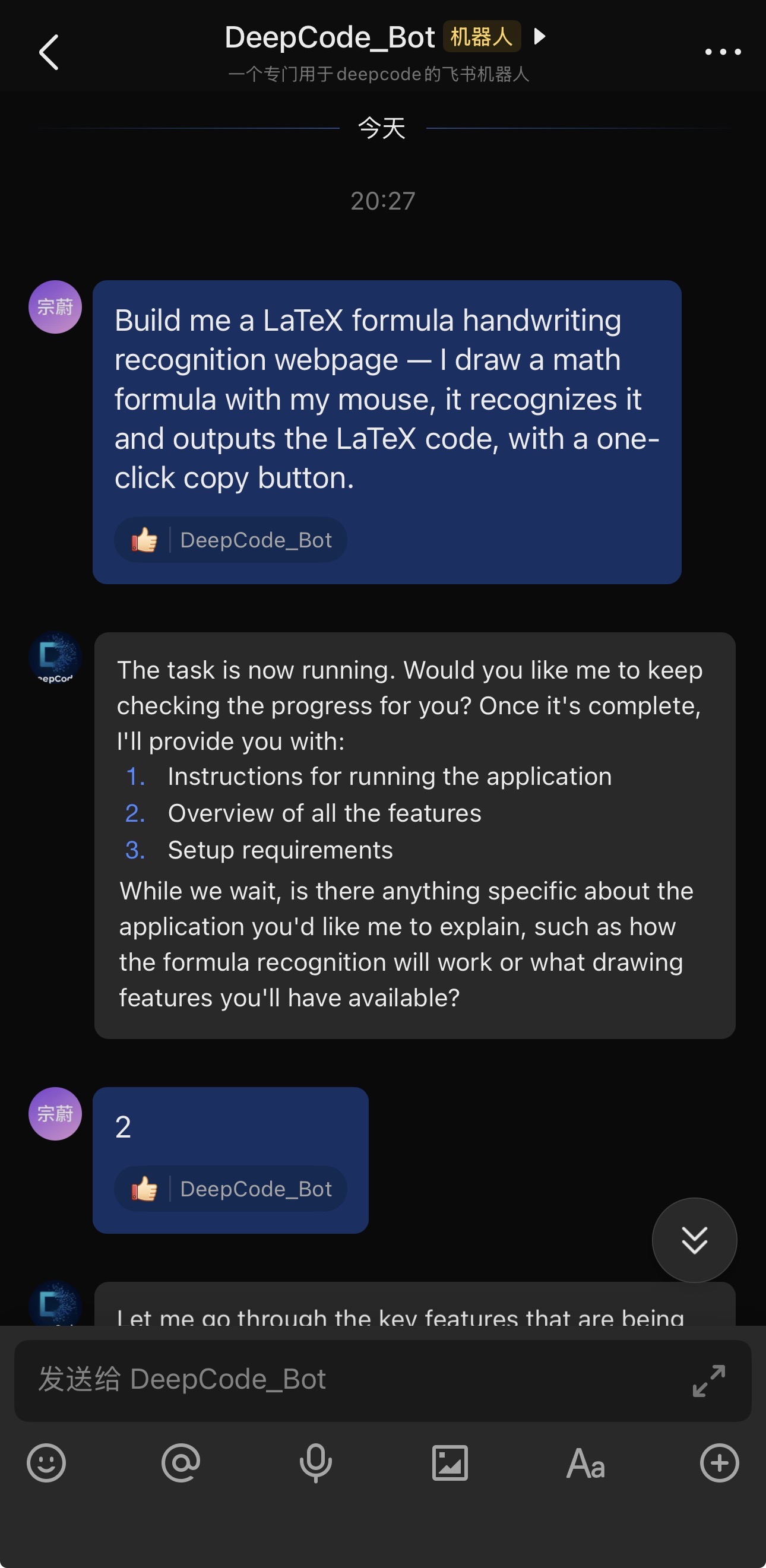
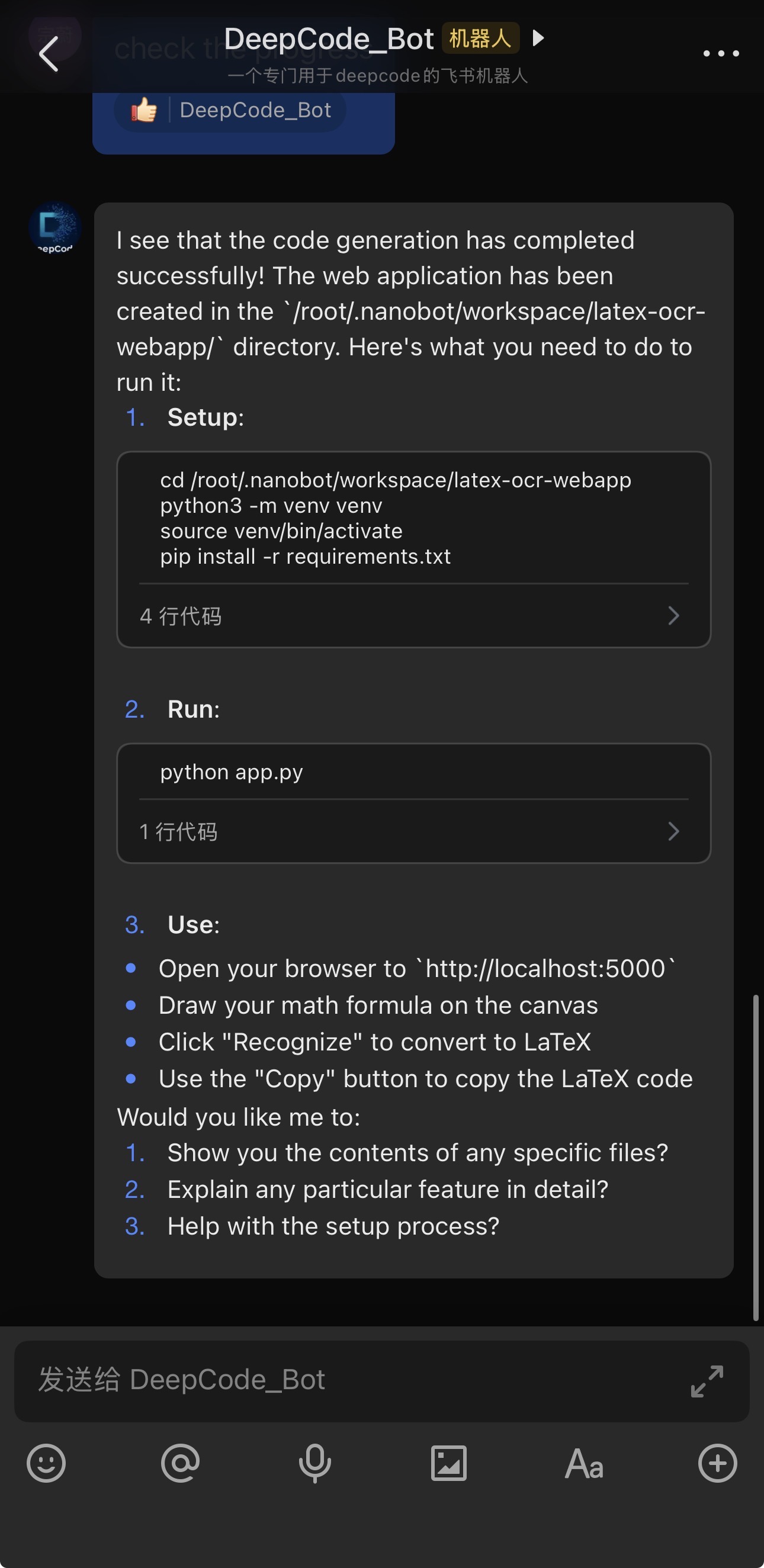
name 'LoopDetector' is not defined — added the missing LoopDetector/ProgressTracker imports in both workflows/code_implementation_workflow.py and workflows/code_implementation_workflow_index.py.mkdir -p / touch / rm -rf / cp -r / mv now work natively. tools/command_executor.py translates these common Unix file-tree commands via pathlib/shutil on every platform, eliminating the bug where cmd.exe would create a literal -p directory and stall the workflow.brave/BRAVE_API_KEY/WebSearchTool. Web fetching now relies entirely on the built-in fetch MCP server.Quick Start → Configuration snippet shows how to point the openai/openrouter blocks at Poe (https://api.poe.com/v1), OpenRouter, or Alibaba DashScope, plus how to set agents.defaults.model / agents.planning.model / agents.implementation.model (e.g. openai/gpt-5.4).deepcode_config.json (nanobot-style), and .gitignore now ignores it alongside secrets.json, *credentials*.json, .env, .env.* (with *.env.example whitelisted).deepcode (no flags) actually starts Docker mode — the README now shows deepcode --local for the no-Docker path and adds explicit Troubleshooting rows for "Docker is installed but not running", Windows GBK encoding, and the issues fixed above.logs/ directory so JSONL logging never fails on a fresh checkout, replace bare except: with except Exception: in agent_orchestration_engine.py (Ruff E722), command_executor MCP tool descriptions now embed the host OS so the LLM picks compatible commands.🎉 [2026-02] nanobot ✖️ DeepCode. Just chat naturally with openclaw/nanobot to handle your coding tasks:
| ✦ |  |
./nanobot/run_nanobot.sh → Setup Guide →
|
|
🎉 [2026-02] New Web UI Experience Upgrade!
deepcode to start the new UI (cross-platform: Windows/macOS/Linux)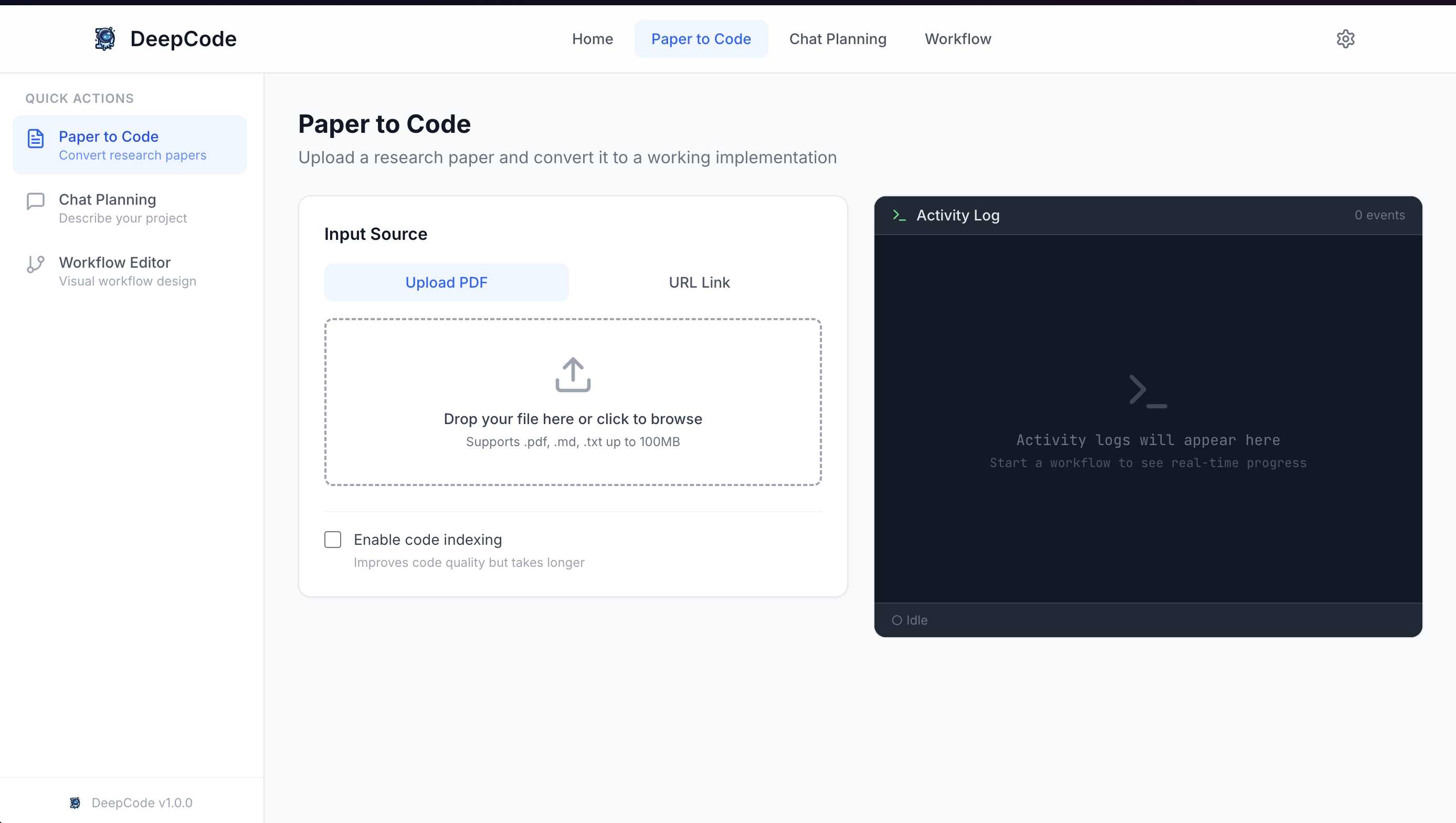
🎉 [2025-10-28] DeepCode Achieves SOTA on PaperBench!
DeepCode sets new benchmarks on OpenAI's PaperBench Code-Dev across all categories:
🚀 Paper2Code
Automated Implementation of Complex Algorithms Effortlessly converts complex algorithms from research papers into high-quality, production-ready code, accelerating algorithm reproduction. |
🎨 Text2Web
Automated Front-End Web Development Translates plain textual descriptions into fully functional, visually appealing front-end web code for rapid interface creation. |
⚙️ Text2Backend
Automated Back-End Development Generates efficient, scalable, and feature-rich back-end code from simple text inputs, streamlining server-side development. |
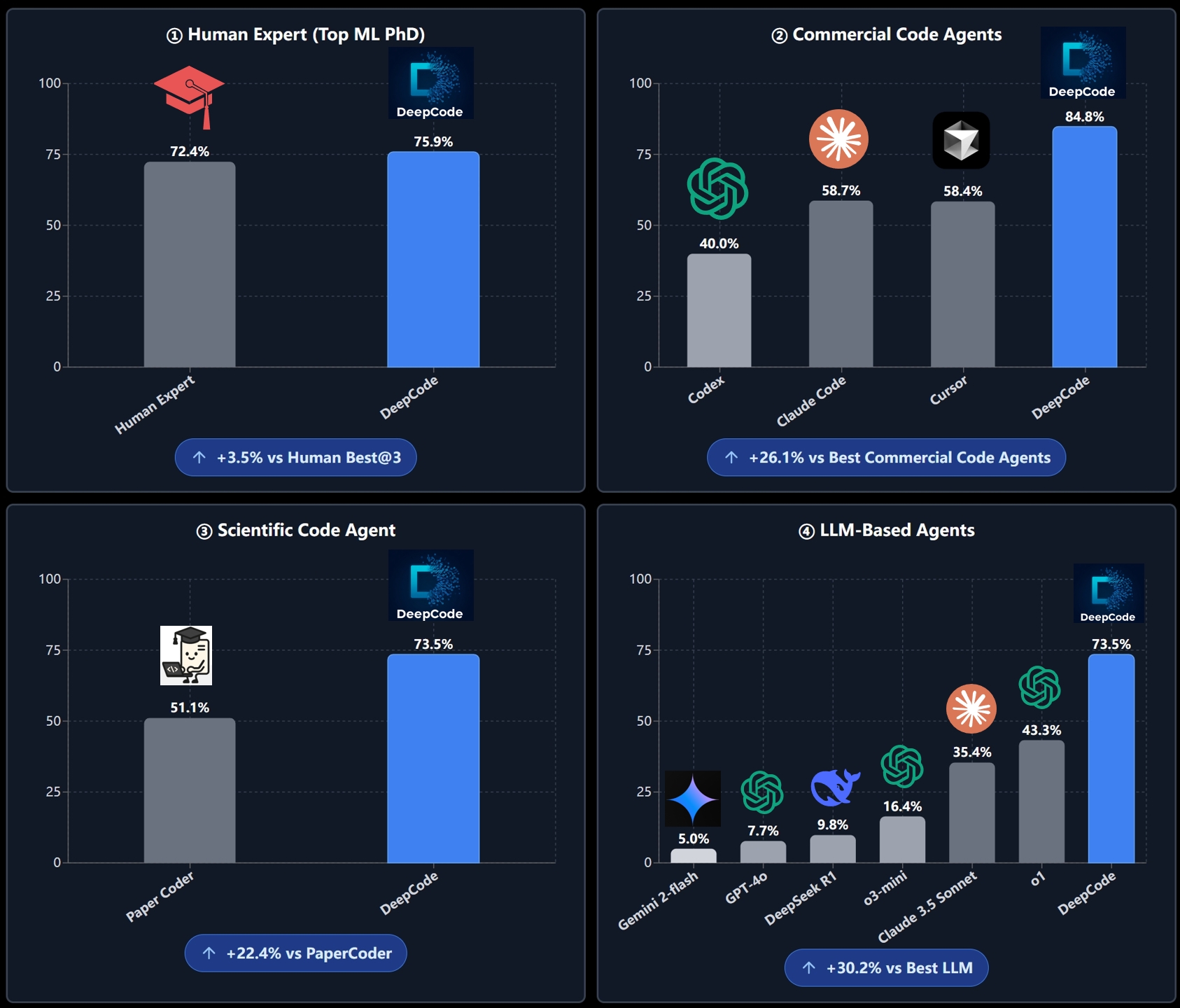
We evaluate DeepCode on the PaperBench benchmark (released by OpenAI), a rigorous testbed requiring AI agents to independently reproduce 20 ICML 2024 papers from scratch. The benchmark comprises 8,316 gradable components assessed using SimpleJudge with hierarchical weighting.
Our experiments compare DeepCode against four baseline categories: (1) Human Experts, (2) State-of-the-Art Commercial Code Agents, (3) Scientific Code Agents, and (4) LLM-Based Agents.
DeepCode: 75.9% vs. Top Machine Learning PhD: 72.4% (+3.5%)
DeepCode achieves 75.9% on the 3-paper human evaluation subset, surpassing the best-of-3 human expert baseline (72.4%) by +3.5 percentage points. This demonstrates that our framework not only matches but exceeds expert-level code reproduction capabilities, representing a significant milestone in autonomous scientific software engineering.
DeepCode: 84.8% vs. Best Commercial Agent: 58.7% (+26.1%)
On the 5-paper subset, DeepCode substantially outperforms leading commercial coding tools:
This represents a +26.1% improvement over the leading commercial code agent. All commercial agents utilize Claude Sonnet 4.5 or GPT-5 Codex-high, highlighting that DeepCode's superior architecture—rather than base model capability—drives this performance gap.
DeepCode: 73.5% vs. PaperCoder: 51.1% (+22.4%)
Compared to PaperCoder (51.1%), the state-of-the-art scientific code reproduction framework, DeepCode achieves 73.5%, demonstrating a +22.4% relative improvement. This substantial margin validates our multi-module architecture combining planning, hierarchical task decomposition, code generation, and iterative debugging over simpler pipeline-based approaches.
DeepCode: 73.5% vs. Best LLM Agent: 43.3% (+30.2%)
DeepCode significantly outperforms all tested LLM agents:
The +30.2% improvement over the best-performing LLM agent demonstrates that sophisticated agent scaffolding, rather than extended inference time or larger models, is critical for complex code reproduction tasks.
The Challenges:
📄 Implementation Complexity: Converting academic papers and complex algorithms into working code requires significant technical effort and domain expertise
🔬 Research Bottleneck: Researchers spend valuable time implementing algorithms instead of focusing on their core research and discovery work
⏱️ Development Delays: Product teams experience long wait times between concept and testable prototypes, slowing down innovation cycles
🔄 Repetitive Coding: Developers repeatedly implement similar patterns and functionality instead of building on existing solutions
DeepCode addresses these workflow inefficiencies by providing reliable automation for common development tasks, streamlining your development workflow from concept to code.
flowchart LR
    A["📄 Research Papers<br/>💬 Text Prompts<br/>🌐 URLs & Document<br/>📎 Files: PDF, DOC, PPTX, TXT, HTML"] --> B["🧠 DeepCode<br/>Multi-Agent Engine"]
    B --> C["🚀 Algorithm Implementation <br/>🎨 Frontend Development <br/>⚙️ Backend Development"]

    style A fill:#ff6b6b,stroke:#c0392b,stroke-width:2px,color:#000
    style B fill:#00d4ff,stroke:#0984e3,stroke-width:3px,color:#000
    style C fill:#00b894,stroke:#00a085,stroke-width:2px,color:#000
DeepCode is an AI-powered development platform that automates code generation and implementation tasks. Our multi-agent system handles the complexity of translating requirements into functional, well-structured code, allowing you to focus on innovation rather than implementation details.
🎯 Technical Capabilities:
🧬 Research-to-Production Pipeline
Multi-modal document analysis engine that extracts algorithmic logic and mathematical models from academic papers. Generates optimized implementations with proper data structures while preserving computational complexity characteristics.
🪄 Natural Language Code Synthesis
Context-aware code generation using fine-tuned language models trained on curated code repositories. Maintains architectural consistency across modules while supporting multiple programming languages and frameworks.
⚡ Automated Prototyping Engine
Intelligent scaffolding system generating complete application structures including database schemas, API endpoints, and frontend components. Uses dependency analysis to ensure scalable architecture from initial generation.
💎 Quality Assurance Automation
Integrated static analysis with automated unit test generation and documentation synthesis. Employs AST analysis for code correctness and property-based testing for comprehensive coverage.
🔮 CodeRAG Integration System
Advanced retrieval-augmented generation combining semantic vector embeddings with graph-based dependency analysis. Automatically discovers optimal libraries and implementation patterns from large-scale code corpus.
🧠 Intelligent Orchestration Agent: Central decision-making system that coordinates workflow phases and analyzes requirements. Employs dynamic planning algorithms to adapt execution strategies in real-time based on evolving project complexity. Dynamically selects optimal processing strategies for each implementation step.
💾 Efficient Memory Mechanism: Advanced context engineering system that manages large-scale code contexts efficiently. Implements hierarchical memory structures with intelligent compression for handling complex codebases. This component enables instant retrieval of implementation patterns and maintains semantic coherence across extended development sessions.
🔍 Advanced CodeRAG System: Global code comprehension engine that analyzes complex inter-dependencies across repositories. Performs cross-codebase relationship mapping to understand architectural patterns from a holistic perspective. This module leverages dependency graphs and semantic analysis to provide globally-aware code recommendations during implementation.
🎯 Central Orchestrating Agent: Orchestrates entire workflow execution and makes strategic decisions. Coordinates specialized agents based on input complexity analysis. Implements dynamic task planning and resource allocation algorithms.
📝 Intent Understanding Agent: Performs deep semantic analysis of user requirements to decode complex intentions. Extracts functional specifications and technical constraints through advanced NLP processing. Transforms ambiguous human descriptions into precise, actionable development specifications with structured task decomposition.
📄 Document Parsing Agent: Processes complex technical documents and research papers with advanced parsing capabilities. Extracts algorithms and methodologies using document understanding models. Converts academic concepts into practical implementation specifications through intelligent content analysis.
🏗️ Code Planning Agent: Performs architectural design and technology stack optimization. Dynamic planning for adaptive development roadmaps. Enforces coding standards and generates modular structures through automated design pattern selection.
🔍 Code Reference Mining Agent: Discovers relevant repositories and frameworks through intelligent search algorithms. Analyzes codebases for compatibility and integration potential. Provides recommendations based on similarity metrics and automated dependency analysis.
📚 Code Indexing Agent: Builds comprehensive knowledge graphs of discovered codebases. Maintains semantic relationships between code components. Enables intelligent retrieval and cross-reference capabilities.
🧬 Code Generation Agent: Synthesizes gathered information into executable code implementations. Creates functional interfaces and integrates discovered components. Generates comprehensive test suites and documentation for reproducibility.
🔧 Powered by MCP (Model Context Protocol)
DeepCode leverages the Model Context Protocol (MCP) standard to seamlessly integrate with various tools and services. This standardized approach ensures reliable communication between AI agents and external systems, enabling powerful automation capabilities.
| 🛠️ MCP Server | 🔧 Primary Function | 💡 Purpose & Capabilities |
|---|---|---|
| 📂 filesystem | File System Operations | Local file and directory management, read/write operations |
| 🌐 fetch | Web Content Retrieval | Fetch and extract content from URLs and web resources |
| 📥 github-downloader | Repository Management | Clone and download GitHub repositories for analysis |
| 📋 file-downloader | Document Processing | Download and convert files (PDF, DOCX, etc.) to Markdown |
| ⚡ command-executor | System Commands | Execute bash/shell commands for environment management |
| 🧬 code-implementation | Code Generation Hub | Comprehensive code reproduction with execution and testing |
| 📚 code-reference-indexer | Smart Code Search | Intelligent indexing and search of code repositories |
| 📄 document-segmentation | Smart Document Analysis | Intelligent document segmentation for large papers and technical documents |
| 🛠️ Function | 🎯 Usage Context |
|---|---|
| 📄 read_code_mem | Efficient code context retrieval from memory |
| ✍️ write_file | Direct file content generation and modification |
| 🐍 execute_python | Python code testing and validation |
| 📁 get_file_structure | Project structure analysis and organization |
| ⚙️ set_workspace | Dynamic workspace and environment configuration |
| 📊 get_operation_history | Process monitoring and operation tracking |
🎛️ Multi-Interface Framework
RESTful API with CLI and web frontends featuring real-time code streaming, interactive debugging, and extensible plugin architecture for CI/CD integration.
🚀 Multi-Agent Intelligent Pipeline:
|
💡 INPUT LAYER 📄 Research Papers • 💬 Natural Language • 🌐 URLs • 📋 Requirements | ||
|
🎯 CENTRAL ORCHESTRATION Strategic Decision Making • Workflow Coordination • Agent Management | ||
|
📝 TEXT ANALYSIS Requirement Processing |
📄 DOCUMENT ANALYSIS Paper & Spec Processing | |
|
📋 REPRODUCTION PLANNING Deep Paper Analysis • Code Requirements Parsing • Reproduction Strategy Development | ||
|
🔍 REFERENCE ANALYSIS Repository Discovery |
📚 CODE INDEXING Knowledge Graph Building | |
|
🧬 CODE IMPLEMENTATION Implementation Generation • Testing • Documentation | ||
|
⚡ OUTPUT DELIVERY 📦 Complete Codebase • 🧪 Test Suite • 📚 Documentation • 🚀 Deployment Ready | ||
🎯 Adaptive FlowDynamic agent selection based on input complexity |
🧠 Smart CoordinationIntelligent task distribution and parallel processing |
🔍 Context AwarenessDeep understanding through CodeRAG integration |
⚡ Quality AssuranceAutomated testing and validation throughout |
Before installing DeepCode, ensure you have the following:
| Requirement | Version | Purpose |
|---|---|---|
| Python | 3.9+ | Core runtime |
| Node.js | 18+ | New UI frontend |
| npm | 8+ | Package management |
# Check your versions
python --version   # Should be 3.9+
node --version     # Should be 18+
npm --version      # Should be 8+
# macOS (using Homebrew)
brew install node

# Ubuntu/Debian
curl -fsSL https://deb.nodesource.com/setup_20.x | sudo -E bash -
sudo apt-get install -y nodejs

# Windows
# Download from https://nodejs.org/
Choose one of the following installation methods:
# 🚀 Install DeepCode package directly
pip install deepcode-hku

# 🔑 Download the unified configuration template
curl -O https://raw.githubusercontent.com/HKUDS/DeepCode/main/deepcode_config.json.example
cp deepcode_config.json.example deepcode_config.json
git clone https://github.com/HKUDS/DeepCode.git
cd DeepCode/

curl -LsSf https://astral.sh/uv/install.sh | sh
uv venv --python=3.13
source .venv/bin/activate  # On Windows: .venv\Scripts\activate
uv pip install -r requirements.txt

# Install frontend dependencies
npm install --prefix new_ui/frontend
git clone https://github.com/HKUDS/DeepCode.git
cd DeepCode/

pip install -r requirements.txt

# Install frontend dependencies
npm install --prefix new_ui/frontend
deepcode always run THIS checkout)If you want the global deepcode command to launch the source tree you are
hacking on, install the project in editable mode after the steps above:
pip install -e .
This registers a deepcode-hku package (current version 1.2.0) and exposes
the deepcode CLI entry point. Any local code change is picked up
immediately on next launch — no reinstall needed.
If you maintain multiple DeepCode checkouts, only one of them can own the
deepcodecommand at a time (the most recentpip install -e .wins). Reinstall in the checkout you currently want to be active.
The following configuration applies to all installation methods (pip, UV, source, and Docker). Everything lives in one file:
deepcode_config.json(single source of truth, nanobot-style).
Edit deepcode_config.json and fill in at least one provider key. Inline strings work, and ${ENV_VAR} references are resolved at load time.
{
  "providers": {
    "openai":    { "apiKey": "your_openai_api_key" },
    "anthropic": { "apiKey": "${ANTHROPIC_API_KEY}" },
    "gemini":    { "apiKey": "" }
  }
}
Any OpenAI-compatible endpoint is supported by overriding apiBase on the matching provider entry. Then set the model name on the agents block (using provider/model slugs):
{
  "agents": {
    "defaults": {
      "provider": "openrouter",
      "model": "z-ai/glm-5.1"
    },
    "planning":       { "provider": "openrouter", "model": "z-ai/glm-5.1" },
    "implementation": { "provider": "openrouter", "model": "z-ai/glm-5.1" }
  },
  "providers": {
    "openai":     { "apiKey": "your_openai_api_key" },
    "openrouter": { "apiKey": "your_openrouter_key", "apiBase": "https://openrouter.ai/api/v1" }
  }
}
OpenRouter model ids must use the exact id returned by OpenRouter, for example
z-ai/glm-5.1, anthropic/claude-sonnet-4.5, or
google/gemini-2.5-pro. In the new UI, open Settings → OpenRouter Models
to search the live OpenRouter catalog and update the Default, Planning, and
Implementation models without editing this file manually. Saving from the UI
reloads the runtime for newly started workflows.
🔐 Never commit
deepcode_config.json. It is already in.gitignore.
The provider is inferred from the model slug (openai/..., anthropic/..., gemini/..., etc.). To force a specific backend, set agents.defaults.provider:
{
  "agents": {
    "defaults": { "provider": "openai" }
  }
}
{
  "documentSegmentation": {
    "enabled": true,
    "sizeThresholdChars": 50000
  }
}
On Windows you may need to configure MCP servers manually in deepcode_config.json (tools.mcpServers):
# 1. Install MCP servers globally
npm i -g @modelcontextprotocol/server-filesystem

# 2. Find your global node_modules path
npm -g root
{
  "tools": {
    "mcpServers": {
      "filesystem": {
        "type": "stdio",
        "command": "node",
        "args": ["C:/Program Files/nodejs/node_modules/@modelcontextprotocol/server-filesystem/dist/index.js", "."]
      }
    }
  }
}
Replace the path with the actual global
node_modulespath from step 2.
DeepCode performs web content retrieval through the built-in fetch MCP server (no API key required) and reads local files via filesystem. The auxiliary search server defaults to filesystem:
{
  "tools": { "defaultSearchServer": "filesystem" }
}
💡 Tip: To plug in another search backend, add it under
tools.mcpServersindeepcode_config.jsonand settools.defaultSearchServerto its name.
Choose your preferred launch method:
| 🐳 Docker (Recommended) | 🚀 Local — no Docker | 🛠️ Other Methods |
|---|---|---|
|
No Python/Node needed — everything in container. hljs language-bash
|
Run the new UI directly on the host (frontend + backend, no container). hljs language-bash Features: User-in-Loop, real-time progress, inline chat. Use this when Docker isn't available or you need to iterate on local source changes. |
hljs language-bash |
The CLI is session-aware by default. A run without --session creates a new
persistent session under ~/.deepcode/sessions/<id>/; pass --session <id> to
attach a new task to an existing session.
# Session management from the shell
python cli/main_cli.py session list
python cli/main_cli.py session show <session_id>
python cli/main_cli.py session resume <session_id>   # show history, then enter interactive mode
python cli/main_cli.py --session <session_id> --file paper.pdf
Inside python cli/main_cli.py, type these at the main menu prompt:
/resume                 # pick a previous session from a numbered list
/new My experiment      # create and switch to a fresh session
/session                # show the currently active session
@/absolute/path.pdf     # process a file without opening the file picker
@"C:\path with spaces\paper.pdf"
@https://arxiv.org/pdf/....
Every task created from these flows inherits the active session_id; per-task
logs are written to deepcode_lab/tasks/<task>/logs/.
In the web UI, use the Sessions menu in the header to resume or delete a
session. Deleting a session removes its JSONL session record and associated task
workspace under deepcode_lab/tasks/, but keeps original files in uploads/.
If the session still has pending, running, or waiting_for_input tasks, the
backend rejects the deletion until the task is cancelled or completed.
./deepcode_docker/run_docker.sh stop      # Stop
./deepcode_docker/run_docker.sh restart   # Restart (no rebuild needed for config changes)
./deepcode_docker/run_docker.sh --build   # Force rebuild
./deepcode_docker/run_docker.sh logs      # Real-time logs
./deepcode_docker/run_docker.sh status    # Health check
./deepcode_docker/run_docker.sh clean     # Remove containers & images
Or with Docker Compose directly:
docker compose -f deepcode_docker/docker-compose.yml up --build   # Build & start
docker compose -f deepcode_docker/docker-compose.yml down         # Stop
docker compose -f deepcode_docker/docker-compose.yml logs -f      # Logs
💡 Config files are mounted as volumes — edit and restart, no rebuild needed. 💡 Windows users: run
docker composecommands directly if shell scripts aren't available.
| Problem | Cause | Fix |
|---|---|---|
Docker build fails with tsc: not found | Corrupted build cache | docker builder prune -f then rebuild with --no-cache |
error during connect / cannot find the file / Docker is installed but not running | Docker Desktop not running | Either start Docker Desktop, or skip Docker entirely with deepcode --local |
| Frontend blank page | Corrupted node_modules | cd new_ui/frontend && rm -rf node_modules && npm install |
ERR_CONNECTION_REFUSED | Wrong port / backend not running | Docker: http://localhost:8000. Local (--local): frontend http://localhost:5173, backend http://localhost:8000 |
npm install → Could not read package.json | Wrong directory | Use npm install --prefix new_ui/frontend |
| Windows: MCP servers not working | Need absolute paths | See Windows MCP Configuration above |
Windows: UnicodeEncodeError: 'gbk' codec can't encode... on launch | Default GBK console can't render emoji in startup banner | Set UTF-8 first: set PYTHONIOENCODING=utf-8 && set PYTHONUTF8=1 (cmd) or $env:PYTHONIOENCODING="utf-8"; $env:PYTHONUTF8="1" (PowerShell) |
Windows: code-implementation stage hangs / produces a -p directory | LLM emitted mkdir -p ... and cmd.exe treated -p as a folder name | Already fixed in tools/command_executor.py — common Unix commands (mkdir -p, touch, rm -rf, cp -r, mv) are now executed natively via pathlib/shutil, no shell needed |
name 'LoopDetector' is not defined during code implementation | Missing import in workflow modules | Already fixed — LoopDetector and ProgressTracker are now imported from utils.loop_detector in both workflows/code_implementation_workflow.py and workflows/code_implementation_workflow_index.py |
Chat with DeepCode from Feishu — powered by nanobot.
flowchart LR
    subgraph Clients["💬 Chat Platforms"]
        direction TB
        F["<b>Feishu</b><br/>WebSocket"]
        T["<b>Telegram</b><br/>Polling"]
        D["<b>Discord</b><br/>Gateway"]
    end

    subgraph Gateway["🐈 nanobot Gateway"]
        direction TB
        A["Agent Loop<br/><i>LLM + Tool Calls</i>"]
    end

    subgraph Engine["🧠 DeepCode Engine"]
        direction TB
        P2C["Paper → Code"]
        C2C["Chat → Code"]
        TRK["Task Tracking"]
    end

    F & T & D <-->|"messages"| A
    A -->|"HTTP API"| P2C & C2C & TRK
    A -.->|"LLM API"| LLM["☁️ OpenRouter"]

    style Clients fill:#1a1a2e,stroke:#00d9ff,color:#fff
    style Gateway fill:#1a1a2e,stroke:#4ecdc4,color:#fff
    style Engine fill:#1a1a2e,stroke:#ff6b6b,color:#fff
    style LLM fill:#1a1a2e,stroke:#9b59b6,color:#fff
| ✦ | |
Both services run inside the same Docker Compose network. Prerequisites: Docker Desktop + OpenRouter API Key (get one) + Feishu App.
im:message · im:message:send_as_botim.message.receive_v1cli_xxx) and App Secret → Publish the appNote: Feishu requires an active WebSocket connection before you can save "Long Connection" mode. Start nanobot first (Step 3), then come back to configure Event Subscription.
cp nanobot_config.json.example nanobot_config.json
Edit nanobot_config.json — fill in the 3 required fields:
{
  "channels": {
    "feishu": {
      "enabled": true,
      "appId": "cli_xxx",              // ← Feishu App ID
      "appSecret": "xxx",              // ← Feishu App Secret
      "allowFrom": []                  // [] = allow all users
    }
  },
  "providers": {
    "openrouter": {
      "apiKey": "sk-or-v1-xxx"         // ← OpenRouter API Key
    }
  },
  "agents": {
    "defaults": {
      "model": "anthropic/claude-sonnet-4-20250514"
    }
  }
}
Model choice: Any model on openrouter.ai/models. Use
anthropic/claude-sonnet-4-20250514for English,minimax/minimax-m2.1for Chinese.
Make sure deepcode_config.json has your DeepCode API keys (see Configuration), then:
./nanobot/run_nanobot.sh -d # Start both DeepCode + nanobot in background
The script checks Docker, validates configs, builds images (first run only), and starts both containers.
✓ DeepCode API:  http://localhost:8000
✓ Nanobot:       http://localhost:18790
Now open Feishu → find your bot → send a message!
./nanobot/run_nanobot.sh              # Start (foreground)
./nanobot/run_nanobot.sh -d           # Start (background)
./nanobot/run_nanobot.sh stop         # Stop all services
./nanobot/run_nanobot.sh restart      # Restart (config changes take effect immediately)
./nanobot/run_nanobot.sh --build      # Force rebuild Docker images
./nanobot/run_nanobot.sh logs         # View real-time logs
./nanobot/run_nanobot.sh status       # Health check
./nanobot/run_nanobot.sh clean        # Remove containers & images
| Problem | Fix |
|---|---|
| Feishu bot doesn't respond | Check logs (./nanobot/run_nanobot.sh logs), verify appId/appSecret, ensure app is published with Long Connection mode |
| Can't connect to DeepCode | Verify deepcode container is healthy: curl http://localhost:8000/health |
| Wrong language output | Switch model — minimax-m2.1 defaults to Chinese, use Claude/GPT for English |
| Config not taking effect | Just restart: ./nanobot/run_nanobot.sh restart (no rebuild needed) |
| Clear chat history | Send /clear in chat, or: docker exec nanobot sh -c 'rm -rf /root/.nanobot/sessions/*.jsonl' |
📄 Paper2Code DemoResearch to Implementation |
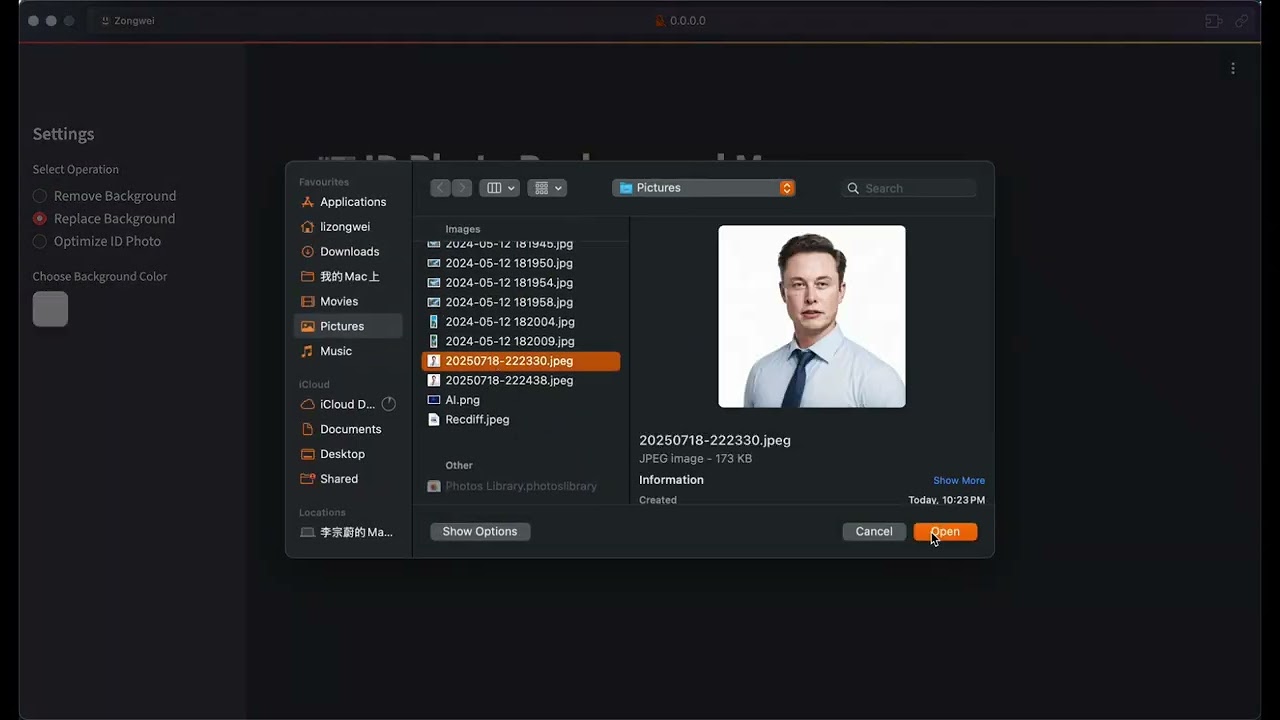
🖼️ Image Processing DemoAI-Powered Image Tools |
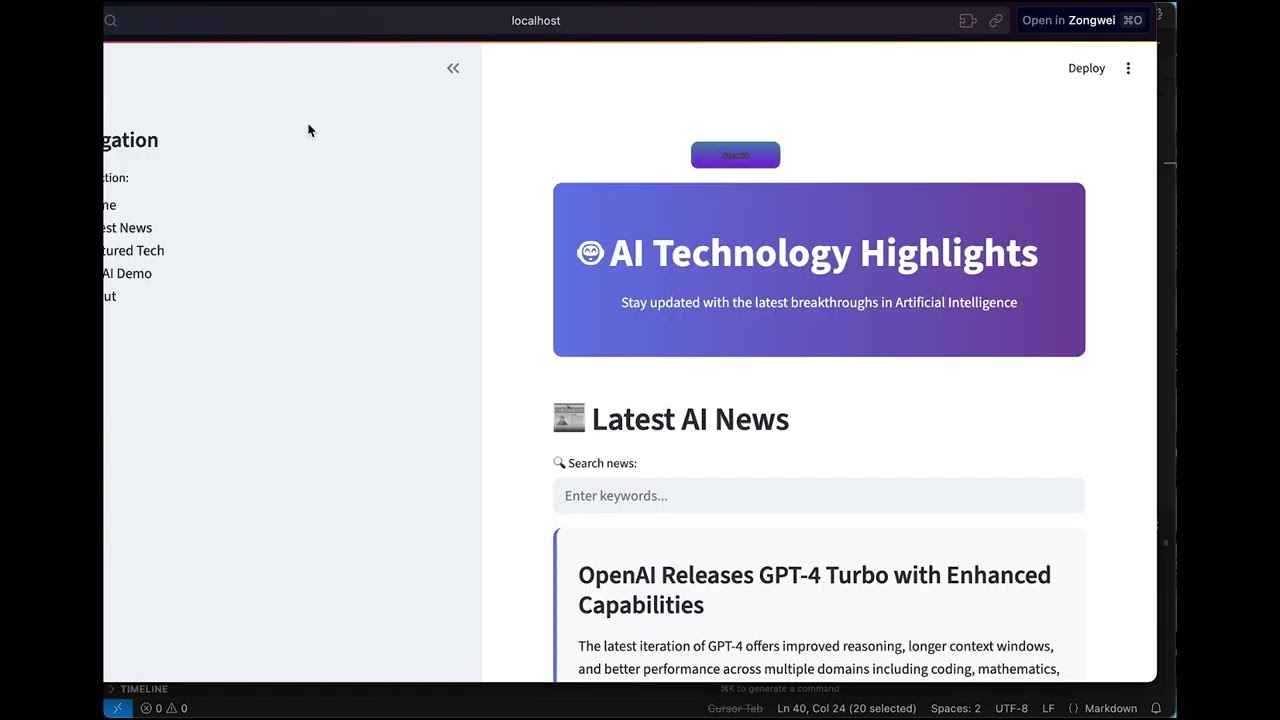
🌐 Frontend ImplementationComplete Web Application |
We're continuously enhancing DeepCode with exciting new features:
Community Growth Trajectory



If you find DeepCode useful in your research or applications, please kindly cite:
@misc{li2025deepcodeopenagenticcoding,
      title={DeepCode: Open Agentic Coding},
      author={Zongwei Li and Zhonghang Li and Zirui Guo and Xubin Ren and Chao Huang},
      year={2025},
      eprint={2512.07921},
      archivePrefix={arXiv},
      primaryClass={cs.SE},
      url={https://arxiv.org/abs/2512.07921},
}

MIT License - Copyright (c) 2025 Data Intelligence Lab, The University of Hong Kong
⚠️ Experimentelle Skill-Sammlung für deutsches Recht (Arbeits-, Gesellschafts-, Insolvenz-, Datenschutz-, Prozessrecht u
Manage multiple Claude Code agents from TUI or Web with tmux and git worktrees
Project management using GitHub Issues + Git worktrees for parallel agent execution
Core skills library for Claude Code with 20+ battle-tested skills including TDD, debugging, and brainstorming