

Are you the author? Sign in to claim
Browser control + dev-server logs on one correlated timeline — an MCP server with a headless (stdio) mode and an Electro

Browser control + dev-server logs on one correlated timeline — for AI agents and humans.




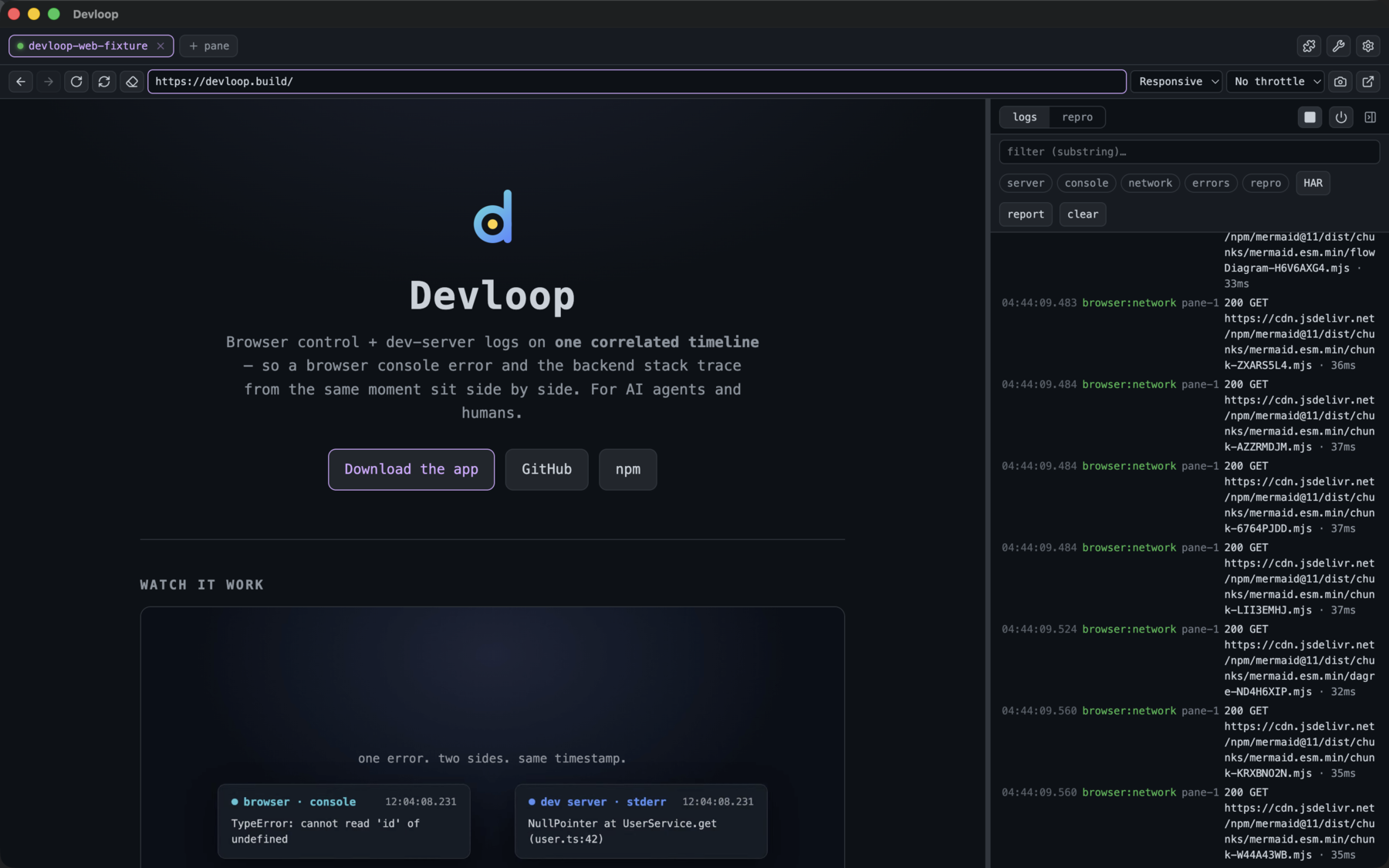
A unified dev-loop tool: it drives a browser and your dev server, pushing both sides into one timestamped buffer so you can correlate a browser console error with the backend stack trace from the same moment. It runs two ways from a shared core:
devloop-mcp daemon to instead serve one shared, long-running instance over HTTP/SSE that many agents/sessions connect to (see Daemon mode).WebContentsViews driven via CDP) with a browser bar (back/forward/reload + address) beside a collapsible side panel that toggles between logs and a repro builder. Project picker, auto-navigate, pop-out targets. The renderer is React 19 + Tailwind v4 + Radix + lucide-react. Serves the same tools over HTTP.Because every event (browser console/network/page-errors and server stdout/stderr) shares one monotonic clock, get_logs_around / repro return a correlated, cross-source slice of the timeline.
The cockpit also drives Expo/React Native projects, not just web. Open a native project and you get one pane with a Web · iOS · Android target switcher, a bundler toggle (Metro) separate from a Build button (expo run:ios / expo run:android, with @expo/fingerprint staleness detection), and:
index.bundle:1:… resolves to original .tsx).XMLHttpRequest hook turns the app's fetch/XHR traffic into the same network timeline rows as web (so get_network / export_har / the network chip work for native too).native source — iOS simctl log stream, Android logcat.screencap mirror (~2fps) with click→tap + key input. Screenshots on both.browser_snapshot reads the native accessibility tree (iOS via idb's UIKit a11y tree; Android via uiautomator dump) and browser_click/type/scroll/press drive the device by an element's pt:x,y ref (from the snapshot) or its label — replayable through repro, openable over MCP via native_open / native_build. The same agent tools as web, mapped onto native.All of it lands on the same correlated timeline, app-scoped — the web dev-loop experience, for a native app. (macOS + Apple Silicon for the embedded iOS simulator; Android works wherever the Android SDK + an emulator do.)
iOS interactions need idb: brew install facebook/fb/idb-companion and pipx install fb-idb (use Python <3.14 — newer Python breaks fb-idb). Android interactions need the Android SDK platform-tools (adb) + a booted emulator. The cockpit's Settings → native readiness runs a per-platform preflight (iOS: idb · companion · booted sim; Android: adb · booted device) and shows the exact fix for anything missing; observation (logs/screenshots) works without the interaction tooling.
serve-sim is vendored into the cockpit and run via Electron's own Node, so the embedded simulator works out of the box — offline, no bun/node/npx or first-run fetch. (Running from source uses the copy in node_modules instead.)
Three transports expose one shared core, which drives one of several substrates (a real browser, or — in the cockpit — a native device). Everything pushes onto a single timestamped timeline.
%%{init: {"flowchart": {"wrappingWidth": 700}}}%%
flowchart TD
  clients["<b>MCP clients</b><br/>Claude Code · agents · mcporter"]
  clients --> stdio & daemon & cockpit

  stdio["<b>stdio</b><br/><i>spawned per session</i>"]
  daemon["<b>daemon</b><br/><i>HTTP/SSE · one shared instance</i>"]
  cockpit["<b>cockpit</b><br/><i>HTTP/SSE · Electron app</i>"]

  stdio --> mcp
  daemon --> mcp
  cockpit --> mcp
  mcp(["<b>MCP Server</b><br/><i>stdio transport, or HTTP/SSE for the daemon + cockpit</i>"])
  mcp --> core

  core["<b>shared core</b> · <i>transport- and substrate-agnostic</i><br/>the MCP tool layer + one unified, correlated timeline"]

  core --> iface(["<b>IBrowserController · IBrowserManager · ITargetController</b><br/><i>capability-gated by the active target</i>"])
  iface --> pup & elec & rn

  pup["<b>web</b> · Puppeteer / Chrome<br/><i>stdio + daemon</i>"]
  elec["<b>web</b> · Electron CDP panes<br/><i>cockpit · per-project partitions</i>"]
  rn["<b>native</b> · React Native (Hermes)<br/><i>JS + network over Metro CDP</i>"]

  rn -->|"idb / adb"| nd["<b>NativeDriver</b><br/>iOS idb · Android adb<br/>taps · snapshot · screens · logs"]
The tool layer never knows what's behind it — Puppeteer or Electron, stdio or HTTP, web page or native app. It's wired once at startup. The browser sits behind a single IBrowserController interface; the cockpit's pane manager implements the richer IBrowserManager (multiple panes, delegating browser_* to the active one — or to the native controller when an iOS/Android target is open). A capability layer gates tools by the active target, so an agent gets a clear message instead of a substrate error.
stdout is reserved for the MCP protocol in stdio mode; all human-facing output goes to stderr.
WebContentsView panes over CDP in the cockpit) and a native one (React Native over Hermes/Metro). Shared page-action + accessibility-snapshot logic and device/throttle emulation sit above them.NativeDriver (idb on iOS, adb on Android); native logs (simctl / logcat), screenshots + live mirrors, build orchestration (expo run), and a readiness preflight round it out.Headless MCP (stdio) — no clone needed, register it with Claude Code:
claude mcp add devloop --scope user -- npx -y devloop-mcp
(Published as devloop-mcp on npm; Puppeteer fetches Chromium on first install.)
Cockpit (desktop app) — grab the installer for your OS from Releases (.dmg / .exe / .AppImage). macOS ships both Apple Silicon (arm64) and Intel (x64) builds. The app checks GitHub for a newer release on launch and prompts before downloading or installing — or trigger it yourself from settings → updates → check for updates.
From source (dev) — requires bun:
bun install
bun run app          # build + launch the Electron cockpit
bun run start        # or run the stdio MCP directly
Once it's registered, drop this into your CLAUDE.md (or any agent's rules file) so the agent drives features through Devloop and verifies them live instead of reasoning from the code alone:
## Devloop — use it for any web/mobile feature work

When you build, test, or debug a feature that runs in a **browser** or an **Expo /
React Native** app, drive it through **devloop** instead of reasoning from the code
alone. It puts the dev-server logs and the live browser/device on one correlated
timeline, so you can see what actually happened.

- **Start the loop:** `dev_start` (auto-detects the dev command), then
  `browser_navigate` to the page — or `native_open` for an iOS/Android target.
- **Act, then verify — don't assume:** after a change, reproduce it with `repro`
  (a navigate/click/type sequence) and read the result. Never claim a fix works
  without exercising it in the running app.
- **Find/target elements** with `browser_snapshot` (returns clickable `ref`
  selectors) — prefer it over screenshots.
- **When something breaks:** `diagnose` first (groups errors + failed requests),
  then `get_logs_around` a timestamp to line up the browser console error with the
  matching server stack trace from the same moment. `get_network` / `export_har`
  for request detail.
- **Definition of done:** the feature is verified live in devloop — no console or
  page errors, the expected network calls succeeded, the UI reflects the change —
  not just "the code looks right."
- **Setup stays yours:** if a native build needs a toolchain that isn't installed,
  devloop tells you exactly what's missing and the command to fix it — it
  **diagnoses, it never installs or touches your toolchain.** Run the fix, then rebuild.

Register once: `claude mcp add devloop --scope user -- npx -y devloop-mcp`
Dev server — runtime, no per-project registration needed
dev_start({ project?, cmd?, cwd? }) — start a dev server and tee its logs. Specify it three ways: a saved registry project; explicit cmd+cwd; or neither (cwd defaults to the server's dir, cmd auto-detected from package.json scripts: dev/develop/web/start/serve).dev_stop() — stop it. Kills the whole process group (so next dev/metro grandchildren die too).dev_status() — running?, plus cmd/cwd/pid.Native targets — Expo/React Native (cockpit only; needs Electron + a simulator/emulator)
native_open({ platform }) — open the iOS simulator or Android device mirror for the active pane; browser_* then drive the native app (idb/adb) and JS + native logs stream to the timeline. Returns ok:false with a reason if the device/tooling isn't ready.native_close() — back to the pane's web content.native_build({ platform, cwd? }) — expo run:ios / expo run:android, streamed to the timeline (cwd defaults to the active pane's project). Android returns a toolchain checklist instead of building if the SDK/JDK isn't set up.native_doctor() — re-check native readiness without building or opening: iOS + Android interactions + the Android build toolchain, each a ✓/✗ checklist with the fix for anything missing. Run it after installing a missing tool to confirm it's resolved.Browser control — act on the active pane
browser_navigate({ url })browser_back() · browser_forward() · browser_reload({ hard? }) — history nav + reload (the browser bar's ←/→/⟲; hard ignores cache).browser_screenshot({ fullPage? }) → PNG imagebrowser_click({ selector })browser_type({ selector, text })browser_hover({ selector }) · browser_scroll({ selector? | x?, y? }) · browser_select({ selector, value }) · browser_press({ key, selector? }) — keys like Enter/Escape/Tab/ArrowDown.browser_wait_for_idle({ idleMs?, timeoutMs? }) — wait until network settles.browser_clear_storage({ allOrigins? }) — clear cookies / localStorage / IndexedDB / cache / service workers for the current origin (or the whole session) — log out / test a fresh user.browser_emulate({ device? | width?, height?, mobile?, deviceScaleFactor?, userAgent?, reset? }) — emulate a device/viewport (device: iphone/ipad/pixel, or custom; reset → desktop).browser_throttle({ profile }) — network conditions: slow-3g / fast-3g / offline / none.browser_eval({ expression }) — runs in page context (not blocked by CSP)browser_snapshot() — structured page snapshot: url, title, and interactive/landmark elements (role, accessible name, value/state, heading level) each with a CSS selector ref usable by browser_click/browser_type. Prefer this over a screenshot to find/target elements reliably.browser_wait_for({ selector?, text?, timeoutMs? }) — wait until a selector appears or text is present (after a navigation/async render). Returns { ok, waitedMs }.Logs & correlation
get_logs({ source?, stream?, grep?, app?, sinceSeq?, limit? }) — unified tail. source is server|browser; stream is stdout/stderr/console/network/pageerror. app scopes to one project's logs — it matches a pane's label (project name) or id (see pane_list) and filters both that pane's server and browser logs, regardless of which pane is active. Pass the last seq as sinceSeq to tail incrementally.get_logs_around({ ts, windowMs?, source?, app? }) — the correlation tool: all events within ±windowMs of a timestamp, time-ordered across both sources (optionally scoped to one app).DEVLOOP_NET_THRESHOLD (set it to 0 to surface everything inline), carrying rich detail on all substrates (Puppeteer / CDP / React Native): method, status, resource type, mime, duration, request + response headers, and capped request/response bodies.get_network({ grep?, app?, limit? }) — every request from the full capture ring, independent of the threshold (vs get_logs, which shows only the curated timeline). Use it when a fast 200 you care about isn't on the timeline.export_har({ app? }) — export the full network ring as a HAR 1.2 document (import into Chrome DevTools / Charles); complete regardless of the threshold. Scope to one app if you like.diagnose({ windowMs?, app? }) — triage what's broken right now: groups/dedupes repeated errors (console / page / server) with counts, lists failed/4xx-5xx network requests, and returns a one-line summary. Start here before digging through get_logs.resolvedStack — minified browser stack traces are mapped back to original source via the bundle's source map (the browser only de-minifies in its DevTools UI; error.stack stays compiled, so we resolve it for you). On the entry's detail.export_bundle({ app?, windowMs? }) — a shareable bug-report bundle (JSON): diagnose summary + timeline + screenshots + HAR + repro. The cockpit's report button saves it as a self-contained HTML page.clear_logs() — reset before reproducing an issue.repro({ actions | action, waitFor?, settleMs?, stepSettleMs?, idleMs?, timeoutMs?, continueOnError?, clear? }) — reproduce-and-correlate: clears the buffer, performs one action or a sequence, waits, and returns everything that happened on both sides across the sequence — with per-step results (steps[]), a byStream count, and a pre-filtered errors list.
actions: [{kind, ...}] — kinds: navigate/click/type/hover/scroll/select/press/eval/wait/none. action (singular) = one-step convenience.stepSettleMs (default 300) between steps, settleMs (default 1000) after the last. waitFor: "networkidle" waits until no network activity for idleMs (default 500) up to timeoutMs (default 10000) — use it for slow/streaming responses (Expo's first web bundle takes ~12s). On timeout you still get what landed, with a waitNote.continueOnError (default false) — otherwise stops at the failing step (stoppedAtStep).Project registry — saved projects, persisted to ~/.devloop/projects.json
project_list() — list saved projects (name, cwd, cmd, url, steps).project_add({ name, cwd, cmd?, url?, steps? }) — save/replace a project (incl. a saved repro steps sequence), so you can dev_start({ project }) by name.project_remove({ name }).Panes — multi-target (cockpit only; stdio mode is single-pane and reports so)
pane_list() — each pane: { id, url, active, popped }. The active pane is what browser_*/repro target; events are tagged with their pane id.pane_new({ url? }) — open a new pane and make it active.pane_select({ id }) — make a pane active.pane_close({ id }).pane_pop({ id }) — detach a pane into its own standalone window (side-by-side targets).pane_set_label({ id, label }) — rename a pane (same as double-clicking the tab).Extensions — Chrome extension management (cockpit only)
ext_list() — installed extensions: { id, name, version, enabled }.ext_install({ idOrUrl }) — install by Chrome Web Store id/URL.ext_remove({ id }) — uninstall.ext_set_enabled({ id, enabled }) — enable/disable without uninstalling.console.log(obj) is captured with arguments resolved to real values (e.g. [log] user {"id":7}), not JSHandle@object. The Electron substrate renders them synchronously from CDP previews; the Puppeteer substrate uses a reserve-then-fill pattern (stamp seq/ts synchronously at arrival, patch resolved args in afterward) so ordering matches emit order and interleaves correctly with server logs.
Register once, at user scope — works for every project:
claude mcp add devloop --scope user -- npx -y devloop-mcp
Then, in any project: "dev_start and repro a navigate to /projects". dev_start defaults cwd to the project you're in and auto-detects the command.
| Var | Default | Meaning |
|---|---|---|
DEVLOOP_HEADLESS | false | "true" runs Chrome headless; default headful so you can watch. |
DEVLOOP_CHROME_PATH | (bundled) | Explicit Chrome executable path. |
DEVLOOP_NET_THRESHOLD | 400 | Log network responses with status >= this (failures always logged). |
DEVLOOP_ACTION_TIMEOUT | 10000 | Cap (ms) on interactions — a wedged page fails fast instead of hanging. |
DEVLOOP_NAV_TIMEOUT | 30000 | Cap (ms) on navigations. |
DEVLOOP_LOG_CAPACITY | 5000 | Max buffered events. |
DEVLOOP_NET_RING | 3000 | Max requests held in the full-capture network ring (get_network / export_har), independent of DEVLOOP_NET_THRESHOLD. |
DEVLOOP_DEV_CMD / DEVLOOP_DEV_CWD | (none) | Optional dev-server auto-start on boot (normally use dev_start). |
DEVLOOP_HOME | ~/.devloop | Registry location. |
Instead of every agent/session spawning its own stdio server (its own browser + timeline), run one long-running daemon they all connect to over HTTP/SSE — many clients, one Devloop instance (one browser, one dev server, one correlated timeline):
devloop-mcp daemon                 # headless; serves MCP at http://localhost:7333/mcp
# then point any number of MCP clients at it:
claude mcp add --transport http devloop http://localhost:7333/mcp
Same backend + env vars as stdio (defaults headless; set DEVLOOP_HEADLESS=false to watch), and it auto-picks a free port from DEVLOOP_HTTP_PORT (default 7333). Each client gets its own MCP session but shares the same backend, so one agent's dev_start / navigation shows up on another's get_logs. (The Electron cockpit serves the very same HTTP transport — the daemon is just the headless version of it.)
Manage the daemon's lifecycle:
devloop-mcp daemon --status        # is one running? (pid + url)
devloop-mcp daemon --stop          # SIGTERM the running daemon
DEVLOOP_DAEMON_IDLE_MS=60000 devloop-mcp daemon   # auto-exit 60s after the last client disconnects
Don't want to manage a daemon by hand? Launch the stdio server in shared mode and it will bridge to a daemon automatically — connecting to a running one, or spawning + detaching one if none exists — instead of starting its own browser. So every session transparently shares one browser/timeline:
claude mcp add devloop --scope user -- npx -y devloop-mcp --shared
# or set DEVLOOP_DAEMON=1 in the MCP server env
The stdio process becomes a thin proxy (it speaks stdio to the client, forwarding tools to the daemon over HTTP). The daemon advertises itself in $DEVLOOP_HOME/daemon.json so other sessions find it. If anything goes wrong (daemon won't start, etc.) it falls back to a normal local instance, so a session never just dies. Without --shared / DEVLOOP_DAEMON=1, behavior is unchanged: one browser per session.
Some sandboxed/enterprise setups don't let an agent register or spawn MCP servers (or block the MCP transport) but do allow running shell commands. mcporter bridges that gap: it calls any MCP server's tools as plain CLI commands, so the agent invokes Devloop through Bash instead of an MCP client.
The robust pattern is daemon + mcporter over HTTP — run one Devloop daemon (once, outside or alongside the sandbox), then call its tools as shell commands:
devloop-mcp daemon                                          # one shared instance on :7333

# point mcporter at it ad-hoc (no config); --allow-http since it's localhost cleartext
npx mcporter list  --allow-http --http-url http://localhost:7333/mcp --name devloop
npx mcporter call  --allow-http --http-url http://localhost:7333/mcp 'devloop.dev_start(cwd: "/repo")'
npx mcporter call  --allow-http --http-url http://localhost:7333/mcp 'devloop.browser_navigate(url: "http://localhost:3000")'
npx mcporter call  --allow-http --http-url http://localhost:7333/mcp 'devloop.diagnose()'
Or skip the daemon and let mcporter spawn the stdio server per call (if process spawning is allowed):
npx mcporter list --stdio "npx devloop-mcp" --name devloop
npx mcporter call --stdio "npx devloop-mcp" 'devloop.get_logs(limit: 50)'
Notes:
~/.mcporter/mcporter.json (or pass --persist). mcporter also auto-imports servers already configured in Claude Code/Desktop, Cursor, Codex, etc. — so a prior claude mcp add devloop … is picked up automatically, and you can just npx mcporter call devloop.<tool> ….npx mcporter list devloop --schema prints every tool with TypeScript-style signatures — handy for the agent to discover args.npx mcporter generate-cli devloop emits a standalone binary; mcporter serve re-exposes servers as one bridged endpoint. See the mcporter docs.(Exact ad-hoc flags can vary by mcporter version — npx mcporter --help is authoritative.)
Agent skill: skills/devloop/SKILL.md packages this as an installable Agent Skill — drop it in (cp -r skills/devloop ~/.claude/skills/, or into a project's .claude/skills/) and the agent knows to drive Devloop over mcporter when MCP is blocked, with the daemon setup + tool recipes built in.
bun run app          # build + launch the cockpit
bun run app:selftest # headless integration test (no visible windows)
One window (React 19 + Tailwind v4 with @theme tokens + Radix Dialog/Tooltip + lucide-react icons), laid out as:
● project green when running, ✗ exited (code N) red on a non-zero exit, else dev: stopped/not configured), ▶/⏹ start-stop the dev server, ⟳ restart it (Power), 📷 screenshot the pane into the timeline.⚙ settings · ⤢ pop out the active pane into its own window.package.json name, else folder basename), carry a green running dot when that pane's server is up, show ⤢ when popped; click to switch (the timeline follows the active pane), double-click to rename, × to close, + pane to add. Live-updates whether panes change from the UI or from Claude.did-navigate); accepts a bare port (3000 → http://localhost:3000) or any http(s):// URL; Enter navigates (⌘L focuses).WebContentsView driven via CDP. Other panes keep running in the background (their logs keep flowing); the active one is positioned over this region and reflows when you collapse panels or resize.⚙, collapsed by default so the top bar stays clean) — labeled rows:
cmd (blank = auto-detect) + 📁 folder picker + cwd. Auto-saved to the active pane on blur (and on folder pick) — no separate "apply" button; after that the top-bar ▶ is pre-wired.electron-chrome-web-store; Electron's extension API is partial (MV3 mostly works; some chrome.* gaps).Dialog lightbox). Network rows are status-tier colored (2xx/3xx/4xx/5xx) and expand to show method/status/duration + request/response headers and bodies. Sticky filter bar: substring filter + chips (server/console/network/errors/repro), a ↓ latest pill, HAR export, and clear. Always scoped to the active pane.+ step / pick / run); pick lets you click an element in the page to capture a stable selector straight into a click step; results land in the logs timeline (it auto-switches there) with per-step ✓/✗ and the correlated error list.› in the panel header; re-expand via a small hover handle on the right edge. Popping the active pane into its own window fills the freed space with the timeline. Drag the divider to resize.⤢ (right of the URL bar) detaches the active pane into its own browser window with its own bar (back/forward/reload/hard-reload/address/screenshot), driving that pane by id; the live URL tracks navigations and ⌘R reloads the page. Closing it re-docks the pane.⌘L address bar · ⌘R/⌘⇧R reload/hard-reload · ⌘K clear · ⌘B toggle panel · ⌘, settings · ⌘1–9 switch panes.Per-pane projects: each pane has its own dev server and config (cmd/cwd) — so different panes run different projects (on different ports) at once, and the controls act on whichever pane is active.
Auto-navigate: on dev-start (or opening a project), the cockpit watches that pane's server output and opens the first http://localhost:PORT it announces in the pane — no port-typing.
Persistence & restore: open panes (each pane's URL, project label, and dev config) are saved to ~/.devloop/panes.json and restored on relaunch; the form state (repro steps + selected project) is saved to ~/.devloop/session.json. Restore does not assume a dev server is running — a pane whose saved URL is a dev (localhost) URL comes back as a "press ▶ to start" placeholder (its real URL preserved), and hitting ▶ starts the server and auto-navigates.
The cockpit serves the same tools over MCP-over-HTTP (stateful sessions). It auto-picks a free port starting at DEVLOOP_HTTP_PORT (default 7333) and logs the URL. Point Claude at the running cockpit:
claude mcp add --transport http devloop-cockpit http://localhost:7333/mcp
(Only connected while bun run app is running.)
Clean teardown: closing the window (or quit / SIGTERM / SIGINT) tears down everything — the dev-server process group, all browser panes, and the HTTP server — with a hard-exit fallback if graceful quit stalls. And the dev server runs under a parent-pid watchdog, so even a crash/SIGKILL of the cockpit can't orphan it (no next dev left holding :3000).
Cockpit-only env: DEVLOOP_HTTP_PORT (default 7333), plus the shared DEVLOOP_NET_THRESHOLD / DEVLOOP_ACTION_TIMEOUT / DEVLOOP_LOG_CAPACITY / DEVLOOP_HOME.
src/
  logBuffer.ts          source-aware, timestamped ring buffer (+ live onPush)
  devServer.ts          runtime dev-server manager (process-group kill) + detectDevCommand
  registry.ts           persisted project registry
  browserController.ts  IBrowserController + IBrowserManager interfaces
  browser.ts            PuppeteerBrowserController (headless/stdio)
  electronBrowser.ts    ElectronBrowserController (cockpit; CDP debugger)
  toolLayer.ts          TOOLS + handleTool, bound via configureTools(deps)
  index.ts              stdio entry (Puppeteer + stdio)
cockpit/
  main.ts               Electron main: windows, BrowserManager, MCP-over-HTTP, lifecycle
  browserManager.ts     multi-pane manager (IBrowserManager)
  preload.ts            contextBridge IPC surface
  renderer/             React UI — main.tsx (app) + global.d.ts (IPC types) +
                        styles.css (Tailwind v4 @theme) + index.html
  build.ts              Bun build for main/preload/renderer + Tailwind CLI step
CI gates every push and PR — lint/format, types, unit, smoke, daemon, mcporter CLI, the cockpit selftest, and the GUI end-to-end. Run the whole gate locally with bun run test:all, or piece by piece:
bun run check           # Biome lint + format check (the CI gate; `bun run format` to auto-fix)
bun run typecheck       # tsc across core + renderer + gui
bun test                # unit tests (pure logic)
bun run test-smoke.ts   # headless Puppeteer: structured args, networkidle, repro sequence, abort
bun run test:daemon     # HTTP/SSE daemon: two clients sharing one backend
bun run test:mcporter   # the mcporter CLI path: `mcporter call devloop.<tool>` over HTTP
bun run app:selftest    # headless Electron: substrate→buffer, tool layer, MCP-over-HTTP,
                        # renderer IPC, registry, multi-target panes + pop-out, auto-navigate,
                        # derived project name, per-pane dev (server-log tagging), app-scoped
                        # get_logs, inline repro builder, pane persistence/restore, teardown
bun run mcp-drive.ts    # live smoke test: drives a RUNNING cockpit over its MCP-over-HTTP
                        # endpoint (start dev server → auto-navigate → verify the live app via
                        # browser_eval → app-scoped get_logs → screenshot). Cockpit must be up.
New features are built test-first against this harness. Code is linted + formatted with Biome (bun run check / bun run format), and commits follow Conventional Commits. See CONTRIBUTING.md for the full workflow, and SECURITY.md to report a vulnerability. Release history lives in CHANGELOG.md.
500; the server logs showed Expo had skipped starting. Pin a free port per app — and a good example of why the unified timeline helps.bun run dev spawns the real server as a grandchild. Killing the shell orphans next dev/metro; that's why the dev server is spawned detached and stopped by process group.CI=1 for interactive use — it disables Metro watch/HMR.eas build path for native builds when there's no local toolchain (Android especially), surfaced in the Settings → native readiness preflight.browser_snapshot override the 250-element cap for dense UIs (data tables, long forms).Done: unified browser+server timeline · get_logs_around correlation · repro one-shot + action sequences (results rendered inline) · waitFor: networkidle · structured console args · bounded interaction timeouts · self-healing re-acquire (Puppeteer and Electron panes — recover from renderer crash) · network request/response bodies (capped, base64-decoded, on logged Electron entries) · project registry (with saved repro steps) · session persistence · single-window Electron cockpit — tabbed panes, collapsible toolbar + timeline, pop-out, project-named tabs · per-pane dev servers, configure-once (auto-saved) · auto-navigate from logs · pane persistence + restore (no "assume running") · React 19 + Tailwind v4 + Radix + lucide-react renderer · browser bar (back/forward/reload + live address) · segmented logs/repro panel · pop-out windows with their own browser chrome · screenshot → timeline (thumbnail + lightbox) · dev failed-state indicator · project picker (open-on-pick) + folder browse · visual repro builder · MCP-over-HTTP · clean process-group teardown + crash watchdog · Electron security-warning suppression · native targets (Expo / React Native iOS) — Web·iOS switcher, separate bundler/build (expo run:ios with @expo/fingerprint staleness), source-mapped Hermes JS logs over CDP, simctl native device logs on the timeline, and a vendored, offline live interactive iOS simulator embedded in the pane · agent-driven native interactions — browser_snapshot of the UIKit a11y tree + browser_click/type/scroll/press via idb (by pt:x,y ref or label), replayable through repro, with a Settings → native readiness preflight · per-pane Chrome extension load/toggle + an in-store "Add to Devloop" install button · in-app update banner (download progress + restart) · Android target (Web·iOS·Android switch, adb-driven snapshot/tap via uiautomator, logcat on the timeline, a live screencap mirror, expo run:android) · RN network capture (injected XHR hook → network rows) · full network-capture ring (complete HAR + get_network, threshold-independent) · viewport/throttle picker UI · per-project session partitions (same-origin isolation) · shared HTTP/SSE daemon (devloop-mcp daemon — many agents, one instance) · native open/build over MCP (native_open/native_close/native_build) · shared-mode stdio auto-connect (the stdio entry bridges to a running daemon — or spawns one — and falls back to a local instance) · full MCP parity (extension management ext_*, browser_back/forward/reload, pane_set_label).
Run Claude Code as an MCP server so any agent can delegate coding tasks to it
 @microsoft✓ Official
Browser automation using accessibility snapshots instead of screenshots
 @googleapis✓ Official
Google's universal MCP server supporting PostgreSQL, MySQL, MongoDB, Redis, and 10+ databases
 @github✓ Official
Official GitHub integration for repos, issues, PRs, and CI/CD workflows