

Are you the author? Sign in to claim
Simple, yet useful read-only directory browsing web app





A stateless, read-only web file browser for homelab and NAS power users. No database, no background workers, no disk writes - just point it at a mounted path and go.
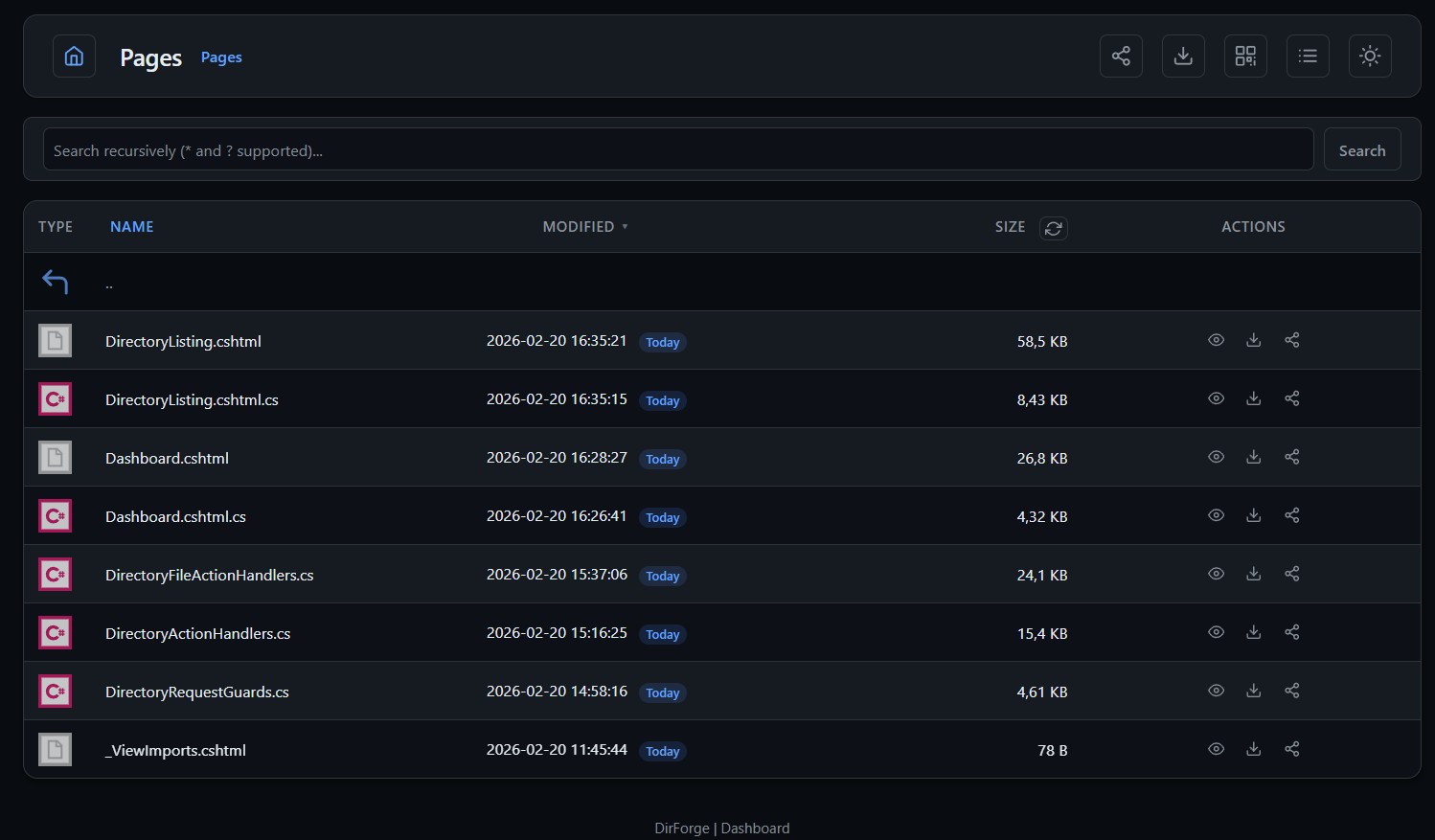
Browse files in a clean web UI with search, previews, and archive inspection. Download individual files or entire folders as ZIP. Access the same data through a RESTful JSON API, an S3-compatible endpoint for tools like rclone, a read-only WebDAV mount for native OS file managers, or an MCP server for AI assistants. Everything runs in a single stateless container with no external dependencies.
Prerequisite: Docker or Podman (images are published for amd64 and arm64).
docker run -d \
  --name dirforge \
  -p 8091:8080 \
  -e RootPath=/data \
  -v /srv/share:/data:ro \
  ghcr.io/dissimilis/dirforge:latest
cp .env.example .env
# edit HOST_PATH, BasicAuthUser, and BasicAuthPass in .env
docker compose up -d
Warning: The default compose file falls back to
admin/dirforgecredentials if you don't setBasicAuthUserandBasicAuthPassin your.env. Change these before exposing the service on your network.
The same commands work with Podman. Replace docker with podman:
podman run -d \
  --name dirforge \
  -p 8091:8080 \
  -e RootPath=/data \
  -v /srv/share:/data:ro \
  ghcr.io/dissimilis/dirforge:latest
For Compose, use podman compose (Podman 4.1+):
cp .env.example .env
# edit HOST_PATH in .env
podman compose up -d
Notes for Podman users:
podman composeis a built-in subcommand in Podman 4.1+, not the older third-partypodman-composePython package.- DirForge uses ports above 1024, so rootless Podman works without extra configuration.
- On SELinux systems (Fedora, RHEL), add
:zto volume mounts:-v /srv/share:/data:ro,z.
dirforge-win-x64.zip from the latest releaseC:\DirForge)appsettings.json — set RootPath to the directory you want to shareDirForge.exe to run interactivelyinstall-service.bat → Run as administrator. DirForge will start on boot automatically. Use uninstall-service.bat to remove the service.dirforge-linux-x64.tar.gz (or linux-arm64) from the latest releasetar -xzf dirforge-linux-x64.tar.gz -C /opt/dirforgeappsettings.json — set RootPath to the directory you want to share./DirForgesudo useradd -r -s /usr/sbin/nologin dirforge
sudo cp dirforge.service /etc/systemd/system/
# Edit /etc/systemd/system/dirforge.service to adjust paths if needed
sudo systemctl daemon-reload
sudo systemctl enable --now dirforge
The tarball includes an example dirforge.service file with systemd hardening options.
Open http://localhost:8091.
With the default config profile in this repository, sharing, dashboard, and metrics are enabled.
DefaultTheme).zip, .tar, .tar.gz, .tgz, and .gzSiteTitle.md5, .sha1, .sha256, .sha512, .sfv)/webdav/ (DAV Class 1)OPTIONS, PROPFIND, GET, and HEAD methods/s3/ for scripted and programmatic accessaws cli, rclone, MinIO client, and other S3-compatible toolsListBuckets, GetBucketLocation, ListObjectsV2, GetObject, HeadObject/health, /healthz, /readyz)/dashboard with optional dedicated credentials/metrics/api/ (browse, search, share, archive)/mcp/ (JSON-RPC 2.0, Streamable HTTP transport)/dashboard/statsDefaults are defined in src/DirForge/appsettings.json. Override any value with an environment variable of the same name. Boolean values must be true or false. For the full list of options, see .env.example.
| Variable | Default | Description |
|---|---|---|
RootPath | . | Root directory to browse. |
Port | 8080 | HTTP listen port. |
ListenIp | 0.0.0.0 | IP address the app binds to. |
BasicAuthUser | unset | Basic Auth username. |
BasicAuthPass | unset | Basic Auth password. |
BearerToken | unset | Bearer token for token-based auth (MCP clients, API consumers, automation). |
BearerTokenHeaderName | Authorization | Header to read the bearer token from. |
EnableSharing | true | Enable HMAC-signed share links. |
ShareSecret | empty | Secret for signing share links. Set a long random value in production; if empty an in-memory secret is generated at startup. |
HideDotfiles | false | Hide entries starting with .. |
DenyDownloadExtensions | env,key,pem,... | Extensions blocked in direct and ZIP downloads. |
DefaultTheme | dark | UI theme (dark or light). |
SiteTitle | DirForge | Custom page title/header label. |
EnableWebDav | true | Read-only WebDAV at /webdav/. |
EnableS3Endpoint | false | Read-only S3 API at /s3/. |
EnableJsonApi | true | RESTful JSON API at /api/. |
EnableMcpEndpoint | true | MCP server at /mcp/. |
CalculateDirectorySizes | false | Auto-calculate subdirectory sizes on page load (slow on large trees). |
DirectorySizeCacheTtlSeconds | 300 | Cache TTL for computed directory sizes in seconds (0–2592000; 0 disables). |
ListingCacheTtlSeconds | 2 | Directory listing cache TTL in seconds (1–2592000). |
Hardened example profile - copy into your .env and adjust:
BasicAuthUser=admin
BasicAuthPass=change-this
BearerToken=replace-with-long-random-token
ShareSecret=replace-with-long-random-value
ForwardedHeadersKnownProxies=10.0.0.2
DashboardAuthUser=metrics
DashboardAuthPass=change-this-too
:ro).BasicAuthUser / BasicAuthPass when exposed outside a trusted network.BearerToken for token-based auth (useful for MCP clients, API consumers, and automation that poorly support Basic Auth). Both auth methods can be enabled simultaneously, either one grants access.BearerTokenHeaderName is Authorization (default), the middleware accepts Authorization: Bearer <token> and Authorization: <token>. Set a custom header name (e.g. X-API-Key) to read the raw token from that header instead.ShareSecret to a long random value in production. If empty, DirForge uses an in-memory secret and share links reset on restart.ExternalAuthEnabled=true and pin ForwardedHeadersKnownProxies. Bearer token auth is also bypassed when external auth is enabled.DashboardAuthUser / DashboardAuthPass are set, /dashboard and /metrics accept only those credentials./dashboard/stats uses the same dashboard auth behavior: if dashboard credentials are configured, they are required./dirforge-assets/* (plus /favicon.ico) and are intentionally public.DirForge includes a read-only WebDAV endpoint at /webdav/ (DAV Class 1), enabled by default. It supports OPTIONS, PROPFIND, GET, and HEAD. All write methods return 405 Method Not Allowed.
| Client | Connection |
|---|---|
| macOS Finder | Finder → Go → Connect to Server → http://host:port/webdav/ |
| Windows Explorer | Map Network Drive → http://host:port/webdav/ (requires HTTPS or registry tweak, see below) |
| Linux (GVFS) | dav://host:port/webdav/ in Nautilus/Thunar |
| cadaver / curl | cadaver http://host:port/webdav/ |
Windows Explorer's WebDAV client (Mini-Redirector) refuses Basic Auth over plain HTTP by default. You must either:
HKLM\SYSTEM\CurrentControlSet\Services\WebClient\Parameters\BasicAuthLevel to 2 and restart the WebClient serviceWebDAV requests follow the same auth and security pipeline as the web UI:
ExternalAuthEnabled=trueHideDotfiles, HidePathPatterns) and denied extensions (DenyDownloadExtensions) are enforcedSet EnableWebDav=false to disable the endpoint entirely.
DirForge includes a read-only S3-compatible endpoint at /s3/, disabled by default. It implements the minimal subset of the S3 API needed for listing and downloading files with standard S3 tools.
| Operation | Description |
|---|---|
ListBuckets | GET /s3/ - returns a single virtual bucket |
GetBucketLocation | GET /s3/{bucket}?location - returns configured region |
ListObjectsV2 | GET /s3/{bucket}?prefix=...&delimiter=/&max-keys=... - list objects with pagination |
GetObject | GET /s3/{bucket}/{key} - download a file (supports Range header) |
HeadObject | HEAD /s3/{bucket}/{key} - file metadata without body |
All write operations (PUT, POST, DELETE) return 405 Method Not Allowed.
S3 requests use AWS Signature V4 - the same signing protocol as real AWS S3. Your secret key is never sent over the wire; clients sign each request with an HMAC-based signature that the server verifies.
By default, the S3 endpoint reuses your BasicAuthUser / BasicAuthPass as access key / secret key. Set S3AccessKeyId and S3SecretAccessKey for dedicated S3 credentials.
Credentials are required - the app will not start with EnableS3Endpoint=true and no credentials configured.
aws cli:
export AWS_ACCESS_KEY_ID=mykey
export AWS_SECRET_ACCESS_KEY=mysecret
aws --endpoint-url http://localhost:8091/s3 s3 ls
aws --endpoint-url http://localhost:8091/s3 s3 ls s3://dirforge/
aws --endpoint-url http://localhost:8091/s3 s3 ls s3://dirforge/subdir/
aws --endpoint-url http://localhost:8091/s3 s3 cp s3://dirforge/file.txt .
rclone:
rclone config create myremote s3 \
  provider=Other \
  endpoint=http://localhost:8091/s3 \
  access_key_id=mykey \
  secret_access_key=mysecret \
  region=us-east-1

rclone ls myremote:dirforge
rclone copy myremote:dirforge/file.txt .
S3 requests bypass Basic Auth (they use SigV4 instead) but enforce all the same file-level policies:
HideDotfiles, HidePathPatterns) are not visibleDenyDownloadExtensions) return 403 Access DeniedSet EnableS3Endpoint=false (default) to disable the endpoint entirely.
DirForge exposes an MCP endpoint at /mcp that lets AI assistants browse directories, read files, search by name or content, check hashes, find duplicates, get disk usage reports, and more. Requires EnableMcpEndpoint=true (default) and a BearerToken set in your DirForge config. All hide/deny/auth policies apply.
Just ask your AI assistant:
"Add DirForge MCP server at http://localhost:8091/mcp with bearer token
changeme"
Then swap changeme for your actual BearerToken in a file config was added.
DirForge follows symlinks but enforces strict containment: every symlink target must resolve to a path under RootPath. Links that escape the root are silently blocked.
When a request path contains a symlink, DirForge resolves it segment-by-segment. At each level, if a path component is a reparse point (symlink or junction), the final target is resolved and checked against RootPath. If the resolved target is outside the root, the entire path is rejected.
This means you can use symlinks freely inside your shared directory tree — for example, to present files from multiple physical locations under a single virtual layout — as long as every target points somewhere within RootPath.
During recursive operations (search, ZIP download, S3 listing), it tracks visited canonical paths to prevent infinite loops caused by circular symlinks. A directory that has already been visited (after symlink resolution) is skipped.
Hardlinks are regular directory entries that share an inode with another file. They have no special metadata that distinguishes them from normal files, so DirForge treats them as ordinary files. Both names are listed and downloadable independently. There is no risk of escaping RootPath through hardlinks since they cannot point outside the filesystem they reside on, and they cannot reference directories.
| Link Type | Followed | Root Containment | Cycle Protection |
|---|---|---|---|
| Symlink | Yes | Enforced per-segment | Yes (visited set) |
| Junction (Windows) | Yes | Enforced per-segment | Yes (visited set) |
| Hardlink | N/A (treated as regular file) | N/A | N/A |
For homelab dashboards (Homarr, Homepage, etc.), DirForge exposes:
GET /dashboard/statsThe endpoint returns compact JSON with 11 basic fields:
generatedAtUtc, ready, uptimeSeconds, totalRequests, inFlightRequests, requestsPerMinute, averageLatencyMs, totalDownloadTrafficBytes, totalDownloadCount, fileCount, zipCount.
See CONTRIBUTING.md.
dotnet restore src/DirForge/DirForge.csproj
dotnet build src/DirForge/DirForge.csproj -c Release --no-restore
docker build -t dirforge:dev .    # or: podman build -t dirforge:dev .
Images are published to ghcr.io/dissimilis/dirforge.
| Tag | When pushed | Use for |
|---|---|---|
latest | Every non-pre-release GitHub Release | Stable production use |
1.2.0 | Every GitHub Release | Pinned stable version |
dev | Every push to main | Latest development build |
dev-<sha> | Every push to main | Pinned to a specific commit |
MIT. See LICENSE.
src/DirForge/wwwroot/file-icon-vectors/ is attributed to dmhendricks.40+ tools for querying dashboards, alerts, datasources, and logs in Grafana
Run Claude Code as an MCP server so any agent can delegate coding tasks to it
 @microsoft✓ Official
Browser automation using accessibility snapshots instead of screenshots
 @googleapis✓ Official
Google's universal MCP server supporting PostgreSQL, MySQL, MongoDB, Redis, and 10+ databases